ElevenLabs vs Smallest.ai 2026: Voice Quality, Latency, Pricing Compared

Compare ElevenLabs vs Smallest.ai in 2026 on voice quality, latency, pricing, and real-time voice AI use cases for developers and teams.
The 'ElevenLabs vs' question comes up constantly among developers building voice agents, conversational AI products, and real-time audio pipelines. ElevenLabs has strong brand recognition and genuinely impressive voice quality. But recognition and performance are not the same thing, especially when your product lives or dies on how fast the first audio byte arrives and how much you pay at scale.
This guide breaks down the actual differences across voice quality, latency, and pricing, and then maps each platform to the use cases where it genuinely fits. By the end, you will have a clear framework for making the call, not just a list of features.
What Each Platform Actually Is
ElevenLabs is a voice AI company that built its reputation on expressive, emotionally nuanced text-to-speech. Their models are trained to produce speech that sounds natural in long-form content, audiobooks, and dubbing workflows. Their product surface is broad: voice cloning, multilingual TTS, a conversational AI layer, and a growing suite of audio tools.
Smallest.ai is purpose-built for real-time voice AI. The core product is a low-latency TTS engine designed to integrate into voice agents, telephony systems, and any application where the gap between text input and audio output needs to be as short as possible. The focus is narrow and deliberate: fast, accurate, affordable speech synthesis at production scale. The TTS Benchmark Report: Smallest.ai vs ElevenLabs documents how that focus translates into measurable performance differences.
This distinction matters before you compare any single metric. ElevenLabs optimizes for expressiveness. Smallest.ai optimizes for speed and cost at scale. Neither is wrong. They are solving different problems, and knowing which problem you have is the most important step.
Voice Quality: Where They Differ and Why It Matters
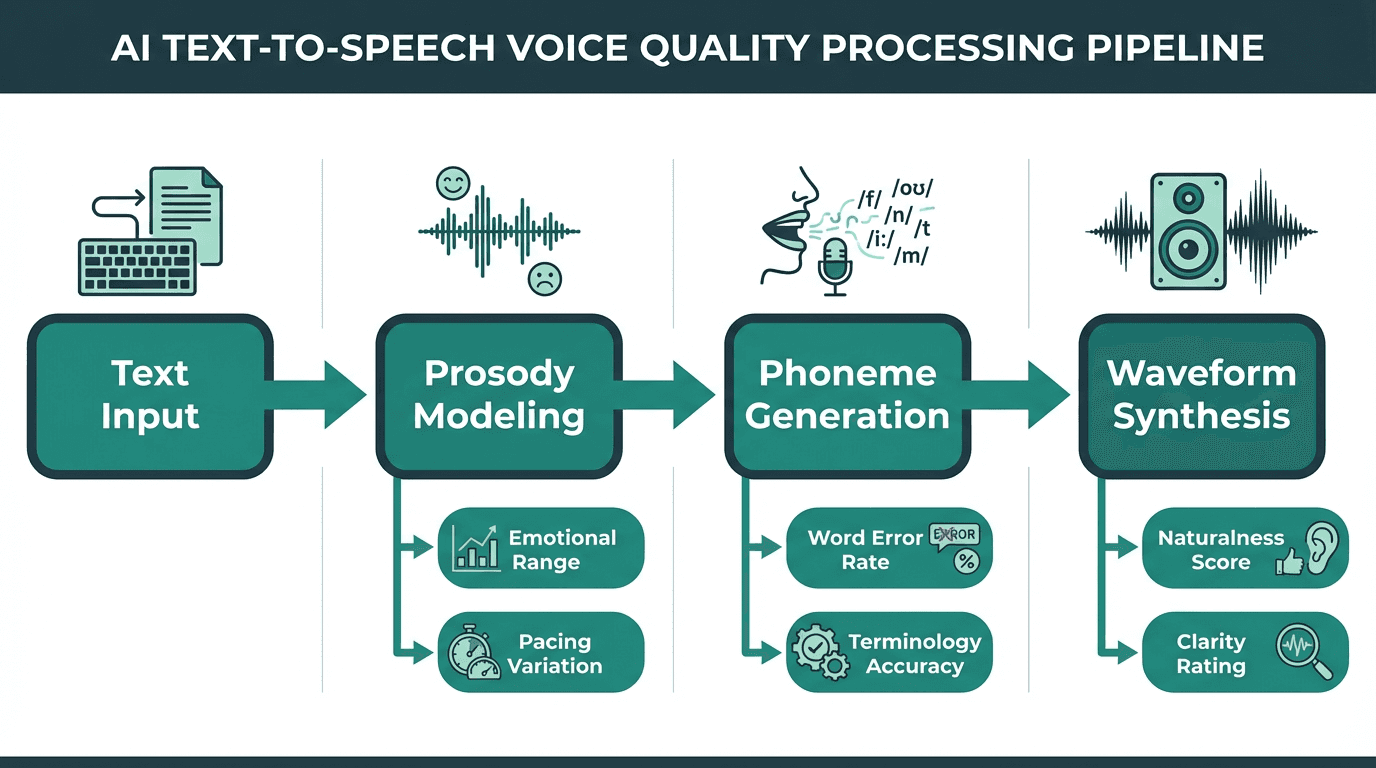
Voice quality in TTS is the product of multiple processing stages, not a single setting
ElevenLabs produces some of the most expressive synthetic voices available. Their models handle emotional range, pacing variation, and natural-sounding pauses in ways that work well for narration and content creation. If you are producing an audiobook or dubbing a video, that expressiveness is genuinely valuable.
For voice agents, however, expressiveness is only one dimension of quality. Consistency across short utterances, accuracy on domain-specific terminology, and the absence of hallucinated prosody artifacts all matter more in a conversational context. Understanding Word Error Rate and voice quality is essential here: a voice that sounds beautiful but mispronounces product names or stumbles on numbers creates a worse user experience than a plainer voice that gets the words right.
Smallest.ai's voice models are tuned for clarity and consistency in short-turn conversational speech. The voices are natural without being theatrical, which is exactly what you want when a voice agent is reading back an order confirmation or answering a billing question. The TTS Benchmark Report: Smallest.ai vs ElevenLabs provides data-backed quality comparisons across both platforms, including naturalness scores and consistency metrics tested in 2025.
Voice quality requirements also change based on the agent's role. A customer support agent needs calm clarity to de-escalate issues, making a neutral and consistent voice ideal. An outbound sales agent might benefit from a more expressive, persuasive tone to build rapport. Internal assistant tools, used for tasks like summarizing meetings, can be entirely neutral and functional. Smallest.ai's models are tuned for the "always-on, neutral helpfulness" required in support and operational roles, ensuring reliability and a predictable user experience. In contrast, ElevenLabs' strengths in expressiveness align better with content creation, character voices, and storytelling scenarios where emotional delivery is the primary goal.
Latency: The Number That Defines Real-Time Voice
Time to First Audio (TTFA) is the metric that separates platforms built for real-time from those built for async. In a voice agent conversation, every 100 milliseconds of added latency is perceptible. Above 400ms, users start to feel the pause. Above 800ms, the interaction feels broken.
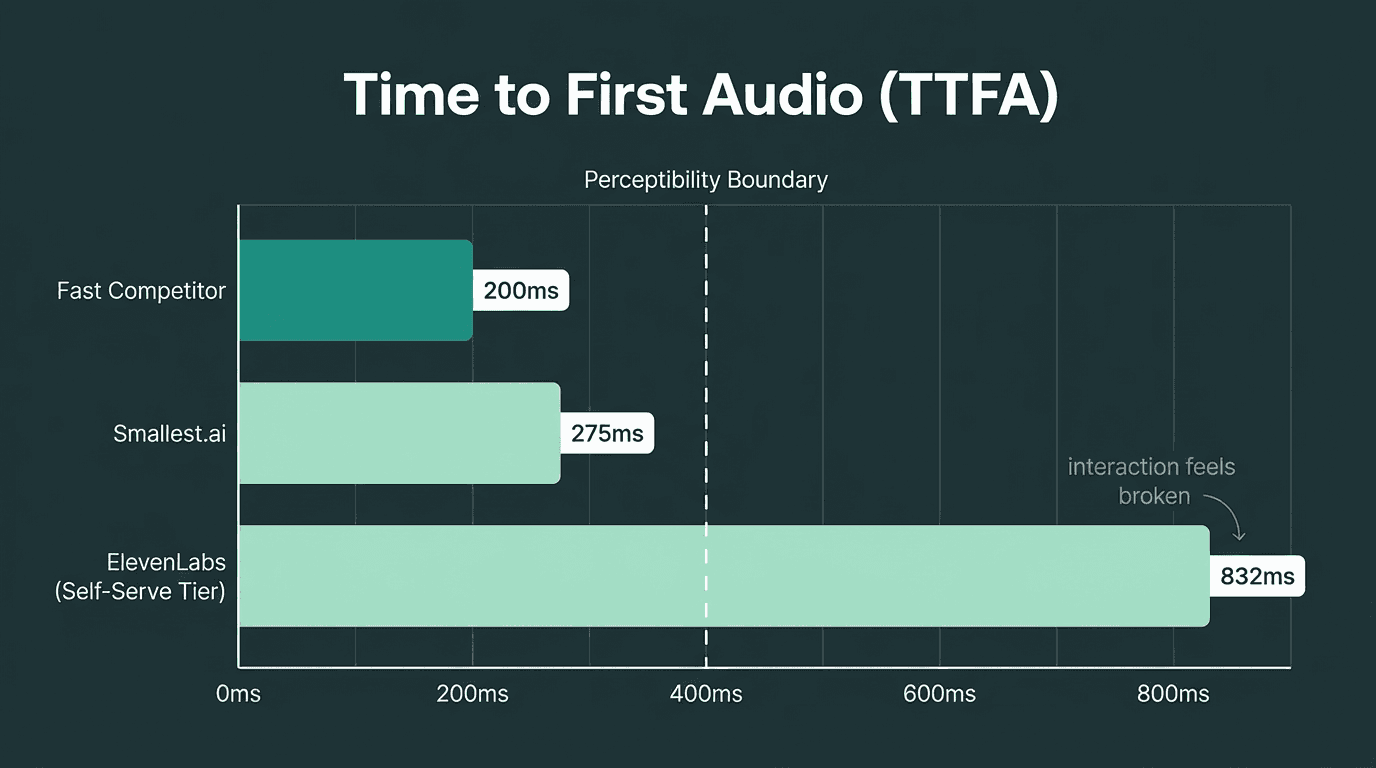
TTFA latency directly determines whether a voice agent feels responsive or broken
As documented in the TTS Benchmark Report: Smallest.ai vs ElevenLabs, ElevenLabs' TTFA at self-serve tiers sits well above the sub-300ms range that real-time voice agents need to feel natural. ElevenLabs does offer faster 'Turbo' options, but they introduce trade-offs in voice quality and are gated behind specific plan configurations and credit mechanics.
Smallest.ai is built around sub-300ms TTFA as a baseline expectation, not a premium tier. The architecture prioritizes streaming delivery so that audio begins playing before the full sentence is synthesized. For developers who want to understand why latency is so consequential in voice products, the detailed breakdown of how to solve the voice AI latency problem covers the technical root causes and mitigation strategies.
From the user's perspective, these latency numbers translate directly to conversation quality. A response under 300ms feels nearly instant, like a natural turn in human conversation. At 500ms, there is a slight but noticeable pause that can make the interaction feel sluggish. Once latency crosses 800ms, the user often assumes the connection is broken or the agent is "thinking," and may start talking over the bot, leading to frustrating conversational breakdowns. This is why sub-300ms is critical for live voice agents. A 400-700ms latency might be acceptable for asynchronous notifications, like a one-way order status update, but it fails in a live, interactive setting. Latency above 800ms is only suitable for use cases where users are not waiting in real time, such as generating audio files for later playback.
See Smallest.ai latency benchmarks and test the API yourself
Pricing: What You Actually Pay at Scale
ElevenLabs uses a credit-based pricing model where one character generally equals one credit for standard models. Turbo models can cost as little as 0.5 credits per character depending on the plan tier, which sounds like a discount until you factor in that Turbo access is gated behind higher monthly subscription tiers. ElevenLabs' own pricing page explains the credit system in detail, but once you convert credits back into a per-minute or per-character rate at different tiers, the math is not always intuitive. Our internal analysis uses those official numbers to model real per-minute costs across common usage patterns.
For a clean apples-to-apples comparison in this guide, focus on how ElevenLabs and Smallest.ai behave at scale. ElevenLabs' credit-based pricing means your effective per-minute rate shifts as you cross plan tiers and enable Turbo models, while Smallest.ai exposes a simple per-minute rate that stays flat as your usage grows.
Smallest.ai offers TTS pricing starting at $0.05 per minute. For a product handling 100,000 minutes of voice output per month, that per-minute difference compounds into a meaningful line item on your infrastructure bill. You can review the current Smallest.ai pricing plans directly to model your own usage.
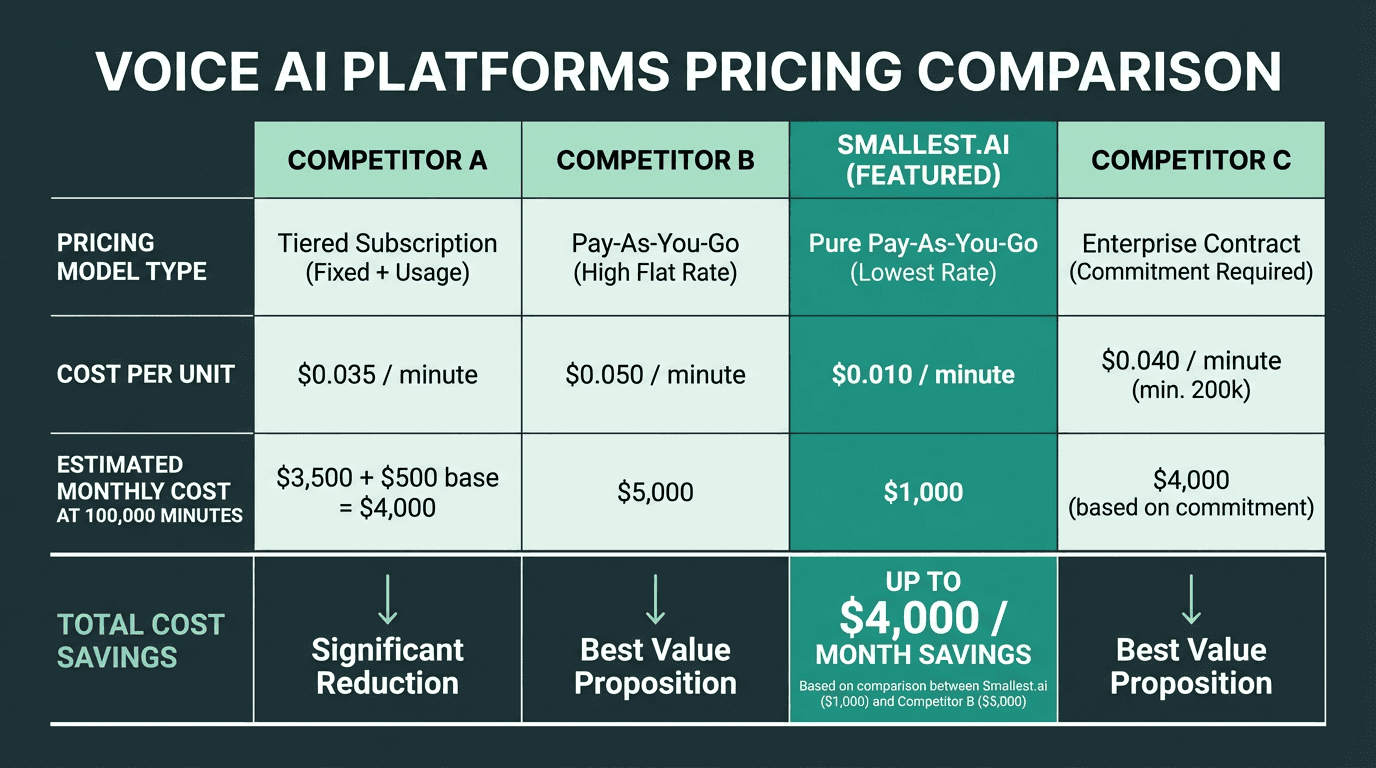
Pricing differences compound significantly at production-scale usage volumes
Best Fit by Use Case
This is where the comparison becomes actionable. The right platform depends almost entirely on what you are building.
When ElevenLabs Makes Sense
ElevenLabs fits best when your priority is expressive, high-fidelity audio for non-real-time delivery:
Audiobook production and long-form narration where emotional range matters
Video dubbing and localization workflows where sync and expressiveness are critical
Content creation tools where users are generating polished audio assets, not live conversations
Voice cloning projects where the source voice needs to be preserved with high fidelity
Prototyping and demos where latency is not a constraint and voice quality is the selling point
When Smallest.ai Is the Better Call
If your product involves a user waiting for a voice response in real time, Smallest.ai's architecture is built for that specific problem. Voice agents in customer support, outbound calling systems, IVR replacements, and conversational AI assistants all depend on TTFA being low enough that the interaction feels natural. Paying three times more per minute for a platform with 4x the latency is a hard trade-off to justify when the user experience suffers on both dimensions.
For enterprise contact center deployments specifically, the combination of latency, cost, and reliability at scale becomes even more pronounced. The comparison of Smallest.ai vs Sierra AI for enterprise contact centers covers how these considerations play out in high-volume, real-time telephony environments.
Consider a contact center that automates 50,000 inbound support calls per day, with each call averaging three minutes. At this volume, low latency is non-negotiable for a positive customer experience, and predictable per-minute pricing is essential for managing operational costs. Smallest.ai's model allows the business to calculate a clear, fixed cost per call. A credit-based, higher-latency setup would not only risk frustrating callers with delays but also introduce unpredictable monthly bills that fluctuate with usage patterns and plan tiers. Teams building for scale must map their own call volumes and latency requirements against these two fundamentally different models before committing to a platform.
Explore Smallest.ai for real-time voice agent deployments
What Most Comparisons Get Wrong
Most 'ElevenLabs vs' articles compare voice samples and call it done. That misses the operational reality of running a voice AI product. A few things that rarely get enough attention:
Streaming architecture is not the same as low latency. Some platforms stream audio but still have high TTFA because the model takes time to begin generating. True low-latency TTS starts delivering audio within the first synthesis pass, not after the full utterance is ready. This is an architectural decision, not a tuning parameter.
Credit-based pricing obscures real costs. When you are evaluating a platform for production use, convert everything to a per-minute or per-character rate and model it against your actual usage. A platform that looks affordable at the starter tier can become expensive once you cross into higher usage bands where the per-unit rate changes.
Voice quality in short utterances is different from voice quality in long-form content. A model that scores well on audiobook naturalness may produce awkward prosody on two-word confirmations or phone numbers. Test your actual content types, not generic demo sentences.
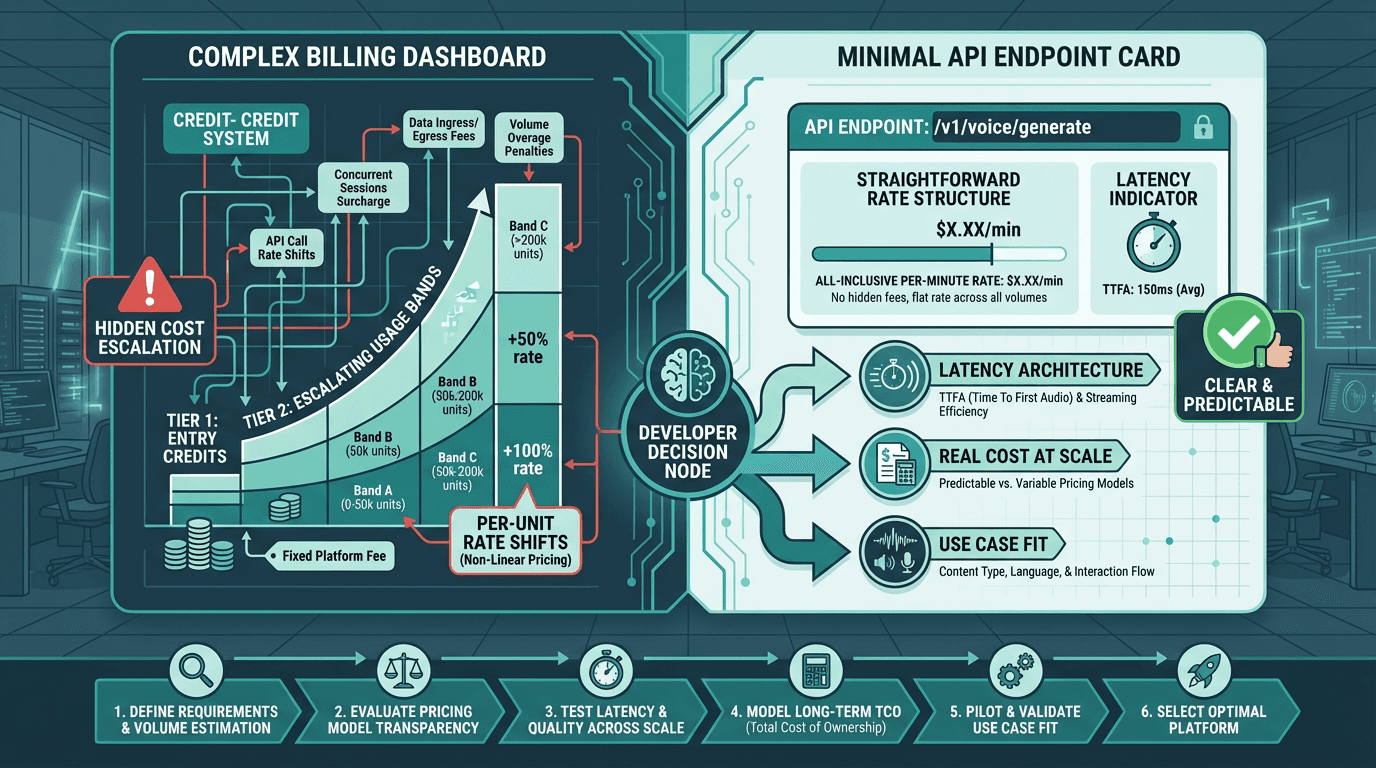
The right platform choice depends on your specific production requirements, not demo quality alone
Key Takeaways and Next Steps
ElevenLabs is a strong platform for expressive, async voice content. If you are producing audio assets where the listener is not waiting in real time, the voice quality is genuinely excellent and the tooling is mature. The pricing and latency trade-offs are acceptable in that context.
For real-time voice AI, the calculus is different. Latency above 400ms degrades user experience in ways that no amount of voice expressiveness compensates for. And at production scale, a 3x cost difference is not a rounding error. The Smallest.ai vs ElevenLabs: A Head-to-Head Comparison post goes deeper on specific benchmark data if you want to validate these numbers against your own use case.
The problem this comparison keeps surfacing is a straightforward one: developers building real-time voice products need a TTS engine that is fast enough to feel live, accurate enough to handle real content, and affordable enough to scale without the unit economics breaking. That is exactly the problem Smallest.ai's Lightning TTS model is built to solve. If your product is a voice agent, a conversational assistant, or any real-time audio application, Smallest.ai is the more logical starting point for both evaluation and production deployment.
Try Smallest.ai Lightning TTS and test latency on your own content
Frequently asked questions
Is ElevenLabs better than Smallest.ai for voice quality?
What is the latency difference between ElevenLabs and Smallest.ai?
How does ElevenLabs pricing work and how does it compare?
Can I use Smallest.ai for voice cloning like ElevenLabs?
Which platform is better for a customer support voice agent?