How to Integrate Speech Recognition into a Web App ?

Speech recognition for a web app: Web Speech API vs streaming ASR, real-time interim results, permissions, privacy, and production pitfalls to avoid.
Getting speech recognition into a web app is less about dropping in a library and more about choosing your trade-offs. You have to decide where audio gets captured, where transcription runs, how results flow back to your backend, and how you deal with the messy parts of real speech: accents, background noise, and latency spikes. This article moves through those choices in a practical order, from browser-native options to production ASR APIs, with the goal of shipping something that holds up outside a demo.
Understanding What You Are Actually Building
Before you touch code, get specific about what you are building and where it runs. If you want the technical grounding on what Automatic Speech Recognition (ASR) is, the quick version is: ASR turns an audio stream into text by applying acoustic and language models to the incoming signal. In a web app, that pipeline can live in the browser, on a server, or split between the two depending on your constraints.
It also helps to lock down terminology up front. Voice Recognition vs. Speech Recognition get blurred in product conversations, but they are solving different problems. Voice recognition is identity (who is speaking). Speech recognition is content (what was said). If your web app needs search, dictation, or voice commands, speech recognition is the thing you are after.
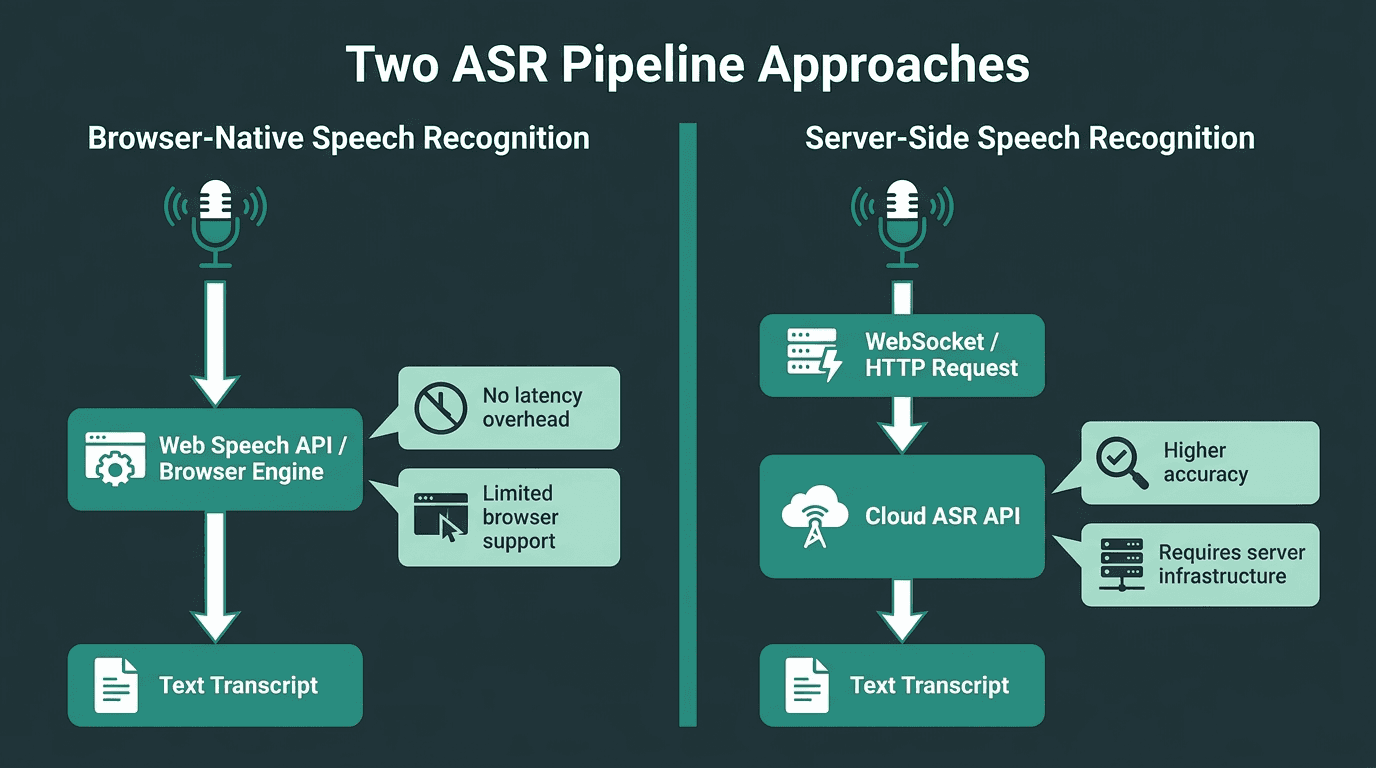
Two distinct ASR pipelines — each with different latency, accuracy, and infrastructure trade-offs.
Choosing between browser-native and server-side recognition shapes every subsequent architectural decision.
Option 1: The Web Speech API (Browser-Native)
The Web Speech API is the closest thing the web has to a built-in "just make it work" speech recognition option. MDN Web Docs describes two halves: SpeechSynthesis for text-to-speech, and SpeechRecognition for asynchronous speech-to-text. If you are prototyping or shipping a low-stakes feature where you can live with browser quirks, this is the fastest route to a working demo.
Here is a minimal example that starts listening on a button click and prints the transcript:
The trade-off is not subtle. In Chrome, the Web Speech API sends audio to a remote server for processing, so it will not work offline. Support is uneven, too: Firefox does not support SpeechRecognition without a flag, and Safari has historically lagged. The W3C Speech API Community Group was closed in March 2023, but standardization is being pushed forward by other groups.
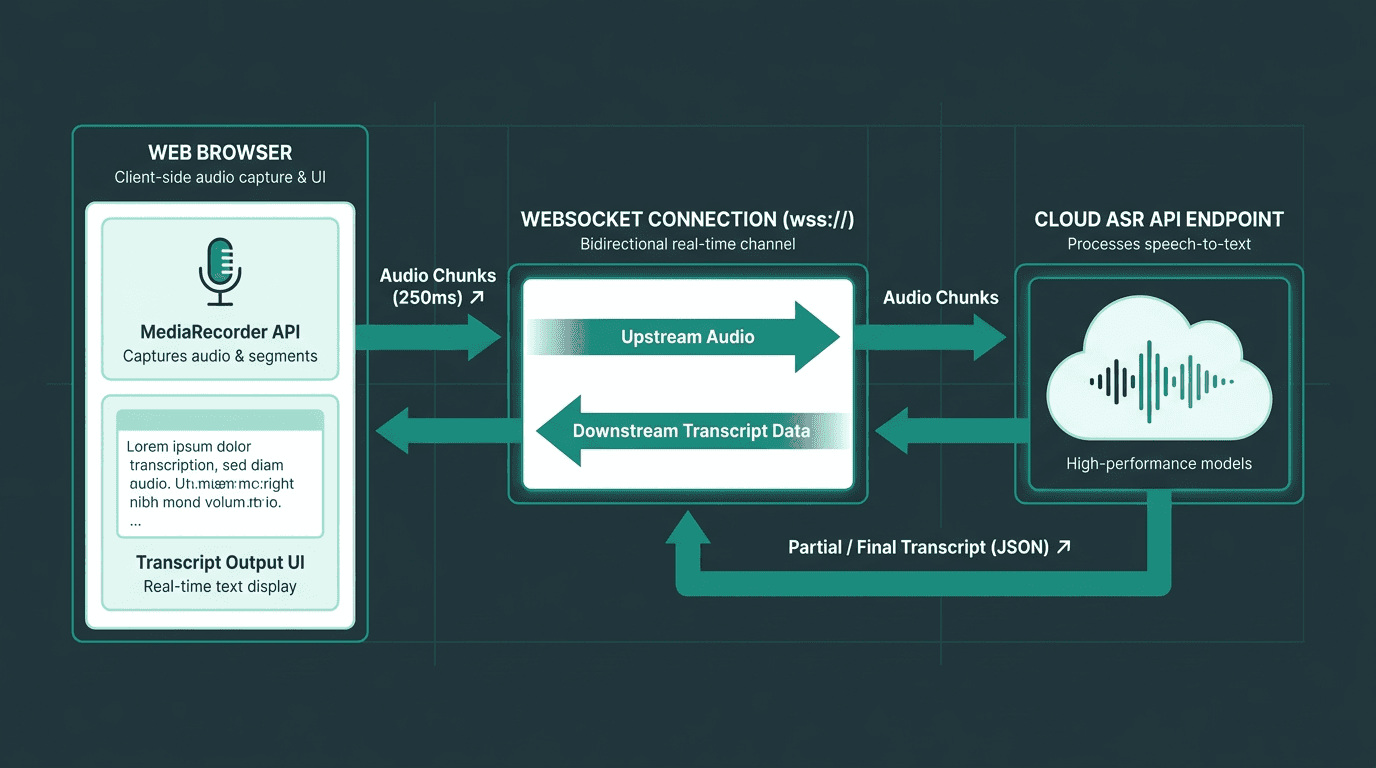
Streaming audio via WebSocket gives you real-time transcription with production-grade accuracy.
If you are shipping speech recognition to real users, a dedicated ASR API is usually the more stable foundation. You get consistent accuracy across browsers, more control over the audio pipeline, and a better shot at handling common challenges like accents and noise because the models are trained for messy, real-world audio. The basic pattern is straightforward: capture audio in the browser with MediaRecorder, then stream it to your endpoint.
The capture loop typically starts like this:
One nice property of this setup is that your frontend is not married to any one recognition engine. The browser captures audio; the endpoint does the recognition. If you decide to switch providers later or migrate between services, the capture logic stays largely the same.
Choosing the Right API: A Practical Comparison
Your ASR API choice shows up everywhere: accuracy, latency, price, and how much control you get over audio handling. The table below lays out the dimensions worth checking before you commit to an integration and build your UI around it.
Provider | Streaming Support | Offline / On-Device | Key Strength | Pricing Model |
|---|---|---|---|---|
Smallest.ai Pulse | Yes (WebSocket) | No (cloud) | Low-latency streaming speech recognition via WebSocket | |
Web Speech API (Browser) | Partial (interim results) | No (Chrome sends to server) | No setup and no API key | Free (browser-native) |
Generic Cloud ASR | Yes | Depends on provider | Large ecosystem with broad language coverage | Pay-per-minute or per-request |
On-device WASM model | Yes (local) | Yes | Privacy and no network dependency | Free (compute cost only) |
Handling Real-Time Transcription and Interim Results
Real-time transcription is where many integrations stop being "easy." Users expect text to keep up with their voice, not appear after an awkward pause. To hit that expectation, your API needs to stream interim (partial) results, and your UI needs to treat those updates as a first-class state, not an afterthought.
Patterns that tend to work well:
UI patterns for real-time transcript display:
Append-and-replace: Keep a confirmed transcript string and a separate interim string. Render both so the user sees stable text plus the in-progress phrase.
Debounced commit: Only append to the permanent transcript on a silence gap or when the API marks a segment as final. This reduces flicker and reflow.
Word-level confidence coloring: If your provider returns per-word confidence, surface uncertainty in the UI so users know what to double-check.
Scroll lock: Auto-scroll to the latest line by default, but disable the lock when the user scrolls up to review earlier text.
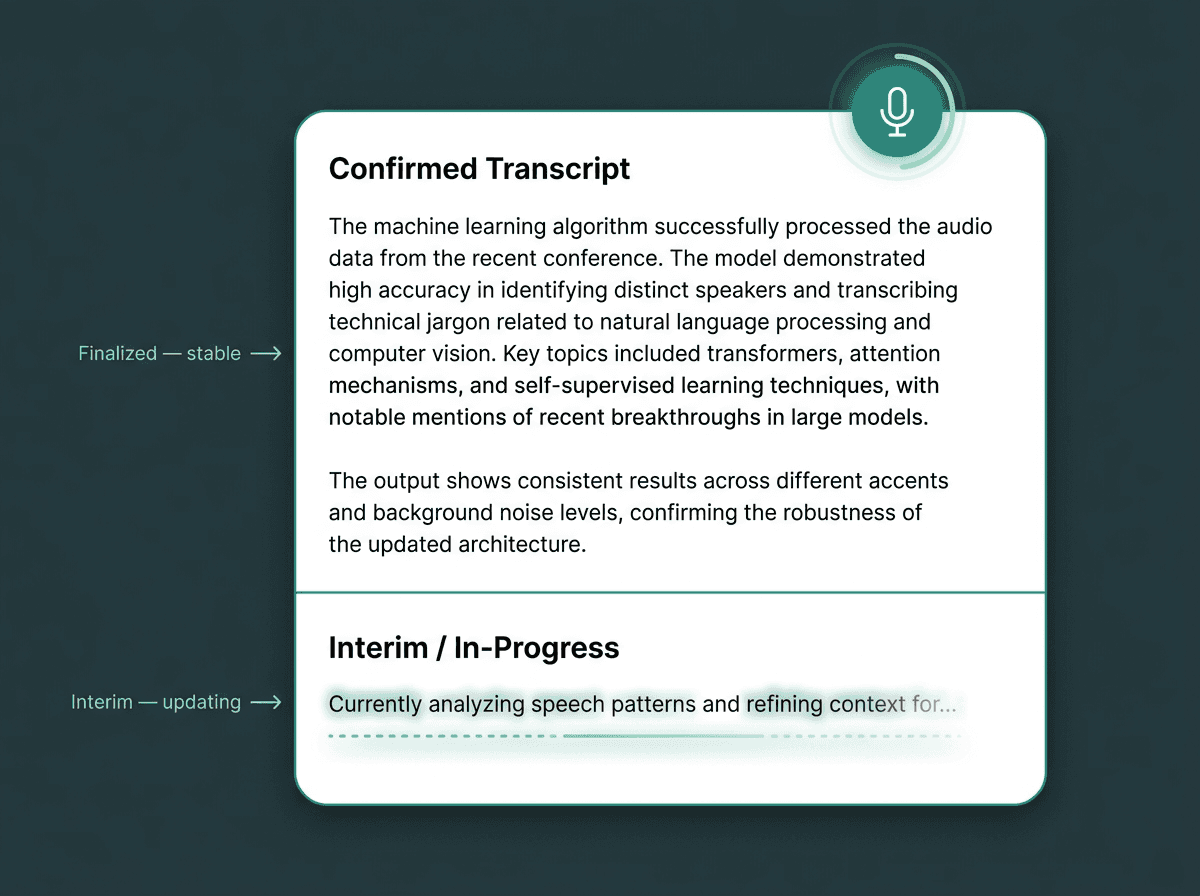
Separating interim from final results prevents the flickering that frustrates users during live transcription.
Permissions, Privacy, and Error Handling
Microphone access is permissioned for good reason. You request it through getUserMedia, and browsers expect that call to be triggered by a user gesture; attempts to prompt on page load are commonly blocked. HTTPS is also non-negotiable because microphone access is limited to secure contexts. Ask for permission when the user taps "Record," not a moment earlier. If the user does not yet understand why you need the mic, they are likely to say no.
Treat error handling as part of the feature, not a cleanup task. The usual failure modes for a speech recognition web app are predictable: permission denied (mic blocked), network interruption (WebSocket drops mid-session), no-speech timeout (silence triggers a stop), and audio format mismatch (MediaRecorder produces a codec your endpoint rejects). Each case deserves its own user-facing message, because "something went wrong" does not tell the user what to do next.
On privacy, clarity beats cleverness. Make it obvious when the microphone is active, keep a persistent recording indicator on screen, and provide a stop control that is hard to miss. If you store transcripts, say so in your privacy policy and give users a way to delete their data.
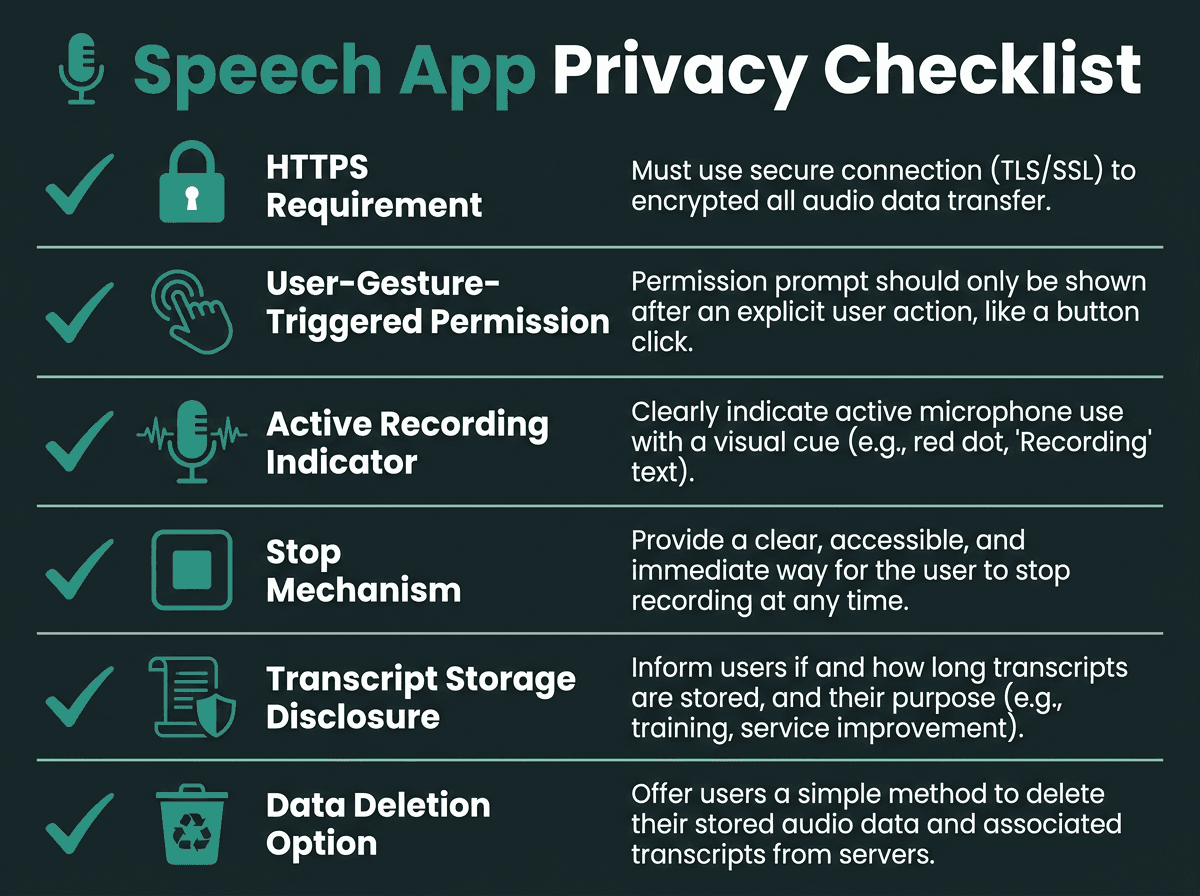
A privacy-first implementation builds user trust from the first interaction.
Backend Integration and Post-Processing
ASR output is rarely ready to ship as-is. Most applications need some post-processing before a transcript becomes useful: punctuation restoration, speaker diarization, or custom vocabulary support, depending on what your provider offers and at what tier. If you are implementing speech recognition in Python on the backend, you can lean on a broad set of NLP libraries to clean, normalize, and structure the raw text.
If your app needs to do something with the transcript (not just display it), intent parsing is the next layer. For command-style interfaces, keyword matching can be enough. For more conversational flows, a language model layer can interpret the transcript and route it to the right action. The end-to-end path usually looks like this: audio capture (browser) -> ASR (API) -> intent parsing (LLM or rules engine) -> action (your app logic).
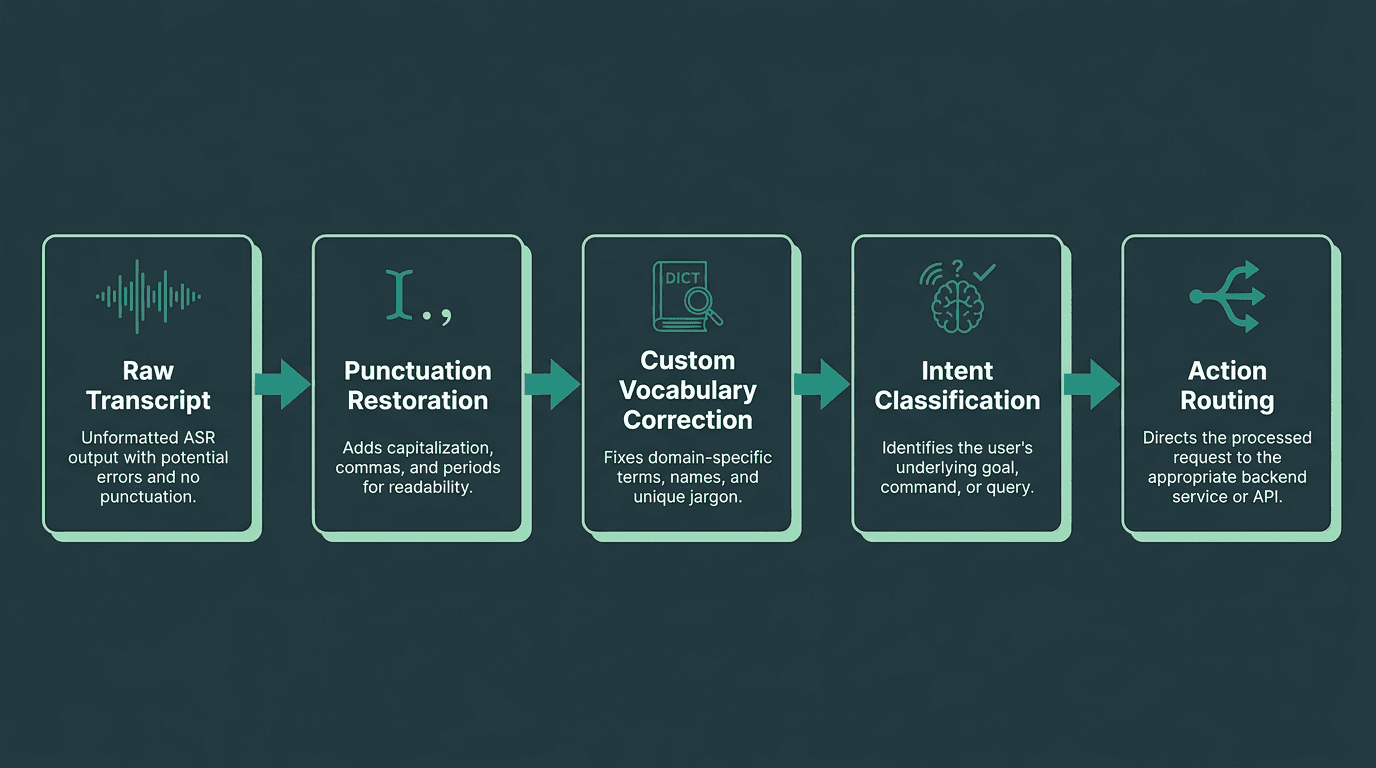
Post-processing transforms a raw transcript into structured, actionable data for your application.
Common Pitfalls and How to Avoid Them
Pitfall | Why It Happens | How to Fix It |
|---|---|---|
Requesting microphone on page load | Assuming permission should be requested upfront | Call getUserMedia only after an explicit user action |
No fallback for unsupported browsers | Development and QA happen only in Chrome | Detect support and offer a text input fallback |
Sending uncompressed PCM audio | MediaRecorder defaults differ by browser | Set mimeType explicitly; use Opus or WebM to keep payloads efficient |
Ignoring WebSocket reconnection | Treating network drops as fatal | Add exponential backoff plus session resume logic |
Displaying interim results as final | Rendering a single text field is simpler | Track interim and final states separately in component state |
Bringing It Together: From Prototype to Production
A speech recognition web app that behaves in a quiet office on a fast connection is a very different thing from one that works for actual users. Production readiness means testing across accents, background noise, and shaky networks. It also means planning for degraded modes when your API is down, and measuring word error rate on your domain vocabulary instead of trusting generic benchmarks.
The Web Speech API is a solid fit for internal tools, demos, and environments where you control the browser. Once you are building something customer-facing, a dedicated ASR API typically provides more control over accuracy, reliability, and customization requirements. The WebSocket streaming pattern above is portable across compliant endpoints, so the integration effort you invest now does not evaporate if you change providers later.
Most teams do not get stuck on the first working transcript. They get stuck on everything that comes after: latency that feels "off," accuracy that collapses on niche terms, and edge cases that only appear in the wild. That is the gap API quality and domain support have to close. Smallest.ai's Pulse speech-to-text API is designed for that production step: low-latency streaming transcription over WebSocket, support for production speech recognition workflows, and an integration model that matches the architecture described here without forcing a frontend rewrite. If you are ready to move beyond prototypes, check Smallest.ai pricing or browse our blog for more technical voice AI build notes.
Frequently asked questions
What is the easiest way to add speech recognition to a web app?
Does speech recognition in a web app require HTTPS?
How do I handle different accents and background noise in my web app?
Can I use speech recognition in a web app without sending audio to an external server?
How does Smallest.ai Pulse compare to using the browser's built-in speech recognition?