Free Voice To Text Converter : Speak And Turn Your Voice Into Text

Free voice to text converter basics: how ASR works, what drives accuracy (WER), and when to use free tools vs paid APIs for real workflows.
Voice-to-text technology has moved from a niche productivity feature to a core workflow across meetings, customer support, content creation, accessibility, and software applications.
You will see how voice to text conversion works under the hood, why some transcripts feel effortless while others fall apart, how to pick tools that match your constraints, and what to watch as the tech keeps moving. If you are integrating speech recognition into an app, transcribing meetings for work, or just trying to stop fighting your keyboard, the sections below are meant to give you a clear, end-to-end mental model.
What a Voice to Text Converter Actually Does
A voice to text converter turns an audio signal into written words by detecting phonemes, assembling them into language, and emitting a transcript. That sounds tidy; the reality is messy. Speech recognition has been a research area since the 1950s, when early systems like Bell Laboratories' "Audrey" could recognize only spoken digits from a single voice.
Modern systems lean on deep learning, especially transformer-based architectures trained on thousands of hours of labeled audio. The model learns to connect acoustic features to text sequences while juggling speaker differences, background noise, and linguistic context at the same time. As IBM's explanation of speech-to-text technology lays out, these systems use AI and machine learning to interpret more than raw sound, which is why they show up everywhere from call center automation to real-time captioning.
A quick terminology check helps here: speech recognition and voice recognition are adjacent, but they are not interchangeable. Speech recognition figures out what was said. Voice recognition tries to determine who said it. A voice to text converter is doing speech recognition; identifying speakers is an extra layer, often called diarization. If you want the technical details, this guide to speaker diarization breaks down how that layer works.
How Accuracy Is Measured (and What the Numbers Mean)
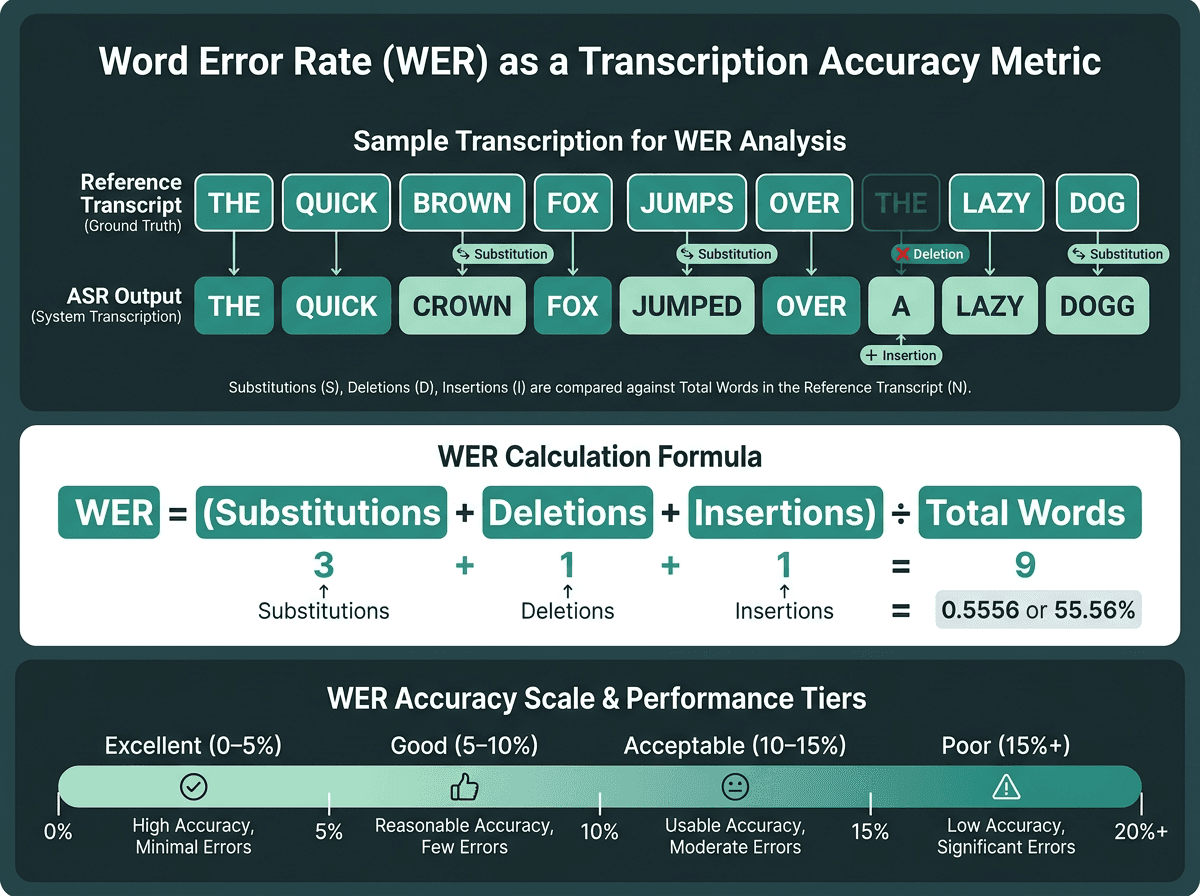
WER is the standard benchmark for transcription accuracy. Lower is better.
Automatic speech recognition (ASR) is usually graded with Word Error Rate (WER). A WER of 5% means 95 out of every 100 words match the reference transcript. The score comes from counting substitutions, deletions, and insertions, then dividing by the total number of words in the ground truth. In practice, a system that misses one word in twenty is often perfectly workable. Once WER drifts above 15%, though, the transcript starts to feel like it needs a second pass before you can trust it in professional settings.
Lab numbers are not what most people experience. In quiet, controlled conditions with decent microphones, modern systems can hit high accuracy. Put that same model in a noisy room with mixed accents and inconsistent mic placement, and accuracy often drops substantially when recordings contain noise, overlapping speakers, poor microphones, or strong accents. That gap is why voice transcription can feel "amazing" in a demo and "unusable" in the real world: the environment is part of the system.
Factor | Impact on WER | Mitigation |
|---|---|---|
Background noise | High (can add 5-15% WER) | Add noise suppression preprocessing or record with a close mic |
Accents and dialects | Medium to high | Pick models trained on diverse speaker datasets |
Technical vocabulary | Medium | Use domain-adapted models or support custom vocabulary |
Audio bitrate and codec | Medium | Record at 16kHz+ mono for best ASR performance |
Speaking pace | Low to medium | Most modern models handle natural speech rates well |
Multiple speakers | High without diarization | Use speaker diarization as a post-processing step |
Free vs. Paid Voice to Text: Where the Line Actually Falls
Free voice to text tools are more than fine for casual, low-stakes work. Browser speech recognition, built-in mobile dictation, and entry-level API tiers can cover personal notes, short memos, and the occasional one-off transcript without touching a budget. The best free voice-to-text apps round up options across platforms.
Where free tiers tend to break is predictable: how long your audio can be (often just a few minutes per file), how much you can process at once (no batching), and how well the model handles specialized language. A free tool can do a solid job on a casual conversation. Point it at a cardiology consult or a legal deposition and you will quickly run into vocabulary and formatting problems unless the model has been tuned for that domain.
When a paid or API-based solution becomes necessary:
You need to process audio files longer than 10-15 minutes regularly
Batch transcription of dozens or hundreds of recordings is required
Your content contains specialized vocabulary (medical, legal, technical)
You need speaker labels or timestamps in the output
The transcript feeds into a downstream system or workflow automatically
Compliance or data residency requirements apply to the audio content
Practical Guide: Getting Accurate Transcripts From Your Voice

The four stages of a reliable voice to text pipeline.
Step 1: Optimize Your Audio Before It Reaches the Model
Most "accuracy" issues show up before a model ever sees your audio. A directional microphone placed 6 to 12 inches from the speaker in a room with soft surfaces will beat an omnidirectional mic in a tiled bathroom, no matter which ASR engine you choose. If you are transcribing existing recordings, run noise reduction first. And when you have control over the file format, 16kHz mono WAV or FLAC generally performs better than a heavily compressed MP3 at a low bitrate.
Step 2: Choose the Right Model for Your Content Type
General-purpose models are trained on broad datasets, which is why they do well on everyday speech. For podcasts, meeting audio, and personal dictation, that is usually the right starting point. If you are transcribing medical dictation, court proceedings, or engineering specs, you want domain adaptation or custom vocabulary support. Domain-adapted models can significantly improve transcription quality on specialized vocabulary compared with general-purpose models.
Step 3: Post-Process for Readability
Raw ASR output is rarely something you can ship as-is. Punctuation is often missing, filler words ("um," "uh," "you know") sneak in, and the transcript ignores basic formatting like paragraph breaks. Strong pipelines treat transcription as the start, not the finish: punctuation restoration, filler cleanup, and formatting are standard steps. If you are building this into a product, the workflow in convert recorded audio into accurate transcripts lays out how to do it programmatically.
Use Cases That Change How You Think About This Technology
Transcription is a massive business, with healthcare, legal, and media accounting for much of the volume. Voice to text now shows up in workflows that do not look like "transcription" at all.
Call centers are the obvious example because the scale is relentless and the stakes are real. Every call doubles as a record: a complaint, a sales lead, a compliance exposure, or training data. Once those calls are transcribed, they become searchable and analyzable in bulk. The practical architecture for that environment is covered in the audio-to-text converter for call centers guide, including batch processing patterns and quality control.
Voice to text is also turning into the front door for richer voice products. In many systems, speech becomes text first, then a language model interprets it, and then the response is synthesized back into speech. That loop is the backbone of Smallest.ai Voice Agents and conversational AI. If you are building that kind of experience, designing conversational voice interfaces is the next layer to think about once transcription is stable.
Advanced Considerations: What Most Guides Skip
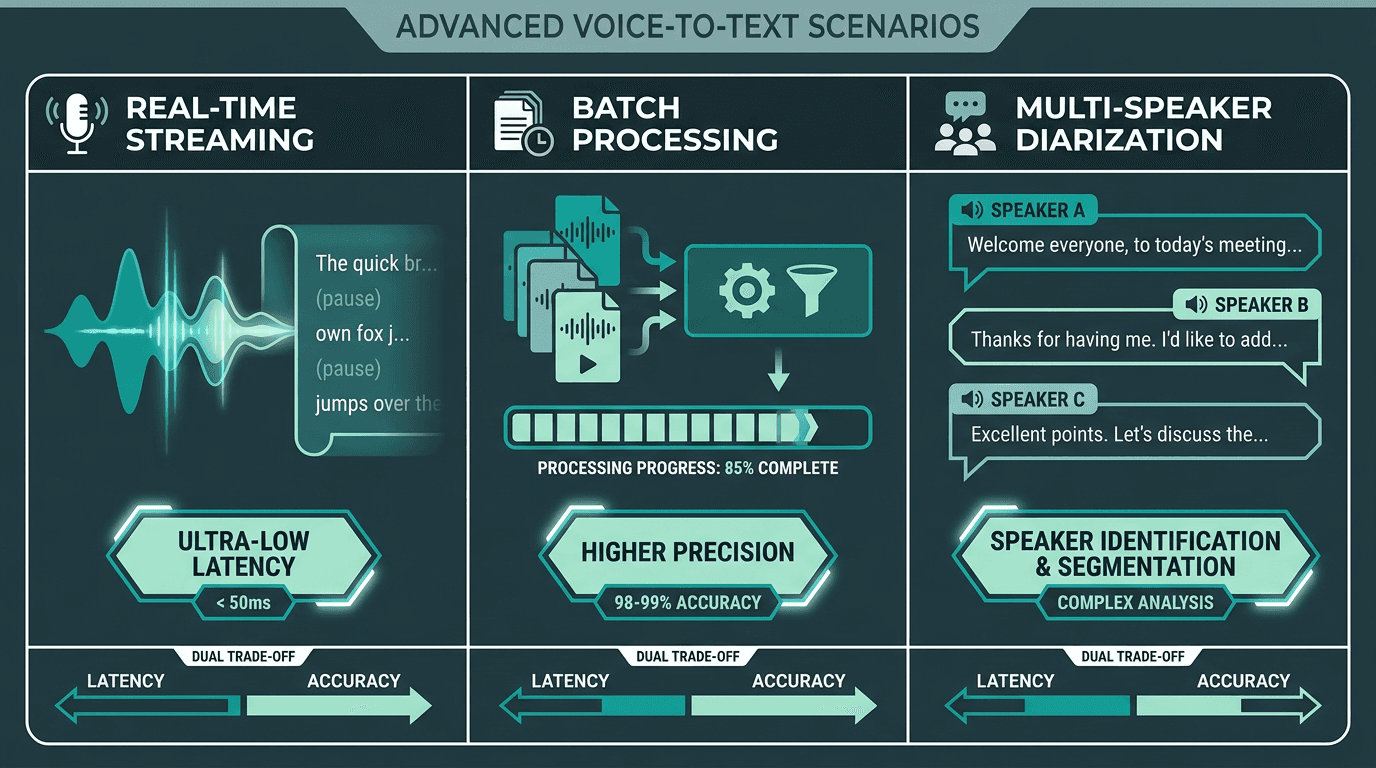
Real-time, batch, and multi-speaker transcription each require different architectural choices.
Most evaluations fixate on accuracy and skip the part that can make or break a product: latency. If you are uploading a file and waiting, latency is measured in seconds or minutes and is often tolerable. If the transcript is driving a live interaction, milliseconds decide whether the experience feels responsive or awkward. Streaming ASR works by processing audio in chunks and emitting partial hypotheses that update as more context arrives. The catch is that streaming can land slightly worse final accuracy than batch transcription, where the model gets to see the entire recording before it commits.
Confidence scores deserve more attention than they get. Many ASR APIs attach a confidence value to each word or phrase. A token at 0.45 confidence is a good candidate for review; 0.98 is usually safe to accept. If you build a workflow that spot-checks low-confidence spans instead of treating the entire transcript as equally trustworthy, you can raise practical accuracy without swapping models.
History also explains why the last few years have felt like a step change. Hidden Markov Models in the 1980s were the first major accuracy leap, followed by deep learning in the 2010s. The current wave is being driven by large transformer models and multilingual training data. Systems released in 2025 and 2026 are noticeably better at code-switching (switching languages mid-sentence) and heavy accents than tools from even three years earlier. If you tried a product in 2022 and wrote it off, it is worth another look.
Choosing a Voice to Text Tool: A Practical Framework
Use Case | Volume | Key Requirement | Recommended Approach |
|---|---|---|---|
Personal notes and memos | Low | Ease of use | Use native OS dictation or a free browser-based tool |
Meeting transcription | Medium | Speaker labels, timestamps | Use a meeting transcription app with diarization |
Content creation (podcasts, video) | Medium | Accuracy, editing workflow | Use file-upload ASR with an editing interface |
Call center analytics | High | Batch processing, searchability | Use an API-based ASR with custom vocabulary |
Voice-enabled applications | Variable | Low latency, streaming | Use a streaming ASR API with SDK integration |
Healthcare or legal transcription | Medium to high | Domain accuracy, compliance | Use a domain-adapted model with a human review layer |
Smallest.ai Pulse: Speech to Text Built for Real Applications
A lot of voice to text tools are built for one narrow job, then start to creak as soon as you ask more of them. Smallest.ai's Pulse is aimed at developers and teams that need accurate, low-latency transcription at scale. It supports streaming and batch transcription, includes speaker diarization, and is designed to drop into production pipelines without a pile of glue code.
Pulse is part of a wider platform that includes Lightning (text-to-speech), Hydra (speech-to-speech), and Atoms (voice and text agent platform). That matters because transcription is rarely the end state; it is usually the first step in a larger voice workflow. When ASR, synthesis, and agent logic live in the same platform, integration work shrinks and end-to-end latency is easier to control. Explore the Smallest.ai Speech-to-Text API to see how Pulse fits into a full voice application stack.
The failure mode is consistent: people choose a voice to text converter based on a quick demo in ideal conditions, ship it, and then real-world audio shows up with noise, interruptions, accents, and edge cases. Accuracy drops, exceptions pile up, and the proof-of-concept tool stops looking production-ready. Pulse is built for that gap, with the accuracy, configurability, and API-first design that makes the move from prototype to production feel predictable instead of painful.
Key Takeaways
What to carry forward from this guide:
Voice to text conversion is mature, but real-world accuracy depends as much on audio quality as it does on the model
Lower WER generally indicates more reliable transcription quality, though acceptable thresholds vary by use case
Free tools work for personal, low-volume tasks; API-based options are better for batching, specialized vocabulary, or downstream automation
Streaming and batch ASR make different latency/accuracy trade-offs, so the mode should follow the product requirement
Diarization, confidence scores, and post-processing are what separate a usable transcript from a raw ASR dump
Smallest.ai's Pulse is a developer-first speech-to-text API built for production-scale voice applications
Move Beyond Basic Dictation
Free voice-to-text tools are useful for occasional notes and short recordings, but production workflows demand more accuracy, speaker separation, streaming transcription, and automation. Smallest.ai Pulse provides developer-ready speech recognition infrastructure built for real-world voice applications.
Frequently asked questions
What is the most accurate free voice to text converter available?
How does a voice to text converter handle multiple speakers?
What audio format gives the best transcription accuracy?
Can a voice to text converter work in real time during a live conversation?
How is Word Error Rate (WER) different from overall accuracy percentage?


