Audio to Text Converter for Call Centers: How to Batch Transcribe Recordings at Scale

Learn to build a scalable audio to text converter pipeline for call centers. Covers batch architecture, preprocessing noisy audio, diarization.
Every call center is sitting on a backlog of recorded conversations that rarely gets used to its full value. Compliance checks, coaching, sentiment work, and dispute resolution all get easier when you can search and analyze what was said instead of scrubbing through audio. An audio to text converter built for enterprise workloads can process thousands of recordings asynchronously, turning raw calls into structured, searchable transcripts without staffing a transcription team.
The question isn’t whether speech-to-text exists; it’s whether it survives contact-center reality. Getting batch transcription right at scale means picking an architecture that won’t collapse under volume, dealing with the acoustic chaos of real calls, and wiring the output into the systems where it becomes operationally valuable. This piece breaks down the stack end to end: how recognition behaves in contact centers, how to design a pipeline that runs reliably, and what separates a production deployment from a demo that falls apart the first time the queue spikes.
What Makes Call Center Audio Different from Standard Transcription
Most general transcription tools are optimized for clean, single-speaker audio like podcasts, lectures, or dictation. Call center recordings are messier and less forgiving. You’re often working with two speakers on separate channels (or, in the worst case, a single mixed mono track), telephony codec artifacts, and background noise from open-plan floors. Then there’s vocabulary drift by industry: healthcare brings clinical terms, financial services brings product codes and regulatory language, and telecom support has its own shorthand that generic models rarely see often enough to learn properly.
Common failure factors include accents, background noise, and domain-specific terminology. In contact centers, those aren’t occasional problems; they’re the default state of the dataset. Any audio to text converter worth evaluating needs to prove itself on your recordings, not on pristine benchmarks. With models that haven’t been tuned for telephony and contact-center conditions, it’s not uncommon to see real-world word error rates land significantly worse than the numbers shown on clean test sets.
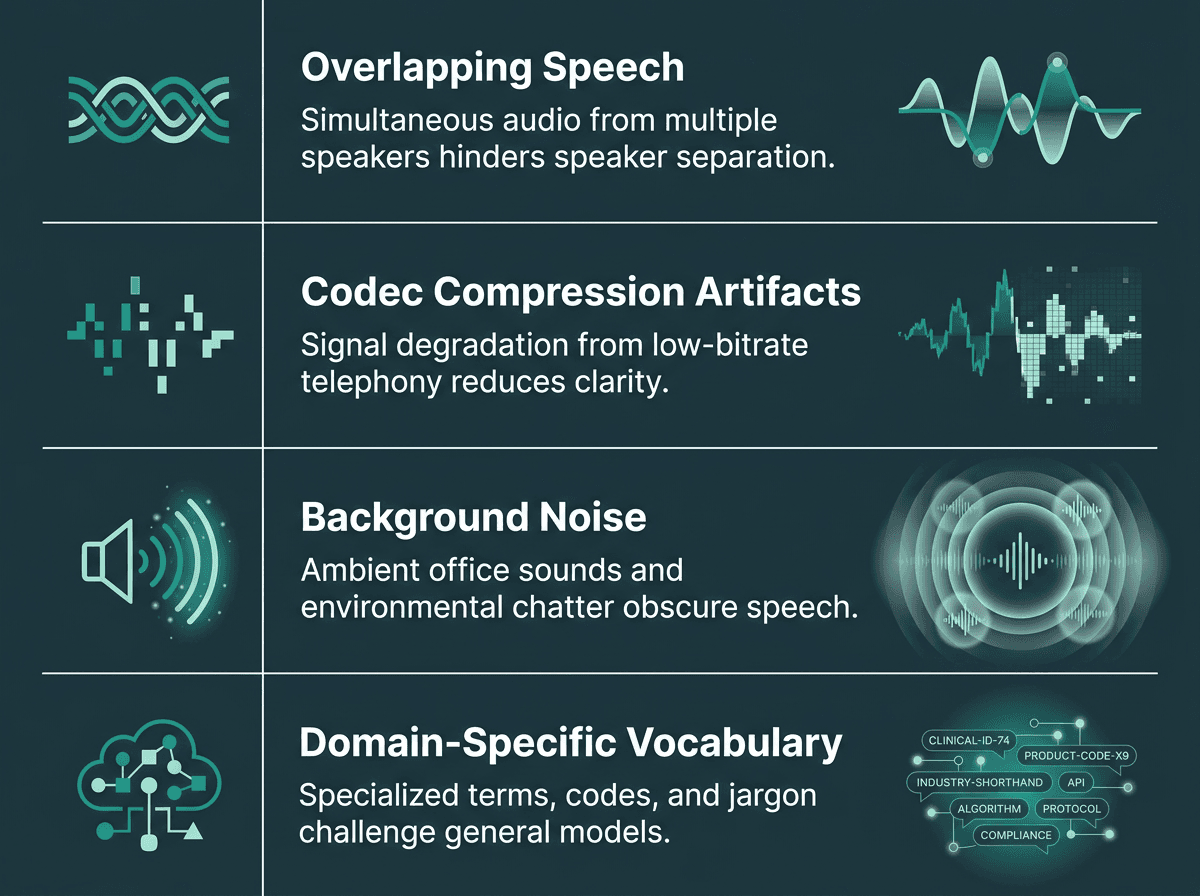
Real call center audio presents four compounding accuracy challenges that generic transcription models are not built to handle.
Batch vs. Real-Time Transcription: Choosing the Right Mode
Real-time transcription streams audio and returns text with low latency, often under 300 milliseconds. That’s the mode you want for live agent assist, where a prompt has to show up while the customer is still mid-sentence. Batch transcription works differently: you hand the system a pile of recorded files, it processes them asynchronously, and you pull the results when they’re ready. Most enterprise batch transcription APIs are designed to process large quantities of audio files in storage and return transcriptions asynchronously.
For most analytics and compliance work, batch is the right default. You’re not trying to steer a live conversation; you’re trying to understand what happened across ten thousand calls last week. Batch pipelines tend to be cheaper at scale, simpler to fan out horizontally, and more forgiving when you want heavier post-processing like diarization, sentiment tagging, or PII redaction. The tradeoff is timing: insights show up hours later, not seconds later. For QA, compliance, and trend analysis, that delay usually doesn’t matter.
How to Batch Transcribe Call Center Recordings: Step-by-Step Workflow
A reliable batch transcription setup starts before the ASR engine receives the audio. The goal is to move recordings from storage to searchable transcripts without losing speaker context, metadata, or compliance controls along the way.
1. Export call recordings from your contact center platform
Start by exporting recordings from your CRM, dialer, CCaaS platform, or call recording system. Each file should carry basic metadata such as call ID, agent ID, customer ID, queue, campaign, language, timestamp, and call duration. This metadata is important because the transcript is only useful if teams can trace it back to the right conversation, agent, customer, or workflow.
2. Normalize the audio format
Call recordings often come in different formats depending on the platform: WAV, MP3, FLAC, OGG, or older telephony formats like G.711. Before transcription, convert everything into a consistent format supported by your ASR provider. Many teams standardize files to 16kHz mono WAV or FLAC to reduce codec-related accuracy issues and make batch processing easier to manage.
3. Split dual-channel recordings when available
If the recording has separate channels for the agent and customer, preserve that separation. Splitting dual-channel audio before transcription usually gives cleaner speaker attribution than trying to separate voices from a single mixed track later. This is especially useful for QA, compliance scoring, sentiment analysis, and dispute resolution, where knowing who said what matters.
4. Submit files to ASR in batches
Once the files are prepared, submit them to the speech-to-text engine in controlled batches. Instead of sending every recording at once, queue jobs based on file size, priority, language, and available API limits. This helps avoid failed jobs, rate-limit issues, and processing delays when call volumes spike.
5. Store transcripts with call IDs and timestamps
The output should not be stored as plain text alone. Each transcript should include the original call ID, timestamps, speaker labels, confidence scores, language metadata, and processing status. This makes it easier to search transcripts, pull exact audio clips, audit transcription quality, and connect the transcript to CRM or QA systems.
6. Run diarization, redaction, and confidence checks
After transcription, apply post-processing. Speaker diarization separates agent and customer turns. PII redaction masks sensitive information such as card numbers, national ID numbers, dates of birth, and account details. Confidence checks help flag low-quality transcript sections for review instead of letting uncertain output flow directly into analytics.
7. Push transcripts into QA, BI, CRM, or compliance workflows
The final step is activation. Send clean transcripts into the systems where teams can use them: QA dashboards, compliance review queues, BI tools, CRM timelines, agent coaching platforms, or conversation intelligence layers. This is where batch transcription becomes more than a back-office process. It turns recorded calls into searchable, analyzable customer data that can support coaching, compliance, trend analysis, and operational decision-making.
Designing a Batch Transcription Pipeline That Holds Up Under Load
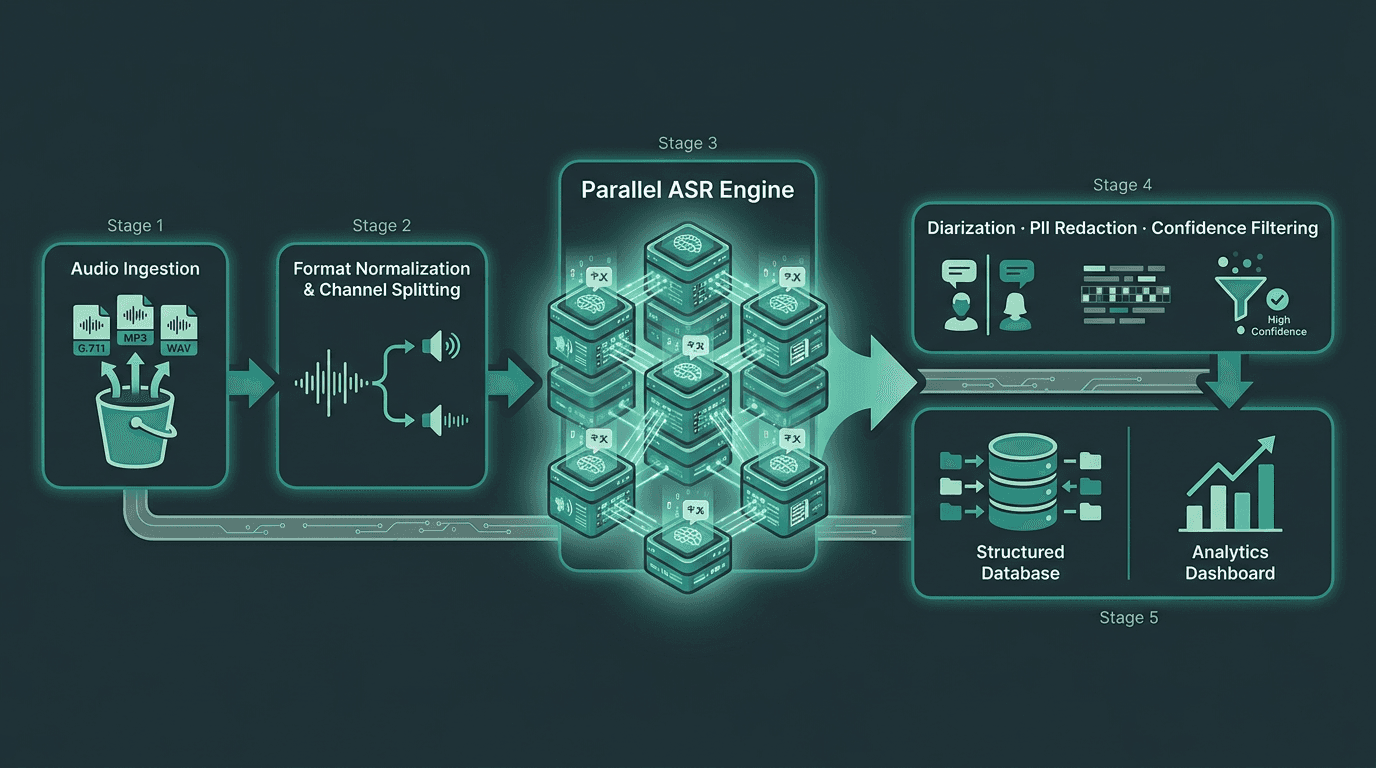
A production batch pipeline separates preprocessing, ASR, and post-processing into distinct, independently scalable stages.
Stage 1: Audio Ingestion and Preprocessing
Accuracy is often decided before the ASR engine even sees the file. Call recordings show up in whatever format your recording stack happens to emit: G.711 mu-law from older PBX setups, MP3 from cloud platforms, stereo WAV where agent and customer sit on separate channels. Pick a house format and normalize everything (16kHz mono WAV or FLAC is broadly supported) before you submit jobs. If you have dual-channel audio, split it up front instead of mixing it down. Transcribing each channel separately and then merging with timestamps typically yields far cleaner diarization than trying to untangle speakers from a single mixed signal afterward.
Stage 2: Parallel ASR Processing
Your ASR layer sets the clock: it determines whether batch runs finish in two hours or drag into the next day. Most enterprise speech-to-text APIs let you submit jobs concurrently and tune parallelism, though the real ceiling depends on the provider and your plan. A practical way to compare throughput is real-time factor (RTF): 0.1 RTF means an hour of audio transcribes in about six minutes. If you’re processing 50,000 calls per month at roughly four minutes each, you need sustained capacity that doesn’t turn into an ever-growing queue. Being fluent in the mechanics of Automatic Speech Recognition (ASR) for call centers helps you pressure-test a vendor’s performance claims before you commit.
Stage 3: Post-Processing and Enrichment
Raw transcripts are only the start. Post-processing is where you turn text into something your QA, analytics, and compliance systems can actually use:
Speaker diarization: Separates turns into agent vs. customer. This is foundational for sentiment and compliance scoring.
PII redaction: Masks credit card numbers, social security numbers, and other sensitive fields before anything lands in your warehouse.
Custom vocabulary application: Fixes the terms base models routinely mangle (product names, internal codes, regulatory language).
Confidence filtering: Routes low-confidence segments to human review instead of polluting downstream analytics with guesses.
Timestamp alignment: Anchors words back to the audio timeline so you can pull clips for coaching or dispute workflows.
Handling the Hard Cases: Accents, Noise, and Code-Switching
Most batch transcription projects don’t fail loudly; they fail in the margins. The “normal” calls look fine, and then accuracy collapses on the long tail, the calls with heavy accents, the mobile recordings with wind noise, the rapid-fire complaints, the bilingual conversations that flip languages mid-thought. If you’re supporting a global customer base, you should assume multilingual audio and code-switching are routine, not rare. The guide on handling multilingual and noisy audio goes deeper on tactics, but the big architectural fork is simple: does your ASR engine reliably detect language on its own, or do you need to specify it per file?
Automatic language ID costs time and, on short utterances or strongly accented speech, it can guess wrong. If your routing or IVR already knows which language queue a call hit, treat that as first-class metadata and pass it into the transcription job. You’ll usually get better accuracy at lower cost than asking the model to infer language from scratch. On the noise side, the most dependable wins come early: apply noise suppression during preprocessing rather than hoping the recognizer will power through. Models trained on cleaner audio degrade quickly on noisy input, and post-processing can’t reconstruct words that were never recognized correctly in the first place.
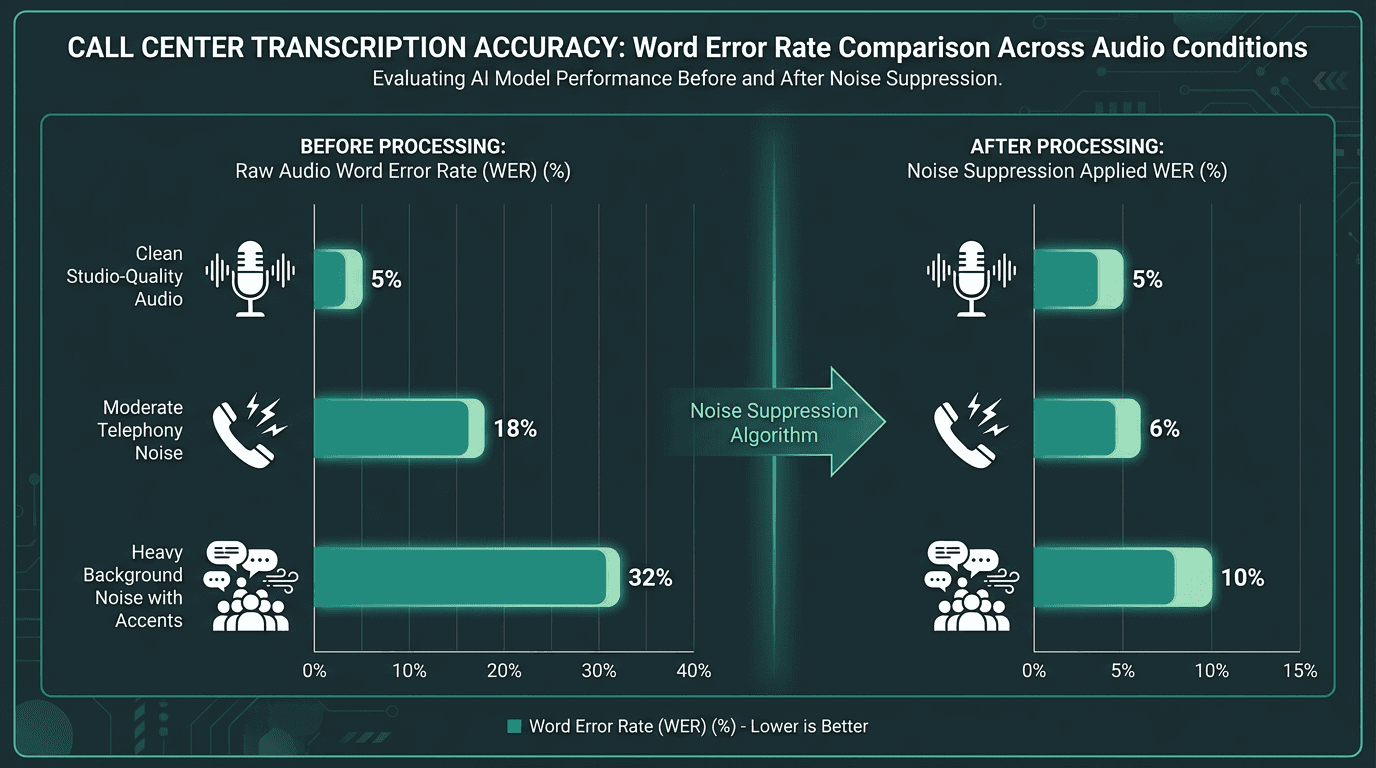
Noise suppression at the preprocessing stage consistently narrows the accuracy gap between clean and degraded call audio.
Connecting Transcripts to Downstream Business Value
A transcript that lives and dies in a storage bucket is just another artifact. Value shows up when transcripts feed an analysis layer that teams actually rely on. The reason is straightforward: recordings contain durable signals about intent, agent performance, product friction, and compliance exposure. Transcription is what makes those signals queryable at scale.
The fastest payoffs tend to come from call center QA and conversation analytics, automated checks for script adherence and compliance, and sentiment trend tracking across large volumes of calls. Once transcripts are dependable, summarization becomes a practical layer on top, which can lead to significant reductions in post-call wrap-up time. Broader AI integration can also reduce average handle time via tools like real-time transcription and automated suggestions. For stakeholders who need the finance story, the ROI of AI in call centers helps put those improvements into a budget frame.
What Most Teams Get Wrong When Evaluating Audio to Text Converters
Mistake one: testing on the wrong calls. A proof-of-concept built on a small set of clean, “representative” recordings almost always looks great. Production doesn’t. The long tail (heavy accents, wind noise on mobile, fast emotional speech) will drag accuracy down and erode trust in whatever analytics you build on top. The fix is boring but effective: evaluate on a stratified sample that intentionally over-indexes on your hardest audio, not your easiest.
Mistake two: treating per-minute pricing as the whole cost story. API rates are easy to compare; total cost of ownership is not. You still pay for preprocessing compute, storage for raw audio and transcripts, engineering time to keep the pipeline healthy, and human review for low-confidence segments. In practice, a provider that charges a bit more per minute but delivers higher accuracy and stronger post-processing can end up cheaper overall than a low-rate option that forces you to build compensating layers. Strong call center quality monitoring depends on transcript quality; once errors enter the system, they cascade into scoring and reporting.
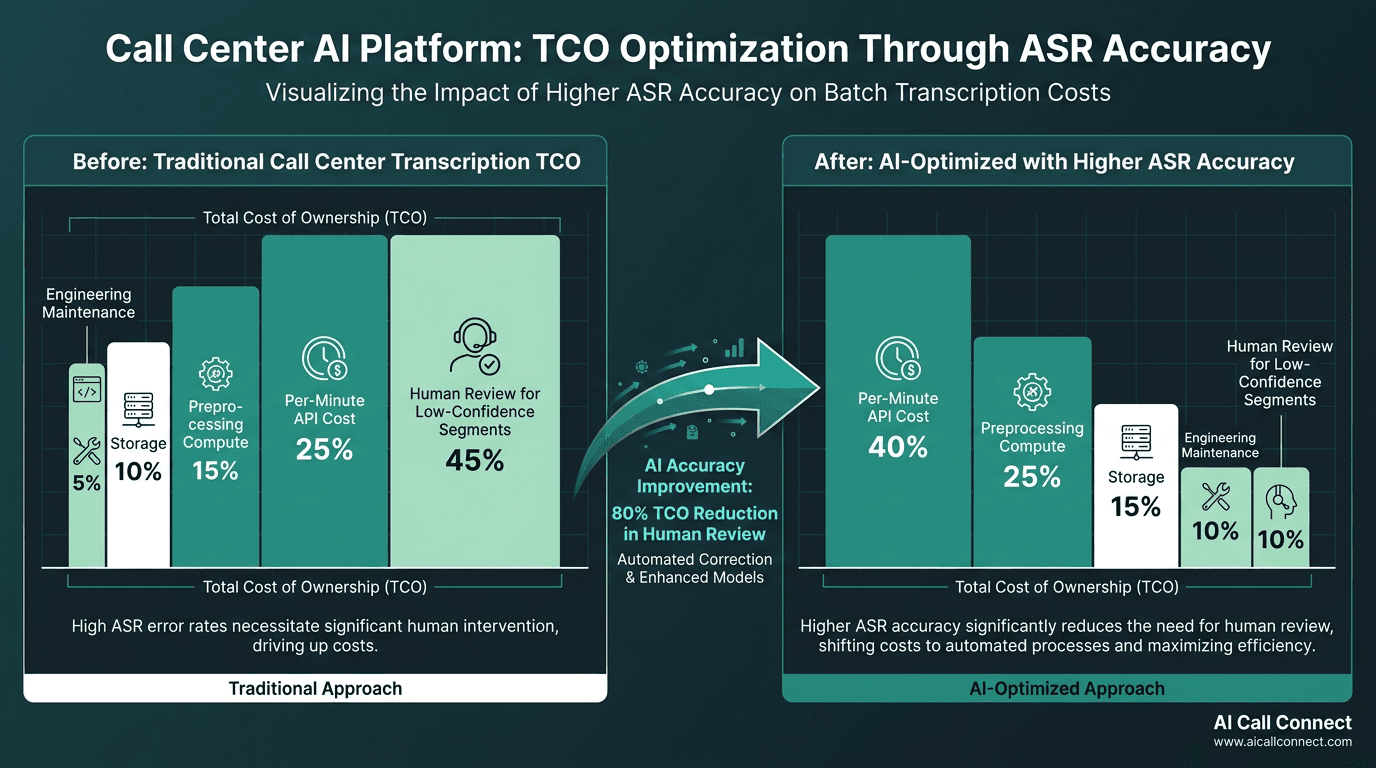
Higher accuracy at the ASR layer reduces the human review burden that often dominates total pipeline cost.
Advanced Considerations for Production Deployments
After the first version is running, a handful of decisions start to dominate outcomes. Language model adaptation is the highest-leverage knob you can turn. Most enterprise ASR providers support vocabulary lists or domain fine-tuning using your own transcribed calls. Even a relatively small adaptation set can significantly cut word error rates on domain terminology versus a base model. That’s where you usually feel it most: product names, internal identifiers, and regulatory terms that are common in your calls and rare in general training data.
Reliability engineering matters just as much as model quality. Batch jobs fail; files arrive corrupted; rate limits happen. A production pipeline should persist job state, retry with exponential backoff, and surface failures loudly instead of quietly skipping calls. Dropping even a small slice of recordings can skew QA metrics and compliance reporting in ways that are hard to spot until an audit forces the issue. Put observability in early, before the system is considered “done.” The broader view in how AI is transforming call center operations is a useful reminder: transcription isn’t a feature you bolt on; it’s infrastructure, and it deserves the same operational discipline as any other data pipeline.
Key Takeaways and Next Steps
The essentials for anyone building or evaluating a batch transcription system for call center audio:
Evaluate accuracy on your hardest audio, not your cleanest. Benchmark word error rate on a stratified sample that includes noisy, accented, and domain-specific calls.
Preprocess before you transcribe. Channel splitting, format normalization, and noise suppression at ingestion improve accuracy more reliably than post-processing corrections.
Build post-processing as a separate stage. Diarization, PII redaction, and confidence filtering belong in their own layer, not mixed into the ASR job.
Measure total cost of ownership, not just per-minute pricing. Engineering time, storage, and human review costs often exceed API costs at scale.
Adapt your language model to your domain. Custom vocabulary and fine-tuning on your own audio are the highest-ROI investments once the base pipeline is stable.
Instrument everything. Job state tracking, retry logic, and accuracy monitoring are not optional in a production system.
Contact center analytics is growing quickly because companies are finally treating recorded conversations as usable data, not just an archive. That shift starts with transcription that’s accurate, scalable, and operationally reliable. Smallest.ai's Pulse is built around that workload: speech-to-text tuned for the acoustic constraints of telephony, with the throughput and post-processing support production deployments demand. If you’re comparing audio to text converters for a contact center, Pulse is a sensible place to start when “works on real calls” matters more than just theoretical benchmark performance.
Frequently asked questions
How accurate is batch transcription on real call center audio?
What audio formats does a batch transcription system typically support?
How does speaker diarization work in a call center context?
What is the difference between batch transcription and real-time transcription for call centers?
How do I handle PII in call center transcripts?

![This blog will be featured on the top of the /blog page. Only one blog can be featured at a time. If multiple blogs are featured, only the first featured blog will appear in the list Transcribe audio to text in Python with clean preprocessing, API calls, diarization, chunking, and production retry/cost patterns you can ship confidently. Meta data of Page Empty How to Transcribe Audio to Text in Python: A Step-by-Step API Guide for Developers Transcribe audio to text in Python with clean preprocessing, API calls, diarization, chunking, and production retry/cost patterns you can ship confidently. how-to-transcribe-audio-to-text-in-python-a-step-by-step-api-guide-for-developers smallest.ai/blog/how-to-transcribe-audio-to-text-in-python-a-step-by-step-api-guide-for-developers Empty Empty Prithvi Bharadwaj Empty Transcribing audio to text sounds like a solved problem right up until you try to ship it. Different file types, odd sample rates, background noise, accents, and multi-speaker chatter have a way of turning a “quick script” into a real engineering effort. What follows is the practical path from “it works on my machine” to Python code that can handle real-world audio without reliability issues. If you’re building meeting notes, a voice-driven support bot, or an audio indexing pipeline, the same fundamentals show up again and again. You’ll end up with working Python code, a clearer sense of which knobs actually move accuracy, and a realistic map from prototype to production. The sections build in order, so you can treat this as a sequence rather than a menu. How Python Audio Transcription Works: Basic Workflow Before you start writing code, it helps to understand the full transcription flow. A speech-to-text pipeline is not just “upload audio and get text back.” In a real application, you need to prepare the audio, send the right request, receive structured output, and make that output usable for your product or workflow. Here is the basic workflow most Python audio transcription systems follow: Prepare or host the audio file Start with the audio source you want to transcribe. This could be a local file from a user upload, a call recording from your CRM, a meeting recording, a podcast episode, or a hosted file URL. If the file is already hosted securely, you can send the URL directly to the transcription API. If it is stored locally, you can upload the raw audio file from Python. Normalize audio format when needed Audio files often arrive in different formats, bitrates, sample rates, and channel layouts. Before sending them to the API, normalize the file if needed. A common safe format is mono, 16 kHz, 16-bit WAV, especially when you want predictable transcription quality across different recordings. This step helps reduce issues caused by unsupported formats, stereo channel confusion, or noisy conversions. Send the file or URL to the transcription API Once the audio is ready, your Python script sends it to the speech-to-text API. For a local file, this usually means reading the audio bytes and sending them in a POST request. For hosted audio, you send the public or signed URL in a JSON payload. In both cases, your request should include authentication, usually through an API key stored in an environment variable. Pass language, diarization, timestamp, and formatting options Most transcription APIs let you control how the output should be generated. For example, you can pass a language code such as en, enable speaker diarization for multi-speaker conversations, request word-level timestamps, or allow automatic language detection. These options are important because they affect how useful the final transcript will be for search, captions, analytics, QA, or downstream automation. Receive structured JSON A good speech-to-text API does not only return plain text. It usually returns structured JSON containing the full transcript, word-level timing, detected language, confidence scores, and speaker information when diarization is enabled. This structure is what turns a transcript from a simple text blob into data your application can work with. Extract transcript, word timestamps, speaker labels, and confidence metadata After receiving the response, parse the JSON in Python. Extract the full transcript for display, word timestamps for syncing text with audio or video, speaker labels for conversations, and confidence scores for quality checks. For example, low-confidence words can be flagged for human review before the transcript is pushed into a customer-facing or compliance-sensitive workflow. Store or post-process the transcript Finally, store the transcript and metadata in your database, object storage, CRM, QA platform, BI tool, or search index. You may also run post-processing steps such as punctuation cleanup, redaction, summarization, keyword extraction, speaker formatting, or topic tagging. This is where transcription becomes useful beyond raw text: it can power searchable call archives, meeting summaries, support QA, captions, compliance review, or voice analytics. A simple Python transcription workflow usually looks like this: 1. Prepare or host audio audio_path = "preprocessed_audio.wav" 2. Send audio to transcription API response = transcribe_audio(audio_path) 3. Extract structured fields transcript = response.get("transcription", "") words = response.get("words", []) utterances = response.get("utterances", []) language = response.get("language", "unknown") 4. Store or post-process results print("Transcript:", transcript) print("Detected language:", language) print("Word count:", len(words)) print("Speaker turns:", len(utterances)) This workflow gives you a clean mental model before you move into the actual implementation. What 'Transcribe Audio to Text' Actually Means at the API Level Before you write Python, it helps to be specific about what a speech-to-text API is doing when you hit “transcribe.” You’re not mailing a file to a black box and getting a paragraph back. The service typically runs audio through an acoustic model (sound to phonemes), a language model (phonemes to likely words in context), and then a post-processing layer that cleans things up with punctuation, capitalization, and sometimes speaker labels. Those layers are also where quality gaps show up fast. A model that looks great on clean, studio English often falls apart on call-center audio, heavy background noise, or conversations that switch languages mid-thought. That’s why API choice matters as much as your Python wrapper. If you want more of the underlying mechanics, the speech recognition Python guide breaks down how modern recognition systems behave in practice. The internal pipeline of a modern speech-to-text API, from raw audio to structured transcript Setting Up Your Python Environment Use a fresh virtual environment. Audio tooling is notorious for dependency clashes, and isolating packages saves you from debugging your machine instead of your pipeline. Run these commands to get your environment ready: python -m venv stt-env # macOS / Linux source stt-env/bin/activate # Windows stt-env\Scripts\activate pip install requests python-dotenv pydub Keep your API key in a `.env` file instead of baking it into code. That’s basic hygiene, and it also makes key rotation painless when you move from local testing to production. Add `SMALLEST_API_KEY=your_api_key_here` to `.env`, then load it with the snippet below. SMALLEST_API_KEY=your_api_key_here from dotenv import load_dotenv load_dotenv() Audio Preprocessing: The Step Most Tutorials Skip A lot of transcription walkthroughs start with a pristine WAV and pretend that’s normal. It isn’t. Phone recordings often arrive at 8 kHz, which is a bad match for models expecting 16 kHz. Video shows up as MP4 or MKV with audio tucked inside a container. Zoom exports can include separate mono tracks per speaker, which changes how you should feed the audio into a model. `pydub` covers most of the annoying format work without much fuss. Here’s a small preprocessing function that converts audio into the shape most APIs prefer: from pydub import AudioSegment def preprocess_audio(input_path: str, output_path: str) -> str: """ Convert an audio file to mono, 16 kHz, 16-bit PCM WAV. This format is commonly preferred for speech-to-text pipelines. """ audio = AudioSegment.from_file(input_path) audio = audio.set_channels(1) audio = audio.set_frame_rate(16000) audio = audio.set_sample_width(2) audio.export(output_path, format="wav") return output_path if __name__ == "__main__": preprocess_audio("input_audio.mp3", "preprocessed_audio.wav") In practice, run everything through this before you call the API. Resampling alone can move the needle a lot, especially when the original recording is telephony-grade. As Mozilla's Common Voice documentation notes, 16 kHz mono WAV is the standard input format across many open-source and commercial speech models. Preprocessing audio before sending it to a transcription API significantly improves accuracy Making Your First Transcription API Call in Python Once you’ve got a clean audio file, the API call is straightforward. The example below uses Smallest.ai's Pulse, a speech-to-text API aimed at low-latency, high-accuracy transcription, with streaming support for real-time scenarios. import os import requests from dotenv import load_dotenv load_dotenv() def transcribe_audio(file_path: str) -> dict: """ Send a local audio file to Smallest.ai Pulse STT and return the transcription response as JSON. """ api_key = os.getenv("SMALLEST_API_KEY") if not api_key: raise ValueError("Missing SMALLEST_API_KEY in environment variables.") url = "https://api.smallest.ai/waves/v1/pulse/get_text" params = { "language": "en", "word_timestamps": "true", "diarize": "false", } headers = { "Authorization": f"Bearer {api_key}", "Content-Type": "audio/wav", } with open(file_path, "rb") as audio_file: response = requests.post( url, headers=headers, params=params, data=audio_file, Two details here matter more than they look. `raise_for_status` turns HTTP failures into exceptions, so you deal with errors explicitly instead of quietly printing an empty string and calling it “done.” And word_timestamps=true gives you word-level timing, which you’ll want the moment you need to sync text to video, highlight search hits, or build any kind of usable audio index. If you’re building a richer pipeline, the speech-to-text developer guide goes further on streaming and real-time patterns. Transcribing a Hosted Audio URL import os import requests from dotenv import load_dotenv load_dotenv() def transcribe_audio_url(audio_url: str) -> dict: """ Send a hosted audio URL to Smallest.ai Pulse STT and return the transcription response as JSON. """ api_key = os.getenv("SMALLEST_API_KEY") if not api_key: raise ValueError("Missing SMALLEST_API_KEY in environment variables.") url = "https://api.smallest.ai/waves/v1/pulse/get_text" params = { "language": "en", "word_timestamps": "true", "diarize": "true", } headers = { "Authorization": f"Bearer {api_key}", "Content-Type": "application/json", } payload = { "url": audio_url, } response = requests.post( url, Handling the API Response and Extracting Structured Data A transcription response is usually more than a single transcript field. Good APIs return structure: word timings, confidence scores, detected language, and sometimes speaker metadata. Here’s a typical response shape and a simple way to pull the useful parts out: def parse_transcript(response: dict) -> None: """ Print the transcript, word-level timestamps, confidence scores, and detected language. """ full_text = response.get("transcription", "") print(f"Transcript: {full_text}") words = response.get("words", []) for word in words: text = word.get("word", "") start = word.get("start") end = word.get("end") confidence = word.get("confidence") start_text = f"{start:.2f}s" if isinstance(start, (int, float)) else "?" end_text = f"{end:.2f}s" if isinstance(end, (int, float)) else "?" confidence_text = ( f"{confidence:.2f}" if isinstance(confidence, (int, float)) else "?" ) print(f"[{start_text} - {end_text}] {text} (confidence: {confidence_text})") language = response.get("language", "unknown") print(f"Detected language: {language}") Treat confidence scores as a routing signal, not trivia. When a word drops below ~0.7, the model is telling you it’s guessing, often because of noise, an unfamiliar proper noun, or overlapping speech. In production, low-confidence spans are a good place to trigger human review instead of letting uncertainty leak into downstream systems. Anatomy of a transcription API response: transcript, word-level timestamps, and confidence scores Speaker Diarization: Knowing Who Said What Single-speaker audio is the easy mode. Meetings, podcasts, and support calls are where things get interesting, because “what was said” isn’t enough, you need “who said it.” That’s diarization, and you typically switch it on with `diarize: True` in your request parameters. When diarization is enabled, Pulse adds speaker labels to word-level and utterance-level output, so you can rebuild the transcript as a conversation. def format_diarized_transcript(response: dict) -> str: """ Format diarized utterances into a readable speaker-by-speaker transcript. """ utterances = response.get("utterances", []) lines = [] for utterance in utterances: speaker = utterance.get("speaker", "unknown_speaker") text = utterance.get("text", "").strip() start = utterance.get("start", 0) if not text: continue lines.append(f"[{start:.1f}s] {speaker}: {text}") return "\n".join(lines) There’s a catch: diarization gets worse when people talk over each other. In call-center audio, interruptions are common, and the cleanest fix is often upstream (separate channels when you have them, then transcribe) rather than expecting the model to untangle cross-talk perfectly. The speaker diarization pipelines guide goes deeper on multi-speaker strategies. Handling Long Audio Files and Chunking Strategies Transcription APIs usually impose limits on file size or duration. Even if yours doesn’t, pushing a 90-minute recording through a single request is asking for trouble: one timeout and you’re back at zero. Chunking long audio into smaller pieces is the standard way to keep the pipeline resilient. A robust chunking strategy for long audio files: Split audio into segments of 30-60 seconds using `pydub`'s `make_chunks` method Add a 1-2 second overlap between chunks to avoid cutting words at boundaries Transcribe each chunk independently and collect results in order Merge transcripts by removing duplicate words in the overlap region using a simple string alignment check Preserve global timestamps by offsetting each chunk's word timestamps by its start position in the original file from pydub import AudioSegment def split_audio_with_overlap( input_path: str, output_dir: str, chunk_length_ms: int = 60_000, overlap_ms: int = 2_000, ) -> list[str]: """ Split long audio into overlapping chunks. Default: 60-second chunks with 2-second overlap. """ audio = AudioSegment.from_file(input_path) chunk_paths = [] start = 0 chunk_index = 0 while start < len(audio): end = min(start + chunk_length_ms, len(audio)) chunk = audio[start:end] chunk_path = f"{output_dir}/chunk_{chunk_index:04d}.wav" chunk.export(chunk_path, format="wav") chunk_paths.append(chunk_path) if end == len(audio): break start = end - overlap_ms chunk_index += 1 return chunk_paths That overlap is the difference between “mostly works” and a system that behaves predictably at boundaries. Without it, words that land on the boundary get clipped and either vanish or come back mangled. A one-second overlap barely changes processing cost, but it wipes out an entire category of edge cases. If you’re dealing with accents, code-switching, or multilingual audio, the speech-to-text for multilingual audio guide lays out the extra pitfalls. Chunking long audio with overlapping segments prevents word-boundary errors at split points Production Considerations: Error Handling, Retries, and Cost Control A laptop script is a demo; production is where the messy stuff shows up. Rate limits kick in, networks flake out, and users upload audio in formats you didn’t plan for (or recordings that are far longer than they should be). If you plan for those three upfront, the rest is mostly engineering. For rate limits and transient failures, use exponential backoff. `tenacity` keeps it tidy: `@retry(wait=wait_exponential(multiplier=1, min=2, max=30), stop=stop_after_attempt(5))`. Put that decorator on your API call and you’ll ride out most short-lived issues without writing your own retry state machine. pip install tenacity import os import requests from dotenv import load_dotenv from tenacity import retry, stop_after_attempt, wait_exponential load_dotenv() @retry( wait=wait_exponential(multiplier=1, min=2, max=30), stop=stop_after_attempt(5), ) def transcribe_with_retries(file_path: str) -> dict: """ Transcribe audio with retries for transient API or network failures. """ api_key = os.getenv("SMALLEST_API_KEY") if not api_key: raise ValueError("Missing SMALLEST_API_KEY in environment variables.") url = "https://api.smallest.ai/waves/v1/pulse/get_text" params = { "language": "en", "word_timestamps": "true", "diarize": "false", } headers = { "Authorization": f"Bearer {api_key}", "Content-Type": "audio/wav", } with open(file_path, "rb") as audio_file: Cost is the other production surprise. Most transcription APIs bill per minute, which means “just run it” can get expensive fast. Two habits keep spend predictable: check duration before you upload (and reject anything over your cap at the app layer), and cache results so the same file doesn’t get transcribed twice. A content hash of the audio makes a practical cache key. If you’re building at volume, the speech-to-text guide gets into higher-throughput architectures, async workers, queues, and the patterns that keep long-running pipelines stable. What Most Developers Get Wrong About Transcription Accuracy A 5% WER sounds tiny until you translate it: roughly 1 in every 20 words is wrong. In a 500-word meeting summary, that's about 25 errors. Even state-of-the-art models show meaningfully higher word error rates on noisy, spontaneous conversational speech compared to clean benchmark conditions (sometimes exceeding 20%) which is why testing on your own audio is non-negotiable. So benchmark like you mean it. Test your API on audio that matches your product, not on clean demo clips. Capture 10–15 minutes from the real environment, measure accuracy, and only then commit. Domain vocabulary is where general models stumble most, medical terms, product names, internal acronyms. If your provider offers custom vocabulary or domain adaptation, use it when specialized terminology is part of the job. Summary and Next Steps A dependable audio-to-text pipeline in Python usually comes down to four disciplines: normalize audio before the API sees it, treat the response as structured data (not a single string), chunk long recordings with overlap, and build retries and error handling as first-class features. The snippets here stay intentionally small so you can drop them into your own stack without a rewrite. As usage grows, you’ll likely add async processing, a job queue, and durable storage for results, but the core flow doesn’t change. If you’re comparing speech-to-text providers, Smallest.ai's Pulse is built for developers who care about latency, transcription quality, and an API that integrates cleanly. It supports streaming transcription, speaker diarization, word-level timestamps, and multilingual audio out of the box, which lines up with the production patterns covered above. Explore Pulse and the Waves API to start transcribing audio in Python today. The four pillars of a production-ready transcription pipeline in Python Gushwork Team: Ignore this Build Audio Transcription in Python Start testing speech-to-text workflows today Start Building https://app.smallest.ai/ FAQ row will only show if FAQ Answer is set. Please make sure both Question and Answers are set. The visibility of the FAQ Section is tied to FAQ Question 1 being set.](https://framerusercontent.com/images/5h0IzsaRLohS5uAxf7C2xhgJnOI.png?width=1456&height=816)