Conversational Voice Interfaces for SaaS Apps: How to Design Natural, Hands-Free User Experiences

Conversational voice interfaces for SaaS apps: design dialogue, manage latency and errors, and ship a multimodal experience users can finish tasks with.
Conversational voice interfaces aren’t an experimental add-on anymore, bolted onto the side of a SaaS product. They’re edging toward a primary interaction channel, and teams that get the details right are seeing real movement in retention, task completion, and accessibility. That curve matches a broader expectation shift: people increasingly want software to respond to them in plain language, on the first try.
A voice interface that feels natural (instead of robotic, brittle, and oddly hostile) takes a different mental model than visual UI. The arc here follows that model end to end: what makes spoken interaction work, the architectural and linguistic choices that shape it, and the testing loops that separate a decent voice UX from one users actually come back to. If you’re layering voice onto an existing SaaS app or starting voice-first, the same fundamentals hold.
Why Voice Interfaces Demand a Different Design Philosophy
Visual interfaces give users a standing map. Menus, buttons, and breadcrumbs quietly tell you where you are and what’s possible next. Voice removes that scaffolding. When someone talks to your SaaS product, there are no visible affordances to lean on, which pushes discoverability to the top of the risk list. Research from the Nielsen Norman Group points to poor discoverability as a major reason people abandon voice assistants after only a few tries.
The W3C Voice Interaction Community Group is explicit about where the field is headed: away from telephony-era, system-directed dialogs and toward flexible, user-initiated conversation. Practically, that means your interface can’t shove people down a rigid decision tree. It needs to tolerate partial input, infer intent from messy phrasing, and recover without making the user feel like they did something wrong. That flexibility starts in the stack, not the script.
The Technology Layer: Speech, NLP, and the Conversation Engine
A conversational voice interface is a pipeline, not a monolith. Up front, speech-to-text (STT) turns audio into text. That text flows into a natural language processing (NLP) layer that pulls out intent and entities. A dialogue manager decides the next move, and text-to-speech (TTS) turns the response back into audio. Each hop adds latency and introduces its own failure modes, so “good enough” at any one stage tends to show up as friction in the experience. The underlying ASR software architecture is what makes this real-time interaction possible.
Natural language processing is a subfield of AI that blends computational linguistics with statistical modeling and deep learning to recognize, understand, and generate text and speech. In day-to-day product terms, your NLP layer has to cope with synonyms, ellipsis, and domain vocabulary without forcing users into pre-scripted incantations. For SaaS, deciding what matters inside an utterance tends to consume the most design and training effort. Platforms like Smallest.ai bundle low-latency STT, TTS, and orchestration into a unified conversational voice stack, reducing the integration complexity that often slows voice UX iteration. These integrated voice recognition systems are designed to handle the entire conversational flow.
Latency is the quiet way voice UX falls apart. People barely notice a 200–300ms delay in a visual UI. In voice, sub-second latency typically feels more conversational, while longer delays can make it feel like the system didn’t hear you, or worse, like it’s stuck. This is a common challenge in real-time voice AI systems. That’s why picking STT and TTS providers isn’t just an engineering procurement decision; it shapes the product. Low-latency, high-accuracy real-time speech-to-text is what makes users trust the interface enough to keep talking to it.
Designing the Dialogue: Intents, Slots, and Conversational Context
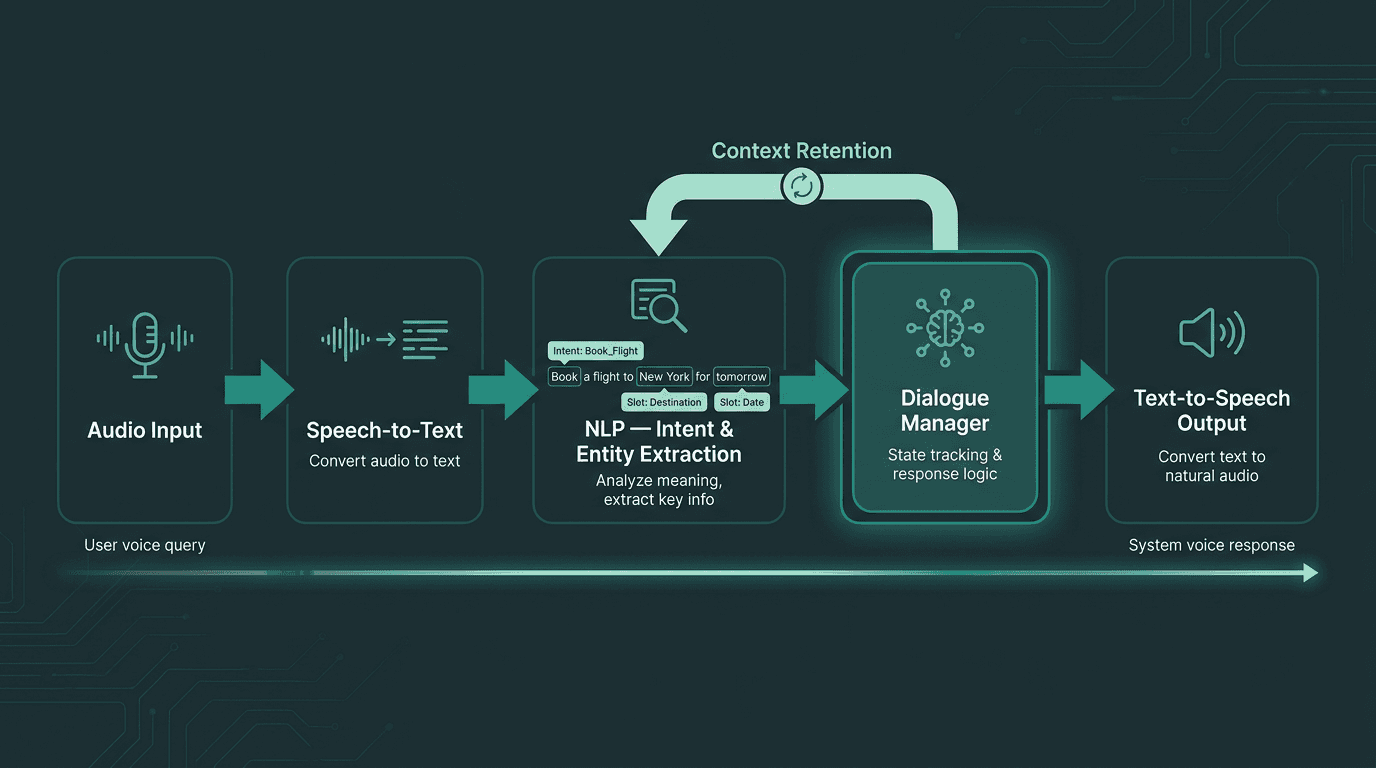
Every voice interaction passes through a multi-stage pipeline where latency and accuracy compound at each step.
Dialogue design is where product thinking collides with linguistics in the best way. Your basic unit is the intent: what the user is trying to get done. Under each intent are slots: the specific pieces of information you need to complete the task. If someone says, “show me revenue for last quarter,” the intent is “view report,” and the slots include “metric: revenue” and “time period: last quarter.” The dialogue manager then has to cope with reality: missing slots, competing intents, and users changing direction mid-sentence.
Practical principles for dialogue design in SaaS voice interfaces:
Confirm before acting on destructive or irreversible commands. A user saying “delete the project” should trigger a spoken confirmation request, not immediate execution.
Use progressive disclosure in prompts. Start with a broad opening (“What would you like to do?”) and only ask for specifics when the intent is ambiguous.
Preserve context across turns. If a user asks “show Q1 revenue” and then says “now compare it to Q2,” the system should carry forward the “revenue” context without forcing repetition.
Design explicit and implicit re-prompts. When the system doesn’t understand, use a re-prompt that teaches the user what works, instead of defaulting to “I did not understand that.”
Limit choices per turn. More than three or four options spoken aloud quickly becomes cognitive overload. Offer the most likely paths and include an escape hatch.
Voice Persona and Tone: Building Trust Through Sound
Your voice interface has a persona whether you plan for it or not. Word choice, pacing, formality, and the synthesized voice itself combine into a “character” users will attribute to the product. When that character doesn’t match the job, users feel it immediately: a financial analytics tool that sounds breezy, or a wellness app that sounds like a corporate helpdesk, creates a subtle but persistent mismatch, even if people can’t quite name what’s off.
Start with your existing brand voice guidelines, then translate them for speech. Written copy can lean on complex sentences, visual emphasis, and parenthetical structure. Spoken language needs shorter phrasing, cleaner cadence, and prosody that signals what matters. When you draft response scripts, read them out loud before you ship them. If it’s clunky for a human mouth, it will be clunky for a synthesizer. Persona, alongside context, discoverability, navigation, error handling, and iteration is a core design principle.
The TTS voice carries more weight than teams often expect. Monotone, robotic synthesis breaks the illusion and makes users second-guess the system, even when the underlying logic is correct. Modern neural TTS systems handle prosody, emphasis, and pauses in ways older concatenative systems never could. And for SaaS products that want a consistent, branded sound, voice cloning makes it possible to ship a voice that’s recognizably “yours” across touchpoints. Understanding the nuances of voice cloning in production is key to deploying it effectively.
Error Handling and Recovery: Designing for the Inevitable Misunderstanding
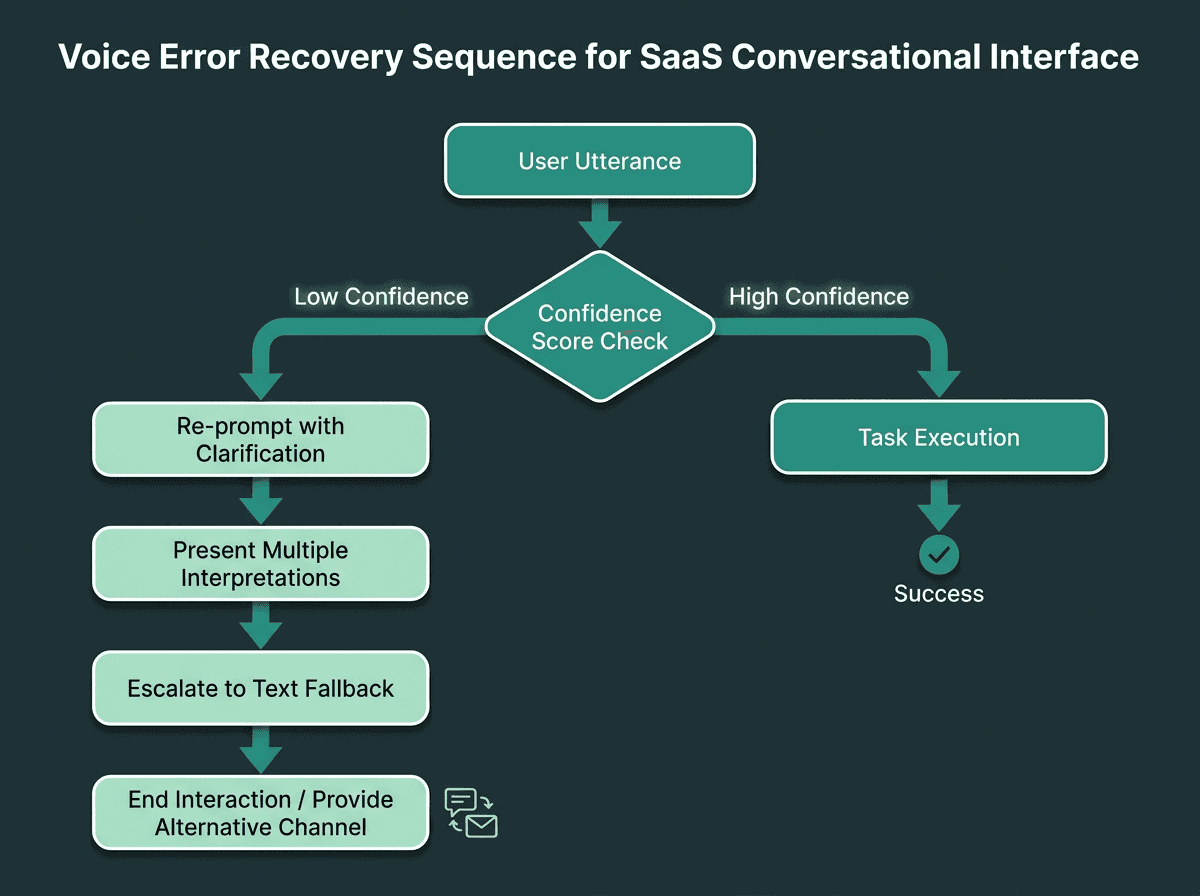
Graceful error recovery is what separates a frustrating voice interface from a trustworthy one.
A Nielsen Norman Group study on intelligent assistant usability found that voice assistants tend to shine on simple, bounded queries with short answers. Once you push into multi-step work, even strong systems start to show seams. That isn’t an argument against voice in complex SaaS workflows; it’s a reminder that error handling can’t be an afterthought.
Voice error handling happens on two layers. First are recognition errors: the STT engine simply captured the wrong words. Second are understanding errors: the transcription is correct, but the NLP layer mapped it to the wrong intent. Those failures deserve different recoveries. For recognition errors, asking the user to repeat or rephrase is reasonable. For understanding errors, it’s usually better to offer a small set of interpretations (“Did you mean X, or were you asking about Y?”) than to fall back to a generic apology.
Every voice interface also needs a clean exit. Users should be able to say “stop,” “cancel,” or “go back” and get a predictable response every time. In SaaS workflows that span multiple turns, a “home base” state (something a user can return to with one command) prevents the disorientation that comes from wandering into a deep dialogue branch. If you’re building on telephony infrastructure, integration patterns for structuring recovery and fallback flows are a useful reference.
Multimodal Considerations: When Voice Meets Screen
Most SaaS apps won’t be voice-only, and that’s fine. Voice usually arrives as a layer on top of an existing screen-based interface, which creates both leverage and new failure cases. The leverage is obvious: you can keep spoken responses short while pushing dense information to the UI. The failure case is synchronization, if the user asks something out loud and the answer silently appears on screen, the experience feels like it dropped a stitch.
A workable rule for multimodal design is to keep voice focused on commands, confirmations, and brief informational responses. Use the screen for data-heavy output, long lists (more than four or five items), and anything people need to scan. When you hand off from voice to visuals, say so (“I’ve pulled up your report on screen”) so users know where to direct attention.
Testing, Iteration, and the Metrics That Matter
Voice quality is harder to measure than visual UI quality because the failure isn’t always visible. A broken button announces itself. A dialogue flow that derails 30% of users only shows up when you test it on purpose. Wizard of Oz testing, where a human operator secretly plays the role of the system while users speak naturally, is one of the fastest ways to get early signal. You learn how people actually phrase requests before you lock in an NLP training set.
After launch, three metrics tend to tell the truth quickly: task completion rate (did the user get the outcome they wanted?), turn count per task (how many back-and-forths did it take?), and fallback rate (how often did the system fail and trigger recovery?). If fallback rate climbs for a particular intent, that’s a clean diagnostic: your model needs more training data for that slice of language. Track at the intent level (not just per session) so improvements map to specific commands and flows.
The audience for voice interfaces is large enough that small gains in completion rate can show up as meaningful retention lift. In contact-center-adjacent SaaS categories, the business case for investing in quality, not just coverage, is strong. Teams can also benchmark transcription quality before choosing a provider.
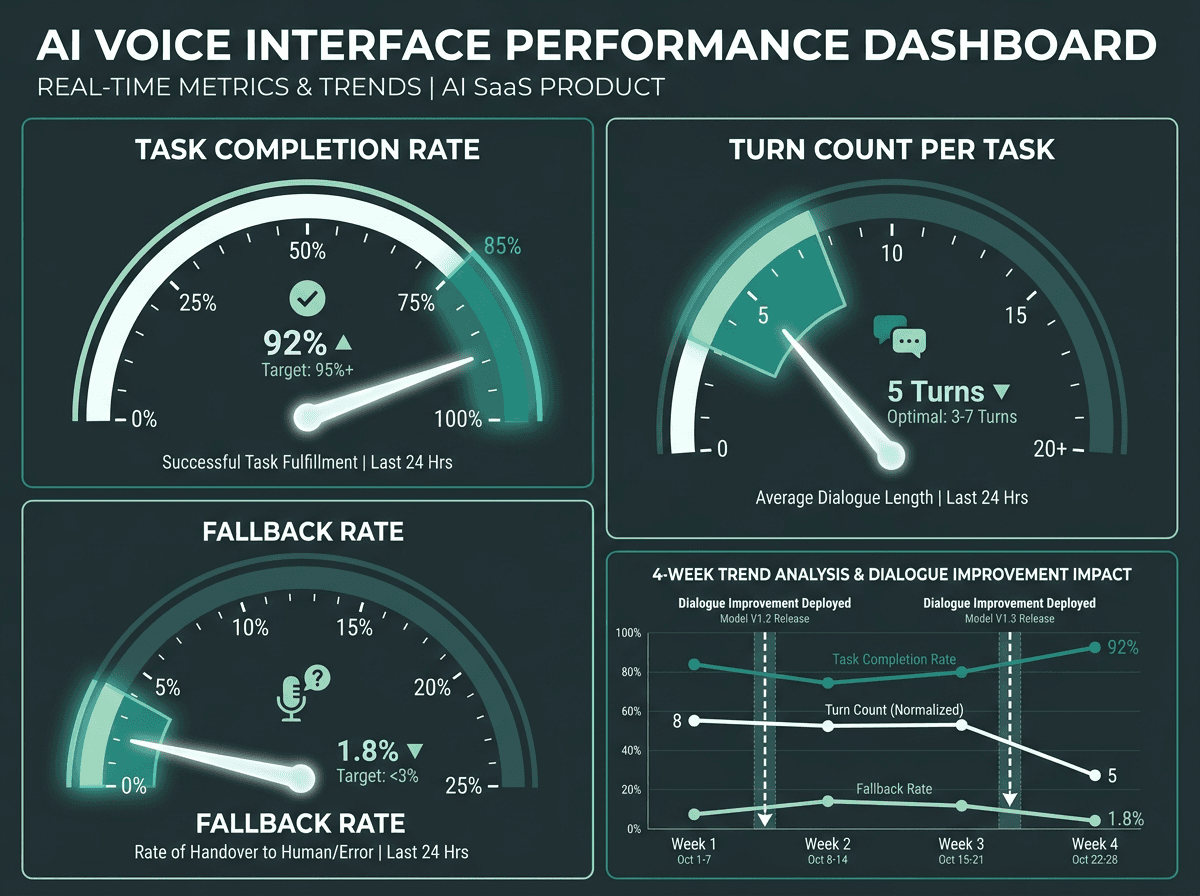
Tracking task completion, turn count, and fallback rate at the intent level reveals exactly where to focus improvement effort.
From Principles to Production: Bridging the Design-Engineering Gap
The distance between a tidy dialogue flow on a whiteboard and a voice interface that holds up in production usually collapses to two things: responsiveness and speech fidelity. A flowchart can look perfect, then fall apart when STT takes 1.5 seconds or when TTS sounds mechanical enough that users start questioning whether they were understood. Closing that gap means design and engineering have to evaluate voice quality together, in the same loop, rather than tossing requirements over a wall. This often requires building streaming conversational pipelines.
Infrastructure choices do a lot of the heavy lifting. Some traditional text-to-speech systems prioritize compatibility and broad deployment support, but may have limited expressiveness. On the other end are neural TTS systems that can run under 200ms latency, enabling the kind of real-time pacing that makes an interface feel conversational instead of transactional. Reliable low-latency speech infrastructure is a prerequisite for production deployment.
Smallest.ai's Atoms platform is built to address that production gap. Atoms bundles the Lightning TTS API (ultra-low-latency, high-expressiveness speech synthesis), the Pulse speech-to-text engine, and Electron, Smallest.ai’s conversational small language model, into a unified agent platform. For SaaS teams building conversational voice interfaces, that means you can orchestrate the full path from spoken input to spoken output through a single integration, with conversational pacing and voice quality that match real product expectations. The Waves API gives developers direct access to Lightning and related speech capabilities, making it easier to embed high-quality voice into existing SaaS architectures without rebuilding the stack.
Frequently asked questions
What is a conversational voice interface in the context of SaaS?
How do I handle situations where the voice interface misunderstands a user?
How important is voice quality in a SaaS voice interface?
What metrics should I track to know if my voice interface is working well?
Can I add a voice interface to an existing SaaS product without rebuilding it?