Text To Audio Converter: Turn Text Into Natural AI Voice

Text to audio converter basics: the neural TTS pipeline, what drives voice quality, and how to ship low-latency, production-ready audio output.
A text to audio converter does exactly what you want it to do: take written content and turn it into spoken audio. The catch is that "TTS" can mean wildly different things depending on the generation of the tech. The systems many of us remember from the mid-2010s were serviceable, but flat and robotic. Modern neural voice synthesis, by contrast, can carry prosody, subtle emotion, and speaker identity well enough that in the right conditions it can pass for a human recording.
This piece is for developers, content teams, and product builders who need the mechanics, not the hype: how text to audio conversion works end-to-end, where quality actually breaks down in production, and how to pick an approach that fits the job. The goal is a clear mental model of the tech, a practical workflow you can implement, and a checklist of what really drives output quality.
What Is a Text to Audio Converter?
A text to audio converter is a system that takes text as input and returns audio as a file or a stream. Depending on where that audio is headed, you might request MP3, WAV, OGG, or a real-time PCM stream. Under the hood, though, the way we get from characters to speech has changed dramatically over the last few generations.
Older concatenative TTS literally stitched together pre-recorded phoneme segments. It was understandable, but it never stopped sounding like a machine. Parametric synthesis smoothed some of that out, while adding its own "buzzy" signature. Modern neural text-to-speech systems have improved dramatically in naturalness, with many producing speech that sounds substantially more human-like than earlier generations of synthetic voice technology. Neural text-to-speech is where the step-change happened: models built around transformer-style architectures and diffusion-based vocoders pushed speech quality into a different tier.
In practice, if you're shipping voice output in 2026, you're almost certainly using neural synthesis. The decisions that separate a smooth experience from a brittle one tend to be about latency, voice quality, language coverage, and how the system behaves on the messy edge cases your content will inevitably contain.
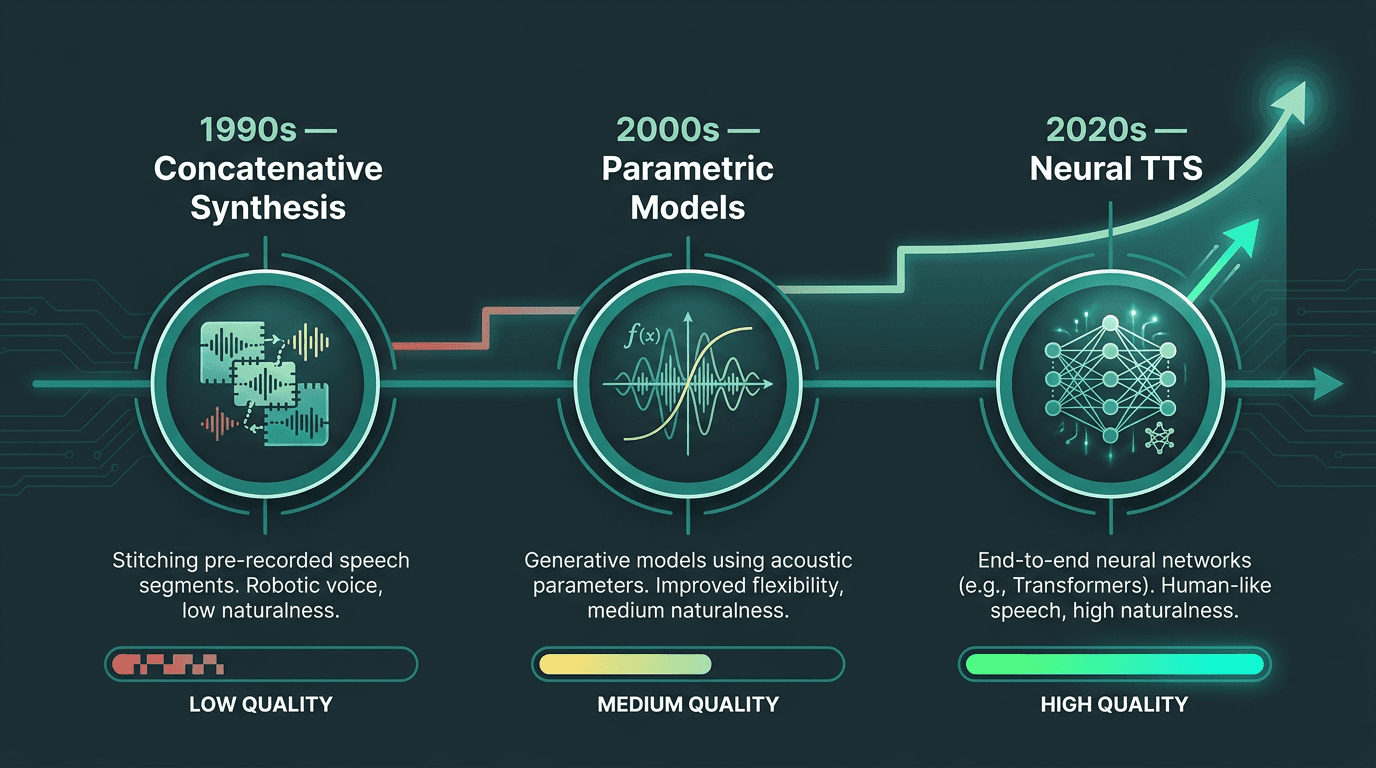
TTS technology has advanced from robotic phoneme stitching to near-human neural synthesis over three decades.
How the Conversion Process Actually Works
If you understand the pipeline, you can usually explain the failure. Modern neural TTS is a sequence of transformations, and each stage introduces its own class of bugs and quality regressions.
The core stages of a neural text to audio pipeline:
Text normalization: Raw input gets cleaned and standardized. Numbers, abbreviations, currency symbols, and dates are expanded into spoken forms. "$1.5M" becomes "one point five million dollars." This stage looks trivial until it isn't, and it is a frequent source of production issues.
Linguistic analysis: The normalized text is converted into phonemes, syllable boundaries, and syntactic structure. That information drives stress, rhythm, and where pauses should land.
Acoustic model inference: A neural model (often a variant of Tacotron, FastSpeech, or a diffusion-based architecture) maps the linguistic representation into a mel-spectrogram or a latent audio representation.
Vocoder synthesis: A neural vocoder (HiFi-GAN, WaveGrad, or similar) turns that intermediate representation into a raw waveform.
Post-processing: The waveform is encoded into the format you asked for, and may include loudness normalization.
Latency mostly shows up during acoustic inference and vocoder synthesis. Streaming TTS works by generating audio in chunks so playback can start before the full utterance is finished. For conversational products, first-chunk latency (time from request to the first audio byte) is the number that makes or breaks the experience. For batch jobs like audiobook generation, throughput matters more than real-time response. Those are different engineering constraints, and vendors tend to optimize for one or the other.
What Most People Get Wrong About Voice Quality
A lot of teams judge a text to audio converter the way you'd judge a demo reel: one impressive clip and a thumbs-up. That test is almost designed to miss the problems that show up once you run real content through the system at scale.
The first failure mode is prosody over long-form audio. A voice can sound great for 10 seconds and still wear listeners down over 10 minutes. Long narration needs variation in pitch, pace, and emphasis across paragraphs and sections, not just within a single sentence.
Second is technical vocabulary. General-purpose models are trained on broad datasets, so they routinely stumble on domain terms, product names, and acronyms. If a medical narration reads "mRNA" as a word instead of spelling it out, that is not a minor quirk; it is a production defect. The usual fix is better normalization plus pronunciation dictionaries, but not every platform gives you enough control to do that cleanly.
Third is emotional range. Neutral delivery works for documentation and a lot of accessibility use cases. But voice agents, e-learning, and marketing scripts often need the voice to shift tone between informational and warm, or calm and urgent, without sounding like it is acting. In those cases, voice design is as consequential as the model family behind the API.
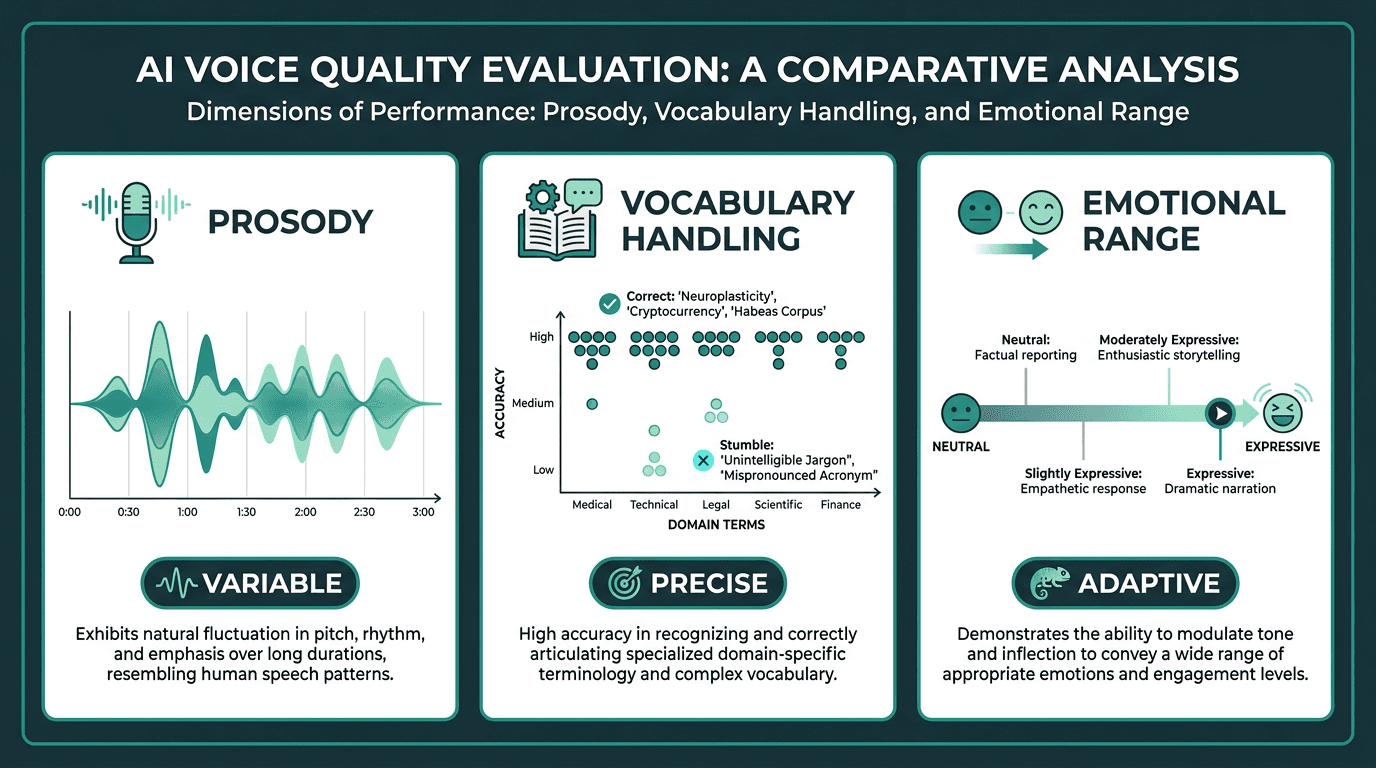
Evaluating a text to audio converter across three dimensions reveals quality gaps a single demo clip never will.
Choosing the Right Text to Audio Converter for Your Use Case
"Best" is the wrong question. The right choice depends on what you're shipping, what your users will tolerate, and what your infrastructure can support. The easiest way to make the decision is to compare the dimensions that actually drive trade-offs.
Use Case | Latency Priority | Voice Variety Needed | Key Feature |
|---|---|---|---|
Conversational voice agent | Very high (sub-300ms first chunk) | Low to medium | Streaming TTS, low latency API |
Audiobook / long-form narration | Low | High | Consistent prosody, chapter-level control |
E-learning content | Medium | Medium | Pronunciation dictionaries, SSML support |
Accessibility (screen reader) | Medium | Low | Broad language support, reliability |
Video dubbing / localization | Low | High | Multilingual voices, timing control |
IVR / phone system | High | Low | Telephony codec support (8kHz, mulaw) |
If you're building a real-time voice product, latency is not a nice-to-have; it is the product. The Lightning TTS from Smallest.ai is oriented around low-latency streaming synthesis, with first-chunk performance tuned for conversational scenarios. If you're a publisher or a content team producing long-form audio, the priorities flip: you care less about sub-second responsiveness and more about consistency across chapters, plus batch throughput that won't turn a catalog into a weeks-long rendering job.
Practical Implementation: From Text Input to Audio Output
Step 1: Prepare and Normalize Your Text
Before you send text to any synthesis API, make it speakable. Strip or replace anything that doesn't map cleanly to audio: HTML tags, markdown artifacts, weird punctuation, and the kind of whitespace that turns into awkward pauses. Expand abbreviations the model is likely to guess wrong. And be deliberate with numbers. "Call 1-800-555-0100" should be read as digits; "The population is 1800" should not. If you don't decide up front, the model will decide for you.
Step 2: Select Voice and Parameters
Most TTS APIs let you pick a voice and adjust speaking rate and pitch. Some also support SSML (Speech Synthesis Markup Language), which is where you get real control: pauses, emphasis, and pronunciation tweaks that the default prosody won't always infer correctly. If pacing affects comprehension, SSML is not optional. A well-placed pause before a key point in an e-learning module is part of the instruction, not decoration. The W3C Speech Synthesis Markup Language specification remains the canonical reference for SSML, defining a standard way to control pronunciation, pitch, volume, rate, pauses, and other speech-output behavior across synthesis systems.
Step 3: Handle Output Format for Your Delivery Context
Choose your output format based on where the audio will live. MP3 at 128kbps is fine for most web, podcast, and app delivery. If you're doing post-production work like mixing, noise reduction, or level normalization, ask for WAV or FLAC so you're not compounding compression artifacts. Telephony is its own world: 8kHz or 16kHz PCM or G.711 mulaw is typical. If you're streaming, you want chunked transfer or WebSocket delivery rather than waiting on a file download. Make the format decision early; back-end conversions add quality loss and make pipelines harder to reason about.
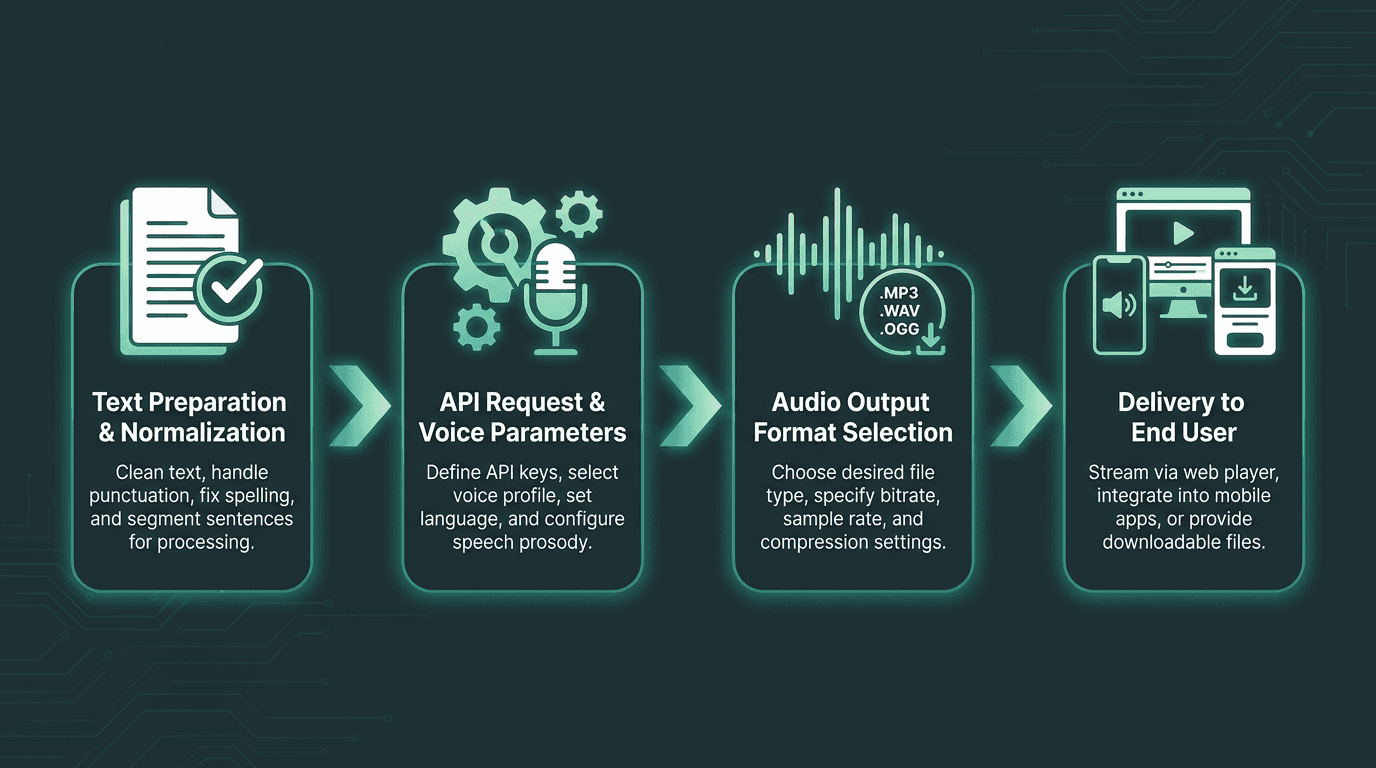
A clean implementation workflow reduces errors and ensures audio quality at every stage of delivery.
Voice Cloning and Custom Voices
Voice cloning is no longer a lab demo; it's a feature you can buy from many commercial TTS platforms. The premise is straightforward: you provide reference audio of a target speaker, and the system synthesizes new speech that matches that voice. The catch is that "voice cloning" covers a wide range of quality levels and data requirements.
Zero-shot cloning works from just a few seconds of reference audio and tends to produce a usable approximation. Fine-tuned cloning uses longer recordings (typically 30 minutes to several hours) to get closer to the target voice, with better prosody and more stable speaker characteristics. If you're building a brand voice that needs to sound consistent across thousands of outputs, fine-tuning is the safer bet. If you're prototyping or producing one-off content, zero-shot can be the pragmatic choice.
This is also where the ethical and legal stakes get real. Cloning a voice without consent is a genuine harm. Regulation around synthetic media and voice cloning continues to evolve, making consent, disclosure, and auditability increasingly important for production deployments. If you deploy voice cloning in production, build explicit consent, disclosure, and audit trails into the workflow rather than treating them as policy docs nobody reads.
Smallest.ai's Lightning TTS supports voice cloning via API, which lets teams build consistent brand voices or personalized audio experiences. If you're scaling narration, the AI audiobook generation workflow is a useful reference for how cloned voices hold up in long-form production.
Multilingual Support and What It Actually Means
"Supports 30 languages" sounds decisive, but it's mostly empty unless you ask better questions. How close is each language to the model's primary training language in quality? Can it handle code-switching (two languages in one utterance) without falling apart? Do the voices sound like native speakers, or like an English model doing an impression?
If you're deploying globally, test the languages you actually care about using the content your users will hear. It is common for quality to vary significantly between high-resource and lower-resource language pairs, so each target language needs its own QA pass. Accent authenticity affects trust, especially in consumer-facing products. A customer service voice agent that technically speaks the right words but carries a heavy foreign accent still creates friction.
If you're localizing video, the bar gets higher because timing matters. The multilingual voice dubbing workflow shows what changes once you add synchronization constraints on top of basic TTS.
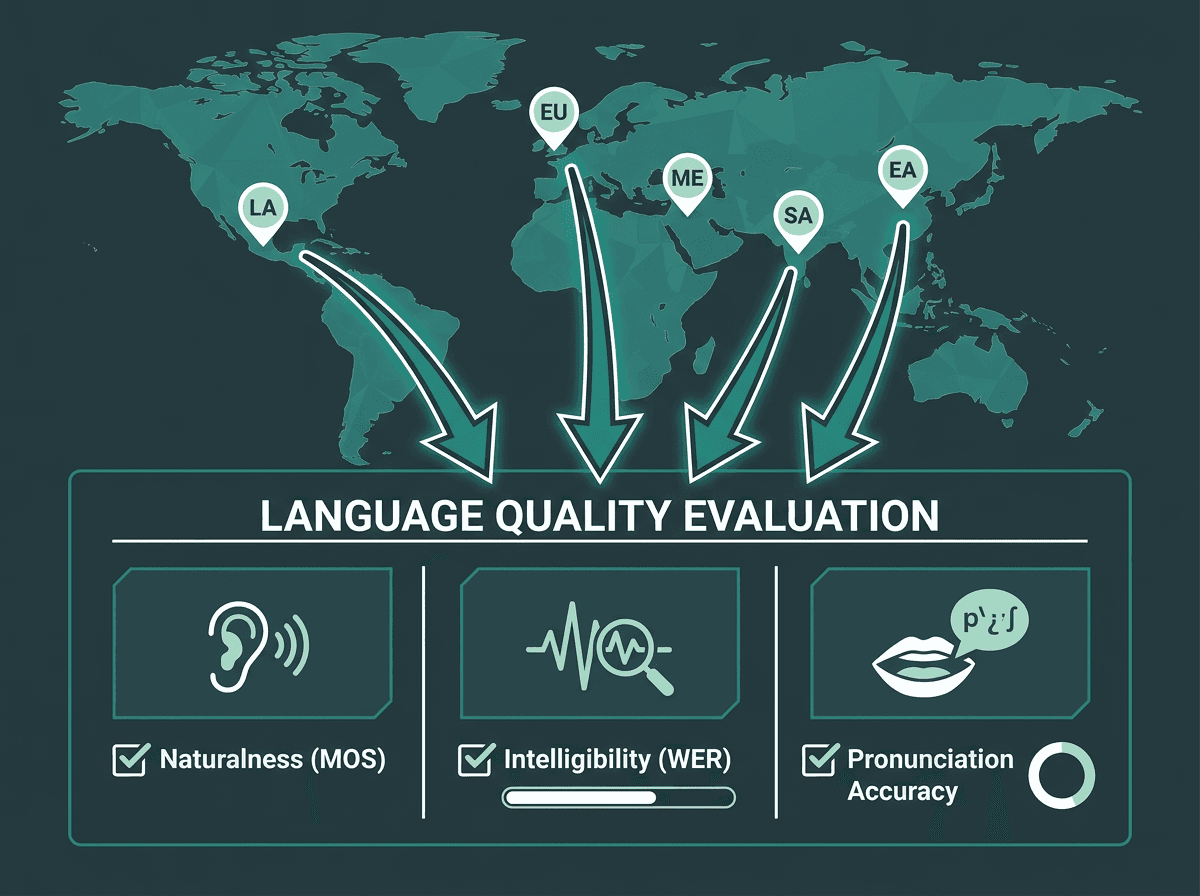
Testing each language individually reveals where a text to audio converter truly performs — and where it falls short.
Advanced Considerations for Production Deployments
A few details that often get a footnote in product docs, but show up immediately once you're in production:
Caching strategy. If your product repeats the same audio (navigation prompts, common responses, static content), caching synthesized files removes both latency and per-request cost. In many applications, a solid caching layer can significantly reduce repeated API requests and improve response times for frequently used audio. The cost is storage, plus the operational headache of cache invalidation when content or voices change.
Fallback handling. TTS APIs fail in boring, predictable ways: timeouts, rate limits, transient model errors. Your app needs a plan for that moment: a pre-synthesized default response, a backup provider, or a clear user-facing error state. Silent failures are the worst outcome because they look like your product is broken, not like a dependency hiccuped.
Audio quality monitoring. Audio can degrade without any obvious signal in an HTTP response code. Build periodic checks into your ops cadence: listen to production samples, watch for odd silence lengths, and track user feedback. Provider-side model updates can shift voice characteristics, which matters if you're trying to keep a brand voice consistent.
Cost modeling. Most TTS APIs charge by character count. A 1,000-word article is roughly 6,000 characters, and at scale that math gets expensive fast. Model expected usage before you lock into a tier, and account for re-synthesis when content changes. If you're building high-volume applications, the Waves API documentation is a good place to understand throughput and pricing structure.
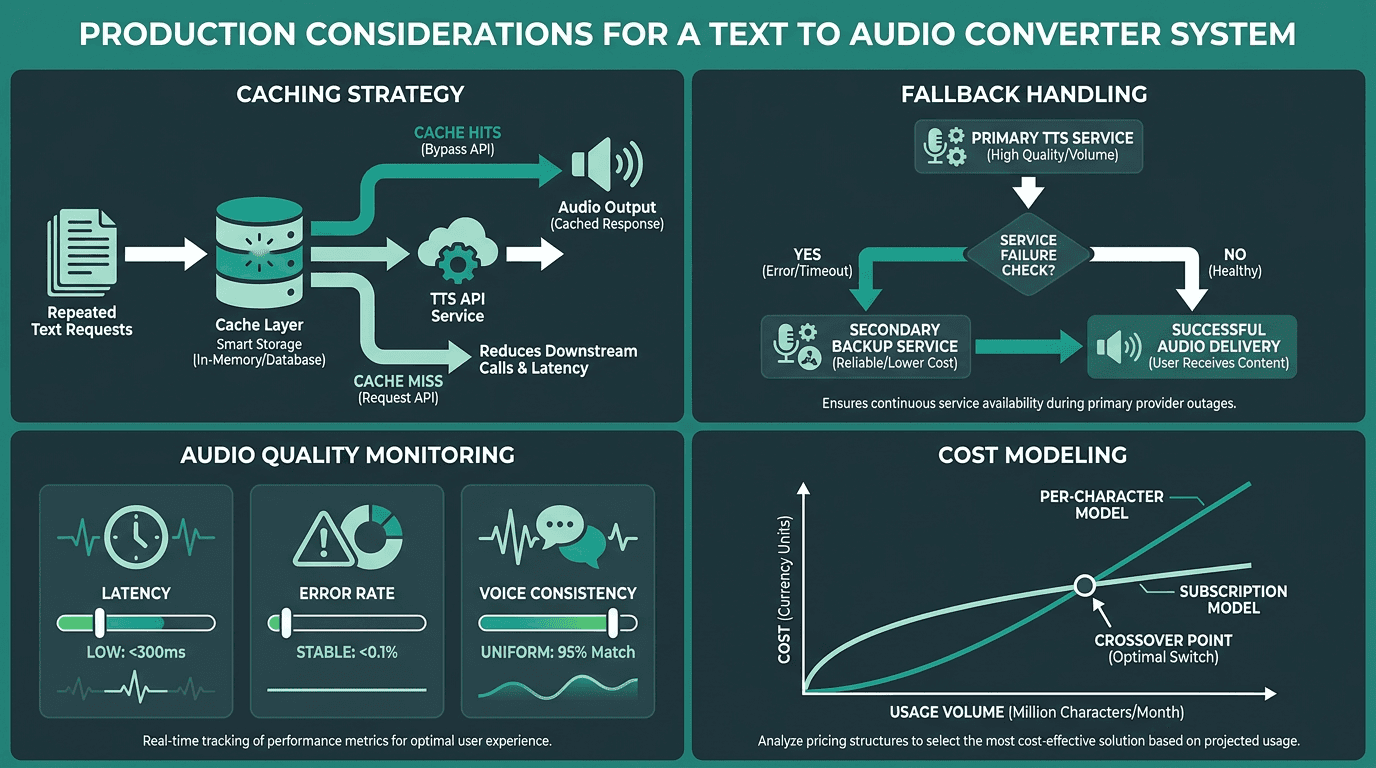
Production-grade TTS deployments require caching, fallback logic, quality monitoring, and careful cost modeling.
Key Takeaways
What to carry forward from this guide:
Neural TTS has reached near-human quality in controlled tests; what separates platforms now is latency, language quality, and production reliability.
Text normalization is easy to underestimate. A large share of production quality issues come from messy input, not the synthesis model.
Pick tools by use case. Conversational agents need low-latency streaming; long-form narration needs stable prosody. Optimizing for one does not automatically optimize for the other.
Voice cloning is ready for production, but it brings ethical and legal obligations with it. Build consent and audit mechanisms from day one.
Treat multilingual claims as hypotheses. Test your target languages with your real content before you commit.
Production deployments need caching, fallback logic, and quality monitoring, not just an API that returns audio.
Most teams don't struggle to find a TTS vendor; they struggle to find one that stays natural across real content, hits the latency their product needs, and doesn't force a pile of brittle workarounds. Smallest.ai's Lightning TTS is positioned for that production reality: a low-latency, high-quality neural voice synthesis engine delivered through the Lightning TTS, with streaming delivery, multilingual support, and voice cloning built in. If you're building a voice agent, scaling narration, or shipping accessibility features, explore the Smallest.ai Text-to-Speech API and evaluate Lightning on your own content, not a polished demo script.
Frequently asked questions
What is the difference between a text to audio converter and a text-to-speech API?
How do I get the most natural-sounding output from a TTS system?
Can I use a text to audio converter to create audiobooks at scale?
What audio formats should I request from a TTS API?
Is voice cloning through a text to audio API legal and ethical to use?