Text to Audio Converter: 9 Things to Check Before Choosing an AI Voice Tool

Text to audio converter checklist: voice quality, latency, SSML, API design, cloning terms, pricing traps, and reliability checks before you commit.
AI voice tools are being used across voice agents, accessibility products, content creation workflows, audiobooks, and customer-facing applications. As more vendors enter the market, choosing the right text-to-audio converter becomes less about finding features and more about understanding which platform fits your workload.
Finding options is easy. Avoiding the wrong option is the hard part, especially when the deal-breakers only show up after a week of integration work. The nine checks below are meant to flush those issues out early: voice quality, latency, pricing mechanics, API ergonomics, and a handful of gotchas that rarely make it onto feature pages. The goal is a practical way to match a text to audio converter to what you are building, rather than what the marketing demo happens to highlight.
What Most People Get Wrong Before They Even Start Comparing
Most evaluations start with a beauty contest: "which tool sounds the best?" It is a sensible instinct, and it is still the wrong first filter. A voice that sounds fantastic in a demo becomes irrelevant if it adds three seconds of lag in a live agent. A library of 50,000 voices does not help if your requirement is one specific cloned voice in one specific accent. Before you open comparison tabs, pin down the job: long-form articles turned into distributable audio, a conversational AI product, or narration for e-learning at scale. That decision reshapes every trade-off you are about to make.
1. Voice Naturalness and Emotional Range
The usual yardstick for synthesized speech is the Mean Opinion Score (MOS): human listeners rate naturalness and clarity on a five-point scale. Vendor MOS numbers, though, are typically self-reported and collected under conditions that flatter the model. If you care about how this sounds in your product, you need your own listening test with your own material.
Use a paragraph that forces the model to do real work: a question, a short list, and a line with emotional intent. Pay attention to how it treats punctuation, where it places emphasis, and whether technical terms turn into a robotic stumble. If the audio will be audience-facing, check for controls beyond "neutral." The ability to choose expressive AI voices with adjustable emotion is often the difference between something that feels produced and something that feels read aloud by a machine.
2. Latency: The Number That Kills Real-Time Products
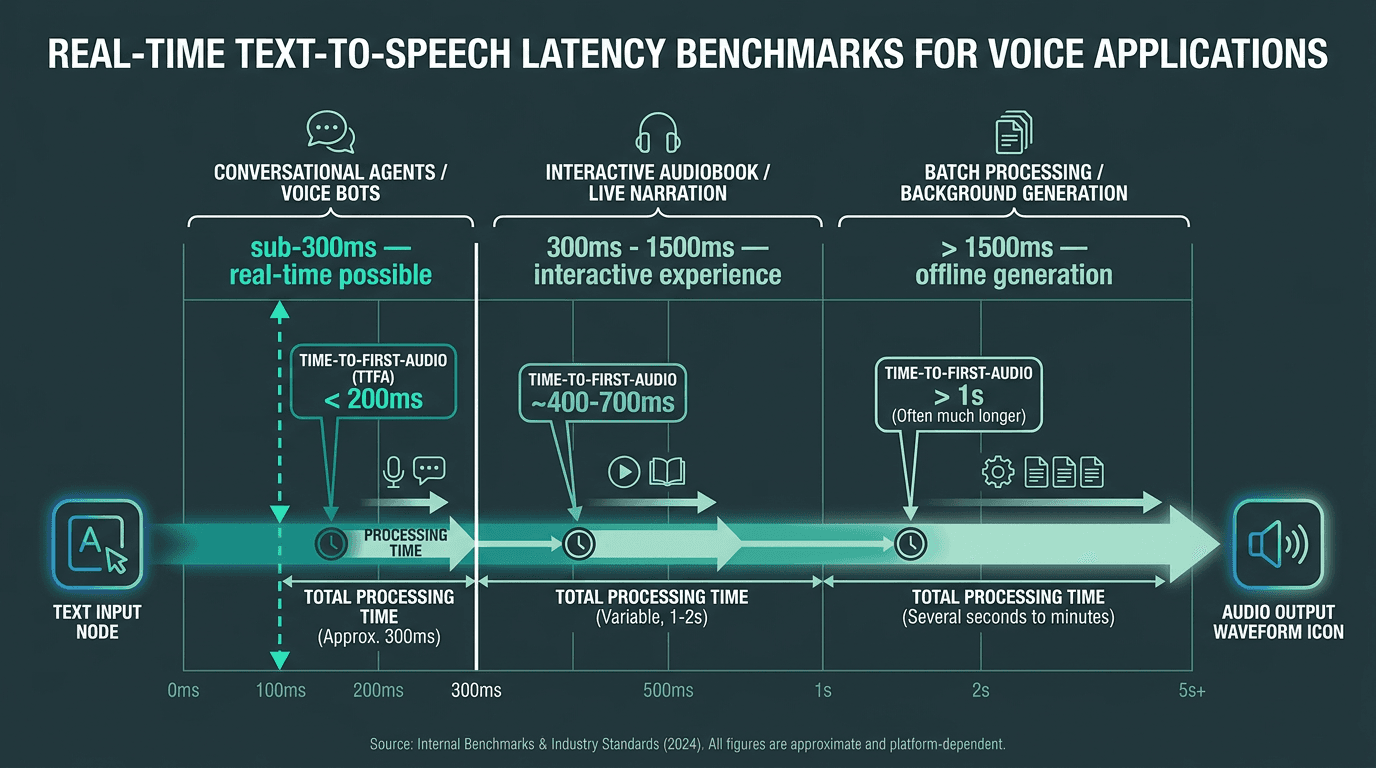
Time-to-first-audio, not total processing time, is the metric that defines real-time voice agent quality.
If you are generating audio files in the background (audiobooks, podcast episodes, batch narration), latency is mostly a rounding error. In a live voice agent, it is product quality. As latency increases, voice interactions begin to feel less responsive and more interrupt-prone. Ask for time-to-first-audio, not a generic "processing time" number. Time-to-first-audio is when the user hears the first sound; total processing time is when the entire output is finished. For streaming experiences, the first metric is the one that matters.
Smallest.ai's Lightning Text-to-Speech API is built around low-latency streaming, which is why it shows up in production voice agent pipelines where response speed is a requirement, not a preference.
3. Language and Accent Coverage
"Supports 30 languages" is the kind of claim that looks helpful until you test it. The real questions are narrower: does the model stay natural in your target language, or does it only shine in English? Do you get meaningful regional accents, or one generic voice per language that no one actually speaks? If your product serves multilingual users, language quality is often the most consequential technical decision you will make.
If you are targeting markets like India, Southeast Asia, or Latin America, run evaluations in those languages and, when possible, put the output in front of native speakers. Many tools are "supported" in the sense that they produce audio, but they are not good enough to ship. For mixed-language setups, the checklist in how to choose a bilingual TTS tool focuses on the failure modes that show up when speakers switch languages mid-sentence.
4. SSML Support and Pronunciation Control
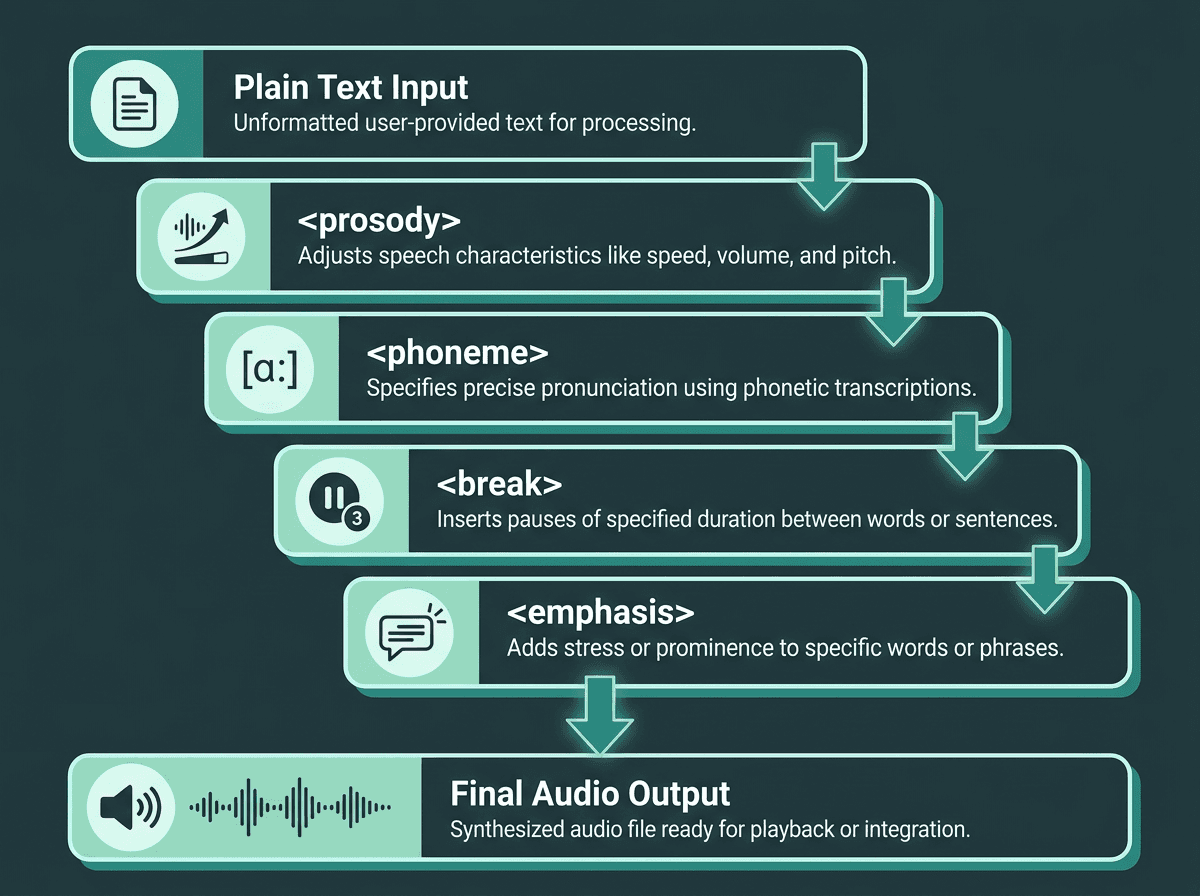
SSML gives developers phoneme-level control over synthesized speech — far beyond basic pause and pitch tags.
Speech Synthesis Markup Language (SSML) is the W3C-recommended standard for controlling pitch, rate, volume, and pronunciation, as laid out in the official W3C SSML 1.1 specification. If your text includes acronyms, brand names, numbers that must be read a certain way, or dense technical terminology, SSML is not a nice extra. Without it, you end up patching around mispronunciations instead of shipping a reliable voice experience.
Do not stop at "supports SSML" on a pricing page. Verify which tags are implemented. Plenty of tools handle `<break>` and `<prosody>` but omit `<phoneme>`, the tag that lets you lock pronunciation at the phonetic level. For domain-heavy content (medical, legal, financial), phoneme support is the line between manageable and maddening.
5. API Design and Integration Complexity
A text to audio converter that only lives in a browser dashboard is a content tool. A text to audio converter with a clean, predictable API becomes part of your infrastructure. API design ends up determining how fast you can ship, how painful it is to debug, and how well this survives production traffic.
When evaluating an API for a text to audio converter, check for:
Streaming support: Can the API return audio as a stream rather than waiting for the full file? Critical for real-time applications.
SDK availability: Are there official SDKs for your language (Python, Node, Go)? Or will your team be writing raw HTTP wrappers?
Webhook and async endpoints: For long-form content, does the API support async generation with a callback rather than blocking the request?
Rate limits and concurrency: What are the actual rate limits and concurrency limits for your expected workload? Vendors rarely advertise these prominently.
Error handling and status codes: A good API returns meaningful errors. A bad one returns 500 and leaves you guessing.
6. Voice Cloning: What the Fine Print Usually Says
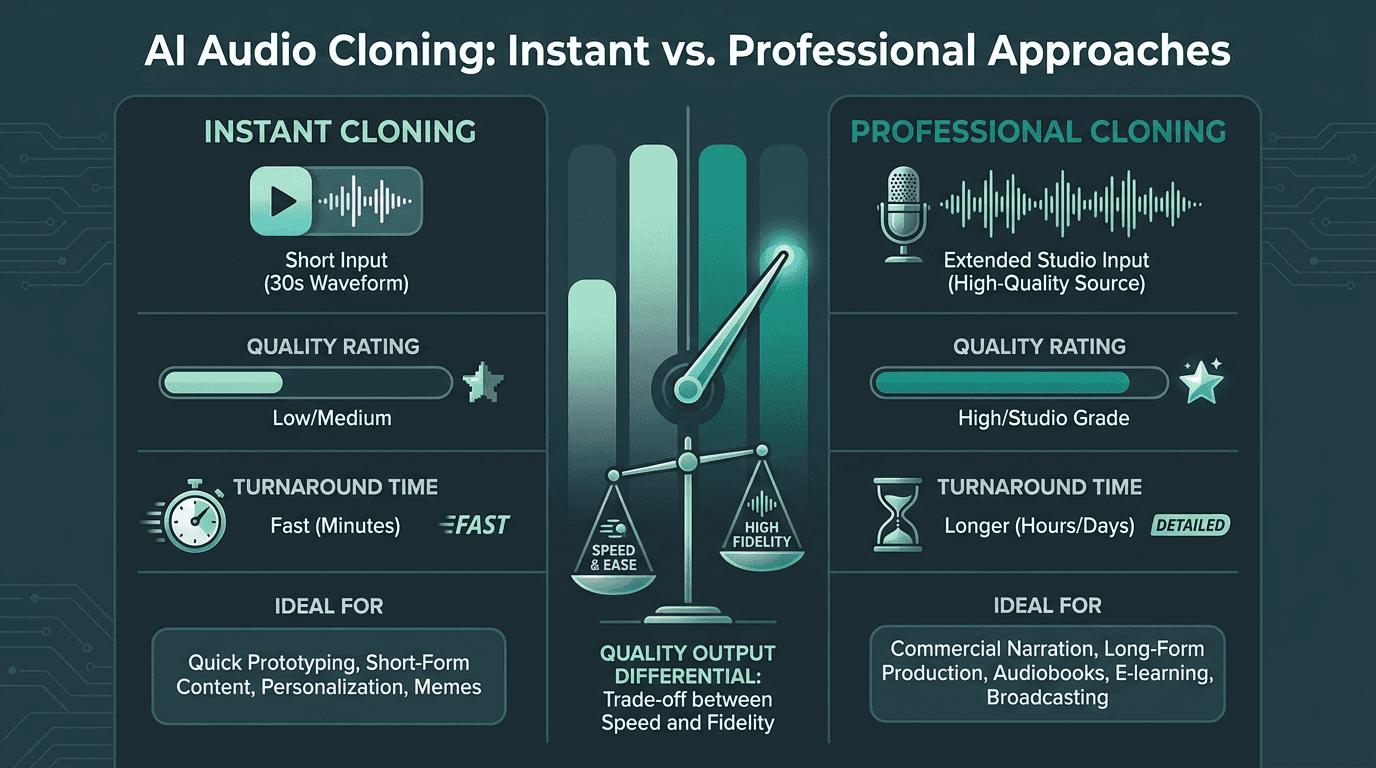
Instant and professional voice cloning differ significantly in quality, input requirements, and commercial use terms.
Voice cloning is now table stakes on feature lists, but the underlying product varies wildly. Some platforms will spin up an "instant" clone from a 30-second clip; others ask for several minutes of clean audio and run a manual review. Those paths do not converge on the same result. Instant clones often fall apart over long-form narration, especially if the source sample includes background noise or inconsistent recording conditions.
Treat the terms of service as part of the technical evaluation. Some vendors retain ownership claims around cloned voices or limit commercial use of the generated audio. Others require explicit consent documentation before enabling cloning at all. These are common clauses, and they have surprised teams after a product was already built around a specific voice.
7. Pricing and Packaging
Pricing Model | How It Works | What to Know |
|---|---|---|
Per character | Billed per character of input text processed | SSML tags add characters and can increase costs |
Per audio minute | Billed per minute of generated audio output | Costs can be harder to estimate up front |
API credit bundles | Credits purchased in advance and consumed per request | Check expiration policies for unused credits |
The most common pricing surprise is SSML. If you pay per character and your pipeline wraps everything in markup, your effective cost per spoken word can climb. Run a cost simulation using a realistic slice of your content, including the SSML you expect to ship, to understand the real cost for your use case.
8. Use-Case Fit: Audiobooks, Agents, and Everything Between
Text to audio converters are not interchangeable, even when their demos sound similar. Tools tuned for audiobook narration tend to optimize for long-form consistency, chapter-to-chapter voice stability, and export formats that play nicely with distribution platforms. Tools built for conversational agents optimize for streaming latency, interruption handling, and smoother integration with dialogue management. Pick the wrong shape of tool and you end up fighting it in small ways that add up with every release.
Audiobooks, in particular, come with their own set of constraints: pacing, breath patterns, and consistency across hours of audio. The guide on how to choose an AI voice narrator breaks down what to test. Smallest.ai also offers a dedicated text-to-speech for audiobooks solution for teams producing at that scale.
9. Reliability, Uptime, and Support When Things Break
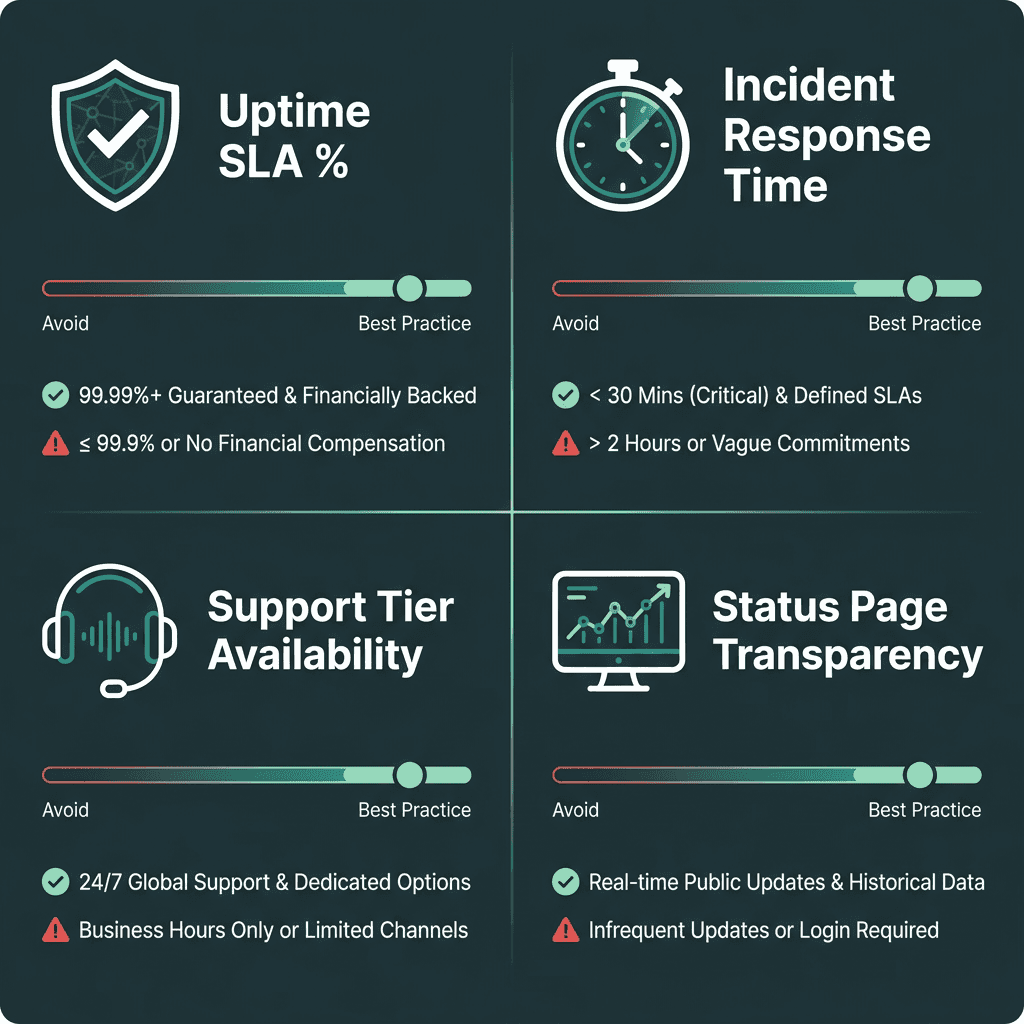
A structured scorecard for evaluating *text to audio converter* reliability before committing to production.
This is the box many teams skip during evaluation and then wish they had obsessed over after launch. Look for a public status page with historical uptime, not just a promise. Read the SLA: is uptime actually guaranteed, and what happens if they miss it? In production voice applications, a two-hour outage during peak traffic is not an internal annoyance. It is a user-facing failure that people remember.
Support is part of reliability, too. A developer-first API should ship with documentation that goes beyond a quickstart, and it should be possible to find answers when things get weird. Scan community forums, public GitHub issues (if available), and whether the vendor runs a Discord or Slack where engineers respond. How you are treated during evaluation is usually a preview of what support looks like once you are paying.
Key Takeaways
Before choosing a text to audio converter, confirm you have evaluated:
Voice naturalness using your real content, not curated demo scripts
Time-to-first-audio latency rather than total processing time
Language and accent quality in the specific markets you serve
Full SSML support, with phoneme-level control for technical terms
API design: streaming, SDKs, and errors you can actually debug
Voice cloning quality over long-form output and the terms of service behind it
Pricing model fit for your usage pattern, including SSML overhead
Use-case alignment between the tool's architecture and your product needs
Vendor reliability: uptime history, SLA terms, and support that responds
The Right Tool Solves a Specific Problem
Text-to-audio tools are designed around different workloads, which is why evaluating them against your actual requirements matters more than comparing feature lists. But most products are designed around a primary workload, even when the website copy tries to sound universal. These nine criteria are meant to expose that fit (or the mismatch) before you sink engineering time into an integration that looks fine in a demo and collapses under production constraints.
If you are building real-time voice agents, need low-latency streaming, or are shipping speech at production scale, Smallest.ai's Lightning API is built for that profile. It is not positioned as a general-purpose audio toy; it is infrastructure for teams that need speech to respond quickly, behave predictably, and hold up under volume.
Frequently asked questions
What is a text to audio converter, and what is it doing under the hood?
How can I tell if a text to audio converter sounds natural enough for my audience?
What latency should I expect from a text to audio converter API?
Can I clone my own voice with a text to audio converter for content production?
How does Smallest.ai compare to other text to audio converter tools?


