Multilingual Voice Dubbing for Product Videos: How to Localize Audio Without Re-Recording

Multilingual voice dubbing for product videos, end to end: transcript, translation, timing, synthesis, and QA so you can ship localized audio without.
Multilingual voice dubbing for product videos used to mean booking studio time in five different cities, juggling five different voice actors, and watching the localization budget evaporate before the campaign even shipped. The economics were rough, and the timelines were usually worse. A 2020 CSA Research survey of 8,709 consumers across 29 countries found that 76% prefer to buy products with information in their native language, and 40% will never purchase from websites in other languages. That single stat changes the framing: localization stops being a "nice to have" and starts looking like a revenue decision.
This piece lays out a practical workflow for localizing product video audio with AI-driven dubbing, from transcript prep and voice selection through lip-sync timing and quality review. If you're a product marketer trying to ship across regions, or a developer wiring dubbing into a localization pipeline, the steps map cleanly to real production work.
Why Traditional Re-Recording Breaks Down at Scale
The conventional dubbing model is workable when you're doing one language pair on a relaxed schedule. It starts to buckle the moment you need a product launch video in eight languages in two weeks. Studio availability, voice actor scheduling, translation review cycles, and post-production each chew up days. Do that eight times and the pipeline simply can't keep up with modern go-to-market pacing.
This operational friction is driving a real shift: teams are moving away from human-only recording and toward AI-augmented pipelines that can turn around localized audio in hours, not weeks. The demand for localized content is rising faster than traditional supply chains can comfortably absorb, pushing teams to find more scalable solutions.
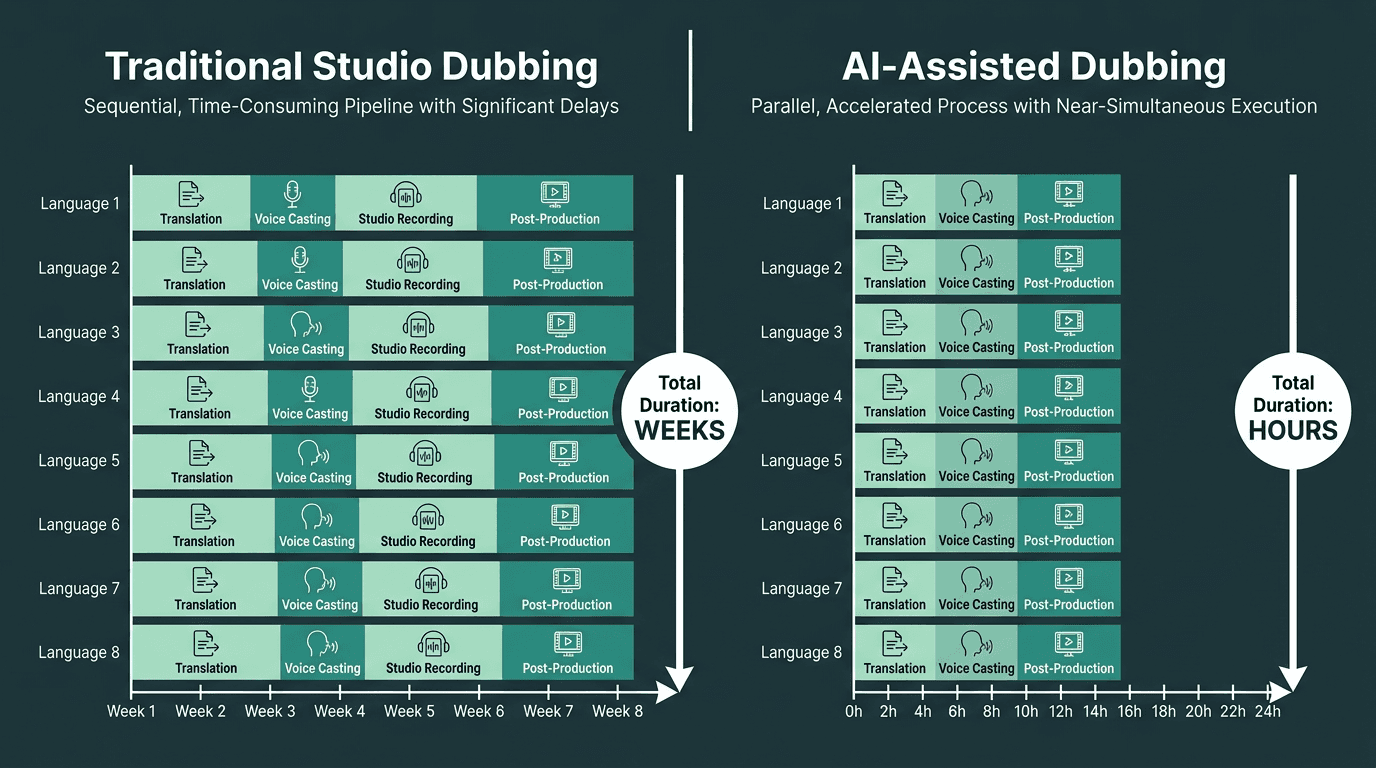
AI dubbing compresses an eight-language rollout from weeks to hours.
The Foundation: What Multilingual Voice Dubbing Actually Requires
Before you pick a tool, you need to be clear on what the pipeline is responsible for delivering. The target isn't "translated audio." It's translated audio that lands inside the original timing, carries the same emotional register as the source, and reads as natural to a native speaker. Most lightweight dubbing options miss at least one of those constraints, and that miss shows up immediately on a product video.
A complete multilingual dubbing pipeline requires:
Accurate source transcript: Everything downstream depends on it. Mistakes here get amplified by translation and show up in the final audio.
High-quality translation with cultural adaptation: Literal translations often blow up timing and sound stiff. Localization-aware translation keeps meaning while using idiomatic phrasing.
Timing-aware audio synthesis: The speech has to fit the original segment durations, unless you're willing to re-edit the video to match the new audio length.
Voice consistency across segments: A single voice character should hold across the full video, rather than drifting between segments.
Accessible output: For many viewers, dubbed content is more accessible than subtitles, particularly for those with visual impairments or reading difficulties.
Treating multilingual AI voiceovers as an engineering discipline, not a convenience feature, changes how you evaluate tooling and how you design the workflow. Teams that do this well run dubbing like a production system: defined inputs, explicit processing steps, and quality gates that catch issues before they ship.
Step-by-Step: Building Your Localization Workflow Without a Recording Studio
Step 1: Extract and Validate the Source Transcript
Start with a clean, timestamped transcript of the original video. If the video was scripted, treat that script as the baseline, then verify it against the delivered audio. Script-to-performance drift is common, and even small mismatches will create timing headaches later. If there's no script, generate one with a speech-to-text engine and then edit it by hand, with extra attention to product names, technical terms, and the specific brand language ASR models tend to mangle.
Step 2: Translate with Localization Intent
Translate the validated transcript, but make the timing constraint explicit. Three seconds of English can easily become four seconds of German or two seconds of Mandarin. Translators who know they're working to duration targets will naturally choose phrasing that fits. If you're leaning on machine translation, add a native-speaker review step that prioritizes naturalness and timing fit, not just semantic correctness. The same issues discussed in handling accents and code-switching show up here too: regional accents and mixed-language phrasing need intentional handling during translation and again during synthesis.
Step 3: Synthesize Localized Audio
Now the TTS system earns its keep. Feed the translated, timestamped segments into an engine that supports your target languages and can deliver natural prosody. The quality bar matters: a synthetic voice that sounds flat or robotic doesn't just hurt comprehension, it undercuts the credibility of the product. Prioritize engines that model sentence-level prosody (not just phoneme accuracy) and can keep a consistent voice character across an entire video, segment after segment.
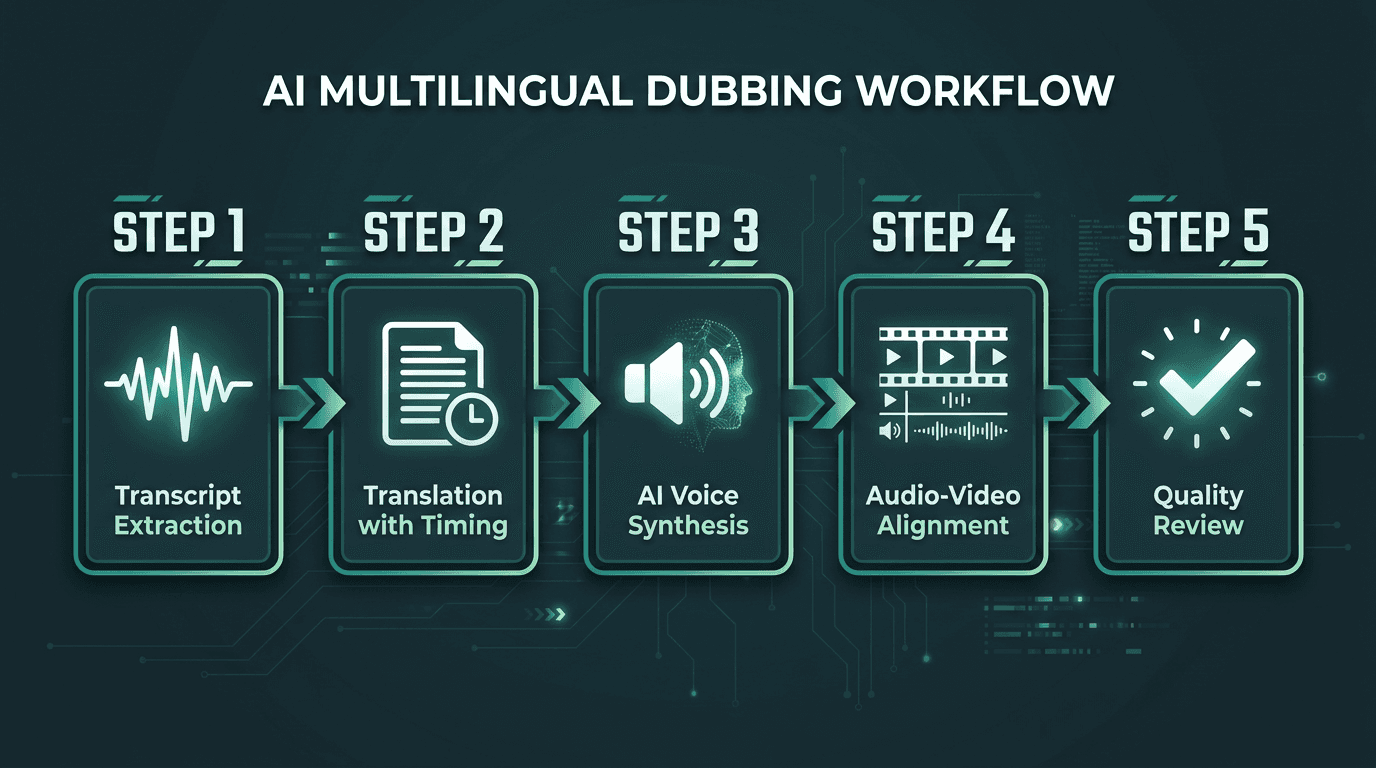
The five-stage AI dubbing pipeline from transcript to final localized video.
Step 4: Align Audio to Video
With synthesized segments in hand, drop them onto the original timeline. Most professional editors support multi-track audio, so you can place the localized track alongside the source and mute the original. When segment durations don't line up, you have two realistic levers: nudge the TTS speaking rate (most engines expose rate control) or make small, surgical edits to the video to buy time. If you also need to meet accessibility requirements, the W3C Timed Text Working Group's standards for synchronized captions and audio descriptions are a useful reference point.
Step 5: Quality Review and Export
Have a native speaker review the final dubbed video in context, not just the audio track. Context is where issues surface: a line that sounds fine on its own can feel off when it lands against a particular visual or on-screen claim. Use a concrete checklist: timing fit, pronunciation of brand and product names, emotional register, and any artifacts like clipping, warble, or unnatural pauses. When you export, match the original audio specs to avoid unnecessary degradation in the final mix.
Voice Cloning vs. Pre-Built Multilingual Voices: When to Use Which
Most write-ups gloss over this choice, but it affects everything downstream. Voice cloning replicates the original narrator in the target language, which keeps continuity across markets and can matter a lot for brand consistency. Pre-built multilingual voices get you moving faster and don't require source audio from the original speaker, which makes them the practical option when the narrator isn't available or when you're dubbing third-party content.
Voice cloning is strongest when the original recording is clean, the speaker's voice is distinctive enough to be worth preserving, and your audience will notice inconsistencies across language versions. In plenty of product videos, especially explainer-style content, a high-quality pre-built voice in the target language will sound better than a clone trained on thin or noisy source material. The practical guide on how to add a voice over to a video walks through the mechanics of both approaches.
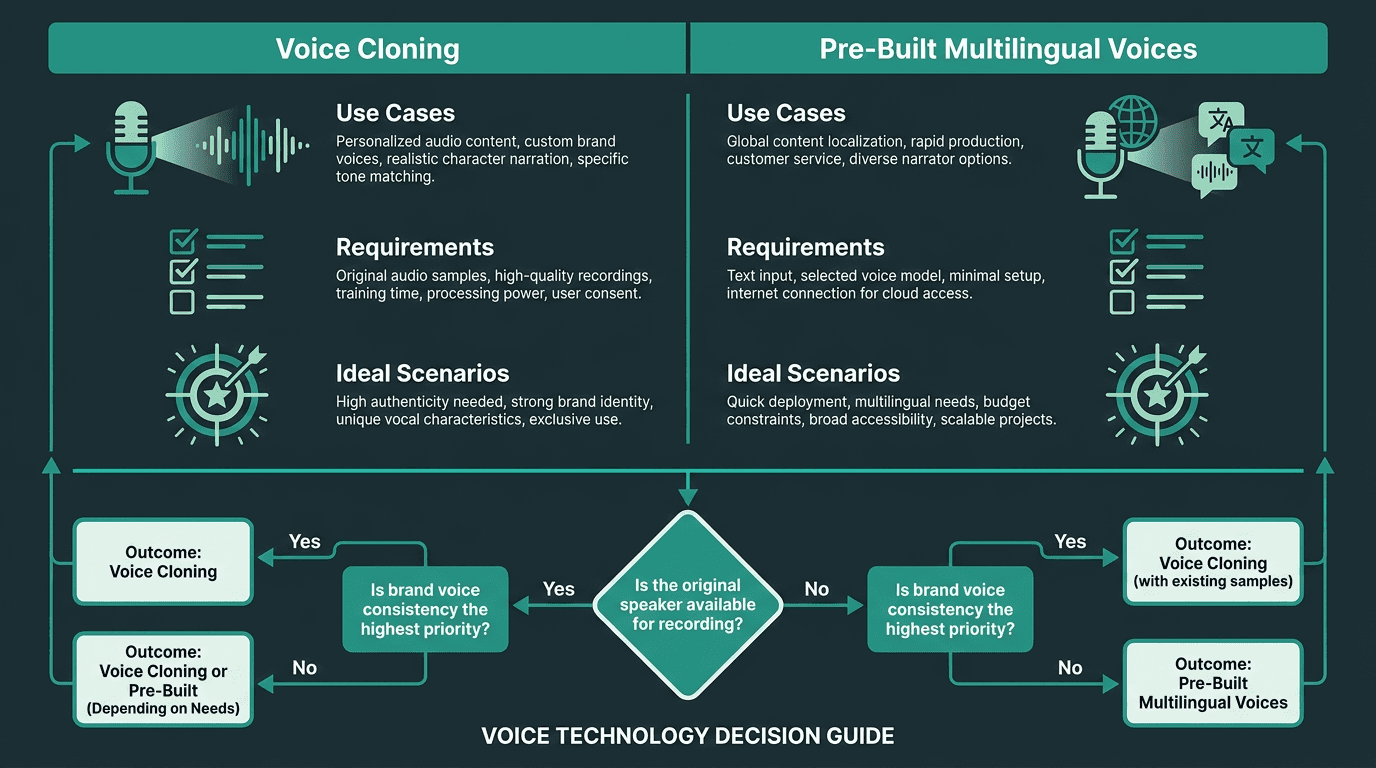
Choosing between voice cloning and pre-built voices depends on your source material and brand requirements.
What Most Teams Get Wrong About Timing and Prosody
Timing is the technical constraint teams tend to underestimate. It's easy to focus on translation quality and voice naturalness, then hit alignment and realize the German track is 30% longer than the English. If the edit is already locked, you're suddenly picking between compromises, and all of them cost time.
Solve timing earlier, during translation, not later during synthesis. Provide translators with segment-level duration targets and ask for phrasing that fits when spoken at a natural pace. Professional localization translators can do this; machine translation systems generally won't unless you build the constraint into the workflow. Prosody matters just as much. A TTS engine can produce grammatically correct speech that still feels dead-on-arrival if stress and intonation are flat. The multilingual capabilities of AI voice agents include prosody modeling that adapts to language-specific stress patterns, and that's a real differentiator when you're evaluating synthesis engines for product video work.
Advanced Considerations: Lip-Sync, Background Audio, and Compliance
If your product video is a talking head, lip-sync becomes part of the quality equation. Standard AI dubbing swaps the audio but doesn't reshape the video, so mouth movements won't match the new language. In practice, you either accept the mismatch (as many audiences do, given the prevalence of dubbed content) or you add a separate lip-sync layer when the stakes justify it. Many viewers will trade perfect lip-sync for native-language audio.
Background audio needs its own plan. If the original mix has music under the voiceover, you'll either want a clean instrumental stem or a way to separate the voice from the bed before you replace it. That decision belongs in asset management, not at the last minute in the dubbing pass. And if you're shipping into regulated markets, confirm whether synthetic voice content triggers disclosure requirements. Government accessibility guidance, such as the resources provided by Accessibility Standards Canada, outlines expectations around synchronized, language-appropriate audio in bilingual and multilingual contexts.
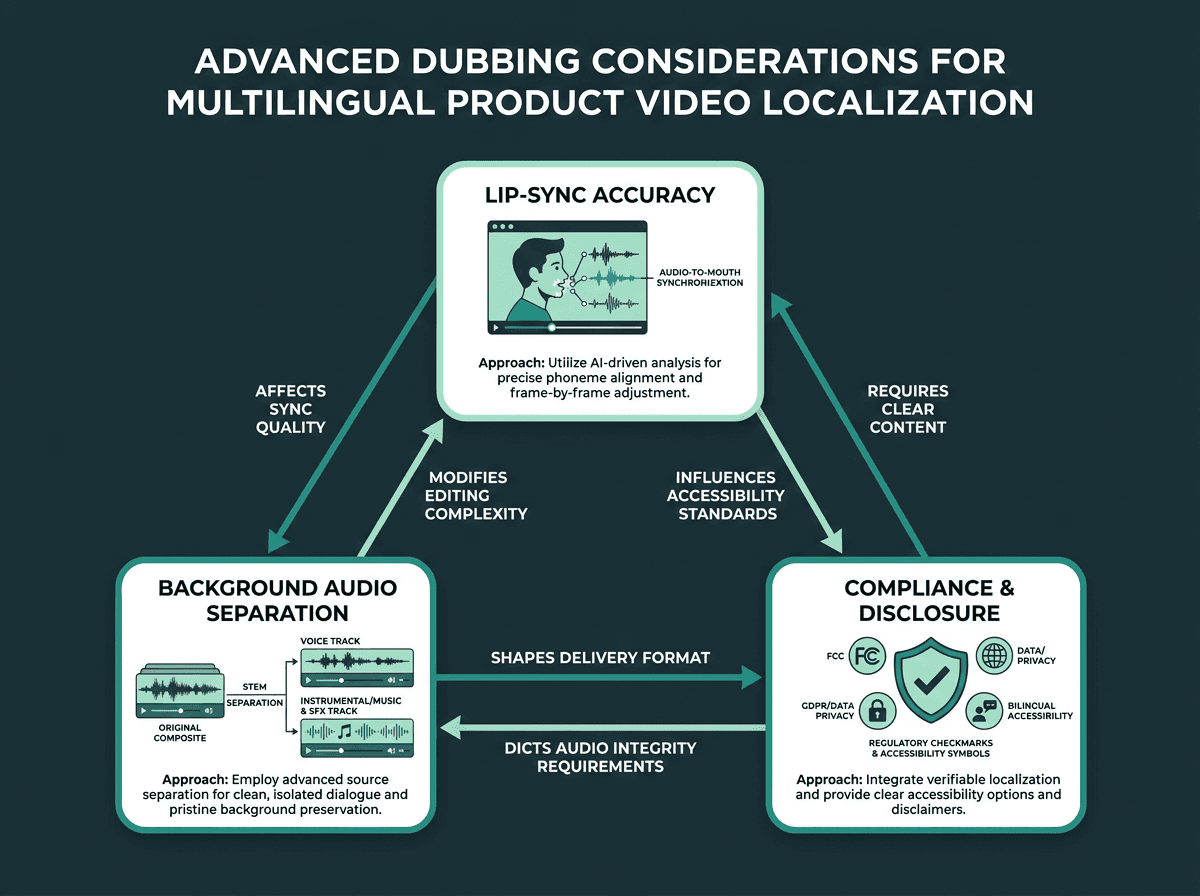
Three advanced considerations that determine production quality in multilingual dubbing.
Scaling Localization: From One Video to a Full Content Library
Once a single-video pipeline is working, scaling becomes an operations question: how do you increase volume without increasing manual effort at the same rate? Standardization is the lever. Define a consistent asset package for every video: a clean audio stem, a timestamped transcript, an approved translation memory, and a chosen voice profile. With those in place, each new video mostly becomes a translation-and-synthesis job, not a workflow reinvention.
If you're managing more than a handful of videos, API-driven synthesis is the infrastructure that makes the math work. Instead of uploading files into a UI one by one, a programmatic pipeline can ingest a translated transcript, call a TTS API with the right language and voice parameters, receive the audio, and hand it off to the editing system. The approach to creating localized text-to-speech voices covers the voice configuration side in practical terms. And for teams building on multimodal AI models, dubbing can slot into the same content pipeline that already processes text, video, and audio together.
The Problem-Solution Bridge: Connecting Localization Needs to the Right Infrastructure
What this workflow really addresses isn't translation or voice in isolation. It's production velocity. Marketing teams need localized product videos faster than traditional studios can turn them around, while the quality bar keeps rising as audiences get used to competent dubbing. The answer isn't hunting for a cheaper studio; it's removing the studio as a dependency by using a synthesis pipeline that can produce natural, timing-accurate multilingual audio with software-like turnaround.
Smallest.ai's Lightning text-to-speech API is designed for production-grade synthesis: multilingual generation with natural prosody, consistent voice character across long-form content, and low-latency responses that fit automated pipelines rather than one-off manual exports. If you need more control, the Waves API exposes the full speech stack, including voice cloning and rate control, which are the two controls that matter most when timing is tight. Check Smallest.ai pricing to match a tier to your production volume.
Key Takeaways
What to carry forward from this guide:
Multilingual voice dubbing for product videos is a pipeline problem, not a translation problem. Design the workflow first, then select tools.
Build timing awareness into the translation step, not the synthesis step. Retrofitting timing at the audio stage is expensive and limiting.
Voice cloning preserves brand voice consistency; pre-built multilingual voices are faster to deploy. Choose based on your source material and timeline.
Standardize your asset structure (clean audio stem, timestamped transcript, translation memory, voice profile) to scale from one video to a full content library without proportional manual effort.
API-driven synthesis is the right infrastructure for teams managing more than a handful of videos. Manual upload workflows don't scale.
Frequently asked questions
How many languages do AI voice dubbing tools usually support?
Can I keep the original narrator's voice in dubbed versions without re-recording?
Which file formats make sense for translated audio output?
How should I handle product names and brand terms that shouldn't be translated?
Is AI-generated dubbing good enough for professional product videos, or only for internal use?