AI Dubbing Pipelines: Localizing Video Audio with Translation, Timing, and TTS

AI dubbing pipelines explained: how transcription, translation, timing alignment, and TTS fit together to localize video audio without studio workflows.
Dubbing AI isn’t a lab experiment anymore. The work that used to demand a studio, a roster of voice actors, and weeks of post-production can now be expressed as a software pipeline that runs in minutes. This shift is a response to demand from creators, e-learning platforms, and media teams that need to ship content in dozens of languages without rebuilding their production budgets from scratch.
What follows is how a dubbing pipeline behaves in practice, from the moment audio hits a transcription engine to the moment a synthesized track is mixed back into a finished edit. The focus is the architecture, the failure points teams tend to miss, and the choices that separate something that passes for broadcast from something that sounds like an IVR menu. If you’re building a pipeline or vetting a vendor, this should leave you with a concrete sense of what each stage requires and where the real engineering pain shows up.
What Dubbing Actually Means in a Software Context
Dubbing, traditionally, is post-production replacement: you swap the original dialogue for a new track, usually in another language. In a software pipeline, the intent is the same, but the labor shifts from people to systems. Instead of actors in a booth, you typically chain three technologies: speech-to-text to capture the source, machine translation to produce the target-language script, and text-to-speech to synthesize that script back into audio.
It’s worth being strict with the term because “dubbing” gets stretched to cover a lot of adjacent work. Subtitles aren’t dubbing. A voice-over laid on top of footage without replacing dialogue isn’t dubbing either. Proper dubbing replaces the dialogue track with synthesized speech that respects timing, emotional register, and (ideally) the speaker’s vocal identity. Localization goes wider still, involving the adaptation of content for language, culture, and market expectations. A pipeline that translates words but ignores idiom, pacing, and register might be “working” technically, while still failing the viewer.
Stage One: Transcription and Why Upstream Accuracy Is Everything
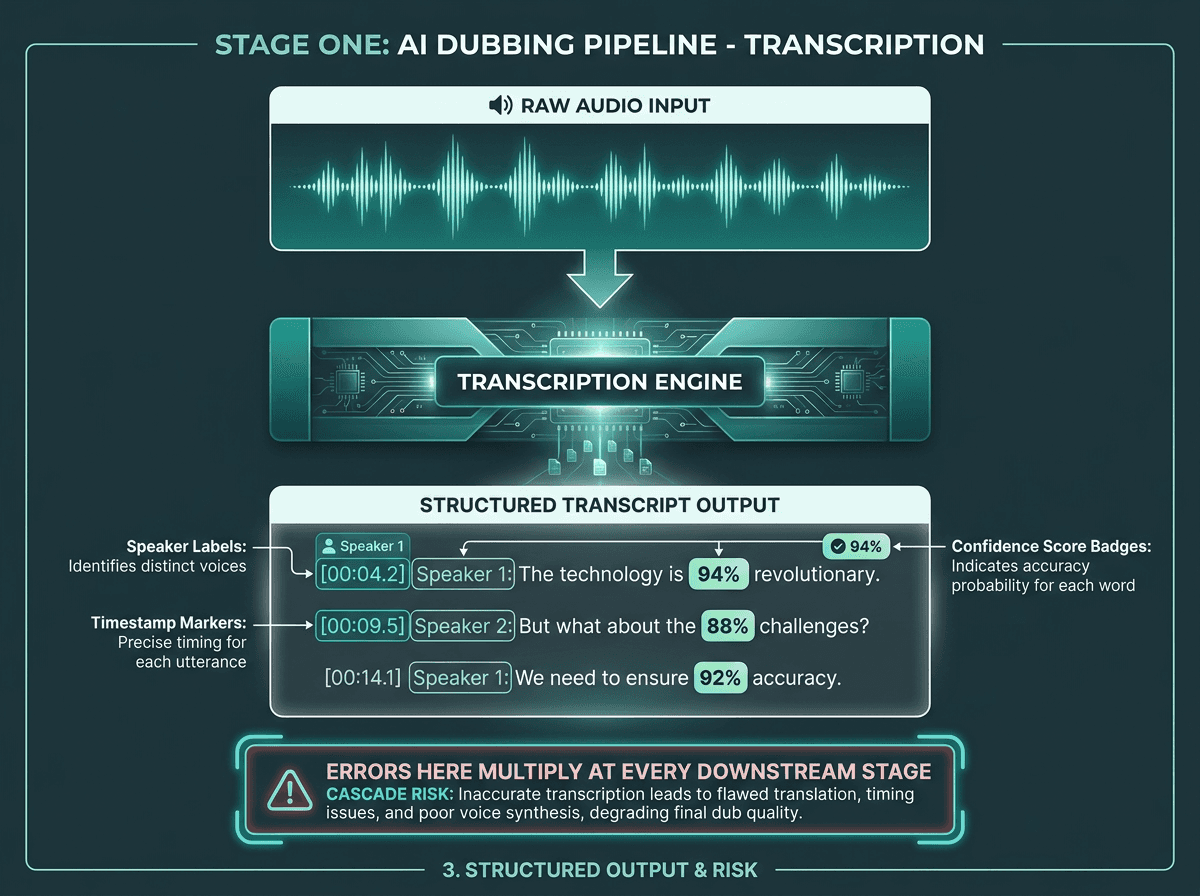
Transcription accuracy at Stage 1 determines the quality ceiling for every downstream stage.
Mistakes in transcription don’t stay contained; they cascade through the rest of the pipeline, which is why upstream accuracy is the biggest lever you have on overall quality. This isn’t a footnote. If the speech-to-text system mishears a key term, the translation model faithfully translates the wrong thing, the TTS engine confidently speaks it, and you end up with a dubbed track that’s incorrect in a way that can be hard to catch if reviewers only listen to the final output. By the time anyone hears it, the error has already been multiplied and polished.
Once you move beyond single-speaker clips, transcription by itself stops being enough. Panel discussions, interviews, and documentaries need speaker diarization pipelines so the system knows who said what before translation starts. Without diarization, translation sees one undifferentiated blob of text, and TTS has no reliable way to assign distinct voices to distinct speakers. The result is predictable: one synthetic voice reading everything like a monologue.
A production transcription layer usually needs more than “words on a page.” You want word-level timestamps (not just sentence-level), speaker labels, punctuation inference, and a plan for domain vocabulary. A cardiology course will stress a general-purpose model in ways casual conversation won’t. For professional use, domain adaptation or custom vocabulary support isn’t a nice-to-have; it’s part of the job description for the transcription engine.
Stage Two: Translation That Preserves Meaning, Not Just Words
Machine translation is far better than it was a few years ago, but there’s still a wide gap between “correct” and “sayable.” Models tuned for written documents often produce text that reads stiff when spoken out loud, especially once it’s pushed through TTS. Dialogue leans on contractions, dropped words, rhythm, and breath. If your translation output sounds like something you’d file with Legal, the synthesized dub will too.
Three translation challenges that are specific to dubbing pipelines:
Isochrony: The translated text has to land in the same time window as the original line. Spanish and German often run longer than English. If the translation comes out 40% longer, you either force the TTS to race through it or you spill into the next speaker’s turn.
Register matching: A casual speaker should sound casual after translation. If the dub suddenly shifts into formal register, the audio fights the on-screen body language.
Idiomatic accuracy: Literal idiom translation is a reliable way to generate nonsense. “It’s raining cats and dogs” doesn’t map cleanly to most languages, and word-for-word output will confuse the audience.
Less common languages make this harder in ways that don’t show up in the usual English-Spanish demo. Low-resource language translation is still a live research problem because many models are trained heavily on high-resource pairs like English-Spanish or English-French. When training data is thin, translation quality drops, and the pipeline becomes less forgiving of upstream transcription noise. If you’re building for South Asian, African, or Southeast Asian markets, you need to audit quality on those specific language pairs instead of assuming high-resource benchmarks will generalize.
Stage Three: Voice Synthesis and the Timing Problem
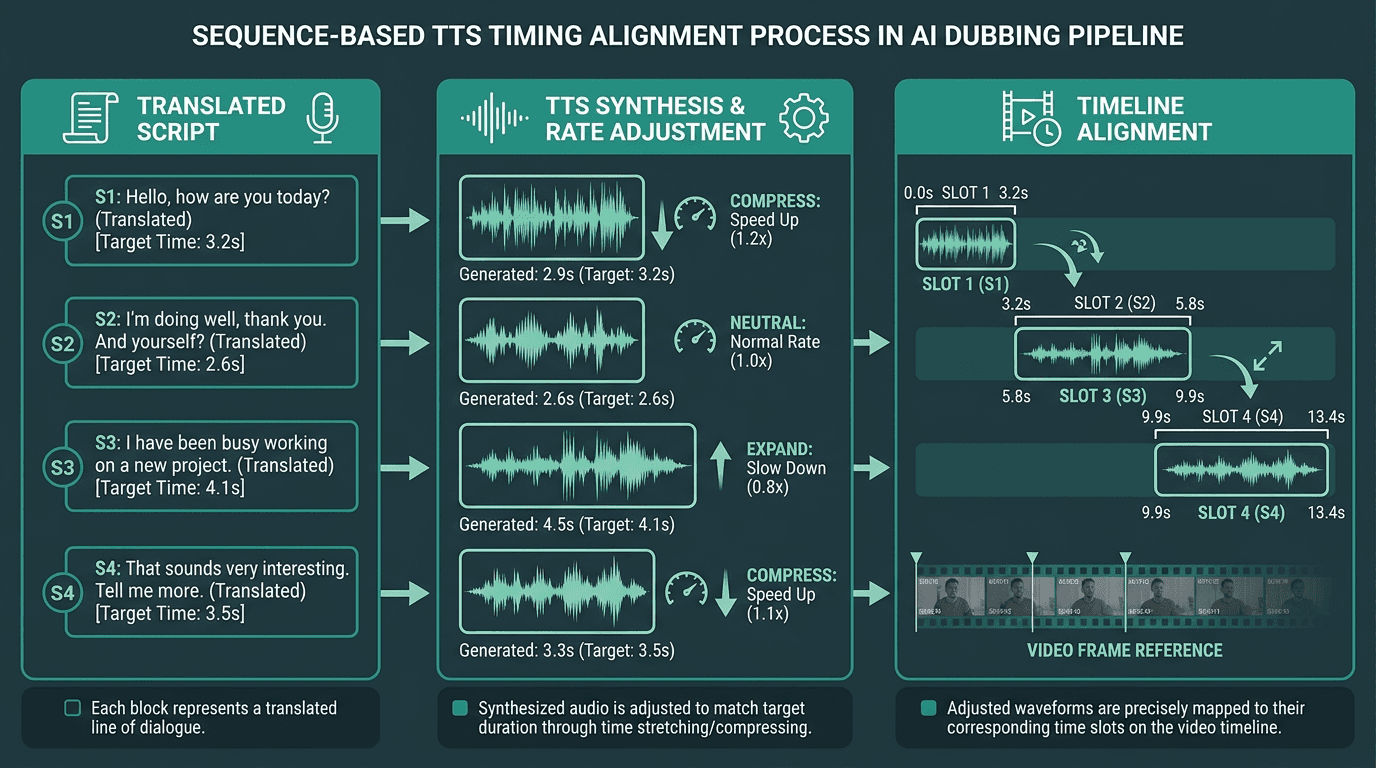
Synthesized audio must be aligned to the original speaker's timing windows, not just generated and dropped in.
Text-to-speech is where a dubbing pipeline either sounds credible or immediately gives itself away. Turning translated text into audio is the easy checkbox. The real work is producing audio that fits the original timing, tracks the speaker’s emotional intent, and lands as human rather than “system voice.” Production-grade text-to-speech voice translation depends on control: speaking rate, prosody, and pauses, not just phonemes.
Timing is the constraint that makes dubbing TTS an engineering problem instead of a simple API call. Each synthesized segment has to fit the bracket defined by the original utterance. If the source line took 3.2 seconds, the translated line needs to live in roughly the same 3.2 seconds. You can get there by adjusting TTS speaking rate, compressing the translation during the translation stage, or allowing some drift and correcting it in post. In production, most pipelines blend all three, because no single knob covers every segment cleanly.
Voice cloning changes the feel of the output, especially for recognizable speakers. Instead of assigning a generic voice per language, a cloning-capable pipeline can model a speaker’s vocal characteristics and synthesize the translation in a voice that resembles the original. Done well, it preserves identity across languages, which matters when the audience already associates a person with a particular sound. Cost and quality swing widely based on how much clean source audio you have per speaker.
Visual Dubbing: When the Audio Is Not Enough
Some systems go past audio replacement into visual dubbing, where models adjust on-screen lip movement to better match the target language’s phonemes. That matters because different languages produce different mouth shapes. “Hello” and “hola” don’t look the same on a face. When the mouth and the audio disagree, viewers notice, and once they notice, the entire production starts to feel less believable.
Visual dubbing isn’t free: it’s compute-heavy and makes the pipeline materially more complex. For e-learning, podcast-to-video, and narrated explainers, you can often skip it because the speaker isn’t on camera or the mouth isn’t clearly visible. For scripted drama, documentary interviews, and any format where a face fills the frame, visual dubbing shifts from “nice” to “necessary” if you want professional results.
Building vs. Buying: What the Pipeline Architecture Decision Actually Involves
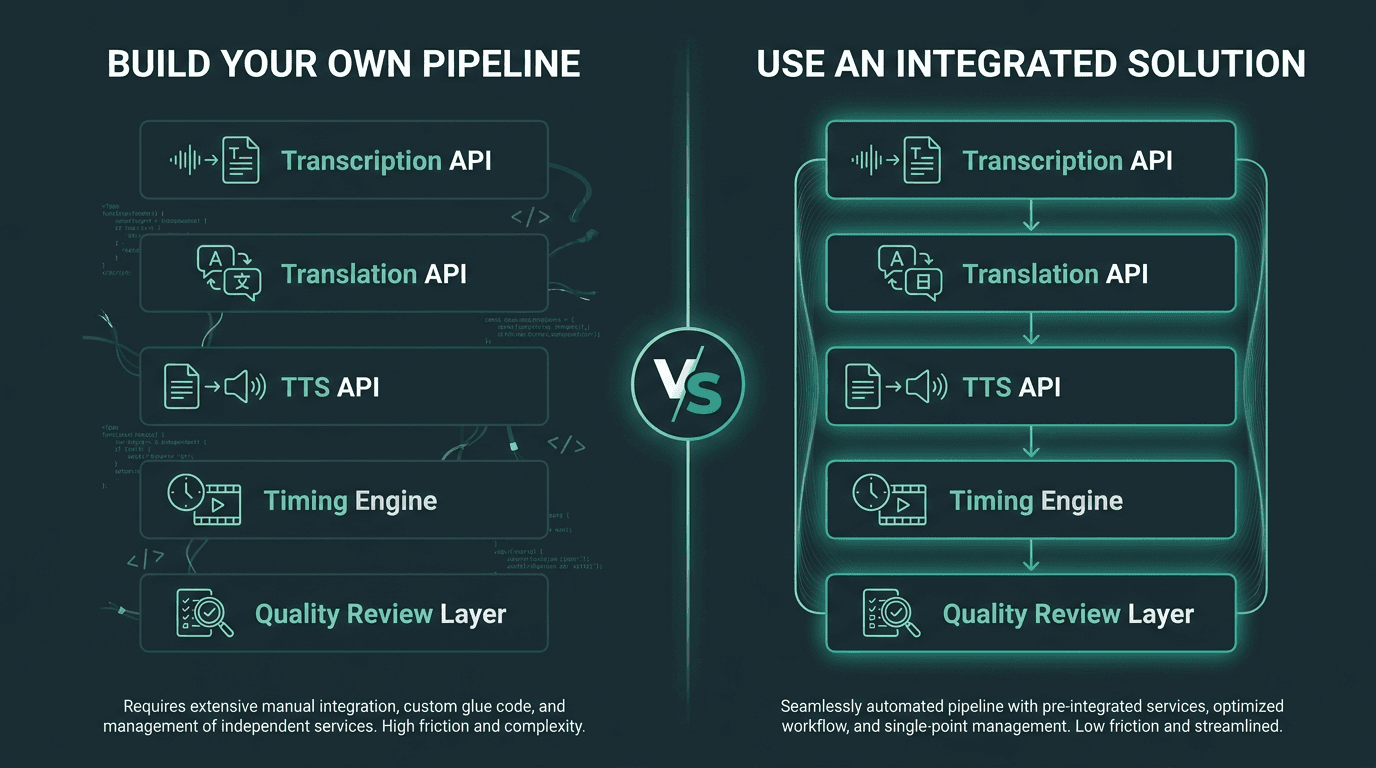
Building a custom pipeline gives control; integrated solutions trade flexibility for speed and reduced maintenance overhead.
Teams often underestimate how much work sits between “we have three APIs” and “we have a pipeline.” Every stage speaks a slightly different dialect. Transcription engines return timestamped JSON. Translation APIs want plain text. TTS engines take text, sometimes with prosody markup. The glue code (format conversion, retries, segmenting, error handling, and final audio assembly) isn’t glamorous, which is exactly why it tends to be under-designed.
AI dubbing can significantly reduce costs compared to traditional studio dubbing, where per-minute costs can be substantial. That delta only holds if the pipeline is dependable. If a custom build needs manual intervention on 30% of files, you haven’t removed cost; you’ve moved it from voice talent to engineering time. The build-vs-buy call should come from an honest read on your team’s capacity and the content volume that makes the investment rational.
If you’re evaluating the best AI dubbing platforms, the architecture questions are concrete. Do you get APIs, or are you stuck in a UI? Can you inject custom vocabulary into transcription? Does the TTS layer offer voice cloning or only preset voices? And the one that tends to decide whether the output feels professional: what does the platform do about timing alignment, where many off-the-shelf solutions quietly cut corners.
Quality Control: The Layer Most Pipelines Skip
Automation buys speed, not self-correction. A production pipeline needs at least three checkpoints: transcript review before translation, translation review before synthesis, and an audio review after synthesis. The first two can be partially triaged with confidence scores and back-translation checks. The third still benefits from human listening, even if it’s sampling-based, because issues like clipped words, strange prosody, and timing drift are hard to reliably flag in code.
As the market for AI dubbing tools grows, more QC tooling is showing up alongside it. This includes automated lip-sync scoring, MOS (Mean Opinion Score) estimation for synthesized audio, and translation quality estimation models that surface segments likely to be wrong. None of this replaces human review, but it does change the economics by helping teams focus attention where it’s most likely to pay off.
What Most Teams Get Wrong About Scaling a Dubbing Pipeline
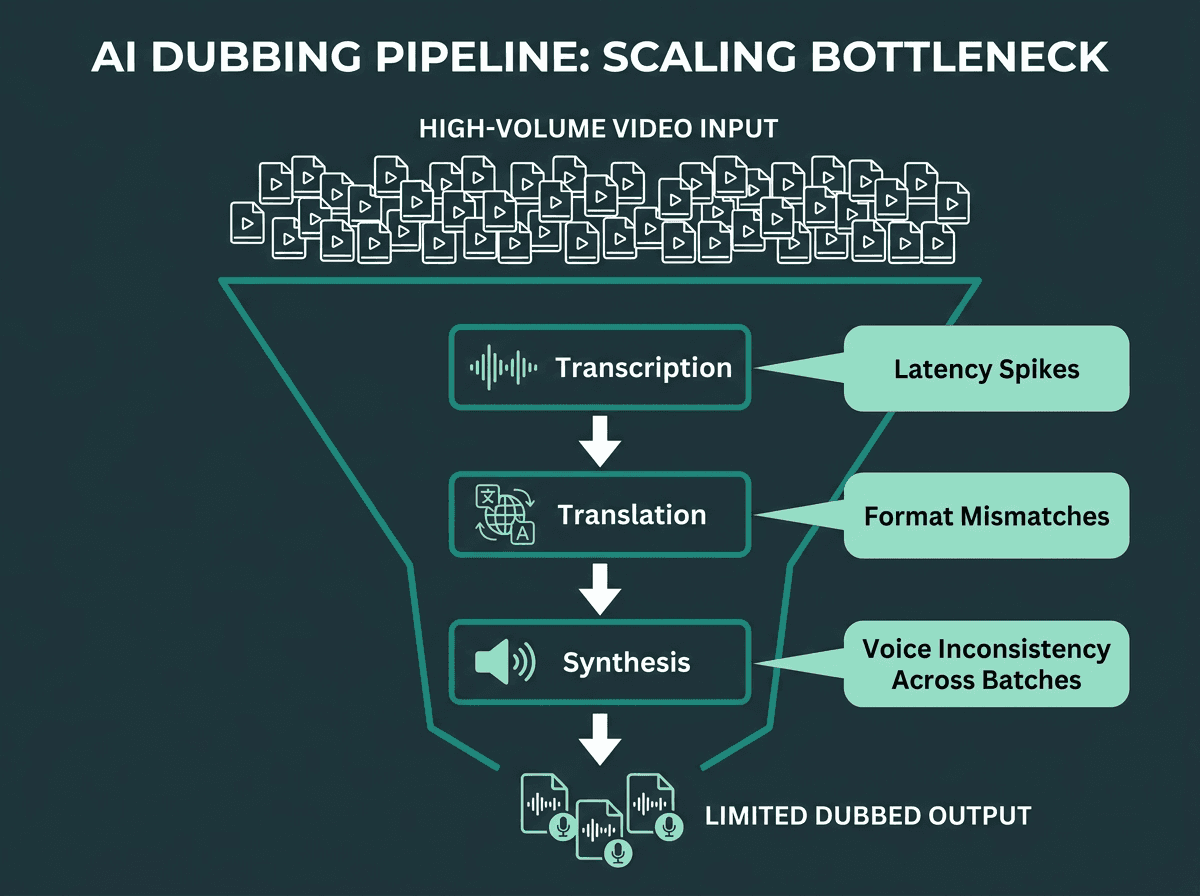
Scaling a dubbing pipeline exposes bottlenecks that are invisible at low volume.
The convergence of demand, technology maturity, and platform support is pushing AI dubbing into the default toolkit for video workflows. Once you scale volume, two issues show up fast. The first is voice consistency: if you’re dubbing a 20-episode series over several weeks, recurring speakers need to sound the same across every episode. Many TTS APIs won’t guarantee that across sessions unless you manage voice IDs explicitly. The second is latency: processing a 10-minute video in 8 minutes is fine for batch, but it’s a non-starter for near-real-time use cases like live event dubbing.
Scale also forces you to confront language-specific edge cases you can miss in small tests. Text normalization varies by language. Numbers, dates, and abbreviations are spoken differently across locales, and a system that normalizes English correctly will often misread the same patterns in Japanese or Arabic unless you add explicit rules. That’s not a TTS bug; it’s an integration responsibility that belongs to the pipeline owner.
Practical Starting Points for Different Use Cases
Different content types stress different parts of the pipeline. Here’s where engineering effort tends to matter most, depending on what you’re dubbing:
E-learning and corporate training: Timing flexibility is usually high because the speaker is rarely on camera. Spend your effort on transcription accuracy and translation quality. Voice cloning is nice, but not mandatory. One strong TTS voice per language is often enough.
YouTube and social video: Timing matters more because edits, cuts, and B-roll often ride the original audio. Put real work into the alignment layer. For short-form, it may be simpler to add a voice over to a video only where it counts rather than fully dubbing every second.
Scripted drama and documentary: Visual dubbing is often required. Voice cloning from source audio helps with authenticity. Plan for human review throughout the pipeline.
Podcast-to-video conversion: Transcription accuracy is the foundation, because viewers don’t have visual context to compensate for mishearing. Creating local text-to-speech AI voices that match the host’s register can improve retention in the target language.
Next Steps for Your Dubbing AI Pipeline
A dubbing pipeline tends to fail at its least-considered stage. In practice, transcription sets the quality ceiling for everything downstream. Translation has to be tuned for spoken dialogue, not written prose. TTS has to solve alignment and timing, not merely generate intelligible audio. And QC needs to be designed into the workflow early, because retrofitting it after launch is usually where schedules and budgets go to die.
Reliable teams treat each stage as its own engineering surface area, with its own failure modes, rather than a set of black boxes they can swap when quality drops. They instrument the pipeline end-to-end, review samples at each checkpoint, and design for the edge cases that only show up once you’re running real volume.
If you’re building a dubbing pipeline and need a TTS layer that can handle timing constraints, voice cloning, and low-latency synthesis at production scale, Smallest.ai’s Lightning API is designed for that. Lightning is built for low-latency TTS, voice cloning, and natural prosody, making it a strong fit for production dubbing workflows where timing and voice quality matter. See our pricing to pair it with Pulse for transcription and cover the core stages of a production-ready pipeline without juggling three separate vendor relationships.
Frequently asked questions
What is a dubbing AI pipeline, and how is it different from subtitling?
How accurate does transcription need to be for usable dubbing output?
Can AI dubbing keep the original speaker’s voice in the target language?
What languages do AI dubbing pipelines support, and does quality vary by language?
How long does AI dubbing take compared to studio dubbing?