How to Build an AI Dubbing Pipeline with STT, Translation, and TTS APIs

AI dubbing pipeline architecture for STT, translation, and TTS APIs, including timestamps, diarization, length checks, QA handoffs, and voice cloning setup.
Developers, content platforms, and media companies are assembling their own dubbing stacks out of APIs: Speech-to-Text, translation, and Text-to-Speech stitched into workflows that, five years ago, would have meant booking a production team.
What follows is the practical architecture: how you get from raw audio ingestion to synthesized voice output without the pipeline collapsing under real-world edge cases. If you’re shipping a single-language prototype or a multilingual production system, the tradeoffs you make at each stage show up in the final audio. The goal here is a working mental model of how the three APIs connect, where they tend to fail, and what to put in place so those failures don’t ship.
What an AI Dubbing Pipeline Actually Does
AI dubbing is the automated replacement of speech in one language with synthesized speech in another. The simple definition is true, but it glosses over the hard parts: preserving speaker identity, keeping emotional intent intact, meeting timing constraints so the dub doesn’t run long, and avoiding that unmistakable “robot reading” cadence. The workflow breaks into three core stages: transcription via Speech-to-Text, translation of the transcript, and Text-to-Speech synthesis to generate the final audio. Each stage has its own failure modes, and the pipeline has a habit of multiplying them.
The economics are a significant reason teams build this programmatically. AI-based pipelines run at a fraction of traditional studio dubbing costs, which makes scalable multilingual production realistic for teams that couldn’t previously afford it. Amazon and YouTube have both expanded AI dubbing capabilities across their platforms, which indicates the three-stage pipeline pattern is already operating at scale in production environments.
Stage 1: Speech-to-Text Transcription
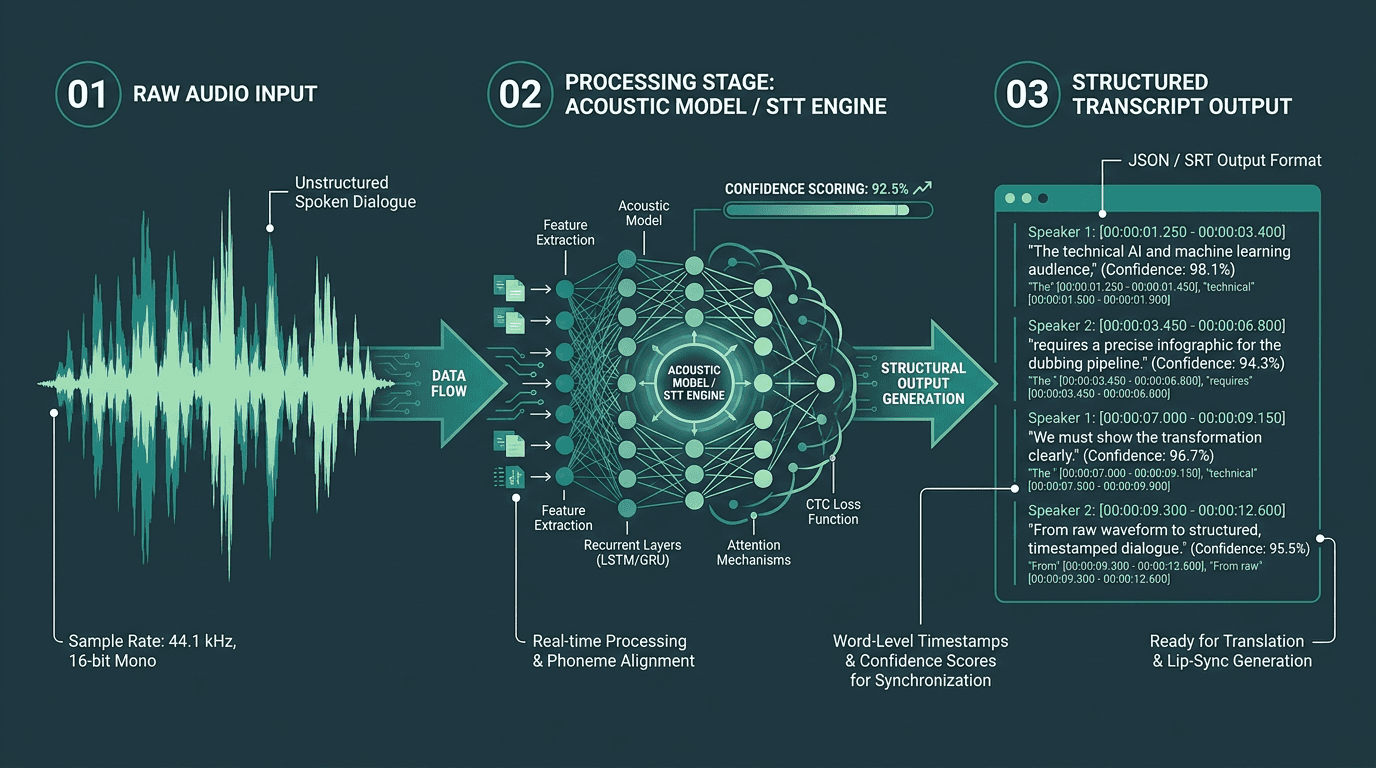
STT output must include precise timestamps and speaker labels to support downstream dubbing processes.
If your pipeline is going to break, it usually starts here. A 5% word error rate sounds survivable until you translate it into impact: in a two-minute segment, that’s roughly 15 to 20 mangled words getting handed to your translation engine. The translation model will do what it’s built to do (produce something fluent) and the TTS layer will read that fluent mistake with total conviction. Garbage in, polished garbage out.
A production STT layer has to return more than plain text. You need word-level timestamps (segment-level isn’t enough), speaker diarization to separate voices, and confidence scores so you can route low-confidence regions to review instead of pretending they’re fine. If you’re dealing with multi-speaker content, get clear on speaker diarization pipelines before you lock in your architecture.
Smallest.ai’s Speech Recognition in Python guide gets into the implementation details for wiring STT into a Python workflow. On the API side, Smallest.ai’s Pulse is designed for low-latency, high-accuracy transcription with the structured output that dubbing workflows need. Whatever STT API you’re evaluating, benchmark it on your actual content domain. Models tuned on podcast audio behave differently on film dialogue, accented speech, or overlapping conversation, and those differences show up downstream fast.
Stage 2: Translation and the Problems Nobody Warns You About
Translation is where a lot of engineering teams get surprised. Sending a transcript to a neural machine translation API and receiving target-language text is the easy part. Getting output that stays faithful to meaning, lands culturally, and still fits the original spoken timing is where the real work starts.
LLM-based translation still encounters language confusion and cultural hallucinations for certain language pairs, which is why professional pipelines treat translation output as draft text requiring QA rather than finished copy. Translated dialogue often changes length significantly across language pairs. A large-scale study of professional dubbing found that many English-to-Spanish and English-to-German dub lines differ from the source by more than 10%, which is why timing checks matter before synthesis.
Translation layer requirements for a production dubbing pipeline:
Segment-aware translation: Translate segment by segment, not as a single document, so sentence boundaries stay aligned to your timestamps.
Length normalization: Either prompt for concise output or add a post-processing check that compares translated segment length to the original duration.
Cultural adaptation flags: Idioms, proper nouns, and culturally specific references regularly need human judgment. Build flagging rather than assuming the model gets it right.
Formality and register preservation: If a character is casual in English, they shouldn’t come out formal in the target language. Pass style context into the translation step.
Glossary enforcement: For branded content or technical material, use glossary/terminology features to lock key terms.
In production, treat translation output as draft text that goes through QA, not as finished copy you can send straight to synthesis.
Stage 3: Text-to-Speech Synthesis
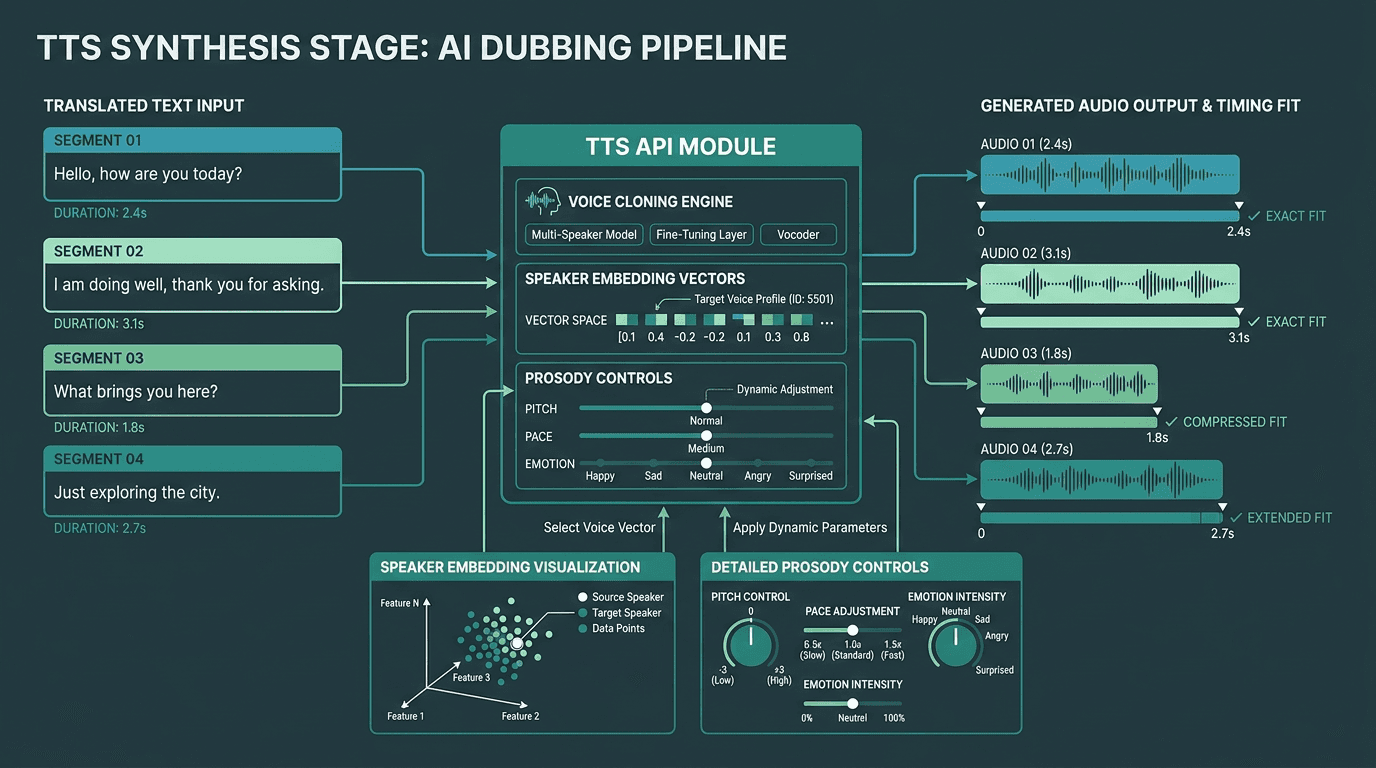
TTS synthesis must match both voice characteristics and timing constraints from the original audio.
This is the moment your dub either passes as human or immediately gives itself away. The TTS layer takes translated segments plus a target duration derived from the source timestamps, then has to synthesize speech that fits that window while still sounding like the original speaker, and still carrying the right emotional intent.
Voice cloning is the line between a basic pipeline and something you can ship professionally. Instead of assigning a generic synthetic voice per speaker, you clone the original speaker from the source audio and synthesize the translated lines using that voice model. Done well, the audio reads as the same person, just speaking another language. For an implementation-focused walkthrough, building realistic text-to-speech in Python covers API integration patterns and production setup considerations.
Emotional fidelity is still the stubborn problem at this stage. Synthesized voices often compress the expressive range of the original performance, a flat tone and missing emotional nuance are two of the most common complaints that come up most consistently in production feedback. If emotional accuracy is a requirement, the guide to human-like AI voices breaks down prosody, emotion modeling, and what to evaluate in a TTS API.
Smallest.ai’s Lightning TTS API is aimed at this dubbing use case: low-latency synthesis, voice cloning support, and more expressive output. If you need real-time or near-real-time dubbing, read Streaming TTS explained. Streaming synthesis changes how you structure the pipeline.
Connecting the Three Stages: Pipeline Architecture
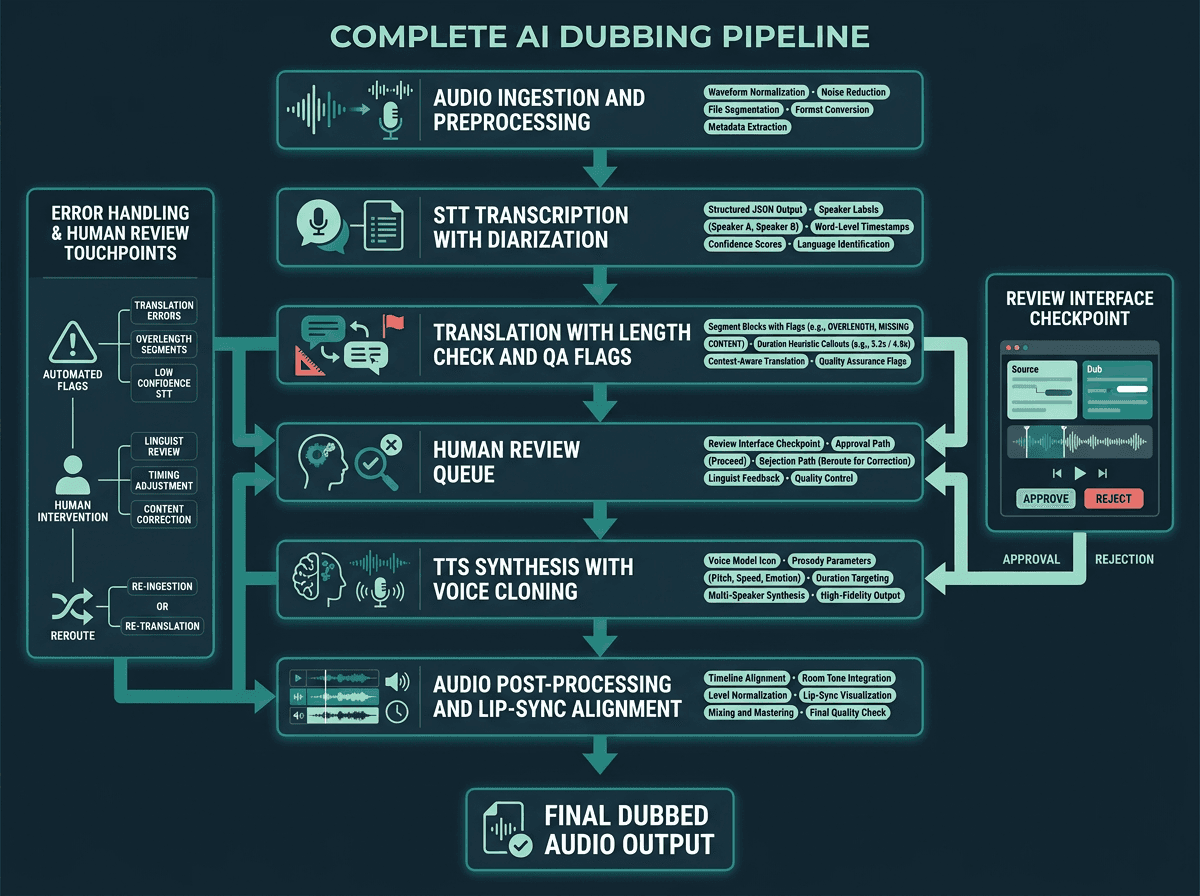
A production AI dubbing pipeline includes preprocessing, QA checkpoints, and post-processing alongside the three core API stages.
In practice, these APIs don’t just “chain” neatly. Production pipelines wrap STT with preprocessing, put checkpoints between translation and synthesis, and add post-processing after TTS. A typical production-grade architecture looks like this:
Pipeline stages in order:
Audio preprocessing: Normalize levels, reduce background noise, and split long files into manageable segments before calling the STT API. This can materially reduce transcription errors.
STT with diarization: Transcribe with word-level timestamps and speaker labels. Store structured JSON with segment ID, speaker ID, start time, end time, and text.
Translation with length check: Translate segments independently. After translation, estimate spoken duration using a character-per-second heuristic for the target language. Flag segments where the estimate exceeds the original duration by more than 15%.
Human review queue: Send flagged segments to a review interface. For professional output, this checkpoint is part of the system, not an afterthought. The goal is to catch cultural errors and timing problems before synthesis.
TTS synthesis with voice cloning: Send each approved segment to the TTS API with the cloned voice model, target duration, and any prosody/emotion parameters. If the API supports it, request audio at the exact duration.
Audio post-processing: Align synthesized segments to the original video timeline, match room tone or background audio, and normalize output levels to the source.
API Workflow for an AI Dubbing Pipeline
A simplified data flow for a batch AI dubbing job:
Upload source audio/video to the processing service.
Call STT API (e.g., Pulse) and receive structured output like this:
Send timestamped segments to a translation API.
Run length/timing validation against the original segment duration.
Send approved translated segments to the TTS API (e.g., Lightning) with duration and voice clone instructions:
Stitch generated audio segments back into the original video timeline for final output.
Where Production Pipelines Actually Break
Most tutorials stop at “call three APIs in sequence.” The real problems show up later: failure modes that only appear with messy content or when you’re processing at scale.
Timestamp drift is the most common issue in production. STT APIs generate timestamps from the audio you send them; if you’ve preprocessed that audio (trimmed silence, normalized levels), those timestamps can slide relative to the original video timeline. Either preserve a mapping between preprocessed and original timestamps, or run STT on the original audio and deal with noise later in post-processing.
Speaker consistency across segments tends to fall apart when speakers reappear across non-contiguous chunks. Diarization labels are typically local to a given audio window. If you chop a long video into 30-second chunks, “Speaker A” in chunk 1 can become “Speaker B” in chunk 3. Add a reconciliation step that matches speaker embeddings across chunks before you assign voice clones.
Language pair quality variance is real, and it’s easy to underestimate. A pipeline that’s solid for English-to-Spanish can degrade quickly for English-to-Thai or English-to-Arabic, where structure and timing behave differently. Validate the full pipeline end-to-end for every language pair you plan to support, not just the first one you prototype. For a broader scan of options across languages, the best AI dubbing platforms overview is a useful reference.
Advanced Considerations: Lip-Sync, Latency, and Voice Consistency
Lip-sync alignment is the frontier problem in AI dubbing. NVIDIA’s LipSync NIM and Content Localization Blueprint show how AI video localization workflows can synchronize lip movements with translated or synthesized audio. In most API-based systems, true lip-sync means adding a video processing layer that either adjusts mouth movements to the new audio or constrains TTS to follow the original phoneme timing. That’s expensive compute and extra complexity, which is why many production deployments settle for approximate lip-sync instead of frame-perfect matching.
If you’re targeting live dubbing or real-time translation, the architecture changes in kind, not degree. Batch assumptions stop applying. You need streaming STT, translation that works on partial sentences, and streaming TTS that can start speaking before the full segment lands. Smallest.ai’s Hydra (speech-to-speech) is built for these real-time paths, handling the STT-to-TTS route with minimal intermediate latency. If you also need conversational interaction layered on top, the AI voice agents architecture piece explains how to extend a speech pipeline into a full agent system.
Key Takeaways and Next Steps
An AI dubbing pipeline has a straightforward shape: STT captures speech with timestamps, translation carries meaning across languages, and TTS renders that meaning in a cloned voice. The output quality is less about any single API choice and more about the seams between them: timestamps, speaker identity, and segment length constraints are where production systems win or lose.
What to take away from this guide:
Word-level timestamps and speaker diarization are requirements for a production STT layer.
Translation length normalization is what keeps synthesized audio from drifting off-timeline.
Voice cloning at the TTS stage is what preserves the original speaker’s identity.
Human review checkpoints matter for translation quality, especially on new language pairs.
Test each language pair independently; performance doesn’t automatically carry across language families.
If you’re ready to build, start with Smallest.ai’s Waves API to test Lightning for voice-cloned TTS, Pulse for transcription, and Hydra for real-time speech-to-speech workflows. Developers can start building directly at app.smallest.ai. If you’re evaluating AI dubbing for a production media or enterprise workflow, book a demo to discuss latency, scale, and deployment requirements.
Frequently asked questions
What is the minimum viable AI dubbing pipeline for a solo developer?
How do I handle multiple speakers in an AI dubbing pipeline?
How accurate is AI dubbing compared to human dubbing?
Can I use AI dubbing for real-time or live content?
What should I look for in a TTS API specifically for dubbing use cases?