Streaming TTS Explained for Developers: UX, Latency, and Cost Guide

Learn how streaming text to speech works, when to use it over batch synthesis, and how it affects latency, user experience, and infrastructure cost.
Most developers encounter text to speech for the first time as a batch process: send a string, wait for a response, play the audio file. That works fine for short, predictable outputs. But the moment you are building a conversational AI agent, a real-time IVR system, or a voice assistant that responds to dynamic prompts, that batch model starts to feel like a bottleneck. The user is sitting there in silence while your server finishes rendering an audio file that could have started playing two seconds ago.
This guide is for developers, product teams, and architects who want to understand how streaming TTS actually works under the hood, when it is the right architectural choice, and what the real tradeoffs look like in terms of latency, cost, and user experience. The global text-to-speech market was valued at USD 4.8 billion in 2025 and is projected to reach USD 5.7 billion in 2026 (Global Market Insights, 2026), so getting the architecture right matters more than ever.
What streaming text to speech actually means
Standard TTS is a request-response cycle. You send the full text, the server synthesizes the entire audio clip, and it returns the completed file. Streaming TTS breaks that cycle. The server begins synthesizing audio from the first sentence or even the first few words, and it pushes audio chunks to the client as they are generated. The client starts playing audio before the full synthesis is complete.
The underlying transport is usually HTTP chunked transfer encoding, WebSockets, or server-sent events, depending on the API design. The audio format matters here too. PCM (raw audio) and Opus are common choices for streaming because they do not require a file header to be valid, unlike MP3 or AAC. This means a player can begin decoding the first chunk without knowing the total file length.
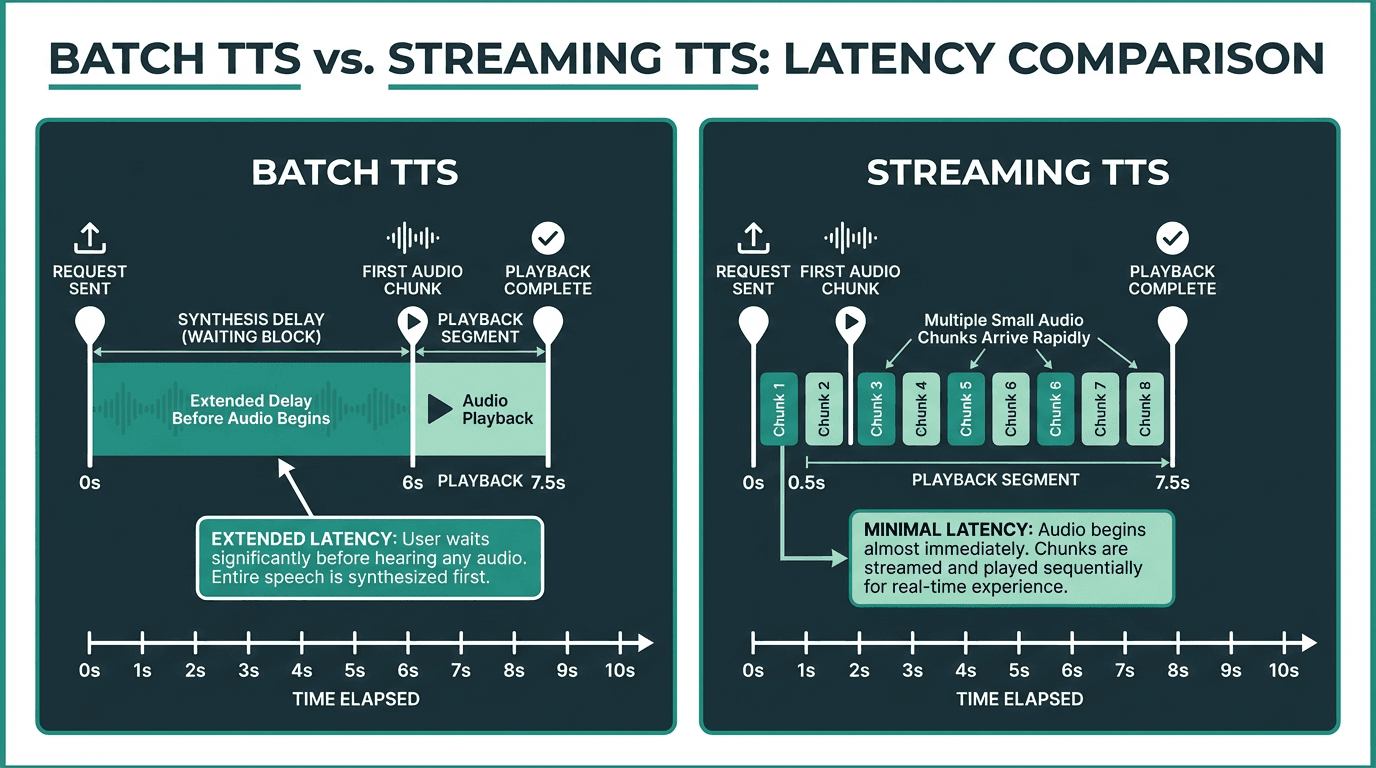
Streaming TTS dramatically reduces the time-to-first-audio compared to batch synthesis.
One thing that trips people up: streaming TTS is not the same as low-latency TTS. A low-latency batch API might return a full audio file in 300ms. Streaming TTS might have a slightly higher total synthesis time but deliver the first audio chunk in under 100ms. For conversational applications, that first-chunk latency is what the user actually perceives.
Why latency perception is the real UX metric
In natural human conversation, the gap between speakers averages just 100 to 300 milliseconds, a threshold well established in psycholinguistics research. When TTS latency exceeds this threshold, the interaction starts to feel artificial.
Streaming TTS reduces perceived latency dramatically because users begin hearing the response almost immediately, rather than waiting for a full audio file to render. The psychological effect is significant: even if the total audio takes the same amount of time to finish, users rate the experience as faster and more natural when audio starts playing quickly. This is the same principle behind skeleton screens in web UI design. Starting the experience early changes how people feel about the wait.
For voice interfaces specifically, silence is the enemy. A two-second gap before any audio plays is often interpreted as an error or a dropped connection. Streaming eliminates that dead air. If you are building on top of a text-to-speech API for any real-time application, streaming support should be a hard requirement, not a nice-to-have.
The cost equation: when streaming saves money and when it does not
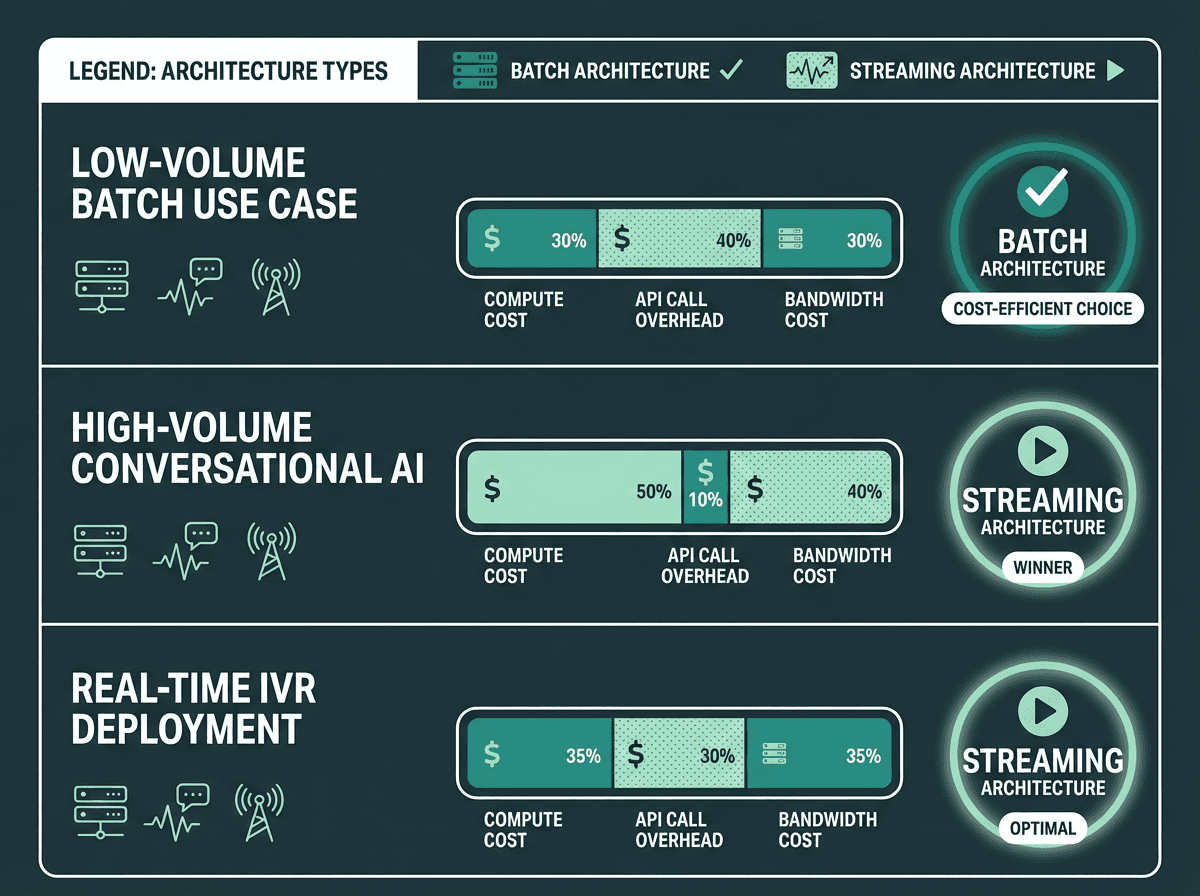
Cost efficiency depends heavily on use case volume and session length, not just API pricing.
The cost picture for streaming TTS is more nuanced than most API pricing pages suggest. Most providers charge per character or per thousand characters synthesized, regardless of whether you use streaming or batch. So at the pure synthesis level, the cost is often identical. The differences show up elsewhere.
Streaming reduces server-side buffering requirements. In a batch model, your application server has to hold the entire audio file in memory before forwarding it to the client. With streaming, you are passing chunks through with minimal buffering. For high-concurrency applications handling thousands of simultaneous sessions, that memory difference adds up. You can run more concurrent sessions on the same infrastructure.
There is also a connection-time consideration. Batch TTS holds an open connection for the full synthesis duration. Streaming opens the connection faster and starts delivering data sooner, which can improve connection pool utilization. For a detailed breakdown of how pricing models interact with these architectural choices, the API pricing models explained guide covers the mechanics in depth.
Where streaming can increase cost: if your use case involves very short, static phrases (think navigation prompts or fixed menu options), batch synthesis with aggressive caching is almost always cheaper. You synthesize once, cache the audio file, and serve it repeatedly. Streaming makes no sense for content that does not change.
Explore Smallest.ai's text-to-speech technology and see how streaming fits your architecture.
Where streaming TTS belongs and where it does not
Not every application needs streaming. The decision comes down to three factors: content dynamism, session interactivity, and acceptable latency. Here is a practical breakdown.
Use streaming TTS when:
You are building a conversational AI agent or voice assistant that generates responses dynamically from an LLM output
Your IVR system handles open-ended customer queries where response text is generated at runtime
You are delivering real-time narration for live content, such as sports commentary or financial data feeds
Accessibility services require immediate audio feedback for dynamically rendered page content
Your application targets in-car navigation or similar contexts where response delay directly affects safety or usability
Stick with batch TTS when:
Your audio content is static or semi-static and can be pre-generated and cached
You are producing long-form content like audiobooks or podcast scripts where total render time matters more than first-byte latency
Your infrastructure does not support persistent connections or chunked transfer encoding
Cost optimization through caching is a higher priority than perceived responsiveness
Key applications for text to speech technology include accessibility services for individuals with visual impairments, in-car navigation systems, and customer service IVR systems. All three of those use cases benefit substantially from streaming. For IVR specifically, the best text-to-speech APIs for IVR guide covers how latency and cost interact across different provider architectures.
How to implement streaming TTS: the technical path
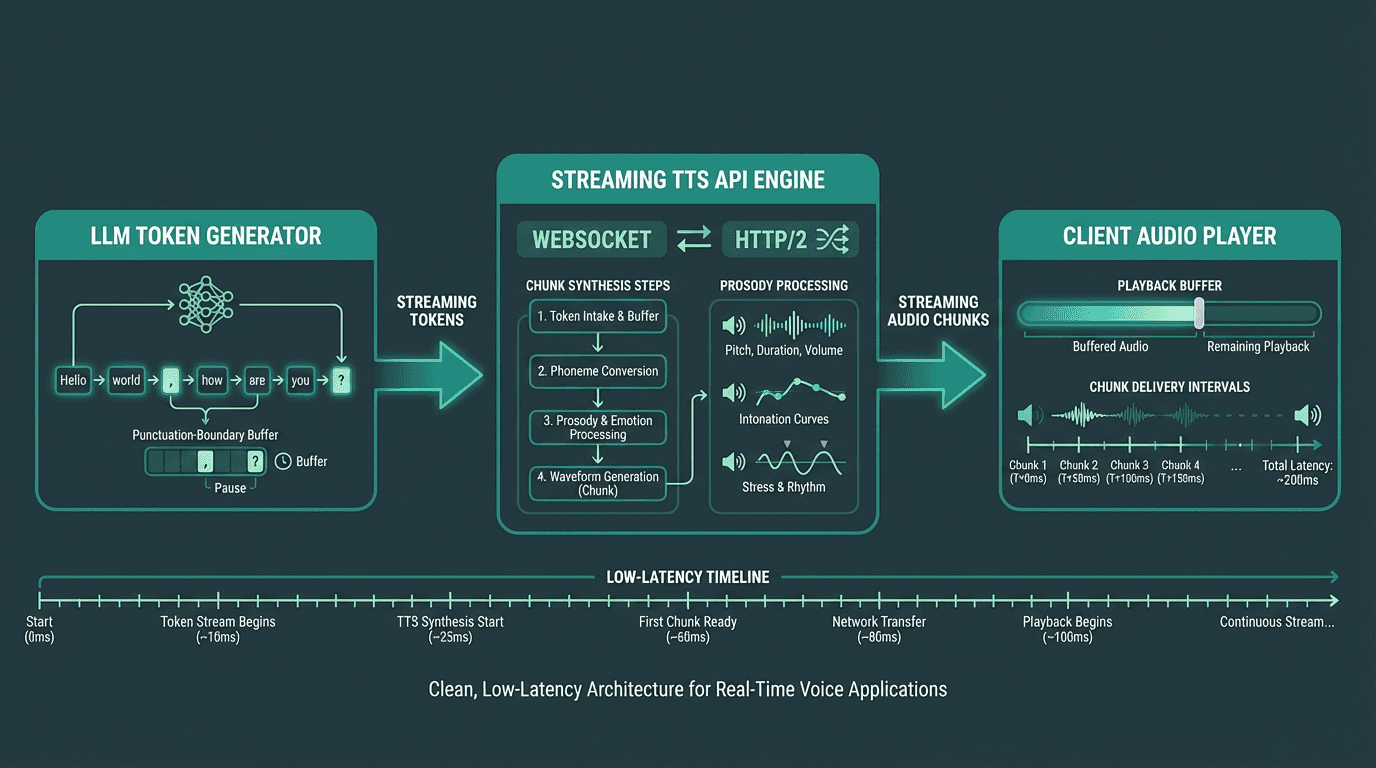
A typical streaming TTS pipeline connects LLM token output directly to the audio synthesis layer.
Connecting LLM output to streaming synthesis
The most common pattern in 2026 is to pipe LLM token output directly into a streaming TTS endpoint. As the language model generates text tokens, you buffer them into sentence-length chunks (typically ending at punctuation boundaries) and send each chunk to the TTS API as soon as it is complete. This keeps the synthesis pipeline fed continuously without waiting for the full LLM response. Smallest.ai's Waves model is designed specifically for this pattern, with low first-chunk latency and prosody consistency across dynamically generated chunk sequences.
Sentence boundary detection is more important than it sounds. If you send chunks that end mid-word or mid-phrase, the synthesized audio will have unnatural prosody at chunk boundaries. Most production implementations use a lightweight sentence splitter that waits for a period, question mark, or comma before flushing the buffer. Some TTS APIs handle this internally, but it is worth confirming with your provider.
Client-side audio playback considerations
On the browser side, the Web Speech API provides native synthesis but limited streaming control. For production applications receiving audio chunks from a server, the Web Audio API with a MediaSource extension or a custom audio queue is the standard approach. The client maintains a small playback buffer, typically 200 to 500ms of audio, to smooth over any network jitter without introducing noticeable delay.
For mobile and native applications, platform-specific audio streaming libraries handle the buffering. The key metric to monitor is buffer underrun rate: how often the playback buffer runs dry and causes a gap in audio. A well-tuned streaming pipeline should keep this below 0.5% of sessions under normal network conditions.
Advanced considerations: SSML, voice consistency, and compliance
One area where streaming TTS introduces genuine complexity is SSML support. The Speech Synthesis Markup Language specification (W3C) allows fine-grained control over pronunciation, pitch, rate, and pauses. In batch mode, SSML tags apply to the full document before synthesis begins. In streaming mode, the API needs to process SSML tags as they arrive in the stream, which not all providers handle gracefully. If your application relies heavily on SSML for brand voice consistency, test streaming behavior explicitly rather than assuming parity with batch.
Voice consistency across chunks is another edge case worth planning for. Neural TTS models (which accounted for over 67% of TTS market revenue in 2025, according to Mordor Intelligence) generate audio with context-dependent prosody. When you split text into chunks for streaming, each chunk is synthesized with awareness of what came before, but the model's context window has limits. Very long responses can develop subtle prosody drift toward the end. This is a known limitation of chunk-based streaming and is an active area of model development.
For healthcare and financial applications, data handling in a streaming architecture requires careful review. Audio data in transit must be encrypted, and any logging of synthesized audio or input text needs to comply with relevant regulations. The HIPAA Security Rule requires appropriate technical safeguards for any electronic protected health information, which includes voice data generated from patient records. Streaming architectures that pass data through multiple services need explicit data flow documentation for compliance audits.
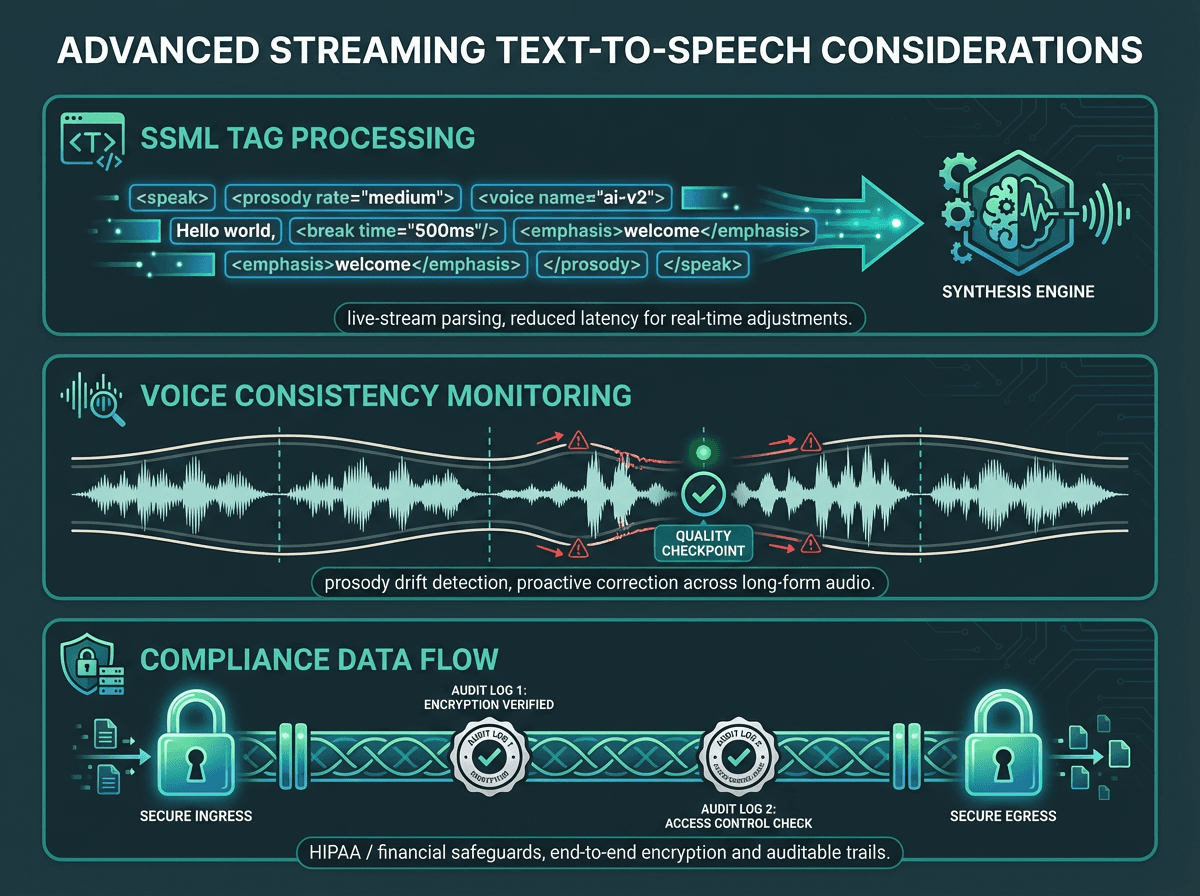
Production streaming deployments need to account for SSML handling, prosody consistency, and data compliance.
See how the fastest text-to-speech APIs compare on latency benchmarks for streaming workloads.
Key takeaways
Streaming TTS is not a universal upgrade over batch synthesis. It is the right architecture for dynamic, conversational, and real-time applications where perceived latency directly affects user experience. For static content with predictable outputs, caching batch synthesis is more cost-efficient. The decision should be driven by your latency requirements, content dynamism, and infrastructure capabilities, not by which approach sounds more modern.
The practical summary:
Streaming delivers first audio in under 100ms, which is the threshold that makes voice interactions feel natural
Cost differences between streaming and batch are often marginal at the API level but significant at the infrastructure level for high-concurrency workloads
LLM-to-TTS pipelines benefit most from streaming because the text itself is generated incrementally
SSML support, voice consistency, and compliance handling require explicit testing in streaming mode
Static or cacheable content should use batch synthesis with aggressive caching for cost efficiency
For developers exploring options across the cost spectrum, free text-to-speech API options can serve as a useful starting point before committing to a production architecture
The gap between a voice product that feels alive and one that feels clunky often comes down to that first 100 to 300 milliseconds. Streaming TTS is the architectural decision that closes that gap. For teams building conversational AI, voice agents, or real-time IVR systems, Smallest.ai's text-to-speech technology is built specifically for this problem. The Waves model delivers first-chunk audio in under 80ms, with neural voice quality that holds up across long, dynamically generated responses. If your current TTS setup is making users wait in silence, that is the problem Smallest.ai is built to solve.
Frequently asked questions
What is the difference between streaming TTS and low-latency TTS?
Which audio formats work best for streaming text to speech?
Does streaming TTS cost more than batch synthesis?
How do I handle SSML in a streaming TTS pipeline?
Can I use streaming TTS for accessibility applications?