Build Voice AI in Python: Complete Speech-to-Text Developer Guide (2026)
Build Voice AI in Python with this complete 2026 speech-to-text developer guide. Learn real-time transcription, APIs, models, and production best practices.
TL;DR – Quick Integration Overview
API Platform: Pulse STT by Smallest AI – a state-of-the-art speech-to-text API supporting real-time streaming and batch audio transcription.
Key Features:
Transcribes in 32+ languages with automatic language detection
Ultra-low latency: ~64ms time-to-first-transcript for streaming
Pre-Recorded Audio:POST https://waves-api.smallest.ai/api/v1/pulse/get_text – upload files for batch processing
Real-Time Streaming:wss://waves-api.smallest.ai/api/v1/pulse/get_text – WebSocket for live transcription
Developer Experience: Use any HTTP/WebSocket client or official SDKs (Python, Node.js). Authentication via a single API key.
Why Pulse STT? Compared to other providers, Pulse offers faster response (64ms vs 200-500ms for typical cloud STT) and all-in-one features (no need for separate services for speaker ID, sentiment, or PII masking).
Voice is becoming the next frontier for user interaction. From virtual assistants and voice bots to real-time transcription in meetings, speech interfaces are making software more accessible and user-friendly. Developers today have access to Automatic Speech Recognition (ASR) APIs that convert voice to text, opening up possibilities for hands-free control, live captions, voice search, and more.
However, integrating voice AI is more than just getting raw text from audio. Modern use cases demand speed and accuracy – a voice assistant needs to transcribe commands almost instantly, and a call center analytics tool might need not just the transcript but also who spoke when and how they said it.
Latency is critical. A delay of even a second feels laggy in conversation. Traditional cloud speech APIs often have 500–1200ms latency for live transcription, with better ones hovering around 200–250ms. This has pushed the industry toward ultra-low latency – under 300ms – to enable seamless real-time interactions.
In this guide, we'll walk through how to integrate an AI voice & speech API that meets these modern demands using Smallest AI's Pulse STT. By the end, you'll know how to:
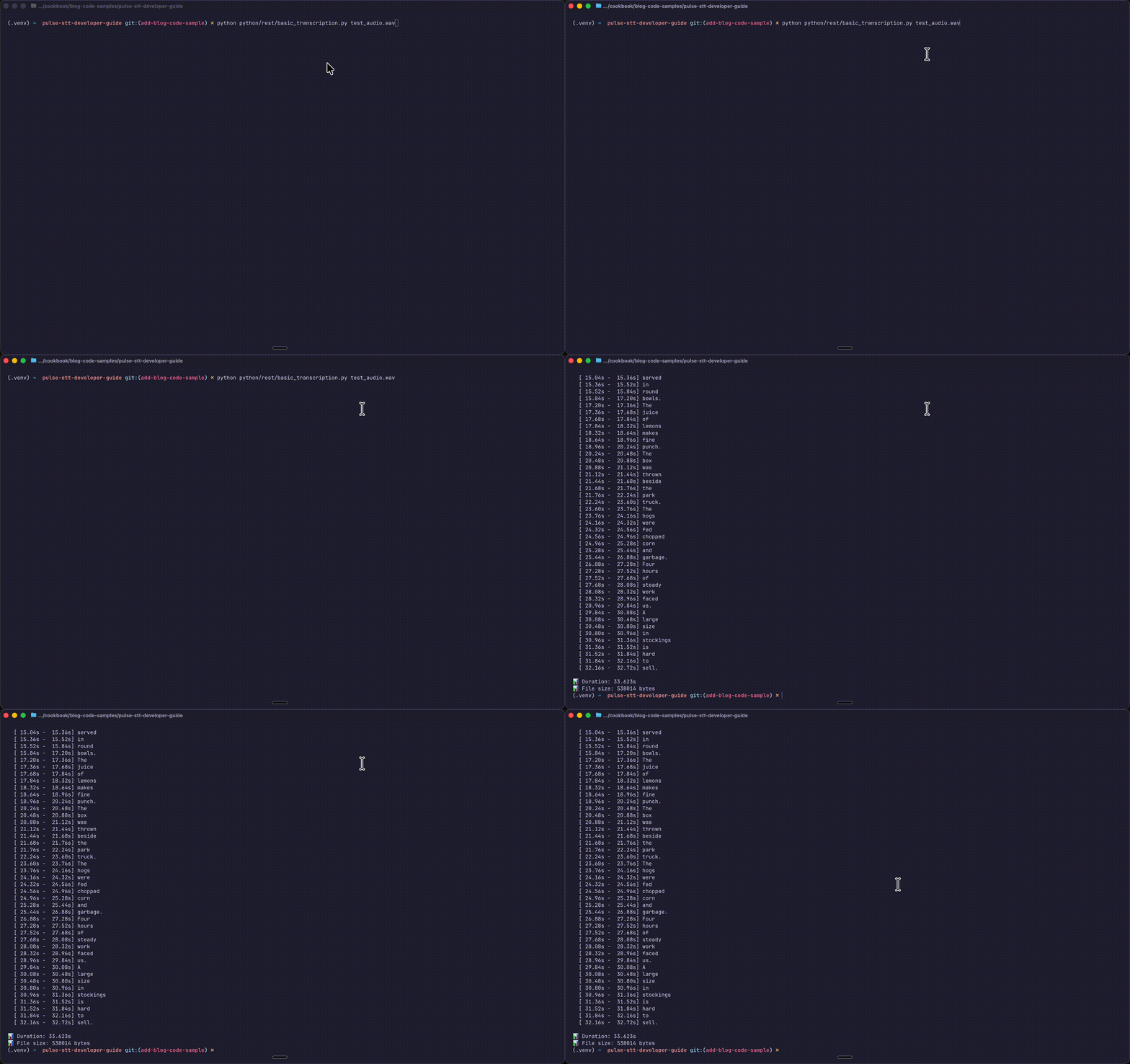
Transcribe audio files (WAV/MP3) to text using a simple HTTP API
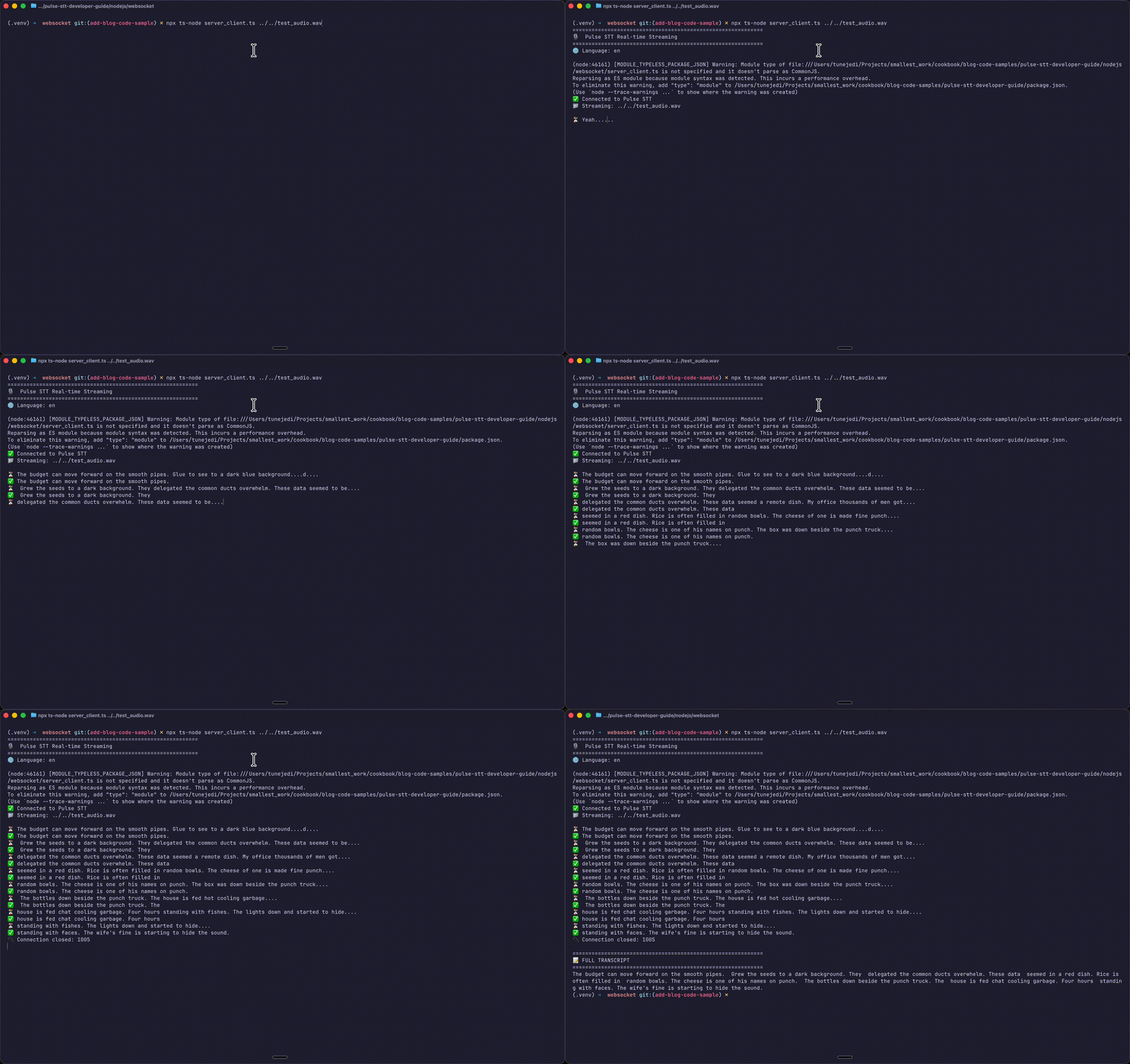
Stream live audio for instantaneous transcripts via WebSockets
Leverage advanced features like timestamps, speaker diarization, and emotion detection
Use both Python and Node.js to integrate voice capabilities
Understanding Pulse STT
Pulse is the speech-to-text/ ASR(automatic speech recognition) model from Smallest AI's "Waves" platform. It's designed for fast, accurate, and rich transcription with industry-leading latency – around 64 milliseconds to first transcribed word TTFT for streaming audio. This is an order of magnitude faster than many alternatives.
Highlight Features
Feature
Description
Real-Time & Batch Modes
Stream live audio via WebSocket or upload files via HTTP POST
32+ Languages
English, Spanish, Hindi, French, German, Arabic, Japanese, and more with auto-detection
Word/Sentence Timestamps
Know exactly when each word was spoken (great for subtitles)
Speaker Diarization
Differentiate speakers: "Speaker A said X, Speaker B said Y"
Emotion Detection
Tag segments with emotions: happy, angry, neutral, etc.
Age/Gender Estimation
Infer speaker demographics for analytics
PII/PCI Redaction
Automatically mask credit cards, SSNs, and personal info
64ms Latency
Time-to-first-transcript in streaming mode
Getting Started: Authentication
Step 1: Get Your API Key
Sign up on the Smallest AI Console and generate an API key. This key authenticates all your requests.
{"status":"success","transcription":"Hello, this is a test transcription.","words":[{"start":0.0,"end":0.88,"word":"Hello,","confidence":0.82,"speaker":0,"speaker_confidence":0.61},{"start":0.88,"end":1.04,"word":"this","confidence":1.0,"speaker":0,"speaker_confidence":0.76},{"start":1.04,"end":1.20,"word":"is","confidence":1.0,"speaker":0,"speaker_confidence":0.99},{"start":1.20,"end":1.36,"word":"a","confidence":1.0,"speaker":0,"speaker_confidence":0.99},{"start":1.36,"end":1.68,"word":"test","confidence":0.99,"speaker":0,"speaker_confidence":0.99},{"start":1.68,"end":2.16,"word":"transcription.","confidence":0.99,"speaker":0,"speaker_confidence":0.99}],"utterances":[{"start":0.0,"end":2.16,"text":"Hello, this is a test transcription.","speaker":0}],"age":"adult","gender":"female","emotions":{"happiness":0.28,"sadness":0.0,"anger":0.0,"fear":0.0,"disgust":0.0},"metadata":{"duration":1.97,"fileSize":63236}}
{"status":"success","transcription":"Hello, this is a test transcription.","words":[{"start":0.0,"end":0.88,"word":"Hello,","confidence":0.82,"speaker":0,"speaker_confidence":0.61},{"start":0.88,"end":1.04,"word":"this","confidence":1.0,"speaker":0,"speaker_confidence":0.76},{"start":1.04,"end":1.20,"word":"is","confidence":1.0,"speaker":0,"speaker_confidence":0.99},{"start":1.20,"end":1.36,"word":"a","confidence":1.0,"speaker":0,"speaker_confidence":0.99},{"start":1.36,"end":1.68,"word":"test","confidence":0.99,"speaker":0,"speaker_confidence":0.99},{"start":1.68,"end":2.16,"word":"transcription.","confidence":0.99,"speaker":0,"speaker_confidence":0.99}],"utterances":[{"start":0.0,"end":2.16,"text":"Hello, this is a test transcription.","speaker":0}],"age":"adult","gender":"female","emotions":{"happiness":0.28,"sadness":0.0,"anger":0.0,"fear":0.0,"disgust":0.0},"metadata":{"duration":1.97,"fileSize":63236}}
{"status":"success","transcription":"Hello, this is a test transcription.","words":[{"start":0.0,"end":0.88,"word":"Hello,","confidence":0.82,"speaker":0,"speaker_confidence":0.61},{"start":0.88,"end":1.04,"word":"this","confidence":1.0,"speaker":0,"speaker_confidence":0.76},{"start":1.04,"end":1.20,"word":"is","confidence":1.0,"speaker":0,"speaker_confidence":0.99},{"start":1.20,"end":1.36,"word":"a","confidence":1.0,"speaker":0,"speaker_confidence":0.99},{"start":1.36,"end":1.68,"word":"test","confidence":0.99,"speaker":0,"speaker_confidence":0.99},{"start":1.68,"end":2.16,"word":"transcription.","confidence":0.99,"speaker":0,"speaker_confidence":0.99}],"utterances":[{"start":0.0,"end":2.16,"text":"Hello, this is a test transcription.","speaker":0}],"age":"adult","gender":"female","emotions":{"happiness":0.28,"sadness":0.0,"anger":0.0,"fear":0.0,"disgust":0.0},"metadata":{"duration":1.97,"fileSize":63236}}
Part 2: Real-Time Streaming (WebSocket API)
For live audio – voice assistants, live captioning, call center analytics – use the WebSocket API for sub-second latency with partial results as audio streams in.
WebSocket Endpoint
Query Parameters
Parameter
Type
Default
Description
language
string
en
Language code or multi for auto-detect
encoding
string
linear16
Audio format: linear16, linear32, alaw, mulaw, opus
{"session_id":"sess_12345abcde","transcript":"Hello, how are you?","full_transcript":"Hello, how are you?","is_final":true,"is_last":false,"language":"en","words":[{"word":"Hello,","start":0.0,"end":0.5,"confidence":0.98,"speaker":0},{"word":"how","start":0.5,"end":0.7,"confidence":0.99,"speaker":0},{"word":"are","start":0.7,"end":0.9,"confidence":0.97,"speaker":0},{"word":"you?","start":0.9,"end":1.2,"confidence":0.99,"speaker":0}]}
{"session_id":"sess_12345abcde","transcript":"Hello, how are you?","full_transcript":"Hello, how are you?","is_final":true,"is_last":false,"language":"en","words":[{"word":"Hello,","start":0.0,"end":0.5,"confidence":0.98,"speaker":0},{"word":"how","start":0.5,"end":0.7,"confidence":0.99,"speaker":0},{"word":"are","start":0.7,"end":0.9,"confidence":0.97,"speaker":0},{"word":"you?","start":0.9,"end":1.2,"confidence":0.99,"speaker":0}]}
{"session_id":"sess_12345abcde","transcript":"Hello, how are you?","full_transcript":"Hello, how are you?","is_final":true,"is_last":false,"language":"en","words":[{"word":"Hello,","start":0.0,"end":0.5,"confidence":0.98,"speaker":0},{"word":"how","start":0.5,"end":0.7,"confidence":0.99,"speaker":0},{"word":"are","start":0.7,"end":0.9,"confidence":0.97,"speaker":0},{"word":"you?","start":0.9,"end":1.2,"confidence":0.99,"speaker":0}]}
{"words":[{"word":"Hello","speaker":0,"speaker_confidence":0.95},{"word":"Hi","speaker":1,"speaker_confidence":0.92}],"utterances":[{"text":"Hello, how can I help?","speaker":0},{"text":"I have a question.","speaker":1}]}
{"words":[{"word":"Hello","speaker":0,"speaker_confidence":0.95},{"word":"Hi","speaker":1,"speaker_confidence":0.92}],"utterances":[{"text":"Hello, how can I help?","speaker":0},{"text":"I have a question.","speaker":1}]}
{"words":[{"word":"Hello","speaker":0,"speaker_confidence":0.95},{"word":"Hi","speaker":1,"speaker_confidence":0.92}],"utterances":[{"text":"Hello, how can I help?","speaker":0},{"text":"I have a question.","speaker":1}]}
Emotion Detection
Enable emotion_detection=true to analyze speaker sentiment:
Next.js (port 3000) — Serves the React UI and handles file upload via /api/transcribe
WebSocket Proxy (port 3001) — Securely proxies audio from browser to Pulse STT WebSocket API
This architecture keeps your API key secure on the server while enabling real-time streaming.
Project Structure
Scripts
Command
Description
npm run dev
Start Next.js only
npm run dev:ws
Start WebSocket proxy only
npm run dev:all
Start both (recommended)
This architecture pattern is recommended for production apps — API keys stay server-side while the React frontend provides a smooth user experience with both file upload and real-time microphone transcription.
Conclusion
Integrating voice and speech capabilities into your workflow and apps can greatly enhance user experience. With Pulse STT, developers can achieve high-accuracy, low-latency transcription with just a few API calls.
When to use REST API:
Podcast transcription
Meeting recordings
Voicemail processing
Batch analytics
When to use WebSocket API:
Live captioning
Voice assistants
Call center real-time analytics
Interactive voice applications
The code patterns in this guide translate directly to production. Start with the REST API for prototyping, then add WebSocket streaming when real-time interaction becomes a requirement.