Free Text-to-Speech API Guide: Best Options for Devs

Discover the leading free Text-to-Speech APIs for developers. Our guide compares performance, voice quality, and ease of use to help you decide.
Voice is no longer a novelty in applications; it's a core user expectation. The global text-to-speech market, valued at USD 4.8 billion in 2025, is projected to reach USD 5.7 billion in 2026 (Global Market Insights Inc., 2026), driven by AI advancements and voice-first devices. For developers, this makes high-quality, natural-sounding voice output a critical part of the user experience. While many providers offer a 'free' tier, these often come with a confusing mix of character limits, rate throttling, and feature restrictions that can derail a project.
This guide cuts through the marketing fluff to help you find a genuinely useful free service. We'll break down the free offerings from major TTS API providers, giving you a clear technical comparison of what you actually get at no cost. You'll learn the key metrics for evaluating a text to speech API, understand the real limitations of popular free tiers, and be able to select the right service for both development and production.
We'll start with how modern text to speech systems work and define the criteria for evaluating a free API beyond just character counts. Then, we'll compare top providers head-to-head, analyzing their quotas and limitations. A practical Python implementation guide will help you get started, and we'll explore advanced features like SSML and alternatives such as open-source and browser-native tools.
How Text to Speech Technology Works
Before evaluating APIs, it helps to understand the technology that powers them. The quality of a text to speech service is a direct result of its synthesis method. Early TTS systems sounded robotic because they used simpler techniques. Today's natural-sounding voices are the product of AI breakthroughs. Neural and AI-powered voices accounted for over 67% of the text-to-speech market revenue in 2025 (Mordor Intelligence, 2026), showing a clear industry shift.
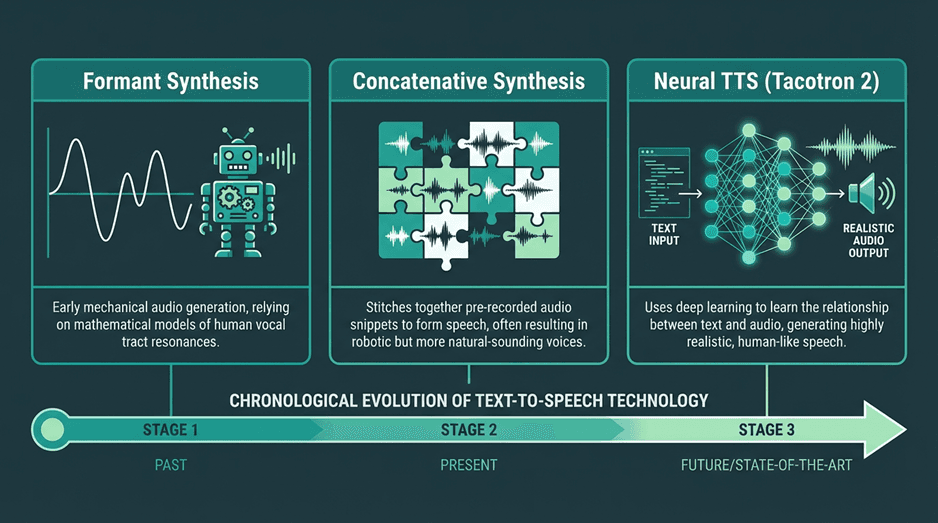
A useful way to think about text to speech is as a pipeline that converts written language into spoken output in two stages. First, the system interprets the text itself, identifying pronunciation, sentence structure, punctuation, numbers, abbreviations, and emphasis. Then it generates the speech signal, deciding how the voice should sound in terms of rhythm, pitch, pauses, and tone. This is why two TTS APIs can read the exact same sentence but produce very different results. The best systems do not just pronounce words correctly; they make the speech sound fluid, expressive, and appropriate to the context, which is especially important in customer-facing and real-time applications.
The primary synthesis methods you'll encounter are:
Concatenative Synthesis: This older technique stitches together pre-recorded snippets of speech (diphones). While it can produce high-quality audio for its domain, it often sounds unnatural with new words or complex prosody, resulting in audible 'joins' or a choppy cadence.
Parametric Synthesis: This method uses a statistical model (like a Hidden Markov Model, or HMM) to generate speech from acoustic parameters like frequency and duration. It produces smoother speech than concatenative systems and requires less data, but the voice quality can sound muffled or 'buzzy'.
Neural Text-to-Speech (NTTS): This is the modern standard. Systems like Google's Tacotron 2 or WaveNet use deep neural networks to generate speech from scratch. A vocoder model takes a spectrogram (a visual map of sound) and synthesizes a raw audio waveform. This approach produces the most natural, human-like voices with realistic intonation. Nearly all competitive commercial APIs today use a form of neural TTS. You can learn more in this complete guide to human-like AI voices.
When a provider advertises 'AI text to speech' or 'neural voices', they are referring to NTTS. The difference in quality is significant. For applications requiring user engagement, like audiobooks or virtual assistants, neural TTS is the only viable option. The free tiers of major providers now almost exclusively offer these high-quality neural voices, which was not the case just a few years ago.
Key Criteria for Evaluating a Free Text to Speech API
When your budget is zero, it's easy to just grab the API with the highest character count. This is a common mistake. The 'best' free TTS API isn't just about volume; it's about the right fit for your use case. A free tier with a million characters but high latency is useless for real-time conversational AI. A low-latency API with only a few voices is a poor choice for creating diverse character dialogue. You must evaluate these services like any other critical piece of your infrastructure.
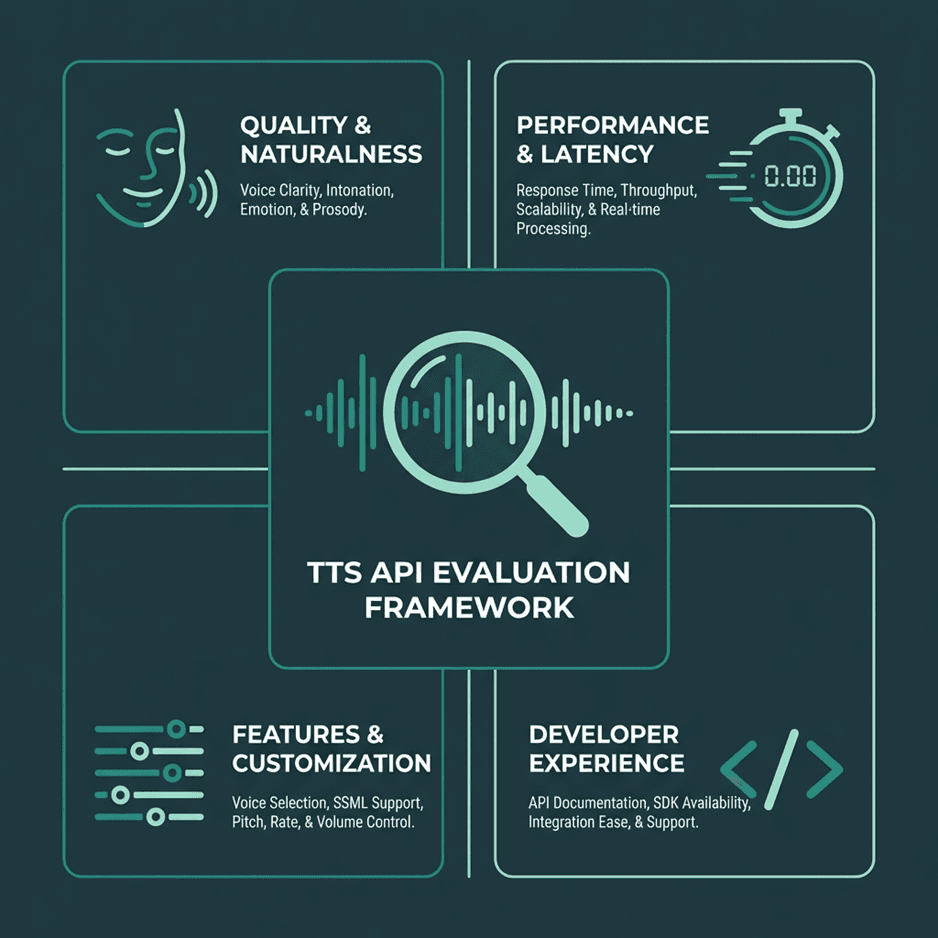
1. Voice Quality and Naturalness
This is the most subjective yet most important metric. Does the voice sound human? Is the prosody (the rhythm, stress, and intonation) correct? Listen to samples of standard and neural voices if they are offered separately. A key differentiator is how the API handles complex sentences, acronyms, and emotional inflection. Some APIs offer better control over these aspects through Speech Synthesis Markup Language (SSML).
2. Performance: Latency and Throughput
Latency, or time-to-first-byte (TTFB), is the delay between sending text and receiving the first chunk of audio. For interactive applications like voice bots, low latency is non-negotiable. For batch processing tasks like creating audiobook chapters, latency is less critical than throughput (how many characters can be processed over time). Many free tiers may deprioritize your requests, leading to higher latency compared to paid plans.
3. Feature Set and Customization
Look beyond basic text-to-audio conversion. Key features to check for include:
SSML Support: Does the API support SSML for fine-grained control over pronunciation, pitch, rate, and volume? This is essential for creating polished audio.
Voice Selection: How many languages and voices are available? Are there different genders, accents, and speaking styles (e.g., newscaster, conversational)?
Audio Formats: Can you request different output formats (e.g., MP3, WAV, OGG) and sample rates? This affects audio quality and file size.
Voice Cloning/Custom Voice: While rarely available for commercial use in a free tier, some services may offer limited access to create a custom voice from your audio samples. This is a premium feature but worth checking for if your project requires a unique brand voice.
4. Developer Experience (DX) and Documentation
A generous free tier is worthless if the documentation is confusing and the SDKs are buggy. How easy is it to get an API key? Is the documentation clear, with code samples in your preferred language? Are the SDKs well-maintained? A good developer experience saves time and frustration. Check their API status page and community forums to gauge reliability and support levels. If you're building voice AI in Python, for example, a solid Python SDK is a must.
Comparing the Top Free Text to Speech APIs
The TTS landscape is shaped by two groups: large cloud providers and specialized AI companies. Each structures its free tier differently to attract specific developers and use cases. Let's analyze the free offerings from the most prominent services, keeping in mind that 'free' almost always means 'free up to a certain limit'.
Lightning by Smallest.ai
Smallest.ai focuses on high-performance, low-latency AI models with a developer-first approach.
As a specialized provider, Smallest.ai is built to deliver state-of-the-art speech models that excel in performance and developer experience. Rather than competing on sheer character volume, our free tier is designed to give developers full access to the platform's most powerful features, so you can build and test sophisticated applications without compromise.
What our developer-focused free tier offers:
Access to All Voices: The 20,000 character-per-month quota includes every standard and premium voice, so you can test the full capabilities of the API from day one.
Ultra-Low Latency: Our models are purpose-built for real-time conversational AI, delivering an industry-leading time-to-first-byte.
Premium Features Included: Experiment with advanced capabilities often gated by other providers, such as voice cloning (for non-commercial use) and fine-grained emotional tuning.
Simple Pay-as-you-go: When you're ready to scale, our pricing is transparent and straightforward. You can view the full details on our API pricing page.
Best for: Developers building voice applications where low-latency performance, emotional control, and access to advanced features like voice cloning are critical. It’s an ideal starting point for startups and those looking for powerful, free alternatives to popular TTS services.
2. Google Cloud Text-to-Speech
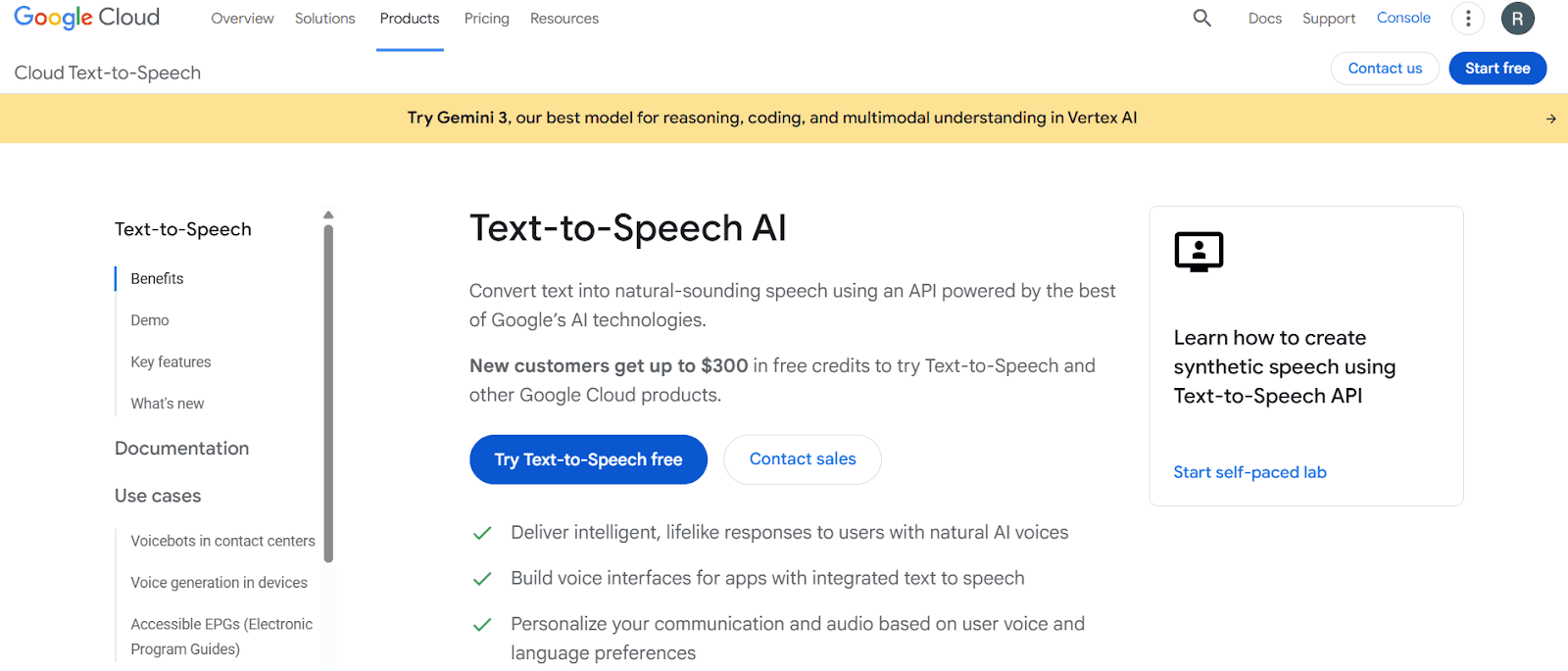
Google Cloud offers a wide selection of high-quality WaveNet voices in its free tier.
Google’s leadership in speech synthesis is clear in its mature and powerful Cloud TTS API. Its free tier is notably generous, granting access to premium WaveNet and Neural2 voices, which are widely considered among the most natural-sounding on the market. For developers needing high-quality audio, prioritizing these advanced voices over the standard ones is key to achieving the most realistic text-to-speech AI.
What the free tier includes:
Substantial Quota: You get a monthly allowance of 4 million characters for standard voices and, more importantly, 1 million characters for the superior WaveNet/Neural2 voices.
Extensive Voice Library: Access hundreds of voices across dozens of languages and variants.
Fine-Grained Control: Comprehensive SSML support enables detailed manipulation of speech output, from pitch to pronunciation.
Clear Documentation: As you'd expect from Google, the resources are thorough. Find detailed guides in the official Google Cloud Text-to-Speech documentation.
Best for: Teams already in the Google Cloud ecosystem or those needing a high volume of top-tier voice synthesis without an initial cost.
3. Amazon Polly
Amazon Polly is deeply integrated into the AWS ecosystem and offers both standard and neural voices.
Amazon Polly is AWS's reliable and scalable text-to-speech service, tightly integrated into its suite of AI services. Its value is strongest for developers building within the AWS infrastructure. The free offering is part of the standard AWS Free Tier, which has a critical time limit: it’s only available for 12 months to new customers.
What the 12-month free tier provides:
Generous Initial Limits: During your first year, you can synthesize 5 million characters per month with standard voices or 1 million characters per month with higher-quality neural voices.
Neural and Standard Voices: Polly provides a broad catalog of voices, with a growing number of neural options offering more natural-sounding intonation.
Synchronization Tools: A standout feature is the ability to generate 'speech marks', metadata that lets you sync animations or visual highlights with the spoken audio.
Low-Latency Performance: The service is built for real-time use cases. For specifics, consult the Amazon Polly documentation.
Best for: Developers building on AWS, particularly during the first 12 months. It's less suited for projects needing a permanently free production environment.
4. Microsoft Azure Cognitive Services for Speech
Azure's Speech service bundles multiple capabilities and offers a competitive free tier.
Microsoft bundles TTS into its Azure Cognitive Services for Speech, a unified API that also handles speech-to-text and translation. Azure’s biggest advantage is its perpetual free tier, which doesn't expire after a year. This makes it a sustainable choice for long-term projects with modest needs.
The free plan offers 500,000 characters per month of high-quality neural voices. Uniquely, it also includes 1 hour of Custom Neural Voice training, allowing you to experiment with creating a bespoke brand voice, a feature typically locked behind a paywall. Azure’s neural voices also support expressive styles ('cheerful', 'empathetic') and roles ('newscaster'). The Microsoft Azure documentation covers the unified SDKs and advanced capabilities in detail.
Best for: Developers needing a permanent free tier with access to high-quality neural voices and advanced features like speaking styles. An excellent option for those in the Microsoft ecosystem or building applications that might also need speech recognition.
The Fine Print: Understanding Free Tier Limits & Quotas
This is the most important part of the guide. A 'free tier' is a marketing tool designed to get you to build on a platform. The limits are generous enough for development and small hobby projects, but restrictive enough to require an upgrade for any application that gains traction. Below is a breakdown of the limits for the APIs we've discussed. These numbers are accurate as of early 2026 but are subject to change, so always verify on the provider's official pricing page.
Provider | Free Character Limit (Neural/Premium) | Free Character Limit (Standard) | Time Limit | Key Restriction |
|---|---|---|---|---|
Smallest.ai | 20,000 characters (all voices) | N/A (all voices are premium) | None (Perpetual) | Designed for development and prototyping; scales with paid plans. |
Google Cloud | 1 Million characters | 4 Million characters | None (Perpetual) | Requires credit card for setup. |
Amazon Polly | 1 Million characters | 5 Million characters | 12 Months (New Customers) | Part of the AWS Free Tier, expires after one year. |
Microsoft Azure | 500,000 characters | N/A (focus on neural) | None (Perpetual) | Free account has lower transaction-per-second limits. |
Beyond these headline numbers, you must also consider other, less obvious limits:
Rate Limits (Requests per Second): Most free tiers will throttle the number of API requests you can make in a given period (e.g., 10 requests per second). If your application needs to generate many short audio clips quickly, you could hit this limit even if you are well under your character quota.
Request Size Limits: There is typically a maximum number of characters you can send in a single API request (e.g., 5,000 characters). For synthesizing long-form content like an article or a book chapter, you will need to chunk your text into smaller pieces and make multiple requests.
Concurrent Requests: Free tiers often limit you to a small number of concurrent API calls. Trying to run a large batch job with many parallel requests will likely result in errors.
Feature Gating: As mentioned, premium features like voice cloning, custom lexicons, or access to the newest, most advanced voice models may be partially or fully restricted on the free plan.
The key takeaway is to map your application's expected usage against these limits. A podcast generation tool might be sensitive to the monthly character quota, while a real-time voice assistant will be constrained by rate limits and latency. Choose the free tier that aligns with your most critical performance bottleneck.
Practical Implementation: Getting Started with Smallest TTS API
Theory is useful, but implementation is where an API proves its value. To make this guide more practical, let’s focus on how to get started with the Smallest TTS API in a simple developer workflow. The overall process is straightforward: generate your API credentials, send a synthesis request, and handle the returned audio output.
The reason this workflow is a useful starting point is that it reflects the needs of modern voice applications more closely than a generic demo. Whether you are prototyping a voice assistant, building a narration feature, or testing dynamic spoken responses, the setup process should be fast and the API behavior should be predictable.
Step 1: Generate your Smallest API credentials
Start by creating a Smallest account and generating an API key from the developer dashboard. This key authenticates your application and must be included with each request you send to the API. Like any credential, it should be stored securely, never exposed in frontend code, and never committed directly to a public repository.
Step 2: Send your first TTS request
Smallest exposes a REST API, so you interact with it using a standard HTTP POST request. In most implementations, you will send a JSON body containing the model, selected voice, input text, and audio configuration.
A typical request body might look like this:
In Python, you would typically use a library like requests to send this payload to the Smallest endpoint and pass your API key in the request headers. This makes it easy to test voice output quickly, iterate on prompt text, and compare different voices or speaking styles during development.
Step 3: Handle the audio response
If the request succeeds, the API returns audio data that your application can save, stream, or process further. Depending on the integration pattern, the response may arrive as raw audio bytes or in an encoded format that your code needs to decode before writing it to a file such as output.mp3.
You should also implement basic error handling around authentication failures, invalid payloads, and request limit issues. That is especially important when moving from local testing to a production environment where retries, logging, and response validation become part of the application flow.
For more detailed tutorials and code samples, check out the official documentation of the API you choose or explore our blog for more developer guides.
Advanced Features in Free Tiers: SSML, Custom Voices, and More
While free tiers are primarily for basic synthesis, some providers offer a glimpse into their more advanced capabilities. Using these features can dramatically improve the quality of your audio output, even on a free plan.
Mastering Speech Synthesis Markup Language (SSML)
SSML is a W3C-standardized, XML-based markup language for speech synthesis applications. Instead of sending plain text, you wrap it in SSML tags to control various aspects of the speech.
With SSML, you can:
Add Pauses: Use the `<break>` tag to insert pauses of specific durations (e.g., `<break time="500ms"/>`).
Change Pitch and Rate: The `<prosody>` tag allows you to adjust the pitch, speaking rate, and volume of specific words or phrases.
Emphasize Words: The `<emphasis>` tag can be used to add or remove stress from a word.
Specify Pronunciation: With the `<phoneme>` tag, you can provide a specific phonetic pronunciation for a word, which is invaluable for correctly pronouncing jargon, brand names, or ambiguous words.
Most top-tier APIs, including those from Google, Amazon, Microsoft, and Smallest.ai, have strong SSML support in their free tiers. Learning to use it is the single most effective way to improve the quality of your synthesized audio.
Experimenting with Custom Voices and Voice Cloning
This is typically a premium feature, but some providers are beginning to offer limited access for free. For example, Microsoft Azure's free tier includes a small amount of training time for a Custom Neural Voice.
Smallest.ai provides access to its voice cloning API for non-commercial projects on its free plan. This allows you to provide a few minutes of audio of a specific speaker and create a custom TTS voice model that mimics it. While the free versions may have limits on quality or usage rights, they are excellent for prototyping applications that require a unique, branded voice.
Beyond APIs: Open-Source and Browser-Native TTS
Cloud-based APIs offer the highest quality and greatest convenience, but they aren't the only option. For certain use cases, offline or browser-native solutions can be more appropriate. These alternatives give you more control and can operate without an internet connection, but often come with a trade-off in voice quality.
Open-Source TTS Engines
For developers who need full control, privacy, or offline capabilities, open-source TTS engines are a powerful alternative. Projects like Mozilla TTS, Coqui TTS, and Piper allow you to run the synthesis model on your own hardware. The main challenges are the significant computational resources required (often needing a GPU for decent performance) and the technical expertise needed to train and deploy the models. However, for those willing to invest the time, it's possible to achieve excellent results. You can find more information on creating local text-to-speech voices for free.
The Web Speech API
For purely web-based applications, don't overlook built-in browser capabilities. The MDN Web Speech API provides a `SpeechSynthesis` interface that allows JavaScript to generate speech directly in the browser. The quality of the voices depends entirely on the operating system and browser (e.g., Chrome on Windows will use Microsoft's voices), so it can be inconsistent. It lacks the advanced features and premium quality of cloud APIs, but for simple use cases like reading out notifications, it is completely free, has no character limits, and requires no API key. It is a W3C Community Group specification (W3C, 2014) and is supported by all major modern browsers.
Choosing the Right Free Path for Your Project
Choosing a free text to speech API is a strategic decision, not just a technical one. The market, expected to grow to USD 35.3 billion by 2035 (Global Market Insights Inc., 2026), is fiercely competitive, and free tiers are the primary battleground for developer adoption. Your choice of a 'free' API today will likely determine which ecosystem you invest in and pay for tomorrow.
Here are the key takeaways:
Define Your Needs First: Before looking at limits, define your core requirements. Is it low latency for conversations, high volume for batch processing, or advanced features like SSML for polished narration?
The Big Three Offer Generous Starting Points: Google Cloud, AWS, and Azure provide substantial free tiers with excellent voice quality. They are a safe bet, especially if you are already using their other cloud services. Be mindful of AWS's 12-month time limit.
Specialized Providers Offer an Edge: Companies like Smallest.ai compete by offering superior performance, more advanced features in the free tier (like voice cloning), and a more focused developer experience.
'Free' has Many Limits: Look beyond the monthly character count. Rate limits, request size, and concurrent request limits are often the real-world constraints that will force you to upgrade.
Don't Discount Offline and Native Options: For projects where connectivity is an issue, privacy is paramount, or quality requirements are less stringent, self-hosting an open-source model or using the browser's Web Speech API are viable, truly free alternatives.
The best approach is to prototype on two or three different services. Sign up for the free tiers, get your API keys, and run the same set of test scripts against each. Listen to the output, measure the latency, and test their SSML capabilities. This hands-on evaluation will give you a much clearer picture than any comparison table and will ensure you build your application on a foundation that can support its growth.
Frequently asked questions
What happens when I exceed the free tier limits on a TTS API?
Can I use the audio generated from a free tier for commercial purposes?
Which free text to speech API has the most realistic voice?
Are there any completely free, unlimited text to speech APIs?