Building Realistic Text-to-Speech in Python: Libraries, APIs, and Production Setup
Learn how to build realistic text-to-speech in Python using neural TTS APIs, async synthesis, real-time streaming, and voice agent architecture.
The quest for human-parity speech synthesis has reached a definitive turning point as we navigate through 2025 and 2026. For technical developers and machine learning engineers working within the Python ecosystem, the challenge has shifted from merely achieving intelligibility to mastering the nuances of prosody, emotional depth, and ultra-low latency. Realistic text-to-speech (TTS) in Python is no longer a luxury reserved for high-budget research labs; it is the cornerstone of modern conversational AI, interactive entertainment, and global accessibility solutions.
The Gap Between Robotic and Human-Like Speech
Most legacy Python TTS libraries rely on concatenative synthesis, stitching together pre-recorded audio fragments. The result is uneven rhythm, abrupt transitions, and a signature "robot" quality.
Neural TTS, by contrast, learns the full acoustic space of a human voice and generates audio from scratch for any input text.
Key Indicators of High-Quality TTS Systems
When evaluating realistic TTS solutions for Python applications, several technical factors determine output quality and usability.
Voice Identity
Modern systems provide named voice models trained on real speakers. Example:
voice_id="emily"voice_id="sophia"voice_id="alex"
voice_id="emily"voice_id="sophia"voice_id="alex"
voice_id="emily"voice_id="sophia"voice_id="alex"
Sample Rate
Higher sample rates preserve more audio detail.
Sample Rate
Audio Quality
8kHz
Telephone grade
16kHz
Standard voice
24kHz
High quality
44.1kHz
Studio quality
Most production voice agents use 24kHz or higher.
Prosody
Prosody refers to natural speech patterns: pitch movement, emphasis, pauses and rhythm. Without prosody control, even advanced TTS models sound mechanical.
Playback Control
Production systems often require runtime tuning such as: speech speed, pitch, output format and audio streaming behavior. These controls allow applications to adapt voice output to different environments.
How Modern Neural TTS Works
Under the hood, modern TTS systems follow a multi-stage pipeline that transforms written text into natural audio.
Text Normalization
Numbers, dates, and abbreviations are converted into spoken equivalents
Acoustic Modeling
The acoustic model predicts how speech should sound, including phoneme timing, pitch contour and emphasis.
Neural Vocoder
The vocoder converts acoustic predictions into a waveform audio signal. This final stage determines the realism of the generated voice.
Building Realistic Text-to-Speech in Python
Python developers can access modern neural TTS through SDKs or APIs. One example is the Smallest AI Python SDK, which provides a streamlined interface for generating speech.
Installation
Basic TTS Example Using the Python SDK
The simplest implementation involves generating speech from a single text input.
Even this minimal setup produces high-quality speech suitable for many applications.
Asynchronous Text-to-Speech for Scalable Applications
Real production systems often generate multiple audio responses simultaneously. Blocking synthesis calls can quickly become a bottleneck.
Python’s asynchronous runtime makes concurrent synthesis efficient.
importasyncioimportaiofilesfromsmallestai.wavesimportAsyncWavesClientasyncdefmain():
client = AsyncWavesClient(api_key="YOUR_API_KEY")asyncwithclientastts:
audio_bytes = awaittts.synthesize("Hello, this is a test of async synthesis.")asyncwithaiofiles.open("async_synthesize.wav","wb")asf:
awaitf.write(audio_bytes)asyncio.run(main())
importasyncioimportaiofilesfromsmallestai.wavesimportAsyncWavesClientasyncdefmain():
client = AsyncWavesClient(api_key="YOUR_API_KEY")asyncwithclientastts:
audio_bytes = awaittts.synthesize("Hello, this is a test of async synthesis.")asyncwithaiofiles.open("async_synthesize.wav","wb")asf:
awaitf.write(audio_bytes)asyncio.run(main())
importasyncioimportaiofilesfromsmallestai.wavesimportAsyncWavesClientasyncdefmain():
client = AsyncWavesClient(api_key="YOUR_API_KEY")asyncwithclientastts:
audio_bytes = awaittts.synthesize("Hello, this is a test of async synthesis.")asyncwithaiofiles.open("async_synthesize.wav","wb")asf:
awaitf.write(audio_bytes)asyncio.run(main())
This pattern is commonly used for:
generating IVR prompts
batch audiobook production
automated video narration
Direct API Access with HTTP
For systems integrating multiple services or microservices, direct HTTP APIs provide more flexibility.
importrequestsimportbase64defhttp_tts_direct(text,output_file="output.wav"):
API_KEY = "YOUR_API_KEY"TTS_URL = "https://waves-api.smallest.ai/api/v1/tts/get_speech"headers = {"Authorization": f"Bearer {API_KEY}","Content-Type": "application/json"}payload = {"text": text,"voice_id": "emily","model": "lightning-v3","output_format": "wav","speed": 1.0,"sample_rate": 24000}response = requests.post(TTS_URL,json=payload,headers=headers)ifresponse.status_code == 200:
# Audio returned as base64 or binary depending on API versionwithopen(output_file,"wb")asf:
f.write(response.content)returnoutput_fileelse:
raiseException(f"TTS API error: {response.status_code} - {response.text}")# Example usage
importrequestsimportbase64defhttp_tts_direct(text,output_file="output.wav"):
API_KEY = "YOUR_API_KEY"TTS_URL = "https://waves-api.smallest.ai/api/v1/tts/get_speech"headers = {"Authorization": f"Bearer {API_KEY}","Content-Type": "application/json"}payload = {"text": text,"voice_id": "emily","model": "lightning-v3","output_format": "wav","speed": 1.0,"sample_rate": 24000}response = requests.post(TTS_URL,json=payload,headers=headers)ifresponse.status_code == 200:
# Audio returned as base64 or binary depending on API versionwithopen(output_file,"wb")asf:
f.write(response.content)returnoutput_fileelse:
raiseException(f"TTS API error: {response.status_code} - {response.text}")# Example usage
importrequestsimportbase64defhttp_tts_direct(text,output_file="output.wav"):
API_KEY = "YOUR_API_KEY"TTS_URL = "https://waves-api.smallest.ai/api/v1/tts/get_speech"headers = {"Authorization": f"Bearer {API_KEY}","Content-Type": "application/json"}payload = {"text": text,"voice_id": "emily","model": "lightning-v3","output_format": "wav","speed": 1.0,"sample_rate": 24000}response = requests.post(TTS_URL,json=payload,headers=headers)ifresponse.status_code == 200:
# Audio returned as base64 or binary depending on API versionwithopen(output_file,"wb")asf:
f.write(response.content)returnoutput_fileelse:
raiseException(f"TTS API error: {response.status_code} - {response.text}")# Example usage
This approach is commonly used when:
integrating TTS inside backend services
generating audio during batch processing
building cross-language pipelines
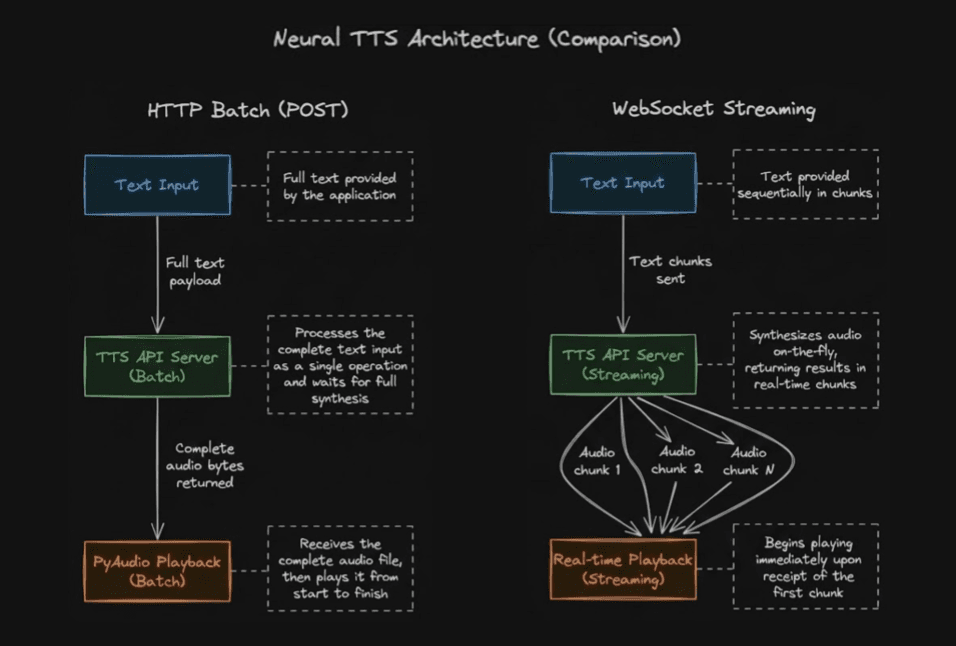
Real-Time Streaming Text-to-Speech
WebSocket connections enable streaming synthesis where audio chunks arrive as they generate, critical for conversational AI applications requiring immediate playback.
fromsmallestai.wavesimportTTSConfig,WavesStreamingTTSimportwave# Configure the TTS engineconfig = TTSConfig(voice_id="aditi",api_key="YOUR_SMALLEST_API_KEY",sample_rate=24000,speed=1.0,max_buffer_flush_ms=100)streaming_tts = WavesStreamingTTS(config)defsave_audio_chunks_to_wav(audio_chunks,filename="output.wav"):
"""Save streamed PCM chunks into a WAV file."""withwave.open(filename,"wb")aswf:
wf.setnchannels(1)# mono audiowf.setsampwidth(2)# 16-bit PCMwf.setframerate(24000)# sample ratewf.writeframes(b"".join(audio_chunks))text = "Streaming text to speech allows audio playback to begin immediately."audio_chunks = []# Stream synthesized audio chunksforchunkinstreaming_tts.synthesize(text):
audio_chunks.append(chunk)# Save to filesave_audio_chunks_to_wav(audio_chunks,"speech_output.wav")
fromsmallestai.wavesimportTTSConfig,WavesStreamingTTSimportwave# Configure the TTS engineconfig = TTSConfig(voice_id="aditi",api_key="YOUR_SMALLEST_API_KEY",sample_rate=24000,speed=1.0,max_buffer_flush_ms=100)streaming_tts = WavesStreamingTTS(config)defsave_audio_chunks_to_wav(audio_chunks,filename="output.wav"):
"""Save streamed PCM chunks into a WAV file."""withwave.open(filename,"wb")aswf:
wf.setnchannels(1)# mono audiowf.setsampwidth(2)# 16-bit PCMwf.setframerate(24000)# sample ratewf.writeframes(b"".join(audio_chunks))text = "Streaming text to speech allows audio playback to begin immediately."audio_chunks = []# Stream synthesized audio chunksforchunkinstreaming_tts.synthesize(text):
audio_chunks.append(chunk)# Save to filesave_audio_chunks_to_wav(audio_chunks,"speech_output.wav")
fromsmallestai.wavesimportTTSConfig,WavesStreamingTTSimportwave# Configure the TTS engineconfig = TTSConfig(voice_id="aditi",api_key="YOUR_SMALLEST_API_KEY",sample_rate=24000,speed=1.0,max_buffer_flush_ms=100)streaming_tts = WavesStreamingTTS(config)defsave_audio_chunks_to_wav(audio_chunks,filename="output.wav"):
"""Save streamed PCM chunks into a WAV file."""withwave.open(filename,"wb")aswf:
wf.setnchannels(1)# mono audiowf.setsampwidth(2)# 16-bit PCMwf.setframerate(24000)# sample ratewf.writeframes(b"".join(audio_chunks))text = "Streaming text to speech allows audio playback to begin immediately."audio_chunks = []# Stream synthesized audio chunksforchunkinstreaming_tts.synthesize(text):
audio_chunks.append(chunk)# Save to filesave_audio_chunks_to_wav(audio_chunks,"speech_output.wav")
This architecture enables python voice assistant implementations that feel natural and responsive, with audio playback beginning typically within 200ms of request initiation.
Voice Agent Architecture with Python
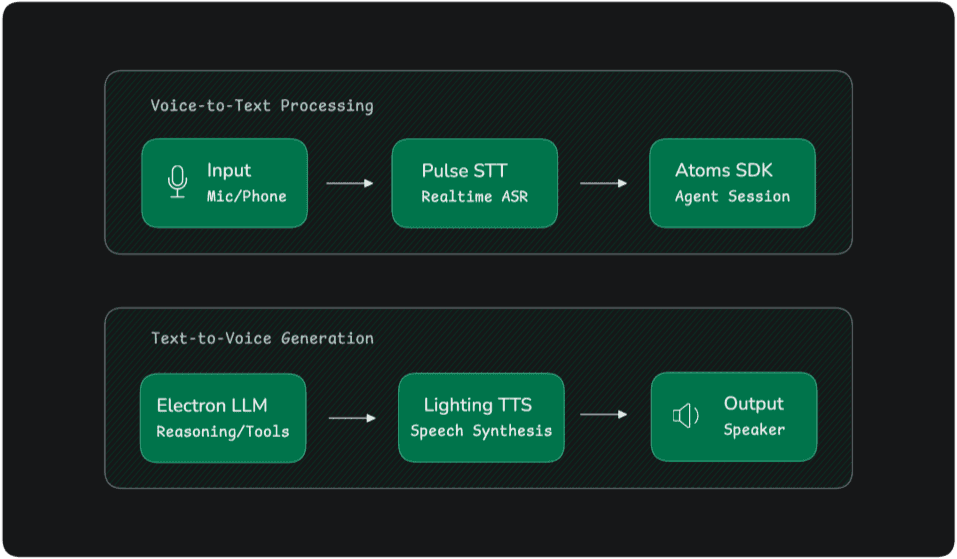
Realistic TTS rarely operates in isolation. Most voice applications form part of a larger conversational pipeline.
A typical voice agent architecture looks like this:
Below is a simplified Python implementation of such a system.
importosfromsmallestai.atoms.agent.nodesimportOutputAgentNodefromsmallestai.atoms.agent.clients.openaiimportOpenAIClientfromsmallestai.atoms.agent.serverimportAtomsAppfromsmallestai.atoms.agent.sessionimportAgentSessionfromsmallestai.atoms.agent.eventsimportSDKSystemUserJoinedEventclass MyAgent(OutputAgentNode):
def__init__(self):
super().__init__(name="my-agent")self.llm = OpenAIClient(model="gpt-4o-mini",api_key=os.getenv("OPENAI_API_KEY"))self.context.add_message({"role": "system","content": "You are a helpful assistant. Be concise and friendly."})asyncdefgenerate_response(self):
response = awaitself.llm.chat(messages=self.context.messages,stream=True)full_response = ""asyncforchunkinresponse:
ifchunk.content:
full_response += chunk.contentyieldchunk.contentiffull_response:
self.context.add_message({"role": "assistant","content": full_response})asyncdefon_start(session: AgentSession):
agent = MyAgent()session.add_node(agent)awaitsession.start()awaitsession.wait_until_complete()
importosfromsmallestai.atoms.agent.nodesimportOutputAgentNodefromsmallestai.atoms.agent.clients.openaiimportOpenAIClientfromsmallestai.atoms.agent.serverimportAtomsAppfromsmallestai.atoms.agent.sessionimportAgentSessionfromsmallestai.atoms.agent.eventsimportSDKSystemUserJoinedEventclass MyAgent(OutputAgentNode):
def__init__(self):
super().__init__(name="my-agent")self.llm = OpenAIClient(model="gpt-4o-mini",api_key=os.getenv("OPENAI_API_KEY"))self.context.add_message({"role": "system","content": "You are a helpful assistant. Be concise and friendly."})asyncdefgenerate_response(self):
response = awaitself.llm.chat(messages=self.context.messages,stream=True)full_response = ""asyncforchunkinresponse:
ifchunk.content:
full_response += chunk.contentyieldchunk.contentiffull_response:
self.context.add_message({"role": "assistant","content": full_response})asyncdefon_start(session: AgentSession):
agent = MyAgent()session.add_node(agent)awaitsession.start()awaitsession.wait_until_complete()
importosfromsmallestai.atoms.agent.nodesimportOutputAgentNodefromsmallestai.atoms.agent.clients.openaiimportOpenAIClientfromsmallestai.atoms.agent.serverimportAtomsAppfromsmallestai.atoms.agent.sessionimportAgentSessionfromsmallestai.atoms.agent.eventsimportSDKSystemUserJoinedEventclass MyAgent(OutputAgentNode):
def__init__(self):
super().__init__(name="my-agent")self.llm = OpenAIClient(model="gpt-4o-mini",api_key=os.getenv("OPENAI_API_KEY"))self.context.add_message({"role": "system","content": "You are a helpful assistant. Be concise and friendly."})asyncdefgenerate_response(self):
response = awaitself.llm.chat(messages=self.context.messages,stream=True)full_response = ""asyncforchunkinresponse:
ifchunk.content:
full_response += chunk.contentyieldchunk.contentiffull_response:
self.context.add_message({"role": "assistant","content": full_response})asyncdefon_start(session: AgentSession):
agent = MyAgent()session.add_node(agent)awaitsession.start()awaitsession.wait_until_complete()
This implementation demonstrates the core execution loop of a conversational voice agent. The OutputAgentNode manages dialogue generation while the AgentSession coordinates lifecycle events, streaming responses, and context management.
Because the architecture separates speech processing, language reasoning, and response synthesis into independent components, developers can modify or replace individual layers without redesigning the entire system. This modular approach enables flexible experimentation with different speech recognition engines, language models, or TTS providers while preserving the overall conversational pipeline.
Cost Management and Scalability
At scale, TTS costs can vary dramatically depending on provider pricing models.
Most vendors charge per million characters processed.
Provider
Pricing Model
Google Cloud TTS
per million characters
Amazon Polly
per million characters
Microsoft Azure
per million characters
ElevenLabs
subscription + character limits
Smallest AI
per million UTF-8 bytes
Large deployments processing thousands of hours of speech monthly must carefully evaluate these pricing differences.
Advanced Capabilities: Voice Cloning
Modern TTS platforms increasingly support voice cloning, allowing organizations to replicate a speaker’s voice using a small audio sample.
Once created, the cloned voice can be used across applications:
customer support agents
branded assistants
video narration
automated announcements
Multilingual Text-to-Speech
Global applications require speech synthesis across many languages.
Modern phoneme-based architectures handle multilingual synthesis more effectively than earlier tokenization approaches.
This allows natural pronunciation in languages such as: English, Spanish, Hindi, Japanese, Mandarin and many other languages.
Some systems also support code-switching, where multiple languages appear within the same sentence.
Conclusion
The barrier to building realistic text-to-speech systems has dropped dramatically over the past few years. Advances in neural speech synthesis, streaming infrastructure, and conversational AI frameworks have made natural voice interfaces accessible to everyday developers.
Python’s ecosystem provides a powerful environment for building these systems, from simple narration scripts to complex conversational voice agents.
By combining modern TTS engines with scalable architectures, developers can create applications that move beyond robotic responses and deliver truly natural voice interactions.
The next generation of user interfaces will increasingly be spoken rather than typed. Python is rapidly becoming one of the most effective platforms for building that future.