Google's Multimodal Embedding Model: Text, Image, Video, Audio & PDF in One Vector Space
Google's new multimodal embedding model unifies text, images, video, audio, and PDFs into a single vector space- here's what developers and engineers need.
If you've been building anything with embeddings lately, you know the pain. One model for text. Another pipeline for images. Some janky workaround to make audio searchable. And if someone sends you a PDF? Good luck.
Google just said "we'll handle all of that" with a single model.
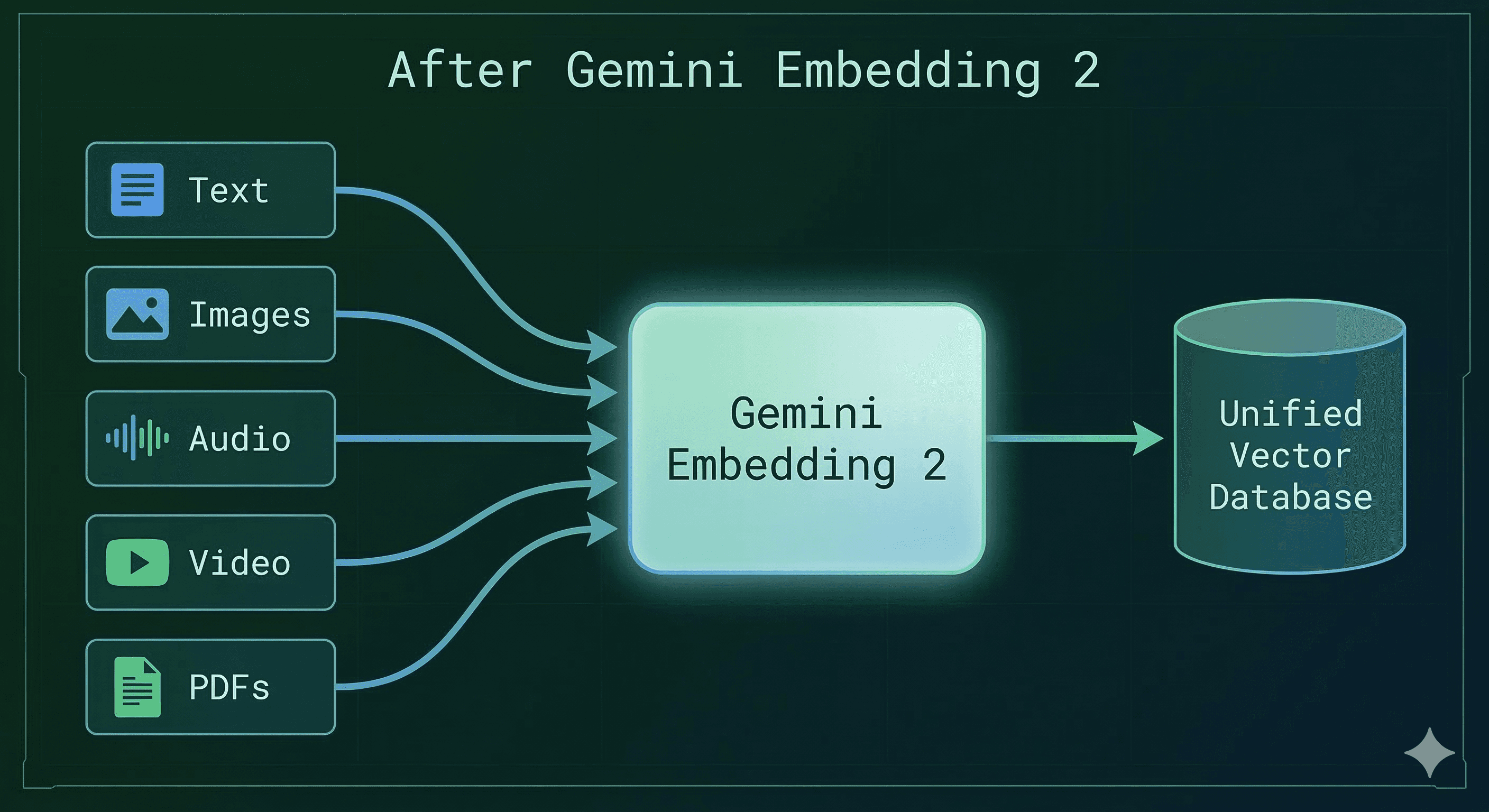
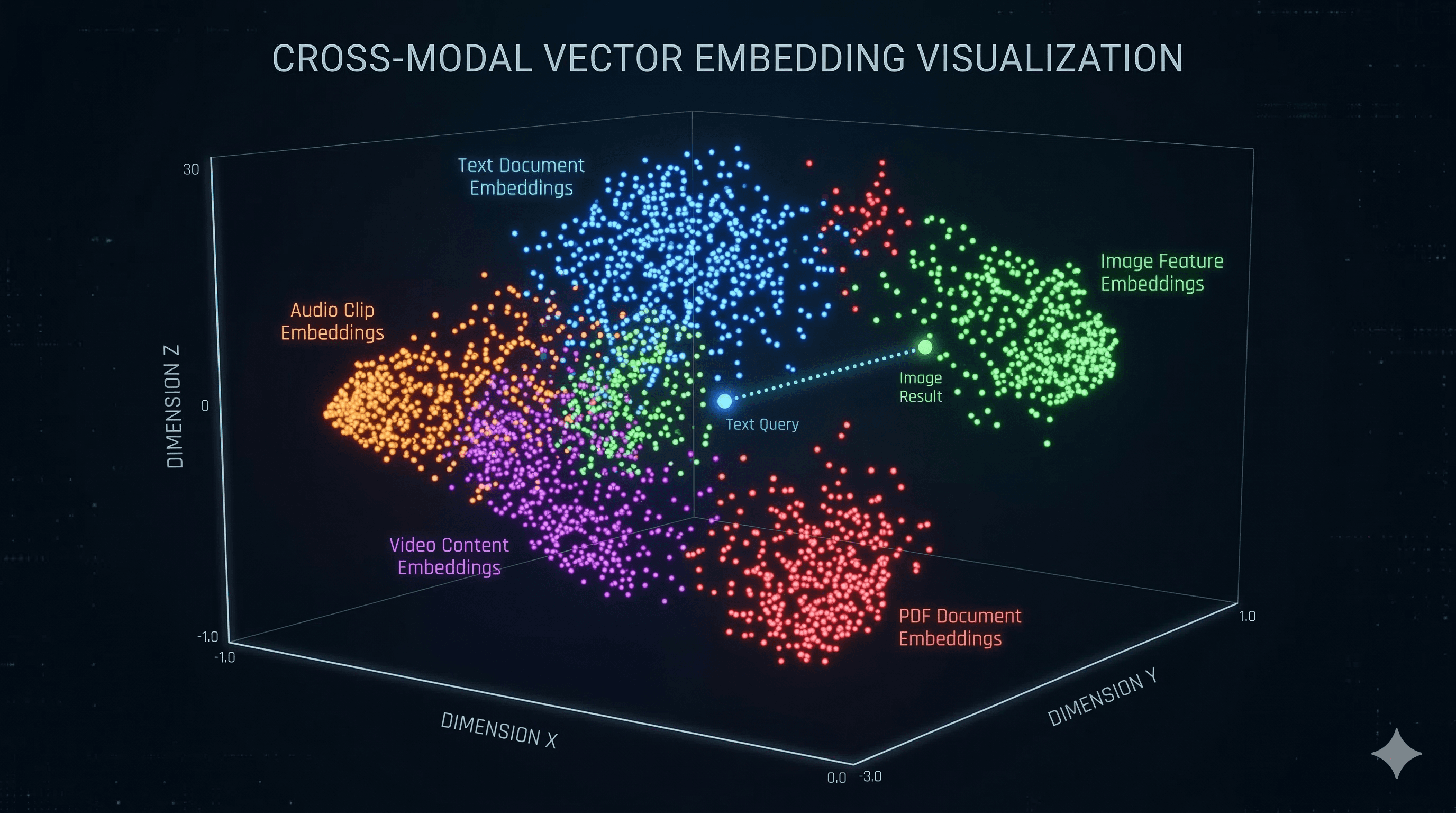
Gemini Embedding 2 dropped on March 10, 2026, and the developer community is already losing it. This is the first natively multimodal embedding model built on the Gemini architecture, and it maps text, images, video, audio, AND documents into one unified embedding space.
One model. One vector space. Five modalities. Let that sink in.
TL;DR for the Busy Devs
Model: gemini-embedding-2-preview
Modalities: Text, Images (PNG/JPEG), Video (MP4/MOV up to 128s), Audio (MP3/WAV up to 80s), PDFs (up to 6 pages)
Dimensions: 128 to 3,072 (flexible via Matryoshka Representation Learning)
Context window: 8,192 tokens
Languages: 100+
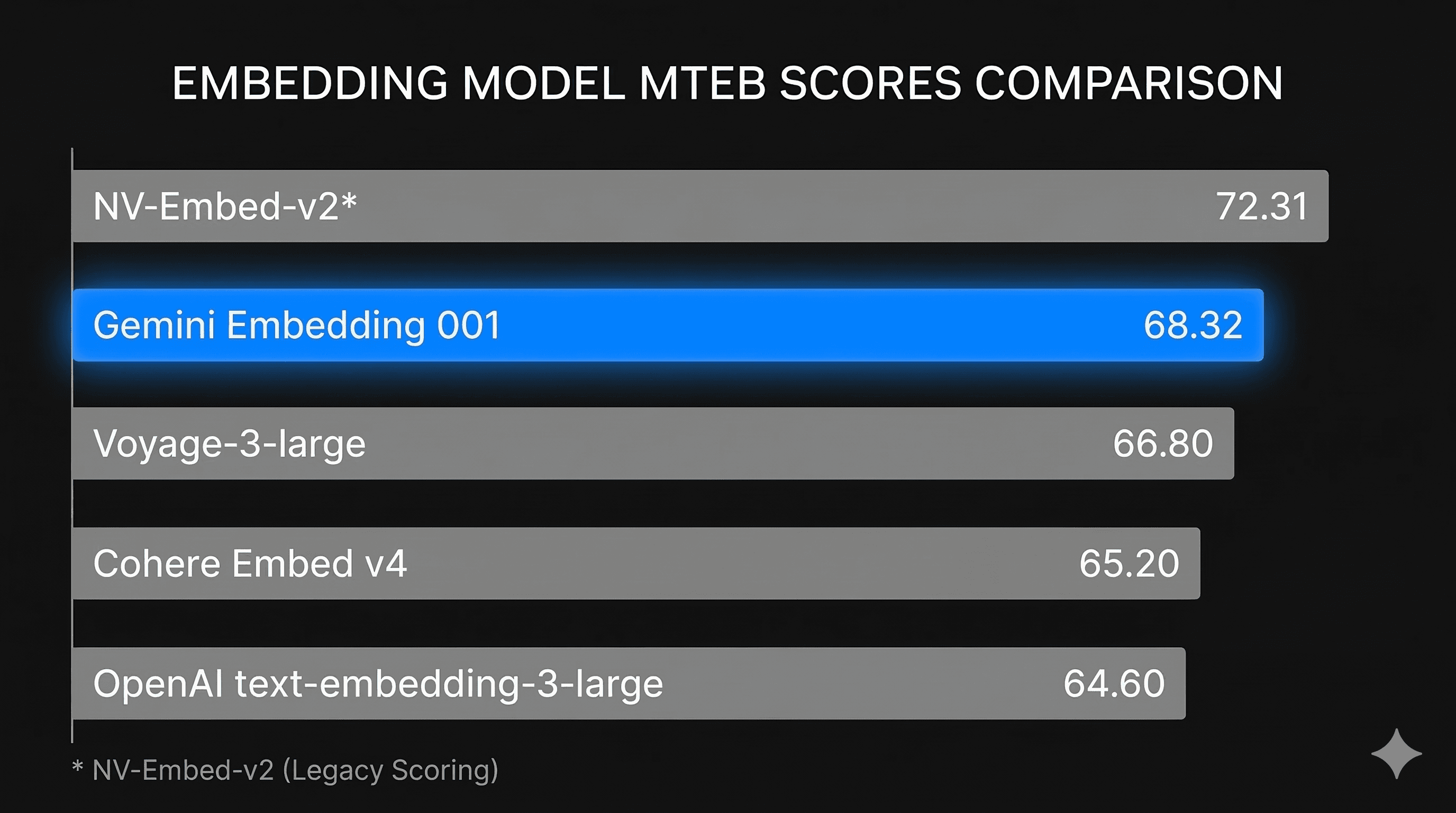
MTEB Score: 67.99-68.17 (multimodal variant) | Gemini Embedding 001 holds #1 on MTEB English at 68.32
Available: Public Preview via Gemini API and Vertex AI
Why Should You Care?
Let me paint a picture.
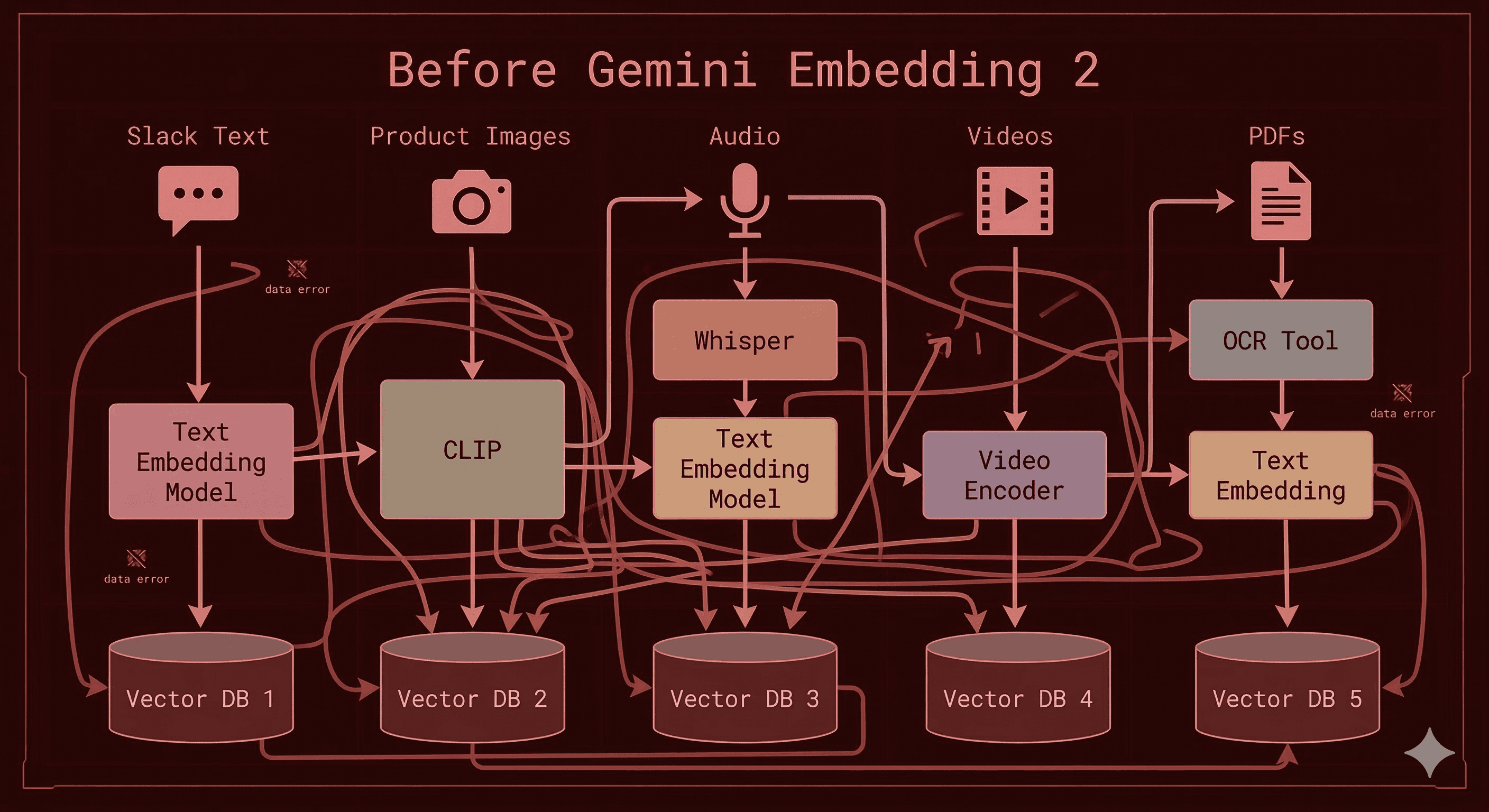
You're building a knowledge base for your company. Your data lives across Slack messages (text), product screenshots (images), onboarding videos (video), customer support calls (audio), and compliance documents (PDFs).
Before Gemini Embedding 2, you needed a different model or pipeline for each of those. You'd stitch together some Frankenstein architecture with CLIP for images, Whisper for audio transcription + text embeddings for the transcript, and yet another model for your text docs.
Now? One API call. Everything goes into the same vector space. You can literally search across all of it with a single query.
That's not incremental improvement. That's a paradigm shift.
What Makes Gemini Embedding 2 Different
1. Natively Multimodal (Not Bolted On)
This is the big one. Gemini Embedding 2 doesn't convert your audio to text first and then embed it. It doesn't run your images through a separate vision encoder. It processes all five modalities natively through the Gemini architecture.
That means:
Audio goes in as audio. No lossy speech-to-text step. No information lost in transcription.
Images go in as images. The model sees what you see.
Video goes in as video. Temporal understanding included.
PDFs go in as documents. Layout, tables, figures, all captured.
And you can mix them. Send an image + text description in one request, and get a single embedding that captures the relationship between both.
2. Matryoshka Representation Learning (MRL)
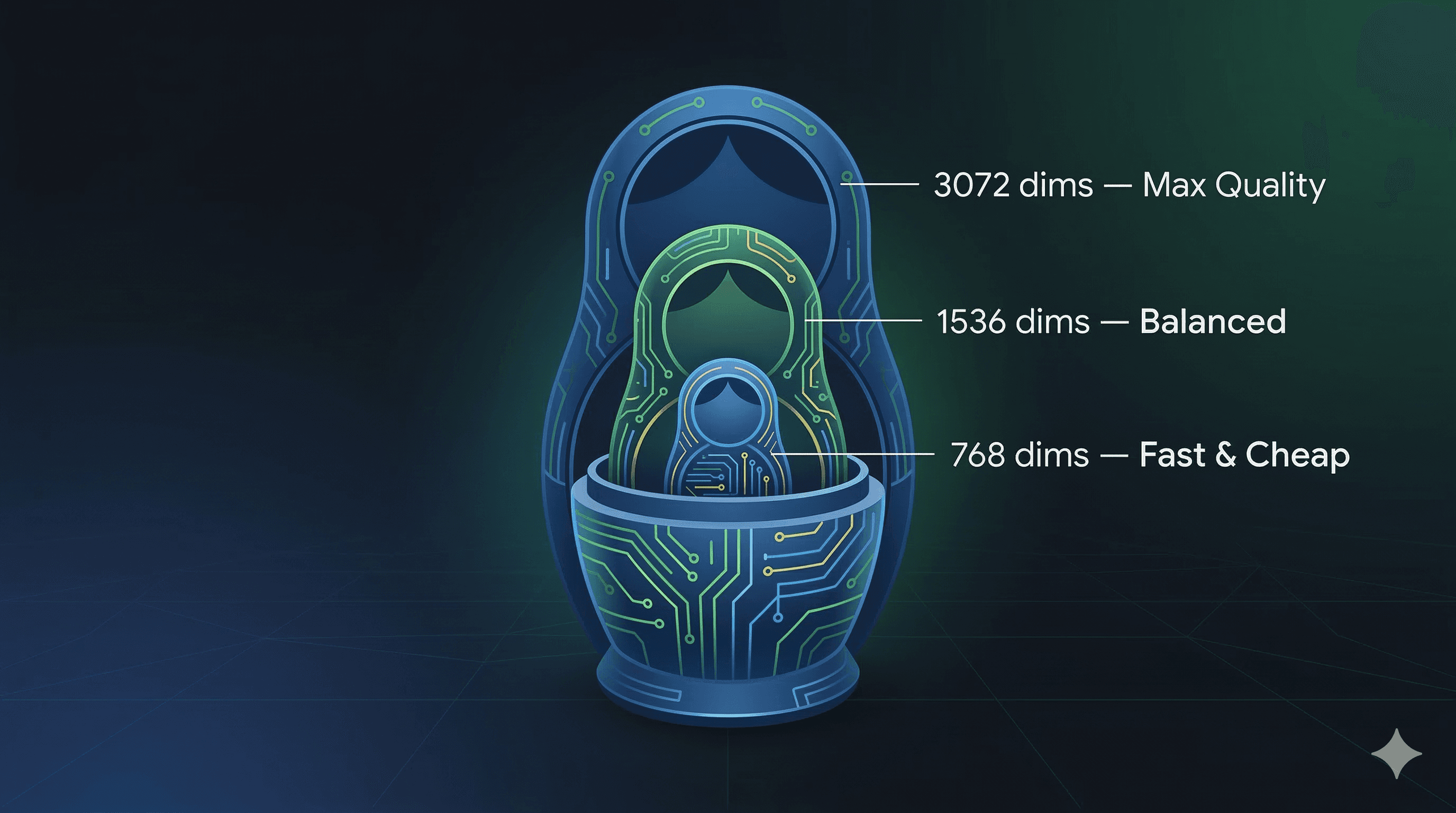
Named after those Russian nesting dolls, MRL lets you scale your embedding dimensions without retraining. The full output is 3,072 dimensions, but you can truncate down to 1,536 or 768 and still get solid semantic quality.
Why does this matter? Storage costs and latency.
3,072 dims: Maximum quality. Use for your gold-standard retrieval.
1,536 dims: Great balance. Most production systems will live here.
768 dims: Fast, cheap, still surprisingly good. Perfect for initial candidate retrieval.
Pro tip: run a two-pass retrieval system. First pass at 768 dims for speed, then rescore top-K results with full 3,072 dims for precision. Qdrant's blog on this strategy breaks it down well.
3. Native Audio Embedding (This Is Huge for Voice AI)
If you're in the voice AI space, pay attention.
Most embedding models completely ignore audio. You'd have to transcribe first, lose all the prosody, tone, and speaker characteristics, and then embed the flat text.
Gemini Embedding 2 embeds audio directly. MP3, WAV, up to 80 seconds per clip.
Think about what this unlocks:
Podcast search: Find segments by meaning, not just transcript keywords
Customer call analytics: Semantic search across thousands of hours of calls
Voice note retrieval: "Find the recording where I talked about the Q3 budget"
Music similarity: Embed audio and find semantically similar tracks
For companies building voice AI products, this removes an entire layer of complexity from the stack.
4. Interleaved Multimodal Inputs
This is a feature most people are sleeping on.
You can send multiple modalities in a single content entry, and the model produces one aggregated embedding that captures the relationships between them. Image + caption? Video + description? Audio clip + transcript? All in one embedding.
This is how real-world data works. A product listing isn't just text or just an image. It's both. And now your embeddings can reflect that.
The Benchmarks: Where Does It Actually Stand?
Let's talk numbers. Here's the March 2026 MTEB leaderboard:
Rank
Model
Provider
MTEB Avg
Dims
Pricing
1
Gemini Embedding 001
Google
68.32
3072
~$0.004/1K chars
2
NV-Embed-v2
NVIDIA
72.31*
4096
Free (open-weight)
3
Qwen3-Embedding-8B
Alibaba
70.58**
4096
Free (open-weight)
6
Voyage-3-large
Voyage AI
66.80
2048
$0.06/1M tokens
8
Cohere Embed v4
Cohere
65.20
1024
$0.12/1M tokens
9
text-embedding-3-large
OpenAI
64.60
3072
$0.13/1M tokens
Scores from legacy MTEB (56 tasks). Cross-leaderboard comparisons are approximate.
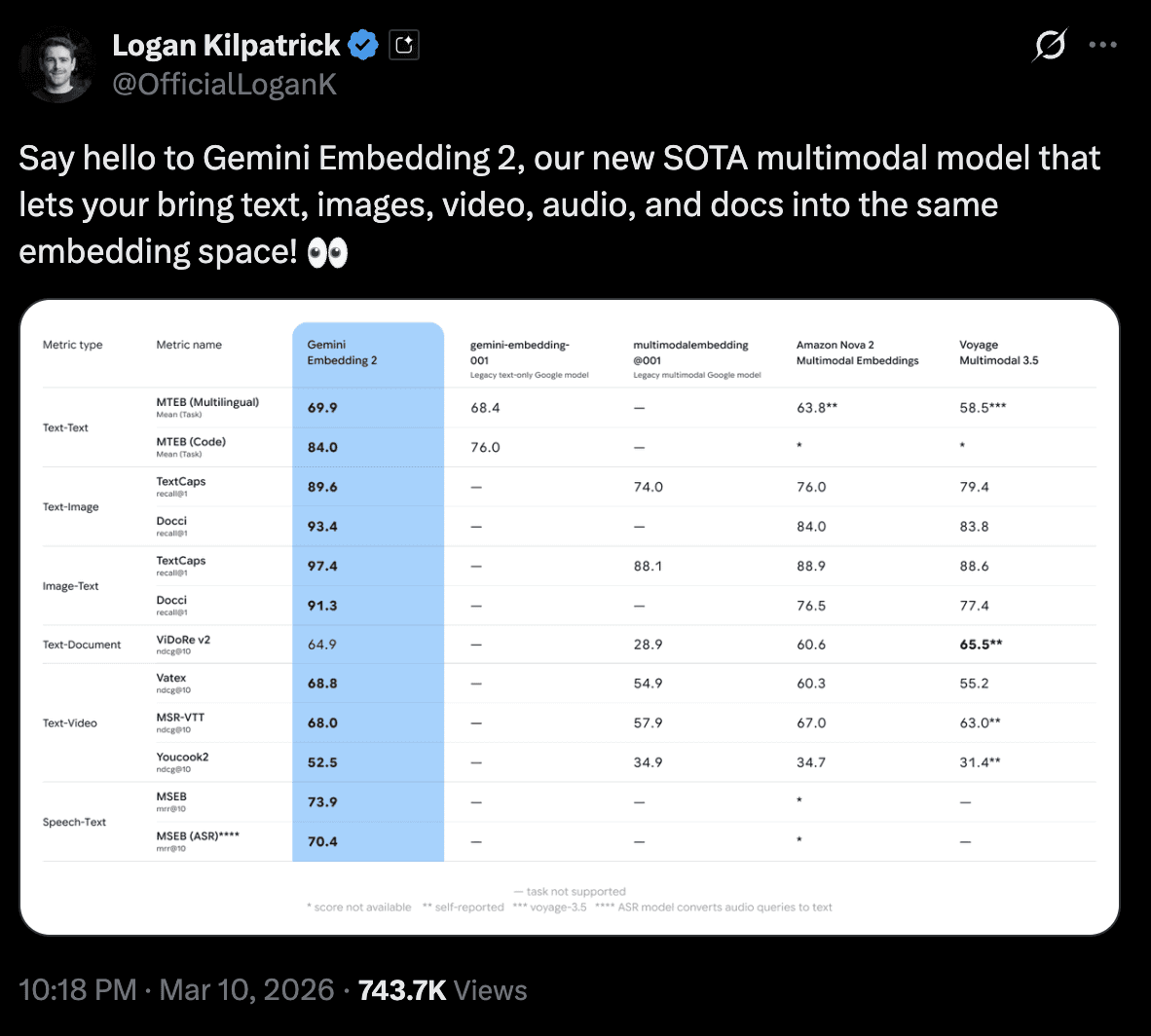
Google's Gemini Embedding 001 is #1 on the refreshed English MTEB leaderboard with a 68.32 average. And Gemini Embedding 2 (the multimodal version) scores 67.99-68.17 across its dimension tiers. That's with multimodal support, which none of the other top models have.
On retrieval specifically, which is what most of us actually care about for RAG, Gemini Embedding 001 scores 67.71. Compare that to NV-Embed-v2 at 62.65. If retrieval is your primary use case, Google's lead is even more significant.
The pricing story is insane. At roughly $0.004 per 1K characters, Gemini Embedding is significantly cheaper than OpenAI ($0.13/1M tokens) and Cohere ($0.12/1M tokens). And the open-source models that score higher? They require you to host and scale your own infrastructure.
Show Me the Code
Enough theory. Let's build.
Basic: Text Embedding
fromgoogleimportgenaifromgoogle.genaiimporttypes
<p>client = genai.Client()</p>
<h1>Simpletextembedding</h1>
<p>result = client.models.embed_content(<br>model="gemini-embedding-2-preview",<br>contents="What is retrieval augmented generation?",<br>config=types.EmbedContentConfig(<br>task_type="RETRIEVAL_DOCUMENT",<br>output_dimensionality=768# MRL: scale down for speed<br>)<br>)</p>
fromgoogleimportgenaifromgoogle.genaiimporttypes
<p>client = genai.Client()</p>
<h1>Simpletextembedding</h1>
<p>result = client.models.embed_content(<br>model="gemini-embedding-2-preview",<br>contents="What is retrieval augmented generation?",<br>config=types.EmbedContentConfig(<br>task_type="RETRIEVAL_DOCUMENT",<br>output_dimensionality=768# MRL: scale down for speed<br>)<br>)</p>
fromgoogleimportgenaifromgoogle.genaiimporttypes
<p>client = genai.Client()</p>
<h1>Simpletextembedding</h1>
<p>result = client.models.embed_content(<br>model="gemini-embedding-2-preview",<br>contents="What is retrieval augmented generation?",<br>config=types.EmbedContentConfig(<br>task_type="RETRIEVAL_DOCUMENT",<br>output_dimensionality=768# MRL: scale down for speed<br>)<br>)</p>
uv tool install git+<a href="<a href="https://github.com/run-llama/audio-kb" data-framer-link="Link:{"url":"https://github.com/run-llama/audio-kb","type":"url"}">https://github.com/run-llama/audio-kb</a>"data-framer-link="Link:{"url":"<a href="https://github.com/run-llama/audio-kb%22,%22type%22:%22url%22%7D%22>https://github.com/run-llama/audio-kb</a><br>audio-kb"data-framer-link="Link:{"url":"https://github.com/run-llama/audio-kb%22,%22type%22:%22url%22%7D%22>https://github.com/run-llama/audio-kb</a><br>audio-kb","type":"url"}">https://github.com/run-llama/audio-kb","type":"url"}">https://github.com/run-llama/audio-kb</a><br>audio-kb</a> process --file meeting_notes.mp3<br>audio-kb search "What did we decide about the launch date?"
uv tool install git+<a href="<a href="https://github.com/run-llama/audio-kb" data-framer-link="Link:{"url":"https://github.com/run-llama/audio-kb","type":"url"}">https://github.com/run-llama/audio-kb</a>"data-framer-link="Link:{"url":"<a href="https://github.com/run-llama/audio-kb%22,%22type%22:%22url%22%7D%22>https://github.com/run-llama/audio-kb</a><br>audio-kb"data-framer-link="Link:{"url":"https://github.com/run-llama/audio-kb%22,%22type%22:%22url%22%7D%22>https://github.com/run-llama/audio-kb</a><br>audio-kb","type":"url"}">https://github.com/run-llama/audio-kb","type":"url"}">https://github.com/run-llama/audio-kb</a><br>audio-kb</a> process --file meeting_notes.mp3<br>audio-kb search "What did we decide about the launch date?"
uv tool install git+<a href="<a href="https://github.com/run-llama/audio-kb" data-framer-link="Link:{"url":"https://github.com/run-llama/audio-kb","type":"url"}">https://github.com/run-llama/audio-kb</a>"data-framer-link="Link:{"url":"<a href="https://github.com/run-llama/audio-kb%22,%22type%22:%22url%22%7D%22>https://github.com/run-llama/audio-kb</a><br>audio-kb"data-framer-link="Link:{"url":"https://github.com/run-llama/audio-kb%22,%22type%22:%22url%22%7D%22>https://github.com/run-llama/audio-kb</a><br>audio-kb","type":"url"}">https://github.com/run-llama/audio-kb","type":"url"}">https://github.com/run-llama/audio-kb</a><br>audio-kb</a> process --file meeting_notes.mp3<br>audio-kb search "What did we decide about the launch date?"
Task Types: Pick the Right One
Gemini Embedding 2 supports specialized task types that optimize the embedding for your specific use case:
Task Type
When to Use It
RETRIEVAL_DOCUMENT
Indexing documents for search
RETRIEVAL_QUERY
The search query itself
SEMANTIC_SIMILARITY
Recommendations, deduplication
CLASSIFICATION
Spam detection, sentiment analysis
CLUSTERING
Document organization, anomaly detection
CODE_RETRIEVAL_QUERY
Finding relevant code blocks
QUESTION_ANSWERING
QA systems
FACT_VERIFICATION
Fact-checking pipelines
Don't skip this. Using the right task type can meaningfully improve your retrieval quality. Use RETRIEVAL_DOCUMENT when indexing and RETRIEVAL_QUERY when searching. It's a small detail that makes a big difference.
The Dev Community Is Hyped
The announcements hit X on March 10 and the reactions came fast.
I work in voice AI. I build with speech pipelines every day. So when I saw "native audio embedding" in the Gemini Embedding 2 announcement, I stopped scrolling.
Here's why.
If you've ever built anything that needs to search, retrieve, or classify voice data, you know the drill. Your pipeline looks something like this:
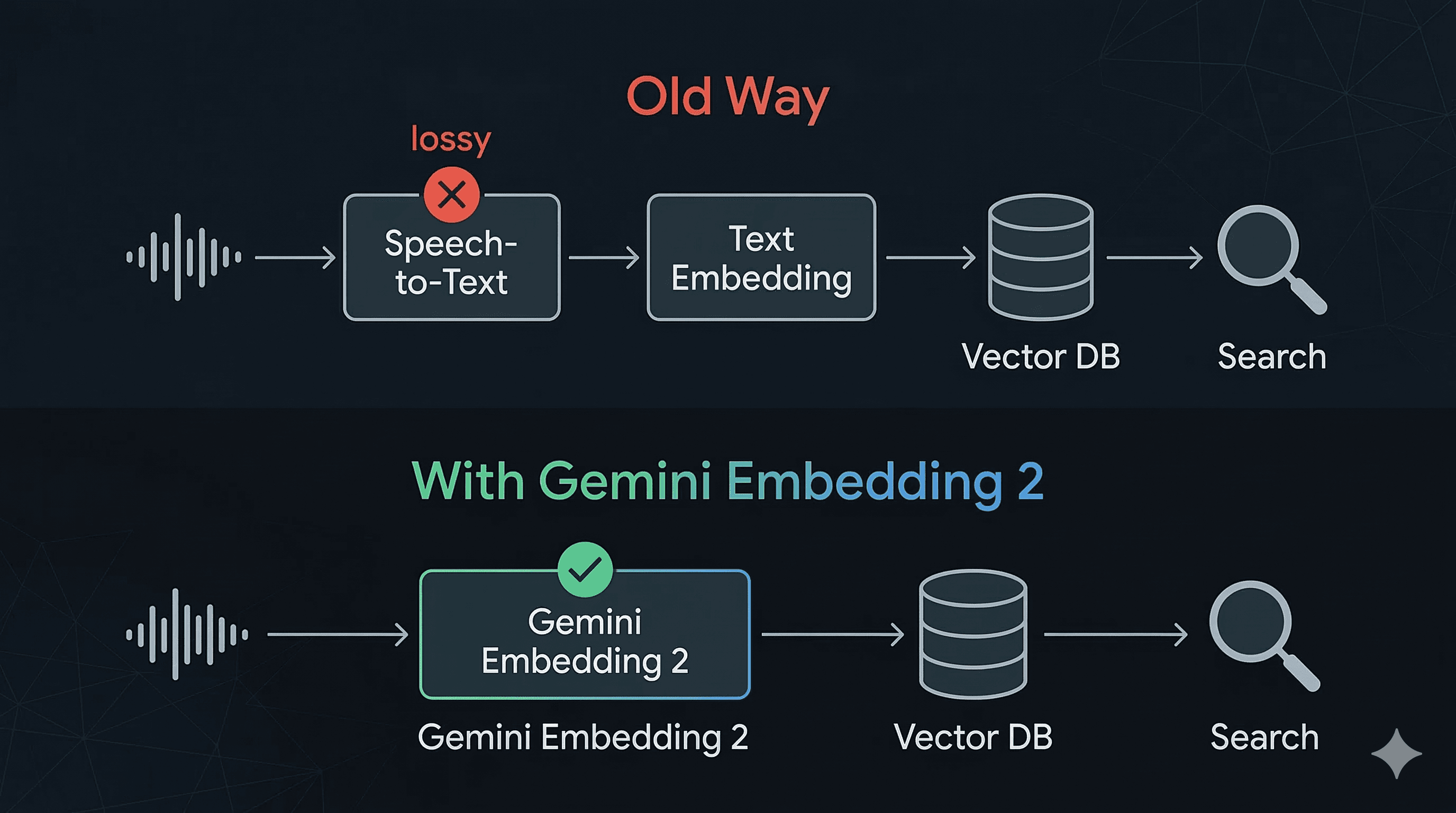
Audio -> Speech-to-Text -> Text Embedding -> Vector DB -> Search
Audio -> Speech-to-Text -> Text Embedding -> Vector DB -> Search
Audio -> Speech-to-Text -> Text Embedding -> Vector DB -> Search
Every step adds latency. Every step introduces error. And that speech-to-text step in the middle? It's the real bottleneck. Not just in speed, but in information loss. The moment you transcribe, you throw away tone, emphasis, pacing, speaker characteristics, emotional context. You're left with flat text that barely captures what was actually communicated.
And if that audio is in Hinglish? Or Tamil with code-switching? Or accented English from a noisy call center? The STT mangles it, and everything downstream falls apart. Your embeddings are only as good as the transcript, and the transcript is often garbage.
With Gemini Embedding 2, that entire middle layer disappears:
Audio -> Embedding -> Vector DB -> Search
Audio -> Embedding -> Vector DB -> Search
Audio -> Embedding -> Vector DB -> Search
Audio goes in. Embedding comes out. No transcription. No information loss. No STT dependency.
The moment I saw this, my brain started running through every painful pipeline I've worked with:
Call center search: Thousands of hours of customer calls. Right now you transcribe everything, pray the STT handles the accent, and search the text. With native audio embedding, you skip all of that and search the audio directly by meaning.
Multilingual voice retrieval: The model supports 100+ languages. You could embed a Hindi audio clip and retrieve it with an English text query. Think about what that means for companies serving multilingual markets. No more maintaining separate STT models per language just to make your content searchable.
Voice note retrieval: "Find the recording where I discussed pricing with the client." That query, as text, finding the right audio clip, without ever transcribing the clip. That's the promise.
Preserving what words can't capture: Sarcasm, frustration, urgency. A customer saying "great, thanks" in a flat tone means something very different from an enthusiastic one. Transcripts lose that. Audio embeddings might not.
Is it production-ready for all of this today? Honestly, I don't know yet. The 80-second audio limit is a constraint for long calls. And I want to see how it handles real-world noisy audio before I rip out any existing pipelines.
But the direction is unmistakable. The "transcribe first, embed later" era for voice AI is on borrowed time. And if you're building anything with speech data, this should be on your radar right now.
Integration Ecosystem: Ready on Day One
Google didn't launch this in isolation. Gemini Embedding 2 has day-one integrations with:
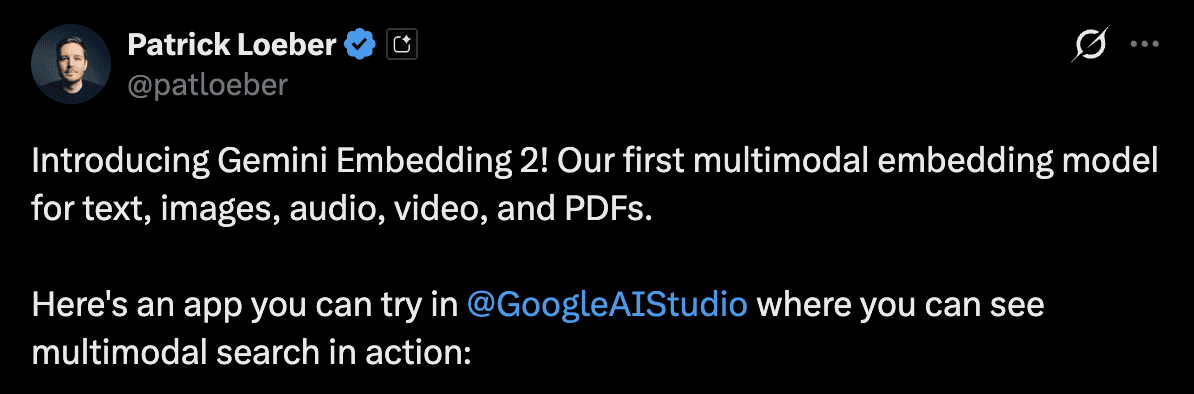
Plus there's a live demo app in Google AI Studio where you can see multimodal search working in real-time. Patrick Loeber shared it on launch day.
Important Migration Note
If you're already using gemini-embedding-001, heads up: the embedding spaces are incompatible. You can't mix embeddings from the two models in the same vector store. You'll need to re-embed your existing data when you switch.
Plan for this. It's not a "swap the model name and go" situation.
Quick Start: Zero to Embeddings in 5 Minutes
fromgoogleimportgenai<p></p><br><p>client = genai.Client()</p><br><h1>That's it. You're ready.</h1><br><p>result = client.models.embed_content(<br>model="gemini-embedding-2-preview",<br>contents="Your text, image, audio, video, or PDF goes here"<br>)</p>
fromgoogleimportgenai<p></p><br><p>client = genai.Client()</p><br><h1>That's it. You're ready.</h1><br><p>result = client.models.embed_content(<br>model="gemini-embedding-2-preview",<br>contents="Your text, image, audio, video, or PDF goes here"<br>)</p>
fromgoogleimportgenai<p></p><br><p>client = genai.Client()</p><br><h1>That's it. You're ready.</h1><br><p>result = client.models.embed_content(<br>model="gemini-embedding-2-preview",<br>contents="Your text, image, audio, video, or PDF goes here"<br>)</p>
I've been playing around with embedding models for a while now. The jump from text-only to truly multimodal embedding in a single model is significant. Not "oh cool, a new model" significant. More like "this changes what architectures are even possible" significant.
The fact that you can now:
Take a customer support call (audio)
Embed it directly without transcription
Store it alongside product docs (PDF), screenshots (image), and knowledge base articles (text)
Search across ALL of that with a single text query
…and it all just works because everything lives in the same vector space? That's a fundamentally different building block than what we had before.
Is it perfect? No. It's still in preview. The 80-second audio limit and 6-page PDF limit will be constraints for some use cases. And you'll want to test thoroughly against your specific data before committing to a migration from your current embedding setup.
But the direction is clear. Multimodal embeddings are the future of retrieval. And Google just made them accessible to every developer with an API key.