Voice Over vs Dubbing vs Narration: Key Differences for AI TTS

Voice over vs dubbing vs narration, explained with the exact TTS features to prioritize for each format, from prosody control to duration matching and latency.
If you have ever briefed a vendor for a voice over project and gotten dubbing back, or requested narration and ended up with a punchy commercial read, you have already felt how expensive this mix-up can be. People toss these terms around interchangeably, but production teams use them to describe different workflows, different skill sets, and different technical constraints. Nail the definition up front, before you pick a text-to-speech tool or book talent, and you avoid the kind of rework that quietly blows up budgets.
The goal here is to draw bright lines between voice over, dubbing, and narration, then connect each one to the TTS features that actually matter in practice. You should come away knowing what to look for when you are evaluating an AI speech platform for your next project. The number of teams making these choices is only going up as video-first content continues to expand across platforms.
Voice Over: The Original Off-Screen Voice
A voice over is recorded speech used in media while the speaker is not visible on screen. The voice addresses the audience from outside the frame. It does not have to match lip movements. It does not replace existing dialogue. It is added as an extra layer of audio over the picture.
That umbrella is wide on purpose. The announcer in a TV spot describing a product over footage is voice over. The expert explaining what you are seeing in a documentary is voice over. So are corporate explainers, e-learning modules, video game lines delivered during a cutscene, and radio ads. Voice over work typically breaks into categories like commercial, animation, audiobook, and narration, each with its own delivery style and casting expectations.
What ties these together is that nobody is chasing lip sync. A voice over performer can focus on tone, clarity, and pacing without having to hit the exact timing of a mouth on screen. That lack of a sync constraint is also why voice over is the most straightforward of the three to support with AI TTS: the output has to sound natural and land the intended read.
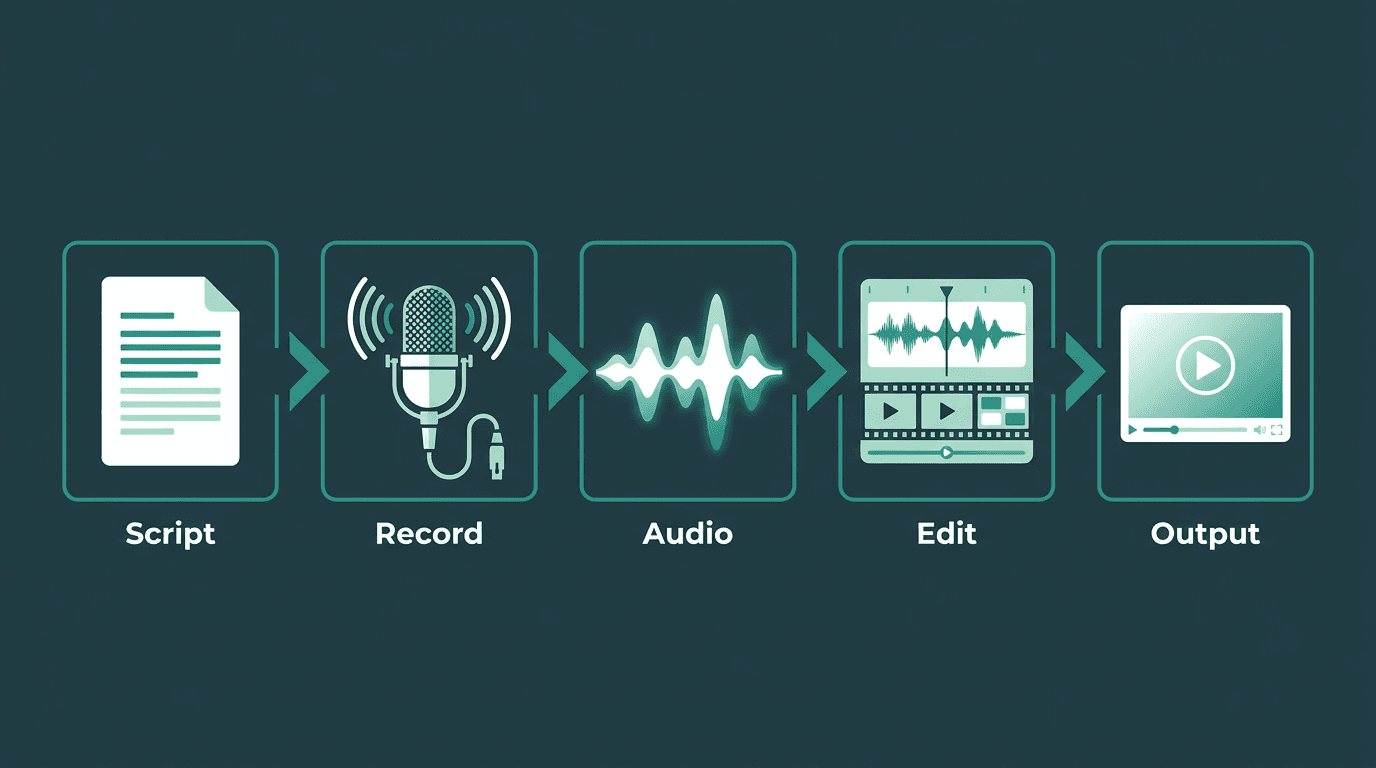
The voice over workflow: script, record, edit, and layer over video without lip-sync constraints.
Dubbing: When the Voice Has to Match the Mouth
Dubbing is post-production work where the original dialogue in a film, TV show, or video is replaced with a new recording, usually in another language. The replacement has to line up with what the actor’s mouth is doing on screen. That single requirement is why dubbing is harder than voice over, both technically and creatively, and why "AI dubbing" is still a tough problem to get right.
A typical dubbing pipeline is long for a reason: translation, adaptation, casting, directed studio sessions, and then mixing. The adaptation step is the one people underestimate most: a literal translation almost never fits mouth shapes, so an adaptor rewrites lines for what the industry calls lip sync or mouth sync. Dubbing is also distinct from ADR (Automated Dialogue Replacement), which swaps in the original actor’s voice rather than recording a different language entirely.
From a TTS standpoint, dubbing is not "voice over, but translated." You need timing control down at the phoneme level, the ability to compress or stretch speech to hit a target duration, and ideally a way to score lip sync so you can validate output before it ships. Those are specialized capabilities, not a standard text-to-speech API call. If you are translating video for international markets, you are doing dubbing, and you should judge tools by how well they handle that constraint.
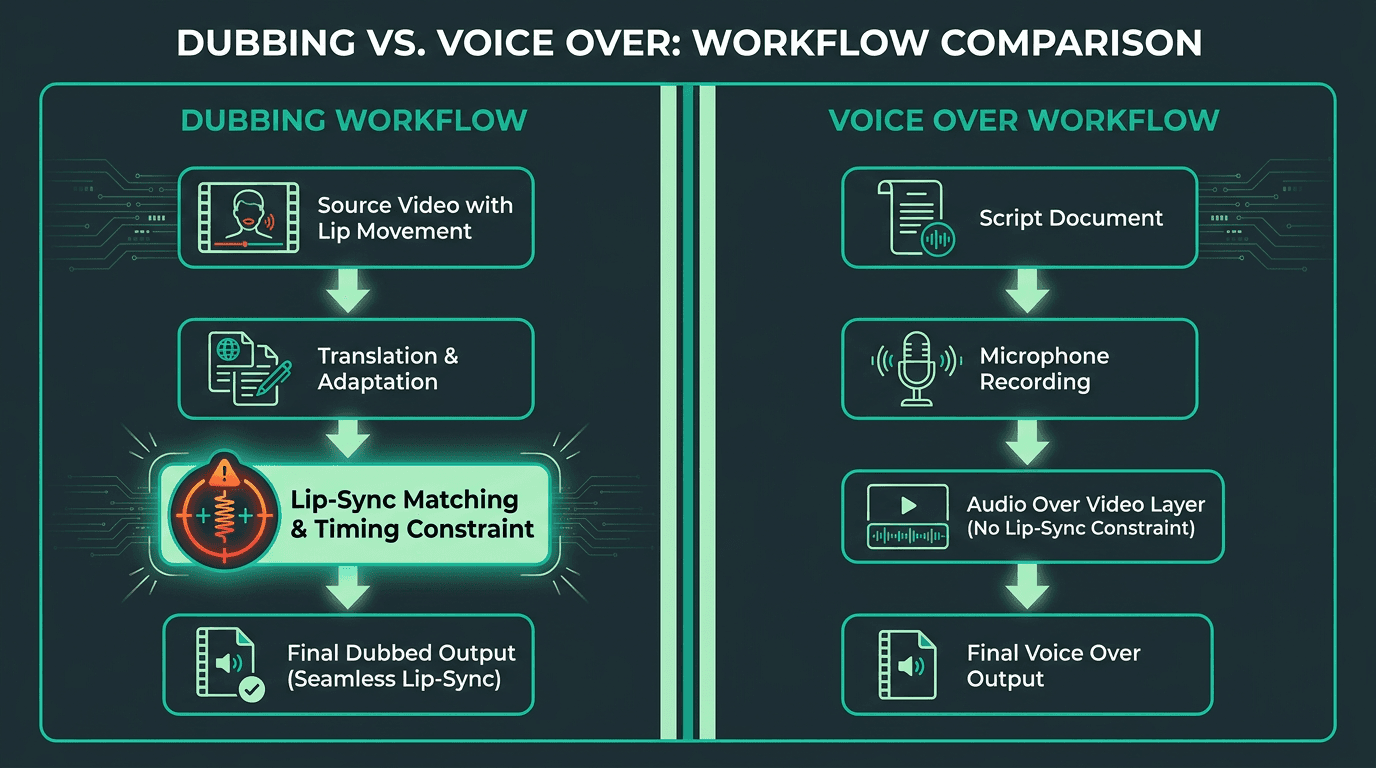
Dubbing adds a lip-sync constraint that voice over simply does not have.
Narration: Storytelling Voice, Not Just Information Delivery
Narration is spoken commentary that carries an audience through a story or a sequence of events. The Cambridge Dictionary defines it as "the act of telling a story or a spoken description of events during a film or television program." Wikipedia's entry on narration adds a useful framing: narration is mandatory in written stories (every novel has a narrator), but optional in film and TV, where it is a deliberate stylistic choice.
Narration overlaps with voice over in the real world, which is exactly why the terms get tangled. The difference is less about where the voice sits and more about what it is doing to the story. A narrator has a point of view and guides interpretation, not just comprehension. An announcer voice over is primarily informational. When a documentary narrator says, "and so the expedition ended in silence," they are shaping meaning; when a commercial says, "now available in three new flavors," it is delivering a message. Both are off-screen voices. Only one is narrating.
For TTS, narration is where prosody stops being a nice detail and becomes the product. Pacing, pause placement, emotional shading, and the ability to hold a consistent persona across long-form material matter more here than they do in a 30-second spot. If you are producing audiobooks, documentary work, or narration for YouTube channels, you want an engine that stays coherent over long passages and has expressive range, not just clean pronunciation.
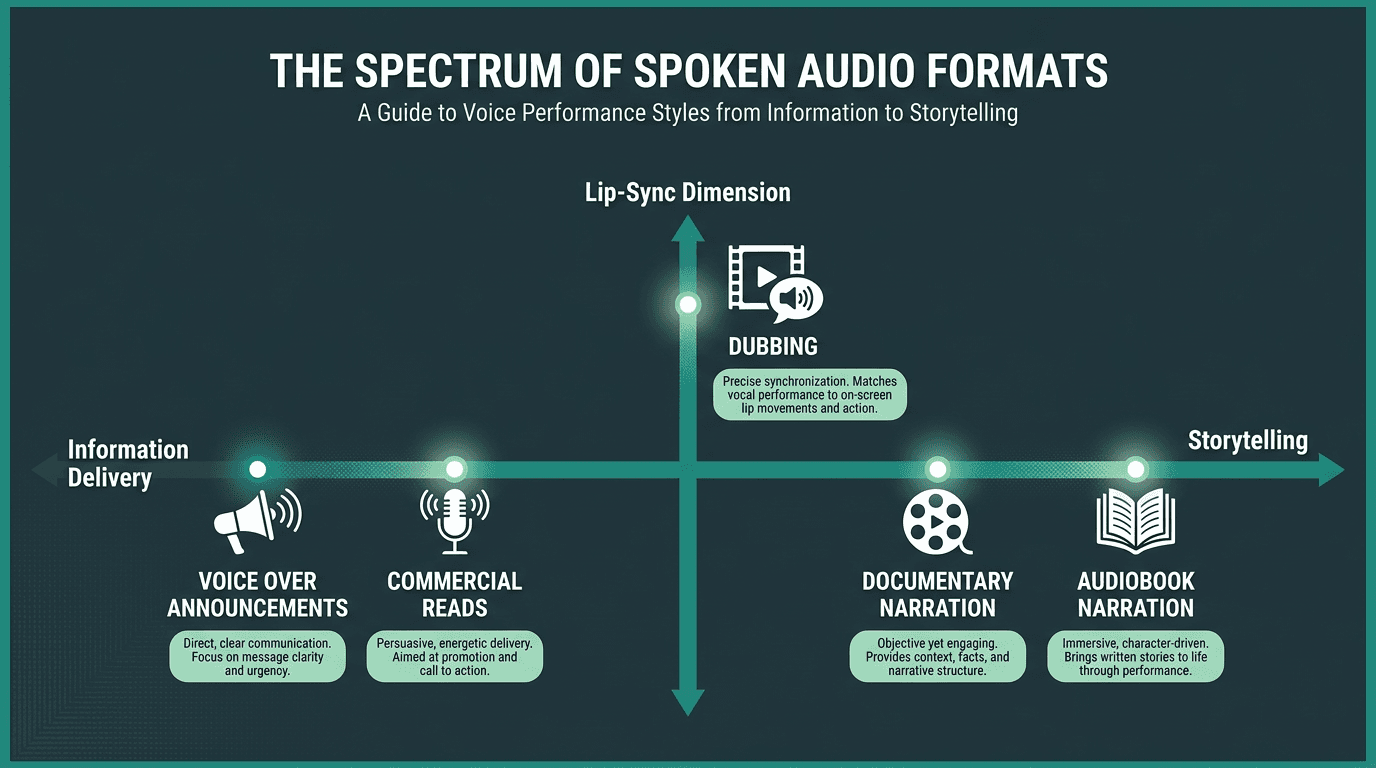
Narration lives on a storytelling spectrum that voice over announcements do not occupy.
Side-by-Side: What Actually Separates These Three
The table below condenses the differences into something you can use while scoping a project. Two rows do most of the work: “lip sync required” immediately knocks most TTS tools out of the dubbing conversation, and “persona continuity” is the line between narration-grade TTS and a basic voice over generator.
Feature | Voice Over | Dubbing | Narration |
Primary purpose | Add off-screen commentary or information. | Replace original dialogue with a translated version. | Tell a story or guide interpretation with a point of view. |
Lip sync required? | No | Yes, critical for realism. | No |
Translation required? | No, not inherently | Yes, almost always for localization. | No, not inherently |
Best use cases | Commercials, e-learning, explainers, announcements. | Films, TV shows, and video games for international markets. | Documentaries, audiobooks, long-form storytelling. |
Main TTS feature needed | High-quality voices, low latency, SSML for style control. | Duration matching and phoneme-level timing control. | Long-form consistency and expressive prosody control. |
Hardest quality risk | Generic, flat delivery that lacks brand voice or energy. | Poor lip sync or unnatural timing that breaks immersion. | Inconsistent persona or robotic prosody over long content. |
Which TTS Feature Do You Actually Need?
This is the point where terminology stops being a trivia question and starts affecting schedules and budgets. As more vendors claim they can do it all, the only reliable filter is knowing which capability your format actually demands.
For Voice Over Projects
Prioritize low-latency generation, a voice library with genuinely distinct styles (conversational, authoritative, energetic), and solid pronunciation control for brand names and technical terms. Speed control and pitch adjustment help when you are trying to hit a specific brand read. If you are producing at scale, batch processing plus SSML support saves real time. And if your pipeline is video-first, the ability to add voice over to a video programmatically, instead of exporting files and hand-syncing them, is a workflow win you will feel immediately.
For Dubbing Projects
Duration matching is the requirement you cannot negotiate away. You need a system that can synthesize speech to fit a target time window, not just generate natural audio at whatever pace the model prefers. Phoneme-level timing control, multi-language support with native-quality voices, and ideally automated lip-sync scoring are the features that separate an actual dubbing tool from a voice over tool being pushed past its limits. Most general-purpose TTS APIs are not designed for this. Treat any "dubbing" claim with suspicion if the product cannot show duration-constrained generation.
For Narration Projects
Long-form consistency is where narration TTS tends to break. A voice that impresses in a 30-second sample can get tiring, or start drifting, by the 30-minute mark. Look for voice cloning that lets you define and lock a persona, plus fine-grained prosody controls (pause length, emphasis, reading rate by segment) and support for long documents without quality falling off. For narration, the gap to close is sustained expressiveness over time, not basic pronunciation.
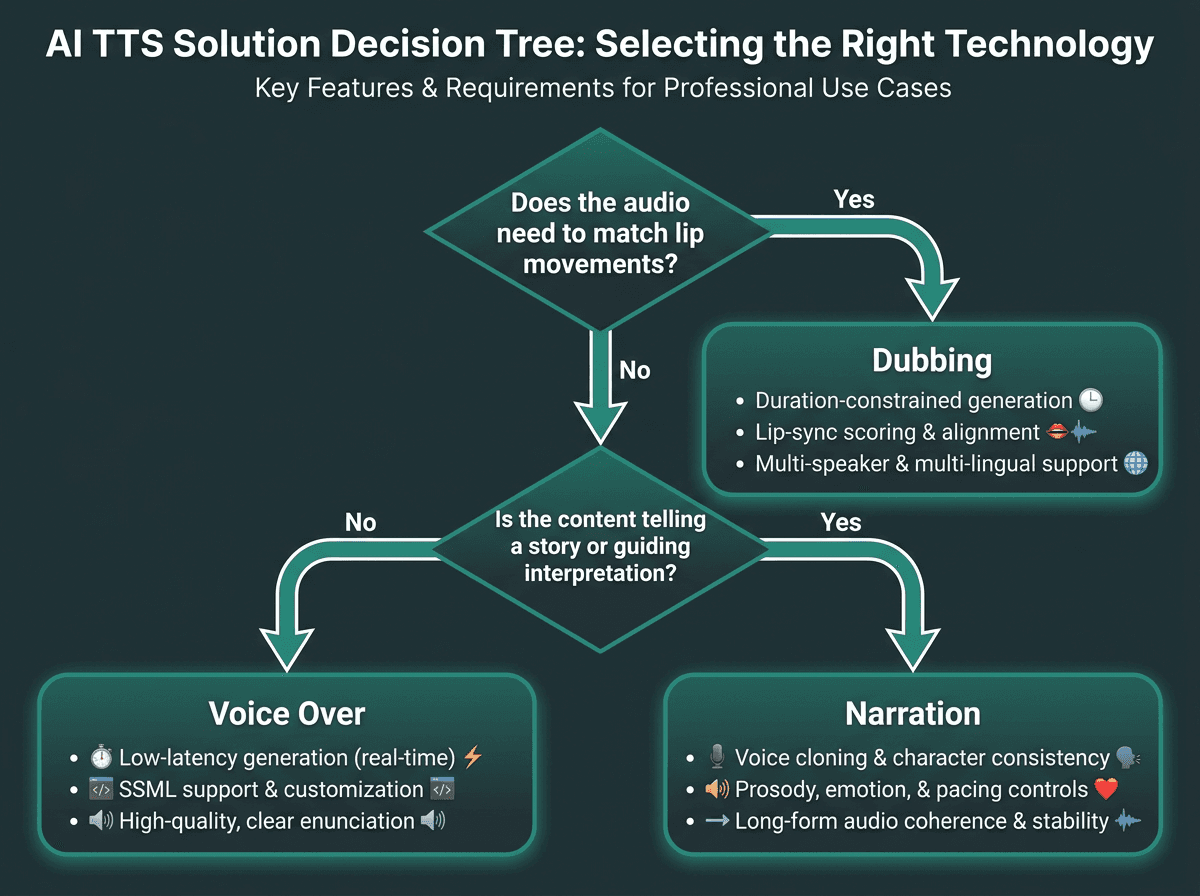
Use this decision tree to identify which TTS capability your project actually requires.
What Most People Get Wrong When Evaluating TTS for These Use Cases
The most common mistake is judging a TTS platform by a 10-second demo and assuming that quality scales to the real job. It usually doesn’t. A voice that sounds warm in a short clip can flatten out across a 500-word narration passage. A model that shines in English can turn stiff and robotic in Spanish right when you need dubbing. Test with material that matches your actual length, language, and delivery style, not a marketing snippet.
The next mistake is treating voice cloning as a stand-in for narration quality. Cloning gives you timbre and identity; it does not automatically deliver strong prosody. If you feed a cloned voice plain text with no SSML guidance, the read often comes out flat even when the voice itself is highly realistic. Prosody is its own layer: how the engine handles sentence structure, punctuation, emphasis, and emotional context. If you are exploring speech-to-text technology to understand how the input side of the pipeline affects output quality, the underlying architecture matters as much as the voice you pick.
Latency is another factor people underrate, especially in conversational or interactive voice over setups. If you are building a voice agent or an interactive e-learning module where the system responds to user input, a two-second TTS delay makes the experience feel broken, even if the audio is pristine. For real-time work, latency is a first-order requirement. And understanding Voice Recognition vs. Speech Recognition is relevant because the input pipeline contributes directly to the round-trip time users experience.
The Market Behind These Choices
North America has historically held the largest share of the dubbing and voice-over market, and the human talent pool is substantial. That context matters for AI TTS: the story is not "machines replace talent." It is that the total volume of audio being produced keeps expanding, especially in e-learning, short-form video, and interactive formats where speed and cost often matter more than the absolute ceiling of a top-tier human performance.
For creators and teams producing at scale, whether that is a TikTok AI voice generator workflow or a full enterprise e-learning pipeline, the real decision is rarely "AI or human." It is which AI capability fits the format you are shipping. That is the distinction this piece has been building toward. If you are building more complex voice-driven products, AI voice agents architecture is useful background on where TTS sits in the broader system.
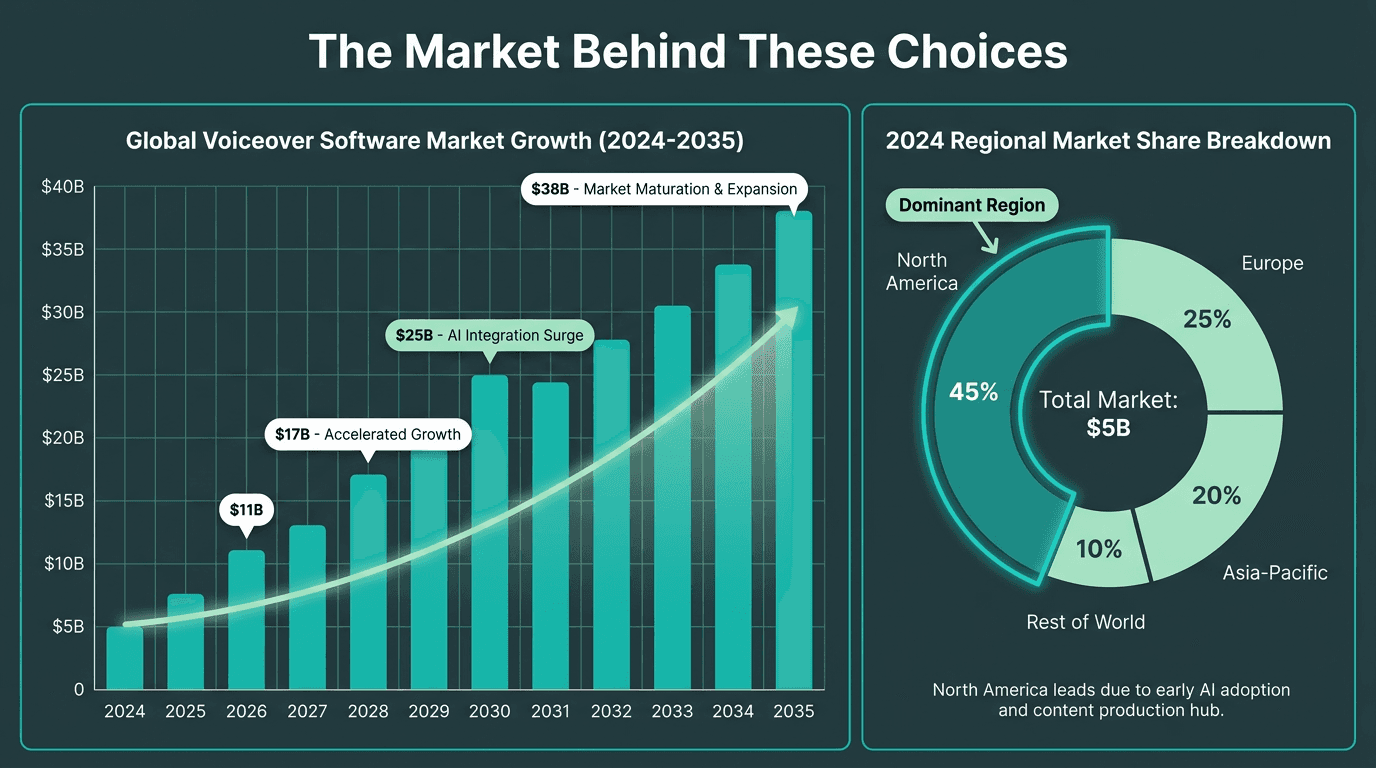
Voice over software market growth projection through 2035, driven by AI adoption across e-learning, media, and interactive applications.
Summary and Next Steps
Voice over is off-screen speech layered onto media, with no need to match mouth movements. Dubbing replaces existing dialogue and lives or dies on tight timing against on-screen lip movement. Narration is a storytelling voice with a point of view, which raises the bar on long-form consistency and expressive prosody. Each format pulls for different TTS capabilities, and using the wrong tool often produces audio that sounds "fine" in isolation but is wrong for the job.
Start by naming the format, then score tools against the constraints that format imposes. For most voice over and narration work, a high-quality TTS API with voice cloning, SSML support, and low latency covers the bulk of production needs. For dubbing, filter aggressively for duration-constrained generation and native-quality voices across your target languages.
If your roadmap includes voice over, narration, or real-time interactive audio, Smallest.ai's Lightning TTS API is designed around those production requirements. Lightning focuses on ultra-low latency speech synthesis with expressive voice cloning, so it fits documentary-style narration, scaled e-learning voice over, and real-time voice agents. The Atoms platform extends that into full voice and text agent workflows.
Frequently asked questions
Can one AI TTS tool cover voice over, dubbing, and narration?
What is the difference between voice over and narration in practical terms?
How does AI TTS handle lip sync for dubbing?
Is voice cloning the same as having a narrator persona for long-form content?
Which format is most common in e-learning and corporate training?