HubSpot + Atoms: Build an AI Voice Lead Qualification Agent

Build an AI voice lead qualification agent with Smallest AI Atoms, automate calls, capture lead details, and sync results to HubSpot CRM.
A practical walkthrough for qualifying opted-in sales leads by phone, recording the outcome, and sending the useful parts back to HubSpot, without building a custom calling application.
A new lead fills out a form at 10 a.m. By the time a sales rep finds the record, checks the details, and calls back, the person may already be talking to someone else. The problem is not necessarily a shortage of leads. It is the gap between expressing interest and having a useful conversation.
A voice qualification agent can shorten that gap. It calls a person who has agreed to be contacted, asks a few focused questions, and returns a structured outcome for the sales team. But the important part is not just the conversation. It is whether HubSpot ends up with the right contact, the right information, and a next action someone can trust.
This guide builds that workflow with Smallest.ai Atoms for calls, HubSpot for sales records, and a no-code automation tool for the handoff. We will start with a small outbound pilot and avoid custom code in the main setup.
This HubSpot AI voice lead qualification workflow shows how to automate the first sales conversation while keeping contact updates and follow-up actions in your CRM.
What We Are Building
Picture a software company with 50 demo requests each week. Every contact already has a phone number in HubSpot and has opted in to follow-up calls. The team wants a short conversation about use case, timeline, decision process, and the best next step.
Component | Responsibility |
|---|---|
HubSpot | Holds source contact records and the sales team’s follow-up fields. |
Atoms voice agent | Speaks with the lead and asks the qualification questions. |
Atoms post-call metrics | Turns the conversation into a structured qualification result. |
Webhook + automation bridge | Receives call results, finds the right contact, and updates HubSpot. |
HubSpot follow-up | Uses the new fields to help a rep act, or triggers an available workflow. |
Implementation note: At the time of writing, the Atoms integrations documentation does not list a self-service native HubSpot connector. This tutorial uses its documented webhook integration with a separate automation bridge instead. Confirm available connectors and plan access in your own account before starting.
The Architecture at a Glance
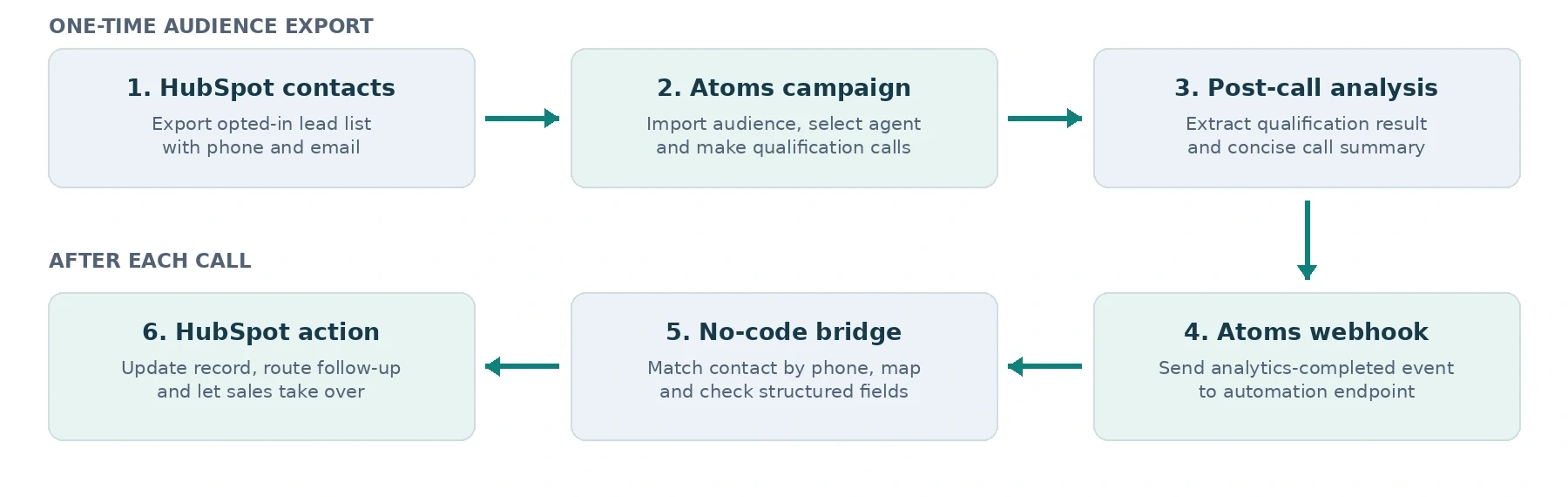
An initial CSV import starts the outbound pilot; call results return to the existing HubSpot contact through a separate event flow.
The important separation is between the call and the CRM update. Atoms can finish a call successfully even if the automation that updates HubSpot fails. That is why the webhook, contact matching, and recovery steps deserve as much attention as the voice prompt.
Before You Open the Builder
You need an Atoms account with access to an agent and an outbound-capable phone number, HubSpot access to view contacts and create properties, and a no-code automation workspace with an inbound-webhook trigger and a HubSpot connector. Zapier is used as the example below, but the same design can be adapted to a comparable builder.
Start with five to ten test contacts you control. Do not begin with a full sales database.
Use only leads who have given the necessary permission to receive this type of call. Follow applicable calling-hour, AI-disclosure, recording, privacy, and opt-out rules.
Keep a stable identifier. For this pilot, we will match the called phone number to an existing HubSpot contact. Do not create a new contact just because a phone lookup failed.
Check your HubSpot plan before planning automated workflows; advanced workflow actions may require Professional or Enterprise tiers.
Step 1. Decide What Counts as a Qualified Lead
A voice agent cannot follow a clear sales process if the team itself has not agreed on what “qualified” means. Keep the first version small. You can always make the model smarter after the outcomes are reliable.
Outcome | Example decision rule | Sales action |
|---|---|---|
Ready for sales | Relevant need, near-term interest, and willingness to speak with a rep. | Create a prompt human follow-up. |
Nurture | Relevant need but a later timeline or no immediate next step. | Keep in a nurture queue. |
Not a fit | Clear mismatch with the product or stated use case. | Do not schedule an unnecessary demo. |
Needs review | Caller declines, key answers are unclear, or the call ends early. | Ask a human to review before changing stage. |
These are example business rules, not a universal BANT score. A caller who says “maybe next quarter” should not automatically be pushed into a sales-ready stage. Unknown answers should stay unknown.
For a broader framework on defining and testing sales qualification criteria, read How to Use Voice Agents for Sales to Qualify Leads on Autopilot.
Step 2. Prepare HubSpot to Receive the Answers
To create custom contact properties in HubSpot, open Settings → Properties, select Contact properties, and choose Create property. Make a small set of fields that your team will actually use. Use existing fields where appropriate rather than creating duplicates.
Suggested contact property | Type | Purpose |
|---|---|---|
Voice qualification status | Dropdown | Ready for sales / Nurture / Not a fit / Needs review |
Voice call summary | Multi-line text | Short reason and relevant details from the conversation |
Voice next step | Dropdown | Demo requested / Callback requested / Nurture / None / Needs review |
Last Atoms call ID | Single-line text | Helps identify repeat deliveries and troubleshoot one call |
Voice qualification updated at | Date or date/time | Shows whether the result is fresh |
Keep the lead’s original name, email address, owner, and lifecycle history. A voice agent should enrich a contact, not replace what the sales team already knows. Also resist the temptation to write an AI-generated score into HubSpot’s built-in Lead Score unless it is genuinely produced by that scoring system.
Step 3. Create the Qualification Agent in Atoms
Open the Atoms dashboard and create a voice agent for handling lead qualification calls. Give it a clear internal name, such as “Demo Request Qualifier.” Choose a suitable voice and default language, then open the prompt editor. Follow the Atoms prompt guide to configure the agent's conversation flow, qualification questions, and response instructions. Atoms supports templates and dashboard-based testing, so no application code is needed to get the first conversation running.
A starter prompt you can adapt
The following is a sample configuration. Replace the product context, escalation contact, and business rules with your own before using it.
ROLE You are the AI voice assistant for [Company]. You speak to people who requested information and agreed to a follow-up call. Your goal is to understand fit and interest, not pressure anyone into a meeting.
STYLE Sound natural and respectful. Keep answers short. Ask one question at a time, and listen without interrupting. Make it clear that you are an AI assistant.
OPENING Introduce yourself and the reason for the call. Ask whether this is a convenient time. If not, offer to have the team follow up later and end politely.
QUALIFICATION Ask what the prospect wants to solve, their approximate timeline, who will participate in the decision, and whether they would like a human follow-up. Do not force a budget question if it does not fit the conversation.
GUARDRAILS Do not invent product features, prices, availability, or meeting bookings. Do not claim to access HubSpot during the call. Do not change or promise a contract. If the person opts out, stop the call and record the request for human handling.
ENDING Summarize the prospect’s stated next step in one sentence. Thank them, and close the call.
Add a short first message that identifies the caller and asks permission to continue. Connect the approved phone number under the agent’s Telephony settings. Test with the dashboard’s Test Agent option before publishing, then publish the revision and explicitly activate it for live calls.
Step 4. Turn the Conversation Into Structured Results
A transcript is useful for review, but it is not a good value for a dropdown field. Use Atoms post-call metrics to extract structured qualification results from each conversation and store them consistently in HubSpot. In the agent editor, open Post-call metrics and add three disposition metrics.

Identifier and type | Prompt or allowed values |
|---|---|
lead_qualification | Enum | Classify from the caller’s explicit answers. Choose exactly: ready_for_sales, nurture, not_a_fit, needs_review. If evidence is insufficient, select needs_review. |
requested_next_step | Enum | Choose exactly: demo_requested, callback_requested, nurture, none, needs_review. A request is not a confirmed booking. |
opt_out_requested | Boolean | Did the caller explicitly ask not to receive further sales calls? Answer true only when requested. |
Add a short call summary through the built-in post-call analytics summary. Keep enum options exhaustive and do not instruct a metric to “skip” itself. Atoms validates metric types and choices; a malformed metric can invalidate the entire post-call result.
This is the first quality gate: the agent may sound excellent but still produce a poor CRM update if the extracted values are vague or inconsistent. Review the results of several test calls, including silence, interruptions, and partially answered questions.
Step 5. Run a Small Outbound Campaign
Export only the opted-in test leads from HubSpot to a CSV. In Atoms, create an audience by opening Audiences → Create Audience, uploading the CSV file, and mapping the phone number column. Use international phone-number formatting, then name the audience clearly, for example “Demo Requests Pilot.” The audience may include names and other context fields, but avoid uploading unnecessary personal data.
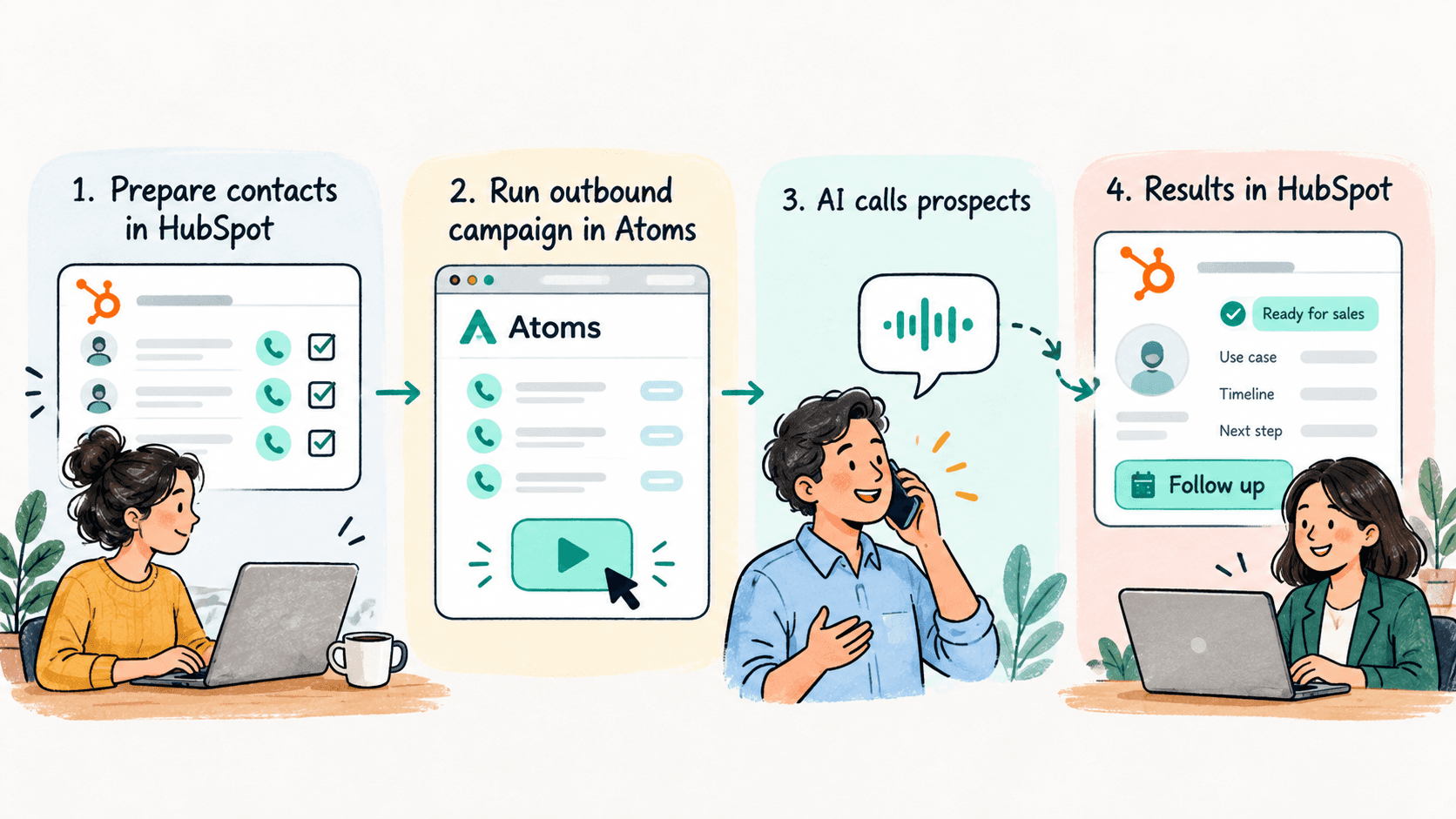
Next, create an outbound calling campaign by opening Campaigns → Create Campaign. Choose the test audience, qualification agent, and the number to call from. Start with zero automatic retries while you validate the conversation. Save it as a draft or schedule an authorized calling window in the correct timezone.
The first successful test is not “the phone rang.” It is “the agent spoke appropriately, captured the lead’s answer, and produced a usable qualification result.” Review the call record before moving on.
Step 6. Send Atoms Results to HubSpot Without Writing Code
This is the integration layer. For a no-code pilot, use a webhook-triggered automation in Zapier. It is an example route, not a certified native Atoms-to-HubSpot integration.
Can you use the Smallest AI n8n node instead?
Yes, Smallest AI has an official n8n community integration for speech-to-text, text-to-speech, and voice cloning. However, the available node operations do not provide a ready-made Atoms outbound-campaign or post-call-results-to-HubSpot action. This guide therefore uses Atoms analytics webhooks for the CRM handoff rather than presenting the n8n node as a one-click HubSpot connector.
Already using n8n? You can build a similar automation using an n8n Webhook trigger and HubSpot update actions, while keeping the same signature-verification, contact-matching, opt-out, and deduplication safeguards described below. For a published example of Smallest AI in a visual automation workflow, see PDF to Podcast Generator: A No-Code n8n Workflow. The n8n node documentation covers node installation and supported operations.
Create the receiving automation
In Zapier, start a Zap with Webhooks by Zapier → Catch Hook. Copy the generated receiving URL. Webhooks may be a paid or premium feature depending on your plan.
In Atoms, open Settings → Webhook, create an endpoint with that URL, and attach the webhook to the agent under Agent Settings → Webhook.
Subscribe to analytics-completed. This event arrives after the call is analyzed and carries the summary plus disposition metrics. Run one permitted test call to capture a sample event in your Zap.
In the Zap, filter for metadata.eventType = analytics-completed and the expected agent. Select each metric by its identifier, not by assuming it always sits at the same position in an array.
Find the right HubSpot record
For an outbound call, metadata.callData.toNumber is the destination phone number. Normalize that value to the same international format stored in HubSpot and look up the matching existing contact. For an inbound call, the prospect number is typically fromNumber instead. Some automation connectors have different search actions and filters, so check the options exposed by your HubSpot connector.

If matching by phone is not reliable, stop and add a controlled ID-mapping step. Do not use an email-based “Create or Update Contact” action without an email address in the event. The Atoms analytics-completed webhook is not guaranteed to include one.
Map only the fields you trust
Incoming value | HubSpot destination | Rule |
|---|---|---|
metadata.callId | Last Atoms call ID | Skip repeat processing for a call already handled. |
analytics.summary | Voice call summary | Keep it concise; avoid sensitive excess detail. |
lead_qualification metric value | Voice qualification status | Map values to your actual dropdown choices. |
requested_next_step metric value | Voice next step | Treat demo_requested as a request, not a booked event. |
opt_out_requested = true | Suppression/review process | Immediately route for required opt-out handling. |
Use your builder’s mapping, filtering, and formatter steps to pick the identified metrics, then update the existing HubSpot contact. Test by checking the actual contact timeline and property history, not just whether the Zap shows “successful.”
For the CRM handoff, use Zapier's HubSpot contact search and update actions to find the existing contact and update its qualification fields. Make sure the search returns one matching record before allowing the update.
A production security boundary you should not skip
Directly sending Atoms webhook data to a generic catch-hook URL is suitable only for a controlled prototype. As explained in the Atoms webhook security documentation, Atoms signs webhook requests using the X-Signature HMAC header, allowing the receiving system to verify the request before processing it. A production receiver must verify that signature against the raw request body before allowing the data to update HubSpot. A basic no-code catch-hook may not provide this verification automatically. Use a verified webhook gateway or a small security-checking relay, then hand validated events to Zapier or another no-code tool.
Also keep a durable intake log. Atoms documents a 30-second webhook timeout and no automatic retries after failed deliveries. If the receiver is unavailable, you need your own reconciliation process rather than assuming the event will reappear. Treat the call ID as the deduplication key.
Step 7. Route the Result to the Sales Team
Once the HubSpot contact is updated, the rest is ordinary CRM automation. For example, when Voice qualification status becomes “Ready for sales,” you can assign the appropriate owner and create a follow-up task, using an automated HubSpot workflow if your plan supports it.
For “Nurture,” keep the record available for a relevant later action. For “Needs review,” show the summary to a human instead of promoting the contact to a higher lifecycle stage. For opt-outs, follow the appropriate suppression process immediately. A conversationally persuasive agent is not a substitute for a reliable consent system.
If your HubSpot tier does not include the workflow action you want, use an available Zapier HubSpot task action or a saved contact view for manual review. That still preserves the no-code approach for a small pilot.
Walk Through One Realistic Call
A prospect has asked for information about automating appointment reminders. The agent introduces itself, checks that this is a convenient time, then asks about current call volume and the desired rollout date. The prospect says their team needs an initial pilot next month and wants a human to explain pricing.
Atoms should return a brief summary and a result such as ready_for_sales, with requested_next_step = callback_requested. The webhook bridge matches the outbound number to the existing HubSpot contact, updates those properties, and sends the record into the sales follow-up process.
Now consider a different call. The prospect says the timing is unclear and does not answer the fit questions. The expected result is needs_review, not a guessed high score. A system that admits uncertainty is often more useful than one that confidently creates bad leads.
What Usually Breaks, and How to Fix It

Problem | Likely cause | What to check |
|---|---|---|
Calls work; HubSpot stays unchanged | Webhook not subscribed, invalid endpoint, or failed delivery. | Check agent Webhook tab, event logs, receiver history, and authentication. |
Wrong or duplicate contact | Phone-number formats differ; create action used instead of update. | Normalize E.164, search first, and stop on ambiguous matches. |
Qualification metric is blank | Metric prompt output invalid or no analyzable conversation. | Inspect post-call metric configuration and fallback status. |
Prompt changes do not appear | New agent revision was published but not made live. | Check the live version indicator in Atoms. |
A “demo” looks booked in CRM | Result represents intent, not an actual calendar event. | Use demo requested until booking is confirmed. |
Repeated follow-up actions | Webhook reprocessed without deduplication. | Compare call ID against the last processed event or log. |
No-Code vs. Low-Code: Where to Draw the Line
No-code pilot | Low-code / production extension |
|---|---|
CSV audience import, dashboard-built Atoms agent, post-call metrics, catch-hook automation, CRM mapping. | Signature verification, durable event queue, reconciliation, secure secrets handling, and reliable record identity. |
Good for learning the call flow and checking whether qualification logic helps the team. | Necessary when bad data, lost events, or spoofed requests could affect customer records. |
This is an intentional boundary. Low-code does not mean hiding security or reliability work behind a visual editor. First prove that the conversation and CRM fields are useful, then harden the integration before moving to live scale.
A Pre-Launch Checklist
The caller has agreed to the outreach, and the agent identifies itself appropriately.
The prompt handles refusal, silence, unclear answers, and human callback requests.
Five to ten test calls produce the expected post-call metrics.
No webhook can update HubSpot without authentication and signature validation in production.
Every call matches the right existing HubSpot contact and never silently creates duplicates.
The team has a way to review failed deliveries and opt-out requests.
Sales staff understand that a requested meeting is not a confirmed booking.
The Useful Part Happens After the Call
The strongest lead qualification workflow is not the one that asks the most questions. It is the one that collects just enough information, handles uncertainty honestly, and leaves the sales team with a contact record they can act on. Atoms handles the conversation and analysis; HubSpot provides the sales system of record; and the integration layer makes sure one becomes useful to the other.
Bring HubSpot Lead Qualification to Your Sales Team
Want to qualify incoming leads faster and give reps reliable CRM follow-ups? Explore Smallest.ai Voice Agents and book a demo to discuss a production-ready Atoms and HubSpot workflow for your sales team. Building a small pilot yourself? Start building with Atoms and test the flow with opted-in contacts.
Frequently asked questions
Can I build this without writing Python or JavaScript?
Does Atoms have a one-click HubSpot integration?
Can I qualify inbound callers instead?
Does the agent book meetings automatically?
How do I know the workflow is working?