AI Note-Taking for Sales: How to Automate Summaries, CRM Updates, and Action Items

AI note taker for sales calls that captures action items, crisp summaries, and structured CRM logs. What to automate, how to map fields, and what to avoid.
Sales reps often lose an entire workday every week to the "after-call shuffle"—manually updating CRM fields and chasing admin tasks. An effective AI note-taker flips that script by transcribing calls in real-time, extracting action items, and logging structured data directly into your CRM. The result? Reps spend more time talking to customers and less time staring at data entry screens.
This guide is for sales managers, RevOps teams, and high-performing reps who want to see how AI call capture actually works in the field. We’ll break down why basic transcripts often go unread, what a time-saving workflow looks like, and how to ensure your AI output lands exactly where your team already works.
What an AI Note Taker Actually Does (and What It Doesn't)
“AI note taker” is an overloaded label. It can mean anything from a basic transcription bot to a full conversation intelligence suite, and the difference matters if you’re building a repeatable sales workflow.
At the base level, an AI note taker joins the call, records audio, and produces a transcript. Helpful, sure, but that’s not the same thing as capturing an action item: a specific task with an owner and a deadline that emerges from the conversation. Transcription-only tools tend to hand you a wall of text and call it a day, leaving the rep to hunt for commitments. More capable systems run a language model over the transcript to spot next steps, questions, objections, and other deal signals, then turn that into structured, skimmable output.
The biggest bottleneck for most teams isn't generating a summary; it’s getting that information into the CRM in a usable format. If a tool simply emails you a recap, it hasn't solved the problem—it's just moved it to your inbox. True automation means your summaries and action items populate the correct CRM fields automatically, eliminating the need for manual copy-pasting.
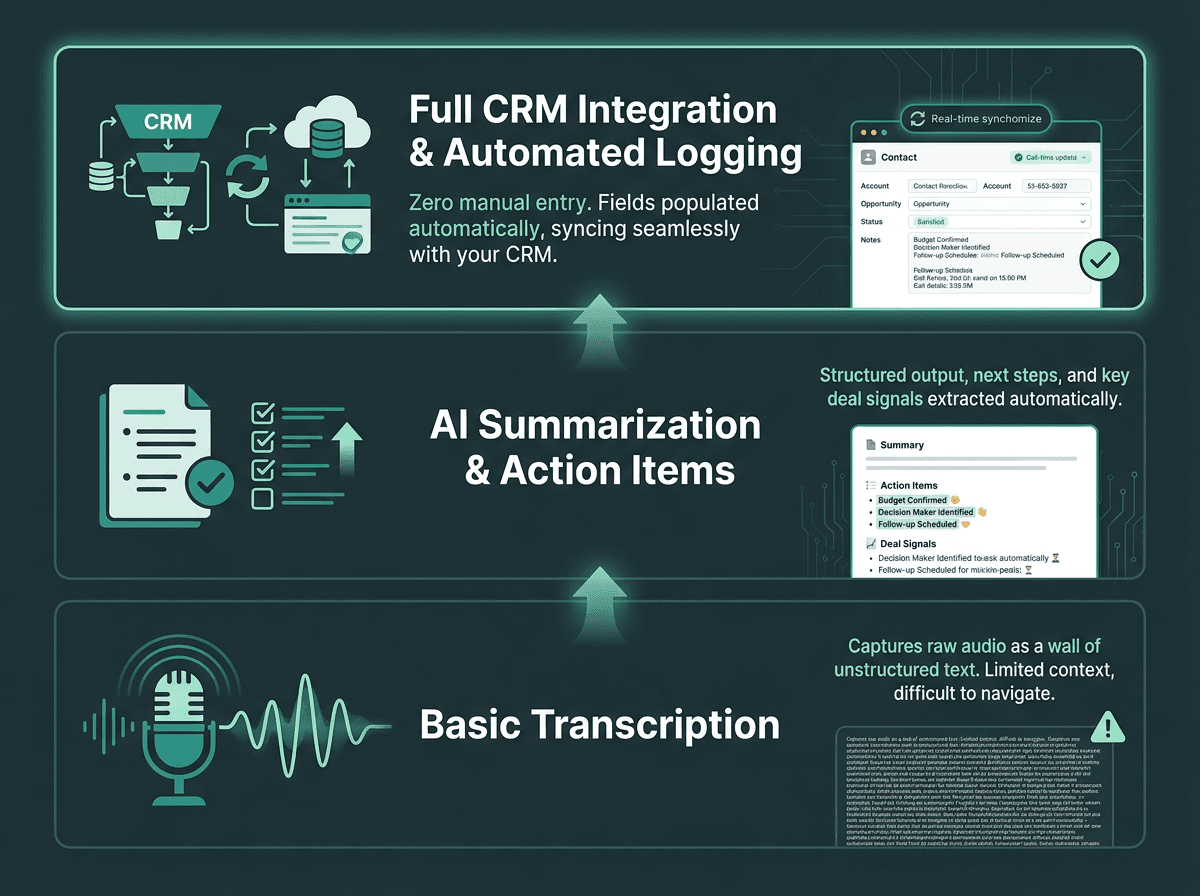
Not all AI note takers are equal: the gap between transcription and true CRM automation is significant.
How Automatic Action Item Extraction Works
Pulling action items out of a sales call is a natural-language understanding problem, not a transcription checkbox. The system has to infer intent, ownership, and urgency from conversational speech, which is messy compared to written text. People talk over each other, refer to “that” and “it,” and make commitments sideways (“I’ll have someone reach out”) instead of stating them cleanly (“I’ll send the proposal by Friday”).
Most modern note takers combine speech-to-text with a language-model layer that labels chunks of the conversation: commitment, question, objection, pricing, next step, and so on. The better tools are tuned on sales call data, so they treat “let me check with my team” as a follow-up signal rather than conversational padding.
What a well-designed action item extraction system should produce for every call:
Owner-assigned tasks with the rep’s name or the prospect’s name attached to each item
Deadline signals pulled from phrases like “by end of week” or “before our next call”
A clear split between internal actions (rep tasks) and external commitments (what the prospect agreed to do)
Priority hints based on deal stage, sentiment, or explicit urgency language
A clean list (not a paragraph) formatted for direct use in a task manager or CRM activity log
Building the CRM Logging Pipeline
[Sample] CRM fields after a sales call:
Call Summary:
Prospect is evaluating an AI voice solution for outbound qualification. Main concern is CRM integration and data privacy.
Next Action:
Send technical integration notes and book a follow-up with RevOps.
Owner:
Account Executive
Due Date:
Friday
Objection:
Needs clarity on Salesforce field mapping and data retention.
Deal Signal:
High intent; prospect asked about rollout timeline and pricing.
Structured call data only pays off once it reliably lands in your CRM. CRM integration means connecting systems so data moves automatically between them. In a sales-call workflow, that means your note taker needs to write to the right CRM objects (contacts, deals, activity logs, and tasks) without turning every call into a manual data-entry chore.
How you get there depends on the integration path. Native integrations (built-in connectors for Salesforce, HubSpot, and similar platforms) are usually the least brittle because they use the CRM’s official API and come with default field mappings. Webhooks buy you flexibility, but you’ll be doing more setup. Zapier-style middleware can work, but it adds latency and introduces another place for the pipeline to break.
Field mapping is the unglamorous detail that decides whether this becomes useful or just “AI notes” in a different tab. A summary shoved into a generic notes field is searchable, but it’s not reportable. If you want to analyze objections across the pipeline or measure follow-up rates, the data has to land in structured fields. Plenty of tools generate great transcripts while leaving the CRM underfed, creating a new silo instead of improving the system of record. The practical fix is choosing tools that let you configure mapping so “next step” goes into “Next Action,” not into a blob of text.
If you’re building a custom pipeline, an API-level approach offers the most control. You can explore this detailed walkthrough on integrating voice assistants with Salesforce, HubSpot, and Zendesk to learn how to direct specific data points to the right CRM objects.
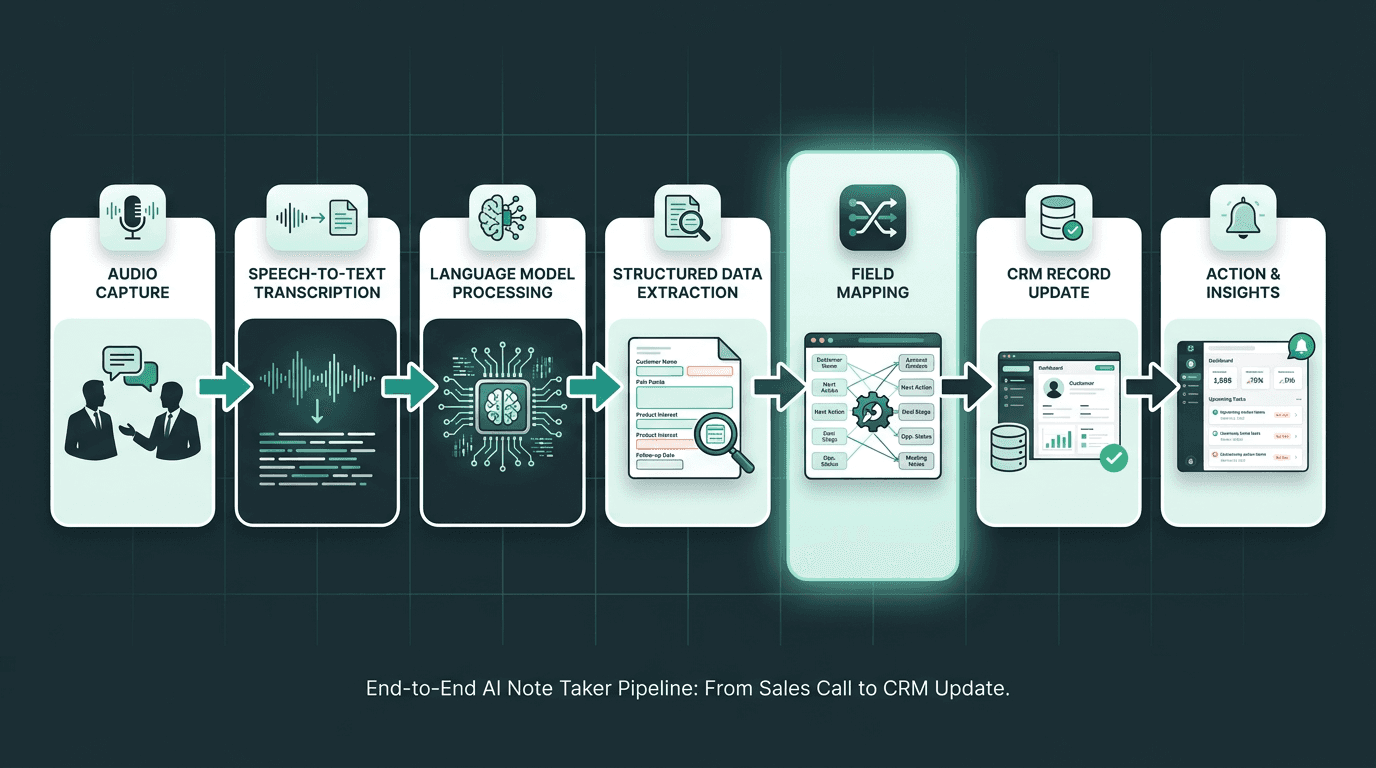
The full pipeline from call audio to structured CRM data, with field mapping as the critical middle step.
Standalone Tools vs. Embedded AI: Choosing the Right Architecture
The AI note-taking market is growing rapidly as teams demand more structured call data. A growing number of standalone note-taking tools make different trade-offs across transcription quality, CRM depth, and conversation analytics.
Standalone tools are attractive when you want something running quickly and you don’t mind the product living slightly outside your core stack. The cost shows up later: many workflows still require manual review before anything hits the CRM, and you’re taking on another vendor relationship, another data store, and another security review. In larger orgs this often turns into a shadow-IT headache, sensitive deal data sitting in a third-party system the security team hasn’t fully vetted.
Alternatively, you can embed note-taking directly into the system that owns the call, such as a voice agent or conversational AI platform. This removes the "meeting bot" friction and gives the system access to the full audio stream from second one. If you are designing an AI agent for sales calls, this architecture allows note-taking to become a native output rather than a clunky add-on.
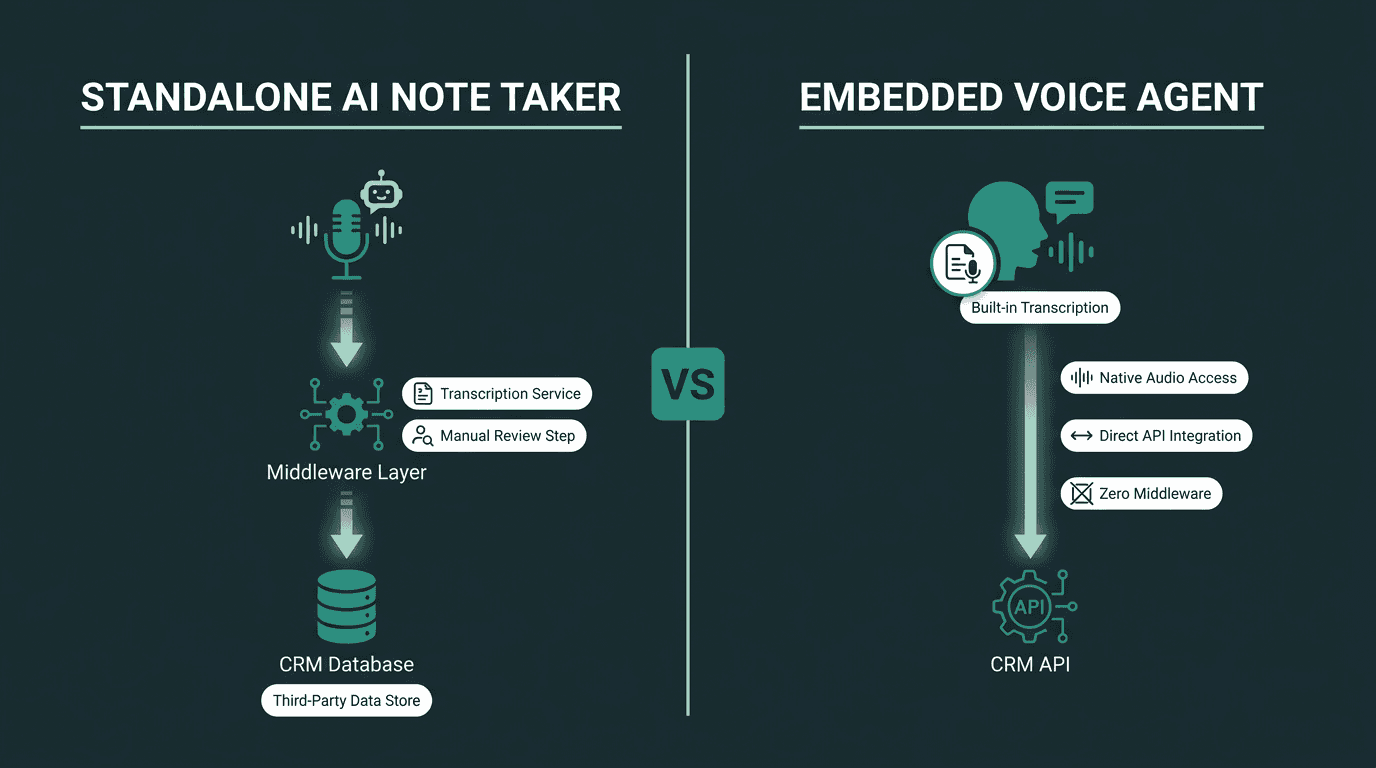
Standalone tools add flexibility; embedded agents reduce friction and data silos.
What Most Teams Get Wrong About Call Summaries
A call summary shouldn’t be a transcript in miniature. It also shouldn’t be a bullet dump of everything that happened. For a rep, the useful version is three to five sentences that answer the only questions that matter: what was the prospect’s main concern, what did we agree happens next, and where does the deal stand right now. The rest is context you can retrieve when you need it.
Where teams go sideways is treating whatever the model outputs as “good enough” without defining a template. Language models summarize toward what they infer is important, and they often overweight the longest part of the call rather than the most deal-relevant part. The practical fix is prompt design: give the model a consistent structure (situation, concern, next step, deal signal) and you’ll get summaries that are stable enough to use across the team.
Teams using structured AI-generated call data consistently report improvements in revenue and sales ROI. The teams that get there aren’t just collecting transcripts, they’re using structured summaries for coaching, spotting objection patterns across the pipeline, and shrinking the time between call end and follow-up. That last bit is easy to underestimate: fast follow-up with a relevant, personalized message tends to convert better than a generic note sent hours later. A note taker that delivers a clean summary seconds after the call makes that speed realistic.
Practical Setup: A Workflow That Actually Runs Itself
Here’s one workflow that gets you from call audio to CRM updates with as few human steps as possible.
Step-by-step automated call capture workflow:
Step 1: Connect your dialer or conferencing tool. Most AI note takers integrate with Zoom, Google Meet, or dialers via calendar invite or bot invitation. Embedded systems connect at the telephony layer and capture audio directly.
Step 2: Configure your extraction template. Define what counts as an action item for your team. Set up the summary format. Map each output field to a specific CRM field before you run a single call.
Step 3: Set CRM write rules. Decide which events trigger a CRM update: call end, summary approval, or immediate push. For high-volume teams, immediate push with a 15-minute review window works well.
Step 4: Build a rep review step (optional but recommended). A 90-second review of the AI-generated summary before it posts to the CRM catches errors and keeps reps accountable for data quality without adding significant time.
Step 5: Run pipeline analytics on structured fields. Once data is landing in the right CRM fields, build reports on objection frequency, follow-up completion rates, and deal velocity by rep.
This setup complements broader automation strategies. If you already use AI voice agents to qualify leads, the note-taking layer acts as the downstream system of record for every insight the agent surfaces, creating a seamless loop from lead qualification to closed deal.
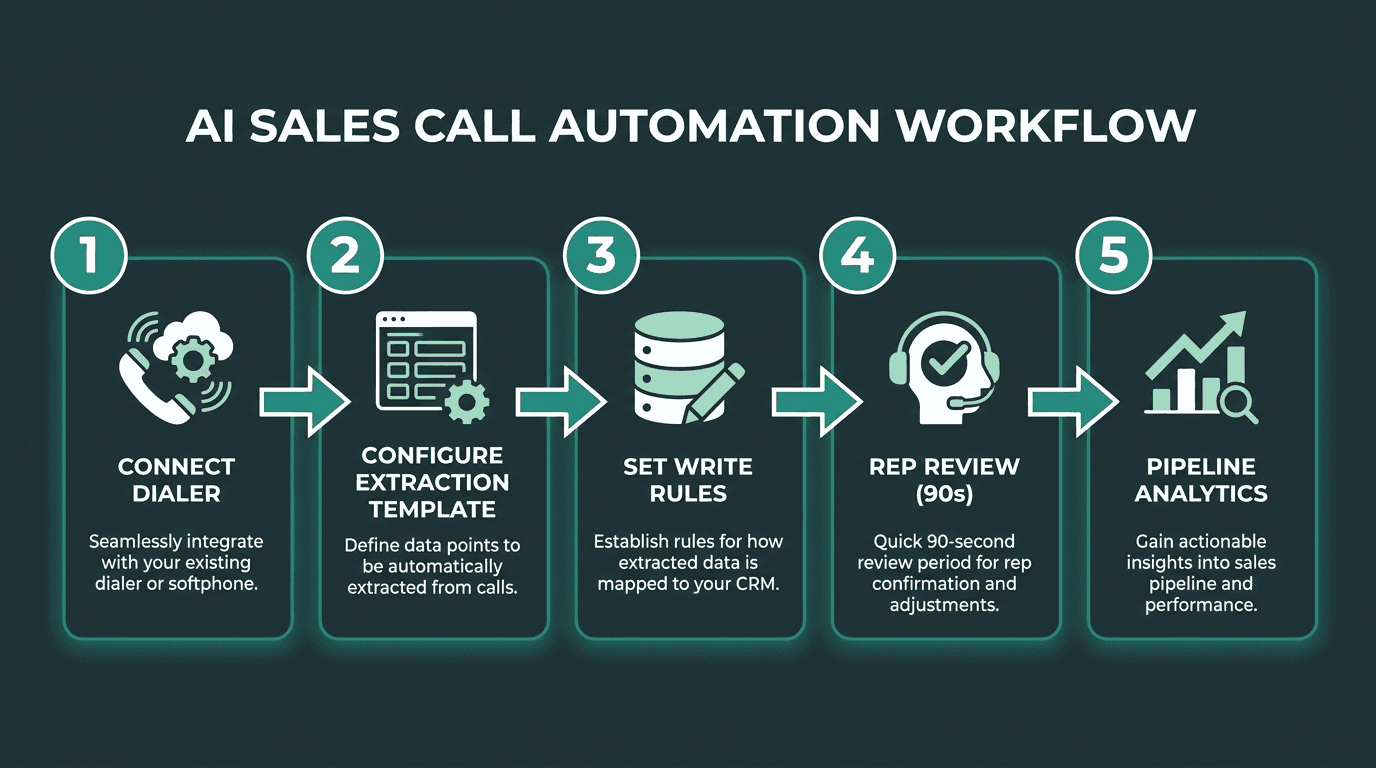
A five-step workflow that takes a call from audio to structured CRM data with minimal manual effort.
Advanced Considerations: Latency, Accuracy, and Data Privacy
The difference between a production-ready note taker and a slick demo usually comes down to three things: transcription latency, word error rate, and how the vendor handles your data.
Latency is practical, not academic. A summary that shows up 20 minutes after the call is already behind the rep’s workflow; one that arrives in 30 seconds is something you can act on immediately. Real-time or near-real-time transcription (under 500ms end-to-end) also lets the system surface action items while the conversation is still happening, which is genuinely useful on long discovery calls. Batch processing is cheaper, but the delay often breaks the “follow up immediately” loop.
Word error rate (WER) determines how much guesswork the language model has to do before it can extract meaning. Once WER climbs above 10% (especially with accented speech or technical vocabulary) you start getting summaries that are wrong often enough to require human cleanup, which defeats the point. Prefer systems that publish WER benchmarks on real sales-call audio, not pristine studio reads.
Data privacy is often the final hurdle for enterprise rollouts. Because sales calls contain sensitive pricing and competitive data, your vendor must be transparent about storage, retention, and whether your data is used for model training. Since personalizing cold calls with AI requires high-quality data governance, security must be a Day 1 priority, not an afterthought.
Analysts project that AI will handle the majority of seller research workflows within a few years. Teams that benefit from that shift will be the ones with clean pipelines from call to CRM, because AI-assisted research is only as useful as the historical call data it can pull from.
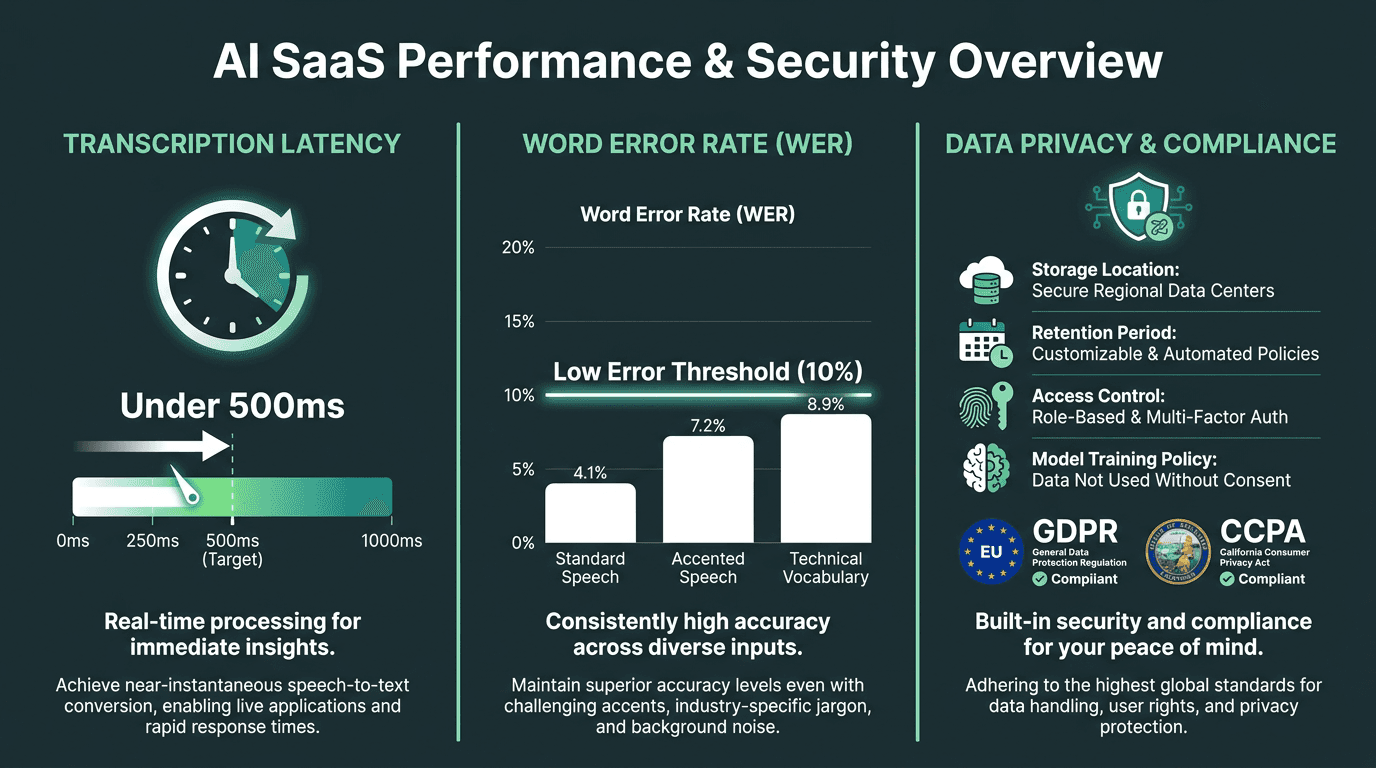
Latency, word error rate, and data privacy are the three factors that determine production readiness.
The Problem-Solution Bridge: Why Most Note Takers Stop Short
Sales teams aren’t short on transcripts. The real failure is that deal-critical information gets said out loud and never reaches the systems that drive decisions. Reps don’t log calls. Summaries vary wildly from person to person. Action items disappear into email threads. The CRM becomes untrustworthy, and forecasts become less reliable, and revenue planning turns into educated guessing.
Standalone note takers usually solve the “I need a transcript” problem, and then stall. What teams actually need is a voice-intelligence layer that captures audio, understands context, structures the output, and writes it back to the right systems automatically, without adding steps or creating yet another data silo.
Smallest.ai’s Atoms platform is built for this end-to-end workflow. By combining agent orchestration with the Pulse speech-to-text engine, revenue teams can build a call capture system that sits inside the communication layer rather than relying on external bots. If you’re interested in the future of AI-driven outbound calls, Smallest.ai provides the infrastructure to scale your sales operations efficiently.
Key Takeaways
What to carry forward:
An AI note taker only earns its keep when CRM integration is real. Transcripts without structured field mapping create new silos.
Action item extraction needs a language-model layer on top of transcription, one that can recognize commitments, ownership, and urgency in natural speech.
Summary quality is a template problem. Define the output structure before you roll anything out.
Latency, word error rate, and data privacy decide whether the tool works in production.
Embedded voice-agent architectures avoid the “bot joined your meeting” experience and give teams tighter control over data flow.
Teams seeing revenue increases from AI are using structured call data for coaching and pipeline analytics, not just shaving admin time.
Frequently asked questions
What is an AI note taker for sales calls?
How does an AI note taker integrate with a CRM like Salesforce or HubSpot?
Can AI note takers handle accented speech or technical sales vocabulary accurately?
Is it legal to record and transcribe sales calls with AI?
How is an embedded voice agent different from a standalone AI note taker for sales automation?