Designing Voice Assistants: STT, LLM, TTS, Tools, and Latency Budget

Build better voice assistants with this technical guide to STT, LLM inference, TTS streaming, and latency budget allocation across the full pipeline.
Consumers were projected to interact with more than 8.4 billion voice assistant devices by 2024, underscoring how mainstream voice interfaces have become. Separately, the global AI assistant software market was estimated at USD 8.46 billion in 2024 and is expected to reach USD 35.72 billion by 2033.
Yet most of the engineering effort that makes a voice assistant feel natural happens in a narrow pipeline that most developers treat as a black box. This article breaks that pipeline open.
Whether you are building a customer-facing voice bot, an in-car assistant, or a real-time agent for enterprise workflows, the same three components govern your product's quality: Speech-to-Text (STT), a Large Language Model (LLM) with optional tool calls, and Text-to-Speech (TTS). How you wire them together and where you assign your latency budget determines whether your voice assistant feels like a conversation or a phone tree. We will examine each component, explain how to allocate latency across the pipeline, and outline the practical decisions to make at each stage.
The Three-Stage Voice Assistant Pipeline
When a user says something to a voice assistant, the audio travels through three sequential processing stages before they hear a response. Each stage adds latency, and each stage can introduce errors that compound downstream. Understanding the pipeline as a whole is more useful than optimizing any single component in isolation.
Stage one is STT: raw audio is transcribed into text. Stage two is LLM inference: the text is processed by a language model that generates a response, sometimes after calling external tools or APIs. Stage three is TTS: the text response is converted back into audio and streamed to the user. The total round-trip time from end of speech to first audio byte is what most teams call 'time to first audio' (TTFA), and it is the single most important latency metric for conversational feel. Research consistently shows that humans perceive delays beyond 300-500ms as unnatural in conversation.
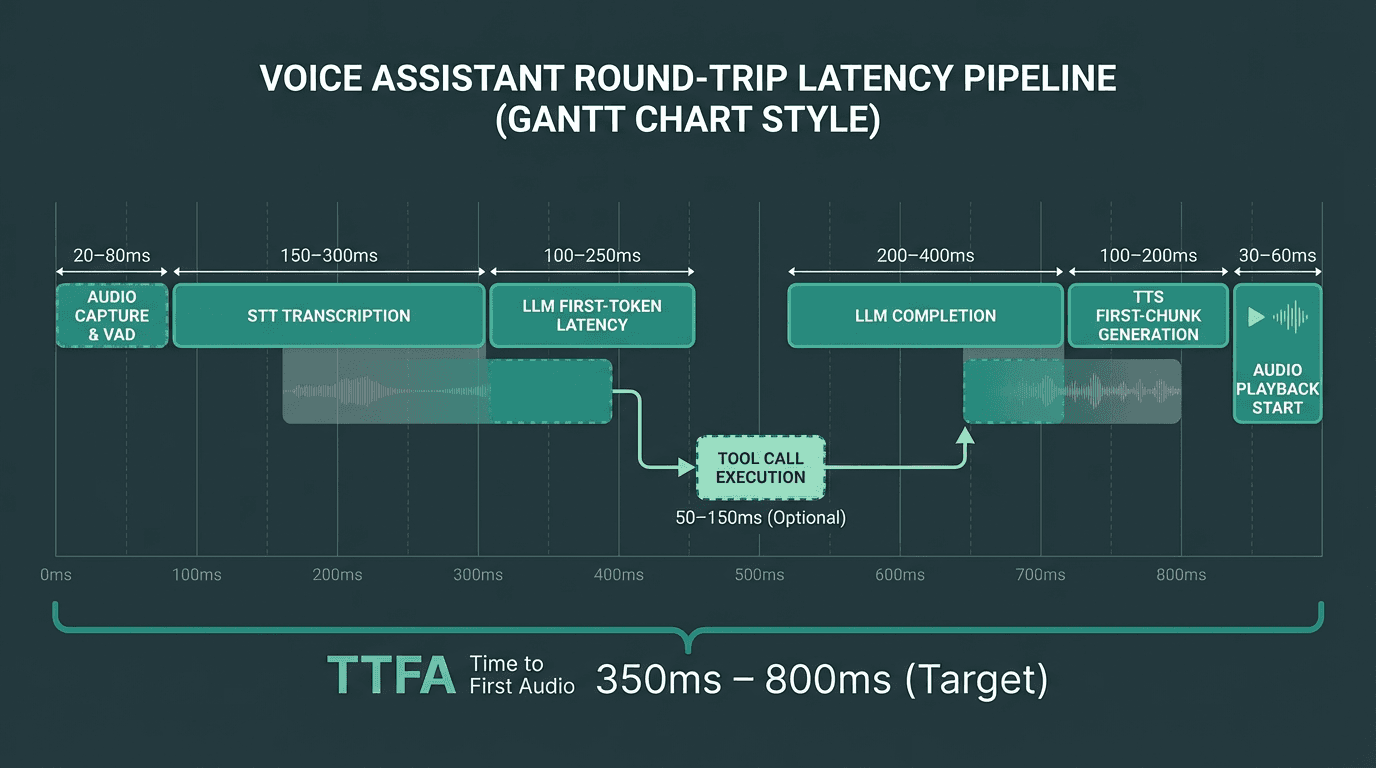
Every millisecond in this timeline is a design decision. Streaming overlaps between stages are where the biggest gains come from.
Speech-to-Text: The Front Door of Your Pipeline
STT quality sets a ceiling on everything downstream. A transcript with word error rates above 5-8% will confuse even a well-prompted LLM, and no amount of prompt engineering fixes a bad transcription. For a thorough comparison of current options, see this guide to best speech-to-text AI covering accuracy, latency, and real-time performance in 2026.
The two architectural choices that matter most at the STT layer are streaming vs. batch transcription, and endpoint detection. Streaming STT sends partial transcripts to the LLM before the user has finished speaking, which can shave 200-400ms off TTFA. Endpoint detection (also called Voice Activity Detection, or VAD) determines when the user has stopped speaking and triggers the LLM call. Aggressive VAD cuts latency but causes the assistant to interrupt users mid-sentence. Conservative VAD feels sluggish. Most production systems tune VAD silence thresholds between 300ms and 600ms depending on the use case.
One thing teams frequently underestimate is acoustic environment. A model that achieves 95% accuracy in a quiet studio may drop to 85% in a call center with background noise. Always benchmark your STT choice against audio samples from your actual deployment environment, not clean studio recordings.
LLM Inference and Tool Calls: Where Intelligence Lives
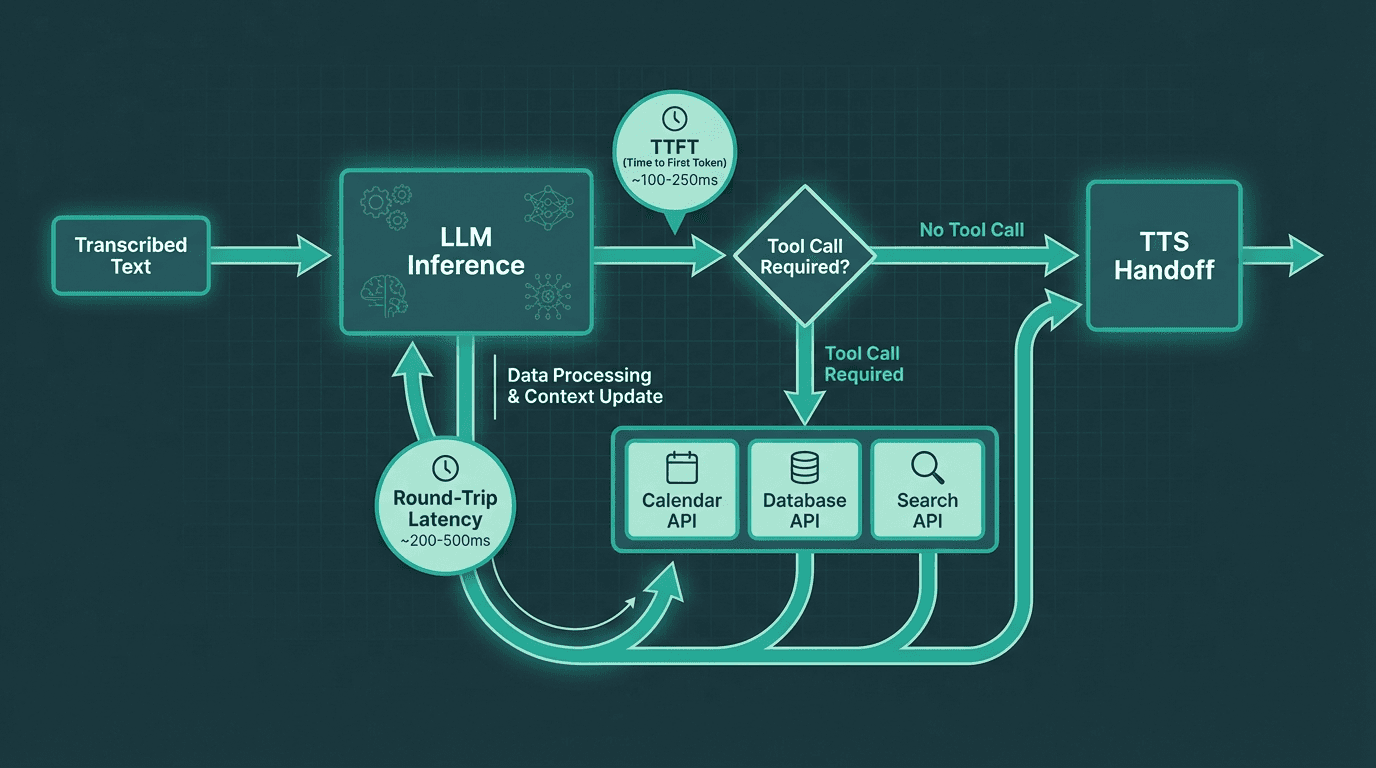
Tool calls add a second round-trip inside the LLM stage. Minimizing unnecessary tool invocations is critical for latency.
The LLM stage is where most of the latency budget gets consumed, and where most architectural mistakes happen. There are two distinct latency numbers to track: time to first token (TTFT) and total generation time. For voice, TTFT is the one that matters most because TTS can begin streaming audio as soon as the first sentence is complete. If your LLM takes 800ms to produce its first token, that delay is fully visible to the user regardless of how fast your TTS is.
Tool calls introduce a second round-trip. When the LLM decides it needs to call an external API (checking inventory, looking up a calendar, querying a database), the pipeline stalls until that call returns. In voice contexts, every tool call that adds 200ms+ of latency needs to be justified. Common strategies to mitigate this include pre-fetching likely context before the conversation starts, caching frequent tool results, and using smaller specialized models for tool routing rather than sending every query to a large general-purpose model.
Prompt design for voice LLMs is also different from chat. Voice responses need to be shorter, more direct, and structured so that the first sentence is a complete, speakable unit. A response that starts with 'Sure! Here are five things to consider...' is bad for voice because TTS has to wait for a natural sentence boundary before it can begin speaking. Train your prompts to front-load the answer.
Text-to-Speech: The Voice Your Users Actually Hear
Text-to-Speech technology has moved from robotic concatenative synthesis to neural waveform generation in the span of a few years. What was initially an assistive technology is now the primary interface layer for hundreds of millions of daily interactions. The quality bar has risen accordingly: users now notice unnatural prosody, awkward pauses, and misplaced emphasis in ways they did not five years ago.
For voice assistants, the critical TTS metric is not audio quality in isolation but time to first audio chunk. Streaming TTS systems begin generating audio before the full response text is available, using sentence-level or even clause-level chunking. This means the TTS engine receives 'Your appointment is confirmed for Thursday at 3pm.' and immediately begins synthesis while the LLM is still generating the rest of the response. The practical result is that users start hearing the response 300-600ms sooner than with batch TTS.
Voice selection and consistency matter more than most teams expect. Users form a strong association between a voice and a brand within a few interactions. Switching voices between sessions, or using a voice that does not match the brand's tone, creates cognitive friction. For a broader look at available options, the fastest TTS options for voice agents landscape has expanded significantly, with providers offering different trade-offs between naturalness, latency, and customization.
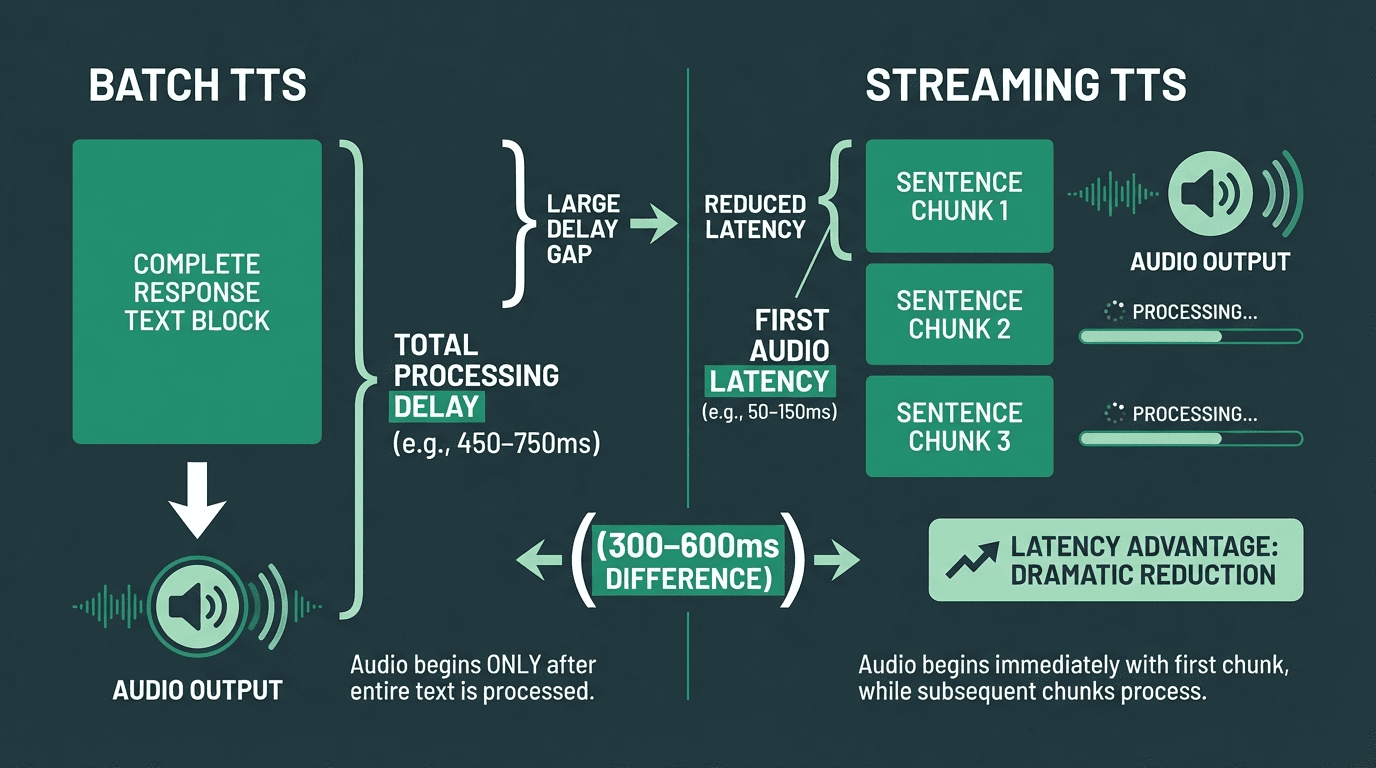
Streaming TTS can cut perceived response latency by 300-600ms compared to batch synthesis.
Building Your Latency Budget
A latency budget is a deliberate allocation of time across pipeline stages, not a post-hoc measurement. You set a target TTFA (say, 800ms for a phone-based assistant), then work backwards to determine how much time each stage is allowed to consume. This forces architectural decisions early rather than discovering latency problems in production.
A realistic budget for a well-optimized voice assistant in 2026 might look like this: VAD and audio capture (50ms), STT transcription (150ms), LLM TTFT (400ms), TTS first chunk (150ms), network overhead (50ms). That totals 800ms. Notice that the LLM gets the largest allocation because it is the hardest to compress without sacrificing response quality. If your LLM provider's TTFT is consistently above 500ms, you either need a faster model or you need to reduce the context window being sent. For reference, Smallest.ai's Lightning TTS delivers a first audio chunk in under 100ms, meaning teams using it have 50ms of additional headroom in the TTS allocation above. For a thorough treatment of the latency problem in voice AI, including specific optimization techniques, that resource goes into significant depth.
The budget changes significantly when tool calls are involved. A single tool call that takes 300ms pushes TTFA to 1100ms or beyond. Teams building tool-heavy agents often accept higher latency for tool-call turns and use filler audio ('Let me check that for you...') to maintain conversational feel during the wait. This is a UX decision as much as an engineering one, and the importance of low-latency in maintaining user trust cannot be overstated.
Streaming Architecture: The Non-Negotiable Design Pattern
Every component in the pipeline should stream. STT should emit partial transcripts. The LLM should stream tokens. TTS should begin synthesis on partial text. Without streaming at each stage, latencies compound additively. With streaming, stages can overlap, and the user starts hearing audio while the LLM is still generating the tail of the response.
The practical challenge is that streaming requires careful state management. Partial STT transcripts can change as more audio arrives (a phenomenon called 'transcript instability'), which means you cannot trigger the LLM too early or you risk sending an incomplete or incorrect prompt. Most production systems use a confidence threshold on partial transcripts before triggering the LLM, or they wait for a short silence window. For a detailed treatment of this design pattern, streaming architecture for real-time agents covers the implementation considerations thoroughly.
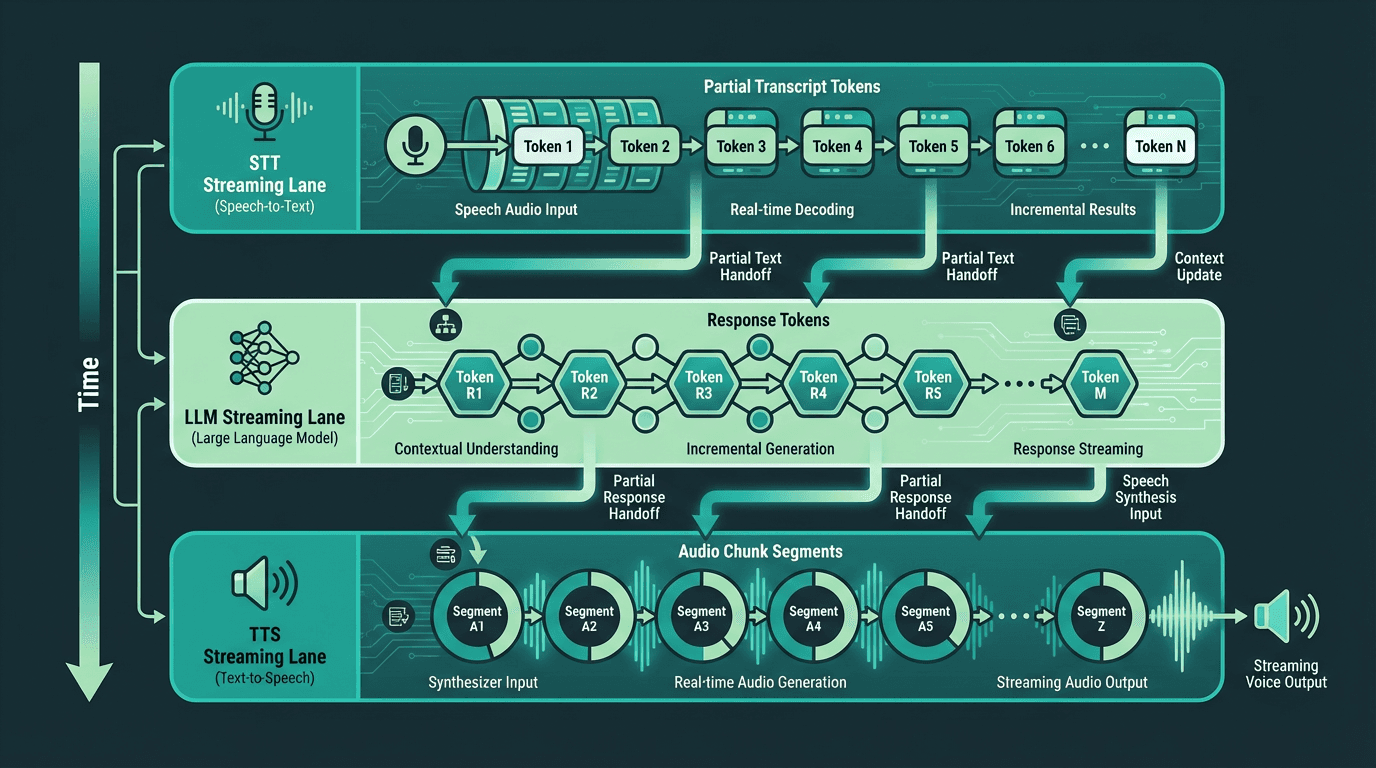
In a fully streaming pipeline, all three stages run concurrently, dramatically reducing time to first audio.
Advanced Considerations: Interruption Handling, Context Management, and Edge Cases
Most guides stop at the happy path. Here is what they often skip.
Interruption handling (also called barge-in) is the ability for the user to speak while the assistant is talking, causing the assistant to stop and process the new input. This sounds simple but requires canceling in-flight TTS synthesis, flushing the audio buffer, and restarting the STT pipeline without losing the new utterance. Systems that handle barge-in poorly either clip the user's speech or continue playing the old response over the new input. Both feel broken. The implementation requires tight coupling between the audio playback layer and the VAD system, a pattern covered in the Atoms SDK architecture guide.
Context window management becomes a real engineering problem in long conversations. Every turn adds tokens to the context, and LLM inference cost and latency both scale with context length. Production systems typically use one of three strategies: sliding window (drop oldest turns), summarization (compress older turns into a summary), or retrieval-augmented context (store turns in a vector store and retrieve relevant ones per turn). The right choice depends on the conversation length distribution of your use case.
Multilingual support adds another layer of complexity. STT models vary significantly in accuracy across languages, and many TTS providers offer high-quality voices in English but noticeably degraded quality in other languages. If you are building for global markets, benchmark each language independently.Voice search and voice-assisted interactions are now mainstream in many markets, which makes multilingual benchmarking a practical requirement rather than a nice-to-have. Assuming English-first quality across the board is a product mistake. Smallest.ai's models are designed for production-grade performance across more than 30 languages
Putting It Together: Practical Architecture Decisions
For teams moving from prototype to production, the mastering voice bot architecture resource walks through a concrete implementation using Smallest.ai's Atoms SDK. For a broader business context, the enterprise voice AI assistant guide covers deployment patterns, compliance considerations, and scaling strategies.
Key architectural decisions to lock in before you build:
Streaming vs. batch at each stage: default to streaming everywhere, batch only where accuracy requires it
VAD sensitivity: tune silence threshold against real user audio from your target environment
LLM model size vs. latency: smaller models with good prompts often outperform large models on TTFA
Tool call strategy: pre-fetch, cache, or parallelize tool calls wherever possible
TTS chunking granularity: sentence-level chunking balances latency and prosody quality
Barge-in support: decide early, because it affects the entire audio management layer
Context management: choose a strategy before conversations get long enough to cause problems
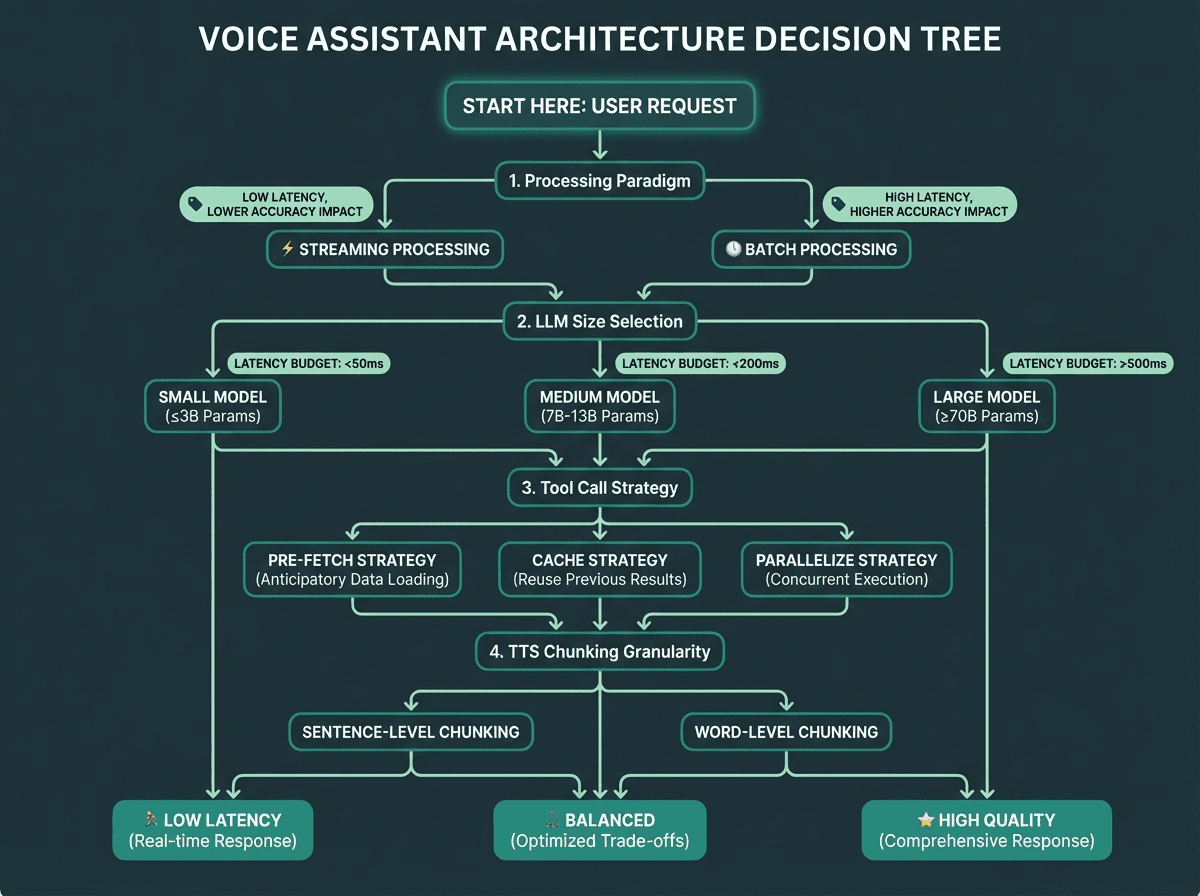
Use this decision tree to lock in your core architectural choices before writing production code.
Solving Latency in Your Voice Assistant Architecture
A voice assistant is only as good as its slowest stage. The pipeline is STT to LLM to TTS, and every design decision either adds or removes milliseconds from the user's perceived wait time. Streaming at every stage is the single highest-impact architectural choice you can make. Your latency budget should be set before you pick components, not after. And the edge cases (interruption handling, context management, multilingual support) are where production systems actually fail, so plan for them from the start.
The voice assistant space is moving fast, and user expectations are rising alongside the quality of the best real-time systems. Getting the pipeline right is the critical first step. The distance between architecture theory and production implementation shrinks considerably when the underlying platform is built around the same streaming-first, latency-minimizing principles this article describes. Smallest.ai's Pulse STT, Lightning TTS, and Atoms SDK are each designed to hit or beat the latency targets outlined here. For more on the topics covered here, explore our blog for ongoing coverage of speech AI, real-time agents, and developer tools.
Frequently asked questions
What is the ideal time to first audio (TTFA) for a voice assistant?
How does VAD (Voice Activity Detection) affect voice assistant quality?
Can I use a large LLM like GPT-4 in a real-time voice assistant?
What is the difference between streaming TTS and batch TTS for voice assistants?
How should I handle tool calls in a voice assistant without destroying latency?