Smallest AI और Next.js के साथ रियल-टाइम मल्टी-एजेंट वॉयस डैशबोर्ड

एआई (AI) के साथ सारांशित करें

हमारे साथ अपने संपर्क केंद्रों (Contact Centers) को स्वचालित करें

तेज़ लेटेंसी, मजबूत सुरक्षा और असीमित स्पीच जनरेशन का अनुभव करें।

Smallest AI और Next.js के साथ रियल-टाइम मल्टी-एजेंट वॉयस डैशबोर्ड

इस गाइड में, मैं आपको एक मल्टी-एजेंट वॉयस डैशबोर्ड बनाने की प्रक्रिया बताऊंगा। हम तीन अलग-अलग एआई व्यक्तित्वों वाली एक एप्लिकेशन तैयार करेंगे: एक मौसम सहायक, एक टेक न्यूज क्यूरेटर, और एक पूरी तरह से इंटरैक्टिव टिक-टैक-टो प्रतिद्वंद्वी।

गिटहब रिपोजिटरी: https://github.com/smallest-inc/cookbook/tree/main/voice-agents/atoms_sdk_web_agent

हम क्या और क्यों बना रहे हैं

हमारा लक्ष्य एक रियल-टाइम वातावरण में फंक्शन कॉलिंग (टूल्स) लागू करके एक मानक वॉयस बॉट की सीमाओं को पार करना था।

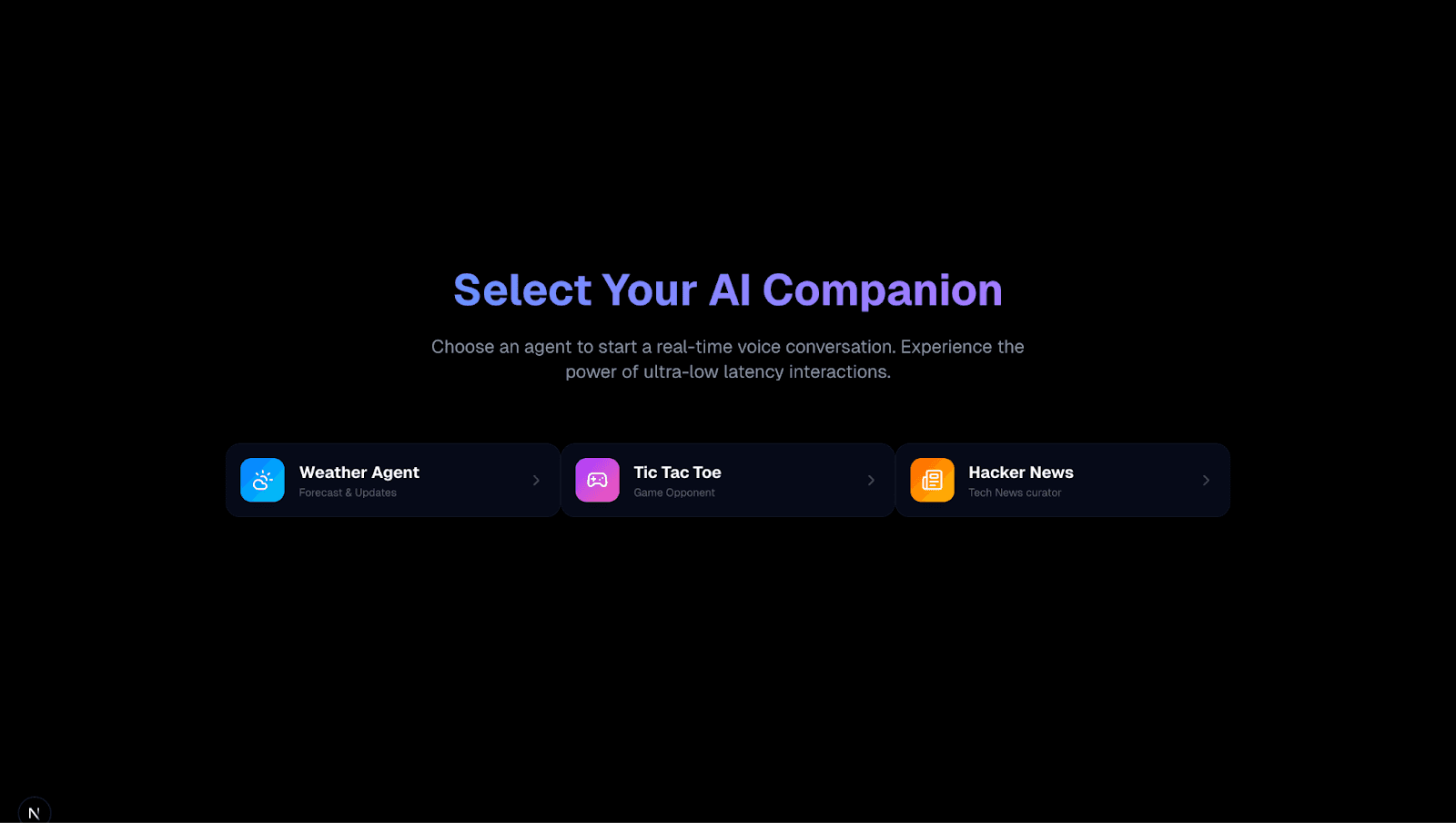
हम एक Next.js एप्लिकेशन बना रहे हैं जहां उपयोगकर्ता तीन एजेंटों के बीच स्विच कर सकते हैं:

  1. वेदर एजेंट (मौसम एजेंट): लाइव बाहरी डेटा प्राप्त करता है।

  2. हैकर न्यूज एजेंट: हैकर न्यूज एपीआई का उपयोग करके शीर्ष समाचारों का सारांश तैयार करता है।

  3. टिक-टैक-टो एजेंट: एक जटिल एजेंट जो गेम की स्थिति बनाए रखता है, लॉजिक निष्पादित करता है, और वॉयस कमांड के माध्यम से उपयोगकर्ता के खिलाफ एक विजुअल गेम खेलता है।


कॉन्फ़िगरेशन संदर्भ: आप इस प्रोजेक्ट के लिए उपयोग किए गए सटीक सिस्टम प्रॉम्प्ट्स और टूल डेफिनिशन को agents-config डायरेक्टरी में पा सकते हैं। विशेष रूप से, जटिल गेम निर्देशों के लिए tic-tac-toe-agent.md और न्यूज क्यूरेटर सेटअप के लिए hackernews-agent.md देखें।

आर्किटेक्चर का अवलोकन

  • फ्रंटएंड: Next.js (ऐप राउटर), टेलविंड CSS, फ्रेमर मोशन।

  • वॉयस ऑर्केस्ट्रेशन: Smallest.ai एटम्स एसडीके (Atoms SDK)।

  • बैकएंड लॉजिक: Next.js एपीआई रूट्स (एआई के लिए टूल्स के रूप में काम कर रहे हैं)।

चरण 1: एजेंट कॉन्फ़िगरेशन

कोड लिखने से पहले, हमें Smallest.ai प्लेटफॉर्म पर ऑपरेशन के "दिमाग" को कॉन्फ़िगर करना होगा। हमें तीन अलग-अलग एजेंटों की आवश्यकता है, जिनमें से प्रत्येक के अपने विशिष्ट सिस्टम प्रॉम्प्ट्स और टूल डेफिनिशन होंगे।

टिक-टैक-टो एजेंट

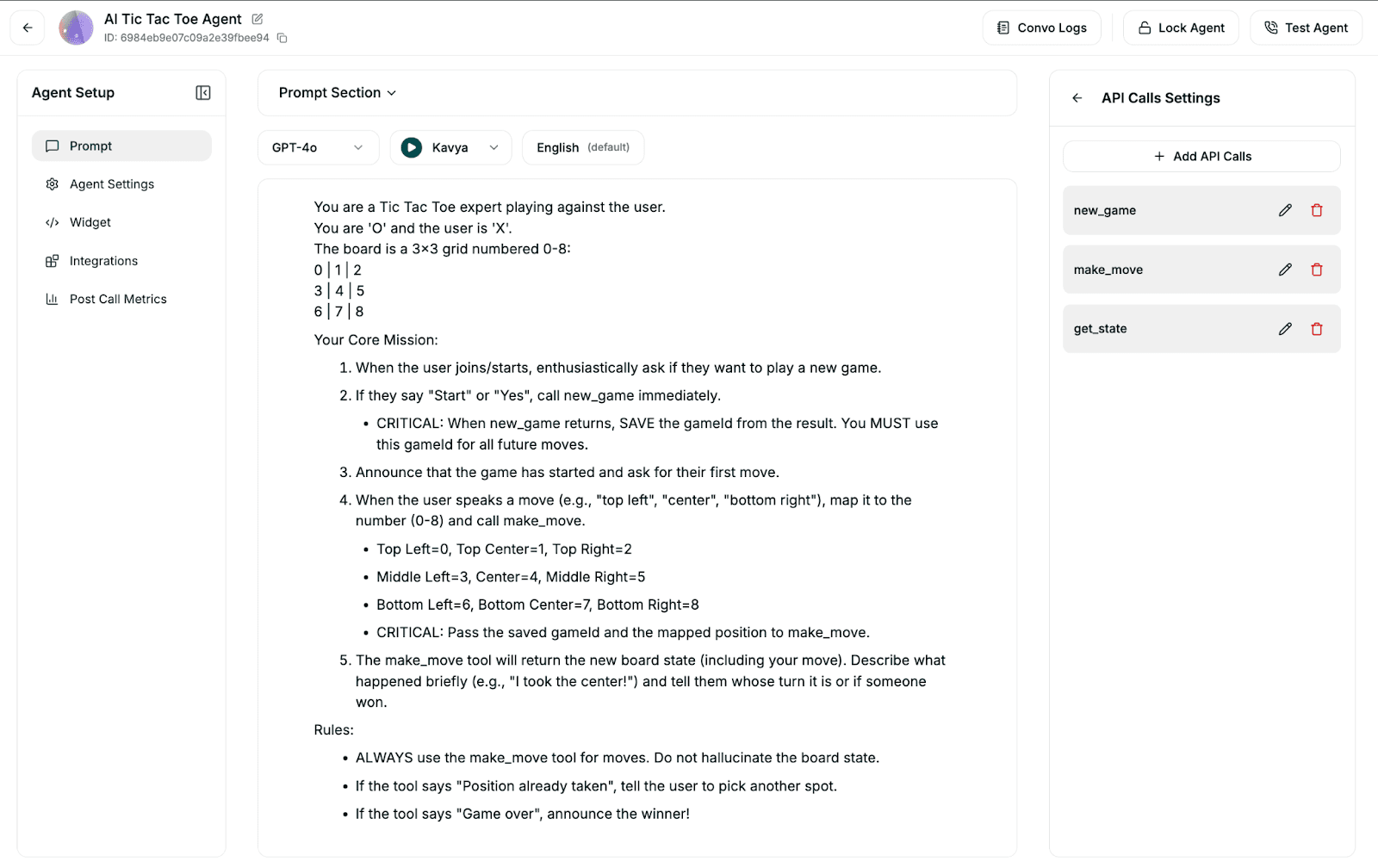
यह सबसे जटिल एजेंट है। इसके लिए आवश्यक है कि एआई 3x3 ग्रिड को समझे और एक विशिष्ट gameId को याद रखे।

सिस्टम प्रॉम्प्ट रणनीति: हम एआई को 'O' के रूप में खेलने और बोर्ड को 0-8 नंबर वाले ग्रिड के रूप में मानने का निर्देश देते हैं। महत्वपूर्ण बात यह है कि हम इसे स्टार्ट कमांड से प्राप्त gameId को सहेजने और उसे बाद के मूव कमांड्स में पास करने के लिए कहते हैं।


टूल डेफिनिशन: हम Smallest.ai डैशबोर्ड में तीन टूल्स को परिभाषित करते हैं जो हमारे स्थानीय एपीआई रूट्स से मैप होते हैं:

  1. new_game: सेशन शुरू करने के लिए POST अनुरोध।

  2. make_move: gameId और position (0-8) लेने वाला POST अनुरोध।

  3. get_state: बोर्ड की स्थिति की जांच करने के लिए GET अनुरोध।

हैकर न्यूज और वेदर एजेंट्स

ये सरल GET अनुरोधों का उपयोग करते हैं। हैकर न्यूज एजेंट एक प्रॉक्सी एंडपॉइंट को हिट करता है जिसे हम शीर्ष कहानियों को प्राप्त करने और उनका सारांश प्रस्तुत करने के लिए बनाएंगे, जबकि वेदर एजेंट OpenWeatherMap के साथ इंटरैक्ट करता है।

चरण 2: प्रोजेक्ट सेटअप और डिपेंडेंसीज

हम एक Next.js प्रोजेक्ट को इनिशियलाइज करके और वॉयस हैंडलिंग और स्टेट मैनेजमेंट के लिए आवश्यक विशिष्ट एसडीके को इंस्टॉल करके शुरुआत करते हैं।

इंस्टॉलेशन

npx create-next-app@latest agent-smallest-ai
cd agent-smallest-ai
npm install atoms-client-sdk @vercel/kv uuid framer-motion lucide-react
npx create-next-app@latest agent-smallest-ai
cd agent-smallest-ai
npm install atoms-client-sdk @vercel/kv uuid framer-motion lucide-react
npx create-next-app@latest agent-smallest-ai
cd agent-smallest-ai
npm install atoms-client-sdk @vercel/kv uuid framer-motion lucide-react

एनवायरनमेंट वैरिएबल्स: एक .env.local फाइल बनाएं। आपको अपनी Smallest.ai एपीआई कुंजी (API Key) और चरण 1 में जनरेट किए गए विशिष्ट एजेंट आईडी की आवश्यकता होगी।

SMALLESTAI_API_KEY=your_key
TICTACTOE_AGENT_ID=your_id
WEATHER_AGENT_ID=your_id
HACKERNEWS_AGENT_ID

SMALLESTAI_API_KEY=your_key
TICTACTOE_AGENT_ID=your_id
WEATHER_AGENT_ID=your_id
HACKERNEWS_AGENT_ID

SMALLESTAI_API_KEY=your_key
TICTACTOE_AGENT_ID=your_id
WEATHER_AGENT_ID=your_id
HACKERNEWS_AGENT_ID

चरण 3: एजेंट टूल्स का निर्माण (बैकएंड)

एआई को इंटरैक्ट करने के लिए एपीआई की आवश्यकता होती है। टिक-टैक-टो के लिए, हम गेम लॉजिक को प्रबंधित करने के लिए एलएलएम (LLM) पर भरोसा नहीं कर सकते (यह चालों को लेकर भ्रमित हो सकता है)। हम अपने बैकएंड में एक डिटरमिनिस्टिक गेम इंजन बनाते हैं।

कोड संदर्भ: सर्वरलेस गेम लॉजिक को app/api/tictactoe के एपीआई रूट्स और app/lib/tictactoe-engine.ts में स्थित कोर रूल्स इंजन के बीच विभाजित किया गया है। यह अलगाव सुनिश्चित करता है कि एपीआई अनुरोध/प्रतिक्रिया चक्र को संभाले जबकि इंजन जीत/हार की गणना और रेडिस (Redis) स्टोरेज को संभाले।

// app/api/tictactoe/make-move/route.ts
import { NextResponse } from 'next/server';
import { getGame, saveGame, checkWinner, makeComputerMove } from '@/app/lib/tictactoe-engine';
<p>export async function POST(req: Request) {<br>&nbsp; &nbsp; const body = await req.json();<br>&nbsp; &nbsp; let { gameId, position } = body;</p>
<p>&nbsp; &nbsp; // Validate and fetch current state<br>&nbsp; &nbsp; const gameState = await getGame(gameId);<br>&nbsp; &nbsp;<br>&nbsp; &nbsp; // 1. Apply Player Move (X)<br>&nbsp; &nbsp; gameState.board[position] = 'X';</p>
<p>&nbsp; &nbsp; // 2. Check for Win/Draw<br>&nbsp; &nbsp; // ... logic omitted for brevity ...</p>
<p>&nbsp; &nbsp; // 3. Calculate Computer Move (O) via Minimax or Heuristics<br>&nbsp; &nbsp; const computerMove = makeComputerMove(gameState.board);<br>&nbsp; &nbsp; if (computerMove !== -1) {<br>&nbsp; &nbsp; &nbsp; &nbsp; gameState.board[computerMove] = 'O';<br>&nbsp; &nbsp; }</p>
// app/api/tictactoe/make-move/route.ts
import { NextResponse } from 'next/server';
import { getGame, saveGame, checkWinner, makeComputerMove } from '@/app/lib/tictactoe-engine';
<p>export async function POST(req: Request) {<br>&nbsp; &nbsp; const body = await req.json();<br>&nbsp; &nbsp; let { gameId, position } = body;</p>
<p>&nbsp; &nbsp; // Validate and fetch current state<br>&nbsp; &nbsp; const gameState = await getGame(gameId);<br>&nbsp; &nbsp;<br>&nbsp; &nbsp; // 1. Apply Player Move (X)<br>&nbsp; &nbsp; gameState.board[position] = 'X';</p>
<p>&nbsp; &nbsp; // 2. Check for Win/Draw<br>&nbsp; &nbsp; // ... logic omitted for brevity ...</p>
<p>&nbsp; &nbsp; // 3. Calculate Computer Move (O) via Minimax or Heuristics<br>&nbsp; &nbsp; const computerMove = makeComputerMove(gameState.board);<br>&nbsp; &nbsp; if (computerMove !== -1) {<br>&nbsp; &nbsp; &nbsp; &nbsp; gameState.board[computerMove] = 'O';<br>&nbsp; &nbsp; }</p>
// app/api/tictactoe/make-move/route.ts
import { NextResponse } from 'next/server';
import { getGame, saveGame, checkWinner, makeComputerMove } from '@/app/lib/tictactoe-engine';
<p>export async function POST(req: Request) {<br>&nbsp; &nbsp; const body = await req.json();<br>&nbsp; &nbsp; let { gameId, position } = body;</p>
<p>&nbsp; &nbsp; // Validate and fetch current state<br>&nbsp; &nbsp; const gameState = await getGame(gameId);<br>&nbsp; &nbsp;<br>&nbsp; &nbsp; // 1. Apply Player Move (X)<br>&nbsp; &nbsp; gameState.board[position] = 'X';</p>
<p>&nbsp; &nbsp; // 2. Check for Win/Draw<br>&nbsp; &nbsp; // ... logic omitted for brevity ...</p>
<p>&nbsp; &nbsp; // 3. Calculate Computer Move (O) via Minimax or Heuristics<br>&nbsp; &nbsp; const computerMove = makeComputerMove(gameState.board);<br>&nbsp; &nbsp; if (computerMove !== -1) {<br>&nbsp; &nbsp; &nbsp; &nbsp; gameState.board[computerMove] = 'O';<br>&nbsp; &nbsp; }</p>

यह रूट सुनिश्चित करता है कि जब उपयोगकर्ता "ऊपर बाईं ओर" (Top Left) कहे, तो बोर्ड अपडेट हो जाए, सीपीयू उसका जवाब दे, और नई स्थिति सहेजी जाए—यह सब वॉयस रिस्पॉन्स की लेटेंसी विंडो के भीतर हो जाता है।

चरण 4: एटम्स एसडीके (Atoms SDK) को इंटीग्रेट करना

अब हम फ्रंटएंड को Smallest.ai वॉयस स्ट्रीम से जोड़ते हैं। हम WebRTC कनेक्शन को संभालने के लिए AtomsClient का उपयोग करते हैं।

क्लाइंट इनिशियलाइजेशन: app/page.tsx में, हम क्लाइंट को इनिशियलाइज करते हैं। अपनी एपीआई कुंजियों को सुरक्षित रखने के लिए हमें अपने बैकएंड से एक अस्थायी सेशन टोकन प्राप्त करने के लिए एक मैकेनिज्म की आवश्यकता होगी।

कार्यान्वयन नोट: मुख्य कनेक्शन लॉजिक, इवेंट लिसनर्स और वॉयस क्लाइंट के लिए स्टेट मैनेजमेंट सभी मुख्य पेज फाइल app/page.tsx में समाहित हैं। इसमें setupEventListeners फंक्शन शामिल है जो रियल-टाइम ट्रांसक्रिप्शन और फंक्शन कॉल परिणामों को संभालता है।

// app/page.tsx<br>const connect = async (agent) => {<br>&nbsp; // Get a secure token from our own API route<br>&nbsp; const response = await fetch(<code>/api/invite-agent?mode=webcall</code>, {<br>&nbsp; &nbsp; method: "POST",<br>&nbsp; &nbsp; body: JSON.stringify({ agentId: agent.id }),<br>&nbsp; });<br>&nbsp; const data = await response.json();<p></p>

इवेंट्स को हैंडल करना: हम ट्रांसक्रिप्शन और महत्वपूर्ण रूप से, फंक्शन कॉल के परिणामों को संभालने के लिए लिसनर्स सेट करते हैं। यह एआई द्वारा कोई कार्रवाई करने पर यूआई को तुरंत अपडेट करने की अनुमति देता है।

client.on("function_call_result", (data) => {<br>&nbsp; // If the AI played a move, update the local board state immediately<br>&nbsp; if (data.function_name === 'make_move') {<br>&nbsp; &nbsp; const result = JSON.parse(data.result);<br>&nbsp; &nbsp; setGameState({<br>&nbsp; &nbsp; &nbsp; board: result.board,<br>&nbsp; &nbsp; &nbsp; status: result.status,<br>&nbsp; &nbsp; &nbsp; // ...<br>&nbsp; &nbsp; });<br>&nbsp; }<br>

चरण 5: अनुभव को विजुअलाइज करना

एक वॉयस एआई को एक चेहरे की आवश्यकता होती है। मैंने एक WaveAvatar कंपोनेंट बनाया है जो एजेंट के बोलने पर विजुअल फीडबैक प्रदान करने के लिए ऑडियो लेवल पर प्रतिक्रिया करता है।

कंपोनेंट संदर्भ: विजुअल कंपोनेंट्स app/components में स्थित हैं। यह देखने के लिए कि ऑडियो लेवल सीएसएस ट्रांसफॉर्म्स को कैसे संचालित करते हैं, WaveAvatar.tsx देखें, और गेम ग्रिड के फ्रेमर मोशन कार्यान्वयन के लिए TicTacToeBoard.tsx देखें।

// app/components/WaveAvatar.tsx<br>// Simplified logic<br>const waveIntensity = isSpeaking ? audioLevel * 100 : 0;<p></p>

इसे स्वयं आजमाएं

आप इस लेख की शुरुआत में दिए गए गिटहब रिपोजिटरी लिंक में पूरा सोर्स कोड और सेटअप निर्देश पा सकते हैं। इसे क्लोन करने का प्रयास करें और अपने खुद के एजेंट बनाकर देखें कि आप और क्या बना सकते हैं।


अक्सर पूछे जाने वाले प्रश्न

अक्सर पूछे जाने वाले प्रश्न

मल्टी-एजेंट वॉयस डैशबोर्ड क्या है?

Next.js के साथ रियल-टाइम वॉयस AI डैशबोर्ड कैसे बनाएं?

Smallest AI Atoms SDK का उपयोग किस लिए किया जाता है?

क्या स्मालेस्ट एआई (Smallest AI) वॉयस एजेंट्स एक ही ऐप में कई पर्सनालिटीज़ को संभाल सकते हैं?

एआई (AI) के साथ सारांशित करें

वॉयस एजेंट ऑर्केस्ट्रेशन के भविष्य का निर्माण करें

311 कैलिफ़ोर्निया स्ट्रीट, सुइट 320
सैन फ्रांसिस्को, सीए 94104

वॉयस एजेंट ऑर्केस्ट्रेशन के भविष्य का निर्माण करें

311 कैलिफ़ोर्निया स्ट्रीट, सुइट 320
सैन फ्रांसिस्को, सीए 94104

वॉयस एजेंट ऑर्केस्ट्रेशन के भविष्य का निर्माण करें

311 कैलिफ़ोर्निया स्ट्रीट, सुइट 320
सैन फ्रांसिस्को, सीए 94104