पायथन में वास्तविक जैसी आवाज़ (टेक्स्ट-टू-स्पीच) बनाना: लाइब्रेरीज़, एपीआई और प्रोडक्शन सेटअप
सीखें कि न्यूरल TTS APIs, एसिंक्रोनस सिंथेसिस, रियल-टाइम स्ट्रीमिंग और वॉइस एजेंट आर्किटेक्चर का उपयोग करके पायथन (Python) में वास्तविक लगने वाला टेक्स्ट-टू-स्पीच कैसे बनाया जाए।
जैसे-जैसे हम 2025 और 2026 के सफर पर आगे बढ़ रहे हैं, मानव-समान (human-parity) स्पीच सिंथेसिस की खोज एक निर्णायक मोड़ पर पहुंच गई है। पायथन इकोसिस्टम के भीतर काम करने वाले तकनीकी डेवलपर्स और मशीन लर्निंग इंजीनियरों के लिए, चुनौती अब केवल स्पष्टता (intelligibility) हासिल करने से हटकर स्वर-शैली (prosody), भावनात्मक गहराई और अल्ट्रा-लो लेटेंसी में महारत हासिल करने पर केंद्रित हो गई है। पायथन में वास्तविक लगने वाला टेक्स्ट-टू-स्पीच (TTS) अब कोई ऐसी विलासिता नहीं रह गया है जो सिर्फ बड़े बजट वाली रिसर्च लैब्स के लिए आरक्षित हो; यह आधुनिक संवादात्मक एआई, इंटरैक्टिव मनोरंजन और वैश्विक सुलभता (accessibility) समाधानों की आधारशिला है।
रोबोटिक और इंसानी आवाज के बीच का अंतर
ज्यादातर पुराने पायथन टीटीएस (TTS) पुस्तकालय कॉन्कैटेनेटिव सिंथेसिस (concatenative synthesis) पर निर्भर करते हैं, जो पहले से रिकॉर्ड किए गए ऑडियो टुकड़ों को आपस में जोड़ते हैं। इसका परिणाम असमान लय, अचानक आने वाले बदलाव और एक खास "रोबोट" जैसी गुणवत्ता के रूप में सामने आता है।
इसके विपरीत, न्यूरल टीटीएस (Neural TTS) इंसानी आवाज के संपूर्ण ध्वनिक स्थान (acoustic space) को सीखता है और किसी भी इनपुट टेक्स्ट के लिए बिल्कुल शुरुआत से ऑडियो उत्पन्न करता है।
उच्च गुणवत्ता वाले टीटीएस सिस्टम के प्रमुख संकेतक
पायथन एप्लिकेशन्स के लिए यथार्थवादी टीटीएस समाधानों का मूल्यांकन करते समय, कई तकनीकी कारक आउटपुट की गुणवत्ता और उपयोगिता को निर्धारित करते हैं।
आवाज की पहचान (Voice Identity)
आधुनिक सिस्टम वास्तविक वक्ताओं पर प्रशिक्षित नामित वॉयस मॉडल प्रदान करते हैं। उदाहरण:
voice_id="emily"voice_id="sophia"voice_id="alex"
voice_id="emily"voice_id="sophia"voice_id="alex"
voice_id="emily"voice_id="sophia"voice_id="alex"
सैंपल रेट (Sample Rate)
उच्च सैंपल रेट अधिक ऑडियो विवरणों को सुरक्षित रखते हैं।
सैंपल रेट
ऑडियो गुणवत्ता
8kHz
टेलीफोन ग्रेड
16kHz
मानक आवाज
24kHz
उच्च गुणवत्ता
44.1kHz
स्टूडियो गुणवत्ता
अधिकांश प्रोडक्शन वॉयस एजेंट 24kHz या उससे अधिक का उपयोग करते हैं।
प्रोसॉडी (Prosody)
प्रोसॉडी से तात्पर्य प्राकृतिक भाषण के पैटर्न से है: पिच का उतार-चढ़ाव, जोर (emphasis), ठहराव और लय। प्रोसॉडी नियंत्रण के बिना, उन्नत टीटीएस मॉडल भी मैकेनिकल लगते हैं।
प्लेबैक नियंत्रण (Playback Control)
उत्पादन प्रणालियों को अक्सर रनटाइम ट्यूनिंग की आवश्यकता होती है जैसे: भाषण की गति, पिच, आउटपुट स्वरूप और ऑडियो स्ट्रीमिंग व्यवहार। ये नियंत्रण अनुप्रयोगों को विभिन्न वातावरणों के अनुसार आवाज आउटपुट को अनुकूलित करने की अनुमति देते हैं।
आधुनिक न्यूरल टीटीएस कैसे काम करता है
बैकएंड पर, आधुनिक टीटीएस सिस्टम एक बहु-चरणीय पाइपलाइन का पालन करते हैं जो लिखित पाठ को प्राकृतिक ऑडियो में बदल देती है।
टेक्स्ट सामान्यीकरण (Text Normalization)
संख्याओं, तारीखों और संक्षिप्ताक्षरों को बोले जाने वाले समकक्षों में परिवर्तित किया जाता है
ध्वनिक मॉडलिंग (Acoustic Modeling)
ध्वनिक मॉडल यह अनुमान लगाता है कि भाषण कैसा सुनाई देना चाहिए, जिसमें स्वनिम समय (phoneme timing), पिच कंटूर और जोर शामिल हैं।
न्यूरल वोकोडर (Neural Vocoder)
वोकोडर ध्वनिक अनुमानों को वेवफॉर्म ऑडियो सिग्नल में परिवर्तित करता है। यह अंतिम चरण उत्पन्न आवाज की यथार्थता को निर्धारित करता है।
पायथन में यथार्थवादी टेक्स्ट-टू-स्पीच बनाना
पायथन डेवलपर्स एसडीके या एपीआई के माध्यम से आधुनिक न्यूरल टीटीएस तक पहुंच सकते हैं। इसका एक उदाहरण स्मॉलेस्ट एआई पायथन एसडीके (Smallest AI Python SDK) है, जो भाषण उत्पन्न करने के लिए एक सुव्यवस्थित इंटरफ़ेस प्रदान करता है।
स्थापना (Installation)
पायथन एसडीके का उपयोग करके बुनियादी टीटीएस उदाहरण
सबसे सरल कार्यान्वयन में एकल पाठ इनपुट से भाषण उत्पन्न करना शामिल है।
यह न्यूनतम सेटअप भी उच्च-गुणवत्ता वाला भाषण उत्पन्न करता है जो कई अनुप्रयोगों के लिए उपयुक्त है।
स्केलेबल अनुप्रयोगों के लिए एसिंक्रोनस टेक्स्ट-टू-स्पीच
वास्तविक उत्पादन प्रणालियाँ अक्सर एक साथ कई ऑडियो प्रतिक्रियाएँ उत्पन्न करती हैं। ब्लॉकिंग सिंथेसिस कॉल्स जल्दी ही एक बाधा बन सकती हैं।
पायथन का एसिंक्रोनस रनटाइम समवर्ती सिंथेसिस (concurrent synthesis) को कुशल बनाता है।
importasyncioimportaiofilesfromsmallestai.wavesimportAsyncWavesClientasyncdefmain():
client = AsyncWavesClient(api_key="YOUR_API_KEY")asyncwithclientastts:
audio_bytes = awaittts.synthesize("Hello, this is a test of async synthesis.")asyncwithaiofiles.open("async_synthesize.wav","wb")asf:
awaitf.write(audio_bytes)asyncio.run(main())
importasyncioimportaiofilesfromsmallestai.wavesimportAsyncWavesClientasyncdefmain():
client = AsyncWavesClient(api_key="YOUR_API_KEY")asyncwithclientastts:
audio_bytes = awaittts.synthesize("Hello, this is a test of async synthesis.")asyncwithaiofiles.open("async_synthesize.wav","wb")asf:
awaitf.write(audio_bytes)asyncio.run(main())
importasyncioimportaiofilesfromsmallestai.wavesimportAsyncWavesClientasyncdefmain():
client = AsyncWavesClient(api_key="YOUR_API_KEY")asyncwithclientastts:
audio_bytes = awaittts.synthesize("Hello, this is a test of async synthesis.")asyncwithaiofiles.open("async_synthesize.wav","wb")asf:
awaitf.write(audio_bytes)asyncio.run(main())
यह पैटर्न आमतौर पर निम्नलिखित के लिए उपयोग किया जाता है:
आईवीआर (IVR) प्रॉम्प्ट उत्पन्न करना
थोक में ऑडियोबुक निर्माण
स्वचालित वीडियो नरेशन
एचटीटीपी (HTTP) के साथ डायरेक्ट एपीआई एक्सेस
कई सेवाओं या माइक्रोसर्विसेज को एकीकृत करने वाले सिस्टम के लिए, प्रत्यक्ष एचटीटीपी एपीआई अधिक लचीलापन प्रदान करते हैं।
importrequestsimportbase64defhttp_tts_direct(text,output_file="output.wav"):
API_KEY = "YOUR_API_KEY"TTS_URL = "https://waves-api.smallest.ai/api/v1/tts/get_speech"headers = {"Authorization": f"Bearer {API_KEY}","Content-Type": "application/json"}payload = {"text": text,"voice_id": "emily","model": "lightning-v3","output_format": "wav","speed": 1.0,"sample_rate": 24000}response = requests.post(TTS_URL,json=payload,headers=headers)ifresponse.status_code == 200:
# Audio returned as base64 or binary depending on API versionwithopen(output_file,"wb")asf:
f.write(response.content)returnoutput_fileelse:
raiseException(f"TTS API error: {response.status_code} - {response.text}")# Example usage
importrequestsimportbase64defhttp_tts_direct(text,output_file="output.wav"):
API_KEY = "YOUR_API_KEY"TTS_URL = "https://waves-api.smallest.ai/api/v1/tts/get_speech"headers = {"Authorization": f"Bearer {API_KEY}","Content-Type": "application/json"}payload = {"text": text,"voice_id": "emily","model": "lightning-v3","output_format": "wav","speed": 1.0,"sample_rate": 24000}response = requests.post(TTS_URL,json=payload,headers=headers)ifresponse.status_code == 200:
# Audio returned as base64 or binary depending on API versionwithopen(output_file,"wb")asf:
f.write(response.content)returnoutput_fileelse:
raiseException(f"TTS API error: {response.status_code} - {response.text}")# Example usage
importrequestsimportbase64defhttp_tts_direct(text,output_file="output.wav"):
API_KEY = "YOUR_API_KEY"TTS_URL = "https://waves-api.smallest.ai/api/v1/tts/get_speech"headers = {"Authorization": f"Bearer {API_KEY}","Content-Type": "application/json"}payload = {"text": text,"voice_id": "emily","model": "lightning-v3","output_format": "wav","speed": 1.0,"sample_rate": 24000}response = requests.post(TTS_URL,json=payload,headers=headers)ifresponse.status_code == 200:
# Audio returned as base64 or binary depending on API versionwithopen(output_file,"wb")asf:
f.write(response.content)returnoutput_fileelse:
raiseException(f"TTS API error: {response.status_code} - {response.text}")# Example usage
इस दृष्टिकोण का उपयोग आमतौर पर तब किया जाता है जब:
बैकएंड सेवाओं के भीतर टीटीएस को एकीकृत करना
बैच प्रोसेसिंग के दौरान ऑडियो उत्पन्न करना
क्रॉस-लैंग्वेज पाइपलाइनों का निर्माण करना
रीयल-टाइम स्ट्रीमिंग टेक्स्ट-टू-स्पीच
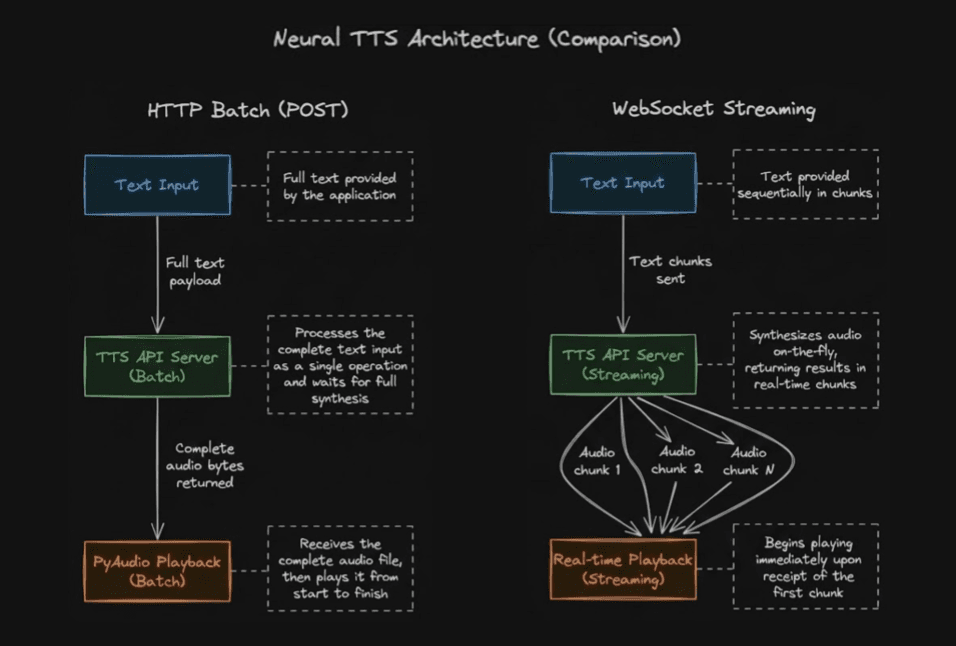
वेबसॉकेट (WebSocket) कनेक्शन स्ट्रीमिंग सिंथेसिस को सक्षम बनाते हैं जहां ऑडियो चंक्स (chunks) उनके जनरेट होते ही आ जाते हैं, जो त्वरित प्लेबैक की आवश्यकता वाले संवादात्मक एआई अनुप्रयोगों के लिए महत्वपूर्ण है।
fromsmallestai.wavesimportTTSConfig,WavesStreamingTTSimportwave# Configure the TTS engineconfig = TTSConfig(voice_id="aditi",api_key="YOUR_SMALLEST_API_KEY",sample_rate=24000,speed=1.0,max_buffer_flush_ms=100)streaming_tts = WavesStreamingTTS(config)defsave_audio_chunks_to_wav(audio_chunks,filename="output.wav"):
"""Save streamed PCM chunks into a WAV file."""withwave.open(filename,"wb")aswf:
wf.setnchannels(1)# mono audiowf.setsampwidth(2)# 16-bit PCMwf.setframerate(24000)# sample ratewf.writeframes(b"".join(audio_chunks))text = "Streaming text to speech allows audio playback to begin immediately."audio_chunks = []# Stream synthesized audio chunksforchunkinstreaming_tts.synthesize(text):
audio_chunks.append(chunk)# Save to filesave_audio_chunks_to_wav(audio_chunks,"speech_output.wav")
fromsmallestai.wavesimportTTSConfig,WavesStreamingTTSimportwave# Configure the TTS engineconfig = TTSConfig(voice_id="aditi",api_key="YOUR_SMALLEST_API_KEY",sample_rate=24000,speed=1.0,max_buffer_flush_ms=100)streaming_tts = WavesStreamingTTS(config)defsave_audio_chunks_to_wav(audio_chunks,filename="output.wav"):
"""Save streamed PCM chunks into a WAV file."""withwave.open(filename,"wb")aswf:
wf.setnchannels(1)# mono audiowf.setsampwidth(2)# 16-bit PCMwf.setframerate(24000)# sample ratewf.writeframes(b"".join(audio_chunks))text = "Streaming text to speech allows audio playback to begin immediately."audio_chunks = []# Stream synthesized audio chunksforchunkinstreaming_tts.synthesize(text):
audio_chunks.append(chunk)# Save to filesave_audio_chunks_to_wav(audio_chunks,"speech_output.wav")
fromsmallestai.wavesimportTTSConfig,WavesStreamingTTSimportwave# Configure the TTS engineconfig = TTSConfig(voice_id="aditi",api_key="YOUR_SMALLEST_API_KEY",sample_rate=24000,speed=1.0,max_buffer_flush_ms=100)streaming_tts = WavesStreamingTTS(config)defsave_audio_chunks_to_wav(audio_chunks,filename="output.wav"):
"""Save streamed PCM chunks into a WAV file."""withwave.open(filename,"wb")aswf:
wf.setnchannels(1)# mono audiowf.setsampwidth(2)# 16-bit PCMwf.setframerate(24000)# sample ratewf.writeframes(b"".join(audio_chunks))text = "Streaming text to speech allows audio playback to begin immediately."audio_chunks = []# Stream synthesized audio chunksforchunkinstreaming_tts.synthesize(text):
audio_chunks.append(chunk)# Save to filesave_audio_chunks_to_wav(audio_chunks,"speech_output.wav")
यह आर्किटेक्चर पायथन वॉयस असिस्टेंट कार्यान्वयन को सक्षम बनाता है जो प्राकृतिक और प्रतिक्रियाशील महसूस होता है, जिसमें ऑडियो प्लेबैक आमतौर पर अनुरोध शुरू होने के 200ms के भीतर शुरू हो जाता है।
पायथन के साथ वॉयस एजेंट आर्किटेक्चर
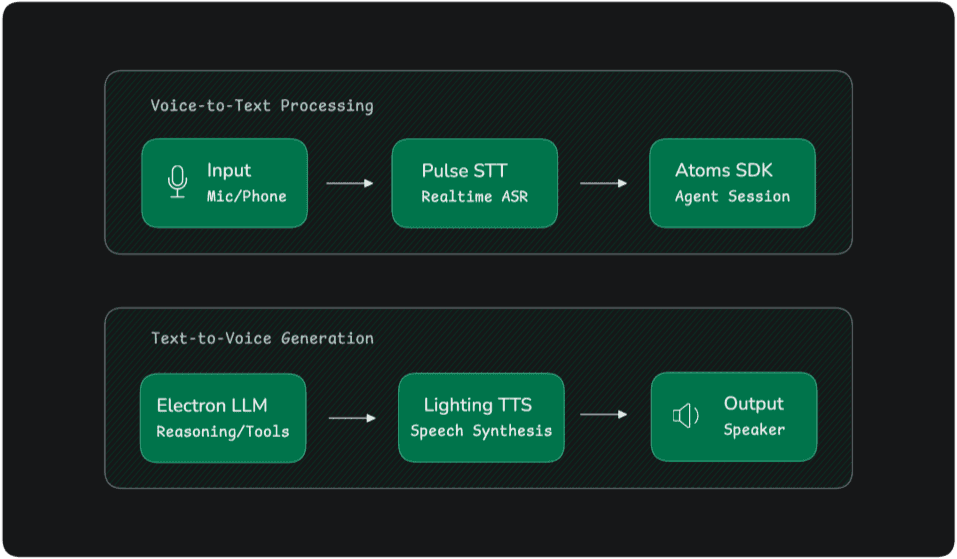
यथार्थवादी टीटीएस शायद ही कभी अलग-थलग काम करता है। अधिकांश वॉयस एप्लिकेशन एक बड़ी संवादात्मक पाइपलाइन का हिस्सा होते हैं।
एक विशिष्ट वॉयस एजेंट आर्किटेक्चर कुछ इस तरह दिखता है:
नीचे ऐसे सिस्टम का एक सरलीकृत पायथन कार्यान्वयन दिया गया है।
importosfromsmallestai.atoms.agent.nodesimportOutputAgentNodefromsmallestai.atoms.agent.clients.openaiimportOpenAIClientfromsmallestai.atoms.agent.serverimportAtomsAppfromsmallestai.atoms.agent.sessionimportAgentSessionfromsmallestai.atoms.agent.eventsimportSDKSystemUserJoinedEventclass MyAgent(OutputAgentNode):
def__init__(self):
super().__init__(name="my-agent")self.llm = OpenAIClient(model="gpt-4o-mini",api_key=os.getenv("OPENAI_API_KEY"))self.context.add_message({"role": "system","content": "You are a helpful assistant. Be concise and friendly."})asyncdefgenerate_response(self):
response = awaitself.llm.chat(messages=self.context.messages,stream=True)full_response = ""asyncforchunkinresponse:
ifchunk.content:
full_response += chunk.contentyieldchunk.contentiffull_response:
self.context.add_message({"role": "assistant","content": full_response})asyncdefon_start(session: AgentSession):
agent = MyAgent()session.add_node(agent)awaitsession.start()awaitsession.wait_until_complete()
importosfromsmallestai.atoms.agent.nodesimportOutputAgentNodefromsmallestai.atoms.agent.clients.openaiimportOpenAIClientfromsmallestai.atoms.agent.serverimportAtomsAppfromsmallestai.atoms.agent.sessionimportAgentSessionfromsmallestai.atoms.agent.eventsimportSDKSystemUserJoinedEventclass MyAgent(OutputAgentNode):
def__init__(self):
super().__init__(name="my-agent")self.llm = OpenAIClient(model="gpt-4o-mini",api_key=os.getenv("OPENAI_API_KEY"))self.context.add_message({"role": "system","content": "You are a helpful assistant. Be concise and friendly."})asyncdefgenerate_response(self):
response = awaitself.llm.chat(messages=self.context.messages,stream=True)full_response = ""asyncforchunkinresponse:
ifchunk.content:
full_response += chunk.contentyieldchunk.contentiffull_response:
self.context.add_message({"role": "assistant","content": full_response})asyncdefon_start(session: AgentSession):
agent = MyAgent()session.add_node(agent)awaitsession.start()awaitsession.wait_until_complete()
importosfromsmallestai.atoms.agent.nodesimportOutputAgentNodefromsmallestai.atoms.agent.clients.openaiimportOpenAIClientfromsmallestai.atoms.agent.serverimportAtomsAppfromsmallestai.atoms.agent.sessionimportAgentSessionfromsmallestai.atoms.agent.eventsimportSDKSystemUserJoinedEventclass MyAgent(OutputAgentNode):
def__init__(self):
super().__init__(name="my-agent")self.llm = OpenAIClient(model="gpt-4o-mini",api_key=os.getenv("OPENAI_API_KEY"))self.context.add_message({"role": "system","content": "You are a helpful assistant. Be concise and friendly."})asyncdefgenerate_response(self):
response = awaitself.llm.chat(messages=self.context.messages,stream=True)full_response = ""asyncforchunkinresponse:
ifchunk.content:
full_response += chunk.contentyieldchunk.contentiffull_response:
self.context.add_message({"role": "assistant","content": full_response})asyncdefon_start(session: AgentSession):
agent = MyAgent()session.add_node(agent)awaitsession.start()awaitsession.wait_until_complete()
यह कार्यान्वयन एक संवादात्मक वॉयस एजेंट के कोर निष्पादन लूप (execution loop) को प्रदर्शित करता है। OutputAgentNode संवाद निर्माण का प्रबंधन करता है जबकि AgentSession लाइफसाइकल इवेंट्स, स्ट्रीमिंग प्रतिक्रियाओं और संदर्भ प्रबंधन का समन्वय करता है।
चूंकि यह आर्किटेक्चर स्पीच प्रोसेसिंग, लैंग्वेज रीजनिंग और रिस्पॉन्स सिंथेसिस को स्वतंत्र घटकों में अलग करता है, इसलिए डेवलपर्स पूरे सिस्टम को फिर से डिजाइन किए बिना व्यक्तिगत परतों को संशोधित या बदल सकते हैं। यह मॉड्यूलर दृष्टिकोण समग्र संवादात्मक पाइपलाइन को सुरक्षित रखते हुए विभिन्न स्पीच रिकग्निशन इंजन, भाषा मॉडल या टीटीएस प्रदाताओं के साथ लचीले प्रयोगों को सक्षम बनाता है।
लागत प्रबंधन और स्केलेबिलिटी
पैमाने पर, प्रदाता मूल्य निर्धारण मॉडल के आधार पर टीटीएस लागत में नाटकीय रूप से बदलाव हो सकता है।
अधिकांश विक्रेता प्रति दस लाख संसाधित अक्षरों (characters) पर शुल्क लेते हैं।
प्रदाता
मूल्य निर्धारण मॉडल
गूगल क्लाउड टीटीएस
प्रति दस लाख अक्षर
अमेज़न पॉली
प्रति दस लाख अक्षर
माइक्रोसॉफ्ट अज़्योर
प्रति दस लाख अक्षर
इलेवनलैब्स (ElevenLabs)
सदस्यता + अक्षर सीमा
स्मॉलेस्ट एआई (Smallest AI)
प्रति दस लाख UTF-8 बाइट्स
हर महीने हजारों घंटों के भाषण को संसाधित करने वाले बड़े परिनियोजनों (deployments) को इन मूल्य अंतरों का सावधानीपूर्वक मूल्यांकन करना चाहिए।
उन्नत क्षमताएं: वॉयस क्लोनिंग (Voice Cloning)
आधुनिक टीटीएस प्लेटफॉर्म तेजी से वॉयस क्लोनिंग का समर्थन कर रहे हैं, जिससे संगठन एक छोटे से ऑडियो नमूने का उपयोग करके किसी वक्ता की आवाज की प्रतिलिपि बना सकते हैं।
वैश्विक अनुप्रयोगों के लिए कई भाषाओं में भाषण संश्लेषण की आवश्यकता होती है।
आधुनिक फोनीम-आधारित (phoneme-based) आर्किटेक्चर पहले के टोकनाइजेशन दृष्टिकोणों की तुलना में अधिक प्रभावी ढंग से बहुभाषी संश्लेषण को संभालते हैं।
यह अंग्रेजी, स्पेनिश, हिंदी, जापानी, मंदारिन और कई अन्य भाषाओं में प्राकृतिक उच्चारण की अनुमति देता है।
कुछ सिस्टम कोड-स्विचिंग (code-switching) का भी समर्थन करते हैं, जहां एक ही वाक्य में कई भाषाएं दिखाई देती हैं।
निष्कर्ष
वास्तविक लगने वाले टेक्स्ट-टू-स्पीच सिस्टम बनाने की बाधा पिछले कुछ वर्षों में नाटकीय रूप से कम हुई है। न्यूरल स्पीच सिंथेसिस, स्ट्रीमिंग इंफ्रास्ट्रक्चर और संवादात्मक एआई फ्रेमवर्क में प्रगति ने प्राकृतिक वॉयस इंटरफेस को सामान्य डेवलपर्स के लिए सुलभ बना दिया है।
पायथन का इकोसिस्टम इन प्रणालियों के निर्माण के लिए एक शक्तिशाली वातावरण प्रदान करता है, साधारण नरेशन स्क्रिप्ट से लेकर जटिल संवादात्मक वॉयस एजेंटों तक।
स्केलेबल आर्किटेक्चर के साथ आधुनिक टीटीएस इंजनों को मिलाकर, डेवलपर्स ऐसे एप्लिकेशन बना सकते हैं जो रोबोटिक प्रतिक्रियाओं से आगे बढ़कर वास्तव में प्राकृतिक वॉयस इंटरेक्शन प्रदान करते हैं।
यूज़र इंटरफेस की अगली पीढ़ी टाइप करने के बजाय बोली जाने वाली अधिक होगी। पायथन तेजी से उस भविष्य के निर्माण के लिए सबसे प्रभावी प्लेटफॉर्मों में से एक बन रहा है।