पायथन में वॉयस एआई बनाएं: संपूर्ण स्पीच-टू-टेक्स्ट डेवलपर गाइड (2026)

इस संपूर्ण 2026 स्पीच-टू-टेक्स्ट डेवलपर गाइड के साथ Python में Voice AI बनाएं। रीयल-टाइम ट्रांसक्रिप्शन, API, मॉडल और प्रोडक्शन की सर्वोत्तम प्रथाएं सीखें।

TL;DR – त्वरित एकीकरण अवलोकन

API प्लेटफॉर्म: Smallest AI द्वारा Pulse STT – एक अत्याधुनिक स्पीच-टू-टेक्स्ट API जो रीयल-टाइम स्ट्रीमिंग और बैच ऑडियो ट्रांसक्रिप्शन का समर्थन करती है।

प्रमुख विशेषताएँ:

  • स्वचालित भाषा पहचान के साथ 32+ भाषाओं में ट्रांसक्राइब करता है

  • अल्ट्रा-लो लेटेंसी: स्ट्रीमिंग के लिए पहले-ट्रांसक्रिप्ट-तक-का-समय ~64ms

  • समृद्ध मेटाडेटा: शब्द टाइमस्टैम्प, स्पीकर डायराइजेशन, भावना पहचान, आयु/लिंग अनुमान, PII संपादन

एकीकरण के तरीके:

  • पहले से रिकॉर्ड किया गया ऑडियो: POST https://waves-api.smallest.ai/api/v1/pulse/get_text – बैच प्रोसेसिंग के लिए फ़ाइलें अपलोड करें

  • रीयल-टाइम स्ट्रीमिंग: wss://waves-api.smallest.ai/api/v1/pulse/get_text – लाइव ट्रांसक्रिप्शन के लिए WebSocket

डेवलपर अनुभव: किसी भी HTTP/WebSocket क्लाइंट या आधिकारिक SDKs (Python, Node.js) का उपयोग करें। एक ही API कुंजी के माध्यम से प्रमाणीकरण।

Pulse STT ही क्यों? अन्य प्रदाताओं की तुलना में, Pulse तेज़ प्रतिक्रिया (विशिष्ट क्लाउड STT के लिए 200-500ms बनाम 64ms) और ऑल-इन-वन सुविधाएँ प्रदान करता है (स्पीकर आईडी, भावना या PII मास्किंग के लिए अलग सेवाओं की कोई आवश्यकता नहीं है)।

त्वरित लिंक्स:

परिचय: वॉयस इंटीग्रेशन क्यों महत्वपूर्ण है

आवाज उपयोगकर्ता की बातचीत का अगला साधन बनती जा रही है। वर्चुअल असिस्टेंट और वॉयस बॉट्स से लेकर मीटिंग्स में रीयल-टाइम ट्रांसक्रिप्शन तक, स्पीच इंटरफेस सॉफ्टवेयर को अधिक सुलभ और उपयोगकर्ता के अनुकूल बना रहे हैं। डेवलपर्स के पास आज ऑटोमैटिक स्पीच रिकॉग्निशन (ASR) APIs तक पहुंच है जो आवाज को टेक्स्ट में बदलते हैं, जिससे हैंड्स-फ्री कंट्रोल, लाइव कैप्शन, वॉयस सर्च और बहुत कुछ की संभावनाएं खुलती हैं।

हालांकि, वॉयस एआई को एकीकृत करना केवल ऑडियो से कच्चा टेक्स्ट प्राप्त करने से कहीं अधिक है। आधुनिक उपयोग के मामलों में गति और सटीकता की मांग होती है – एक वॉयस असिस्टेंट को कमांड को लगभग तुरंत ट्रांसक्राइब करने की आवश्यकता होती है, और एक कॉल सेंटर एनालिटिक्स टूल को न केवल ट्रांसक्रिप्ट की बल्कि यह भी आवश्यकता हो सकती है कि किसने कब और कैसे बात की।

लेटेंसी अत्यंत महत्वपूर्ण है। बातचीत में एक सेकंड की भी देरी सुस्त महसूस होती है। पारंपरिक क्लाउड स्पीच APIs में लाइव ट्रांसक्रिप्शन के लिए अक्सर 500-1200ms की लेटेंसी होती है, जबकि बेहतर APIs में यह 200-250ms के आसपास होती है। इसने उद्योग को सहज वास्तविक समय के इंटरैक्शन को सक्षम करने के लिए बेहद कम लेटेंसी – 300ms से कम – की ओर धकेला है।

इस गाइड में, हम सीखेंगे कि Smallest AI के Pulse STT का उपयोग करके इन आधुनिक मांगों को पूरा करने वाले AI वॉयस और स्पीच API को कैसे एकीकृत किया जाए। अंत तक, आप जानेंगे कि कैसे:

  1. एक साधारण HTTP API का उपयोग करके ऑडियो फ़ाइलों (WAV/MP3) को टेक्स्ट में ट्रांसक्राइब करें

  2. WebSockets के माध्यम से त्वरित ट्रांसक्रिप्ट के लिए लाइव ऑडियो स्ट्रीम करें

  3. टाइमस्टैम्प, स्पीकर डायराइजेशन और भावना पहचान जैसी उन्नत सुविधाओं का लाभ उठाएं

  4. आवाज क्षमताओं को एकीकृत करने के लिए Python और Node.js दोनों का उपयोग करें


Pulse STT को समझना

Pulse, Smallest AI के "Waves" प्लेटफॉर्म का स्पीच-टू-टेक्स्ट/ASR (ऑटोमैटिक स्पीच रिकॉग्निशन) मॉडल है। इसे स्ट्रीमिंग ऑडियो के लिए पहले ट्रांसक्राइब किए गए शब्द TTFT के लिए उद्योग-अग्रणी लेटेंसी – लगभग 64 मिलीसेकंड – के साथ तेज़, सटीक और समृद्ध ट्रांसक्रिप्शन के लिए डिज़ाइन किया गया है। यह कई अन्य विकल्पों की तुलना में बहुत तेज़ है।


प्रमुख विशेषताएँ

विशेषता

विवरण

रीयल-टाइम और बैच मोड

WebSocket के माध्यम से लाइव ऑडियो स्ट्रीम करें या HTTP POST के माध्यम से फ़ाइलें अपलोड करें

32+ भाषाएँ

अंग्रेजी, स्पेनिश, हिंदी, फ्रेंच, जर्मन, अरबी, जापानी और बहुत कुछ स्वतः पहचान के साथ

शब्द/वाक्य टाइमस्टैम्प

सटीक रूप से जानें कि प्रत्येक शब्द कब बोला गया था (उपशीर्षक के लिए बेहतरीन)

स्पीकर डायराइजेशन

वक्ताओं में अंतर करें: "वक्ता ए ने एक्स कहा, वक्ता बी ने वाई कहा"

भावना पहचान

भावनाओं के साथ सेगमेंट को टैग करें: खुश, गुस्से में, न्यूट्रल, आदि।

आयु/लिंग अनुमान

एनालिटिक्स के लिए वक्ता जनसांख्यिकी का अनुमान लगाएं

PII/PCI संपादन

क्रेडिट कार्ड, SSN और व्यक्तिगत जानकारी को स्वचालित रूप से छिपाएं

64ms लेटेंसी

स्ट्रीमिंग मोड में पहले-ट्रांसक्रिप्ट-तक-का-समय


शुरू करना: प्रमाणीकरण

चरण 1: अपनी API कुंजी प्राप्त करें

Smallest AI कंसोल पर साइन अप करें और एक API कुंजी उत्पन्न करें। यह कुंजी आपके सभी अनुरोधों को प्रमाणित करती है।


चरण 2: अपनी कुंजी का परीक्षण करें

curl -H "Authorization: Bearer $SMALLEST_API_KEY" \
  https://waves-api.smallest.ai/api/v1/lightning-v3.1/get_voices
curl -H "Authorization: Bearer $SMALLEST_API_KEY" \
  https://waves-api.smallest.ai/api/v1/lightning-v3.1/get_voices
curl -H "Authorization: Bearer $SMALLEST_API_KEY" \
  https://waves-api.smallest.ai/api/v1/lightning-v3.1/get_voices

प्रमाणीकरण हेडर

सभी अनुरोधों के लिए इस हेडर की आवश्यकता होती है:

Authorization: Bearer <YOUR_API_KEY>


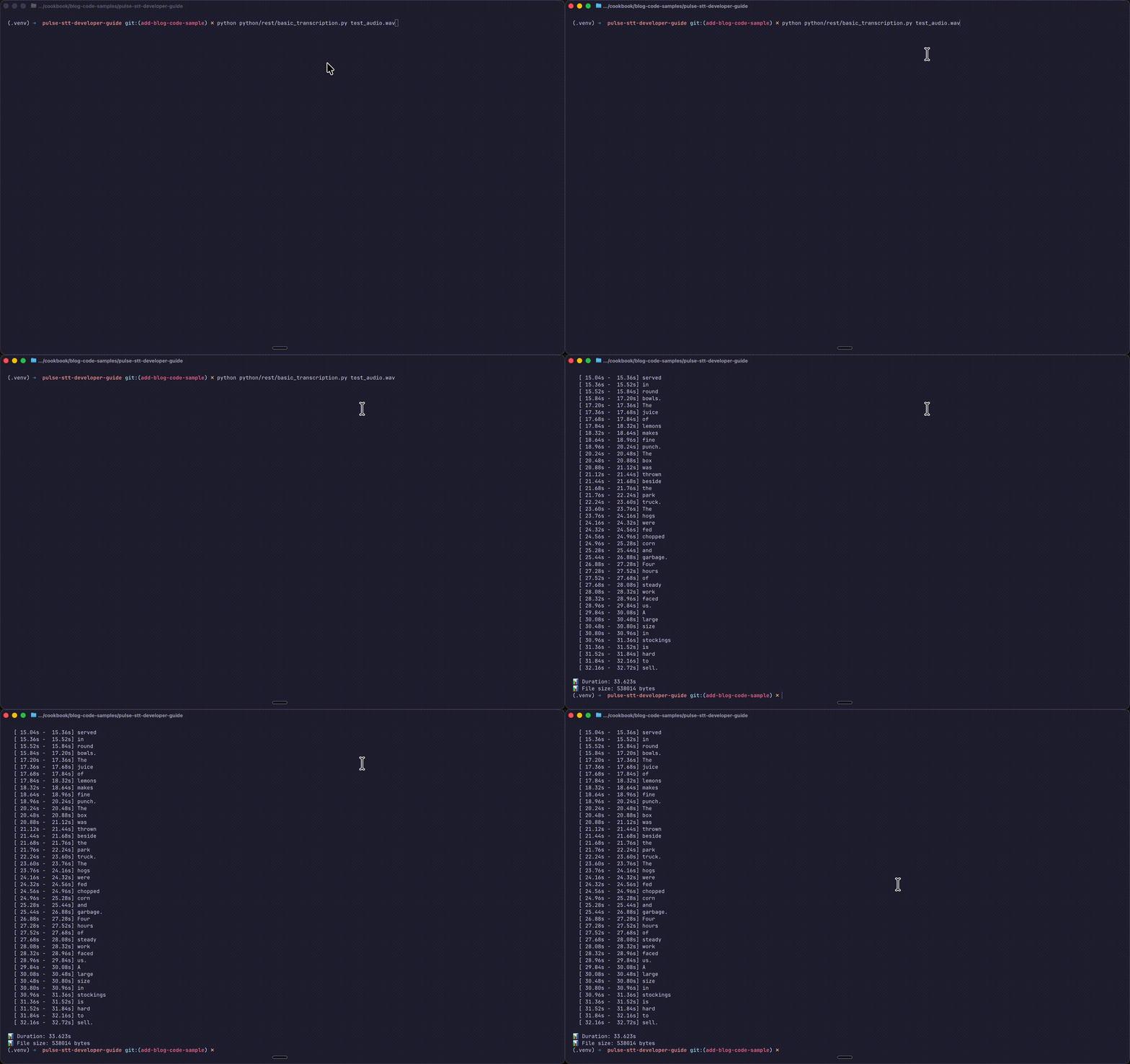
भाग 1: ऑडियो फ़ाइलों को ट्रांसक्राइब करना (REST API)

प्री-रिकॉर्डेड API वॉयस मेल, पॉडकास्ट, मीटिंग रिकॉर्डिंग या किसी भी मौजूदा ऑडियो फ़ाइलों की बैच प्रोसेसिंग के लिए बिल्कुल उपयुक्त है।


एंडपॉइंट


क्वेरी पैरामीटर

पैरामीटर

प्रकार

विवरण

model

string

मॉडल पहचानकर्ता: pulse (आवश्यक)

language

string

ISO कोड (en, es, hi) या स्वतः पहचान के लिए multi

word_timestamps

boolean

शब्द-स्तरीय समय डेटा शामिल करें

diarize

boolean

स्पीकर डायराइजेशन सक्षम करें

emotion_detection

boolean

स्पीकर की भावनाओं का पता लगाएं

age_detection

boolean

वक्ता के आयु वर्ग का अनुमान लगाएं

gender_detection

boolean

वक्ता के लिंग का अनुमान लगाएं


समर्थित भाषाएँ (32+)

इतालवी, स्पेनिश, अंग्रेजी, पुर्तगाली, हिंदी, जर्मन, फ्रेंच, यूक्रेनी, रूसी, कन्नड़, मलयालम, पोलिश, मराठी, गुजराती, चेक, स्लोवाक, तेलुगु, ओडिया, डच, बंगाली, लातवियाई, एस्टोनियाई, रोमानियाई, पंजाबी, फिनिश, स्वीडिश, बल्गेरियाई, तमिल, हंगेरियन, डेनिश, लिथुआनियाई, माल्टीज़ और स्वतः पहचान (multi)।


cURL उदाहरण


curl --request POST \
  --url "https://waves-api.smallest.ai/api/v1/pulse/get_text?model=pulse&language=en&diarize=true&word_timestamps=true&emotion_detection=true" \
  --header "Authorization: Bearer $SMALLEST_API_KEY" \
  --header "Content-Type: audio/wav" \
  --data-binary "@/path/to/audio.wav"
curl --request POST \
  --url "https://waves-api.smallest.ai/api/v1/pulse/get_text?model=pulse&language=en&diarize=true&word_timestamps=true&emotion_detection=true" \
  --header "Authorization: Bearer $SMALLEST_API_KEY" \
  --header "Content-Type: audio/wav" \
  --data-binary "@/path/to/audio.wav"
curl --request POST \
  --url "https://waves-api.smallest.ai/api/v1/pulse/get_text?model=pulse&language=en&diarize=true&word_timestamps=true&emotion_detection=true" \
  --header "Authorization: Bearer $SMALLEST_API_KEY" \
  --header "Content-Type: audio/wav" \
  --data-binary "@/path/to/audio.wav"


Python उदाहरण


import os
import requests

API_KEY = os.getenv("SMALLEST_API_KEY")
audio_file = "meeting_recording.wav"

url = "https://waves-api.smallest.ai/api/v1/pulse/get_text"
params = {
"model": "pulse",
"language": "en",
"word_timestamps": "true",
"diarize": "true",
"emotion_detection": "true"
}
headers = {
"Authorization": f"Bearer {API_KEY}",
"Content-Type": "audio/wav"
}

with open(audio_file, "rb") as f:
    audio_data = f.read()

response = requests.post(url, params=params, headers=headers, data=audio_data)
result = response.json()

# Print transcription

print("Transcription:", result.get("transcription"))

# Print word-level details with speaker info

for word in result.get("words", []):
    speaker = word.get("speaker", "N/A")
    print(f"  [Speaker {speaker}] [{word['start']:.2f}s - {word['end']:.2f}s] {word['word']}")

# Check emotions
import os
import requests

API_KEY = os.getenv("SMALLEST_API_KEY")
audio_file = "meeting_recording.wav"

url = "https://waves-api.smallest.ai/api/v1/pulse/get_text"
params = {
"model": "pulse",
"language": "en",
"word_timestamps": "true",
"diarize": "true",
"emotion_detection": "true"
}
headers = {
"Authorization": f"Bearer {API_KEY}",
"Content-Type": "audio/wav"
}

with open(audio_file, "rb") as f:
    audio_data = f.read()

response = requests.post(url, params=params, headers=headers, data=audio_data)
result = response.json()

# Print transcription

print("Transcription:", result.get("transcription"))

# Print word-level details with speaker info

for word in result.get("words", []):
    speaker = word.get("speaker", "N/A")
    print(f"  [Speaker {speaker}] [{word['start']:.2f}s - {word['end']:.2f}s] {word['word']}")

# Check emotions
import os
import requests

API_KEY = os.getenv("SMALLEST_API_KEY")
audio_file = "meeting_recording.wav"

url = "https://waves-api.smallest.ai/api/v1/pulse/get_text"
params = {
"model": "pulse",
"language": "en",
"word_timestamps": "true",
"diarize": "true",
"emotion_detection": "true"
}
headers = {
"Authorization": f"Bearer {API_KEY}",
"Content-Type": "audio/wav"
}

with open(audio_file, "rb") as f:
    audio_data = f.read()

response = requests.post(url, params=params, headers=headers, data=audio_data)
result = response.json()

# Print transcription

print("Transcription:", result.get("transcription"))

# Print word-level details with speaker info

for word in result.get("words", []):
    speaker = word.get("speaker", "N/A")
    print(f"  [Speaker {speaker}] [{word['start']:.2f}s - {word['end']:.2f}s] {word['word']}")

# Check emotions


Node.js उदाहरण


const fs = require('node:fs');
const axios = require('axios');

const audioData = fs.readFileSync('meeting_recording.wav');
axios.post('https://api.smallest.ai/waves/v1/stt/?model=pulse&language=en', audioData, {
  headers: {
    Authorization: `Bearer ${process.env.SMALLEST_API_KEY}`,
    'Content-Type': 'application/octet-stream',
  },
  timeout: 120000,
}).then(response => {
  console.log('Transcription:', response.data.transcription);
}).catch(error => {
  console.error(error.response?.data ?? error.message);
});
const fs = require('node:fs');
const axios = require('axios');

const audioData = fs.readFileSync('meeting_recording.wav');
axios.post('https://api.smallest.ai/waves/v1/stt/?model=pulse&language=en', audioData, {
  headers: {
    Authorization: `Bearer ${process.env.SMALLEST_API_KEY}`,
    'Content-Type': 'application/octet-stream',
  },
  timeout: 120000,
}).then(response => {
  console.log('Transcription:', response.data.transcription);
}).catch(error => {
  console.error(error.response?.data ?? error.message);
});
const fs = require('node:fs');
const axios = require('axios');

const audioData = fs.readFileSync('meeting_recording.wav');
axios.post('https://api.smallest.ai/waves/v1/stt/?model=pulse&language=en', audioData, {
  headers: {
    Authorization: `Bearer ${process.env.SMALLEST_API_KEY}`,
    'Content-Type': 'application/octet-stream',
  },
  timeout: 120000,
}).then(response => {
  console.log('Transcription:', response.data.transcription);
}).catch(error => {
  console.error(error.response?.data ?? error.message);
});


प्रतिक्रिया उदाहरण


{
"status": "success",
"transcription": "Hello, this is a test transcription.",
"words": [
{"start": 0.0, "end": 0.88, "word": "Hello,", "confidence": 0.82, "speaker": 0, "speaker_confidence": 0.61},
{"start": 0.88, "end": 1.04, "word": "this", "confidence": 1.0, "speaker": 0, "speaker_confidence": 0.76},
{"start": 1.04, "end": 1.20, "word": "is", "confidence": 1.0, "speaker": 0, "speaker_confidence": 0.99},
{"start": 1.20, "end": 1.36, "word": "a", "confidence": 1.0, "speaker": 0, "speaker_confidence": 0.99},
{"start": 1.36, "end": 1.68, "word": "test", "confidence": 0.99, "speaker": 0, "speaker_confidence": 0.99},
{"start": 1.68, "end": 2.16, "word": "transcription.", "confidence": 0.99, "speaker": 0, "speaker_confidence": 0.99}
],
"utterances": [
{"start": 0.0, "end": 2.16, "text": "Hello, this is a test transcription.", "speaker": 0}
],
"age": "adult",
"gender": "female",
"emotions": {
"happiness": 0.28,
"sadness": 0.0,
"anger": 0.0,
"fear": 0.0,
"disgust": 0.0
},
"metadata": {
"duration": 1.97,
"fileSize": 63236
}
}
{
"status": "success",
"transcription": "Hello, this is a test transcription.",
"words": [
{"start": 0.0, "end": 0.88, "word": "Hello,", "confidence": 0.82, "speaker": 0, "speaker_confidence": 0.61},
{"start": 0.88, "end": 1.04, "word": "this", "confidence": 1.0, "speaker": 0, "speaker_confidence": 0.76},
{"start": 1.04, "end": 1.20, "word": "is", "confidence": 1.0, "speaker": 0, "speaker_confidence": 0.99},
{"start": 1.20, "end": 1.36, "word": "a", "confidence": 1.0, "speaker": 0, "speaker_confidence": 0.99},
{"start": 1.36, "end": 1.68, "word": "test", "confidence": 0.99, "speaker": 0, "speaker_confidence": 0.99},
{"start": 1.68, "end": 2.16, "word": "transcription.", "confidence": 0.99, "speaker": 0, "speaker_confidence": 0.99}
],
"utterances": [
{"start": 0.0, "end": 2.16, "text": "Hello, this is a test transcription.", "speaker": 0}
],
"age": "adult",
"gender": "female",
"emotions": {
"happiness": 0.28,
"sadness": 0.0,
"anger": 0.0,
"fear": 0.0,
"disgust": 0.0
},
"metadata": {
"duration": 1.97,
"fileSize": 63236
}
}
{
"status": "success",
"transcription": "Hello, this is a test transcription.",
"words": [
{"start": 0.0, "end": 0.88, "word": "Hello,", "confidence": 0.82, "speaker": 0, "speaker_confidence": 0.61},
{"start": 0.88, "end": 1.04, "word": "this", "confidence": 1.0, "speaker": 0, "speaker_confidence": 0.76},
{"start": 1.04, "end": 1.20, "word": "is", "confidence": 1.0, "speaker": 0, "speaker_confidence": 0.99},
{"start": 1.20, "end": 1.36, "word": "a", "confidence": 1.0, "speaker": 0, "speaker_confidence": 0.99},
{"start": 1.36, "end": 1.68, "word": "test", "confidence": 0.99, "speaker": 0, "speaker_confidence": 0.99},
{"start": 1.68, "end": 2.16, "word": "transcription.", "confidence": 0.99, "speaker": 0, "speaker_confidence": 0.99}
],
"utterances": [
{"start": 0.0, "end": 2.16, "text": "Hello, this is a test transcription.", "speaker": 0}
],
"age": "adult",
"gender": "female",
"emotions": {
"happiness": 0.28,
"sadness": 0.0,
"anger": 0.0,
"fear": 0.0,
"disgust": 0.0
},
"metadata": {
"duration": 1.97,
"fileSize": 63236
}
}


भाग 2: रीयल-टाइम स्ट्रीमिंग (WebSocket API)

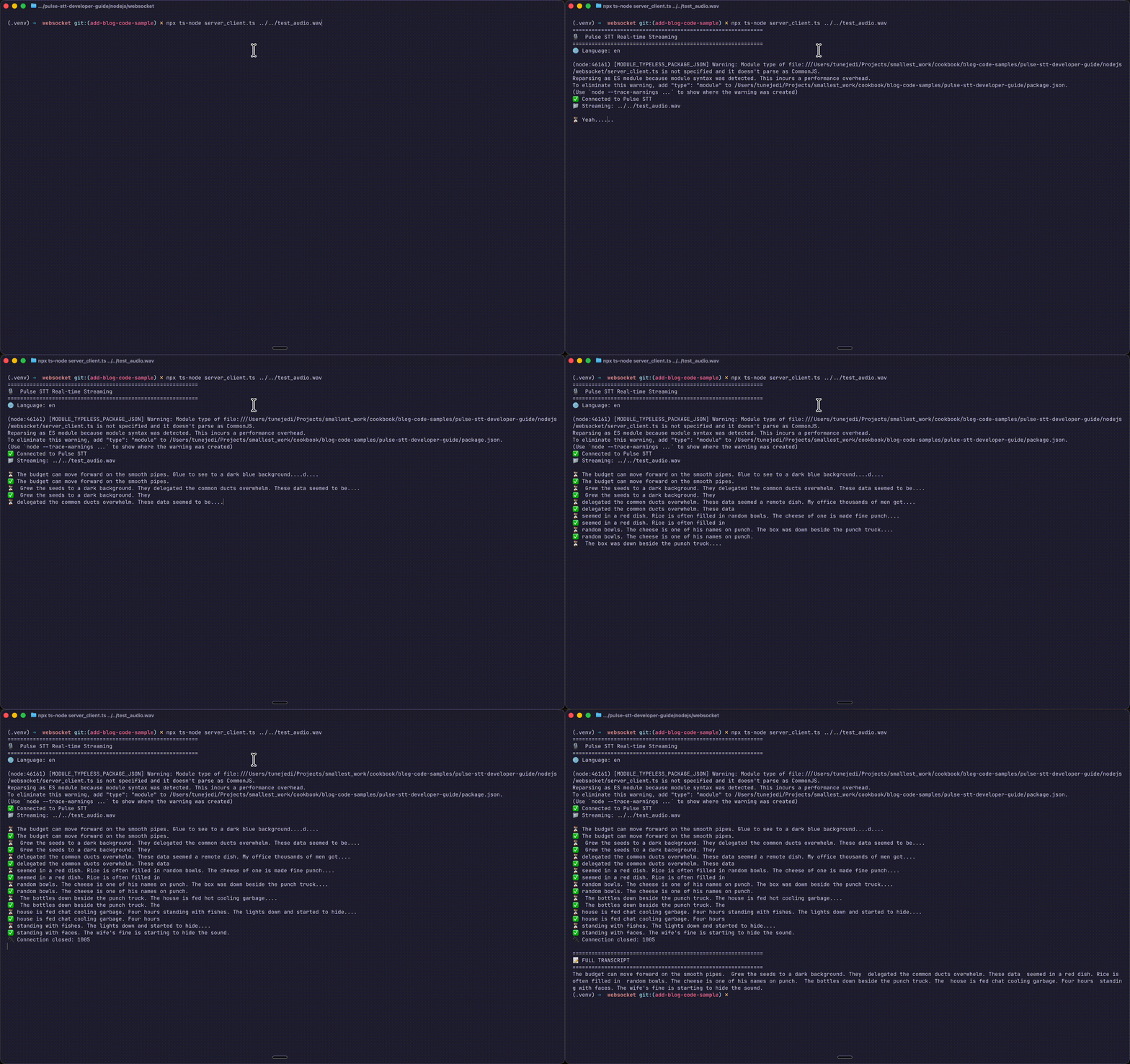
लाइव ऑडियो – वॉयस असिस्टेंट, लाइव कैप्शनिंग, कॉल सेंटर एनालिटिक्स – के लिए ऑडियो स्ट्रीम आने पर आंशिक परिणामों के साथ सब-सेकंड लेटेंसी के लिए WebSocket API का उपयोग करें।

WebSocket एंडपॉइंट

क्वेरी पैरामीटर

पैरामीटर

प्रकार

डिफ़ॉल्ट

विवरण

language

string

en

भाषा कोड या स्वतः पहचान के लिए multi

encoding

string

linear16

ऑडियो प्रारूप: linear16, linear32, alaw, mulaw, opus

sample_rate

string

16000

नमूना दर: 8000, 16000, 22050, 24000, 44100, 48000

word_timestamps

string

true

शब्द-स्तरीय टाइमस्टैम्प शामिल करें

full_transcript

string

false

संचयी ट्रांसक्रिप्ट शामिल करें

sentence_timestamps

string

false

वाक्य-स्तरीय टाइमस्टैम्प शामिल करें

redact_pii

string

false

व्यक्तिगत जानकारी संपादित करें (redact)

redact_pci

string

false

भुगतान कार्ड की जानकारी संपादित करें (redact)

diarize

string

false

स्पीकर डायराइजेशन सक्षम करें


Python स्ट्रीमिंग उदाहरण

आधिकारिक कुकबुक से:

import asyncio
import json
import os
import numpy as np
import websockets
import librosa
from urllib.parse import urlencode

WS_URL = "wss://waves-api.smallest.ai/api/v1/pulse/get_text"

# Configurable features

LANGUAGE = "en"
ENCODING = "linear16"
SAMPLE_RATE = 16000
WORD_TIMESTAMPS = False
FULL_TRANSCRIPT = True
SENTENCE_TIMESTAMPS = False
DIARIZE = False
REDACT_PII = False
REDACT_PCI = False

async def transcribe(audio_file: str, api_key: str):
    params = {"language": LANGUAGE, "encoding": ENCODING, "sample_rate": SAMPLE_RATE}
    url = f"{WS_URL}?{urlencode(params)}"
    headers = {"Authorization": f"Bearer {api_key}"}
    audio, _ = librosa.load(audio_file, sr=SAMPLE_RATE, mono=True)
    chunk_duration = 0.1
    chunk_size = int(chunk_duration * SAMPLE_RATE)
    async with websockets.connect(url, additional_headers=headers) as ws:
        async def send_audio():
            for i in range(0, len(audio), chunk_size):
                pcm16 = (audio[i:i + chunk_size] * 32767.0).astype(np.int16).tobytes()
                await ws.send(pcm16)
                await asyncio.sleep(chunk_duration)
            await ws.send(json.dumps({"type": "end"}))
        async def receive_responses():
            async for message in ws:
                result = json.loads(message)
                if result.get("is_final"):
                    print(result.get("transcript", ""))
                if result.get("is_last"):
                    break
        await asyncio.gather(send_audio(), receive_responses())
import asyncio
import json
import os
import numpy as np
import websockets
import librosa
from urllib.parse import urlencode

WS_URL = "wss://waves-api.smallest.ai/api/v1/pulse/get_text"

# Configurable features

LANGUAGE = "en"
ENCODING = "linear16"
SAMPLE_RATE = 16000
WORD_TIMESTAMPS = False
FULL_TRANSCRIPT = True
SENTENCE_TIMESTAMPS = False
DIARIZE = False
REDACT_PII = False
REDACT_PCI = False

async def transcribe(audio_file: str, api_key: str):
    params = {"language": LANGUAGE, "encoding": ENCODING, "sample_rate": SAMPLE_RATE}
    url = f"{WS_URL}?{urlencode(params)}"
    headers = {"Authorization": f"Bearer {api_key}"}
    audio, _ = librosa.load(audio_file, sr=SAMPLE_RATE, mono=True)
    chunk_duration = 0.1
    chunk_size = int(chunk_duration * SAMPLE_RATE)
    async with websockets.connect(url, additional_headers=headers) as ws:
        async def send_audio():
            for i in range(0, len(audio), chunk_size):
                pcm16 = (audio[i:i + chunk_size] * 32767.0).astype(np.int16).tobytes()
                await ws.send(pcm16)
                await asyncio.sleep(chunk_duration)
            await ws.send(json.dumps({"type": "end"}))
        async def receive_responses():
            async for message in ws:
                result = json.loads(message)
                if result.get("is_final"):
                    print(result.get("transcript", ""))
                if result.get("is_last"):
                    break
        await asyncio.gather(send_audio(), receive_responses())
import asyncio
import json
import os
import numpy as np
import websockets
import librosa
from urllib.parse import urlencode

WS_URL = "wss://waves-api.smallest.ai/api/v1/pulse/get_text"

# Configurable features

LANGUAGE = "en"
ENCODING = "linear16"
SAMPLE_RATE = 16000
WORD_TIMESTAMPS = False
FULL_TRANSCRIPT = True
SENTENCE_TIMESTAMPS = False
DIARIZE = False
REDACT_PII = False
REDACT_PCI = False

async def transcribe(audio_file: str, api_key: str):
    params = {"language": LANGUAGE, "encoding": ENCODING, "sample_rate": SAMPLE_RATE}
    url = f"{WS_URL}?{urlencode(params)}"
    headers = {"Authorization": f"Bearer {api_key}"}
    audio, _ = librosa.load(audio_file, sr=SAMPLE_RATE, mono=True)
    chunk_duration = 0.1
    chunk_size = int(chunk_duration * SAMPLE_RATE)
    async with websockets.connect(url, additional_headers=headers) as ws:
        async def send_audio():
            for i in range(0, len(audio), chunk_size):
                pcm16 = (audio[i:i + chunk_size] * 32767.0).astype(np.int16).tobytes()
                await ws.send(pcm16)
                await asyncio.sleep(chunk_duration)
            await ws.send(json.dumps({"type": "end"}))
        async def receive_responses():
            async for message in ws:
                result = json.loads(message)
                if result.get("is_final"):
                    print(result.get("transcript", ""))
                if result.get("is_last"):
                    break
        await asyncio.gather(send_audio(), receive_responses())

निर्भरताएँ स्थापित करें (Install dependencies):

चलाएं:

export SMALLEST_API_KEY="your-api-key"

export SMALLEST_API_KEY="your-api-key"

export SMALLEST_API_KEY="your-api-key"

(पूर्वावलोकन आउटपुट)

Node.js स्ट्रीमिंग उदाहरण

आधिकारिक कुकबुक से:

const fs = require("fs");
const WebSocket = require("ws");
const wav = require("wav");

const WS_URL = "wss://waves-api.smallest.ai/api/v1/pulse/get_text";

// Configurable features
const LANGUAGE = "en";
const ENCODING = "linear16";
const SAMPLE_RATE = 16000;
const WORD_TIMESTAMPS = false;
const FULL_TRANSCRIPT = true;
const DIARIZE = false;
const REDACT_PII = false;
const REDACT_PCI = false;

async function loadAudio(audioFile) {
return new Promise((resolve, reject) => {
const reader = new wav.Reader();
const chunks = [];

reader.on("format", (format) => {
reader.on("data", (chunk) => chunks.push(chunk));
reader.on("end", () => {
const buffer = Buffer.concat(chunks);
const samples = new Int16Array(buffer.buffer, buffer.byteOffset, buffer.length / 2);
resolve(samples);
});
});

reader.on("error", reject);
fs.createReadStream(audioFile).pipe(reader);

});
}

async function transcribe(audioFile, apiKey) {
const params = new URLSearchParams({
language: LANGUAGE,
encoding: ENCODING,
sample_rate: SAMPLE_RATE,
word_timestamps: WORD_TIMESTAMPS,
full_transcript: FULL_TRANSCRIPT,
diarize: DIARIZE,
redact_pii: REDACT_PII,
redact_pci: REDACT_PCI,
});

const url = `${WS_URL}?${params}`;
const audio = await loadAudio(audioFile);
const chunkDuration = 0.1; // 100ms
const chunkSize = Math.floor(chunkDuration * SAMPLE_RATE);

return new Promise((resolve, reject) => {
const ws = new WebSocket(url, {
headers: { Authorization: `Bearer ${apiKey}`
 },
});

ws.on("open", async () => {
console.log("✅ Connected to Pulse STT WebSocket");

for (let i = 0; i < audio.length; i += chunkSize) {
const chunk = audio.slice(i, i + chunkSize);
ws.send(Buffer.from(chunk.buffer, chunk.byteOffset, chunk.byteLength));
await new Promise((r) => setTimeout(r, chunkDuration * 1000));
}
ws.send(JSON.stringify({ type: "end" }));
console.log("📤 Sent end signal");
});

ws.on("message", (data) => {
const result = JSON.parse(data.toString());

if (result.is_final) {
console.log(`✓ ${result.transcript}`);

if (result.is_last) {
if (result.full_transcript) {
console.log("\n" + "=".repeat(60));
console.log("FULL TRANSCRIPT");
console.log("=".repeat(60));
console.log(result.full_transcript);
}
ws.close();
}

}
});
ws.on("error", reject);
ws.on("close", resolve);
});
}
const fs = require("fs");
const WebSocket = require("ws");
const wav = require("wav");

const WS_URL = "wss://waves-api.smallest.ai/api/v1/pulse/get_text";

// Configurable features
const LANGUAGE = "en";
const ENCODING = "linear16";
const SAMPLE_RATE = 16000;
const WORD_TIMESTAMPS = false;
const FULL_TRANSCRIPT = true;
const DIARIZE = false;
const REDACT_PII = false;
const REDACT_PCI = false;

async function loadAudio(audioFile) {
return new Promise((resolve, reject) => {
const reader = new wav.Reader();
const chunks = [];

reader.on("format", (format) => {
reader.on("data", (chunk) => chunks.push(chunk));
reader.on("end", () => {
const buffer = Buffer.concat(chunks);
const samples = new Int16Array(buffer.buffer, buffer.byteOffset, buffer.length / 2);
resolve(samples);
});
});

reader.on("error", reject);
fs.createReadStream(audioFile).pipe(reader);

});
}

async function transcribe(audioFile, apiKey) {
const params = new URLSearchParams({
language: LANGUAGE,
encoding: ENCODING,
sample_rate: SAMPLE_RATE,
word_timestamps: WORD_TIMESTAMPS,
full_transcript: FULL_TRANSCRIPT,
diarize: DIARIZE,
redact_pii: REDACT_PII,
redact_pci: REDACT_PCI,
});

const url = `${WS_URL}?${params}`;
const audio = await loadAudio(audioFile);
const chunkDuration = 0.1; // 100ms
const chunkSize = Math.floor(chunkDuration * SAMPLE_RATE);

return new Promise((resolve, reject) => {
const ws = new WebSocket(url, {
headers: { Authorization: `Bearer ${apiKey}`
 },
});

ws.on("open", async () => {
console.log("✅ Connected to Pulse STT WebSocket");

for (let i = 0; i < audio.length; i += chunkSize) {
const chunk = audio.slice(i, i + chunkSize);
ws.send(Buffer.from(chunk.buffer, chunk.byteOffset, chunk.byteLength));
await new Promise((r) => setTimeout(r, chunkDuration * 1000));
}
ws.send(JSON.stringify({ type: "end" }));
console.log("📤 Sent end signal");
});

ws.on("message", (data) => {
const result = JSON.parse(data.toString());

if (result.is_final) {
console.log(`✓ ${result.transcript}`);

if (result.is_last) {
if (result.full_transcript) {
console.log("\n" + "=".repeat(60));
console.log("FULL TRANSCRIPT");
console.log("=".repeat(60));
console.log(result.full_transcript);
}
ws.close();
}

}
});
ws.on("error", reject);
ws.on("close", resolve);
});
}
const fs = require("fs");
const WebSocket = require("ws");
const wav = require("wav");

const WS_URL = "wss://waves-api.smallest.ai/api/v1/pulse/get_text";

// Configurable features
const LANGUAGE = "en";
const ENCODING = "linear16";
const SAMPLE_RATE = 16000;
const WORD_TIMESTAMPS = false;
const FULL_TRANSCRIPT = true;
const DIARIZE = false;
const REDACT_PII = false;
const REDACT_PCI = false;

async function loadAudio(audioFile) {
return new Promise((resolve, reject) => {
const reader = new wav.Reader();
const chunks = [];

reader.on("format", (format) => {
reader.on("data", (chunk) => chunks.push(chunk));
reader.on("end", () => {
const buffer = Buffer.concat(chunks);
const samples = new Int16Array(buffer.buffer, buffer.byteOffset, buffer.length / 2);
resolve(samples);
});
});

reader.on("error", reject);
fs.createReadStream(audioFile).pipe(reader);

});
}

async function transcribe(audioFile, apiKey) {
const params = new URLSearchParams({
language: LANGUAGE,
encoding: ENCODING,
sample_rate: SAMPLE_RATE,
word_timestamps: WORD_TIMESTAMPS,
full_transcript: FULL_TRANSCRIPT,
diarize: DIARIZE,
redact_pii: REDACT_PII,
redact_pci: REDACT_PCI,
});

const url = `${WS_URL}?${params}`;
const audio = await loadAudio(audioFile);
const chunkDuration = 0.1; // 100ms
const chunkSize = Math.floor(chunkDuration * SAMPLE_RATE);

return new Promise((resolve, reject) => {
const ws = new WebSocket(url, {
headers: { Authorization: `Bearer ${apiKey}`
 },
});

ws.on("open", async () => {
console.log("✅ Connected to Pulse STT WebSocket");

for (let i = 0; i < audio.length; i += chunkSize) {
const chunk = audio.slice(i, i + chunkSize);
ws.send(Buffer.from(chunk.buffer, chunk.byteOffset, chunk.byteLength));
await new Promise((r) => setTimeout(r, chunkDuration * 1000));
}
ws.send(JSON.stringify({ type: "end" }));
console.log("📤 Sent end signal");
});

ws.on("message", (data) => {
const result = JSON.parse(data.toString());

if (result.is_final) {
console.log(`✓ ${result.transcript}`);

if (result.is_last) {
if (result.full_transcript) {
console.log("\n" + "=".repeat(60));
console.log("FULL TRANSCRIPT");
console.log("=".repeat(60));
console.log(result.full_transcript);
}
ws.close();
}

}
});
ws.on("error", reject);
ws.on("close", resolve);
});
}

निर्भरताएँ स्थापित करें (Install dependencies):


चलाएं:


export SMALLEST_API_KEY="your-api-key"
node

export SMALLEST_API_KEY="your-api-key"
node

export SMALLEST_API_KEY="your-api-key"
node


WebSocket प्रतिक्रिया प्रारूप


{
"session_id": "sess_12345abcde",
"transcript": "Hello, how are you?",
"full_transcript": "Hello, how are you?",
"is_final": true,
"is_last": false,
"language": "en",
"words": [
{"word": "Hello,", "start": 0.0, "end": 0.5, "confidence": 0.98, "speaker": 0},
{"word": "how", "start": 0.5, "end": 0.7, "confidence": 0.99, "speaker": 0},
{"word": "are", "start": 0.7, "end": 0.9, "confidence": 0.97, "speaker": 0},
{"word": "you?", "start": 0.9, "end": 1.2, "confidence": 0.99, "speaker": 0}
]
}
{
"session_id": "sess_12345abcde",
"transcript": "Hello, how are you?",
"full_transcript": "Hello, how are you?",
"is_final": true,
"is_last": false,
"language": "en",
"words": [
{"word": "Hello,", "start": 0.0, "end": 0.5, "confidence": 0.98, "speaker": 0},
{"word": "how", "start": 0.5, "end": 0.7, "confidence": 0.99, "speaker": 0},
{"word": "are", "start": 0.7, "end": 0.9, "confidence": 0.97, "speaker": 0},
{"word": "you?", "start": 0.9, "end": 1.2, "confidence": 0.99, "speaker": 0}
]
}
{
"session_id": "sess_12345abcde",
"transcript": "Hello, how are you?",
"full_transcript": "Hello, how are you?",
"is_final": true,
"is_last": false,
"language": "en",
"words": [
{"word": "Hello,", "start": 0.0, "end": 0.5, "confidence": 0.98, "speaker": 0},
{"word": "how", "start": 0.5, "end": 0.7, "confidence": 0.99, "speaker": 0},
{"word": "are", "start": 0.7, "end": 0.9, "confidence": 0.97, "speaker": 0},
{"word": "you?", "start": 0.9, "end": 1.2, "confidence": 0.99, "speaker": 0}
]
}


मुख्य प्रतिक्रिया फ़ील्ड

फ़ील्ड

विवरण

is_final

false = आंशिक/अंतरिम ट्रांसक्रिप्ट; true = अंतिम रूप दिया गया सेगमेंट

is_last

पूरा सत्र समाप्त होने पर true

transcript

वर्तमान सेगमेंट का टेक्स्ट

full_transcript

पूरे सत्र से संचित टेक्स्ट (यदि सक्षम हो)

words

शब्द-स्तरीय टाइमस्टैम्प (यदि सक्षम हो)


भाग 3: उन्नत विशेषताएँ


स्पीकर डायराइजेशन (Diarization)

अलग-अलग वक्ताओं की पहचान करने के लिए diarize=true सक्षम करें:


params = {"model": "pulse", "language": "en", "diarize": "true"}

प्रतिक्रिया में स्पीकर लेबल शामिल हैं:


{
"words": [
{"word": "Hello", "speaker": 0, "speaker_confidence": 0.95},
{"word": "Hi", "speaker": 1, "speaker_confidence": 0.92}
],
"utterances": [
{"text": "Hello, how can I help?", "speaker": 0},
{"text": "I have a question.", "speaker": 1}
]
}
{
"words": [
{"word": "Hello", "speaker": 0, "speaker_confidence": 0.95},
{"word": "Hi", "speaker": 1, "speaker_confidence": 0.92}
],
"utterances": [
{"text": "Hello, how can I help?", "speaker": 0},
{"text": "I have a question.", "speaker": 1}
]
}
{
"words": [
{"word": "Hello", "speaker": 0, "speaker_confidence": 0.95},
{"word": "Hi", "speaker": 1, "speaker_confidence": 0.92}
],
"utterances": [
{"text": "Hello, how can I help?", "speaker": 0},
{"text": "I have a question.", "speaker": 1}
]
}


भावना पहचान (Emotion Detection)

वक्ता की भावनाओं का विश्लेषण करने के लिए emotion_detection=true सक्षम करें:


{
"emotions": {
"happiness": 0.28,
"sadness": 0.0,
"anger": 0.0,
"fear": 0.0,
"disgust": 0.0
}
}
{
"emotions": {
"happiness": 0.28,
"sadness": 0.0,
"anger": 0.0,
"fear": 0.0,
"disgust": 0.0
}
}
{
"emotions": {
"happiness": 0.28,
"sadness": 0.0,
"anger": 0.0,
"fear": 0.0,
"disgust": 0.0
}
}


PII/PCI संपादन (Redaction)

अनुपालन (HIPAA, PCI-DSS) के लिए, redact_pii=true या redact_pci=true सक्षम करें:


{
"transcript": "My credit card is [CREDITCARD_1] and SSN is [SSN_1]",
"redacted_entities": ["[CREDITCARD_1]", "[SSN_1]"]
}
{
"transcript": "My credit card is [CREDITCARD_1] and SSN is [SSN_1]",
"redacted_entities": ["[CREDITCARD_1]", "[SSN_1]"]
}
{
"transcript": "My credit card is [CREDITCARD_1] and SSN is [SSN_1]",
"redacted_entities": ["[CREDITCARD_1]", "[SSN_1]"]
}


आयु और लिंग पहचान

age_detection=true और gender_detection=true सक्षम करें:


{
"age": "adult",
"gender": "female"
}
{
"age": "adult",
"gender": "female"
}
{
"age": "adult",
"gender": "female"
}


STT प्रदाताओं की तुलना

प्रदाता

लेटेंसी

भाषाएँ

डायराइजेशन

भावना

PII संपादन

कीमत (प्रति 1000 मिनट)

Pulse STT

64ms

32+

✅

✅

✅

प्रतिस्पर्धी

Google Cloud STT

200-300ms

125+

✅

❌

❌

$16

Deepgram

100-200ms

36+

✅

❌

✅

$4-5

AssemblyAI

200-400ms

30+

✅

✅

✅

$3.50

OpenAI Whisper

केवल बैच

99+

❌

❌

❌

~$6

Pulse STT क्यों सबसे अलग है:

  • सबसे तेज़ समय-से-पहला-ट्रांसक्रिप्ट (64ms)

  • ऑल-इन-वन सुविधाएँ (अलग सेवाओं की आवश्यकता नहीं)

  • विविध लहजों में प्रतिस्पर्धी सटीकता

  • रीयल-टाइम वॉयस एआई एप्लिकेशन्स के लिए निर्मित

h2 id="378">सर्वोत्तम प्रथाएँ (Best Practices)

ऑडियो गुणवत्ता

  • सर्वोत्तम परिणामों के लिए 16kHz, मोनो, 16-बिट PCM का उपयोग करें

  • WAV या FLAC प्रारूप आदर्श हैं

  • यदि संभव हो तो पृष्ठभूमि के शोर को कम करें


त्रुटि प्रबंधन (Error Handling)

import time

try:
    response = requests.post(url, params=params, headers=headers, data=audio_data, timeout=120)
    response.raise_for_status()
except requests.exceptions.HTTPError as exc:
    if exc.response.status_code == 429:
        time.sleep(2 ** retry_count)
    elif exc.response.status_code == 401:
        raise ValueError("Invalid API key") from exc
    else:
        raise
import time

try:
    response = requests.post(url, params=params, headers=headers, data=audio_data, timeout=120)
    response.raise_for_status()
except requests.exceptions.HTTPError as exc:
    if exc.response.status_code == 429:
        time.sleep(2 ** retry_count)
    elif exc.response.status_code == 401:
        raise ValueError("Invalid API key") from exc
    else:
        raise
import time

try:
    response = requests.post(url, params=params, headers=headers, data=audio_data, timeout=120)
    response.raise_for_status()
except requests.exceptions.HTTPError as exc:
    if exc.response.status_code == 429:
        time.sleep(2 ** retry_count)
    elif exc.response.status_code == 401:
        raise ValueError("Invalid API key") from exc
    else:
        raise

दर सीमित करना (Rate Limiting)

  • बैच अनुरोधों के बीच 500ms+ का विलंब जोड़ें

  • लंबी ऑडियो फ़ाइलों के लिए वेबहुक्स का उपयोग करें

  • 429 त्रुटियों के लिए एक्सपोनेंशियल बैकऑफ़ लागू करें

h2 id="396">बोनस: पूर्ण डेमो एप्लीकेशन

सब कुछ एक साथ काम करते देखना चाहते हैं? कोड नमूने रिपॉजिटरी में डेमो ऐप देखें — एक पूर्ण Next.js वेब एप्लिकेशन जिसमें निम्नलिखित शामिल हैं:

  • शब्द-स्तरीय टाइमस्टैम्प के साथ फ़ाइल अपलोड ट्रांसक्रिप्शन (समय देखने के लिए होवर करें)

  • लाइव ट्रांसक्रिप्ट डिस्प्ले के साथ रीयल-टाइम माइक्रोफ़ोन स्ट्रीमिंग

  • सुरक्षित WebSocket प्रॉक्सी जो आपकी API कुंजी को सर्वर-साइड रखता है

  • Smallest AI ब्रांड रंगों के साथ आधुनिक UI

  • भाषा चयन (अंग्रेजी, हिंदी, स्पेनिश, फ्रेंच, जर्मन, पुर्तगाली, स्वतः पहचान)

  • भावना पहचान और स्पीकर डायराइजेशन डिस्प्ले


त्वरित शुरुआत

cd demo-app
npm

cd demo-app
npm

cd demo-app
npm

अपनी API कुंजी के साथ एक .env.local फ़ाइल बनाएं:

echo 'SMALLEST_API_KEY=your-api-key' > .env.local

दोनों सर्वर प्रारंभ करें (Next.js + WebSocket प्रॉक्सी):

फिर क्रोम या सफारी में http://localhost:3000 खोलें (माइक्रोफ़ोन पहुंच के लिए)।

यह कैसे काम करता है

डेमो दो सर्वर चलाता है:

  1. Next.js (पोर्ट 3000) — रिएक्ट UI परोसता है और /api/transcribe के माध्यम से फ़ाइल अपलोड को संभालता है

  2. WebSocket प्रॉक्सी (पोर्ट 3001) — ब्राउज़र से पल्स STT WebSocket API में ऑडियो को सुरक्षित रूप से प्रॉक्सी करता है


यह आर्किटेक्चर रीयल-टाइम स्ट्रीमिंग को सक्षम करते हुए सर्वर पर आपकी API कुंजी को सुरक्षित रखता है।

परियोजना संरचना (Project Structure)


स्क्रिप्ट

कमांड

विवरण

npm run dev

केवल Next.js प्रारंभ करें

npm run dev:ws

केवल WebSocket प्रॉक्सी प्रारंभ करें

npm run dev:all

दोनों प्रारंभ करें (अनुशंसित)

उत्पादन ऐप्स के लिए यह आर्किटेक्चर पैटर्न अनुशंसित है — API कुंजियाँ सर्वर-साइड रहती हैं जबकि रिएक्ट फ्रंटएंड फ़ाइल अपलोड और रीयल-टाइम माइक्रोफ़ोन ट्रांसक्रिप्शन दोनों के साथ एक सहज उपयोगकर्ता अनुभव प्रदान करता है।


निष्कर्ष

अपने वर्कफ़्लो और ऐप्स में आवाज और भाषण क्षमताओं को एकीकृत करने से उपयोगकर्ता अनुभव में काफी सुधार हो सकता है। Pulse STT के साथ, डेवलपर्स केवल कुछ API कॉल के साथ उच्च-सटीकता, कम-लेटेंसी ट्रांसक्रिप्शन प्राप्त कर सकते हैं।

REST API का उपयोग कब करें:

  • पॉडकास्ट ट्रांसक्रिप्शन

  • मीटिंग रिकॉर्डिंग

  • वॉयस मेल प्रोसेसिंग

  • बैच एनालिटिक्स

WebSocket API का उपयोग कब करें:

  • लाइव कैप्शनिंग

  • वॉयस असिस्टेंट

  • कॉल सेंटर रीयल-टाइम एनालिटिक्स

  • इंटरैक्टिव वॉयस एप्लिकेशन्स

इस गाइड के कोड पैटर्न सीधे प्रोडक्शन पर लागू होते हैं। प्रोटोटाइपिंग के लिए REST API से शुरुआत करें, फिर वास्तविक समय की बातचीत की आवश्यकता होने पर WebSocket स्ट्रीमिंग जोड़ें।

संसाधन


लेख सुनें
2:00
लेख सुनें
2:00

एआई (AI) के साथ सारांशित करें

हमारे साथ अपने संपर्क केंद्रों (Contact Centers) को स्वचालित करें

तेज़ लेटेंसी, मजबूत सुरक्षा और असीमित स्पीच जनरेशन का अनुभव करें।

एआई (AI) के साथ सारांशित करें

हमारे साथ अपने संपर्क केंद्रों (Contact Centers) को स्वचालित करें

तेज़ लेटेंसी, मजबूत सुरक्षा और असीमित स्पीच जनरेशन का अनुभव करें।

वॉयस एजेंट ऑर्केस्ट्रेशन के भविष्य का निर्माण करें

311 कैलिफ़ोर्निया स्ट्रीट, सुइट 320
सैन फ्रांसिस्को, सीए 94104

वॉयस एजेंट ऑर्केस्ट्रेशन के भविष्य का निर्माण करें

311 कैलिफ़ोर्निया स्ट्रीट, सुइट 320
सैन फ्रांसिस्को, सीए 94104

वॉयस एजेंट ऑर्केस्ट्रेशन के भविष्य का निर्माण करें

311 कैलिफ़ोर्निया स्ट्रीट, सुइट 320
सैन फ्रांसिस्को, सीए 94104