Streaming Voice API For Real-Time Speech, Voice Agents, And AI Apps

Streaming voice API basics: how real-time audio streaming works, what latency targets matter, and what to test before shipping a production voice agent.
A streaming voice API is the difference between a voice product that feels present and one that feels like it's stalling. If a user asks an AI agent a question and then sits through a two-second gap, the spell breaks. When the first audio lands in ~200 milliseconds, the interaction reads as conversational. That gap isn't a "model quality" problem as much as an architecture problem, starting with how your API delivers audio.
This piece is for developers, product engineers, and technical architects building real-time voice systems: AI phone agents, voice-enabled apps, customer support bots, or anything where speech latency shows up directly in UX. You'll walk away with a practical mental model for how streaming voice APIs work, what to test when you're evaluating providers, and how to wire one into production without hitting the usual production pitfalls.
What Is a Streaming Voice API?
Classic text-to-speech was built around batch jobs: send the full text, wait while the server synthesizes the whole thing, then download the completed audio. For narration, audiobooks, and any pre-recorded workflow, that model is fine. The moment you expect a back-and-forth conversation, it's the wrong shape of system.
A streaming voice API flips the delivery model. You don't wait for the entire waveform to exist before anything leaves the server; the service starts sending audio chunks back as soon as it can. The client can begin playback while the model is still producing the rest of the utterance. You'll also hear this described as "chunk-based" or "progressive" delivery, and it's the mechanism that makes sub-300ms time-to-first-audio (TTFA) achievable in production.
The transport protocol is not a footnote; it sets the ceiling on interactivity. Most production streaming voice APIs run over WebSockets, which keeps a persistent, bidirectional connection open between client and server. WebSockets are the standard for voice apps because they allow the client to send interruptions, cancellations, or new input while audio is still streaming back. While streaming over HTTP/2 (often via server-sent events) is possible, it lacks the native bidirectional capabilities of WebSockets, and legacy HTTP chunked transfer is generally less efficient for real-time interactivity.
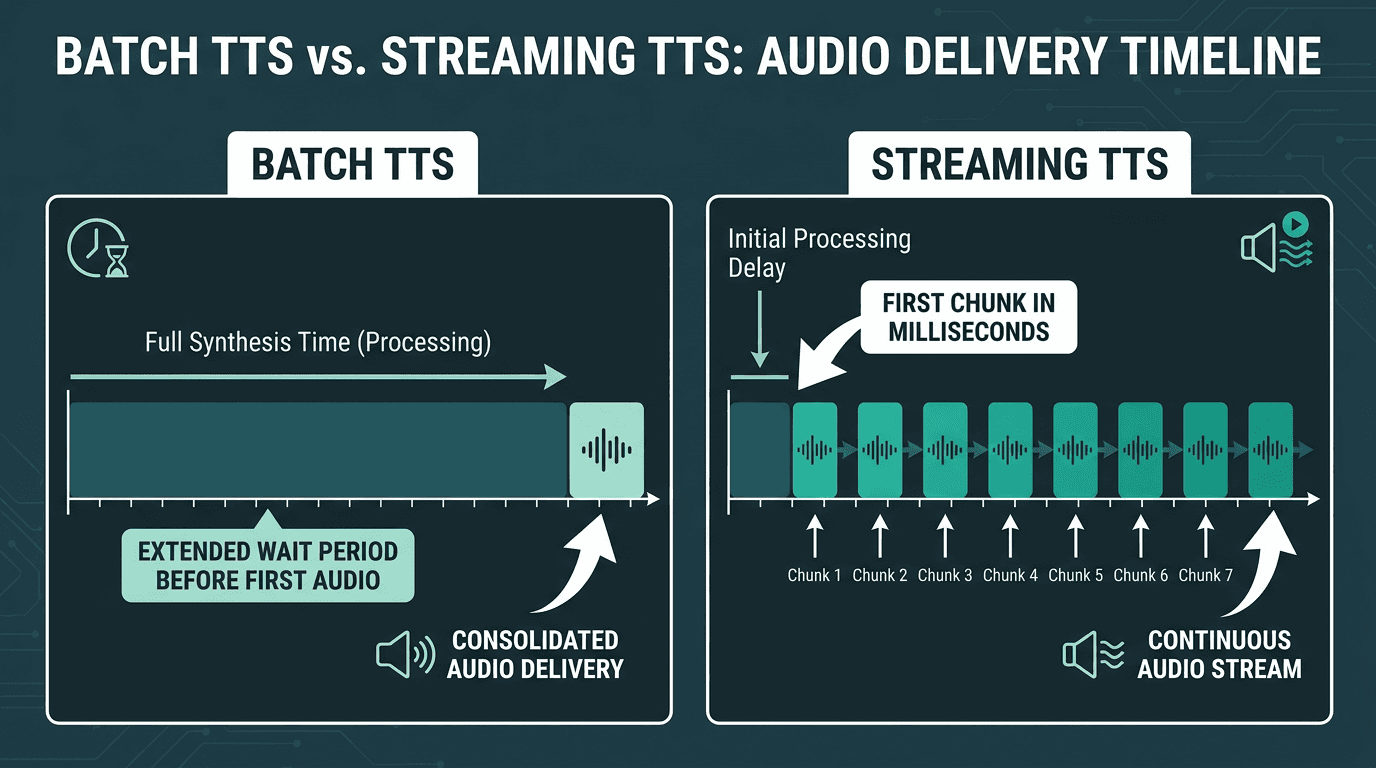
Batch synthesis waits for the full audio before delivery; streaming starts playback from the first chunk
Why Latency Is the First Metric to Test in Production
Voice API bake-offs often start with the fun stuff: voice quality, languages, pricing tiers. Those are real constraints, but they're not the first constraint. A voice can be pristine and still fail if it shows up 1.8 seconds after the user stops talking. No amount of prosody polish compensates for a system that feels unresponsive.
Human conversation depends on rapid turn-taking, which is why even relatively small delays become noticeable during voice interactions. Once you drift past ~500ms, people start to perceive the pause. Cross the one-second mark and many users will disengage or assume the system has hung. The following table offers general guidance based on common user experience expectations and field-tested heuristics, not hard-and-fast benchmarks.
Time-to-First-Audio (TTFA) | User Perception | Use Case Viability |
|---|---|---|
Under 200ms | Feels human; response timing blends into conversation | All real-time voice applications |
200ms - 400ms | Slight delay, still conversational | Voice agents, customer support bots |
400ms - 800ms | Noticeable pause; acceptable in a pinch | Non-conversational TTS, assistants |
800ms - 1500ms | Clearly laggy; friction becomes obvious | Borderline for interactive use |
Over 1500ms | Feels broken; users drop off | Batch/offline only |
TTFA in a streaming voice API usually comes down to three variables: model inference speed (how quickly the TTS model produces the first audio tokens), network round-trip time (RTT between your client and the provider's inference stack), and chunk sizing (smaller chunks can start playback sooner, but they also increase overhead). You can shave some RTT with regional deployment and connection reuse, and you can tune chunking. Inference speed is the one you largely inherit from the provider, which is why it's the most important thing to measure before you commit.
Core Architecture: How Streaming Audio Delivery Works
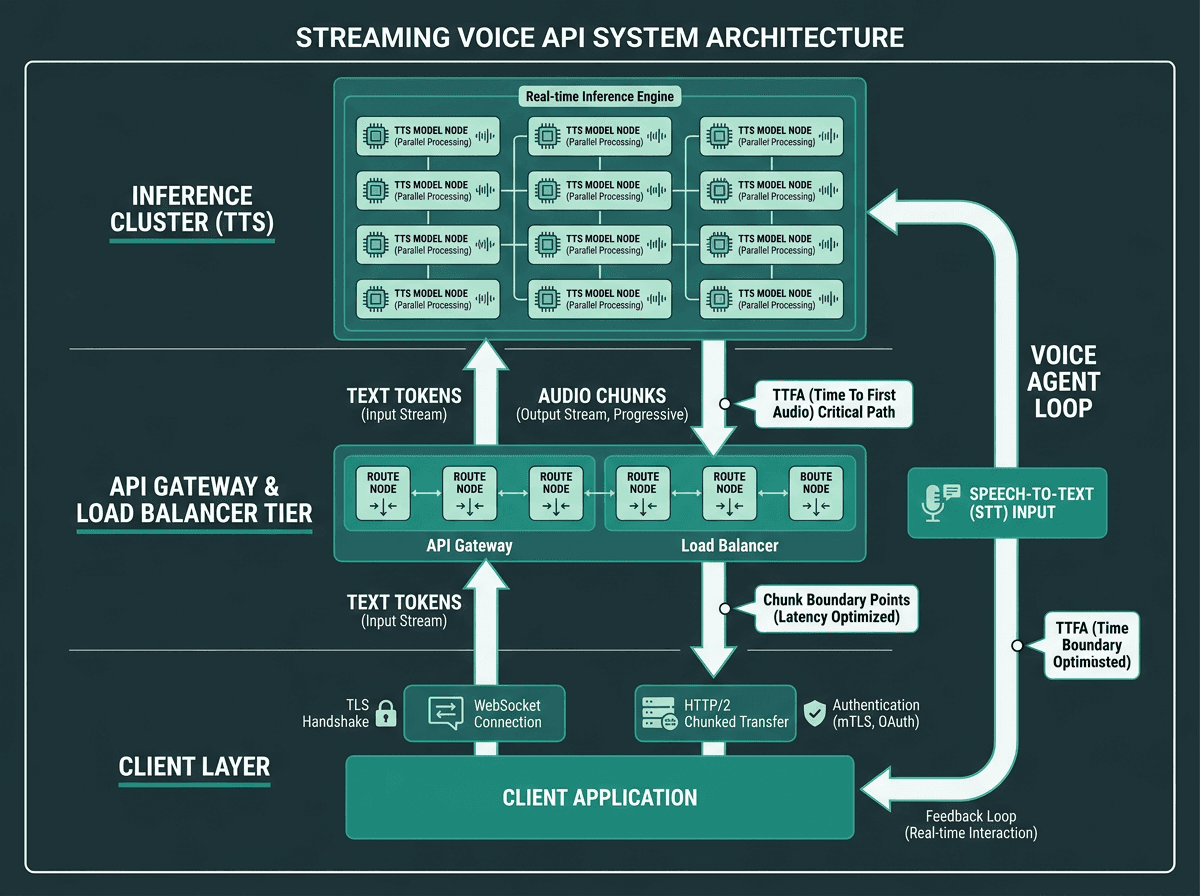
Internal architecture of a production streaming voice API: from WebSocket connection to inference cluster to audio chunk delivery
If you can picture what's happening inside the stack, latency spikes stop being mysterious and your integration choices get a lot easier to justify. A production streaming voice API call typically looks like this:
Streaming audio delivery sequence:
Connection establishment: The client opens a WebSocket or HTTP/2 stream to the API endpoint. TLS handshake and authentication happen here. In production, keep connections warm so you don't pay this cost on every turn.
Text input and tokenization: The client sends the text. The server tokenizes it and starts feeding tokens into the TTS inference model.
First-chunk generation: The model produces the first audio segment (often 50-150ms of audio). This is the TTFA critical path. Targeting smaller initial chunks can reduce TTFA, but it increases network overhead.
Progressive streaming: The service keeps generating and pushing subsequent audio chunks. The client buffers and plays them in order.
Stream termination: The server signals end-of-stream. The client finishes playback and either closes the connection or reuses it.
One decision that shows up immediately in agent responsiveness is how you chunk audio: sentence-boundary streaming versus token-level streaming. Sentence-boundary streaming holds back audio until a full sentence is ready, which can help prosody but pushes TTFA higher. Token-level streaming sends audio as soon as any audio tokens exist, minimizing TTFA but risking audible discontinuities at chunk boundaries. The strongest systems blend the two: get the first chunk out aggressively, then switch to sentence-aware chunking once the conversation is already moving.
If you want a more opinionated walkthrough of these tradeoffs, Smallest.ai lays them out in streaming architecture design principles for real-time voice agents.
Building Real-Time Voice Agents with a Streaming API
A voice agent isn't a single TTS request. It's a pipeline: the user speaks, speech-to-text (STT) turns audio into text, a language model drafts the response, and TTS synthesizes and streams audio back. Every stage adds delay, which means the streaming voice API is only one part of an end-to-end latency budget you have to manage. For those building with Smallest.ai, our platform for Smallest.ai Voice Agents is designed to manage this complexity.
Designing the Full Voice Agent Loop
The most common architecture mistake is treating STT, LLM, and TTS as three separate calls that run one after another. In a real-time agent, you want them overlapped. Start streaming TTS while the LLM is still generating, not after it's done. That means your LLM has to stream tokens, and your TTS has to accept streaming text (partial sentences) and begin synthesis early. When all three stages stream at once, well-tuned systems can significantly reduce end-to-end latency by overlapping STT, LLM, and TTS processing.
Voice activity detection (VAD) is where a lot of "my agent feels off" complaints actually come from. If VAD is sloppy, the agent will either interrupt users mid-thought or wait awkwardly long after they've finished. Both break turn-taking. Before you lock in an architecture, it's worth reading the production notes in voice activity detection for real-time voice apps.
Handling Interruptions Gracefully
People talk over each other. If your agent can't handle barge-in (the user speaking while the agent is still talking), it will feel rigid and frustrating. Clean interruption handling means running VAD while TTS audio is playing, sending a cancel signal to stop generation, clearing the client's audio buffer, and immediately switching back to STT on the new input. WebSocket streaming tends to make this straightforward because the channel is bidirectional; you can cancel without tearing down the connection.
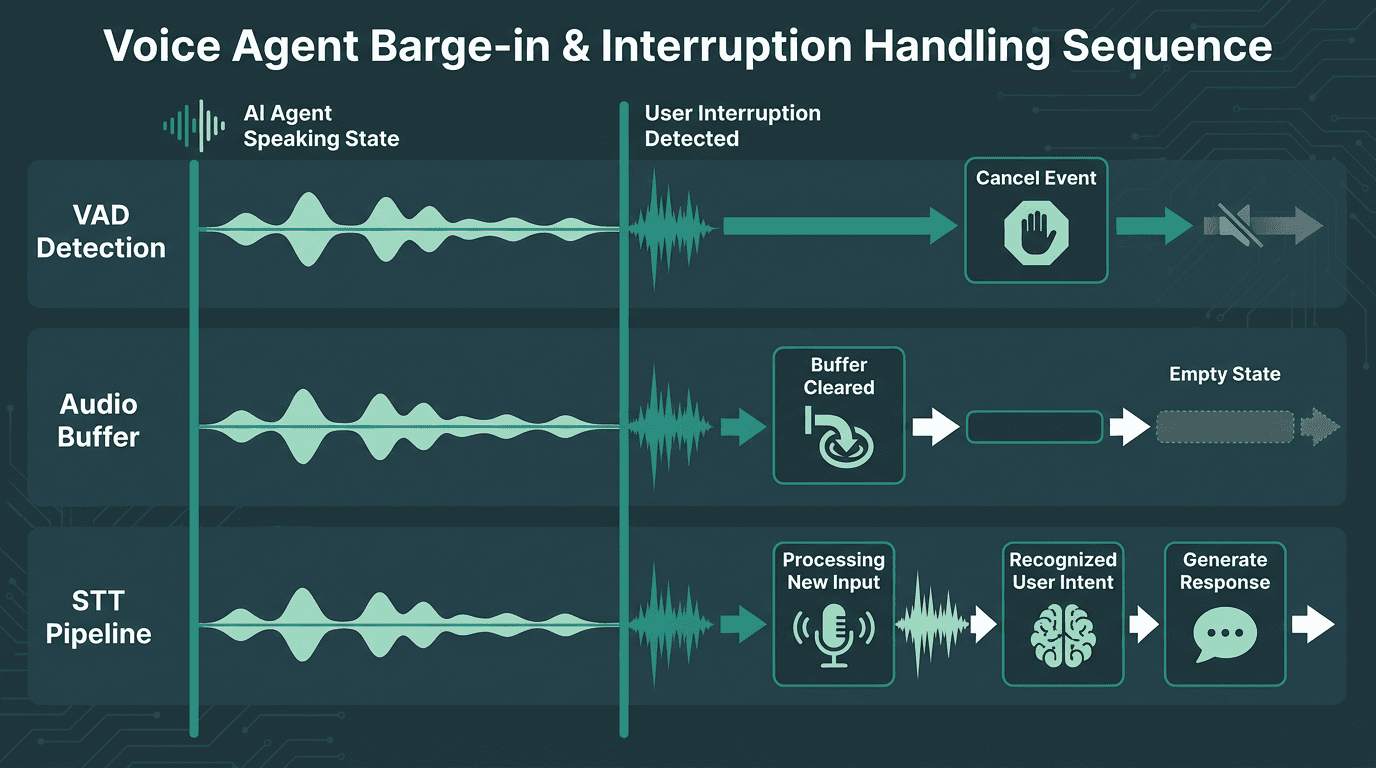
Proper barge-in handling requires coordinated VAD detection, stream cancellation, and immediate STT activation
If you're building for customer support, Smallest.ai's walkthrough on real-time speech-to-speech AI for customer support maps the full loop and calls out implementation patterns that matter in production.
Evaluating a Streaming Voice API: What to Actually Test
Listening to demo clips is the fastest way to get fooled. Demos tell you what a provider's best-case audio sounds like, not how the system behaves under load, on messy inputs, or in the middle of a real conversation. Before you bet a production agent on an API, measure the things that users will actually feel.
Test | What to Measure | Target Heuristic |
|---|---|---|
TTFA under load | Time from request to first audio byte at 50/100/500 concurrent connections | Under 300ms at p95 |
Chunk consistency | Variance in inter-chunk delivery time (jitter) | Under 20ms jitter at p99 |
Long-text degradation | TTFA and quality on inputs over 500 characters | No significant TTFA increase |
Interruption latency | Time from cancel signal to stream halt | Under 50ms |
Connection reuse | TTFA on warm vs. cold WebSocket connections | Warm connection should be 30-50% faster |
Voice consistency | Prosody and timbre consistency across chunks | No audible seams between chunks |
One evaluation trap I see repeatedly: benchmarking on synthetic prompts that don't resemble your product. Use your real input distribution as a baseline for these heuristics. Customer support agents get short, conversational fragments and half-finished sentences. Reading assistants get long, syntactically dense text. Those profiles stress different parts of the system, and performance relative to these guidelines can shift a lot between them. An API that looks great in one mode can stumble in the other.
Advanced Considerations: Concurrency, Cloning, and Security
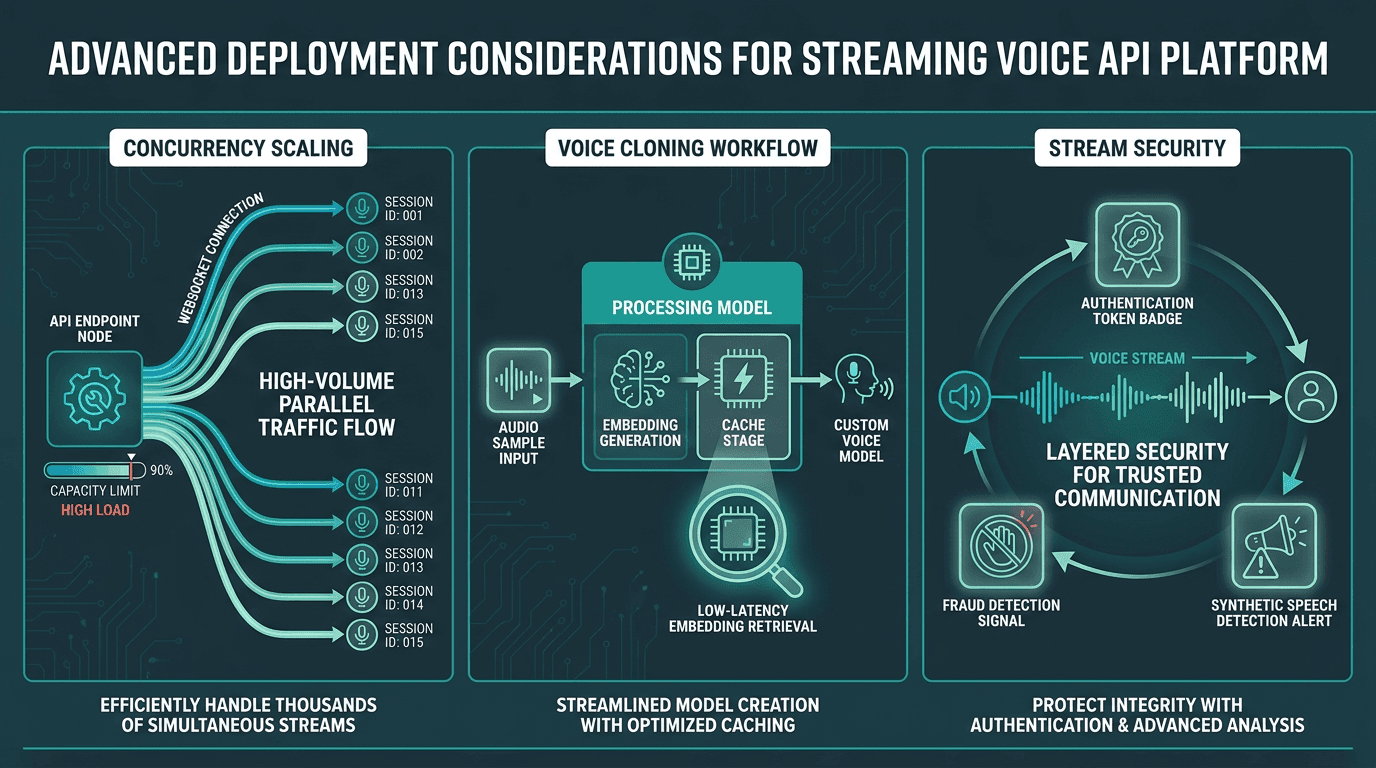
Production voice API deployments must account for concurrency scaling, voice cloning workflows, and stream-level security
Concurrency and Rate Limits
Once you hit real traffic, concurrent streaming connections become the constraint that quietly runs the show. Batch TTS can hide behind queues; real-time voice can't. If a provider rate-limits concurrent WebSocket sessions, users will see sudden latency jumps during busy periods, and you'll struggle to diagnose it without provider-side observability. Before you scale, get clear answers on concurrent connection limits and whether capacity is dedicated or shared across tenants.
Voice Cloning in Streaming Contexts
Voice cloning can introduce additional latency depending on how voice embeddings are loaded and cached during inference. Better setups keep active embeddings cached in memory, which removes most of the penalty for frequently used voices. If you're building a multi-tenant product where each customer has their own cloned voice, ask directly about embedding caching and the cache eviction policy.
Voice Fraud and Synthetic Speech Detection
As synthetic speech gets harder to spot by ear, streaming voice APIs increasingly sit near the blast radius for voice fraud. If your platform handles inbound voice, you also need a plan for identifying when the audio coming in is synthetic or altered, not just generating audio going out. This comes up fast in contact centers and identity verification. Smallest.ai's overview of voice fraud detection for contact centers covers practical detection approaches for real-time inbound streams.
Multi-Agent Voice Architectures
Some systems run multiple agents in parallel: a routing agent that hands off to specialists mid-call, for example. Each handoff can trigger a new TTS stream initialization, so TTFA work can't be isolated to the first agent in the chain. If you're building that kind of topology, Smallest.ai's real-time multi-agent voice dashboard implementation guide shows how to coordinate multiple streaming voice connections inside a single app.
Key Takeaways
What to carry forward from this guide:
Streaming voice APIs stream audio progressively, which is how you get sub-300ms TTFA; batch synthesis can't match that interaction model
WebSockets are usually the right default for interactive voice agents because bidirectional signaling enables interruptions and cancellations
Latency compounds across STT + LLM + TTS; overlapping all three with streaming is how you reach conversational end-to-end timing
Test against your real inputs and expected concurrency, not vendor demos or toy benchmarks
Concurrency limits, voice cloning overhead, and interruption handling tend to surface after the first integration, so plan for them early
Developers building real-time voice apps run into the same wall: standard TTS infrastructure was built for content pipelines, not conversation. Closing that gap means choosing a streaming voice API designed for low-latency, high-concurrency, interactive use. The Smallest.ai Text-to-Speech API exposes the Lightning TTS engine with WebSocket streaming, voice cloning, and sub-200ms TTFA targeted at production voice agents. If you're shipping a voice agent, a real-time speech app, or any AI app where audio latency is a first-class requirement, it's the infrastructure layer to evaluate first.
Frequently asked questions
What is the difference between a streaming voice API and a standard TTS API?
Which protocol should I use for a streaming voice API: WebSocket or HTTP chunked transfer?
How do I reduce latency in a voice agent built on a streaming voice API?
Can I use voice cloning with a streaming voice API for real-time applications?
What should I look for when choosing a streaming voice API for a production voice agent?