Real-Time Speech-to-Speech AI for Customer Support: How to Build Low-Latency Voice Conversations

Real-time speech-to-speech AI for customer support, explained: pipeline architecture, latency targets, and build steps with Smallest.ai STT, SLM, and TTS.
Real-time speech-to-speech AI is starting to redraw the boundaries of what “good” customer support feels like at scale. When a caller hits a support line, every beat of silence (every slightly-too-long, slightly-too-robotic pause) chips away at trust. In a field with hundreds of vendors, the thing that separates the winners is still basic: how quickly, and how naturally, the system talks back.
What follows is the practical architecture: the engineering choices that actually move latency, and the build steps that turn a demo into a support-ready voice experience. The aim is straightforward: if you’re evaluating infrastructure or scoping a deployment, you should walk away with a clear-eyed sense of what it takes for voice AI to feel immediate instead of “automated.”
Why Latency Is the Make-or-Break Factor in Voice AI
Customer expectations for immediate interaction are high. In voice AI, “immediately” translates to sub-300ms response behavior. Once you drift past that, the gap reads as an awkward pause, and on a phone call, awkward pauses don’t feel neutral. They feel like the system is broken, or the company doesn’t have its act together.
Latency in voice AI isn’t a single bottleneck; it’s death by a thousand cuts. The classic setup is a three-stage relay: speech-to-text (STT) turns audio into words, a large language model (LLM) produces a text reply, and text-to-speech (TTS) turns that reply back into audio. Each handoff costs time, and the costs add up. Even a well-tuned cascade can land around 600–900ms end-to-end, fast on paper, still obvious in conversation. That’s why the processing model matters as much as raw model speed, especially once you understand what real-time speech-to-text is and where it sits in the chain.
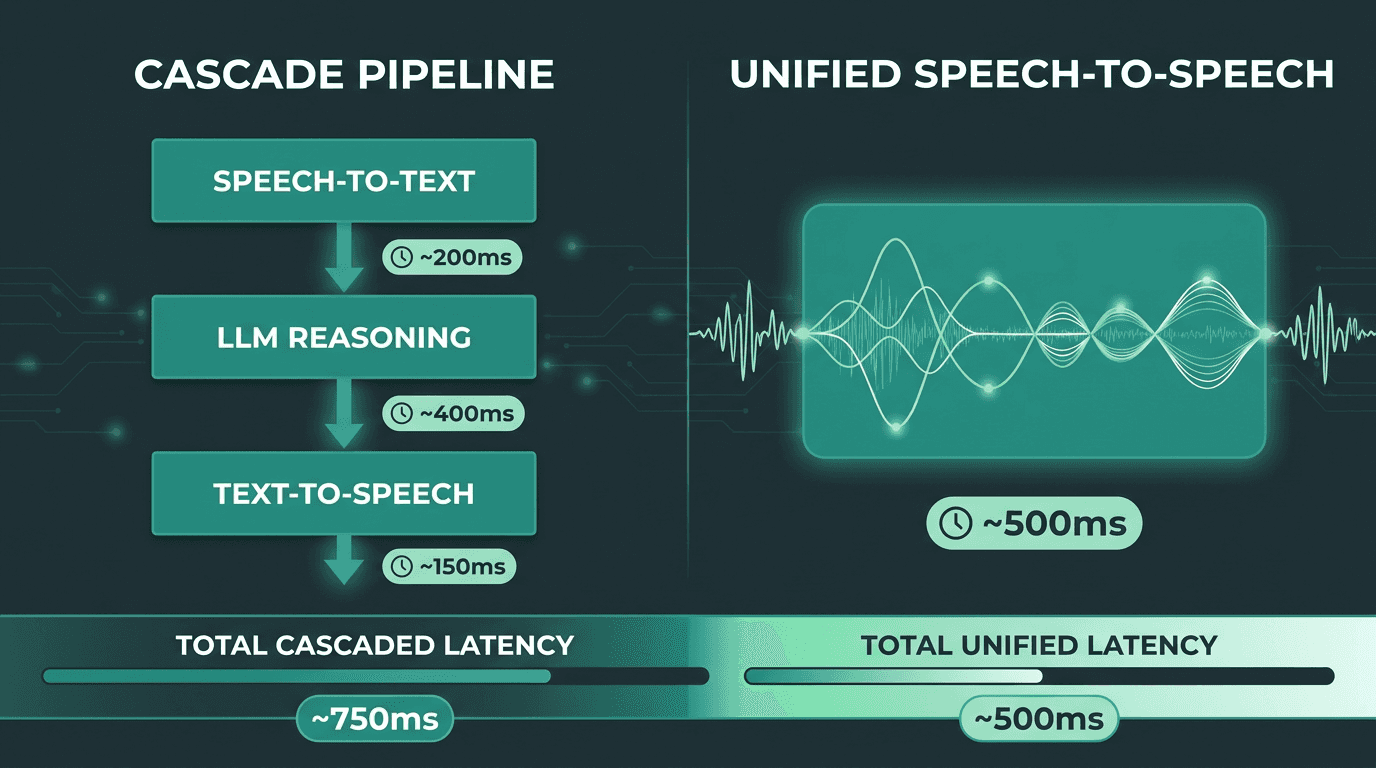
Cascade pipelines accumulate latency at every handoff. Unified architectures reduce that overhead significantly.
Understanding the Speech-to-Speech Architecture
Speech-to-speech is really about collapsing the gaps between “listen,” “think,” and “speak.” Instead of converting audio to text, waiting, generating a full text response, waiting again, and only then synthesizing speech, a low-latency system streams. Partial transcripts flow forward as they’re recognized, and partial responses flow forward as they’re generated, so the loop stays tight and the conversation doesn’t stall.
In practice, you’ll see two common patterns. One is the aggressively optimized cascade: fast STT, fast LLM, fast TTS, stitched together with streaming interfaces and careful buffering. The other is more integrated, pushing closer to the audio domain so you do fewer representation conversions. Some integrated speech platforms, for example, package GPU-accelerated libraries for ASR, TTS, and neural machine translation into a unified deployment for real-time multilingual speech pipelines. Both approaches can work; the right call depends on what you can run, what you need to customize, and how much integration complexity you’re willing to own.
The Three Core Components and Where They Slow You Down
Each stage in the pipeline has characteristic latency sources:
STT (Automatic Speech Recognition): Latency comes from audio buffering, model inference time, and end-of-utterance detection. Streaming ASR models that emit partial transcripts in real time are essential. Waiting for a complete utterance before transcribing adds 300-500ms on its own.
LLM Reasoning: First-token latency (time to generate the first output token) is the critical metric, not total generation time. A model that starts streaming tokens within 80ms feels responsive even if full completion takes longer.
TTS (Text-to-Speech): Sentence-level streaming, where the TTS begins synthesizing audio as soon as the first sentence is complete rather than waiting for the full LLM response, is the single biggest TTS latency optimization available.
Step 1: Choose the Right STT Layer for Real-Time Transcription
For low-latency speech-to-text AI, a few requirements aren’t optional: true streaming, strong word error rate on telephone audio (often 8kHz narrowband), and resilience to accents and background noise. Customer support audio is messy by default, call center chatter, mobile distortion, domain jargon, people talking over each other, and callers who restart a thought mid-sentence. The hard problems in real-time speech AI are exactly those: accents and dialects, noise, responsiveness, and staying accurate while all of that is happening at once.
Smallest.ai’s Pulse is built for that environment. It provides streaming transcription with low word error rates on conversational audio, and it plugs into the wider Smallest.ai stack without the extra serialization and glue code you tend to accumulate when mixing vendors. If you’re building real-time voice conversations from scratch, an STT layer that shares infrastructure with your TTS can remove an entire category of integration latency before you even start tuning models.
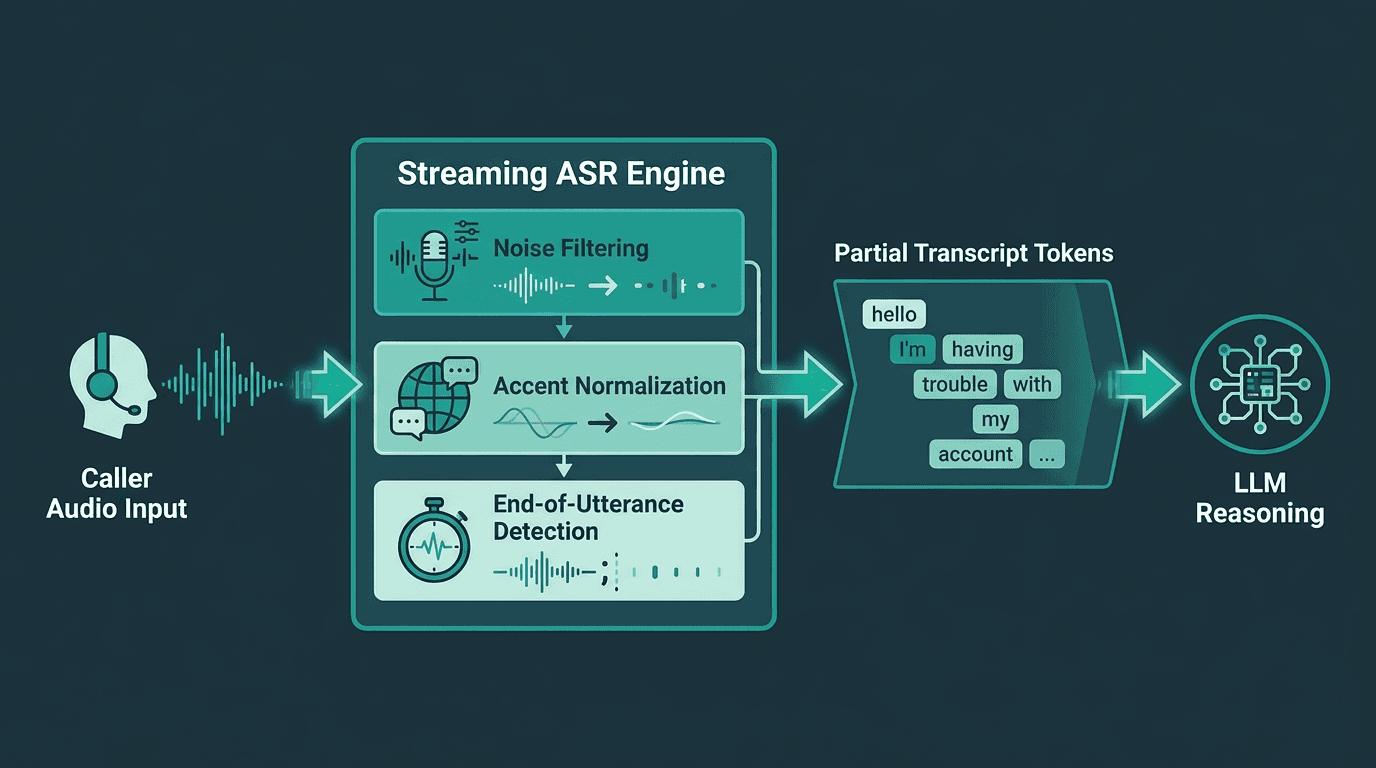
Streaming ASR emits partial transcripts continuously, allowing the LLM to begin reasoning before the caller finishes speaking.
Step 2: Select a Language Model Optimized for Conversational Latency
Most general-purpose LLMs weren’t built with phone-call timing in mind. They’re tuned for throughput (lots of tokens, lots of requests) more than the moment that matters in speech: time to first token on a single interaction. For voice, you want the model to start talking back in roughly 50–100ms after it has enough context. That’s where small language models (SLMs) earn their keep. With fewer parameters, inference is faster, and in a constrained customer support domain, a well-trained SLM can meet (or beat) a larger model on the task you actually care about.
Smallest.ai’s Electron is a conversational SLM designed specifically for real-time voice. Electron v2 for real-time conversations is engineered to keep first-token latency low while still producing coherent, context-aware replies over multi-turn support dialogs. When you pair it with streaming STT, you don’t wait for the caller to “finish” before the model starts working, it can begin on partial transcripts, which trims the delay the caller actually perceives.
Step 3: Build a TTS Layer That Streams, Not Waits
TTS is where a lot of pipelines quietly give back the latency they saved upstream. If your synthesizer waits for the full LLM response before it starts generating audio, you’ve just reintroduced a delay that scales with response length. For something like a 40-word answer, that alone can tack on 400–600ms, even before playback begins. Sentence-level streaming fixes the shape of the problem: as soon as the LLM completes the first sentence, TTS starts synthesizing it, and playback can begin while the rest of the response is still being written.
Smallest.ai’s Lightning TTS API is designed around that streaming behavior. It targets low synthesis latency while keeping the voice natural, and it supports voice cloning so support teams can keep a consistent brand voice across calls.
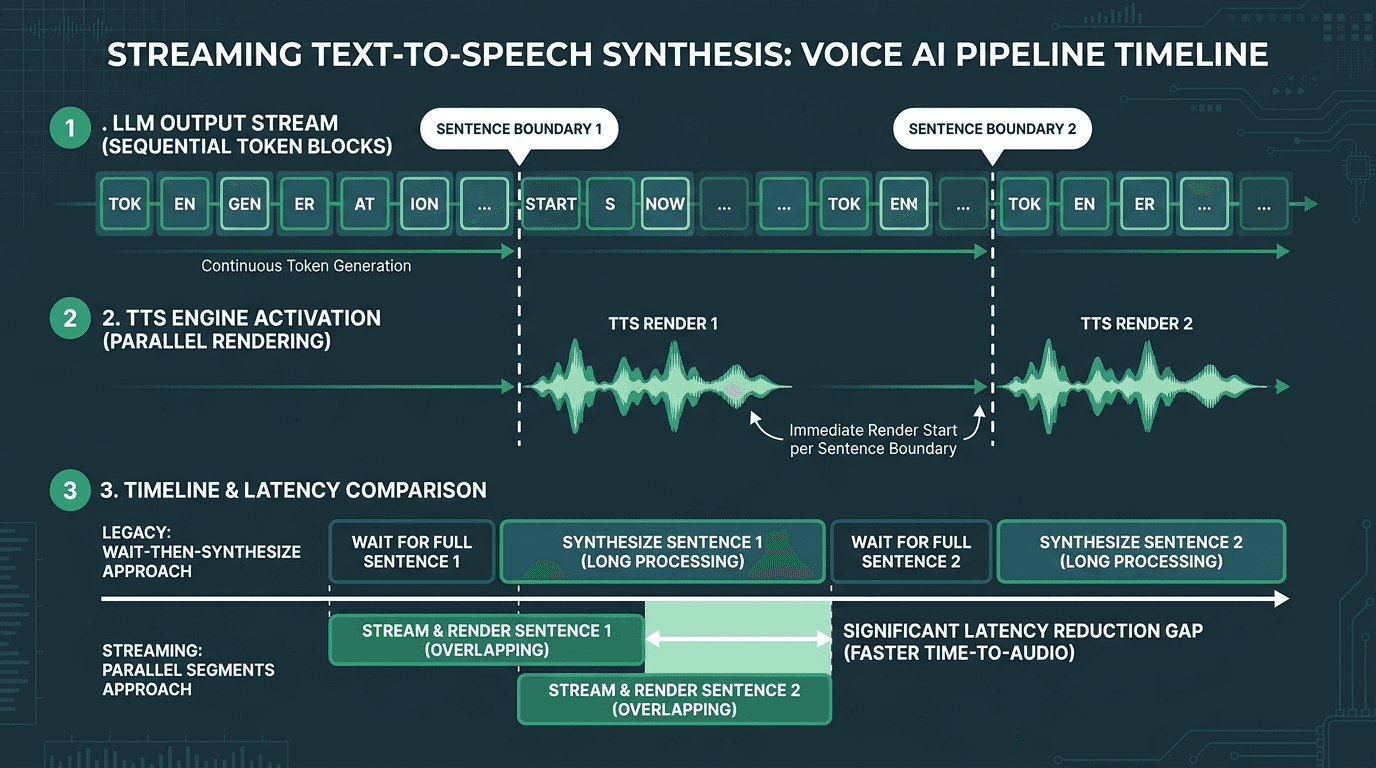
Sentence-level streaming in TTS allows audio playback to begin before the LLM finishes generating the full response.
Step 4: Integrate the Pipeline with Telephony and Support Infrastructure
A fast demo that can’t plug into your telephony stack or CRM isn’t a support system, it’s a science project. Production deployments have to ingest calls over SIP trunking or WebRTC, offer DTMF fallback for callers who won’t (or can’t) speak, pull context from ticketing systems, and hand off cleanly to a human agent when the AI hits its confidence threshold.
Smallest.ai’s Atoms platform is aimed squarely at that “last mile.” It’s a voice and text agent platform that connects the speech components (Pulse, Lightning, Electron) to customer support workflows you can actually run. If you’re building on AWS AI Services or an existing cloud telephony setup, Atoms acts as the orchestration layer that keeps transcription, reasoning, and synthesis coordinated as a deployable agent.
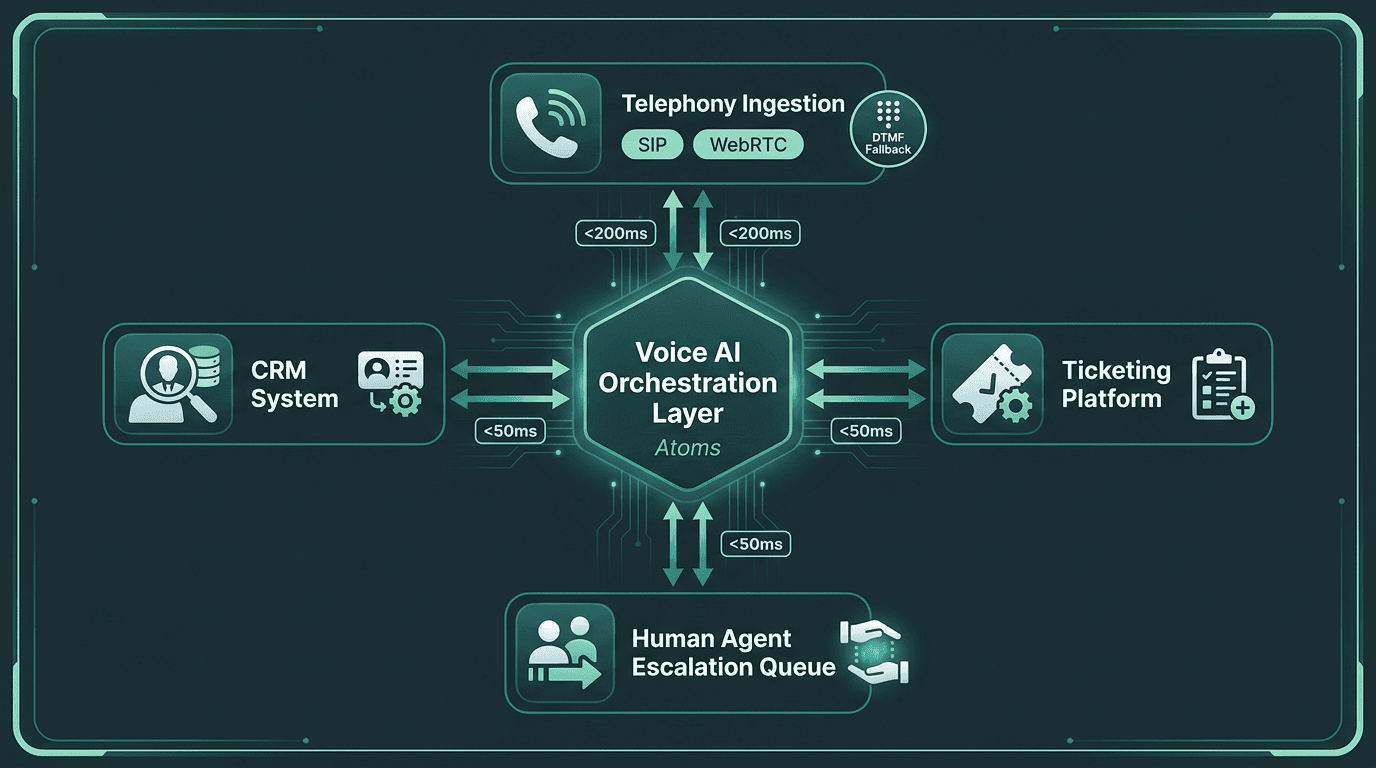
Production deployments require the AI pipeline to connect cleanly with telephony, CRM, and escalation infrastructure.
Step 5: Test for the Failure Modes That Matter in Production
Voice AI is notorious for looking great in the lab and getting weird in the real world. The problems you need to care about rarely show up in clean test sets. They show up when a caller has a strong regional accent, when there’s a crying child in the background, when the caller says something ambiguous and the model confidently picks the wrong meaning, or when network jitter drops packets mid-utterance.
A production readiness checklist for real-time voice AI in customer support:
Accent and dialect coverage: Test with audio samples that match the actual geographic distribution of your caller base, not just “standard” accents.
Noise robustness: Measure WER (word error rate) in realistic background noise, call center ambient noise and mobile phone audio included.
Barge-in handling: Make sure the system detects interruptions and stops playback immediately when the caller talks over the AI.
Graceful degradation: Decide what the system does when confidence drops: reprompt, clarify, or escalate, and avoid trapping callers in a loop.
Latency under load: Track end-to-end response time at 10x, 50x, and 100x your expected peak concurrent call volume.
If you’re building AI voice assistants for customer support, this is also the point where escalation stops being a policy memo and becomes a measured system. Escalate too aggressively and you’ve paid for automation you don’t use. Escalate too rarely and callers feel stuck arguing with a bot. The only reliable way to set that threshold is empirically, using real call data and tuning against what your support org considers an acceptable handoff rate.
The Hydra Advantage: Purpose-Built Speech-to-Speech
Everything above assumes you’re assembling a low-latency pipeline out of parts. Smallest.ai’s Hydra goes the other direction: a purpose-built speech-to-speech model designed to behave like one system, not three services in a trench coat. Because it processes audio input and produces audio output inside a tighter architecture, it avoids some of the conversion and handoff overhead that component pipelines accumulate. In customer support, where a few hundred milliseconds can be the difference between “smooth” and “stilted,” that architectural choice shows up directly in caller experience.
Hydra is available through Smallest.ai’s speech-to-speech product access flow, exposing Smallest.ai’s speech capabilities. If you’re weighing how to build a cost-effective AI receptionist or a full customer support voice agent, you can start with individual components and shift toward Hydra’s unified architecture as requirements harden. For a broader view of where voice fits in the stack, explore AI tools in customer support.
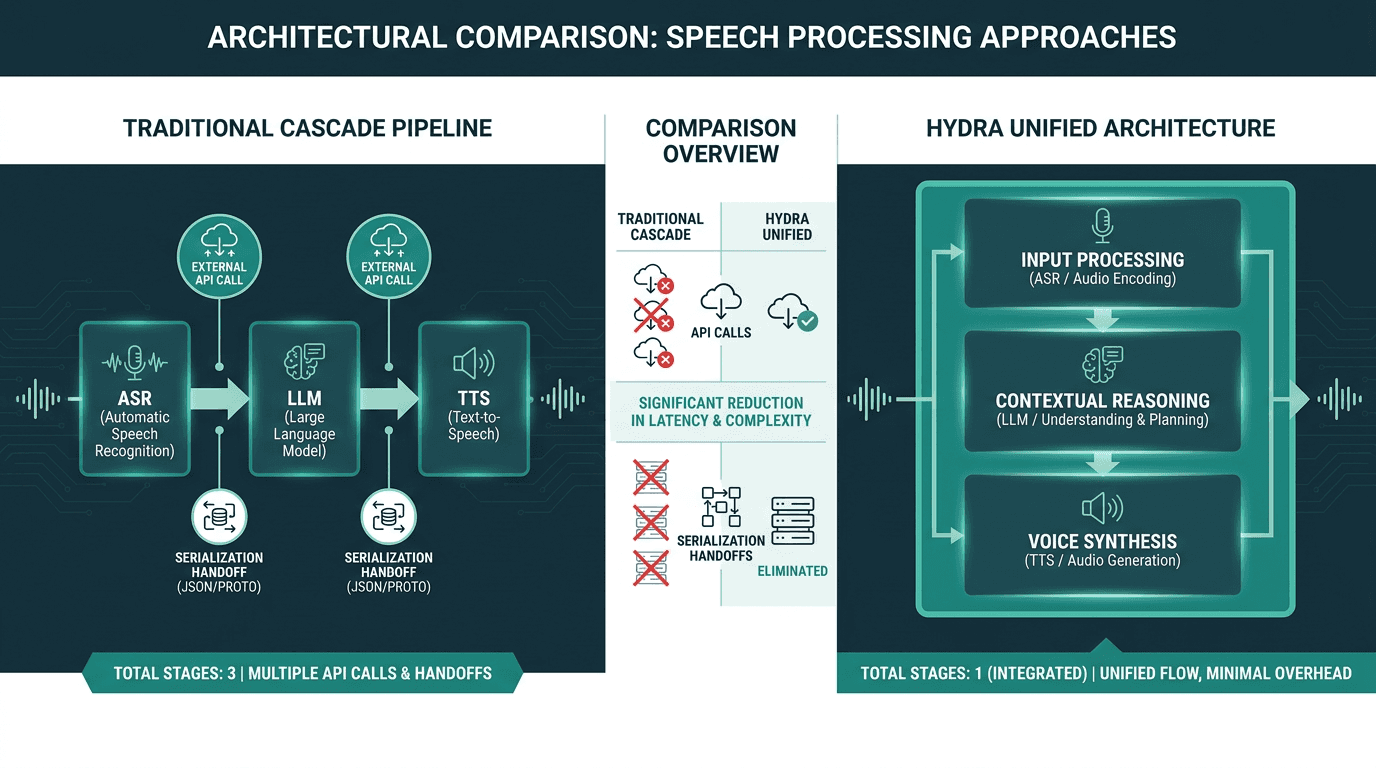
Hydra’s integrated architecture eliminates the serialization overhead between pipeline stages, reducing end-to-end latency.
What Good Looks Like: Benchmarks to Target
Targets keep teams from spending weeks shaving milliseconds off the wrong place. For a customer support voice AI deployment, the metrics that map most cleanly to caller satisfaction are: end-to-end response latency (under 500ms from the end of the caller’s utterance to the first audio output), word error rate on your actual caller population (under 8% WER on domain vocabulary), and barge-in detection accuracy (under 150ms to detect and react to interruption). These aren’t universal standards; they’re pragmatic thresholds that line up with the expectation that people call support because they want an immediate interaction.
Building the Right Foundation for Voice AI That Scales
The failure pattern in customer support voice AI is usually architectural, not theoretical. Models can be “good enough” and still produce a bad experience when the pipeline piles on latency until every exchange feels halting and robotic. Callers notice delays measured in hundreds of milliseconds. They read that delay as incompetence. And they bail on automation that feels like a barrier instead of help.
Smallest.ai’s Hydra is a direct response to that latency tax. It’s built as a speech-to-speech model specifically to avoid the accumulated overhead of a cascade. Paired with Pulse for streaming transcription, Electron for low-latency conversational reasoning, Lightning for streaming TTS, and Atoms for telephony integration and production deployment, the result is a coherent stack rather than a bundle of services you have to stitch together and then babysit. When you’re ready to move from diagrams to implementation, Smallest.ai pricing makes it possible to start at a scale that matches where your team is today.
Frequently asked questions
What counts as real-time speech-to-speech AI, and how is it different from a typical voice bot?
How can I cut latency in a customer support voice AI pipeline?
What are the hardest technical problems when deploying voice AI for customer support?
Can voice AI handle multiple languages for global customer support?
How is Smallest.ai’s Hydra different from an STT-LLM-TTS cascade?


