AI Phone Agent for Customer Support: How to Handle Inbound Calls, FAQs, and Escalations Automatically

AI phone agent setup for customer support: faster inbound call handling, FAQ automation tied to live data, and clean escalations with full context transfer.
An AI phone agent has moved past the "someday" bucket on a roadmap. For many support orgs, it’s already part of the plumbing: taking calls, absorbing spikes, and dealing with the repetitive-but-never-identical mess of inbound support. The call center AI market has seen rapid enterprise adoption, reflecting a significant shift in how organizations view the first line of customer contact.
Support ops leads, product managers, and developers tend to want the same thing here: a sober picture of what it takes to ship an AI phone agent that holds up on real calls. That means resolving FAQs without turning the conversation into a maze, escalating when it should (and quickly), and fitting into the telephony and CRM stack you already run. The goal is a practical implementation framework, a clear view of where voice agents shine and where they need guardrails, and a straightforward way to get moving.
What an AI Phone Agent Actually Does (and What It Doesn't)
Before you touch architecture diagrams, it helps to define the thing you’re building. An AI phone agent is a voice conversational system that answers inbound calls, understands natural language, pulls the right information, and replies in real time without a human on the line. The big difference from a traditional IVR isn’t cosmetic; it’s the input model. IVRs expect menu choices. An AI agent works from intent. When someone says, “I need to change my delivery address,” they shouldn’t have to guess which option shipping lives under. The agent extracts the intent and takes the next action.
If you want the longer technical breakdown, what are AI phone agents and how they work is a solid primer. The short version is a pipeline: automatic speech recognition (ASR) turns speech into text, a language model handles intent and response generation, and a text-to-speech (TTS) engine speaks back. Caller experience rises or falls on the weakest link in that chain.
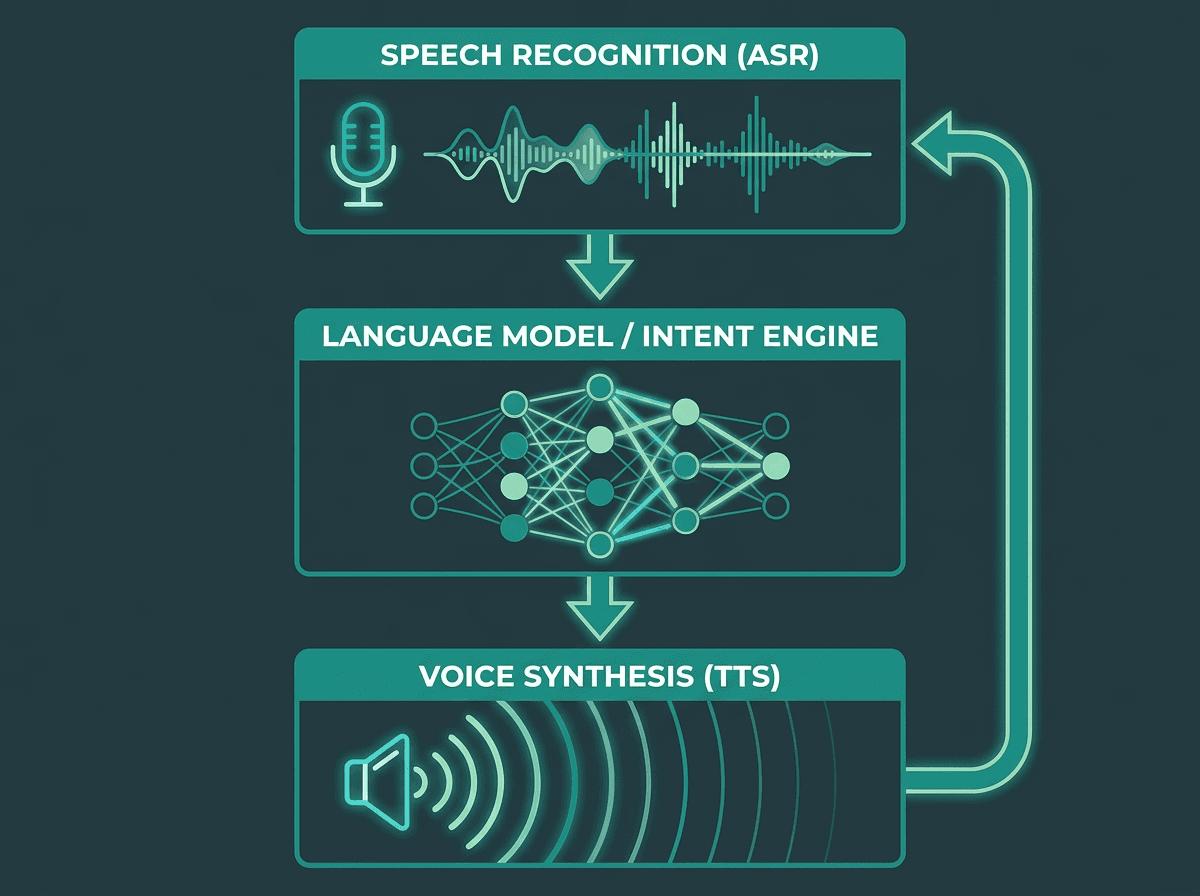
The three-layer stack powering a real-time AI phone agent conversation.
How an AI Phone Agent Handles an Inbound Support Call: Step-by-Step Flow
The first few seconds of an inbound call are where callers decide if they’re dealing with something competent or something they’ll have to fight. This is also where a lot of deployments either win trust immediately or train people to mash zero. A good agent opens naturally, signals that it understood what it just heard, and keeps the conversation moving without forcing a do-over.
Latency is the quiet killer. When the caller finishes a sentence and the line goes dead for 2–3 seconds, the experience feels glitchy, not conversational. Modern speech-to-speech pipelines, like those built on Smallest.ai's Hydra, target sub-second response latency because that’s roughly where the interaction starts to feel like a real exchange rather than a slow transaction. In practice, that responsiveness often matters more than pristine voice tone in the very first impression.
A clean inbound flow usually has these jobs:
● Call comes in: The telephony layer receives the call and routes it to the AI agent runtime.
● Caller is identified: The system uses the incoming phone number to look up the caller or asks for verbal verification.
● Intent is detected: Automatic speech recognition (ASR) transcribes what the caller says, and a language model classifies their goal (e.g., order status, password reset).
● CRM/order/ticket data is fetched: The agent queries integrated systems (CRM, order management) to retrieve relevant context for a personalized response.
● Agent answers or takes action: The agent provides the information, updates a record, or completes the requested task.
● Agent escalates with transcript if needed: If the caller's request is complex, emotionally charged, or explicitly asks for a human, the agent transfers the call along with the full conversation context.
Handling Inbound Calls: The Mechanics of a Good First Response
The first few seconds of an inbound call are where callers decide if they’re dealing with something competent or something they’ll have to fight. This is also where a lot of deployments either win trust immediately or train people to mash zero. A good agent opens naturally, signals that it understood what it just heard, and keeps the conversation moving without forcing a do-over.
Latency is the quiet killer. When the caller finishes a sentence and the line goes dead for 2–3 seconds, the experience feels glitchy, not conversational. Modern speech-to-speech pipelines, like those built on Smallest.ai's Hydra, target sub-second response latency because that’s roughly where the interaction starts to feel like a real exchange rather than a slow transaction. In practice, that responsiveness often matters more than pristine voice tone in the very first impression.
A clean inbound flow usually has four jobs: identify the caller (number lookup or spoken verification), classify intent (what they’re trying to do), retrieve context (account, order, or case data), and generate the next response (answer or route). Each step is a chance to add delay if the system isn’t tuned for it. Strong deployments reduce that drag by pre-fetching likely context before the caller even finishes the opener, using predictive lookup from the incoming number.
Automating FAQs Without Sounding Like a FAQ Page
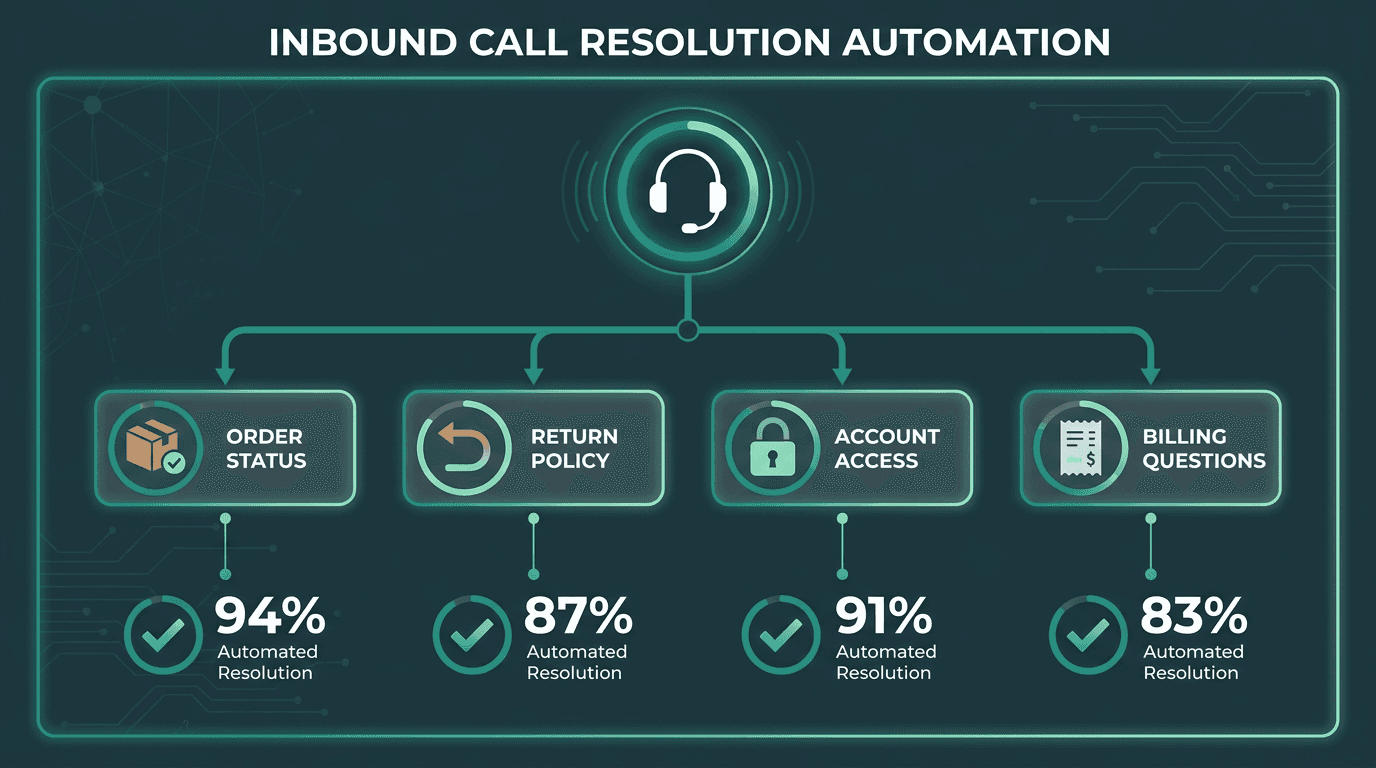
Mapping common inbound intents to automated FAQ resolution paths.
FAQ automation is where AI phone agents tend to pay for themselves first. The work is obvious and high-volume: store hours, order status, return policies, account balances, appointment confirmations. The patterns repeat, the answers live in systems you already have, and most callers don’t care that it’s not a human as long as the answer is correct and quick.
Where teams trip up is treating FAQ automation like a fancy script reader. A caller who asks, “Where is my package?” isn’t asking for your shipping policy. They want the status of their order. That means authentication, a fulfillment lookup, and a response that lands like: “Your order shipped yesterday and is expected to arrive Thursday.” That’s not a canned answer problem; it’s an integration problem. And it’s the line between actually resolving calls and merely deflecting them.
If the goal is to reduce handle time with AI voice assistants, the FAQ layer has to pull from live systems: CRM records, order management, ticketing. The language model carries the conversation; the integration layer fetches the facts. You need both, or you end up with polite-sounding guesses.
Escalation Logic: When the Agent Should Step Back
The word that matters is “hybrid.” No AI phone agent should be built on the assumption that it will handle everything. Hybrid human-AI support models can achieve meaningful reductions in resolution time and improvements in first-contact resolution. The real design question is when to escalate, and how to make that handoff feel like a continuation rather than a reset.
Escalation should be triggered automatically under these conditions:
Sentiment detection: The caller is clearly frustrated, distressed, or angry past a defined threshold. Mishandling emotional calls with automation drives churn, not resolution.
Intent ambiguity: The agent has tried to clarify twice and still can’t classify the request with enough confidence.
High-stakes transactions: Refunds above a set value, legal complaints, medical information, or account security flags.
Explicit request: The caller asks for a human. That request shouldn’t be blocked or slow-walked.
Policy edge cases: The situation falls outside what the agent was trained or configured to handle.
Most escalation failures aren’t about detection; they’re about the transfer. A solid handoff sends the human agent the full transcript, the inferred intent, any account data already retrieved, and the specific reason the system escalated before the call connects. The caller shouldn’t have to repeat the story. That context transfer is the difference between “thanks” and “are you kidding me?” If you want a broader lens on finding the ideal balance between AI and human agents, treat escalation architecture as a first-class product decision, not a bolt-on.
Building the System: A Practical Implementation Framework
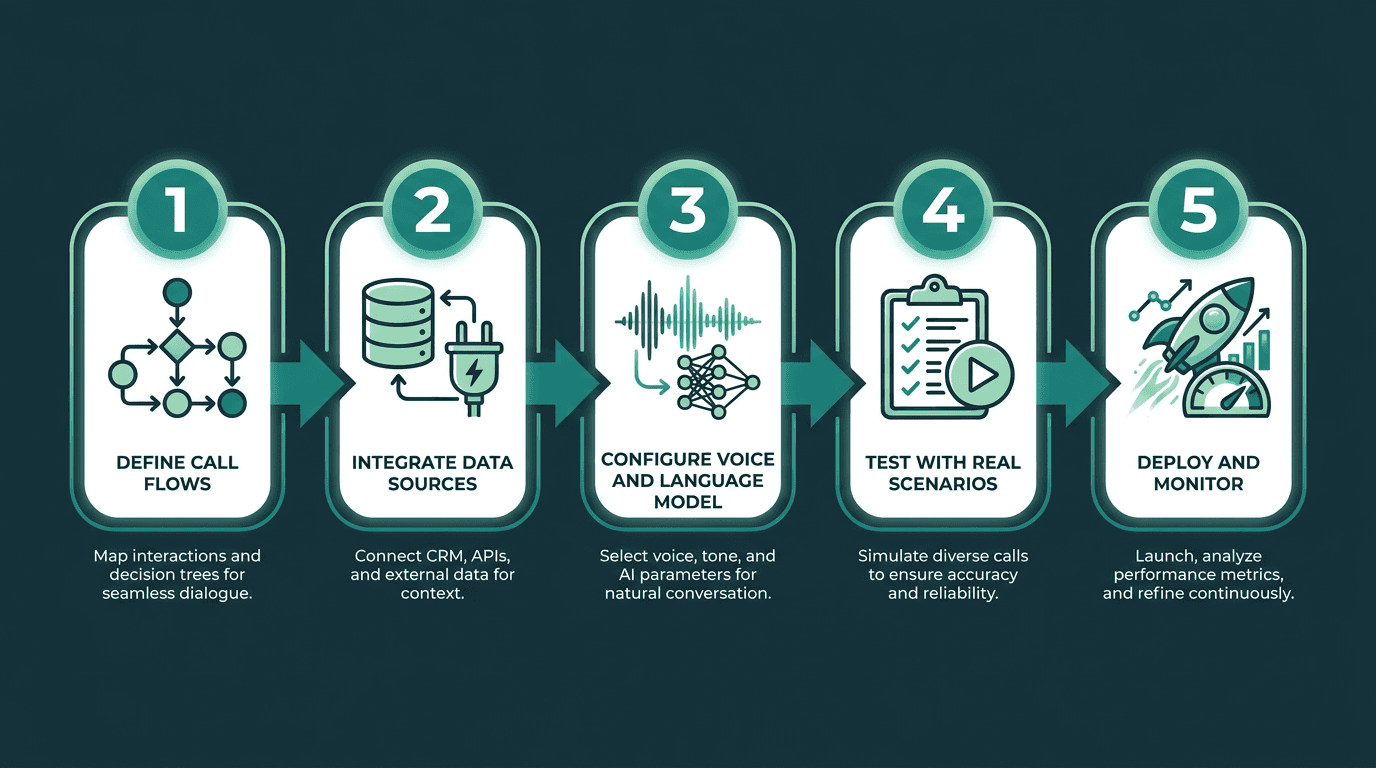
A five-stage framework for deploying an AI phone agent in a customer support environment.
Teams routinely under-scope the scoping. Before you write integration code, get specific about what you’re automating. Pull three months of call logs, bucket them by intent, then rank by volume. Your first automation targets are the top five intents with the lowest complexity. Everything else belongs in phase two, even if it’s tempting to chase the long tail.
With call flows mapped, the build tends to follow a familiar order. Telephony integration (SIP trunk or a carrier API) brings inbound calls into the agent runtime. ASR transcribes speech as it happens. A language model (prompted or fine-tuned for your domain) classifies intent and drafts responses. TTS turns those responses into audio. Then come the integrations that make the answers real: CRM, order management, ticketing, billing. If you’re new to assembling this stack, how to set up AI agents lays out the setup choices in concrete terms.
Testing is where the gaps show up fast. Run the agent against real historical call transcripts before you put it in front of customers. Look for misclassified intents, answers that are technically correct but tonally off, and edge cases where the system loops or freezes. A staged rollout helps: start with after-hours calls, when human backup isn’t available anyway, and use that window to collect performance data before you expand coverage.
Advanced Considerations: Multilingual Support, Scale, and Voice Quality
After the core flows behave, three areas tend to separate “working” from “production-grade.” First is multilingual support. If your customers span regions, your AI phone agent has to deal with accents, code-switching, and dialect variation without falling apart. That’s harder than it sounds: ASR trained on clean English audio often degrades quickly on accented speech or mixed-language turns. For teams supporting multiple geographies, speech-to-text for multilingual contact centers goes straight at those failure modes.
Second is scale. Conversational AI deployments in contact centers are designed to reduce agent labor costs. Hitting that kind of impact requires infrastructure that stays stable under concurrency: horizontal scaling, session isolation, and sensible failover behavior when pieces of the pipeline hiccup. Before peak season teaches you the hard way, validate whether your voice agent can handle enterprise-level needs.
Third is voice quality, which too many technical evaluations treat as cosmetic. A robotic or flat voice adds friction to every exchange, and callers notice immediately. Your TTS choice affects trust, perceived brand quality, and the odds someone stays on the line long enough to get an answer. Naturalness, prosody, and low latency are the three dimensions that matter, and providers vary widely on all three. You can hear the difference in the first sentence.
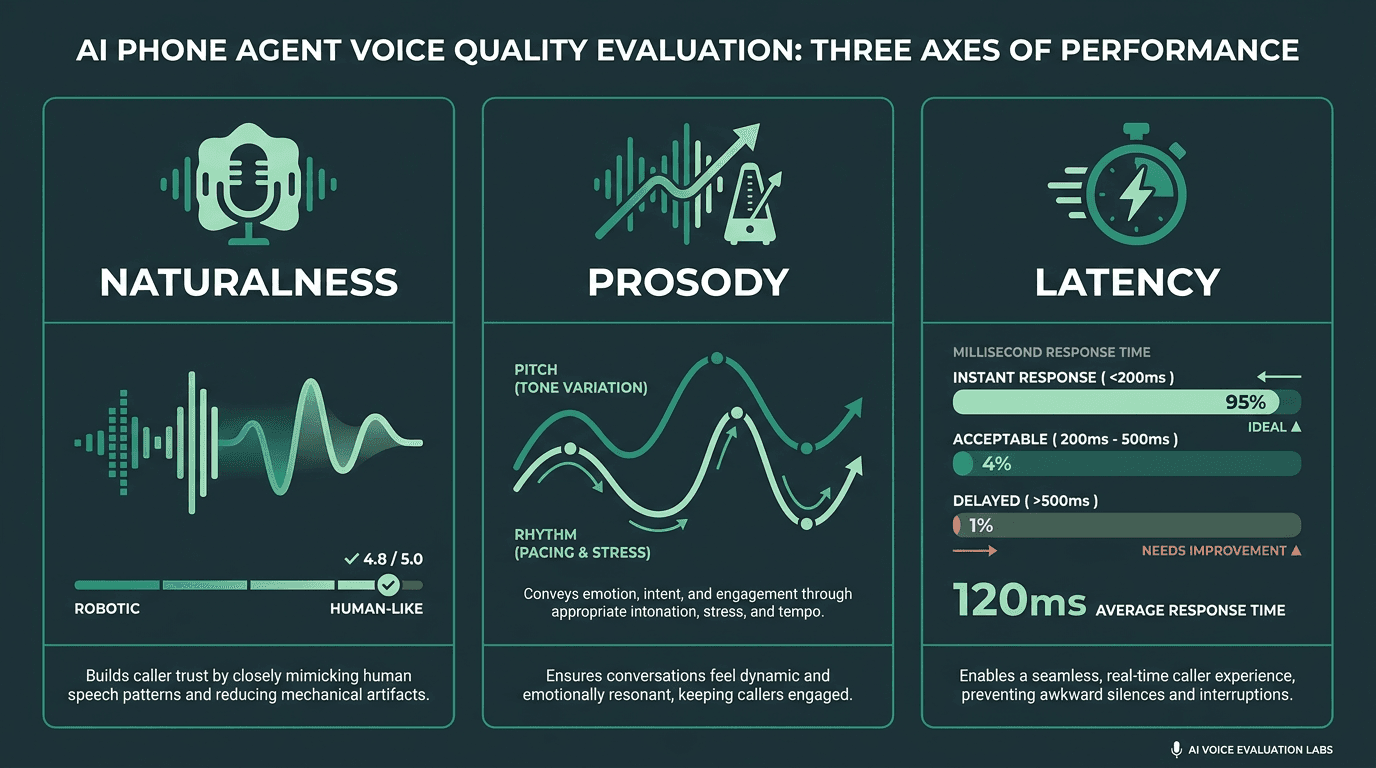
The three axes that determine whether an AI phone agent voice builds or erodes caller trust.
What Most Teams Get Wrong About AI Phone Agent Deployment
The most common failure isn’t a model problem; it’s a product decision. Teams try to cover every edge case before the core flows are reliable, and they end up with an agent that does a mediocre job across the board. Narrow scope is a feature. Automate the five highest-volume, lowest-complexity call types, make them solid, then expand with intent-by-intent discipline.
The second miss is treating go-live as the finish line. An AI phone agent drifts if you ignore it. Intent mix changes, product launches create new questions, and seasonal spikes surface latency bottlenecks you didn’t see in a quiet test environment. Put monitoring in place for containment rate (calls resolved without escalation), escalation rate by intent, caller sentiment scores, and average handle time. Those four numbers tell you what’s working and what’s regressing. If you want an example of iterative tuning in production, AI enhancements in hotel customer service shows how monitoring and adjustment translated into measurable improvements.
Key Takeaways and Next Steps
If you are evaluating or building an AI phone agent for customer support, these are the principles worth holding onto:
Start with call intent mapping before any technical work. Volume and complexity are your two sorting axes.
FAQ automation requires live data integration, not static responses. Connect the agent to your CRM and order systems from day one.
Escalation logic is as important as resolution logic. A seamless handoff with full context transfer is what separates a good deployment from a frustrating one.
Voice quality and latency are caller experience factors, not just technical specs. Evaluate them as seriously as accuracy.
Monitor containment rate, escalation rate, and sentiment scores continuously. The system will drift without active oversight.
The market signal isn’t subtle. Teams building this capability now are reshaping their support cost structure and responsiveness. For a wider strategic view, a complete guide to AI phone agents walks through the broader set of deployment and architecture decisions.
Support teams keep running into the same math problem: call volume scales faster than headcount, and adding humans doesn’t scale linearly in cost or consistency. A well-built AI phone agent changes that equation by absorbing the repeatable work and routing the rest with context. Smallest.ai's Atoms platform is designed for that deployment reality: a voice and text agent platform combining low-latency speech synthesis, real-time transcription, and conversational intelligence into a shippable agent layer. Whether you’re handling 500 inbound calls a day or 50,000, Atoms is built to scale without punishing the caller experience. Check Smallest.ai pricing for fit by volume and requirements.
Frequently asked questions
What is an AI phone agent and how is it different from a traditional IVR?
How does an AI phone agent handle calls it cannot resolve?
Can an AI phone agent handle multiple languages and accents?
What data integrations does an AI phone agent need to resolve FAQs effectively?
How do I measure whether my AI phone agent is performing well?