Streaming TTS in Node.js: transport, codec & buffering guide

Learn to add streaming text-to-speech to Node.js: decide on transport, codec, and buffering strategies to eliminate latency, stutter, and playback gaps.
Most tutorials on streaming text-to-speech stop at "call the API and pipe the response." That works fine for a file download. It breaks badly the moment you need a browser to play audio as it arrives, without gaps, without clicks, and without a three-second wait before the first syllable.
The real engineering is in three decisions: which transport protocol you use, which audio codec you request, and how you buffer chunks between the provider and the client. Get those three right and streaming TTS feels genuinely real-time. Get any one wrong and you're debugging silence or stutter at 2 a.m.
What "streaming TTS" actually means in Node.js
Two distinct transport patterns exist, and they are not interchangeable. The first is HTTP body streaming (chunked transfer or SSE). You make a POST request, and instead of waiting for a complete audio file, you read response.body as a ReadableStream using for await...of async iteration (as documented in MDN Web Docs). Each chunk is a slice of the binary audio payload. Your Node.js server receives those bytes and forwards them downstream before the response is complete.
The second is WebSocket streaming. The provider sends discrete event messages, each containing an audio delta. These deltas are often base64-encoded PCM frames. You decode base64 audio deltas back to raw Buffer objects and push them into your pipeline.
Codec choice intersects with both patterns in a way that catches people off guard. MP3 is a compressed format with frame-level headers; a partial MP3 stream fed directly to <audio> will usually stall until the browser's decoder accumulates enough frames to determine the bitrate and container structure. Raw PCM or WAV, by contrast, is headerless sample data (or a header followed by raw samples), which an AudioWorklet can consume incrementally with no decoding ambiguity. OpenAI's TTS documentation states explicitly: "For the fastest response times, we recommend using wav or pcm as the response format." That guidance applies to any provider offering format options.
The proxy architecture: Node.js in the middle
The minimal pipeline looks like this:
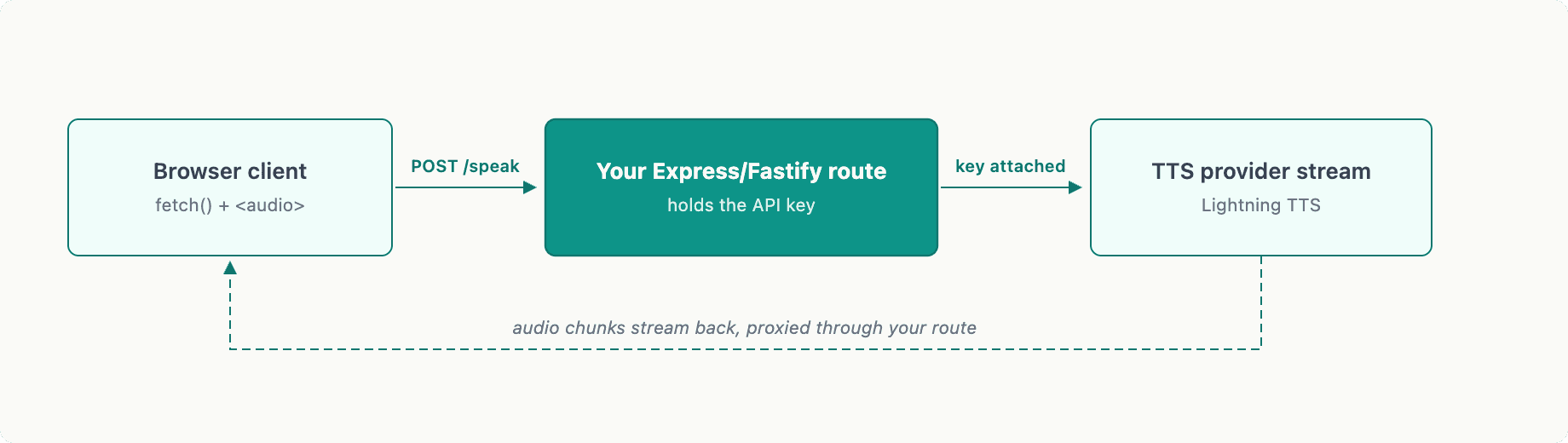
Your Node.js route does three things: it authenticates to the provider (keeping API keys server-side), it consumes the provider's stream, and it forwards binary chunks to the browser response before the provider stream ends.
Cancellation matters in production. Wrap the outbound fetch in an AbortController and tie its abort() call to the client's close event or a user-initiated stop action:
Don't attempt to play each micro-chunk the instant it arrives. Accumulate 80–200 ms worth of audio data in a small queue before pushing to the audio pipeline. This prebuffer absorbs jitter and prevents the stutter pattern that appears when a chunk arrives slightly late.
Option A: HTTP SSE streaming to the browser
Set your response headers before forwarding anything:
Then iterate the provider's response body and write each chunk directly:
On the browser side, a MediaSource extension or an AudioWorklet with a ring buffer can consume this stream incrementally. For PCM/WAV, AudioWorklet is the cleaner path to gapless playback streamed PCM data.
Option B: WebSocket streaming with PCM events
Some providers send audio as discrete JSON messages containing base64-encoded audio deltas. The Node.js side decodes and forwards binary frames:
One thing that breaks playback silently: mismatched sample rates. If the provider sends 44100 Hz PCM and your AudioContext is initialized at 48000 Hz, you'll get pitch shift and tempo drift. Always initialize new AudioContext({ sampleRate: <provider_sample_rate> }) to match the stream.
Codec and playback decisions that break in production
MP3 is acceptable when the user tolerates a 1–2 second wait before playback begins, or when you're writing the stream to disk and serving it later. For true low-latency speech synthesis where audio should start playing within the first sentence, request PCM or WAV from the provider if available.
For gapless playback streamed PCM in the browser, an AudioWorklet with a ring buffer is the standard approach. The worklet's process() callback pulls from the ring buffer on each audio frame (128 samples at a time), so playback continues even if network chunks arrive unevenly.
TTS continuations are the other gap-creator that rarely gets mentioned. If your application streams LLM-generated text token by token and you dispatch a new TTS request per sentence, you'll hear a hard reset between sentences as the TTS model cold-starts for each fragment. A continuation mechanism batches those token fragments into a single continuous synthesis job. This is critical for enterprise contact center voice AI deployments where natural prosody across multi-sentence responses directly affects perceived call quality.
Smallest AI Lightning v3.1: concrete endpoint reference
Smallest AI's Lightning v3.1 model exposes three transports on unified endpoints (verified against Smallest AI documentation, September 2026):
Non-streaming:
POST /waves/v1/ttsSSE streaming audio:
POST /waves/v1/tts/liveWebSocket streaming TTS:
WSS /waves/v1/tts/live
Lightning v3.1 operates at a native 44.1 kHz sample rate, so initialize your AudioContext at sampleRate: 44100 accordingly.
For voice cloning, Lightning v3.1 accepts 5–15 seconds of clean reference audio via the API or the Smallest AI console. Note that voice cloning is available on Lightning v3.1 but not on Lightning v3.1 Pro. Collect and store consent records before submitting reference audio; most enterprise deployments require explicit opt-in documentation.
When your application generates text incrementally (from an LLM token stream, for example), use Lightning's continuations feature to pass text fragments into a single ongoing synthesis session. This keeps the voice continuous across fragments without the hard resets you'd get from chaining separate TTS calls.
Production troubleshooting: symptoms and causes
Symptom | Likely cause |
|---|---|
Complete silence | Proxy buffering enabled (add |
Clicks/stutter | Prebuffer too small, or chunks pushed directly without queuing |
Pitch/tempo distortion |
|
Audio cuts off early |
|
Memory growth | Unbounded chunk queue with no backpressure; cap queue depth and apply backpressure to the upstream fetch |
CORS errors | TTS provider called from browser directly; always proxy through Node.js to keep API keys server-side |
Log chunk sizes, time-to-first-byte, and queue depth as metrics. If time-to-first-byte exceeds 300 ms consistently, investigate provider routing or whether your Node.js instance is co-located with the provider's inference endpoint. For self-hosted deployments, Lightning v3.1 is recommended on an NVIDIA L40S 48 GB GPU to sustain real-time throughput at production concurrency levels.
The three decisions that determine whether TTS feels real-time
First: transport. SSE over HTTP is simpler to proxy and debug; WebSocket is better when you need bidirectional coordination (say, interrupting TTS mid-sentence based on STT input). Pick based on your interaction model, not habit.
Second: audio format. PCM or WAV for anything requiring immediate playback. MP3 only when latency tolerance exceeds one second.
Third: buffering strategy. A short prebuffer of 80–200 ms plus a bounded queue with backpressure eliminates the majority of click and stutter complaints. Pair that with AbortController cancellation tied to the client disconnect event.
Build the Node.js proxy pattern first against any provider. Once the pipeline works, swapping the upstream endpoint is a one-line change. The architecture remains stable; the model improves around it.
Frequently asked questions
What transport should I use for streaming TTS?
Why choose PCM or WAV over MP3 for streaming?
How much audio should I buffer before sending to playback?
How should I handle cancellations and aborted streams?
Will mismatched sample rates cause problems?


