How to Transcribe Audio to Text: Tools, APIs, and Workflow

Learn how to transcribe audio to text with a practical stack: tool categories, API evaluation, preprocessing, post-processing.
Transcribing audio to text isn’t a novelty feature anymore; it’s plumbing. Podcasters want transcripts people can search. Developers ship real-time speech recognition inside products. Legal and medical teams push documentation out of inboxes and into systems.
What follows pulls the whole stack into one view: the major tool categories, what actually matters when you pick an API, and how to assemble a workflow that doesn’t fall apart the moment the audio gets messy. The same fundamentals apply whether you’re converting a single recording or wiring up a production pipeline; the difference is how much rigor you put into the edges.
Understanding What You Are Actually Solving
Before you choose anything, get specific about the job you’re asking the system to do. “Transcribe audio to text” sounds like one task, but it hides a bunch of very different problems with very different failure modes. A quiet, single-speaker podcast is one thing; a customer support call with crosstalk, jargon, background noise, and regional accents is another.
The research backs up what most teams learn the hard way. Research on automatic speech recognition shows that transcript quality can drop sharply when audio quality is poor, especially in real-world recordings with noise, overlapping speech, or unclear speaker conditions. Benchmarks tell the same story in numbers: while leading AI platforms can hit over 90% accuracy on clean audio, this figure often drops significantly on typical business audio with noise, multiple speakers, and varied accents. That gap is where transcription projects usually stall, which is why handling accents and noisy audio in transcription should be part of your decision process, not an afterthought.
Define the variables up front: the source and quality of the audio, whether you need streaming or batch, the languages and accents you expect, and the shape of the output (speaker labels, timestamps, and any downstream steps like summarization). Those choices determine which tools are viable and what “good” looks like in practice.
The Main Categories of Transcription Tools
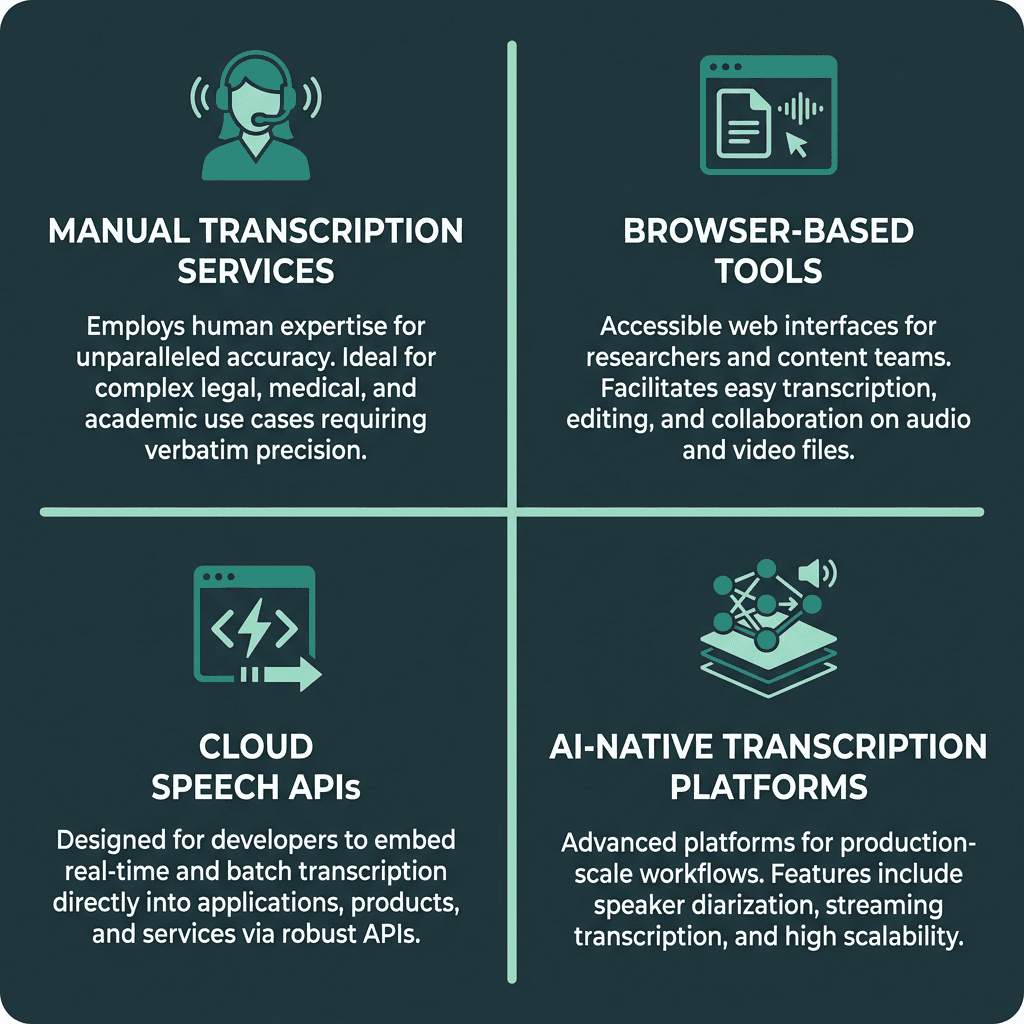
Four distinct categories of transcription tools, each suited to different use cases and technical requirements.
Most transcription options land in one of four buckets. Your best fit depends on scale, how much accuracy you truly need, and whether transcription has to plug into an existing product or workflow.
Here is a practical breakdown of each category:
Manual transcription services: Human transcriptionists listen and type. You pay for that attention: accuracy is strong even on difficult audio, but turnaround is hours or days and costs rise linearly with volume. This is the default for legal, medical, and archival work where errors have real consequences.
Browser-based tools: Lightweight apps for individuals who want transcripts without building infrastructure. Many pair AI output with an editor so you can clean things up quickly. They’re a good match for researchers, journalists, and content teams.
Cloud speech APIs: Developer-oriented REST or gRPC endpoints that take audio and return structured text. They’re meant to be embedded, not used as standalone apps. You’ll write code, but you get the flexibility to shape the workflow around your product.
AI-native transcription platforms: Built for production transcription and the details that show up in real deployments: diarization, streaming, custom vocabulary, webhook delivery, and operational defaults that reduce glue code. They sit between raw cloud APIs and consumer tools: still developer-friendly, but more opinionated.
If you want a wider scan of what’s out there, a breakdown of the best audio transcription tools can go platform by platform. Once you’re building a product or automating transcription at scale, most of the real tradeoffs happen in the API and platform categories.
Choosing and Integrating a Transcription API
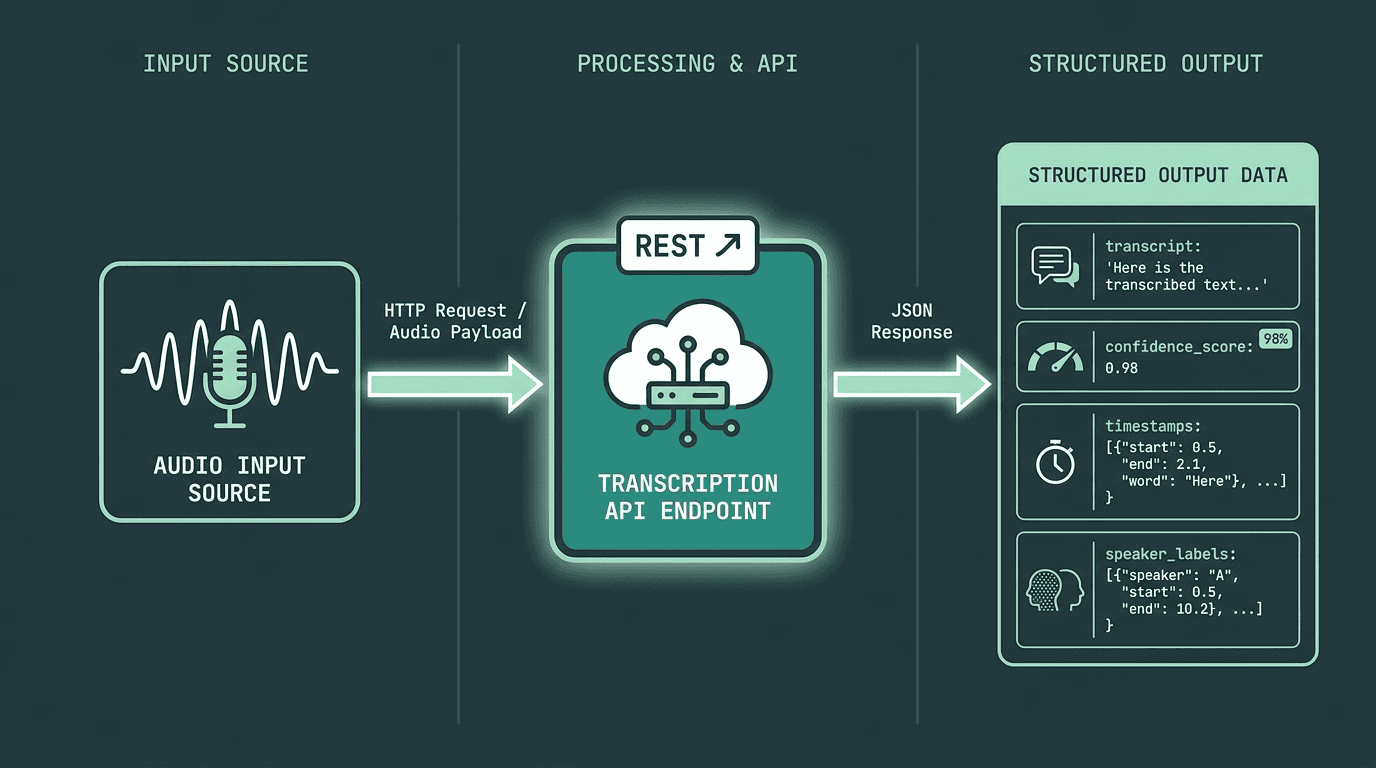
How a speech-to-text API fits into a typical application architecture, from audio input to structured JSON output.
API comparisons often fixate on word error rate (WER) from public benchmarks, but that number rarely predicts how your deployment will behave. Production quality is mostly about fit: how the model handles your accents, your microphones, your noise profile, and your domain vocabulary. When you evaluate an API, focus on the operational parameters that will bite later: supported formats and sample rates, streaming vs. batch, diarization quality, custom vocabulary or domain adaptation, real-time latency, and how pricing behaves at your volume.
A sane evaluation loop is simple and a little tedious. Pull a representative slice of your real audio, not pristine studio clips unless that’s genuinely what you ship. Run the same files through two or three candidates and compute WER on a subset by hand. Then look beyond the score: how does each service treat silence, crosstalk, and the terms your users actually say? Finally, price in the integration work: do you have to adopt a particular SDK, or can you hit a straightforward REST endpoint from whatever stack you already run?
If transcription is one step inside a larger AI product pipeline, the technical comparison of transcription APIs is a useful way to frame those tradeoffs. Pricing is also less uniform than it looks at first glance: some providers bill per minute, others per character, and some offer flat tiers for high-volume workloads. Model your expected monthly audio volume before you commit, because the “cheap” option can flip once you scale.
Building a Reliable Transcription Workflow
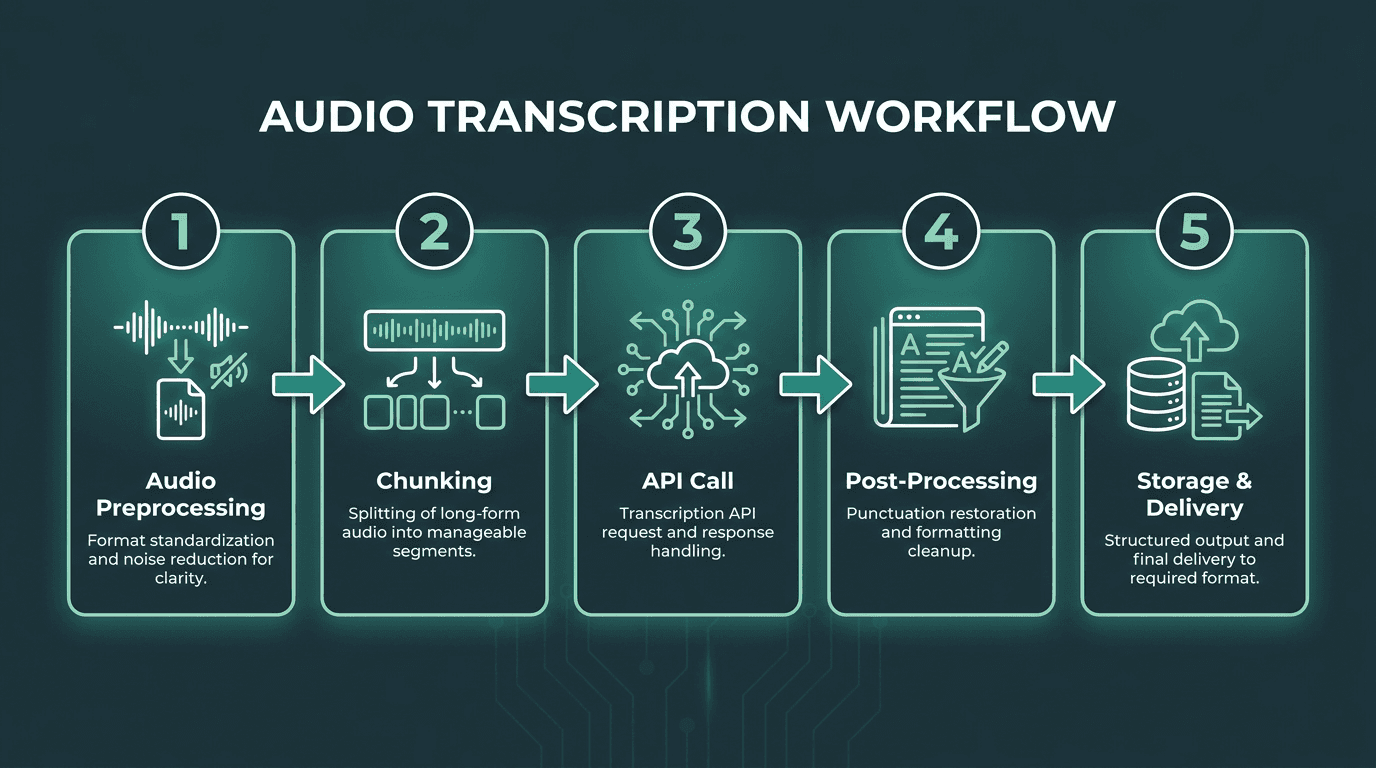
A five-stage transcription workflow that covers preprocessing, API integration, and post-processing for production use.
Stage 1: Audio Preprocessing
If you want the biggest accuracy win before you touch an API, start with preprocessing. Standardize the format (16kHz mono WAV or FLAC is broadly accepted), normalize levels, and apply noise reduction when the source is rough. A lot of “the model is bad” incidents turn out to be “the audio was inconsistent.” FFmpeg is usually enough for conversion and basic filtering without paying for yet another service.
Stage 2: Chunking for Long-Form Audio
Most speech APIs impose file size or duration limits, so long recordings need to be split. A common pattern is 5 to 10 minute chunks with a small overlap (around 2 seconds) so you don’t chop words at boundaries. Keep chunk metadata with the transcript so you can stitch the full output back together deterministically. As a bonus, chunking lets you retry failures without reprocessing the entire recording.
Stage 3: API Call and Response Handling
Ask for the metadata you’ll need later, not just the raw text: word- or sentence-level timestamps, speaker labels for multi-participant audio, and confidence scores if you plan to route uncertain segments to human review. Treat error handling as part of the feature, not an afterthought. Timeouts, rate limits (HTTP 429), and malformed-audio failures don’t want the same retry strategy. Exponential backoff with a hard retry cap covers most transient issues without turning your pipeline into a denial-of-service machine against your own provider.
Stage 4: Post-Processing the Transcript
The raw transcript is almost never the asset you actually want to ship. Depending on the API, you may need punctuation restoration, consistent speaker label formatting, and cleanup rules for domain terms the model repeatedly mangles. Some workflows also remove filler words when the end product is meant to read like documentation rather than speech. If you’re wiring this together without writing a lot of glue code, a no-code audio workflow using tools like n8n can handle transformations between the API call and the final destination.
Stage 5: Storage, Search, and Delivery
Decide early what “done” means for storage and access. Plain text is easy to dump somewhere, but structured output (JSON with timestamps and speaker labels) is what makes search, summarization, and compliance review workable later. If you need captions, SRT or VTT are better suited for time-aligned playback. For internal tools, a searchable database that links transcripts back to the original audio unlocks retrieval workflows that aren’t possible when the transcript lives as an orphaned text file.
Real-Time Transcription: Different Rules Apply
Batch transcription and real-time transcription look similar from the outside, audio goes in, text comes out, but they’re different engineering problems. Live captioning, voice interfaces, and real-time agent assist in contact centers depend on streaming APIs that emit partial results as audio arrives. In that world, latency is the constraint you feel first, not throughput.
For streaming, prioritize APIs with WebSocket support and low first-word latency, plus interim results you can render immediately. The catch is that interim hypotheses will change as more audio arrives, so your UI and state management need to tolerate updates without flicker or confusion. The best transcription software in 2026 for real-time voice systems breaks down what to look for and which platforms are built for streaming versus batch workloads.
Common Mistakes That Degrade Transcription Quality
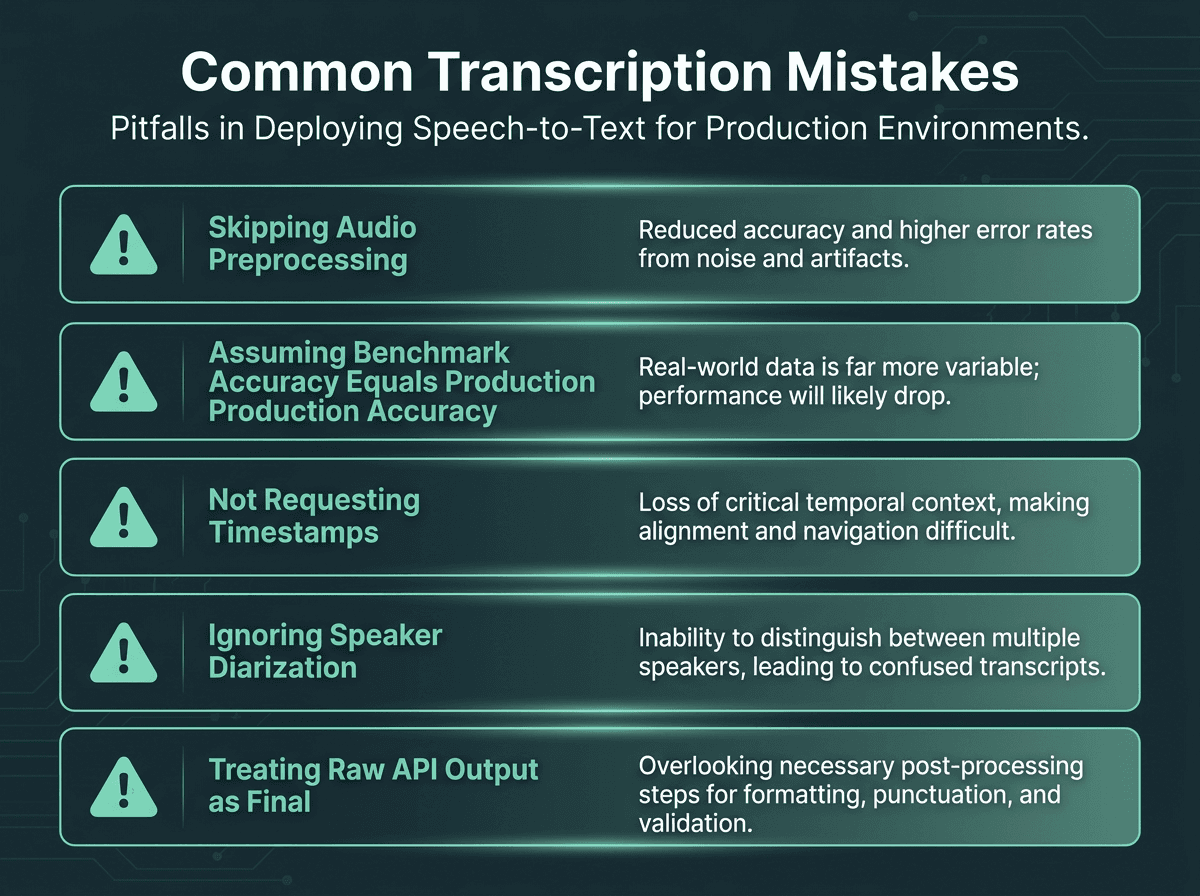
Five mistakes that consistently degrade transcription quality in production environments.
These are the errors that appear most consistently across transcription projects:
Skipping audio preprocessing: Shipping raw audio straight to an API is a reliable way to get disappointing output. Even basic normalization and noise reduction tends to show up immediately in accuracy.
Assuming benchmark accuracy equals production accuracy: Clean-audio WER scores don’t tell you what happens with your microphones, your speakers, and your noise. Test on representative samples before you standardize on a platform.
Not requesting timestamps: A transcript without sentence- or word-level timestamps is harder to search, edit, audit, or align to media.
Ignoring speaker diarization for multi-speaker audio: If more than one person is talking and you skip diarization, you end up with a wall of text that’s painful to parse and weak for meeting notes or interview analysis.
Treating the raw API output as final: Production transcripts need cleanup. Punctuation, formatting, and domain corrections are part of the workflow, not optional polish.
Where Smallest.ai Fits in This Stack
Most teams don’t fail at transcription because they can’t find a tool. They fail because the workflow turns into a patchwork: preprocessing over here, transcription over there, post-processing somewhere else, and no clean connective tissue to keep it reliable. That fragmentation is especially painful when speech-to-text is only one module inside a broader voice or conversational system.
Smallest.ai is built to reduce that glue work. Pulse, the speech-to-text product, targets production transcription with real-time streaming, speaker diarization, and multilingual support. It’s designed to sit alongside the rest of the Smallest.ai stack: Lightning for text-to-speech, Hydra for speech-to-speech, and Atoms for voice agents and text agent workflows. If you’re building a voice agent or conversational AI product, having transcription, synthesis, and agent logic behind a unified API surface cuts down the integration overhead that comes from stitching together multiple vendors.
If you want to compare Pulse to other transcription APIs on technical criteria before you commit, start with the technical comparison of transcription APIs. And if your pipeline spans both transcription and synthesis, the Lightning text-to-speech model rounds out the end-to-end picture. For teams building production voice systems, Pulse combined with Atoms provides a cleaner path from raw audio to real-time conversational workflows.
Frequently asked questions
What is the most accurate way to transcribe audio to text?
How do I handle multiple speakers when transcribing audio?
What audio format should I use for best transcription results?
Can I transcribe audio to text in real time for a voice application?
How much does it cost to transcribe audio to text using an API?