How To Build An AI Voice Agent Using Atoms API

Build an AI voice agent with Smallest.ai's Atoms API: Python setup, WebSocket audio streaming, barge-in interrupts, tool calls, and latency tuning.
When you build an AI voice agent for a production environment, your architecture is as consequential as the code you ship. The demand for high-quality voice interactions requires something that sounds fast, stable, and human. A common mistake is to focus only on the conversational model without planning for the surrounding pipeline, which often leads to latency and reliability issues.
This tutorial shows how to put together a production-minded voice agent using Smallest.ai Voice Agents and the Atoms API. It covers prerequisites, pipeline decisions, a working Python implementation, and the practical tuning that turns a demo into a deployable system. The steps build on each other, so it is best to follow them in order.
What the Atoms API Actually Does
Atoms is Smallest.ai's platform for voice and text agents. Instead of wiring up separate speech-to-text, language model, and text-to-speech services, Atoms provides a single API that runs the full conversational loop. Under the hood, it coordinates Pulse (speech-to-text), Electron (the conversational small language model), and Lightning (text-to-speech) as one pipeline. You interact with one endpoint, and Atoms handles the internal handoffs.
This design matters because many production voice agents use a cascading pipeline: STT feeds an LLM, which feeds TTS, and every boundary adds latency. Atoms is built to reduce that overhead at the infrastructure layer. This allows your latency budget to be used for better agent behavior and tooling, rather than compensating for slow plumbing. If you want a longer version of how these pieces fit together, the voice agent API architecture guide on the Smallest.ai blog lays out the core design tradeoffs.
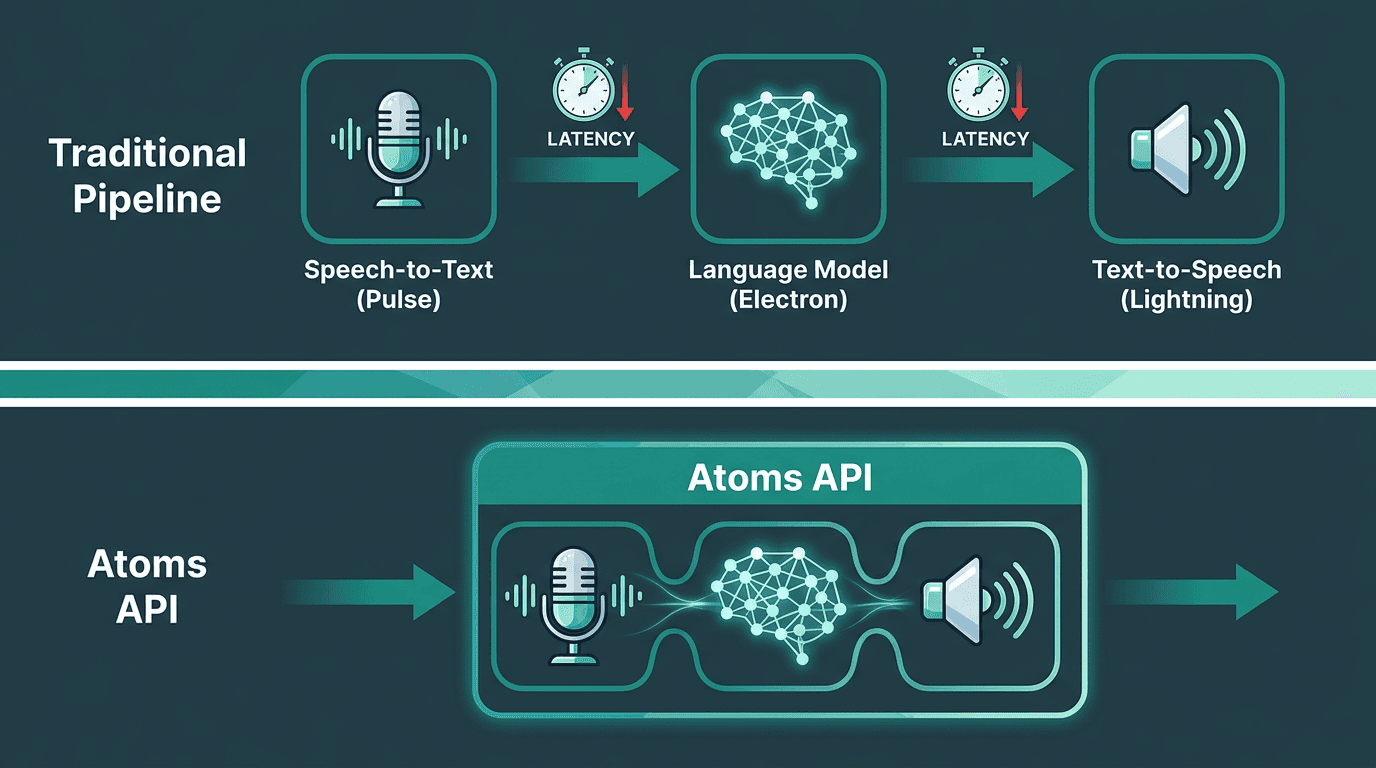
Atoms API collapses three latency-prone handoff stages into a single unified pipeline.
Prerequisites Before You Write a Line of Code
Make sure the following are in place before starting:
Smallest.ai account and API key: sign up at smallest.ai and generate a key from the dashboard. Check Smallest.ai pricing to choose the right tier for your usage volume.
Node.js 18+ or Python 3.10+: the examples below use Python, but the Atoms API is REST-based and works with any HTTP client.
A microphone input source: for local testing, a system microphone works. For production, you will stream audio from a telephony provider or WebRTC client.
Basic familiarity with async I/O: the pipeline relies on streaming responses, so understanding async/await or event loops in your language of choice will save debugging time.
ffmpeg installed: needed for audio format conversion if your input source does not produce 16kHz mono PCM, which is a common format for voice agent APIs like Pulse.
Step 1: Initialize the Atoms Agent
Every Atoms voice agent starts with an agent configuration object. This is where you set the persona, the system prompt that constrains behavior, the speaking voice, and the model parameters. You can think of it as the agent's specification sheet: what it is allowed to do, how it should sound, and how verbose it should be. You POST this configuration once at startup, and Atoms returns an `agent_id` that you use for every subsequent turn in the conversation.
A minimal Python initialization looks like this:
voice_id points to a pre-built voice in the Lightning TTS library, or a cloned voice you've already created through the API. electron-1 is Smallest.ai's conversational small language model, tuned for low-latency turn-taking instead of long-form output.
Step 2: Stream Audio Input to the Agent
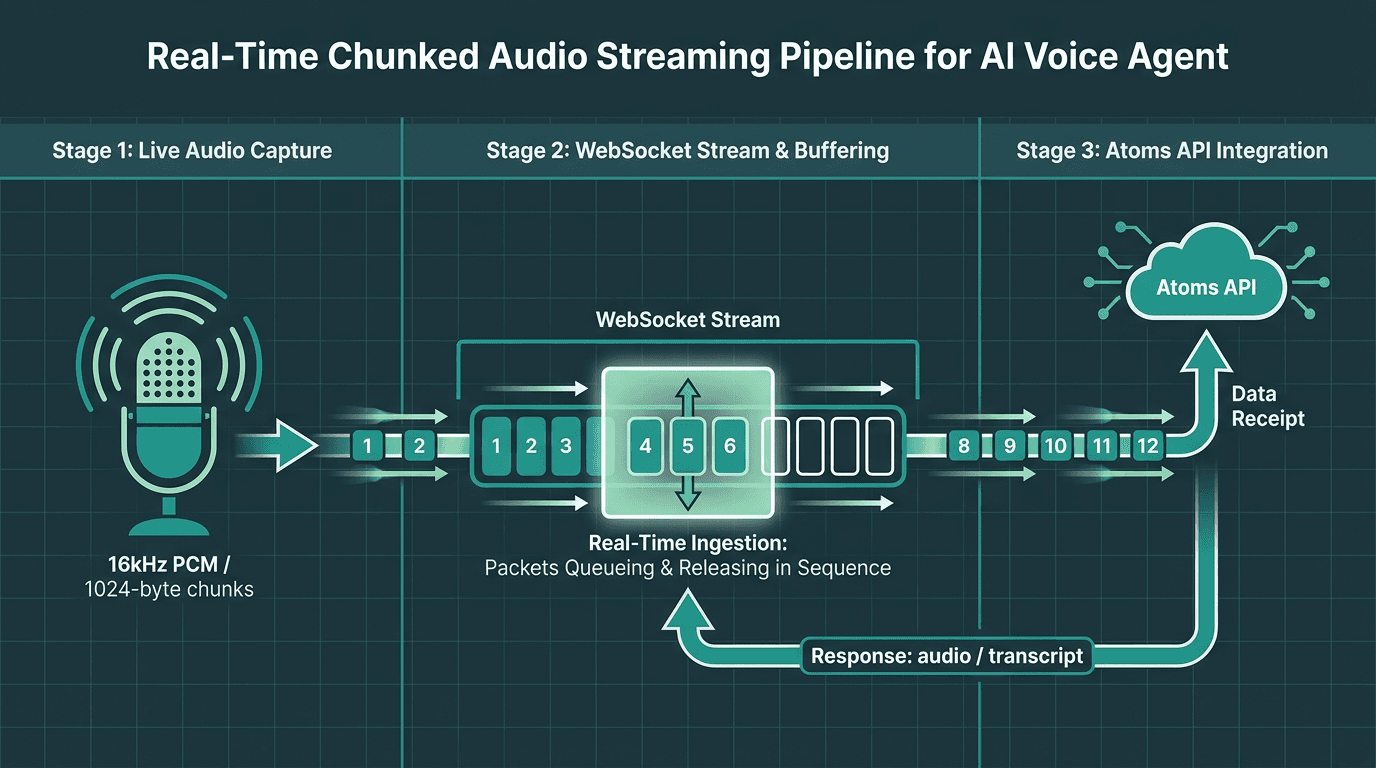
Audio chunks flow continuously over a WebSocket to the Atoms API — no batching, no dropped context.
Once the agent exists, you need to feed it audio. Atoms takes streaming audio over a WebSocket connection, a practical choice for real-time voice. This approach avoids the overhead of repeated HTTP requests and keeps the session state alive. In practice, you create one WebSocket session per conversation and push audio chunks as the microphone produces them.
send_audio continuously pushes raw PCM chunks. receive_responses listens for two useful message types: audio (synthesized speech bytes to play back) and transcript (the text of what the agent said, useful for logs and UI). Running both directions at once is what makes the interaction feel conversational instead of request/response. If you want to explore the tradeoffs in more detail, the real-time streaming voice API post compares WebSocket, WebRTC, and chunked HTTP for voice applications.
Step 3: Handle Turn-Taking and Interruptions
A voice agent that cannot be interrupted will always sound robotic. Humans talk over each other, users change their minds mid-sentence, and people often start answering while the agent is still speaking. While Atoms can run voice activity detection (VAD) server-side, your client still needs to act on the signals it sends to manage interruptions, also known as barge-in.
When the server detects the user speaking over the agent, it can emit a message, such as a {"type": "interrupt"} event, on the WebSocket. Your receive_responses handler should stop playback as soon as that arrives. A minimal implementation requires managing playback state.
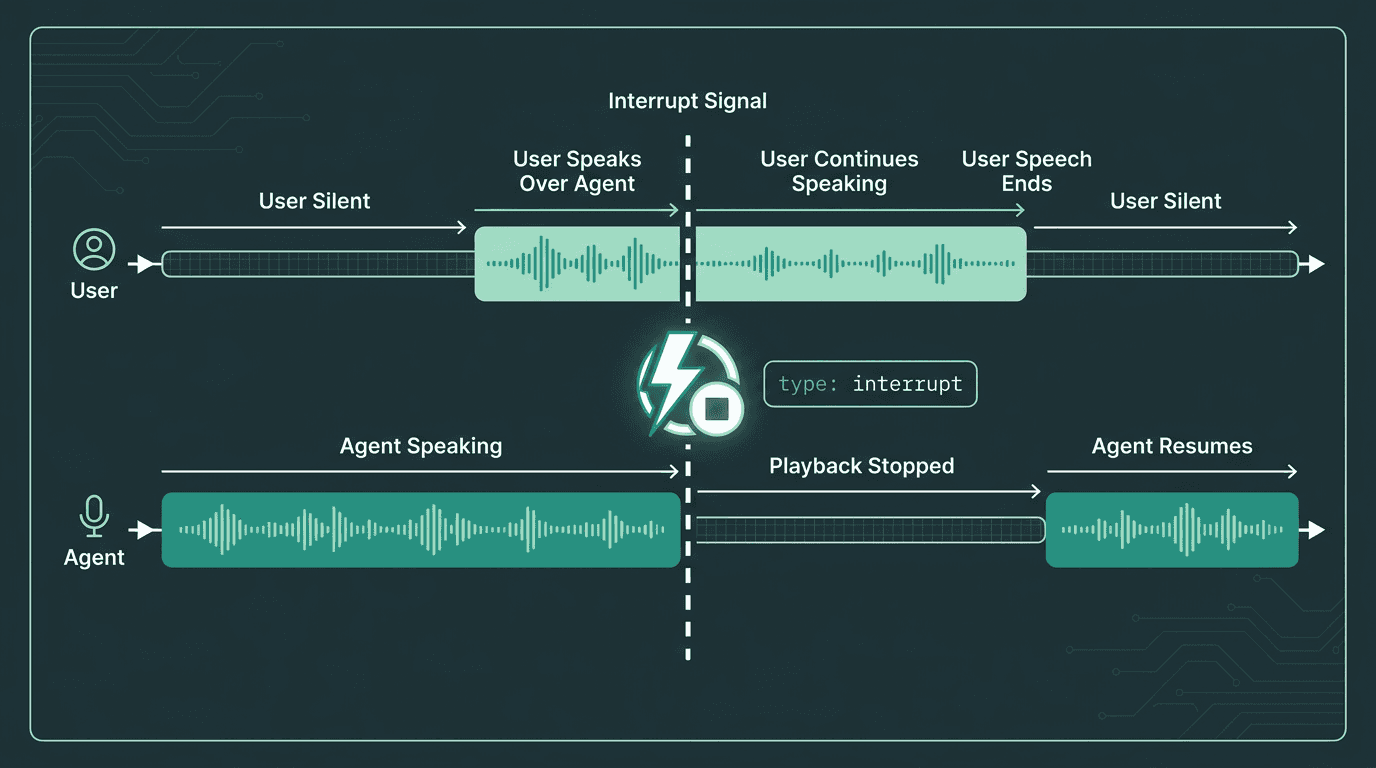
When a user speaks over the agent, the Atoms API emits an interrupt event to stop playback immediately.
Step 4: Add Tool Calls for Real-World Actions
An agent that only talks is a voice-shaped chatbot. To be useful, it must perform actions: fetch an order status, book a slot, query a knowledge base, or write back to a CRM. Atoms supports function calling via a tools schema you define in the agent configuration.
Add a tools array to your agent creation payload:
When Electron determines a tool call is appropriate, the WebSocket can emit an event like {"type": "tool_call", "name": "get_order_status", "arguments": {"order_id": "ORD-9821"}}. Your client is responsible for executing the function and sending back a tool_result message. The agent then incorporates the result into its next spoken response without requiring extra prompt engineering to connect the pieces.
Step 5: Test and Optimize for Latency
Before deploying, it is crucial to test the agent for latency. Measure from the end of the user's utterance to the first audio byte arriving back at the client. This is your speech time-to-first-byte (TTFB), and it's the lag users notice most. A well-tuned agent should aim for a TTFB under 500ms, a common target for responsive voice interactions.
Practical optimizations that can improve performance:
Keep system prompts concise: Every token in the prompt is processed on each turn. Remove anything that does not materially change the agent's behavior. Overly long prompts can increase latency.
Set
max_tokensconservatively: Voice answers should usually be one or two sentences. A 150-token cap helps prevent rambling responses that delay audio output.Co-locate your client with the API region: Network round-trip time directly impacts TTFB. Deploy your server in the same cloud region as the Atoms endpoint.
Use streaming TTS playback: Do not wait for the full audio response before you start playing it. Atoms streams audio chunks; play the first chunk as soon as it arrives.
Profile tool call latency separately: Slow external APIs will dominate your end-to-end time. Implement aggressive caching and tight timeouts for any tools your agent uses.
The post on how to build faster AI voice agents digs into the neural TTS side, including how streaming synthesis differs from batch synthesis at the model level. Once performance is acceptable locally, use the testing voice agents tooling from Smallest.ai to run scripted conversation scenarios before shipping to production.
Deployment and Operational Considerations
Moving from a prototype to a production system introduces new challenges. A successful deployment requires thinking about scalability, security, and maintainability. For example, a common mistake is to deploy an agent without clear boundaries on its responsibilities, leading to unpredictable behavior. Start with a single, well-defined use case, such as appointment scheduling or order status checks, and expand from there.
Another key aspect is creating a safe fallback path. An agent should have a clear mechanism to escalate to a human operator if it cannot understand a request after a few attempts or if the user shows signs of frustration. This not only improves the user experience but also provides a valuable feedback loop for identifying areas where the agent needs improvement. Regularly reviewing failed interactions and escalated conversations is essential for iterative development.
Finally, consider the operational lifecycle of your agent. As your product or business policies change, your agent's knowledge and behavior must be updated. Version control for prompts, tool schemas, and configurations is just as important as for your application code. The W3C Voice Interaction Community Group is also worth tracking if you're building for the open web. Their work on virtual assistant interaction patterns will influence how browsers and devices handle voice input, and aligning your agent's behavior with emerging standards can save rework later.
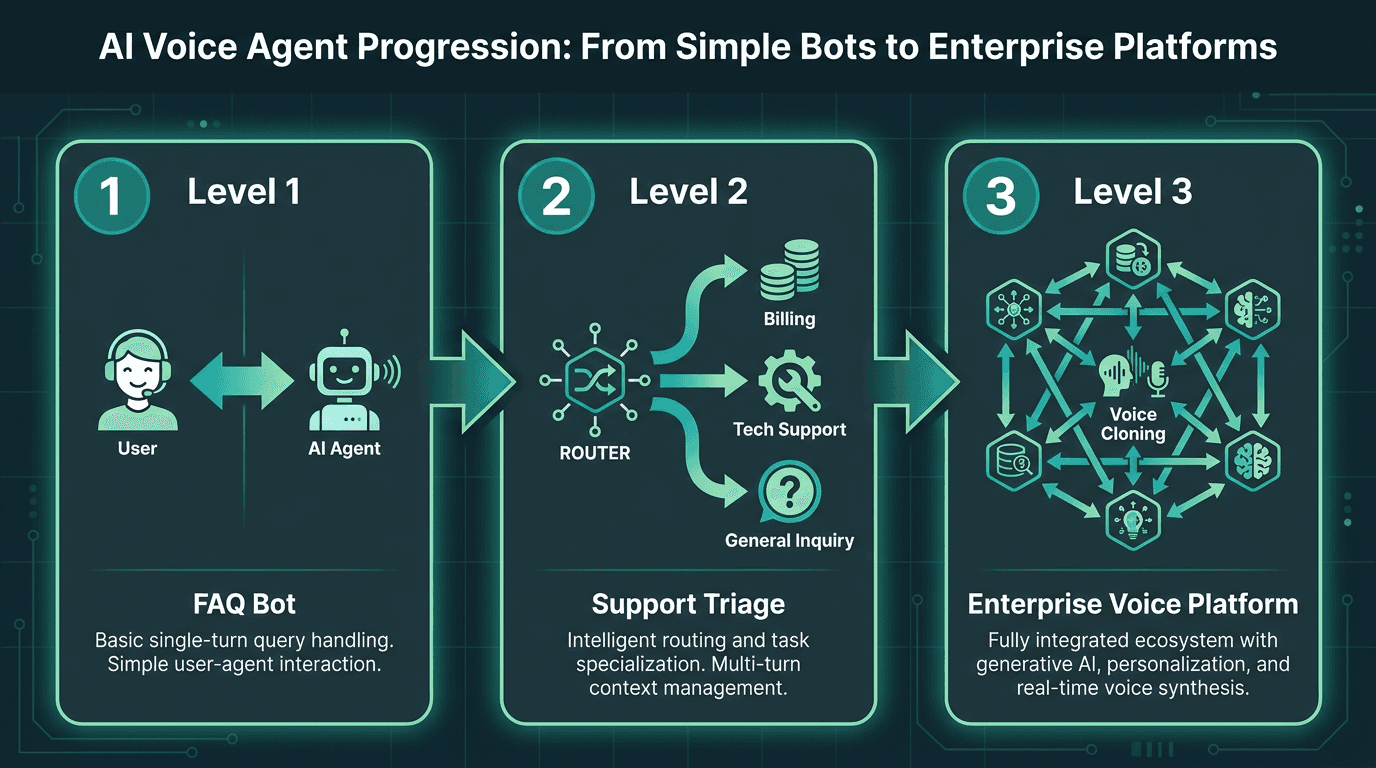
Scaling voice agent architecture from a simple FAQ bot to an enterprise-grade multi-agent platform.
Monitoring, Logging, and Security
Once deployed, an AI voice agent requires robust monitoring, logging, and security practices to ensure reliability and protect user data. These are not optional additions but core components of a production-grade system.
Key operational areas include:
Monitoring: Voice agent performance can degrade over time due to changes in user behavior or underlying model updates. Continuous monitoring of metrics like intent completion rate, response latency, and interruption handling is critical to detect issues before they affect users. Setting up real-time alerts for anomalies, such as a sudden spike in fallback rates or increased latency, allows teams to address problems proactively.
Logging: A well-designed logging architecture is essential for debugging and quality analysis. It should capture interaction data such as transcripts, tool calls, and latency metrics, all correlated with a unique session ID. This allows you to answer the question, "What happened on that call?" Storing logs in a tiered system (hot, warm, cold) can balance cost with accessibility for regulatory compliance and analytics.
Security: Voice agents often handle sensitive information, making security a primary concern. Best practices include end-to-end encryption for data in transit (TLS 1.2+) and at rest (AES-256), strict API key management, and implementing the principle of least privilege for all integrations. Regularly rotating API keys and using separate keys for development, staging, and production environments are fundamental security measures.
Architectural Tradeoffs to Consider
The difficult part of building a voice agent has never been the concept. It is often the integration tax: stitching together STT, LLM, and TTS providers, managing three sets of rate limits and error cases, and then discovering the combined latency makes the experience feel sluggish. This plumbing work can consume more time than developing the agent's core conversational behavior.
A unified API like Atoms is designed to abstract away some of this complexity. By managing the pipeline of Pulse, Electron, and Lightning internally, it presents a simpler surface for developers. This approach can help teams focus more on agent logic and less on infrastructure glue. However, it's important to understand that any API, unified or not, is part of a larger system that you are responsible for building and maintaining.
Ready to apply the concepts from this tutorial? You can start by exploring Smallest.ai Voice Agents. Then, map your expected call volume to a plan on the Smallest.ai pricing page, and use the Smallest.ai blog as a pattern library for common deployment scenarios. The infrastructure provides a foundation; the differentiator is what you build on top of it.
Frequently asked questions
What is the benefit of a unified API like Atoms versus separate speech and language APIs?
What audio format should I stream into the Atoms API?
Can I use a custom or cloned voice with a voice agent API?
How do I handle live lookups, like order status or availability checks?
What is a realistic speech TTFB target for a production voice agent?