Choose the best speech-to-text API for low-resource languages

A contact center guide to benchmarking WER, building an evaluation corpus, and picking an STT API that survives production.
Choosing the best speech-to-text API for low-resource languages isn't a question you can answer by reading a vendor's supported-languages page. Language count is a marketing number. What matters is whether the model produces acceptable word error rates on your audio, in your domain, with your speaker population. This guide walks an enterprise contact center team through every step: selecting a streaming or batch deployment mode, building a defensible evaluation corpus, augmenting sparse training data, applying adaptation strategies, and monitoring accuracy in production.
Who this is for: contact center engineering and operations teams evaluating STT infrastructure for languages with limited training data (regional dialects, minority languages, heavily code-switched speech).
Streaming vs batch: picking the right mode before you benchmark
Two metrics determine which deployment mode fits your workflow.
TTFR (time-to-first-result): how long after speech begins before you receive any transcript token. Relevant for live agent assist, real-time captions, and interrupt detection.
RTF (real-time factor): total processing time divided by audio duration. An RTF < 1.0 means the system transcribes faster than the audio plays. For batch QA, RTF is what limits throughput.
For live contact center work (agent assist, live captions, real-time sentiment escalation), you need a streaming WebSocket connection where TTFR stays well under 200ms. Smallest's Waves Pulse real-time mode targets approximately 64ms TTFR, streaming audio via WebSocket in 4096-byte chunks at 50–100ms intervals, encoded as linear16 at 16kHz. That's low enough to feed downstream agent-assist logic without perceptible lag.
For historical QA, compliance audit, or corpus-wide vendor comparison, batch is the right call. Use an HTTPS POST endpoint and process files asynchronously.
Language routing note: most managed APIs let you pin a specific language code or enable automatic detection. For low-resource languages, auto-detection introduces extra variance because the model may misidentify sparse-data languages as higher-resource relatives. Pinning the ISO 639-1 code reduces that variance. If your contact center handles genuinely multilingual traffic (e.g., code-switching between a regional language and English), use the multi-language detection parameter (Smallest AI Wave TTS exposes across 32+ languages) and measure per-language WER slices separately rather than averaging across the full corpus.
Practical recommendation: run a 30-minute streaming pilot on live calls first to confirm TTFR and RTF are within tolerance. Run a batch across your full evaluation corpus to generate statistically stable WER/CER numbers before committing to any vendor or adaptation strategy.
Building a small evaluation corpus that actually measures your language
A vendor's language support page tells you the model was trained on some data for that language. It tells you nothing about accuracy on your audio. Build your own corpus.
Size target: 50–200 audio files per use case. Smaller is acceptable for an initial pass; fewer than 30 files makes WER estimates unreliable because a single outlier skews the aggregate. The Waves evaluation walkthrough uses the same 50–200 range as a practical starting point.
Corpus matrix to cover:
Verified reference transcript (human-reviewed, not auto-generated)
Speaker labels if your use case involves multi-party calls
Word or sentence timestamps if you need alignment validation
Metadata tags: recording environment (phone, VoIP, in-person), channel type, SNR tier (clean/noisy/very noisy), accent or dialect label
Annotation requirements for each file:
Dimension | Variants to include |
Accent/dialect | At least 2–3 regional variants if they exist |
Audio quality | Clean (SNR > 20 dB), noisy (SNR 10–20 dB), degraded (SNR < 10 dB) |
Code-switching | Monolingual vs mixed-language utterances |
Channel | Broadband (16kHz+) vs narrowband telephony (8kHz) |
Recording environment | Mobile handset, landline, VoIP, headset |
Speaker demographics | Age range, gender, reading vs spontaneous speech |
Checkpoint before you evaluate any vendor: run your normalization pipeline on the reference transcripts first. WER is sensitive to punctuation stripping, number normalization ("3" vs "three"), and case folding. Standardize your normalization assumptions, then freeze them. If you change normalization mid-evaluation, your vendor comparisons become meaningless.
Critical warning: don't treat "language supported" as passing criterion. Every major managed API claims multilingual support. OpenAI's Whisper officially supports 98 languages (see the Whisper tokenizer source for the canonical language code list, which defines 99 codes including the base model's token set). AssemblyAI's Universal models cover 99 languages per their supported-languages documentation. AWS Transcribe, Google Cloud Speech-to-Text V2, and Deepgram each publish their own supported-languages pages. The actual WER gap between a high-resource language like English and a low-resource regional language on the same model can be 30–50 percentage points. Measure, don't assume.
Data augmentation and synthetic speech for sparse low-resource corpora
Low-resource languages suffer from two compounding problems: there's less paired audio-text training data in the model's pre-training corpus, and your evaluation audio may not match the acoustic conditions that training data came from. Augmentation addresses the second problem and helps expose where the model breaks.
Augmentation recipes to apply to your evaluation corpus before testing:
Noise injection: add babble noise, HVAC, and keyboard noise at SNR levels of 5, 10, and 20 dB. This lets you measure accuracy degradation curves rather than a single-point WER.
Speed and tempo perturbation: shift playback speed ±10–15%. This simulates fast speakers and slow deliberate speech, both common in contact center recordings.
Reverberation: apply room impulse responses to simulate different recording environments. A speaker on a phone sounds very different from a speaker in a reverberant office.
Telephone-band filtering: for 8kHz telephony scenarios, apply a bandpass filter (300Hz–3400Hz) to broadband files. Many low-resource language deployments involve PSTN channels, and models trained on broadband audio degrade on narrowband input.
Synthetic data for vocabulary coverage gaps: if your domain involves product names, medical terminology, or place names that the model consistently misrecognizes, generate TTS audio for those terms, transcribe it with your target STT model, and measure whether those terms appear in the output. Use a TTS system that supports your target language (Meta's MMS project, announced in May 2023, covers TTS for over 1,107 languages, including many that lack commercial TTS support). Watch for synthetic speech artifacts: TTS prosody is flatter than natural speech, and models sometimes produce different errors on synthetic vs natural audio. If your synthetic-data WER is significantly better than your natural-audio WER on the same vocabulary, the improvement may not transfer to production.
Audio normalization contract: resample everything to 16kHz mono WAV before evaluation. This single step eliminates a large class of format-induced variance. If your production pipeline uses 8kHz telephony, maintain a separate 8kHz test partition and report metrics for both. Never mix bitrates in a single WER aggregate.
Vendor adaptation options: from lexicon injection to fine-tuning
The right adaptation strategy depends on how far your baseline WER is from your acceptance threshold. Start shallow; escalate only when you have evidence that deeper adaptation is justified.
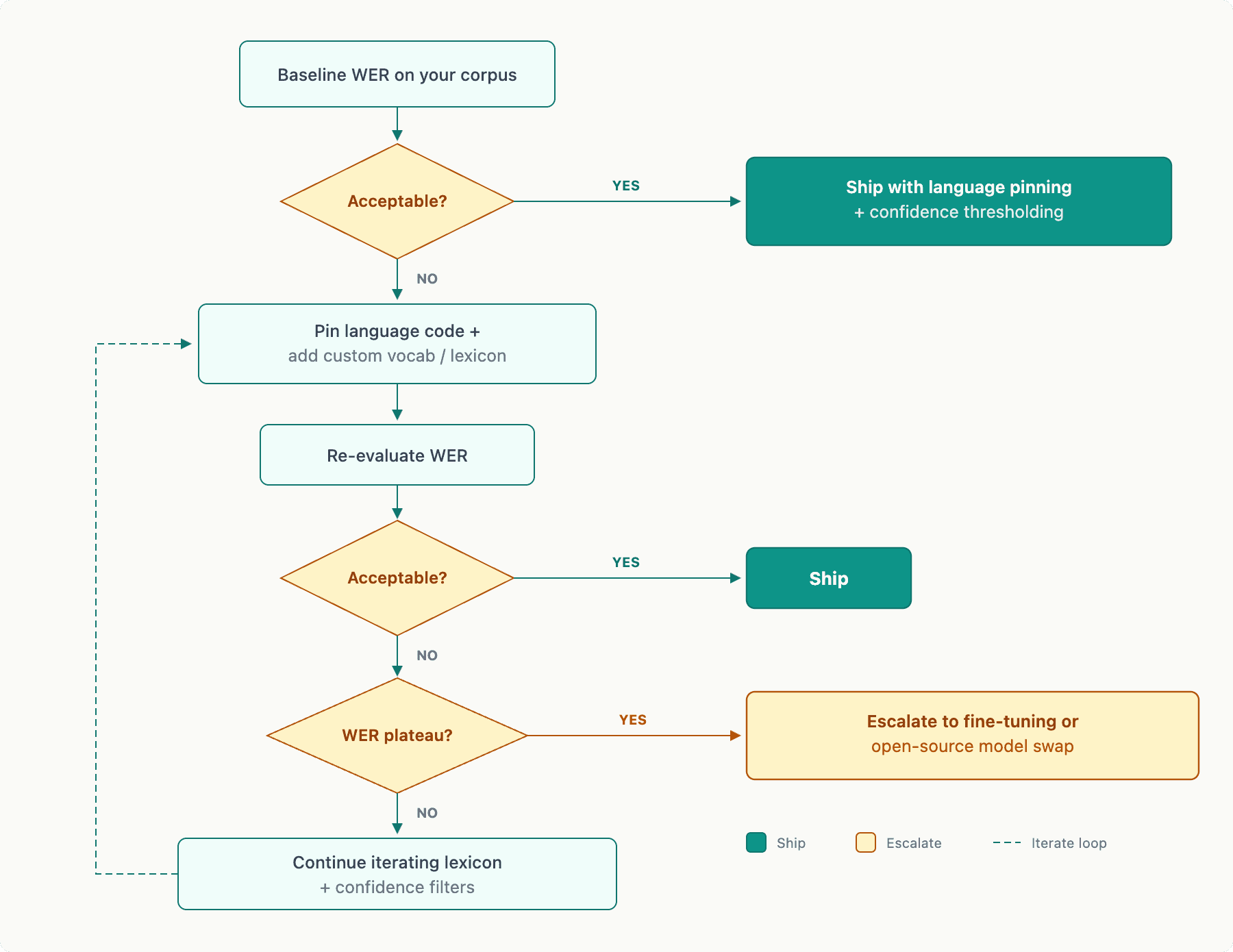
Adaptation decision tree:
Custom vocabulary and lexicon injection is the lowest-effort, fastest-turnaround adaptation lever. Use it when:
Your domain has proper nouns (company names, product lines, agent names) the model consistently mishears
The language has morphological complexity that causes root-word recognition failures
Code-switching involves technical English terms inserted into a low-resource language
Most managed APIs expose some form of word boost or custom vocabulary parameter. Effectiveness varies significantly by vendor and language. Document your lexicon coverage (how many domain terms it contains) and measure WER on a domain-term-only slice of your corpus to isolate the improvement.
Fine-tuning requires labeled audio-text pairs (typically 1–10 hours minimum to see meaningful improvement), longer iteration cycles (days to weeks depending on vendor), and careful evaluation design to avoid overfitting to your small corpus. Use a held-out test set that was never used during fine-tuning development. If your only labeled data is 50 files, fine-tuning on 40 and testing on 10 is too noisy to trust; collect more data before committing to a fine-tuning cycle.
Hybrid pipeline options: for languages where no single managed API performs acceptably, consider a two-stage approach. Use an open-source model (wav2vec2 XLS-R, Meta's SeamlessM4T, or MMS-based models from the Massively Multilingual Speech project) as a pre-filter to detect language, reject non-speech, or generate a rough first-pass transcript. Then pass audio to a managed cloud STT endpoint for final transcription. This adds latency but can substantially reduce WER for languages where open-source models were specifically trained on more dialect-representative data.
Running Waves Pulse in evaluation mode: when benchmarking Waves Pulse against your corpus, enable diarization, emotion detection, and PII/PCI redaction simultaneously. These features are enabled at request time, and running them matches production conditions exactly. Don't benchmark with features disabled and then enable them in production; redaction and diarization add processing overhead that affects your RTF and TTFR measurements.
Measuring success and monitoring accuracy in production
Define your acceptance thresholds before you start evaluating. Post-hoc threshold-setting is how biased decisions get made.
Metric | Definition | Typical tool |
WER | (S + D + I) / N, where N = reference word count |
|
CER | Character-level equivalent of WER |
|
TTFR | Wall-clock time from audio start to first transcript token | Custom instrumentation |
RTF | Processing time / audio duration | Logged per-file |
Confidence | Per-word or per-utterance score from API | API response field |
A basic WER/CER harness using jiwer:
Apply normalization (lowercase, strip punctuation, expand numerals) to both reference and hypothesis before computing. Inconsistent normalization is the single most common source of inflated or deflated WER numbers in vendor comparisons.
Acceptance threshold table by language tier:
Language tier | WER target (contact center QA) | CER target | Rollback trigger |
High-resource (e.g., English, Spanish) | < 15% | < 10% | > 25% |
Mid-resource (e.g., Hindi, Arabic) | < 25% | < 18% | > 40% |
Low-resource (e.g., regional dialects, minority languages) | < 40% | < 30% | > 55% |
These are starting points, not absolutes. Your application's tolerance for misrecognition depends on whether downstream processing is automated (lower tolerance) or human-reviewed (higher tolerance).
Production monitoring loop:
Sample 20–50 new calls weekly from your production traffic.
Get human-verified transcripts for that sample (or use a tiered approach: auto-verify high-confidence utterances, manually verify low-confidence ones).
Recompute WER/CER on the fresh sample and compare to your baseline.
Segment by audio quality tier (clean/noisy/degraded) and by language variant. A clean-audio WER staying flat while noisy-audio WER degrades is a signal your model is drifting on a specific channel condition.
Re-run full benchmark when: the contact center script changes significantly, you onboard a new agent population with different accent distributions, or you switch telephony providers (which changes audio codec and bitrate).
Common failure modes and how to isolate them:
Code-switching errors: create a corpus slice containing only utterances with language switches. Measure WER on that slice separately. If code-switch WER is 2x your monolingual WER, language routing or boundary detection is the problem, not the base model.
Low SNR degradation: plot WER vs SNR bin. If WER increases sharply below 10 dB SNR, pre-processing noise reduction (e.g., RNNoise or SpeexDSP) may help more than model adaptation.
Numeral and date misrecognition: extract all utterances containing numerals from your corpus and compute a numeral-only WER. Many low-resource models handle written-form numbers better than spoken-form. A custom lexicon for your numeral patterns often resolves this.
Punctuation and segmentation failures: if downstream NLP depends on sentence boundaries, measure sentence-level alignment accuracy separately from word accuracy. Sentence timestamp support (available in Waves Pulse) lets you validate boundary detection directly.
Privacy and deployment architecture: a pre-launch checklist
Privacy requirements should shape your deployment architecture before you evaluate APIs, not after.
PII/PCI redaction can happen at two points in the pipeline: within the STT API (the API returns redacted text and never stores the original) or in a post-processing layer you operate. In-API redaction (as supported by Waves Pulse) is simpler operationally and keeps sensitive data from ever leaving the transcription service as plain text. Post-STT redaction gives you more control over redaction rules but requires you to handle raw transcripts in transit. Each approach has latency implications: in-API redaction runs in parallel with transcription and adds minimal TTFR overhead; post-STT redaction adds a sequential processing step before the transcript reaches your application.
On-prem vs managed API tradeoffs: managed APIs reduce infrastructure burden but require you to trust the vendor's data handling and retention policies. Verify explicitly: ask for the vendor's data retention SLA, whether audio is stored after transcription, and what jurisdiction the processing occurs in. For HIPAA-covered contact centers or PCI-scoped workflows, on-premises or private-cloud deployment may be required regardless of API accuracy. Smallest AI supports on-premises deployment for enterprise environments with compliance requirements.
Pre-launch security checklist:
All audio transmitted over TLS 1.2+ (verify encryption in transit for WebSocket and HTTPS endpoints)
API keys rotated on a documented schedule; no keys stored in source code
PII/PCI redaction verified with a test corpus containing synthetic card numbers, SSNs, and date-of-birth patterns
Data retention policy confirmed in writing with vendor
Access controls: only application service accounts have API key access; no developer personal keys in production
Audit logging enabled: every transcription request logged with call ID, timestamp, language code, and feature flags used
Human-in-the-loop review process defined for low-confidence transcripts (confidence < threshold) in regulated workflows
Deployment decision checklist (streaming vs batch vs hybrid):
Requirement | Use streaming | Use batch | Use hybrid |
Live agent assist / real-time captions | Yes | No | Possible |
Post-call QA / compliance audit | No | Yes | Possible |
Corpus-wide vendor evaluation | No | Yes | No |
Mixed: live transcription + async QA | No | No | Yes |
Latency target < 200ms TTFR | Yes | Not applicable | Depends |
Cost optimization for bulk processing | No | Yes | Yes |
Once you've confirmed your accuracy thresholds, locked your deployment mode, and verified your privacy controls, run a 1-week production pilot on a traffic slice (10–15% of calls is typically sufficient). Track WER, TTFR, RTF, diarization coverage, and confidence distribution during the pilot. Compare pilot metrics to your pre-launch benchmark. If they diverge by more than 5 percentage points on WER, investigate before full rollout: production audio conditions frequently differ from evaluation corpus conditions in ways that are only visible at scale.
The full workflow described here (corpus design, augmentation, WER/CER benchmarking, adaptation escalation, and production monitoring) takes more upfront time than simply signing up for an API and testing a few sample files. For high-resource languages with clean audio, that shortcut is often fine. For low-resource languages in a contact center environment, the shortcut produces a deployment that looks adequate in demos and fails in production. The structure in this guide exists precisely to surface those failures before they affect your customers or your compliance posture.
Frequently asked questions
What is the best speech-to-text API for low-resource languages?
Why can't I trust a vendor's supported-languages page?
How many audio files do I need to evaluate a speech-to-text API?
What is the difference between TTFR and RTF?
Can I run speech-to-text on-premises for compliance?