What is AI Transcription and how does it work?

A comprehensive breakdown of how AI transcription works, from audio pre-processing and acoustic modeling to language models and final formatting.
Automatic speech-to-text conversion has become an integral part of modern applications, from meeting assistants to media content analysis. Understanding the mechanics behind AI transcription is crucial for developers and product managers aiming to build effective voice-enabled systems. This article breaks down the core process into a clear, step-by-step explanation, demystifying the technology that turns spoken language into text.
We will walk through the entire AI transcription workflow:
Step 1: Audio Input and Pre-processing
Step 2: Feature Extraction
Step 3: Acoustic Modeling
Step 4: Language Modeling and Decoding
Step 5: Post-processing and Formatting
Step 1: Audio Input and Pre-processing
The journey from speech to text begins with a raw audio signal. This can be a live stream from a microphone or a pre-recorded file (like a WAV, MP3, or FLAC). However, this raw data is often messy and unsuitable for direct analysis by machine learning models. The initial step, pre-processing, is designed to clean and normalize the audio to improve the accuracy of subsequent stages.
Key pre-processing tasks include:
Format Conversion: Standardizing the audio into a consistent, uncompressed format (like Pulse-Code Modulation or PCM) that models can easily interpret.
Noise Reduction: Applying algorithms to filter out background noise, such as hums, clicks, or ambient chatter, which can interfere with speech recognition.
Normalization: Adjusting the audio's volume to a standard level. This prevents issues where quiet speech is missed or loud speech distorts the signal.
Resampling: Changing the audio's sample rate to match what the AI model was trained on. A common rate for speech recognition is 16 kHz.
Step 2: Feature Extraction
Computers don't 'listen' to audio waves in the same way humans do. They need a mathematical representation of the sound. Feature extraction is the process of converting the cleaned audio signal into a format that a machine learning model can understand. This involves breaking the audio into small, overlapping frames, typically around 25 milliseconds long.
For each frame, the system calculates a set of features that represent the essential characteristics of the sound. The most common technique for this is creating Mel-Frequency Cepstral Coefficients (MFCCs). MFCCs are a compact representation of the audio spectrum that mimics the human ear's non-linear frequency perception, emphasizing the frequencies most important for speech. The output of this step is a sequence of numerical vectors, each one a 'fingerprint' of a tiny slice of sound.
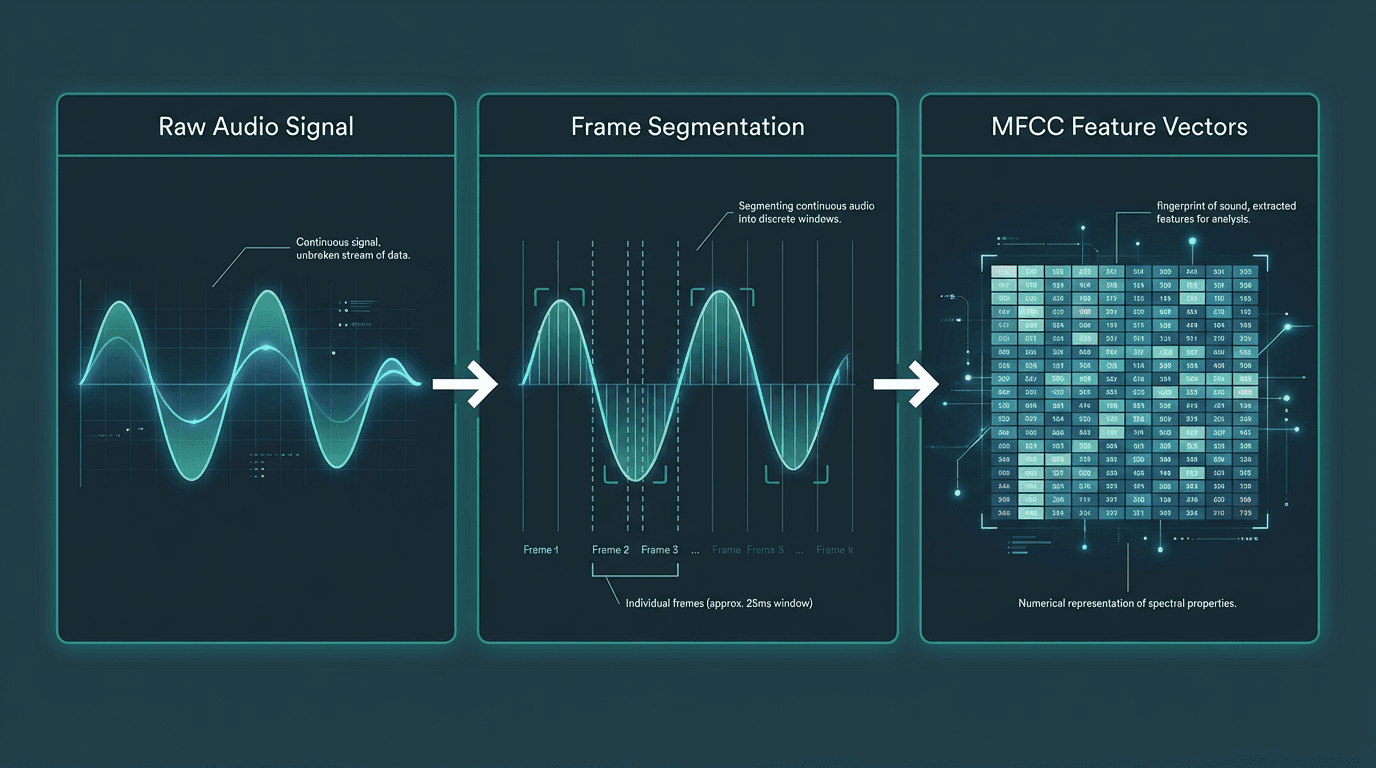
Feature extraction converts a continuous audio signal into a sequence of numerical vectors for the model.
Step 3: Acoustic Modeling
The acoustic model is the core component of the Automatic Speech Recognition (ASR) system. Its job is to take the sequence of feature vectors from the previous step and map them to the most likely sequence of phonemes. Phonemes are the smallest units of sound in a language (e.g., the 'k' sound in 'cat').
Modern acoustic models are typically based on deep neural networks. These models are trained on thousands of hours of labeled audio data, where human transcribers have paired audio segments with their corresponding phonetic transcriptions. Through this training, the model learns the complex patterns that link specific acoustic features to specific phonemes. For example, it learns to recognize the distinct numerical 'fingerprint' of an 's' sound versus a 'sh' sound, even with variations in accent, pitch, and speed. The output of this stage is a probability distribution over all possible phonemes for each time frame of the audio.
Step 4: Language Modeling and Decoding
The acoustic model provides a sequence of probable sounds, but it doesn't understand language, grammar, or context. This is where the language model comes in. A language model is a statistical model that calculates the probability of a given sequence of words. It's trained on vast amounts of text data (books, articles, websites) and learns which words are likely to follow others.
The decoder combines the phonetic probabilities from the acoustic model with the word sequence probabilities from the language model. It searches for the most likely sequence of words that could have produced the given sounds. For example, the acoustic model might hear sounds that could be interpreted as either “recognize speech” or “wreck a nice beach.” The language model knows that “recognize speech” is a much more common and probable phrase, so the decoder will select that as the correct transcription. This process, often using an algorithm like a beam search, is critical for achieving high accuracy and producing coherent sentences.
Component | Input | Output | Core Function |
|---|---|---|---|
Acoustic Model | Audio Features (MFCCs) | Probabilities of Phonemes | Maps sounds to phonetic units |
Language Model | Sequence of Words | Probability of that Sequence | Understands grammar and context |
Step 5: Post-processing and Formatting
The raw output from the decoder is a string of words. The final step is to transform this raw text into a readable, useful format. This is where Natural Language Processing (NLP) techniques are applied to refine the output. This stage is crucial for making the transcription practical for real-world applications.
Common post-processing tasks include:
Punctuation and Capitalization: Models predict and insert commas, periods, question marks, and apply correct capitalization to the start of sentences and proper nouns.
Inverse Text Normalization: Converting spoken numbers back into digits (e.g., “one thousand twenty four” becomes “1024”).
Speaker Diarization: In conversations with multiple people, this process identifies who spoke when and labels the text accordingly (e.g., “Speaker 1: …”, “Speaker 2: …”). This is essential for analyzing meetings or customer service calls.
Filler Word Removal: Automatically deleting non-semantic utterances like “um,” “uh,” and “you know” to create a cleaner transcript.
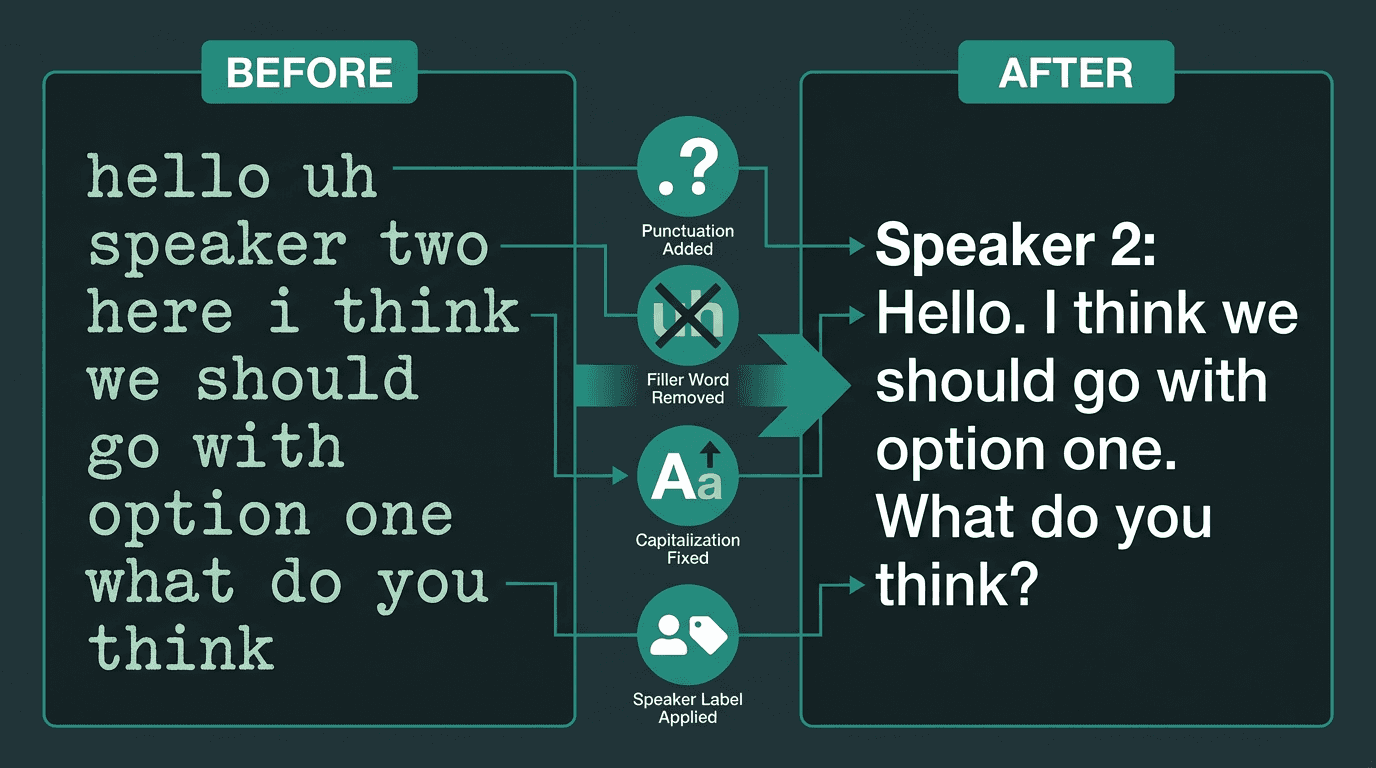
Post-processing transforms raw text into a polished, readable transcript with speaker labels and proper formatting.
Common Challenges in AI Transcription
While modern systems are incredibly powerful, they are not perfect. Several factors can impact transcription accuracy. In ideal conditions, top engines can reach 95-98% accuracy (GoTranscript, 2025). However, a 2025 study found that real-world accuracy can average closer to 61.92% due to common challenges (BrassTranscripts, Ditto, 2026, 2025).
Common pitfalls include:
Background Noise: Loud environments, music, or other simultaneous conversations can obscure the primary speaker's voice.
Multiple Speakers: Overlapping speech (crosstalk) is one of the most difficult challenges for ASR systems to parse correctly.
Accents and Dialects: Models trained primarily on one accent may struggle to accurately transcribe speakers with different regional dialects or non-native accents.
Technical Jargon: Specialized terminology or proper nouns not present in the language model's training data are often misinterpreted. This can be mitigated with custom vocabularies.
Poor Audio Quality: Low-quality microphones, distance from the speaker, and excessive reverberation all degrade the input signal, making accurate transcription difficult.
The Future of Transcription Technology
The field of AI transcription is advancing rapidly, driven by innovations in deep learning and the availability of massive datasets. The global market, valued at $4.5 billion in 2024, is projected to hit $19.2 billion by 2034 (Market.us, 2025). This growth is fueled by applications like AI transcription for customer support and real-time meeting analysis, a segment expected to grow at 25.62% annually (Sonix, 2026).
Future developments will focus on improving accuracy in challenging conditions, better understanding of context and intent, and tighter integration with other AI capabilities. As models become more efficient, we will see more powerful real-time AI speech recognition on edge devices. For developers and businesses, selecting from the best transcription software will depend on specific needs for accuracy, speed, and features like speaker diarization.
Frequently asked questions
What is the difference between ASR and AI transcription?
How accurate is AI transcription?
Can AI transcribe different languages and accents?
What is speaker diarization?
How can I improve the accuracy of my transcriptions?