Real-time LiveKit voice AI setup using Smallest.ai Pulse STT and Lightning TTS, with code, streaming pipeline notes, and production gotchas.
Building a LiveKit voice AI agent that feels snappy is harder than the diagrams suggest. LiveKit gives you the plumbing, but your STT and TTS choices decide whether the result sounds like a conversation or a phone tree with a buffering problem. Below is the end-to-end integration: how the Agents pipeline is put together, how to plug in Smallest.ai's Pulse (STT) and Lightning (TTS), and the unglamorous decisions that turn a slick demo into something you can ship.
This is for developers with basic Python and API comfort. If you already have a LiveKit room running, you can jump straight in. If LiveKit Agents is new to you, the LiveKit Agents quickstart is a solid 10-minute setup before continuing.
How LiveKit Agents Actually Work
LiveKit is an open-source framework and developer platform for real-time voice, video, and physical AI agents (LiveKit, 2026). LiveKit Agents lives on GitHub under Apache 2.0, and you can run the full stack on your own infrastructure. That is a practical win for teams dealing with data residency rules, tighter budgets, or any situation where hosted inference is a non-starter.
Under the hood, Agents is a three-stage streaming pipeline. A user speaks in a room, the audio stream feeds an STT model that emits text, that text is passed to an LLM for a response, and the response is handed to a TTS model that speaks back into the room (LiveKit, 2026). The important detail is that these stages overlap: each one streams partial output forward instead of waiting for a full, finished result. That is how you get sub-second perceived latency, and it is also why streaming TTS is table stakes for real-time agents. If you want the conceptual argument spelled out, why streaming architecture is non-negotiable lays it out clearly.
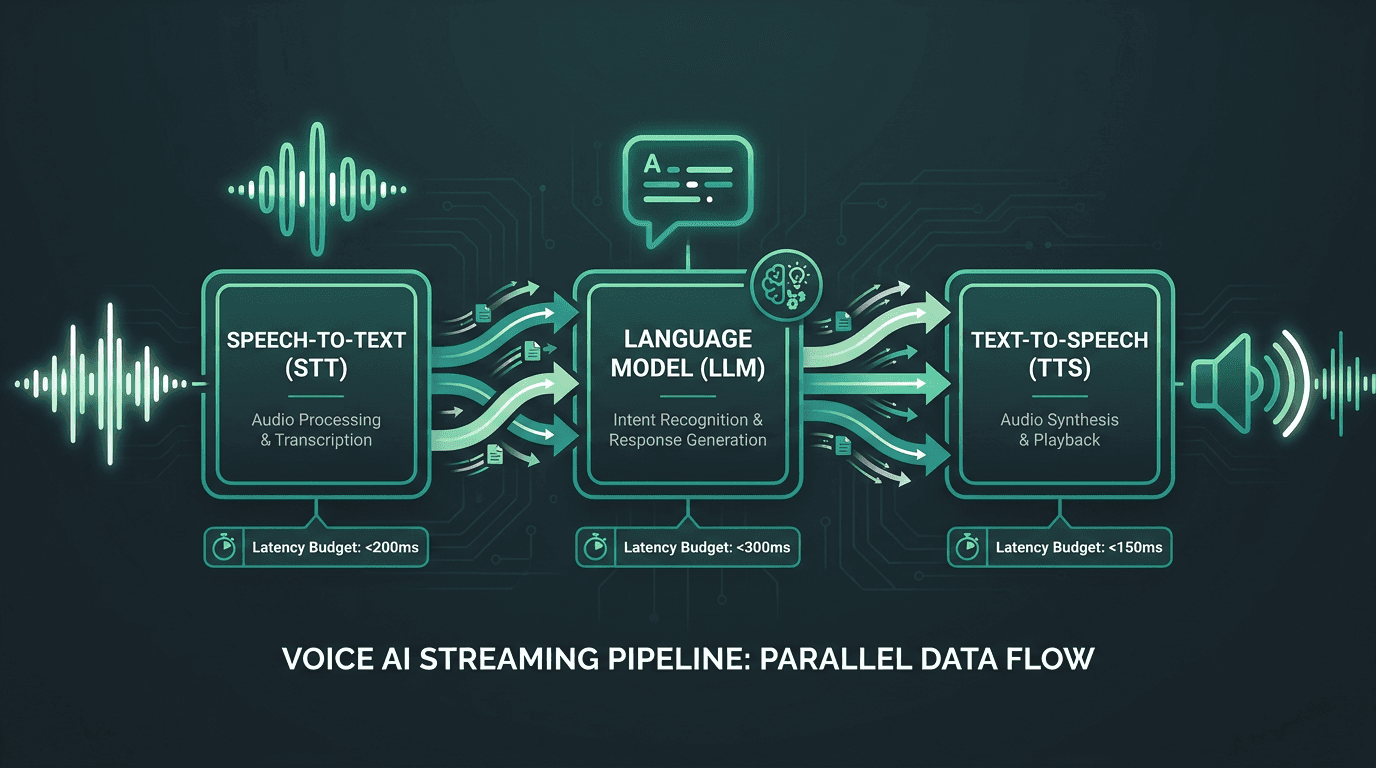
LiveKit Agents overlaps all three pipeline stages simultaneously, keeping perceived latency under one second.
LiveKit gives you two ways to plug models into that pipeline. You can route through LiveKit Inference (their hosted layer), or you can use the plugin system to swap in third-party providers at any stage (LiveKit, 2026). Smallest.ai ships plugins for both STT and TTS, and that is the integration path covered here.
Setting Up Your Environment
Before you write agent code, line up three basics: a LiveKit Cloud account (or your own LiveKit server), a Smallest.ai API key, and Python 3.10+. Both the LiveKit Agents Python SDK and the Smallest.ai plugin install cleanly with pip.
One early simplifier: the Smallest.ai plugin covers both Pulse (STT) and Lightning (TTS), so you are not juggling separate dependencies for each side of the pipeline. Keep an eye on the Smallest.ai documentation for current plugin versions and model parameters; voice IDs and language codes do change as new models roll out.
Wiring In Pulse for Speech-to-Text
Pulse is Smallest.ai's real-time STT model. It shows up as a supported provider in the LiveKit STT models documentation, which means you are working with an integration LiveKit has acknowledged and expects people to run. For production teams, that is not a vanity detail; it is a signal that compatibility is being maintained.
Here is a minimal agent definition that uses Pulse for transcription:
A couple of practical reads on that snippet. `smallest.STT` takes a `model` argument, where you pick the Pulse variant you want to run. `smallest.TTS` takes a `voice_id`, which maps to one of Lightning's voices. In both cases, the plugin pulls credentials from `SMALLEST_API_KEY` automatically. If you want to sanity-check provider choice with numbers before committing, the real-world STT latency benchmarks post focuses on transcription speed under real conditions.
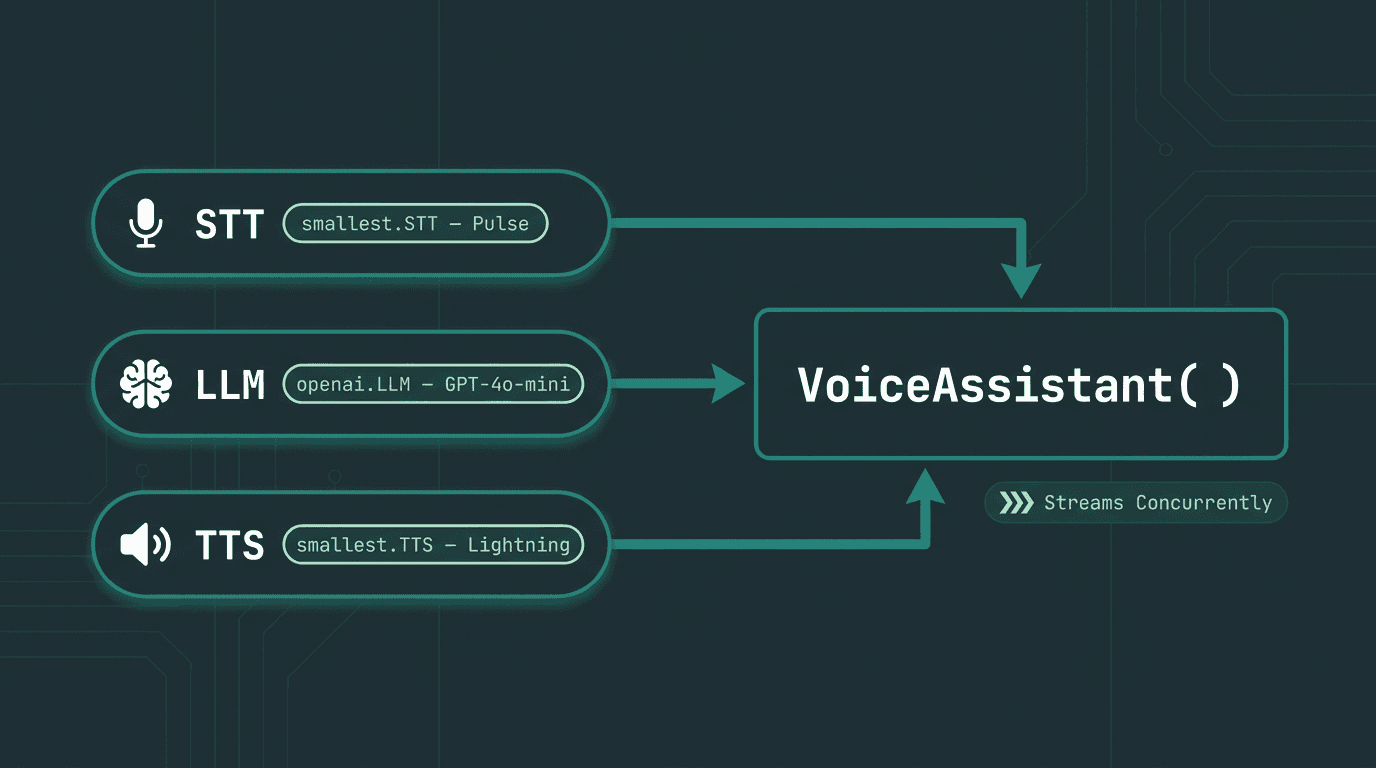
All three providers — Pulse STT, OpenAI LLM, and Lightning TTS — are passed directly into the Voice Assistant constructor as concurrent streaming stages.
Adding Lightning TTS for Low-Latency Speech Synthesis
TTS is where a lot of voice agents quietly fall apart. You can have great recognition and a smart LLM, but if your synthesizer takes 800ms to produce the first audible chunk, users will still experience the system as slow. Lightning is built for streaming synthesis: it starts emitting audio from partial text instead of waiting for a complete sentence, which is exactly the behavior the LiveKit pipeline is designed around (LiveKit, 2026).
The LiveKit TTS models documentation describes the streaming interface: the framework pushes text chunks to TTS as the LLM generates them. Lightning's streaming API fits that contract directly. For a parameter-by-parameter view of what is supported (and which voices are available), Smallest.ai's LiveKit integration page is the most complete reference for this specific pairing.
If your product needs a specific persona, Lightning also supports voice cloning through the Waves API. You generate a cloned voice, then pass the resulting `voice_id` into `smallest.TTS`. For multilingual rollouts, the Lightning v2 multilingual TTS model evaluation breaks down supported languages and how naturalness holds up across them.
Comparing Provider Options for Each Pipeline Stage
Stage | Provider | LiveKit Plugin Support | Streaming | Notable Strength |
|---|---|---|---|---|
STT | Smallest.ai Pulse | Yes (official) | Yes | Low first-token latency, multilingual |
STT | Other providers | Varies | Varies | Depends on provider |
TTS | Smallest.ai Lightning | Yes (official) | Yes | low-latency streaming synthesis, voice cloning |
TTS | Other providers | Varies | Varies | Depends on provider |
LLM | Any OpenAI-compatible | Yes | Yes | Wide model choice |
If you want the backstory on how the integration was implemented and what the official listing implies, Smallest.ai Joins LiveKit's Plugin Ecosystem has the technical details. When you are comparing transcription quality and speed, it pairs well with the Pulse STT vs Deepgram comparison, which stays grounded in performance data.
Production Considerations Most Guides Skip
A demo is mostly wiring. Production is where the edge cases show up and refuse to leave. These are the issues that repeatedly trip teams up on the way to launch.
Endpointing and turn detection. LiveKit Agents includes voice activity detection (VAD) to decide when the user is done speaking before pushing audio into STT. Defaults are fine in quiet rooms, but real users pause, restart, and talk over background noise. That is where `min_endpointing_delay` and `max_endpointing_delay` tuning pays off. Too aggressive and you clip people mid-thought; too conservative and the agent sits in silence long enough to feel broken.
Interruption handling. People interrupt. Your agent needs to treat that as normal, not as an error state. LiveKit's `VoiceAssistant` supports barge-in: when the user starts talking while the agent is speaking, the current TTS playback is canceled and the pipeline restarts. It is enabled by default, but you still need a TTS provider that cancels streams cleanly. Lightning supports this, and you should still test it with the voices and sentence shapes your product actually uses.
Error recovery and fallback. You will see network hiccups between your worker and the STT/TTS APIs. Plan for it. Use retries with exponential backoff, and consider a fallback TTS voice if your primary endpoint is unavailable. The how to build low-latency voice conversations piece goes deeper on resilience patterns for real-time voice flows.
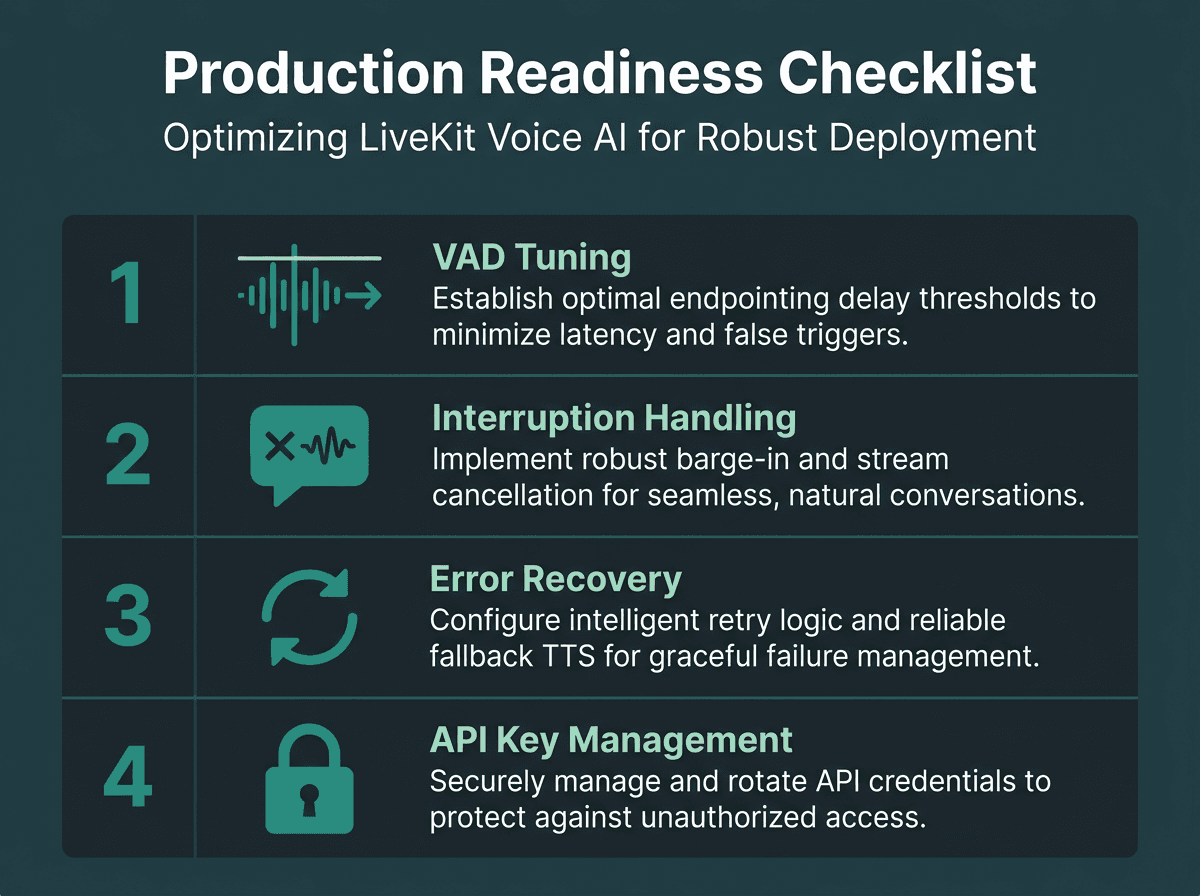
Four LiveKit voice AI checks most tutorials skip — but production deployments demand.
Advanced: Multi-Turn Context and Agent State
Single-turn agents are mostly a latency exercise. Multi-turn agents are a memory problem. By default, LiveKit's `VoiceAssistant` sends the full conversation history to the LLM, which works until a session runs long enough to pressure the context window. In practice, two patterns cover most real deployments.
First: a sliding window. Keep the last N turns and drop the rest. It is easy to implement and usually fits support and assistant scenarios where the most recent exchange matters most. Second: periodic summarization. Every K turns, ask the LLM to summarize the conversation so far, then replace the raw transcript history with that summary. You keep the semantics without paying the full token cost of the entire chat log.
Key Takeaways and Next Steps
LiveKit gives you a strong open-source base for real-time voice AI, and the plugin system keeps you from getting boxed into one vendor for STT or TTS. If you internalize one mental model, make it this: streaming is the product. When each stage emits partial results quickly, the agent feels responsive even when the underlying models are doing real work.
Quick recap of what this guide covered:
LiveKit Agents uses a concurrent STT-LLM-TTS streaming pipeline, not a sequential one
Smallest.ai's Pulse and Lightning are supported plugin integrations listed in LiveKit documentation
Streaming TTS synthesis (first-chunk latency) matters more than total generation time for perceived responsiveness
Production deployments need explicit handling for VAD tuning, barge-in, and error recovery
Multi-turn context management is a design decision, not a default behavior you can ignore
Most teams do not fail at the first demo. They stumble later, when users start judging the agent like a conversational partner instead of a technical artifact. That gap is largely latency, especially at STT and TTS. Smallest.ai positions Pulse and Lightning to attack that directly: Lightning's low-latency streaming synthesis starts producing audio from the first text chunk, and Pulse is tuned for real-time transcription in the streaming-first setup LiveKit expects. When you are ready to move from prototype to production, Smallest.ai's LiveKit integration page is the best starting point for API references, supported voice IDs, and language coverage.
Is Smallest.ai an official LiveKit plugin, or just a community integration?
What end-to-end latency should I expect with Pulse STT and Lightning TTS in LiveKit?
Can Lightning use a cloned voice inside a LiveKit agent?
Is LiveKit Agents free to use?
Which languages does Pulse support for real-time transcription?