Read Aloud TTS for Web Accessibility: A WCAG 2.2 Implementation Guide

Read aloud TTS and WCAG 2.2, explained for teams shipping compliant audio: semantic HTML, SSML language tags, keyboard players, and testing pitfalls.
The World Health Organization estimates that about 1.3 billion people worldwide live with a significant disability. For many, “read aloud” text isn’t a nice-to-have; it’s how they get through news, documentation, forms, and everything else the web throws at them. And yet plenty of sites still treat accessibility like a late-stage patch: a line item on a checklist, not a product capability that’s designed in from day one.
This piece is for developers, product managers, and accessibility leads who want to use a modern AI voice API to ship read aloud functionality that holds up against WCAG 2.2. The goal is practical clarity: which success criteria TTS meaningfully supports, what a compliant implementation looks like end to end, and the failure modes teams keep repeating even when they believe accessibility is “done.”
What WCAG 2.2 Actually Requires (and Where TTS Fits)
WCAG 2.2 became a W3C Recommendation on 5 October 2023, adding nine new success criteria to the existing framework. It’s still organized around the four familiar principles (POUR: Perceivable, Operable, Understandable, and Robust) as the W3C summarizes in its intro materials (W3C, 2024). Read aloud text can intersect with all four, but it earns its keep most clearly under Perceivable: getting the same information to users who can’t reliably consume it visually.
Under Perceivable, Success Criterion 1.1.1 asks for text alternatives for non-text content. SC 1.3.1 requires that information and structure be programmatically determinable. SC 1.4.5 pushes you away from images of text when real text can do the job. None of these lines say “you must provide TTS.” What they do is force you to build content that machines can interpret, and that’s exactly what a read aloud layer depends on to produce accurate, navigable audio. The miss I see most often is conceptual: WCAG doesn’t require a built-in audio player; it requires accessible content. A dependable read aloud API is one of the most straightforward ways to deliver that access for people who can’t, or simply don’t want to, rely on a system screen reader.
Who Benefits From Read Aloud Text (Beyond Screen Reader Users)
Read aloud is often treated as synonymous with “for blind users,” and that framing is too narrow. Web accessibility spans auditory, cognitive, neurological, physical, speech, and visual impairments. A well-designed TTS feature can support several of those needs in ways a conventional screen reader experience doesn’t always match, especially when you control reading order, pacing, and the exact content being voiced.
Take dyslexia: many users have no trouble seeing text, but decoding it quickly and comfortably is a different problem. Research on print disabilities consistently points to audio as an input modality that helps reduce barriers tied to reading fluency, making TTS a practical accessibility tool rather than a niche add-on. The same “listen instead of read” mode can help users with low literacy, non-native language readers, people managing attention-related conditions, and even users on constrained connections who would rather stream lightweight audio than load heavier media. Once you treat accessibility as a wider set of real-world reading constraints, investing in a capable voice API stops looking like a niche feature and starts looking like basic product hygiene.
The Technical Anatomy of a WCAG-Compliant Read Aloud Implementation
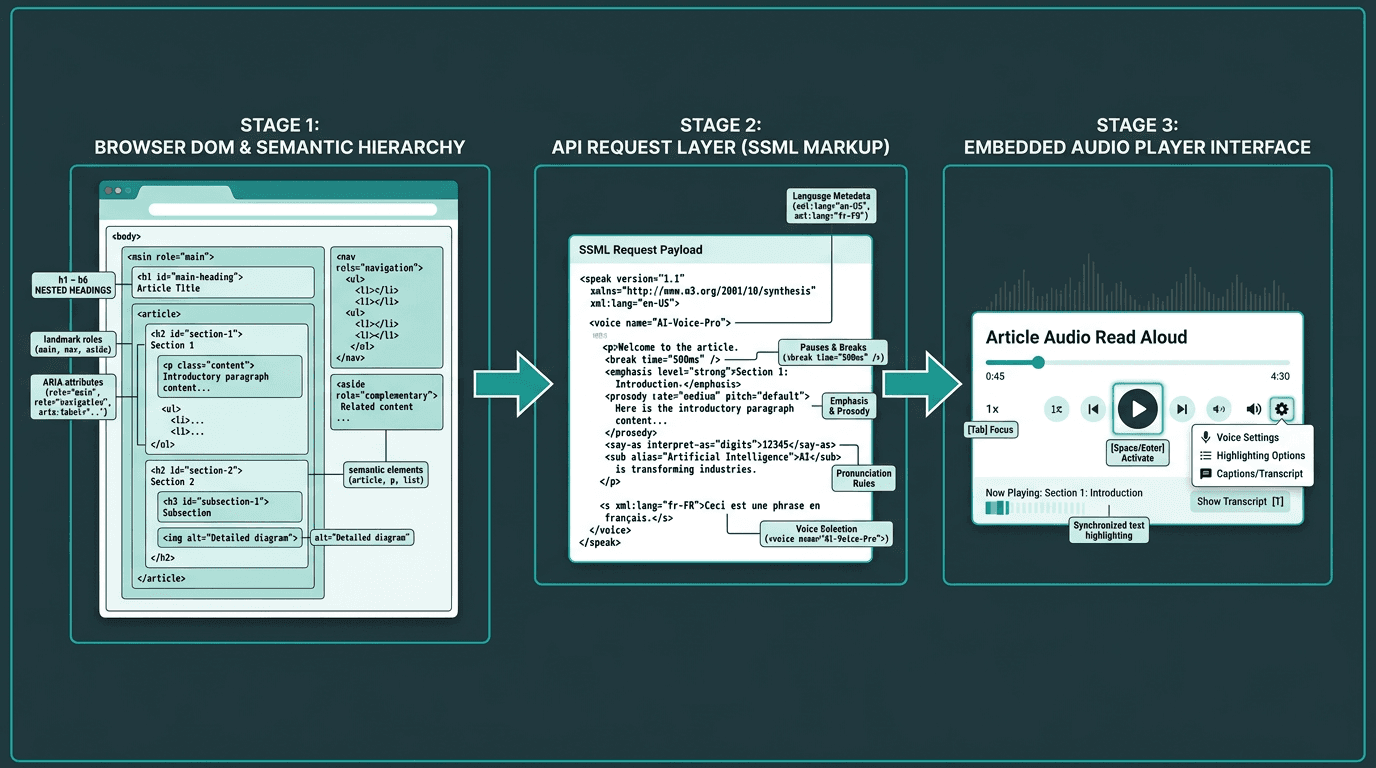
Architecture of a WCAG 2.2 compliant read aloud implementation using an AI voice API
Making a page “talk” is trivial. Making it talk in a way that stands up to WCAG 2.2 means treating read aloud as a system with three layers: the content layer, the API layer, and the player layer.
Layer 1: Semantic HTML and ARIA Markup
A TTS API will faithfully read whatever you feed it, which is precisely the problem. If your extraction logic scrapes raw text from a div-heavy layout with no semantics, the audio will sound like a shuffled deck of sentences, no matter how natural the voice model is. A clean heading hierarchy (h1 through h6), landmark roles (main, nav, aside), and accurate ARIA labels give your extraction code the anchors it needs to assemble a sensible reading order. SC 1.3.2 is non-negotiable here: the reading sequence has to be programmatically determinable. That only happens when the DOM encodes meaning, not just pixels.
Layer 2: SSML and the API Request
SSML is where “text” becomes “speech” with intent. A serious voice API should accept SSML that lets you control pauses, emphasis, pronunciation of abbreviations, and speaking rate, the small things that make audio usable instead of merely audible. From a compliance perspective, SSML also carries language metadata. SC 3.1.1 requires the language of the page to be programmatically determinable; setting the correct language in SSML nudges the engine toward the right phoneme set. SC 3.1.2 extends that requirement to passages that switch languages. If your page moves between English and Spanish, your synthesis request needs to mark those boundaries rather than forcing one language model to guess.
Layer 3: The Audio Player and Keyboard Controls
The player is where accessibility wins or loses in practice. SC 2.1.1 requires that every control works from the keyboard, so play, pause, stop, and speed adjustments can’t be mouse-only affordances. Focus styling matters too: visible focus indicators are covered by SC 2.4.7, while WCAG 2.2 adds SC 2.4.11 to ensure focused elements are not obscured. If you want to go further, SC 2.4.13 covers focus appearance at AAA level. Audio behavior is part of the spec as well. SC 1.4.2 requires a way to pause or stop any audio that plays automatically for more than three seconds, which makes autoplay read aloud risky unless a stop control is immediately available and easy to reach. If your implementation leans on browser-default outlines and “good enough” keyboard handling, WCAG 2.2 is where that approach starts breaking down.
What Most Teams Get Wrong About TTS and Accessibility
The most common misstep is treating a third-party browser extension (or a generic widget dropped onto the page) as the accessibility plan. Tools like TTSReader are useful examples of what a standalone read aloud app can look like, but they’re not a substitute for integrating the experience into your product. Native integration gives you control over what gets read, how it’s ordered, how it sounds, and how it’s operated from the keyboard. Asking users to bring their own assistive tech doesn’t absolve you of building accessible content in the first place.
The second failure mode is pretending the page is static. Modern web apps mutate the DOM constantly, and read aloud has to keep up. That’s where ARIA live regions (aria-live, aria-atomic) come in: they’re the mechanism that lets your TTS experience reflect changes without a full reload. WCAG SC 4.1.3, introduced in 2.1 and carried into 2.2, requires status messages to be programmatically determinable. If your read aloud feature ignores live regions, users will miss the moments that matter: form errors, loading states, and in-app notifications.
Choosing an AI Voice API for Accessibility: What the Spec Demands
Voice APIs aren’t interchangeable, and accessibility is where the differences get sharp. WCAG doesn’t name vendors, but it does imply a set of capabilities your TTS backend needs if you want the implementation to be defensible, and pleasant to use.
API requirements driven by WCAG 2.2 compliance:
SSML support: Full SSML support lets you encode language, emphasis, and pause behavior in ways that line up with SC 3.1.1 and 3.1.2.
Low latency: SC 2.2.1 is about time limits, but a slow TTS pipeline still punishes people who rely on audio as their main access path. As an engineering target, sub-300ms time-to-first-audio is a practical bar.
Streaming audio output: Streaming allows playback to start before synthesis finishes, which matters for long pages and for users who don’t want to wait on a full render before they can begin listening.
Multiple voice options and speaking rates: WCAG does not directly require audio speed controls, but user control over pacing is a strong accessibility and usability best practice. Many users benefit from slower speaking rates, so rate adjustment needs to be supported.
Reliable uptime and SLA: Accessibility can’t be the feature that’s “temporarily unavailable.” Strong uptime guarantees are part of compliance risk management, not just a performance preference.
Products like AI voice generators like WellSaid Labs and tools like Descript are built around content production workflows. That’s a different job than powering read aloud inside a web app, where you need streaming, precise SSML control, and predictable latency. Enterprise TTS platforms exist as alternatives, but teams should pressure-test latency and cost at scale before committing, since headline capabilities don't always hold up in production read aloud workloads.
Implementing Read Aloud With Smallest.ai's Lightning API: A Practical Walkthrough
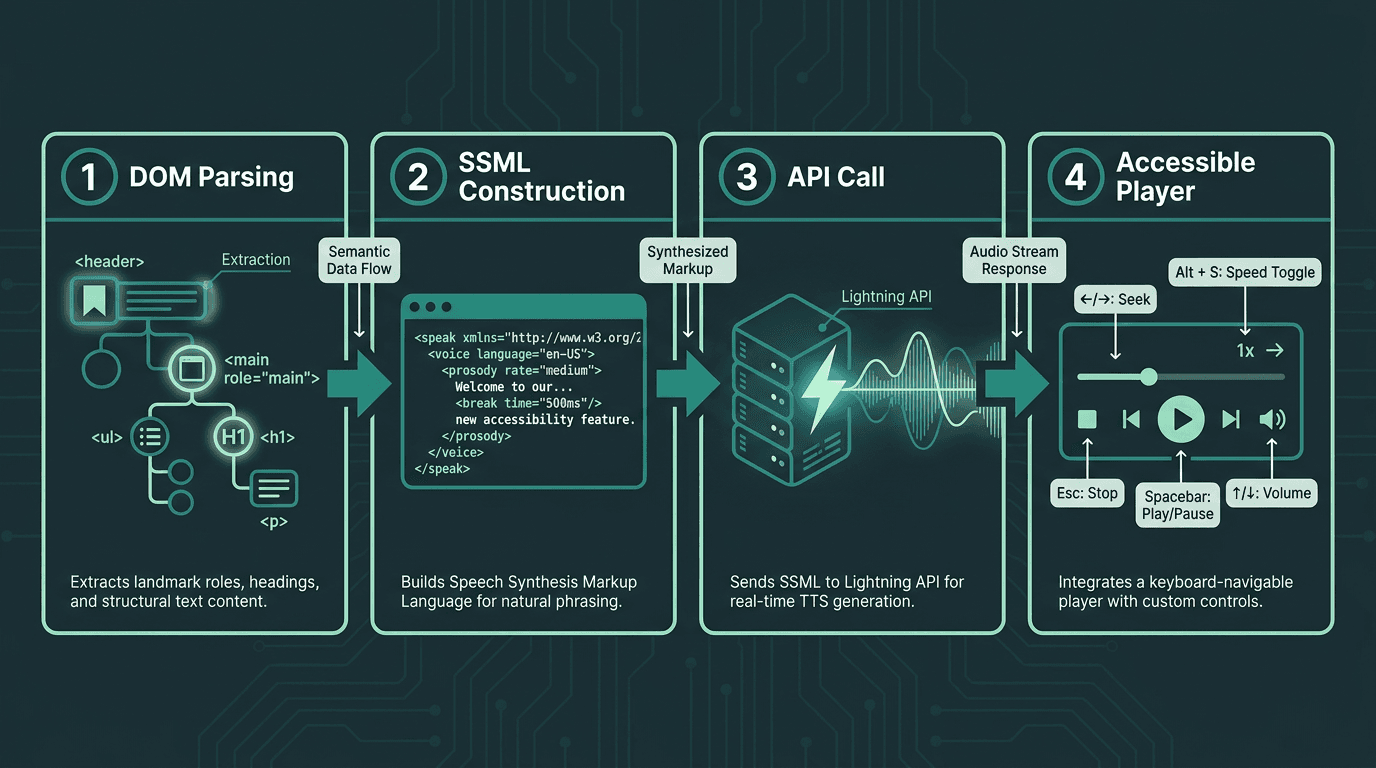
Four-stage implementation flow for a WCAG 2.2 compliant read aloud feature
Smallest.ai’s Lightning API is designed for this integration profile: streaming TTS for real-time web use, SSML support for controlling pronunciation and pacing, and multiple voices and languages. Below is a straightforward sequence that maps cleanly to WCAG expectations.
Step 1: Extract semantic content. Build an extraction function that traverses the DOM using landmark roles and heading hierarchy instead of grabbing a giant innerText blob. Drop nav, footers, and decorative elements by honoring ARIA signals such as role='presentation' and aria-hidden='true'.
Step 2: Construct your SSML payload. Wrap the extracted content in SSML and pass the page language via the xml:lang attribute. Add `<break time='500ms'/>` at heading boundaries to create pauses that sound intentional. Carry the user’s preferred reading speed through a rate attribute on the `<prosody>` element.
Step 3: Call the Lightning API with streaming enabled. Smallest.ai’s Waves API provides developer access to Lightning and related speech capabilities. Request a streaming audio response, then pipe it into a Web Audio API context or an HTML5 audio element so playback can begin as soon as the first chunks arrive.
Step 4: Build a keyboard-accessible player. Ship play/pause, stop, speed controls, and a progress indicator, all reachable and usable from the keyboard. Make focus states unmissable and aligned with SC 2.4.11’s focus appearance requirements. Add an aria-label that describes what’s being read, then test the whole flow keyboard-only, with the mouse untouched.
Testing Your Read Aloud Feature Against WCAG 2.2
Automated accessibility scanners catch only a portion of WCAG issues, so the rest show up when a human actually tries to use the product. For read aloud, that means validating keyboard-only access to every player control, confirming that ARIA live regions announce dynamic changes, and checking that SSML language tags match the page’s declared language. It also means user testing with at least one participant who depends on audio as their primary access mode. For implementation references, MDN Web Docs on accessibility is a solid source on how browsers expose the accessibility tree your extraction logic relies on. The W3C Web Accessibility Initiative publishes evaluation methodology guides worth keeping close during QA.
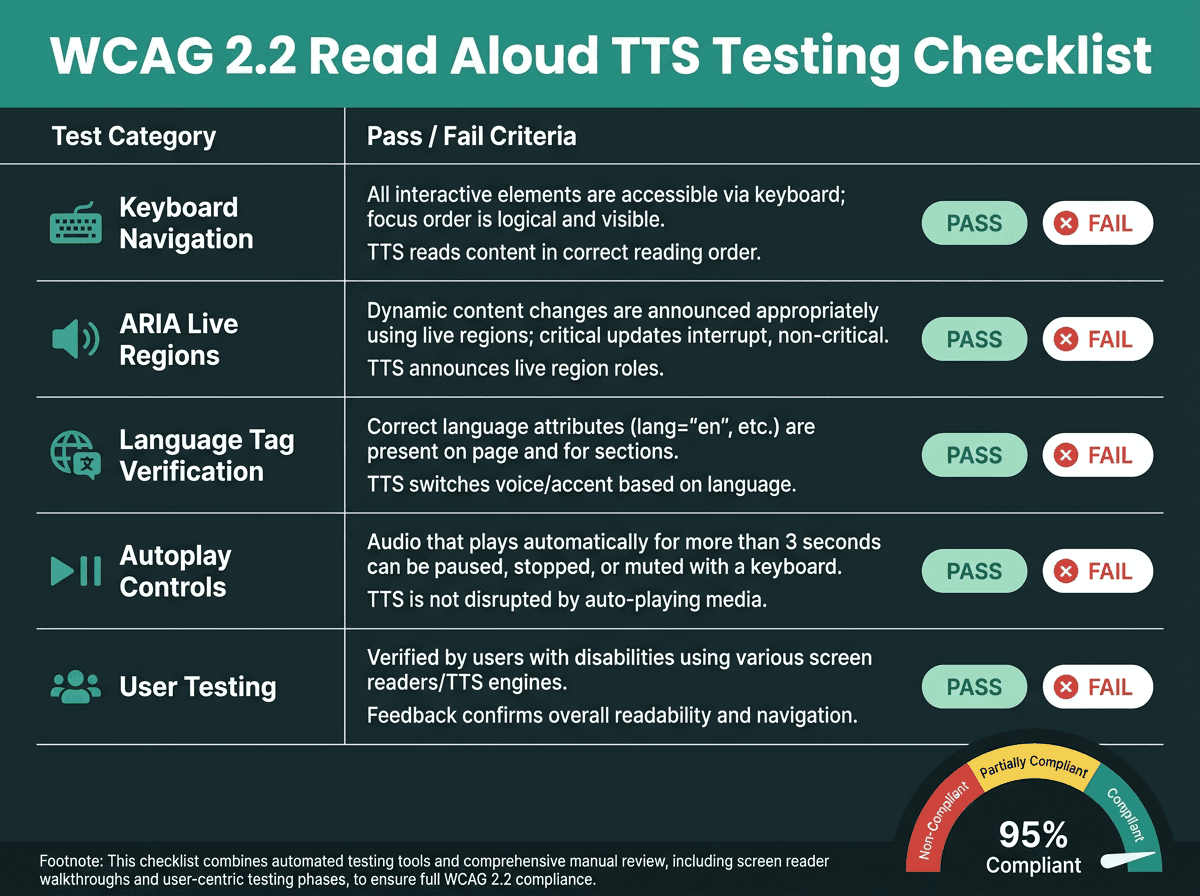
A practical WCAG 2.2 testing checklist for read aloud TTS implementations
Key Takeaways and Next Steps
Accessibility isn’t a box to tick; it’s the difference between a product that 1.3 billion people can actually use and one that quietly shuts them out. WCAG 2.2 doesn’t prescribe “add TTS,” but the success criteria add up to a clear engineering brief: structure your content, identify language programmatically, make audio controls keyboard-operable with strong focus states, and account for dynamic updates. When a read aloud feature is integrated properly (backed by a low-latency, streaming voice API with solid SSML support) it can meet those requirements while making the product easier to consume for far more people than the screen-reader-only mental model suggests.
The voice AI applications ecosystem is mature enough now that teams don’t have to choose between voice quality and accessibility rigor. If you’re building deeper across the speech stack, the Smallest.ai blog tracks implementation patterns, API comparisons, and product updates.
The issue is specific and it’s fixable: read aloud features fail WCAG 2.2 less because teams don’t care, and more because their stack doesn’t give them enough control over latency, SSML, streaming, and multilingual behavior. Smallest.ai’s Lightning API is positioned to cover those gaps, with sub-300ms streaming audio, full SSML support, and developer access via the Waves API. If you’re mapping accessibility work to an actual roadmap, Lightning is worth evaluating as the TTS foundation for a read aloud experience that stands up both to WCAG scrutiny and to day-to-day use by the people who depend on it.
Frequently asked questions
Does a read aloud feature make a site automatically WCAG 2.2 compliant?
What’s the difference between a screen reader and built-in read aloud TTS?
Which WCAG 2.2 success criteria matter most for read aloud implementations?
Can Smallest.ai’s Lightning API support multilingual pages for accessibility?
Is read aloud text legally required on websites?