Free Neural TTS vs Production APIs: Latency, Licensing, and Scaling Risks

Neural TTS vs Production TTS APIs, compared on TTFA latency, streaming, licensing, pricing, and reliability so developers can ship without surprises.
The neural TTS vs production TTS choice feels almost trivial when you’re kicking off a project. Free tiers look generous, voice quality has leapt forward, and you can get a prototype talking in minutes. The trouble starts in the space between a slick demo and something you can actually ship: rate limits that cut sessions off mid-flow, latency spikes that make a voice agent feel sluggish, and licensing language that quietly blocks commercial use.
What follows is a comparison of free neural TTS and production-grade TTS APIs using the things that tend to decide launches: latency, voice quality at scale, pricing mechanics, streaming support, and commercial terms.
The Six Criteria That Separate Prototype Tools from Production APIs
Before you compare vendors, you need a shared definition of “production-ready.” Plenty of tools call themselves production APIs while still hiding meaningful caps on throughput, or carving out restrictions that matter the moment you charge money or redistribute audio. These six criteria are the quickest way to cut through the marketing and evaluate what you’re really buying.
Evaluation criteria used throughout this comparison:
Latency and streaming: Time-to-first-audio (TTFA) under real load, and whether the API supports chunked/streaming output for real-time applications.
Voice quality and naturalness: MOS-equivalent scores, prosody control, and consistency across long-form content.
Pricing model: Free tier limits, pay-as-you-go rates per character or per minute, and whether costs scale predictably.
Commercial licensing: Whether synthesized audio can be used in commercial products, redistributed, or published without additional agreements.
Voice customization: Custom voice cloning, SSML support, speaking style controls, and multi-language coverage.
Reliability and SLAs: Uptime guarantees, rate limit transparency, and support responsiveness for production incidents.
Free Neural TTS: What You Actually Get
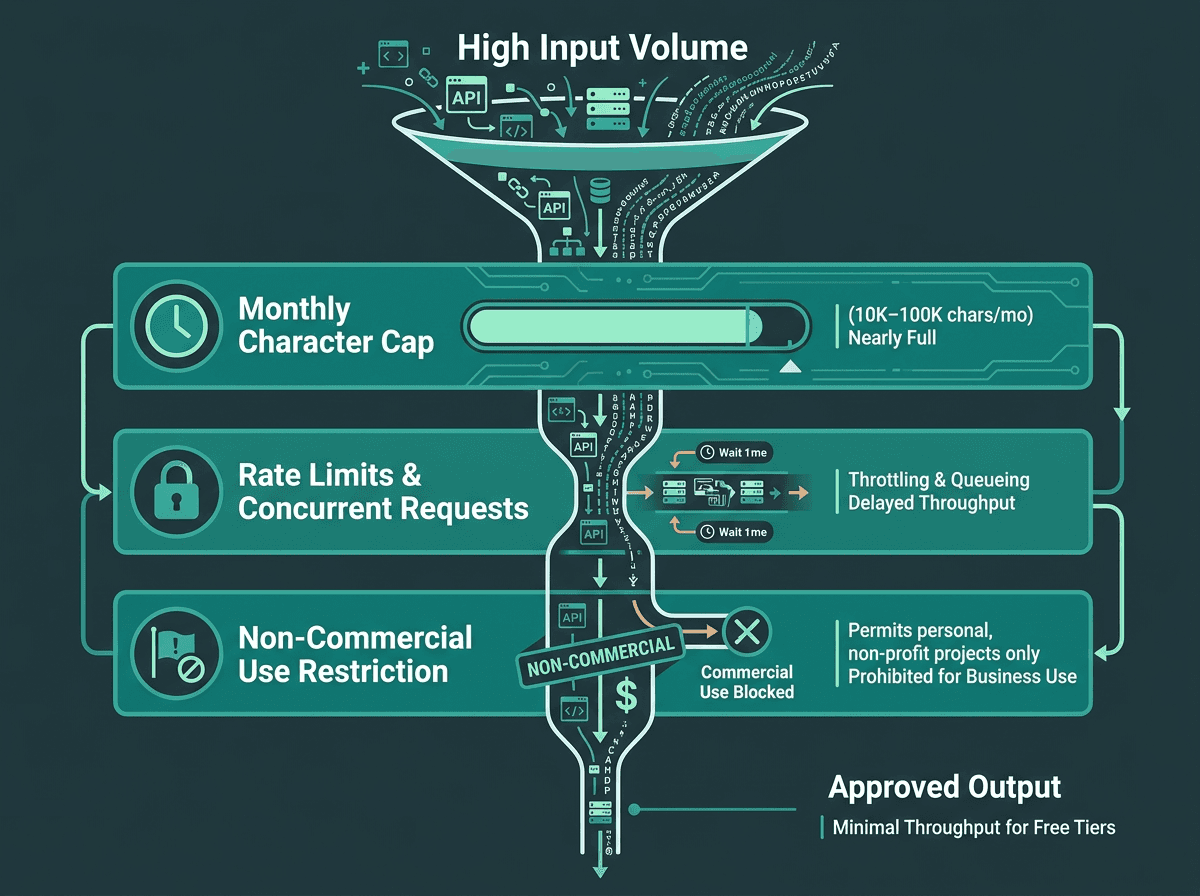
A visual representation of how free neural TTS tiers impose multiple constraint layers that compound under production traffic.
Free neural TTS is no longer a novelty. Between browser-based synthesis, open-weight models like Kokoro (Apache 2.0 licensed, released late 2024), and genuinely usable free tiers from several providers, you can build a convincing voice prototype without opening a wallet. In a short demo clip, free voices can sound close enough to paid ones that the difference is easy to overestimate, or ignore entirely.
The cracks show up when you add three things: sustained traffic, real-time interaction, and commercial deployment. Free-tier limits vary widely: some developer-first tools offer small monthly allowances, while cloud providers may offer hundreds of thousands or even millions of characters depending on voice type and plan terms. That number shrinks fast once you map it to speech: one minute of natural reading pace is roughly 900 to 1,200 characters. An IVR handling 500 calls per day can chew through a 100,000-character allowance in under three days. Quotas are annoying; licensing is riskier. A lot of free tiers explicitly forbid commercial use or redistribution, and it’s the kind of fine print teams only notice after a product is already in motion.
Latency is the other recurring failure mode. Free tiers usually sit on shared infrastructure, and “no guarantees” translates directly into inconsistent TTFA. In practice, shared endpoints often land somewhere between 800ms and 2,000ms depending on load. If you’re batch-generating audio for an audiobook or podcast workflow, that’s workable. If you’re trying to hold a conversation (voice agents, real-time IVR) anything above ~300ms TTFA starts to feel like the system is hesitating. The streaming TTS guide for developers breaks down why these thresholds are so unforgiving in conversational UX.
Production TTS APIs: The Tradeoffs Worth Understanding
A production TTS API isn’t just a free tier with bigger numbers attached. The underlying setup tends to be different: dedicated or reserved compute, streaming WebSocket endpoints, SLA-backed uptime, and clear commercial redistribution rights. Those capabilities cost real money to run. The practical question isn’t “should we pay?” so much as “which capabilities are worth paying for in our specific product?”
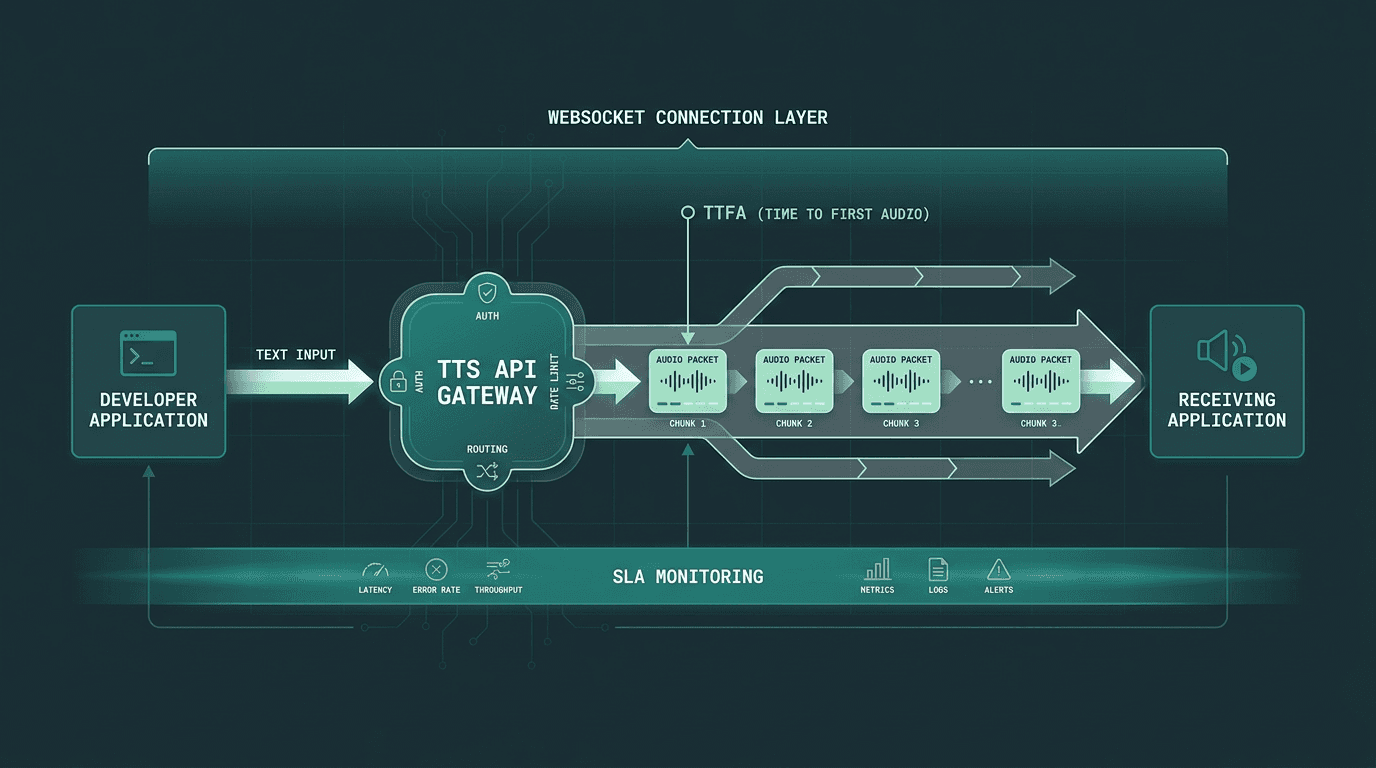
A schematic of a production TTS API, routing through dedicated streaming pipelines with measurable latency checkpoints.
The market has also split into camps. Some providers chase maximum naturalness and emotional range. Others are built around raw speed and streaming performance. A smaller set leans into enterprise compliance. Knowing which axis a provider is optimized for will save you a lot of time, and prevent you from benchmarking the wrong thing. Here’s how the major options stack up for developers right now.
Smallest.ai Lightning: Built for Real-Time Voice Applications
Smallest.ai’s Lightning API is explicitly tuned for latency-sensitive production workloads. The headline claim is sub-100ms TTFA on streaming requests, which puts it in a different bracket than many general-purpose alternatives. That difference isn’t academic: for voice agents, IVR, and anything interactive, the TTS response needs to land like a conversational turn, not like a file that’s being generated and downloaded.
Lightning supports streaming through WebSocket and SSE endpoints, so audio can start arriving while synthesis is still underway. That matters because you don’t need to wait for a full 500-character sentence to complete before you can start playing it back. If you’re building on the Waves API, Lightning also plugs into Pulse (speech-to-text) and Hydra (speech-to-speech) through the same SDK, which reduces the usual glue work of stitching multiple vendor SDKs into one voice pipeline.
What stands out about Lightning for production use:
Designed for low-latency streaming scenarios, with Smallest.ai docs positioning Lightning around ~100ms TTFB and benchmark details available in the Lightning v3.1 model card.
Voice cloning available via API, not just through a UI, which enables programmatic custom voice creation. A voice cloning guide is available in the documentation.
Commercial licensing included across paid tiers without separate agreements.
Multi-language support with consistent prosody across languages, not just English-optimized models.
Pricing starts at accessible pay-as-you-go rates; see Smallest.ai pricing for current tier details.
One caveat worth being clear about: the free tier is intentionally small, more “evaluation” than “extended prototyping.” If your team wants to run long soak tests before paying, you’ll likely find the quota tighter than some other options. If you’ve already validated the use case and you’re tuning for production performance, that constraint tends to matter a lot less.
High-Quality Focused APIs
For some applications, particularly in media and content creation, the absolute naturalness and emotional range of a voice are the top priority. These APIs are often used for audiobooks, dubbing, and long-form narration. The tradeoff for this level of quality is typically higher latency, which makes them less suitable for real-time interaction. Pricing often scales with voice quality tiers, with the most expressive and realistic voices commanding a premium.
Convenience-First APIs
These APIs are appealing for their simple integration, especially for teams already committed to a specific LLM provider's ecosystem. While the voice catalog is often smaller and features like voice cloning may be absent, the convenience of a single vendor relationship is a strong pull. Streaming is usually available but not optimized for the sub-200ms TTFA required for truly conversational applications. They represent a good-enough solution when voice is a supporting feature rather than the core product.
Speed-Focused APIs
A category of providers has emerged that aims their low-latency models squarely at real-time use cases like voice agents and interactive systems. Their benchmarks often show streaming TTFA in the 90-150ms range. While English performance is typically strong, non-English language coverage can be thinner compared to more general-purpose providers. This makes them a strong contender for English-first real-time experiences, but the language gap can be a constraint for global products.
The Verdict: Which Option Fits Which Stage?
For prototyping and internal tooling: Free neural TTS (including self-hosted open-weight models) fits best. The output is good enough, the cost is effectively zero, and you don’t have to optimize until you’ve proven what you’re building. If you’re still comparing “free” options that come with strings attached, a detailed comparison of free-tier offerings can map the landscape in more detail.
For content creation at scale: High-quality focused APIs are the standout for naturalness and emotional range, which makes them a strong fit for audiobooks, dubbing, and media production where latency doesn’t matter and voice quality does.
For real-time production applications: The Lightning TTS for real-time voice agents is one of the most purpose-built options in this set. Sub-100ms TTFA, WebSocket streaming, API-level voice cloning, and consistent multilingual prosody line up with the common ways voice products fail once they hit real traffic. If you’re building a voice agent, IVR, or any experience where TTS sits on the critical path, understanding the performance of the fastest APIs is essential.
For teams already on an established stack: Convenience-first APIs are a sensible default when voice is a supporting feature and you want fewer vendor relationships to manage. If voice quality or real-time performance is a primary product requirement, you’ll run into their limits quickly.
The Problem-Solution Bridge
This comparison isn’t really about finding the “best” voice. It’s about fit. Free neural TTS tools are built for exploration, demos, and offline content workflows; production voice applications need predictable latency, streaming-first delivery, clear commercial rights, and reliability under load. When teams discover that mismatch after launch, the costs show up fast: re-integration work, a degraded user experience, and sometimes legal exposure when licensing terms were misread or overlooked.
Smallest.ai’s Lightning API is designed to narrow that prototype-to-production gap. Sub-100ms streaming TTS, API-accessible voice cloning, multilingual support, and commercial licensing included in paid tiers are the pieces that reduce the odds you’ll need to re-architect later. If you’re building an end-to-end voice pipeline, the Waves API pipeline integration ties Lightning to Pulse (STT) and Hydra (speech-to-speech) through a single integration, which helps you avoid juggling multiple vendor contracts and SDKs as you scale.
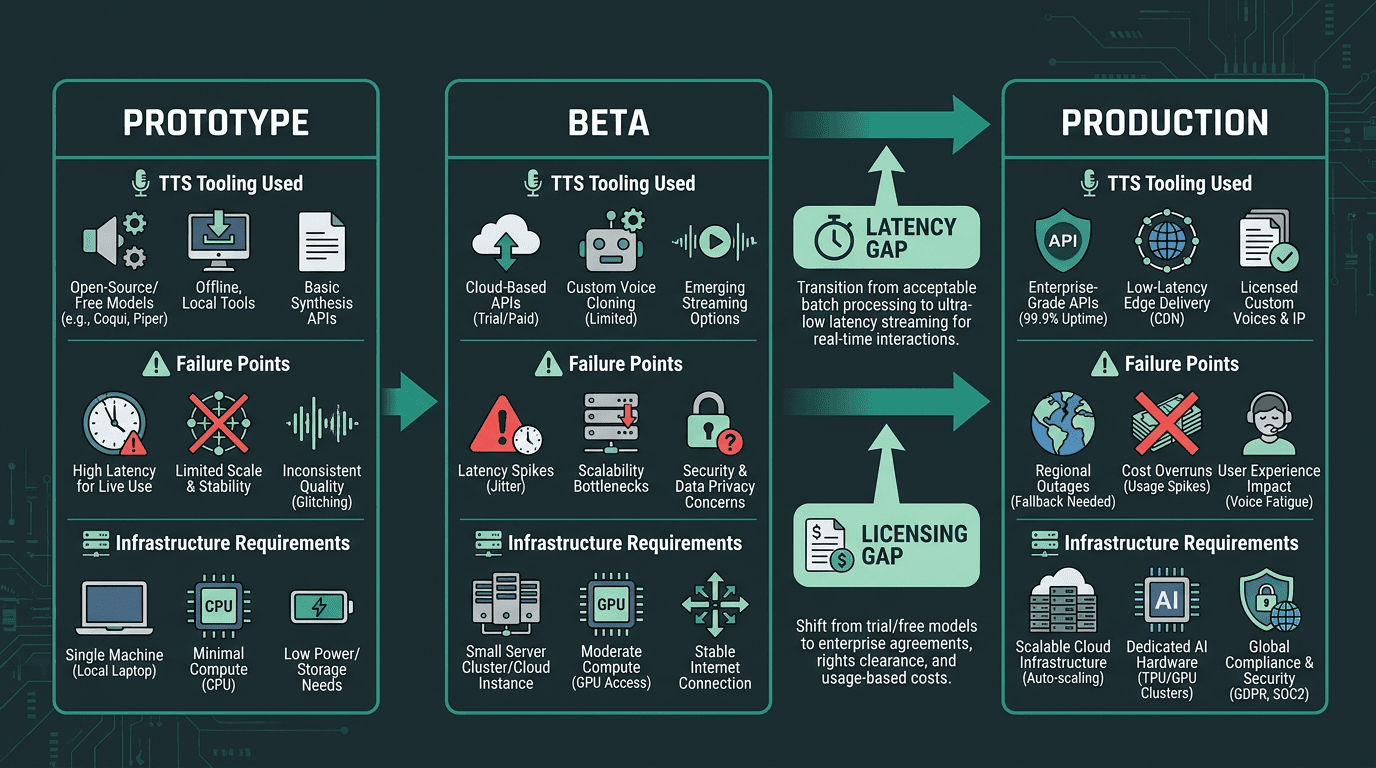
A timeline showing the developer journey, highlighting where TTS integration decisions often need to be revisited.
Frequently asked questions
Can a free neural TTS API be used in a commercial product?
What TTFA target is realistic for a real-time voice agent?
How does voice cloning work in a production TTS API?
What happens if a free TTS tier runs out of monthly quota during deployment?
Is self-hosting an open-source TTS model viable in production?