What Makes a High-Performance Real Time ASR API?

Learn the key metrics that define a high-performance real-time ASR API — latency, accuracy, enrichment features, and more.
Real-time automatic speech recognition has moved from a niche capability to a core building block of modern voice applications. Whether you're building a live captioning system, a voice assistant, a telephony compliance engine, or a conversational AI workflow, the quality of your real time ASR API determines how responsive and intelligent your product feels to users.
This guide covers everything you need to integrate the Pulse Speech-to-Text (STT) API into your applications. With a Time to First Transcript (TTFT) of just 64 milliseconds, Pulse Speech-to-Text (STT) API is engineered specifically for live, latency-sensitive workloads.
We'll walk through authentication, WebSocket connections, audio encoding, response handling, advanced features, and production best practices, with complete code examples.
What Is Real-Time ASR and Why Does It Matter?
Automatic Speech Recognition (ASR) is the technology that converts spoken audio into text. A real time ASR API goes further; it processes audio in a continuous stream as it arrives, returning partial and final transcripts within milliseconds rather than waiting for an entire audio file to be uploaded and analyzed.
High-Level Architecture: How the Waves Pulse API Process Works:
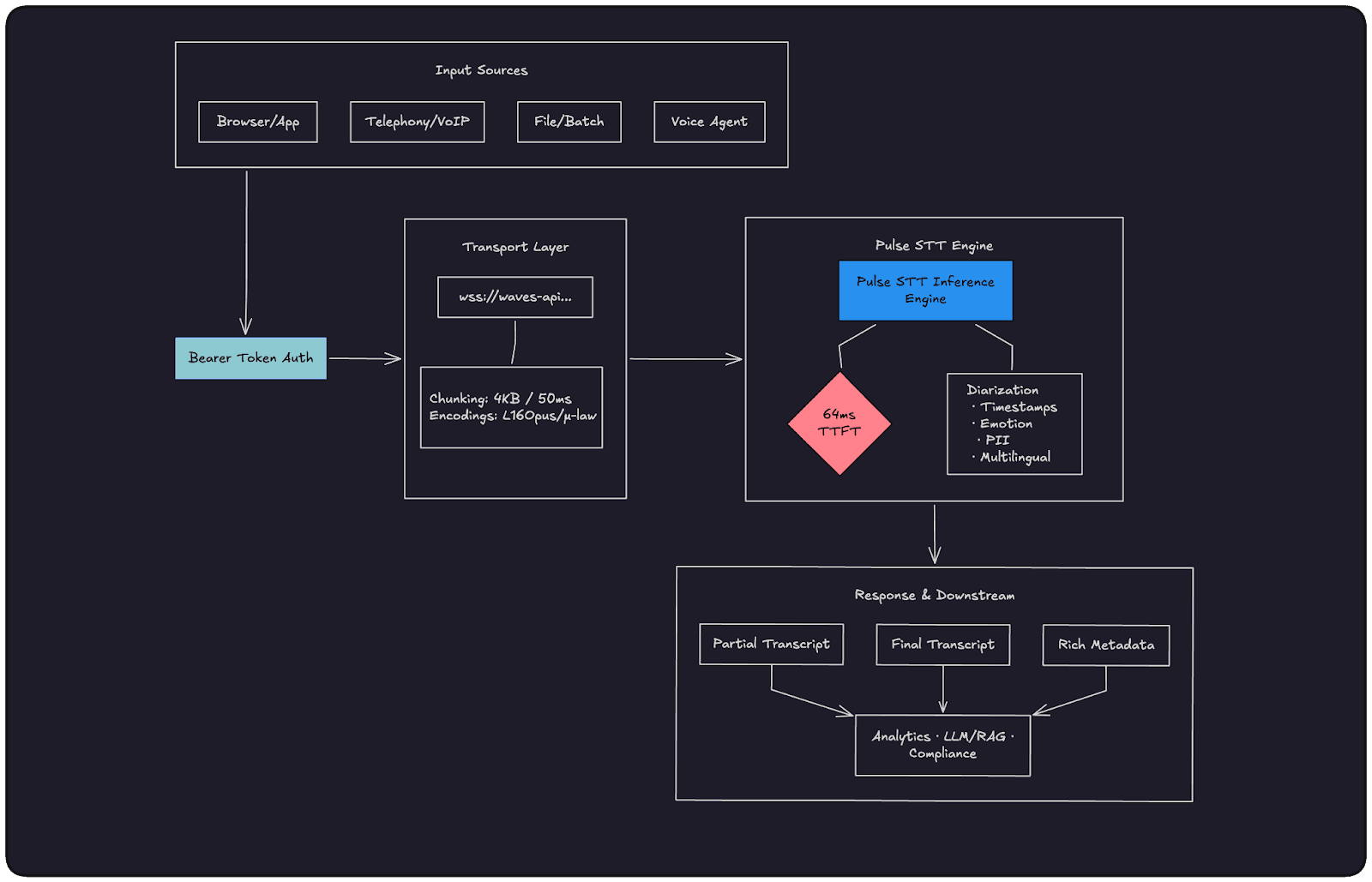
Core Use Cases for Streaming ASR:
Live conversations and call analytics
Voice assistants and conversational agents
Live captioning and accessibility
Streaming compliance and PII redaction
Why the Pulse Speech-to-Text (STT) API Stands Out
The Pulse STT API was designed from the ground up for streaming-first workloads. Its headline specification is a 64 ms Time to First Transcript (TTFT) the time from when audio data first arrives at the server to when the first transcribed words are returned. This is significantly faster than many established cloud STT providers, which typically range from 200 to 500 ms TTFT.
Pulse STT also bundles advanced features such as speaker diarization, word timestamps, emotion detection, age and gender estimation, PII redaction, and numeric formatting directly into its transcription output, eliminating the need for separate downstream analysis pipelines.
What Makes a Good Real-Time ASR API?
Not all speech recognition APIs are built for the same job. A batch transcription API optimized for podcast processing has very different engineering priorities than one designed for live voice agents or telephony compliance. Before picking an ASR provider, here are the dimensions that actually matter in production.
1. Time to First Transcript (TTFT)
This is the single most important metric for conversational applications. TTFT measures the time between audio first arriving at the server and the first transcribed words coming back. At 200–500ms (the range most legacy cloud providers sit in), there's a noticeable lag that breaks the illusion of a natural conversation. Below 100ms, interactions feel genuinely real-time. This is why Pulse STT's 64ms TTFT is an engineering target, not just a marketing number — it's the threshold where voice AI stops feeling like a demo and starts feeling like a product.
2. Partial vs. Final Transcripts
A good streaming ASR API doesn't make you wait for a speaker to finish their sentence. It returns partial transcripts as words are recognized, letting your UI update in real time, and then commits final transcripts once a speech segment is complete. The distinction matters: partials are great for live display and low-latency intent detection; finals are what you pass to an LLM, write to a database, or use for compliance logging. An API that only returns finals forces you to choose between latency and reliability.
3. Word Error Rate (WER) Across Real Conditions
Benchmark WER numbers measured on clean studio audio are almost meaningless for production use. What you want to know is how the model performs on telephony audio (8kHz, mulaw-encoded, background noise), non-native accents, domain-specific vocabulary (medical, legal, financial), and code-switching between languages mid-sentence. Before committing to a provider, test on audio that looks like your actual workload, not a curated dataset.
4. Native Enrichment vs. Bolt-On Pipelines
Many ASR providers give you transcribed text and nothing else, leaving you to wire up separate services for speaker diarization, PII redaction, sentiment analysis, or word-level timestamps. Every additional service adds latency, cost, and failure surface. A well-designed real-time ASR API bundles these capabilities natively into the streaming path so you get a single JSON response with everything you need — transcript, speaker IDs, timestamps, emotions — without building and maintaining a multi-stage pipeline.
5. Audio Format and Codec Flexibility
Your audio source dictates your codec. Browser-based applications typically produce Opus via WebRTC. PSTN telephony runs on mulaw at 8kHz. Internal meeting tools often capture linear16 at 16kHz or higher. An ASR API that only accepts one format forces you to transcode audio on your servers, adding CPU overhead and latency before a single word is recognized. Support for linear16, mulaw, alaw, and Opus/OGG is the baseline for a production-grade streaming API.
6. Session Management and Connection Reliability
For a long-running call or a multi-turn voice agent session, your WebSocket connection needs to stay alive and stable for minutes at a time, not just seconds. A good API is designed for persistent sessions — it handles silence gracefully, doesn't prematurely close segments, and exposes clear reconnection semantics so your application can recover cleanly from a dropped connection without losing transcript context.
7. Multilingual and Code-Switching Support
Global applications don't have the luxury of assuming a single language per session. Users switch between Hindi and English mid-sentence. Support agents serve callers in multiple languages within the same shift. An ASR API that requires you to declare a fixed language at connection time will fail these cases. Auto-detection and mid-stream language switching aren't nice-to-haves for international products — they're requirements.
The Waves Pulse STT API was built with all of these constraints in mind. The rest of this guide walks through exactly how to integrate it, with real code, so you can validate these claims against your own workloads.
Getting Started with the Pulse STT API
Step 1: Create Your API Key
All requests to the Waves API are authenticated with a Bearer token tied to an API key.
Navigate to the Smallest AI Console API Keys page.
Sign up or log in to your account.
Click Create New API Key, give it a descriptive name, and copy the generated key immediately (it won't be shown again).
Export it as an environment variable:
|
Step 2: Authenticate with a Bearer Token
Every request to the Waves API must include an Authorization header with your key formatted as a Bearer token:
Authorization: Bearer YOUR_SMALLEST_API_KEY |
For WebSocket connections, it is passed as part of the connection headers when establishing the wss:// connection.
Python Batch Transcription Example
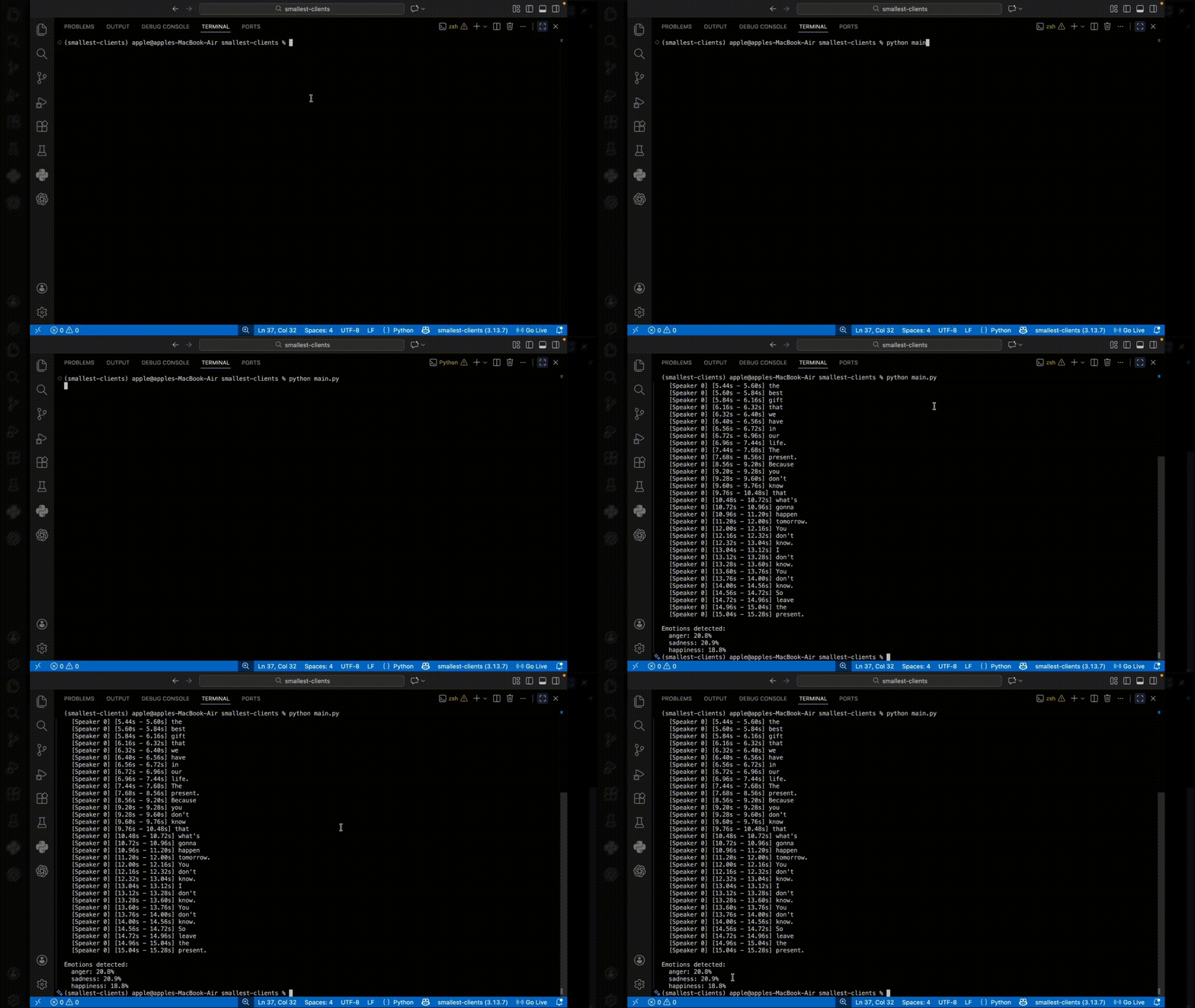
This example demonstrates complete batch transcription with speaker identification and emotion analysis. The code reads a WAV file, configures all available features, and processes the full API response including word-level details and emotional context.
Output:
WebSocket Implementation: Connecting to the Real Time ASR API
The Pulse STT real time ASR API is accessed via a WebSocket connection at: wss://waves-api.smallest.ai/api/v1/pulse/get_text
Configuration parameters are passed as query string parameters on the WebSocket URL, not in a separate JSON initialization message. Your language, encoding, sample rate, and feature flags are baked into the connection URL at the moment you open the socket.
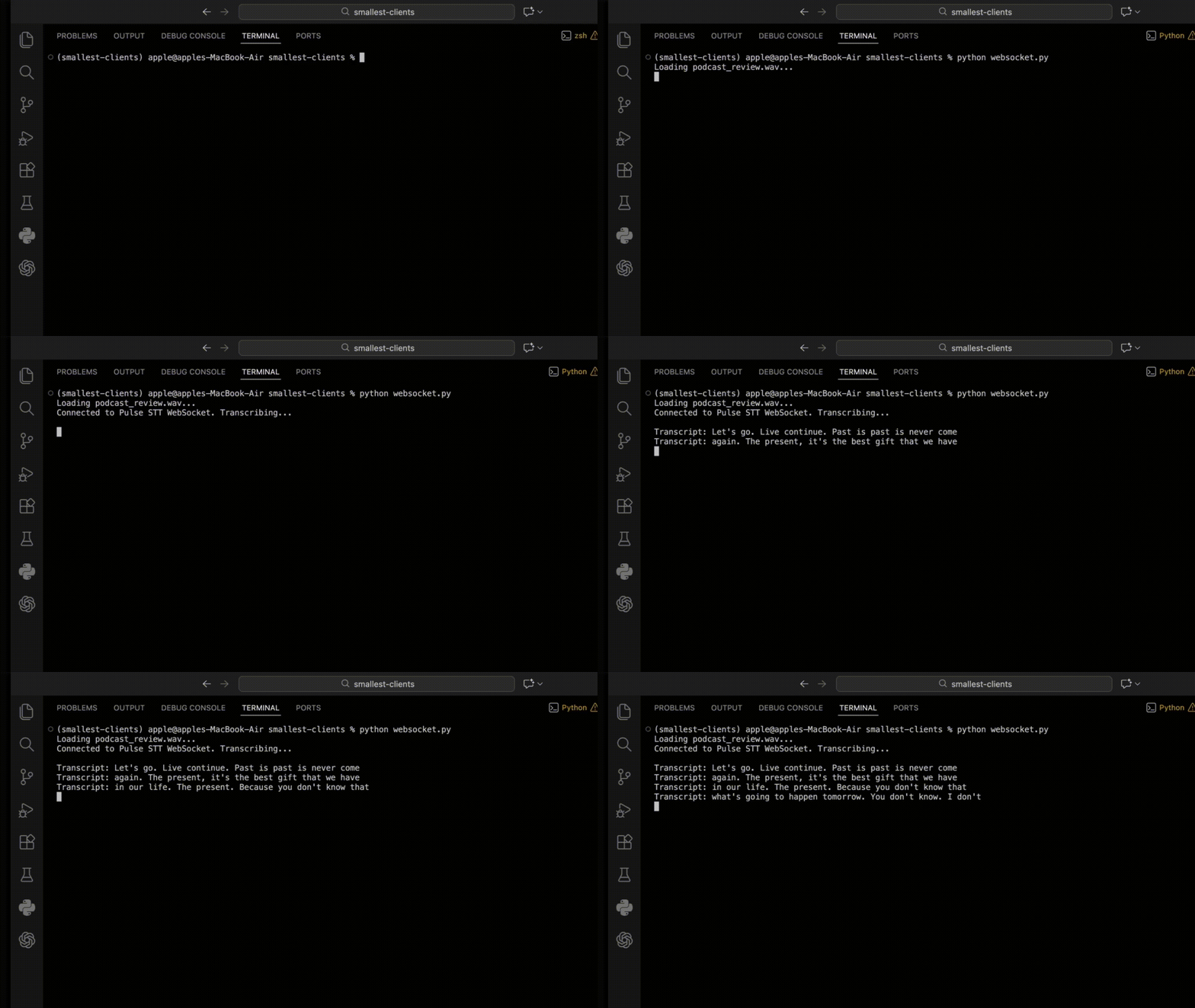
Python WebSocket Connection Example
Here is how to connect using the websockets Python library:
Output:
Streaming Audio: Formats, Sample Rates, and Chunk Sizes
Correctly configuring your audio format is critical. A mismatch between the declared encoding/sample_rate and the actual audio data will result in degraded accuracy or outright failure.
Supported Audio Encodings
linear16: 16-bit, little-endian, signed PCM (General-purpose, highest quality)
linear32: 32-bit, little-endian, floating-point PCM (High-precision pipelines)
alaw: A-law companded PCM (8-bit) (European telephony)
mulaw: μ-law companded PCM (8-bit) (North American PSTN/VoIP)
opus / ogg_opus: Opus compressed audio (WebRTC, browsers, low-bandwidth)
Supported Sample Rates
The real time ASR API accepts sample rates from 8,000 Hz to 48,000 Hz:
8,000 Hz — Standard telephony (PSTN, VoIP)
16,000 Hz — Recommended for most voice/speech applications
24,000 Hz+ — High-quality/Studio capture
Recommended Chunk Size
When streaming audio, the recommended chunk size is 4,096 bytes. Smaller chunks increase overhead without reducing latency; larger chunks introduce unnecessary buffering delays.
Handling API Responses
Every message returned by the Pulse STT API is a JSON object.
Core Response Schema
Partial transcripts (
is_final: false): Intermediate results returned while the speaker is still talking. Great for updating live UI displays.Final transcripts (
is_final: true): Committed results for a completed speech segment. Safe to write to a database or pass to an LLM.
Advanced Features of the Real Time ASR API
Pulse STT makes advanced features available directly in the streaming path.
1. Speaker Diarization
Identify who is speaking at any given moment by appending diarize=true. Both the words array and utterances array will include an integer speaker ID and a speaker_confidence score.
2. Word & Sentence Timestamps
word_timestamps=true: Generates per-word start/end times (vital for subtitle tracks like SRT/VTT).sentence_timestamps=true: Aggregates words into readable utterance segments.
3. Language Detection and Multilingual Support
For multi-speaker streams where the language isn't known in advance, Pulse STT supports auto-detection mid-stream. Set the language parameter to multi or auto. The API will smoothly transition between languages (e.g., English to Spanish to Hindi) without restarting the session.
Best Practices and Performance Optimization
To get the absolute lowest latency and highest accuracy from your real time ASR API, follow these guidelines:
Optimal Audio Configuration:
Voice Assistants/Meetings: Use
encoding=linear16atsample_rate=16000.Telephony/PSTN: Use
encoding=mulawatsample_rate=8000to avoid transcoding overhead.Browser/WebRTC: Use
encoding=opusto skip decompression cycles on your server.
Streaming Rate: Send audio chunks at approximately the natural playback rate (bursts every 50–100 ms). Sending data faster than real-time can create backpressure; sending it too slow can prematurely close speech segments.
Audio Quality: Always record audio as mono (single channel). ASR models are trained on mono speech. Use noise suppression at the capture layer (like browser MediaDevices or RNNoise) whenever possible.
Keep Connections Alive: Connection setup overhead is significant relative to a 64ms TTFT target. Keep your WebSocket connection open for the duration of a session rather than opening/closing between utterances.
Next Steps
The Pulse STT API is a purpose-built real time ASR API that delivers fast, accurate, feature-rich streaming transcription. Its single-endpoint design eliminates the need to build and maintain multi-stage speech intelligence pipelines.
Ready to start building?
Explore the Cookbook: The Smallest AI Cookbook includes ready-to-deploy examples for real-time microphone transcription, telephony integrations, and voice agents.
Experiment with Features: Try adding
diarize=trueandsentence_timestamps=trueto your URL to unlock rich conversation analytics.
Join the Community: Connect with the Smallest AI team and other developers in the Discord server to share what you're building!