AI voice SDKs for Python, browser, and mobile apps

AI voice SDKs for Python, browser, and mobile: how to pick, integrate, and scale streaming TTS/STT, handle permissions, and add voice cloning.
AI voice SDKs are the software layer that lets developers add speech synthesis, speech recognition, voice cloning, and real-time conversational capabilities to an application without building the underlying infrastructure from scratch. Instead of handling low-level audio streaming, authentication, networking, and model interactions manually, developers can integrate a voice SDK and focus on the application itself.Whether you're building a Python backend, a browser-based assistant, or a native mobile experience, the SDK you choose affects both development speed and production reliability. The best SDKs simplify integration, support real-time streaming, and provide a consistent experience across platforms. This guide breaks down how to evaluate and integrate AI voice SDKs in the three environments most teams end up supporting: Python, the browser, and mobile.
What Makes a Voice SDK Worth Using
Before you commit to a library, it helps to know what separates a production SDK from something that only looks good in a demo. The obvious checks still matter (language coverage, docs, latency numbers), but the real test arrives in the messy parts: what happens when the network drops mid-stream? Can you get at raw audio buffers when you need to, or are you stuck with a single high-level abstraction? If you want to swap models later, do you keep your integration layer intact or end up rewriting half the stack?
Three traits usually correlate with long-term developer happiness. One is streaming-first design. Modern streaming voice architectures reduce perceived latency and improve conversational responsiveness. Another is turn detection and segmentation; conversational systems need to understand when a speaker is done with a thought, not merely when the waveform goes quiet. Speechmatics (2026) calls out intelligent segmentation and automatic turn detection as baseline requirements for conversational AI pipelines. The third is portability: when the Python client shares core logic with browser and mobile wrappers, you cut maintenance overhead and avoid feature drift as the product grows.
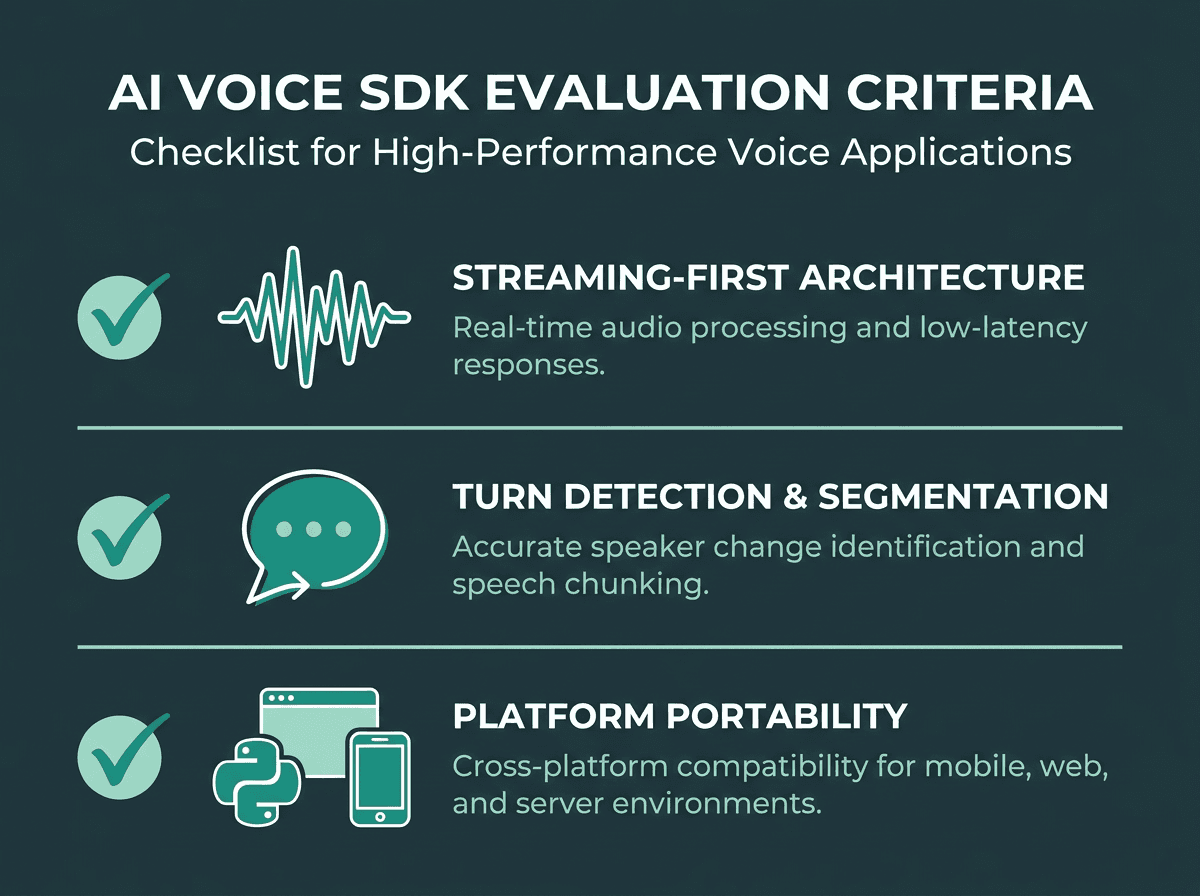
Streaming design, turn detection, and portability are the baseline for production-ready **AI Voice SDKs**.
Integrating AI Voice SDKs in Python
Python still anchors most AI workloads, so many voice vendors start by shipping a Python client. Distribution is usually through PyPI (Python Package Index), and the setup will feel familiar if you've used any API client: install the package, initialize a client with an API key, then call into synthesis or transcription.
For text-to-speech in Python, the basic loop is simple: send a string plus a voice configuration object to a synthesis endpoint, then either write the returned audio bytes to disk or stream them into a playback buffer. Speech-to-text workflows often rely on streaming speech-to-text APIs that process audio incrementally rather than waiting for complete recordings.
A few implementation habits make Python voice pipelines feel less brittle. For real-time transcription, keep audio chunks in the 20ms to 100ms range: smaller chunks raise overhead; larger chunks push latency into the range users can feel. On the TTS side, streaming responses beat waiting on a full audio blob, especially for long inputs. If you are integrating with services like AWS Polly or similar cloud speech services, the AWS SDK for Python (Boto3) is a solid reference for structuring async streaming calls in a way you can adapt to most voice API clients.
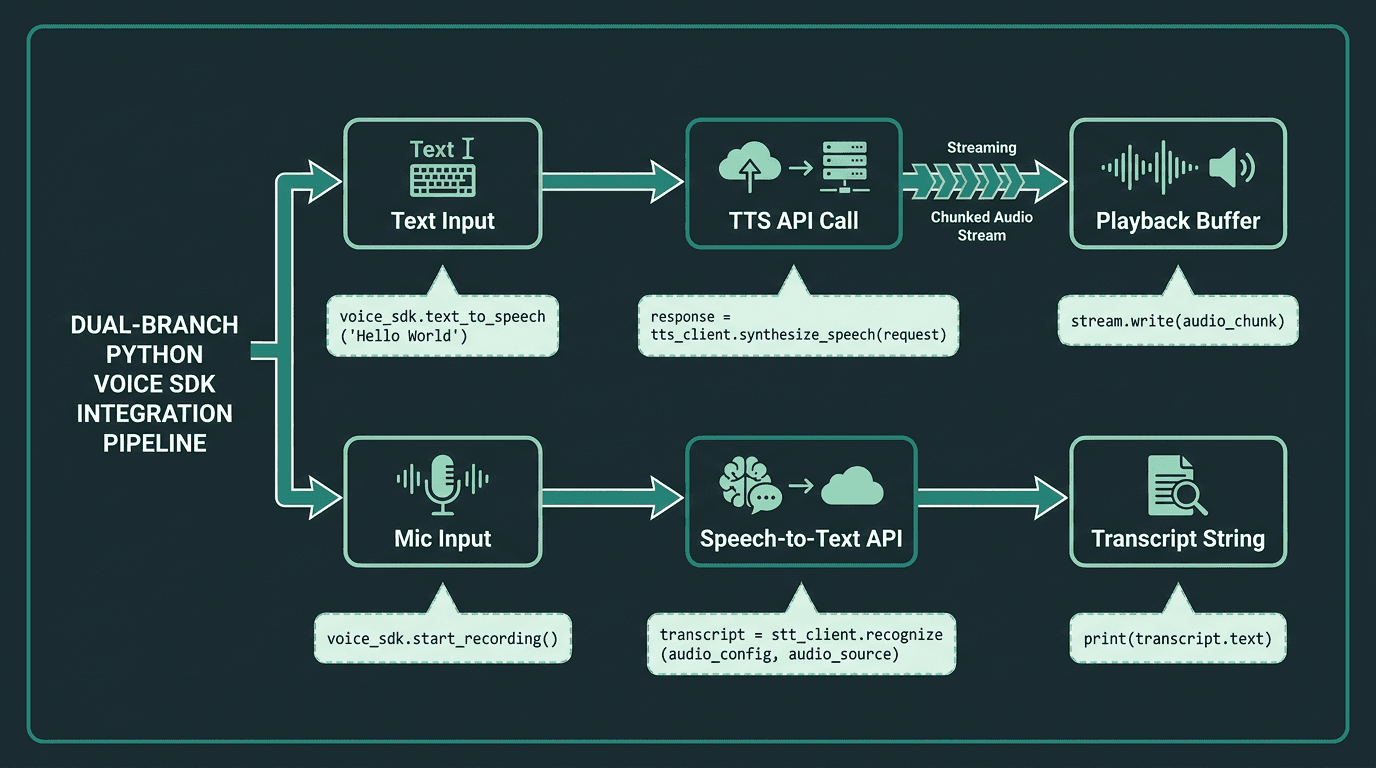
A dual-branch Python voice SDK pipeline covering both TTS streaming and real-time STT transcription.
Building Voice Features in the Browser
Browser voice work comes with constraints that don't show up in a Python backend. The Web Audio API and MediaStream APIs are capable, but you end up dealing with AudioContext lifecycle, microphone permissions, and the long tail of browser quirks. A strong browser voice SDK should absorb most of that complexity while still giving you the hooks needed for custom UI behavior and state management.
Key considerations when choosing a browser voice SDK:
WebSocket vs. HTTP streaming: Real-time transcription depends on a persistent WebSocket connection. SDKs that rely on polling HTTP requests tend to feel laggy in production.
AudioWorklet support: Modern browsers prefer AudioWorklet over the deprecated ScriptProcessorNode for low-latency audio processing. Confirm your SDK actually uses it.
Autoplay policy handling: Browsers block audio autoplay without a user gesture. Your SDK should expose clear hooks so playback can start immediately after user interaction.
CORS and token management: Browser clients cannot safely store API keys. Choose SDKs that support short-lived tokens or a server-side proxy pattern.
Mobile browser parity: iOS Safari and Android Chrome impose different audio constraints. Test both before you lock in a library.
If your voice AI app needs to behave consistently across desktop and mobile browsers, the architecture that tends to survive contact with production is a thin browser SDK for capture and playback, backed by a server-side component that owns the actual API calls. That keeps credentials off the client and lets you change the underlying voice model without rewriting frontend code.
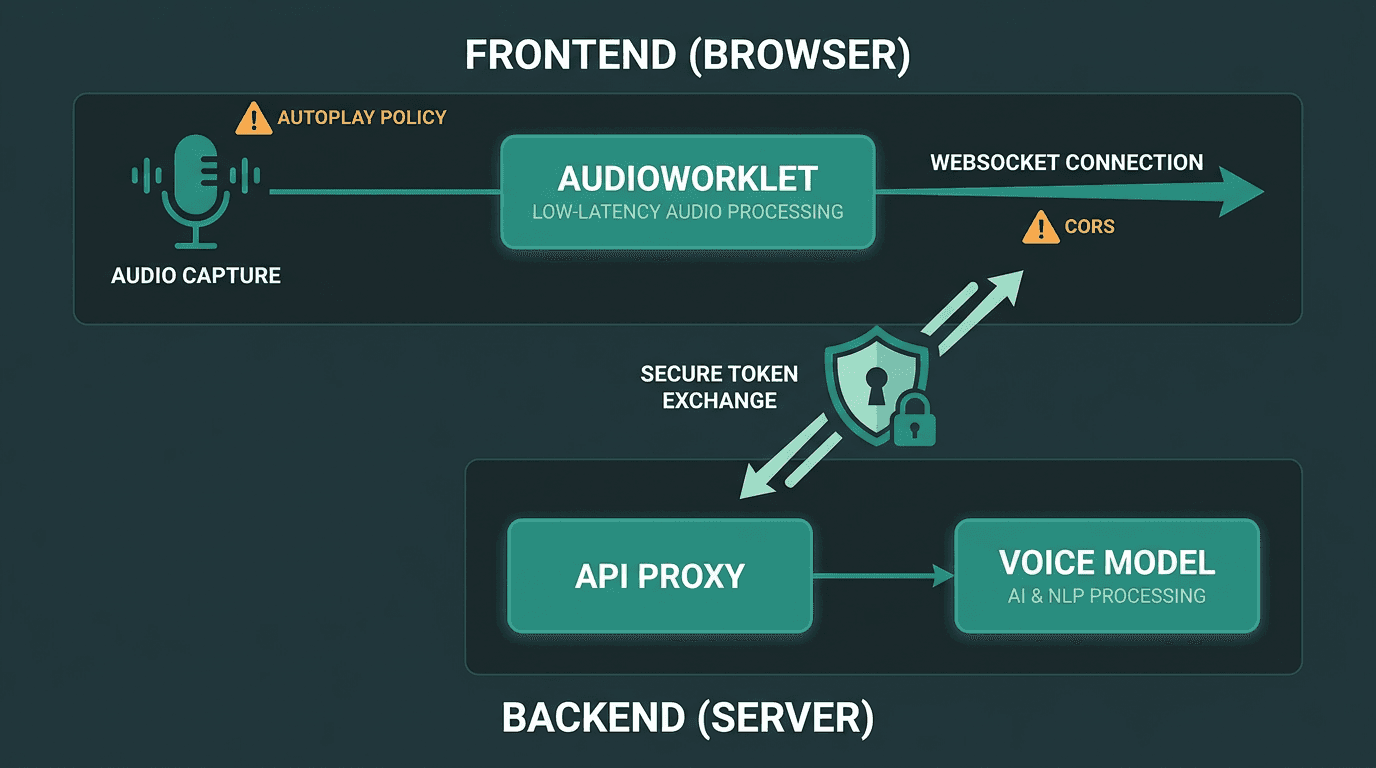
A server-side proxy pattern keeps API keys off the client in browser voice SDK implementations.
Mobile SDK Integration for iOS and Android
A mobile SDK is a collection of tools, libraries, and documentation that allows developers to build mobile applications or add features for platforms such as iOS and Android (HUMAN Security, 2026). Voice adds its own set of constraints that Python and the browser largely avoid: battery drain, background audio permissions, and OS-level interruptions like phone calls or Siri activation.
On iOS, voice integrations typically live or die on AVAudioSession configuration. You need the right category set before capture or playback starts; get it wrong and voice breaks the moment another app takes audio focus. Android has the same class of problem under a different name: manage AudioFocus correctly and declare RECORD_AUDIO in the manifest. On both platforms, microphone denial is a first-class user path, and a well-designed SDK should surface it as a typed error instead of failing quietly.
React Native and Flutter add another moving part: the native SDK has to be bridged into JavaScript or Dart, and serializing audio across that bridge can add latency if you're not careful. The faster pattern is to keep audio processing native and only pass transcript strings or playback commands through the bridge. If you're building on communication stacks, communication platforms like Plivo are a useful reference point for how production mobile apps structure voice features.
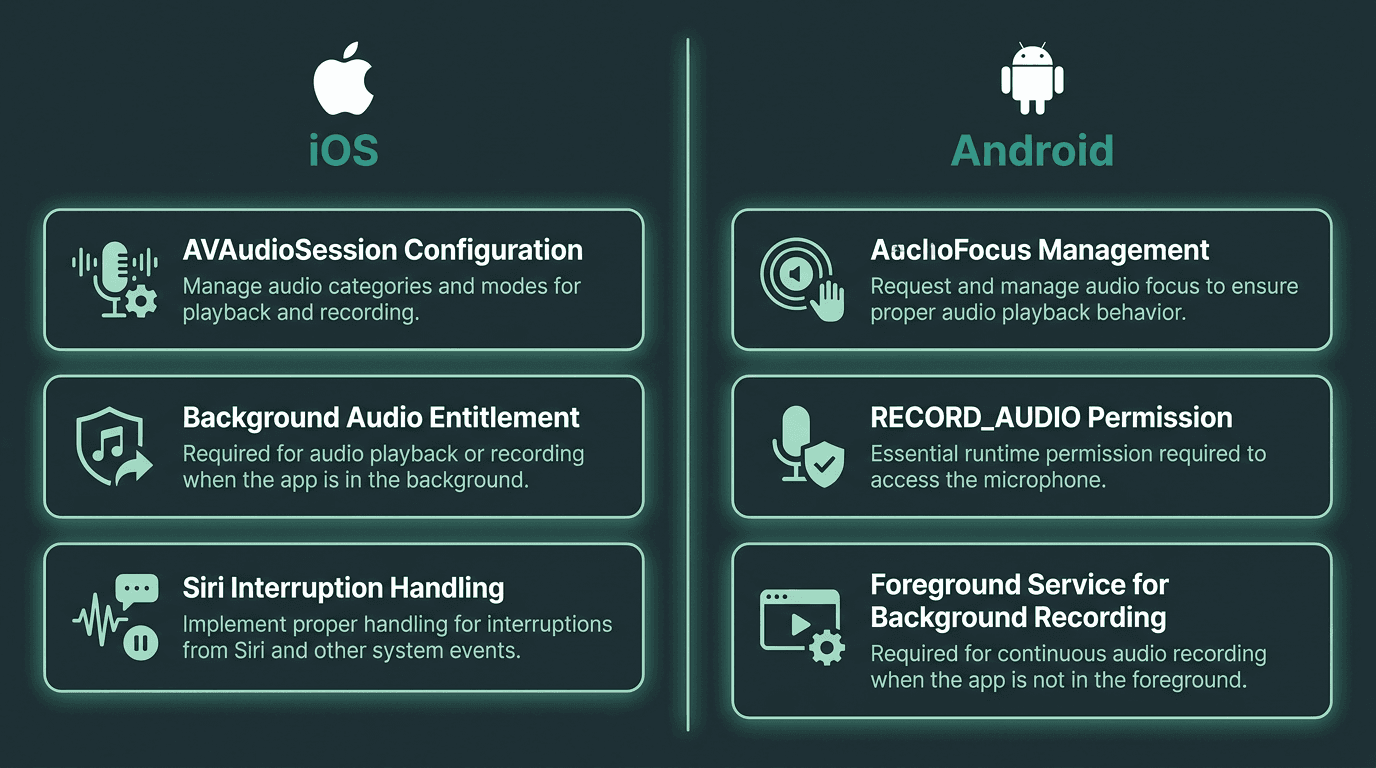
Platform-specific audio permissions and OS constraints shape every **AI Voice SDK** mobile integration.
Voice Cloning and Custom Voice Generation via SDK
Text-to-speech and speech-to-text are table stakes now; many SDKs also expose voice cloning APIs and generative voice design. The OmniVoice model (documented on GitHub, 2026) shows one direction the space is heading: generating voices by describing speaker attributes like gender, age, pitch, and accent, without recording a reference sample. That enables scenarios that were awkward or expensive even two years ago, from spinning up a consistent brand voice for a new product to creating localized voices for regional markets or giving each user in a multi-user app a distinct synthesized persona.
SDK-based voice cloning usually breaks into two calls. First you create a voice and receive a voice ID; then you run synthesis requests that reference that ID. Keeping voice IDs server-side instead of in client state makes the integration easier to maintain and gives you room to update or replace a voice without touching every caller.
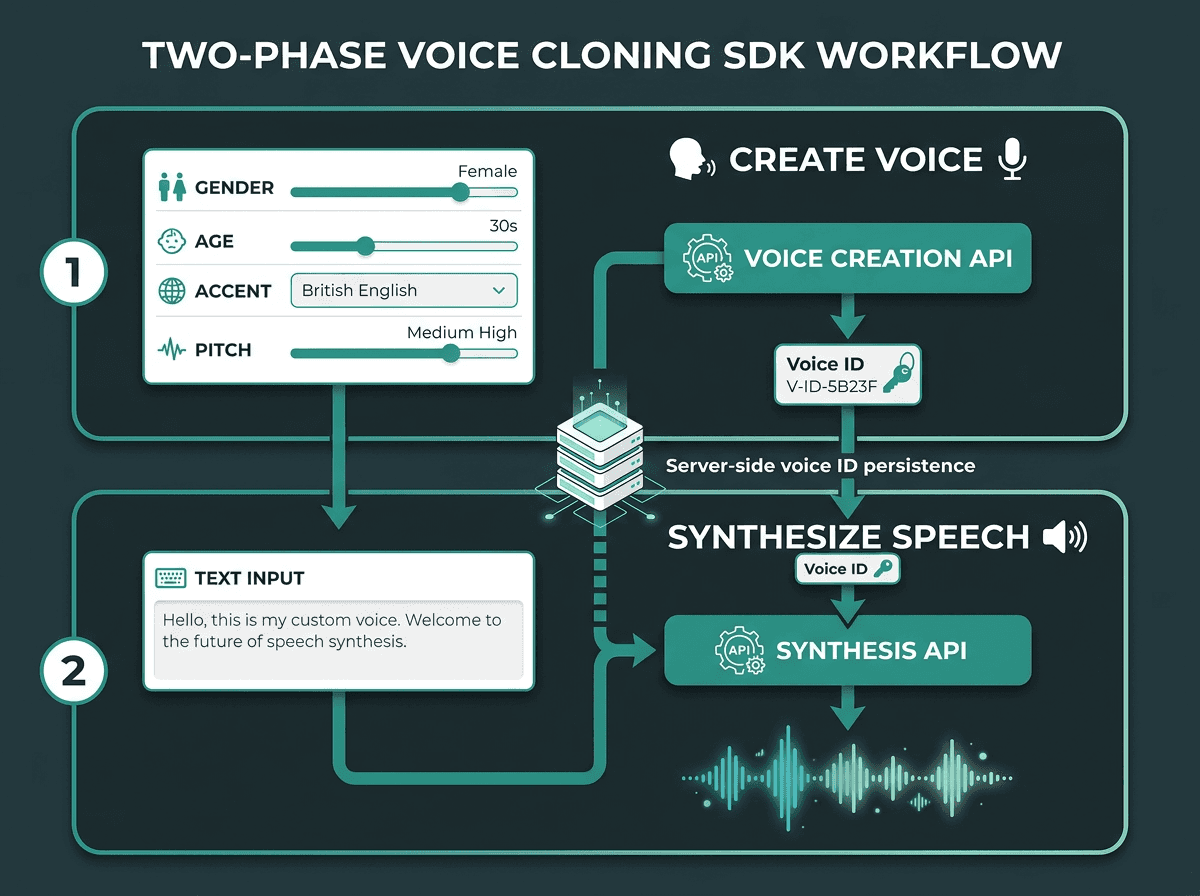
SDK voice cloning splits into two calls: generate a Voice ID, then reference it in every synthesis request.
Running Models and Scaling Your Voice Integration
Getting a voice SDK working on your laptop is the easy part. Production brings a different class of constraints: concurrency caps, cold-start latency, and pricing that accrues per character or per minute. A common scaling failure is treating voice like a synchronous REST request. Once you move beyond a handful of concurrent users, you need an async layer or queueing so bursts don't cascade into slow responses for everyone.
If your team is running models with Replicate or a similar hosting platform, you get scaling primitives out of the box, but your integration still needs to behave well under stress: retries, timeouts, and partial failures are part of normal operations. From a UX standpoint, a voice feature that returns empty audio on a transient error is worse than one that clearly communicates a fallback state. Put error handling into your SDK wrapper early, not after the first production incident forces the issue.
The Problem-Solution Bridge
The biggest practical headache with AI voice SDKs is fragmentation. A Python library can be rock-solid in a backend pipeline and still have no real browser equivalent. Mobile SDKs often trail on features. Voice cloning, meanwhile, is frequently sold as a separate product with its own integration surface. If you stitch together three providers to cover Python, browser, and mobile, you also inherit three billing setups, three sets of API quirks, and three separate systems to monitor when production gets weird. That complexity ramps quickly once voice stops being a prototype and starts being a core feature.
One approach is to consolidate speech recognition, synthesis, streaming, and voice cloning behind a single developer platform. Smallest.ai provides a unified developer platform for speech recognition, speech synthesis, streaming, and voice cloning across Python, browser, and mobile environments. One API, one integration pattern, and one place to debug when something breaks.
Frequently asked questions
What is the difference between a voice API and a voice SDK?
How can I keep API keys secure in a browser voice app?
What is 'time-to-first-audio' (TTFA) and why is it important?
How much audio is needed for voice cloning?


