How to build a voice bot with TTS and STT

Build a voice bot with STT and TTS APIs: real-time architecture, streaming Python loop, latency budget tips, and common mistakes that derail production.
Voice bots are becoming a common interface for customer support, scheduling, and internal workflows. The real question now is how to build a voice bot that feels immediate instead of sluggish and synthetic.
This walkthrough runs end to end: the architecture choices that matter, practical integration with speech-to-text (STT) and text-to-speech (TTS) APIs, and the failure modes that tend to blindside first-time builds. I am assuming you are comfortable working with APIs and basic Python, but you have not yet had to wrangle real-time audio streams.
What a Voice Bot Actually Does Under the Hood
Ignore the branding and the mechanics are always the same: listen (STT), think (LLM or a logic layer), speak (TTS). Audio arrives, text hits a reasoning layer, and the reply comes back as synthesized speech. The loop is conceptually simple, but it gets unforgiving fast because latency piles up at every boundary.
Voice interactions are far less forgiving of delays than text interfaces. Every stage in the pipeline (speech recognition, reasoning, speech synthesis, and network transit) adds latency that users can notice in real-time conversations.
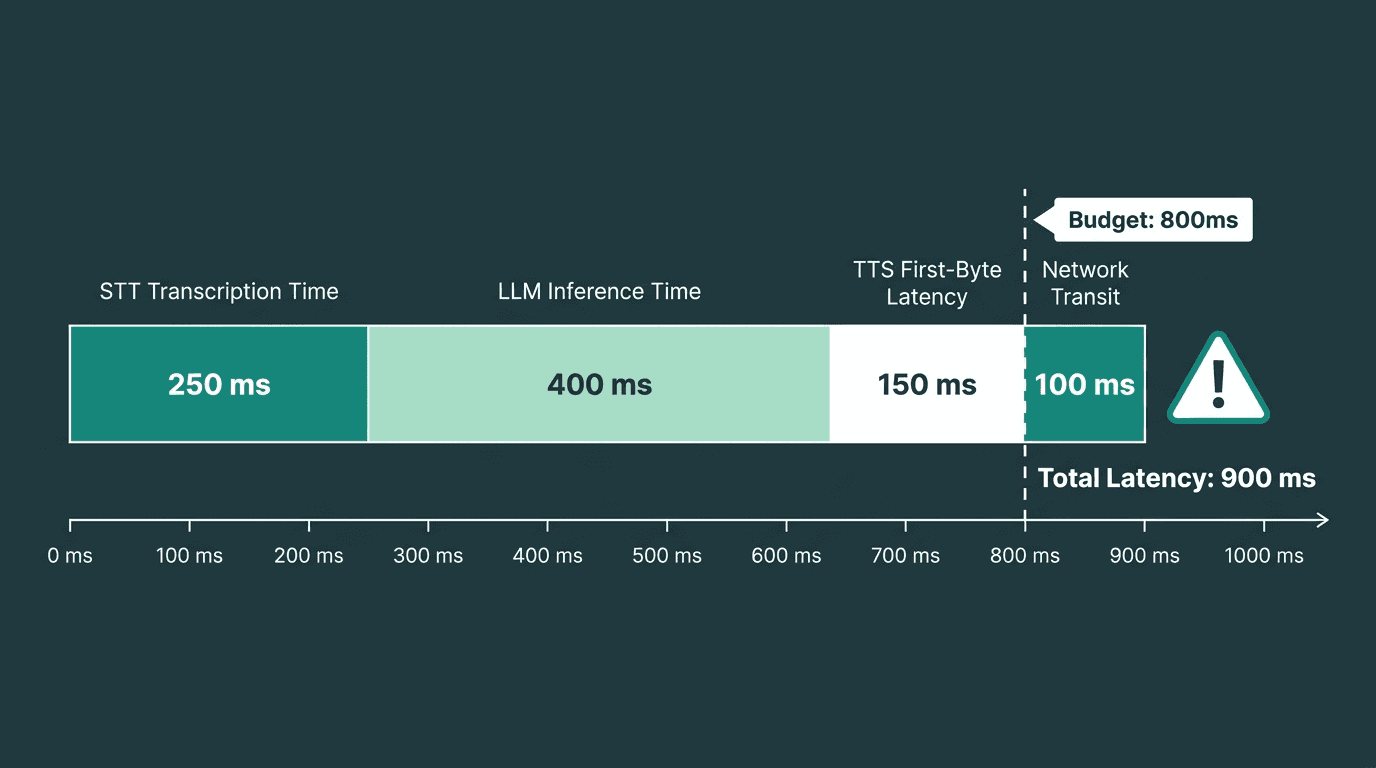
Every stage of the listen-think-speak loop compounds latency against your 800 ms conversational budget.
Choosing Your Stack Before You Write a Line of Code
Before you touch code, three picks lock in most of your outcome: the STT engine that takes incoming audio, the TTS engine that speaks back, and the "brain" in the middle that decides what to say. Keeping STT and TTS in the same ecosystem is not just convenience. It usually means fewer auth and billing headaches, fewer version-mismatch rabbit holes, and handoffs that are tuned to work together, which often shows up as lower end-to-end latency.
Picking an STT Engine
For voice bots, the checklist is different than for offline transcription. You need true streaming (not "upload a file and wait"), word-level timestamps to support barge-in, language coverage that matches your users, and a real-time factor (RTF) that stays under 1.0. RTF is the blunt metric that tells you whether the recognizer can keep up with live speech; once it creeps above 1.0, the backlog grows and the conversation starts to drag. Smallest.ai's Pulse is designed for conversational workloads, providing low-latency streaming transcription along with features such as speaker and emotion detection for production voice applications.
Picking a TTS Engine
TTS quality matters, but in a voice bot, first-byte latency is the make-or-break number. If the bot sits in silence for two seconds before the first syllable, it feels broken no matter how lifelike the voice is once it starts. Look for streaming output (audio chunks before synthesis completes), voice cloning for consistent personas, and SSML or prosody controls when you need emphasis and pacing. Smallest.ai's Lightning API is built around that reality: sub-100 ms first-byte latency, streaming output, and voice cloning. Access to Lightning and related speech services runs through the Waves API, which gives you a single endpoint for both STT and TTS calls.
Choosing the Brain: LLM, Rules, or Both
A full large language model is not mandatory for every voice bot. If you are replacing an IVR that routes callers to departments, a deterministic rules engine is usually the better fit: faster, cheaper, and easier to audit. If you are building a concierge-style bot that has to handle messy, unpredictable questions, you will want an LLM. Smallest.ai's Electron is a compact language model designed for real-time conversational applications. It can be used as the reasoning layer for voice agents where low latency is a priority, while teams can also integrate another compatible language model if their application requires it. If you would rather not build the orchestration layer yourself, Atoms is a managed agent platform that takes care of the wiring.
Architecture Blueprint: How to Build a Voice Bot That Feels Real-Time
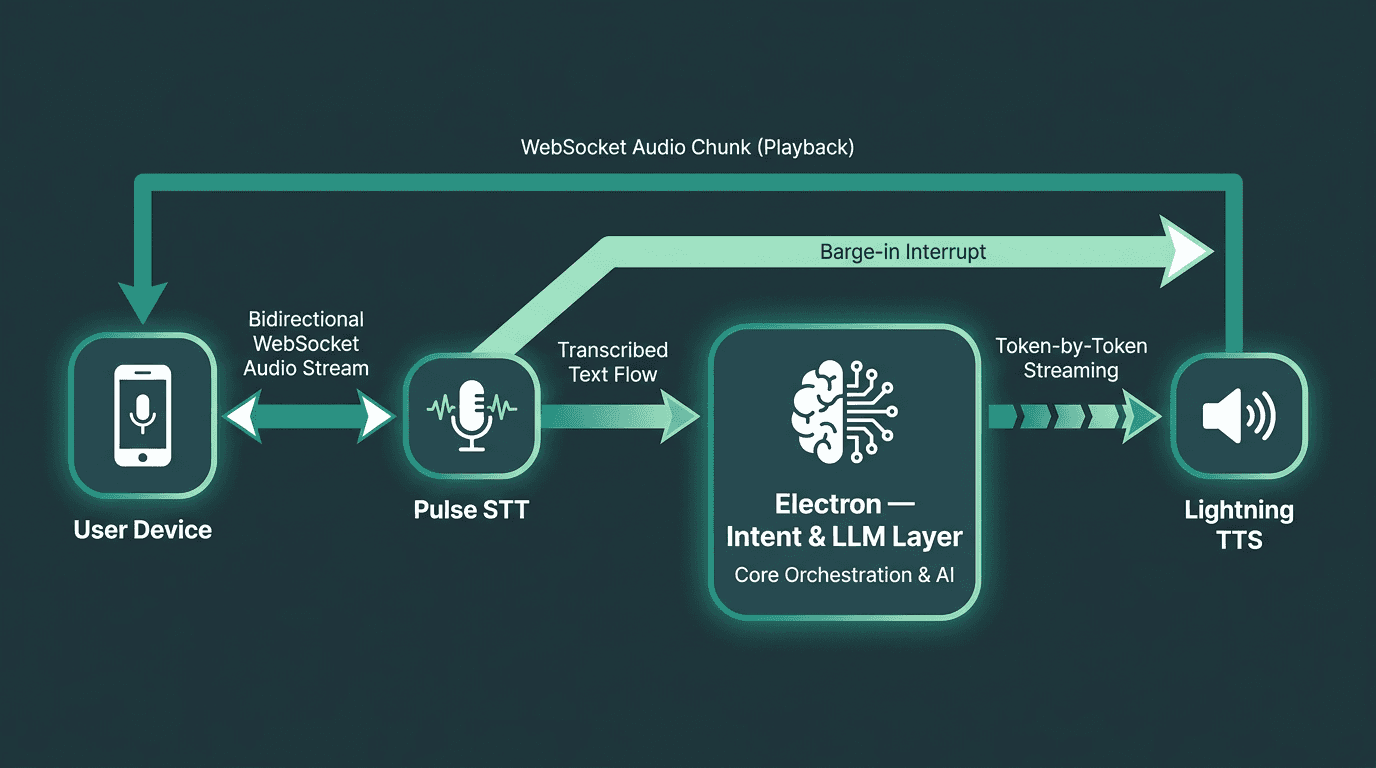
Full-duplex WebSocket architecture: the foundation of a voice bot that feels genuinely real-time.
The reference architecture looks clean on paper: a WebSocket audio stream from the client hits STT (Pulse), the transcript flows into an intent layer or LLM (Electron or your model of choice), and the response streams into TTS (Lightning), which sends audio chunks back to the client. The word that matters there is "streams". Half-duplex request/response, where you upload a full audio clip and wait for a full transcript before doing anything, is fine for a demo. Products need full-duplex streaming over WebSockets or gRPC so work begins the moment the first audio frames arrive.
Barge-in is where a lot of voice bots give themselves away. When the user starts talking while the bot is speaking, the system has to detect voice activity, cancel the in-flight TTS stream, and flip back into listening. That means STT keeps running in the background even during playback, and your orchestrator needs a clean cancellation path. Skip barge-in and the bot will talk over people, which is the fastest route to "this feels fake".
Building the Core Loop: A Practical Walkthrough
The example below uses Python with an async event loop, because that model matches how real-time voice systems behave: a handful of things happening at once, continuously. Audio capture feeds STT, transcripts feed the LLM, and the LLM output feeds TTS, without forcing each stage to wait for the previous one to finish.
Capturing and Streaming Audio to STT
Start by opening a WebSocket connection to Pulse and pushing microphone chunks as you record them. Two settings do most of the latency work here: chunk size (16 ms to 32 ms frames are the usual tradeoff between responsiveness and packet overhead) and sample rate (16 kHz is the common baseline for speech recognition). Pulse will stream partial transcripts as audio arrives, which lets you begin intent detection early, then emit a final transcript once it detects end-of-utterance.
Voice activity detection (VAD) and endpointing are how the bot decides the user is done. Without them, you either clip people mid-thought or you sit on a timeout that makes the bot feel slow. Many STT engines handle endpointing internally, but you still need to tune silence thresholds to the environment: a call center bot expects tighter turn-taking than a voice assistant where users pause to think.
Processing the Transcript and Generating a Response
When the finalized transcript lands, send it to your LLM or Electron and start building a reply. The latency trick that most first-time implementations miss is simple: do not wait for the model to finish the entire response before you call TTS. Stream tokens into the TTS request as they arrive so the first sentence can be synthesizing while the model is still producing the second. In practice, streaming tokens as they are generated can significantly reduce perceived latency compared with waiting for the entire response before beginning speech synthesis.
Streaming the Response Back as Speech
Feed text chunks into Lightning's streaming TTS endpoint and route the returned audio bytes straight to your output path, whether that is a browser audio context, a WebRTC track, or a telephony SIP trunk. For real-time delivery, Opus is usually the right default: it is built for low-latency streaming, tolerates packet loss, and sounds good at 16 kbps to 32 kbps. PCM is handy for local testing and downstream processing; MP3 adds encoder latency that stacks up in live conversations. If you want more implementation detail on this stack, the Smallest.ai post on building efficient AI voice bots walks through the pieces.
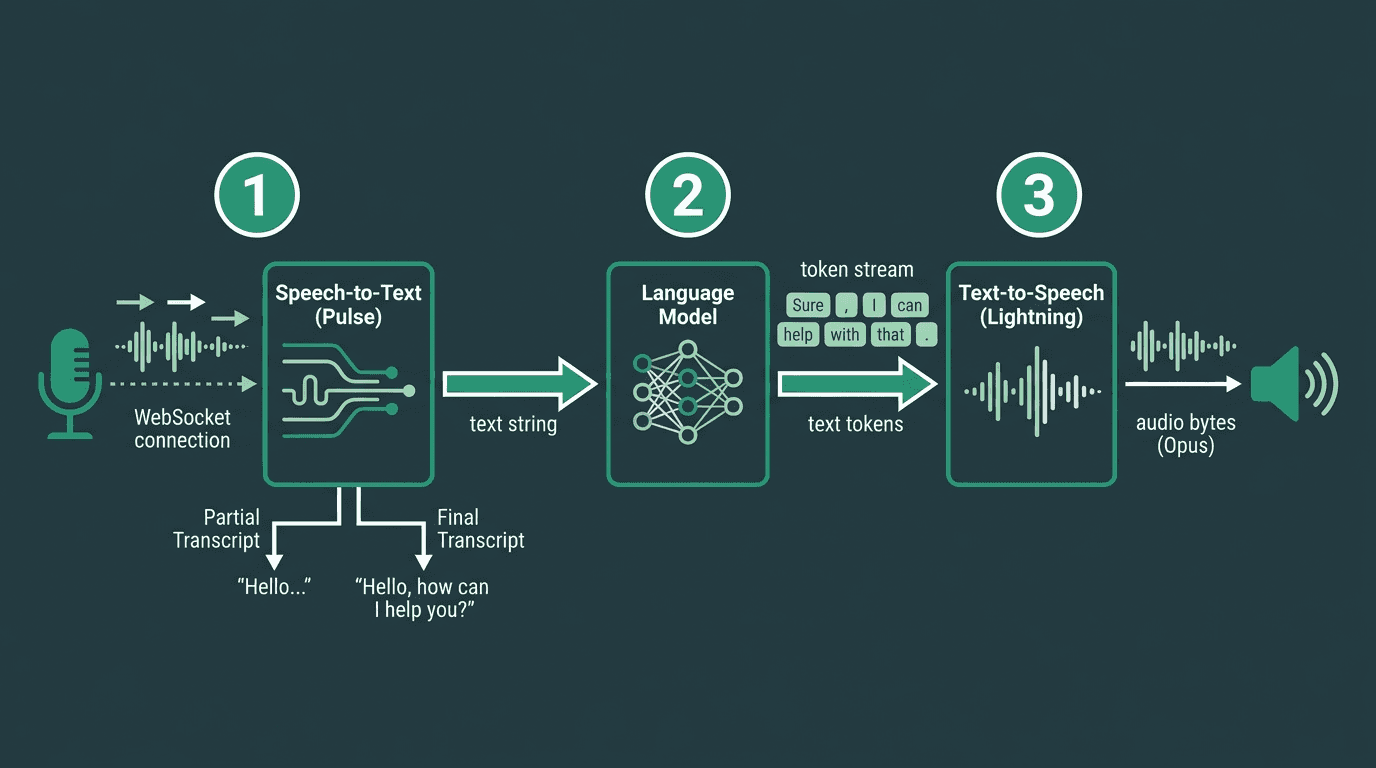
Token-level streaming across all three stages cuts perceived latency by 40–60% versus batching.
The Mistakes That Silently Kill Voice Bot Projects
These four mistakes consistently surface in post-mortems of failed voice bot deployments:
Building a chatbot with a microphone bolted on. Silence thresholds, echo cancellation, and ambient noise handling are not optional "nice-to-haves." If the bot cannot tell a natural pause from an end-of-turn, or if it hears its own TTS output as user input, it will fall apart outside a quiet demo room.
Batching instead of streaming. If you wait for a complete STT transcript before calling the LLM, then wait for the complete LLM response before calling TTS, you have turned three stages into a serial pipeline. That is how you end up with 3 to 5 second response times that feel like the system froze. Stream STT, stream the model, stream TTS.
Launching without load testing real audio concurrency. A bot handling 50 simultaneous calls is running 50 real-time audio streams, each with its own WebSocket, VAD state, and LLM context. That is a different problem than 50 concurrent text API calls. Test at realistic concurrency before you ship.
Hardcoding one voice for every scenario. People react differently depending on tone and context. A debt collection bot and a healthcare scheduling bot should not sound like the same agent. Voice cloning via Smallest.ai lets you create branded or role-specific voices without recording a full voice actor dataset.
Going Beyond the MVP: Features That Separate Demos from Products
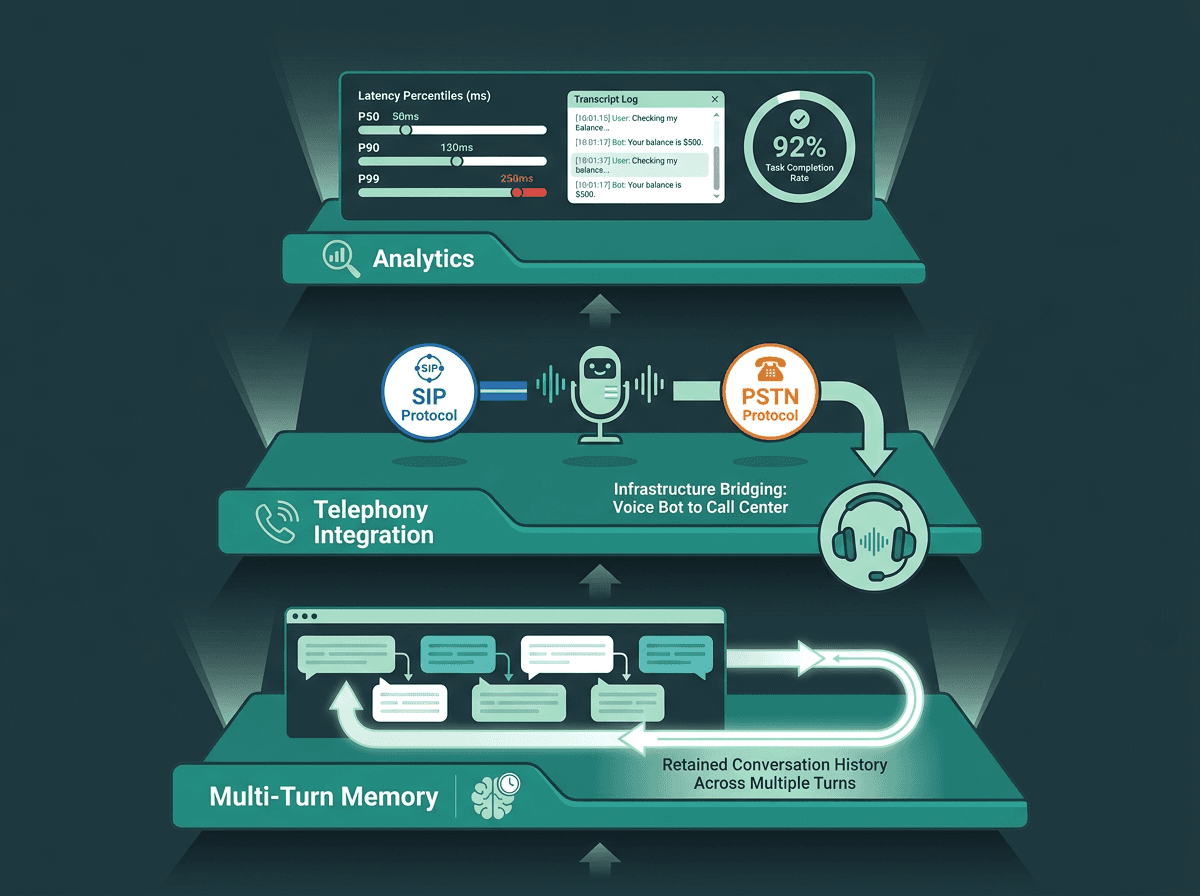
Three capability layers that separate a working voice bot demo from a production-ready product.
Multi-turn memory is the first missing feature users trip over. When the bot forgets what was said 30 seconds ago, people have to repeat themselves, and trust evaporates faster than it does with a small latency spike. Carry the last N turns into each LLM call, and use summarization for longer sessions so token counts do not balloon.
If you are deploying into a call center, SIP/PSTN integration is not optional. This is also where the plumbing gets gnarly: DTMF, transfers, hold music, and compliance recording all show up at once. Smallest.ai's Atoms platform abstracts much of that, which makes it realistic to deploy a voice agent without building telephony infrastructure from scratch.
Analytics are what turn "it works" into "it works reliably." Log every transcript, measure latency at P50, P90, and P99 (averages hide the spikes users remember), and treat task-completion rate as the north-star metric. A bot with 200 ms average latency but a 40 percent completion rate is not succeeding. Latency tells you how the system performs; completion tells you whether it is worth using.
Build Voice Bots Without Stitching Together Five Different Vendors
Real-time voice applications depend on more than just speech recognition or speech synthesis. Low latency, streaming infrastructure, orchestration, and conversation management all need to work together. Smallest.ai brings STT, TTS, conversational models, and voice-agent tooling into a single platform, helping teams move from prototype to production faster.
Smallest.ai is designed as a unified Voice AI platform to reduce integration overhead. Pulse provides speech-to-text, Lightning powers text-to-speech, Electron handles conversational reasoning, and Atoms supports production voice agents through a common platform. For speech-to-speech use cases, Hydra provides a native speech model designed for real-time interactions.
Whether you're building a customer support bot, scheduling assistant, or internal voice workflow, the next step is validating your architecture with real production traffic. If you're evaluating a unified Voice AI platform for production deployments, book a demo to see how Smallest.ai fits your voice bot architecture and deployment requirements. `
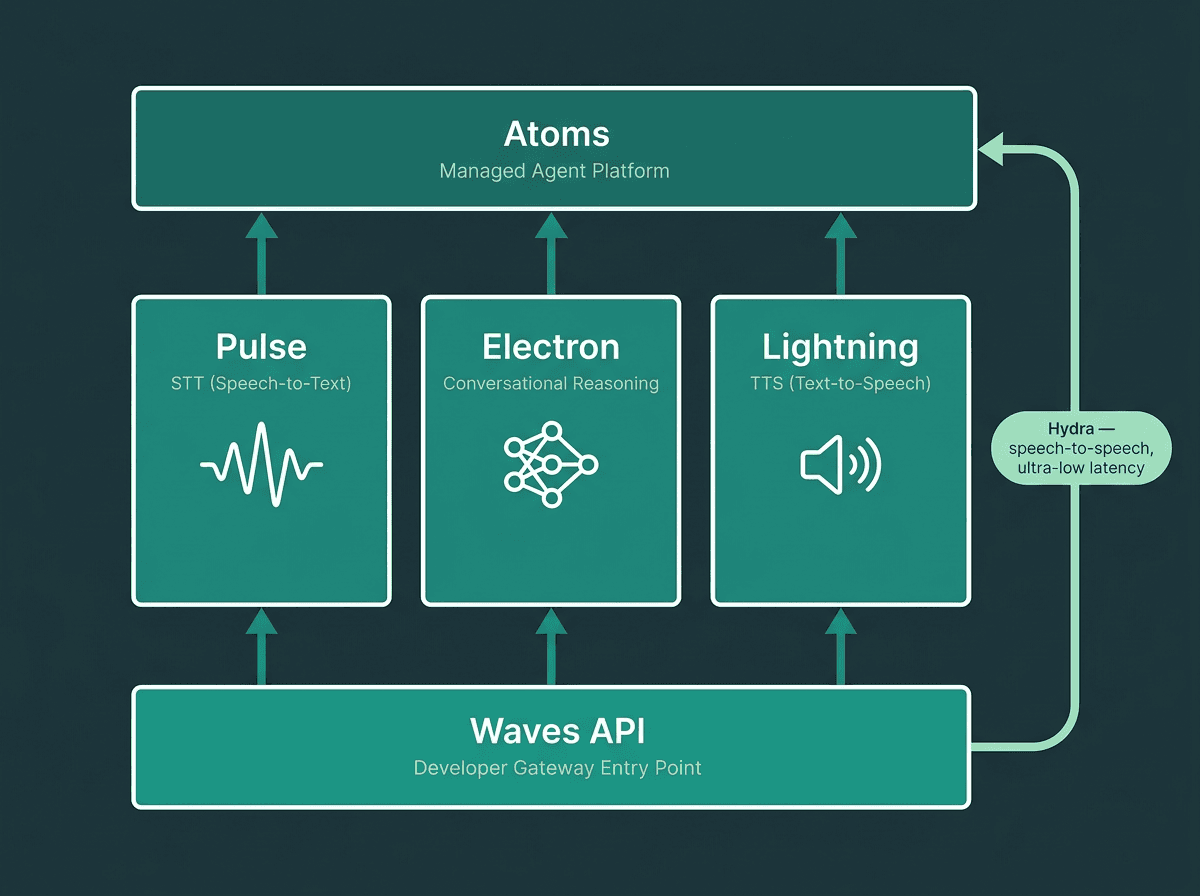
Smallest.ai's unified stack covers every voice bot layer — STT, reasoning, TTS, and orchestration — through a single API gateway.
Frequently asked questions
How long does it take to build a basic voice bot with TTS and STT APIs?
What programming languages work best for building a voice bot?
How do I reduce latency in a real-time voice bot?
Can I clone a custom voice for my voice bot using Smallest.ai?
What is the difference between a voice bot and a voice assistant?