AI Receptionist Buyer’s Guide: Features, Costs, and Deployment in 2026

Compare the best AI receptionist platforms in 2026. Learn how virtual receptionist technology works, what to evaluate, and how to deploy it effectively.
Every missed call is a missed opportunity. For small businesses, medical practices, law firms, and enterprise contact centers, the front desk has always been the first impression. An AI receptionist changes what that impression costs, how fast it responds, and how consistently it holds up across thousands of calls. What follows is a practical breakdown of how virtual receptionist technology actually works, what separates good solutions from great ones, and which platforms deserve serious attention in 2026.
Whether you are evaluating this category for the first time or re-examining a system already in production, the goal is to give you enough substance to make a confident decision: a clear evaluation framework, a side-by-side platform comparison, and a realistic deployment path.
What Does an AI Receptionist Actually Do?
The term gets used loosely, so precision matters. An AI receptionist is a voice-enabled software agent that handles inbound calls, qualifies callers, routes inquiries, books appointments, answers common questions, and escalates to a human when necessary. It is not a basic IVR menu. It does not ask you to press 1 for billing. It listens, understands intent, and responds in natural conversational language.
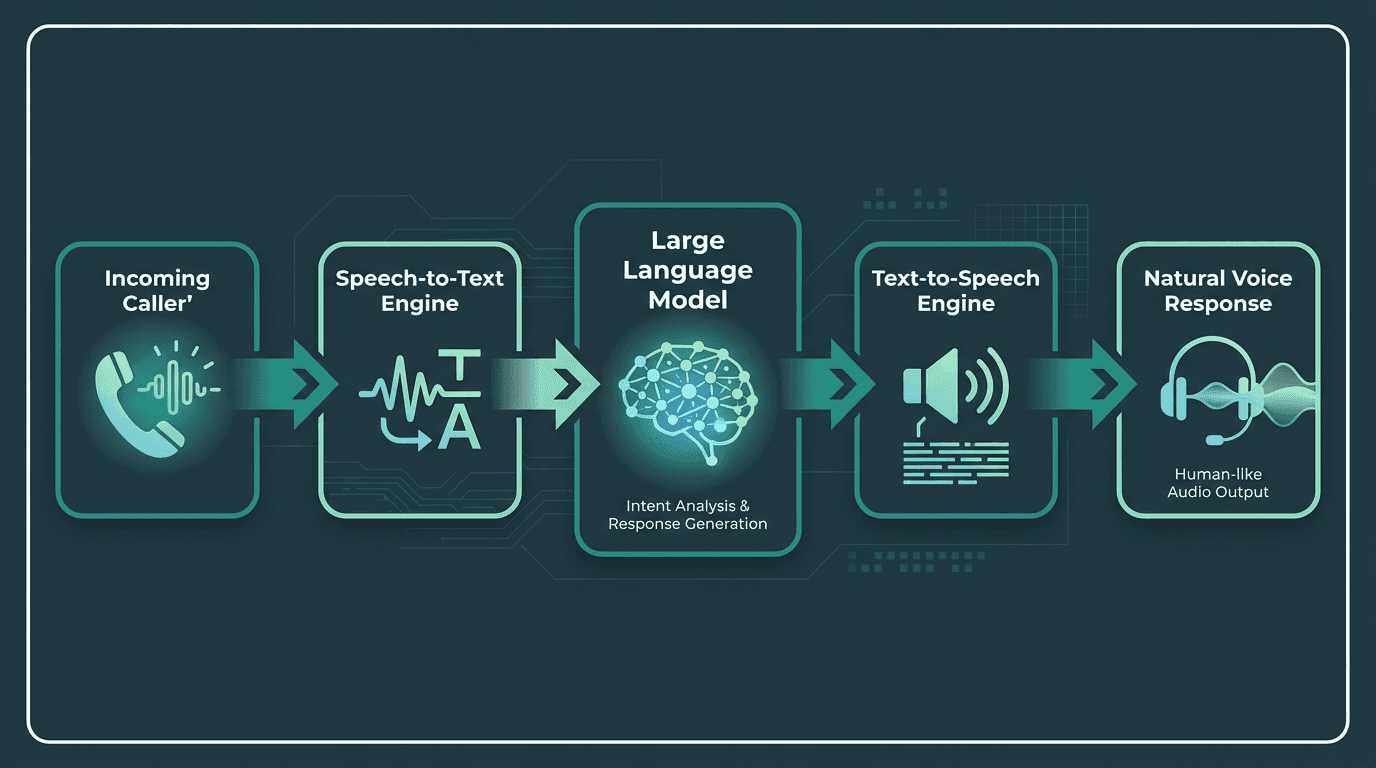
An AI receptionist combines STT, an LLM, and TTS to understand and respond to callers.
The underlying architecture combines three components: a speech-to-text engine that transcribes caller audio in real time, a language model that interprets intent and generates a response, and a text-to-speech engine that delivers that response as natural-sounding voice. The quality of each layer directly determines whether the caller feels like they are talking to a helpful agent or fighting with a phone tree. For a technical breakdown of how these components fit together, the article on AI voice agents architecture, voice models, and use cases covers the full stack in detail.
The Market Case: Why 2026 Is the Inflection Point?
The AI receptionist category has moved from early adopter to mainstream faster than most enterprise software categories.
The cost of a fully-loaded in-house human receptionist, factoring in salary, benefits, training, and turnover, substantially exceeds what most AI receptionist platforms cost annually, which explains why adoption is accelerating across every business size.
Common Mistakes to Avoid When Choosing an AI Receptionist
Most buyers focus on the demo voice and miss the latency. A voice that sounds beautiful but takes 1.8 seconds to respond after a caller finishes speaking will feel broken in a real phone conversation. Human conversation has a natural response gap of roughly 200 to 300 milliseconds. Anything beyond 800ms starts to feel unnatural. When evaluating any platform, ask specifically for end-to-end latency under real call conditions, not just TTS rendering speed measured in isolation.
The second mistake is treating all integrations as equal. An AI receptionist that cannot write to your CRM, pull from your calendar, or trigger a follow-up workflow is essentially an expensive voicemail. Before committing to any platform, map out the three or four workflows it needs to complete autonomously and verify those integrations exist and are actively maintained.
AI Receptionist Solution Types: Which One Fits Your Business?
AI receptionist platforms serve different needs. Some offer developer control, some help teams launch quickly, and others are built for enterprise scale. The right choice depends on your call volume, integrations, and control needs.
Solution Type | Primary Use Case & Technical Approach | Typical Commercial Model |
|---|---|---|
API-First Voice Infrastructure | For developers building custom voice agents. Provides direct programmatic access to core components like speech-to-text (STT), text-to-speech (TTS), and agent logic. | Usage-based pricing that scales with consumption (e.g., per minute or per character). Often includes a free tier for development. |
No-Code/Low-Code Platforms | For business or operations teams who need to deploy voice agents quickly using visual builders and pre-built templates. | Per-seat subscription tiers with monthly or annual billing. Plans often include a set amount of usage credits. |
Packaged Enterprise Solutions | For large organizations needing to automate specific, high-volume workflows like customer support or internal helpdesks. Often includes compliance and advanced analytics. | Custom enterprise contracts with pricing based on outcomes, call volume, or number of agents. Typically involves a significant annual commitment. |
Smallest.ai's AI Receptionist occupies a distinct position in this landscape. Rather than a closed, pre-packaged product, it gives developers and businesses access to the underlying voice infrastructure: Lightning for text-to-speech with sub-100ms latency, Pulse for real-time transcription, and Atoms as the agent orchestration layer. The receptionist behavior is configurable at a level that off-the-shelf platforms simply do not allow.
Core Capabilities to Require in Any Solution
Before signing any contract, verify these capabilities are present and production-ready, not just listed on a features page:
Real-time speech recognition with accuracy above 95% on accented speech and in noisy environments
Sub-800ms end-to-end response latency under concurrent call load
Natural interruption handling so callers can speak over the agent without breaking the conversation
Calendar and CRM integration with bidirectional data sync, not just read access
Escalation logic that transfers to a live agent with full context, not a cold transfer
Multilingual support if your caller base spans geographies
Call recording, transcription, and analytics for quality review
HIPAA or SOC 2 compliance if operating in regulated industries
Deploying an AI Receptionist: A Practical Path
Deployment is where most projects stall. The technology is ready; the organizational process usually is not.
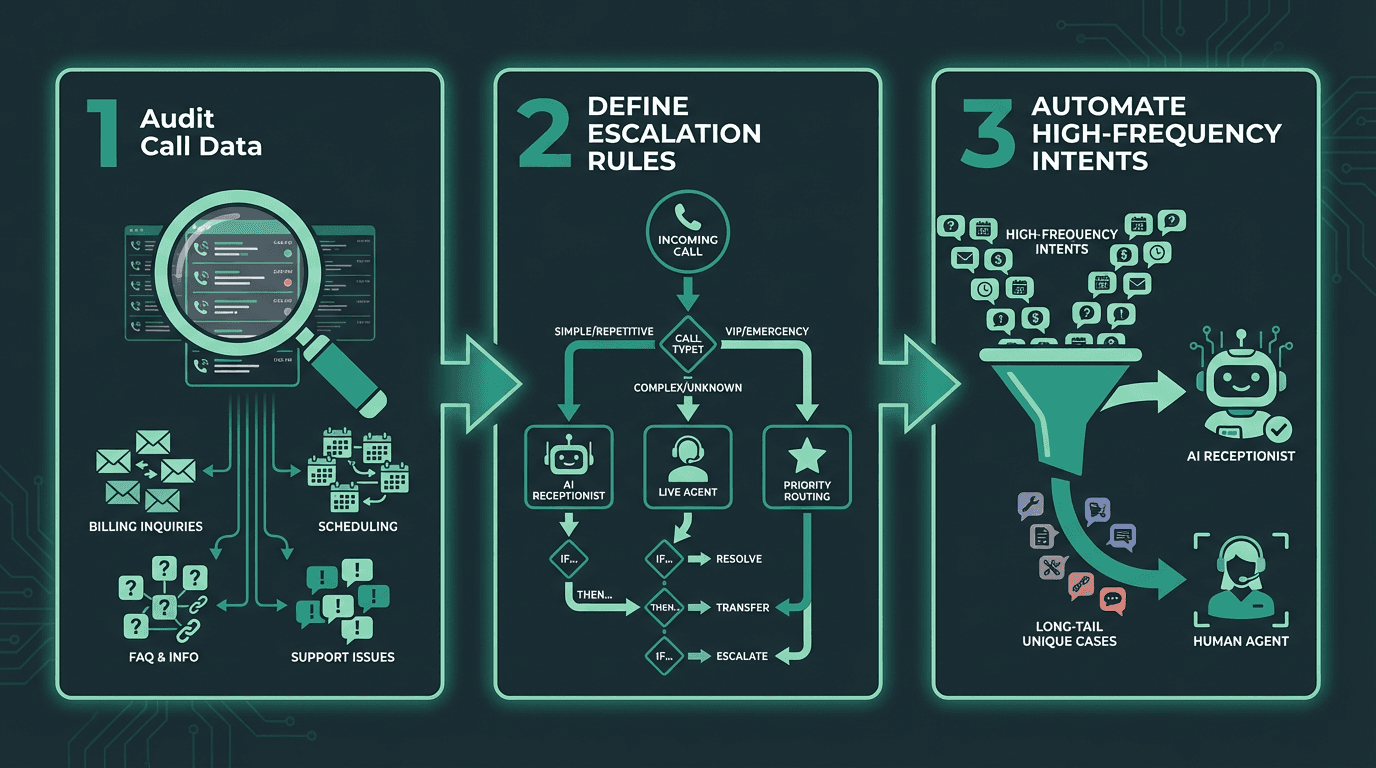
A successful deployment starts with auditing calls and defining clear automation targets.
Start by auditing your inbound call data for 30 days. Categorize every call type by intent: appointment booking, billing question, directions, complaint, sales inquiry. You will almost certainly find that the majority of calls cluster into a small set of repeating intents. Those are your first automation targets. Build the AI receptionist to handle those confidently before touching the long tail.
Next, define your escalation rules explicitly. The AI should escalate when the caller expresses frustration twice in a row, when the intent falls outside the trained scope, or when the caller directly requests a human. Vague escalation logic is the single biggest source of negative caller experiences in early deployments. Write the rules down before you build anything.
For teams building on an API-first platform, the guide on how to build a cost-effective AI receptionist with real-time transcription walks through the technical implementation in detail, including how to wire together the STT, LLM, and TTS layers efficiently.
Small Business Deployment: What Changes
Small businesses operate under a different constraint profile than enterprises. Budget is tighter, technical resources are limited, and the tolerance for a broken caller experience is lower because every caller represents a higher percentage of total revenue. AI receptionists for small businesses need to be fast to configure, reliable under low call volumes (not just high ones), and connected to the tools already in use: typically Google Calendar, a basic CRM, and a payment processor. Complexity that makes sense at enterprise scale becomes a liability here.
Voice Quality and Latency: The Technical Reality
Voice quality is subjective until you measure it. The two objective proxies are MOS (Mean Opinion Score) for naturalness and RTF (Real-Time Factor) for processing speed. A production-grade AI receptionist should target MOS above 4.0 and RTF well below 1.0, meaning the system processes audio faster than real time. Both numbers should be reproducible under concurrent call load, not just in a controlled demo.
Smallest.ai's Lightning TTS engine is engineered for conversational latency, not studio-quality rendering. The distinction matters because most TTS engines are optimized for audiobook or narration use cases where a 500ms delay is invisible. In a live phone call, that same delay breaks the conversational rhythm entirely.
Enterprise and Contact Center Considerations
At enterprise scale, the conversation shifts from 'does it work' to 'does it scale, comply, and integrate.' Contact centers running thousands of concurrent calls need platforms that handle burst traffic without latency degradation, maintain compliance with call recording regulations across jurisdictions, and produce analytics that feed back into agent training and process improvement. A platform that performs well in a 50-seat pilot can expose serious architectural limits at 5,000 concurrent sessions.
The architectural comparison in Is your Voice Agent Prepared to Handle Enterprise Needs? is worth reading for teams evaluating at this scale. The core question for enterprise buyers is whether the platform is built on a real-time voice infrastructure or a batch-processing architecture dressed up to look real-time. That difference becomes visible under load.
Key Takeaways and Next Steps
The AI receptionist category has matured past the proof-of-concept stage. The question in 2026 is not whether to deploy one, but which platform fits your specific call patterns, integration requirements, and latency expectations. The businesses getting the most value started with a narrow automation scope, measured rigorously, and expanded from there.
If you need infrastructure-level control over how your receptionist sounds, responds, and scales, Smallest.ai's Atoms platform gives you the full stack: real-time STT via Pulse, sub-100ms TTS via Lightning, and the Electron language model for conversational reasoning, available on enterprise deployments. It is the architecture built for teams who need a production-grade voice experience without the ceiling that closed platforms impose. Explore Smallest.ai pricing to find the tier that fits your call volume, and start with the free tier to validate latency and voice quality against your actual use case before committing.
Frequently asked questions
What is an AI receptionist and how is it different from a traditional IVR?
How much does an AI receptionist typically cost for a small business?
Can an AI receptionist handle appointment booking and CRM updates?
What latency should I expect, and does it actually matter for caller experience?
Is an AI receptionist suitable for regulated industries like healthcare or legal?