Text to Speech Tools in 2026: Best TTS Options for Real-World Use

Compare the best text to speech reader tools in 2026. Latency, voice quality, pricing, and use case fit covered in one practical guide.
The text to speech reader category has quietly outgrown its accessibility-tool origins. What once served a narrow slice of users with visual impairments or reading difficulties now sits inside developer stacks, content pipelines, and customer-facing voice agents at scale. Industry estimates suggest the global TTS market has seen strong growth, driven by genuine production utility, not hype.
This piece is aimed at people who need to make real decisions: developers evaluating APIs under latency constraints, content teams hunting for voices that hold up over long-form audio, accessibility specialists matching tools to specific user needs, and product teams wiring speech into their applications.
What a Text to Speech Reader Actually Does (and What It Does Not)
At its most basic, a TTS reader converts written text into spoken audio. But that description papers over an enormous implementation gap. Early systems used concatenative synthesis, stitching together pre-recorded phoneme fragments into something recognizable but unmistakably robotic. Neural TTS, the dominant paradigm since the early 2020s, uses deep learning to model the full acoustic space of human speech. The best outputs today can be genuinely hard to distinguish from a real speaker in controlled conditions.
Where modern TTS excels: natural prosody, emotional range, multilingual support, and low-latency streaming for real-time applications. Where it still falls short: highly technical domain vocabulary tends to trip up even strong models, very long documents benefit from preprocessing before synthesis, and maintaining a consistent character voice across multi-hour audio remains an unsolved problem for most tools. Knowing those limits is how you match the right tool to the actual job.
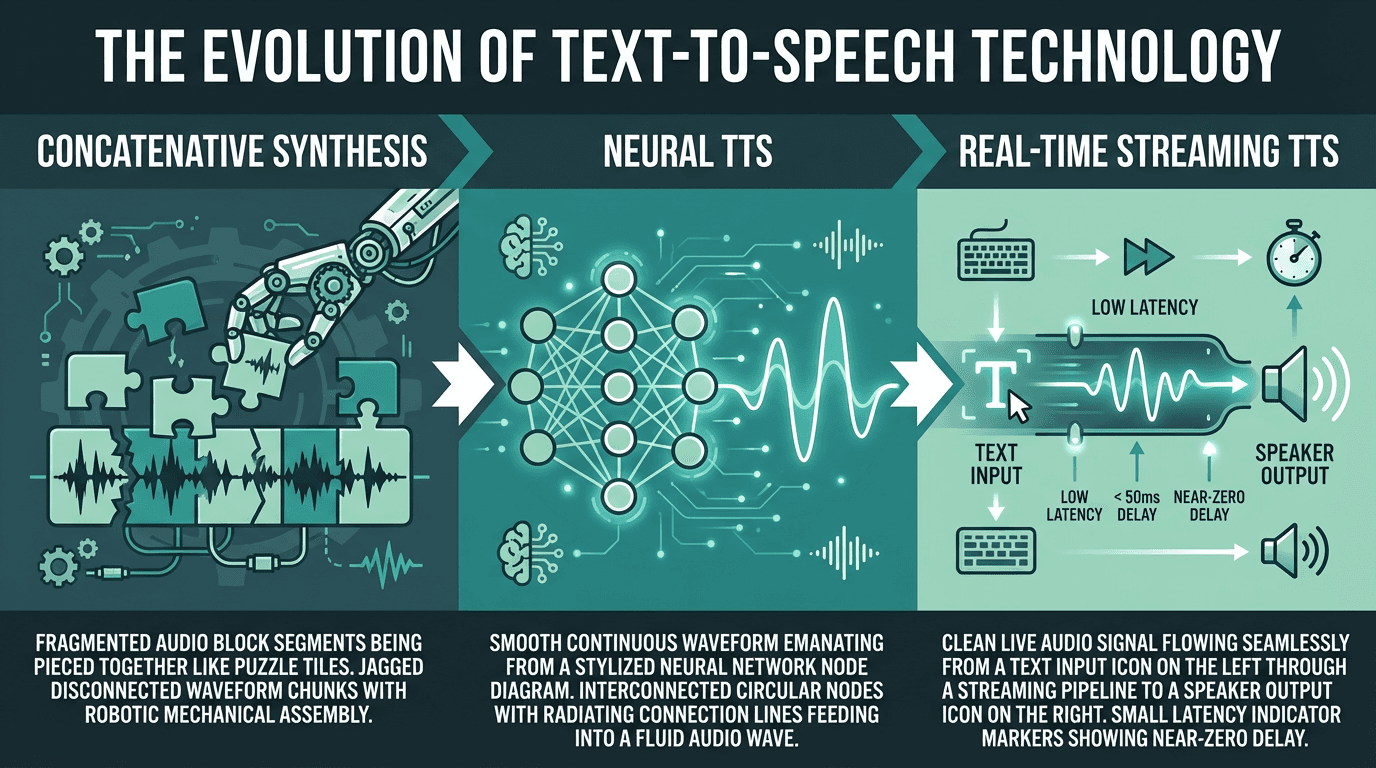
Three generations of TTS technology, each representing a step change in output quality and latency
The Metrics That Actually Separate Good Tools from Great Ones
Most tool roundups rank TTS readers on voice count and pricing. Those matter, but they are not what determines whether a tool holds up in production. The dimensions worth stress-testing are latency, naturalness, SSML support, and streaming capability.
Latency is the gap between sending text and receiving the first audio byte. For a consumer reading app, 500ms is tolerable. For real-time conversational AI, latency under 100ms is typically targeted, ideally under 50ms. Naturalness is harder to quantify, but blind listening tests are a reliable proxy. If you want a structured framework for evaluation, the article on how to evaluate voice AI covers what standard benchmarks miss and what actually predicts user satisfaction.
SSML (Speech Synthesis Markup Language) support governs how much control you have over pronunciation, pauses, pitch, and emphasis. For narration and audiobook production, rich SSML is close to mandatory. For conversational applications, it matters less because a well-trained model should handle prosody without explicit markup. Streaming support, where audio chunks are returned as they are generated rather than after the full output is ready, is non-negotiable for any real-time use case.
A Practical Comparison of Leading AI Reading Tools
The tools below represent the serious options in 2026 for developers and teams. Pricing reflects publicly listed rates as of April 2026, and the comparison is oriented toward production use cases rather than casual listening.
Tool | Starting Price | Latency Profile | Best For | Streaming |
|---|---|---|---|---|
Smallest.ai Lightning | Usage-based | Ultra-low (<100ms) | Real-time apps, conversational AI, high-volume APIs | Yes |
ElevenLabs | Usage-based | Low-medium | Voice cloning, content narration | Yes |
OpenAI TTS | Usage-based | Medium | General narration, GPT-integrated workflows | Yes |
Deepgram Aura | Usage-based | Low | Developer APIs, transcription-adjacent workflows | Yes |
Cartesia | Usage-based | Low | Low-latency voice agents, edge deployment | Yes |
Voice count is deliberately absent from that table. It is a vanity metric: having 1,000 voices means little when the top 10 are the only ones anyone touches. Smallest.ai's Lightning Text-to-Speech model is designed to achieve sub-100ms latency in real-time streaming scenarios, which puts it in a distinct category for real-time applications. For structured naturalness benchmarks across several of these tools, the most realistic text-to-speech AI article runs listening tests worth reviewing before you commit.
Try Smallest.ai's Lightning TTS free and hear the difference in real-time voice quality
Choosing the Right Tool for Your Specific Use Case
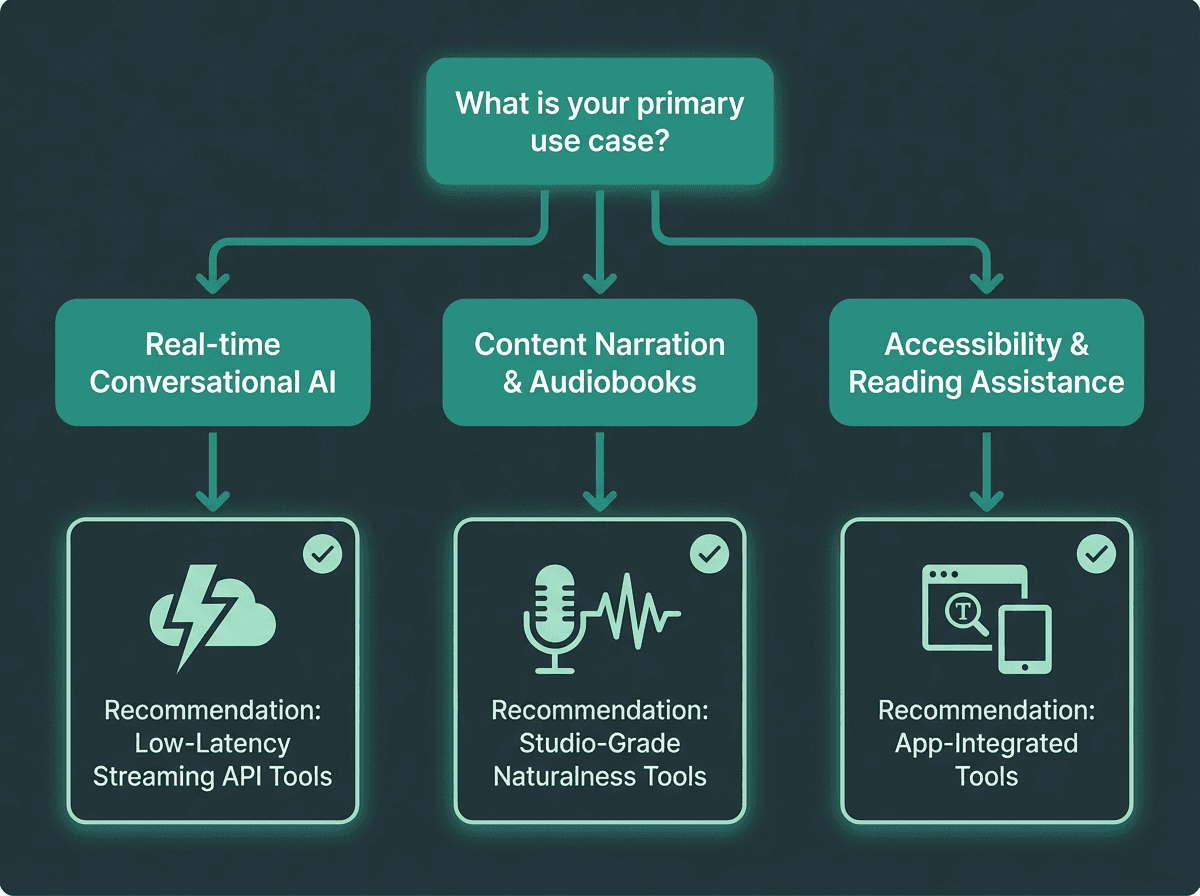
Use case determines which TTS capabilities matter most in your selection
The most common mistake teams make is choosing a TTS tool based on a demo rather than a production simulation. Demos are curated. Production is not. Here is a more honest breakdown by use case:
Use case to tool fit:
Real-time voice agents and conversational AI: Latency is everything. You need streaming, sub-100ms first-chunk delivery, and a model that handles incomplete sentences gracefully. Smallest.ai's Lightning model is purpose-built for exactly this. Explore Smallest.ai's Text to Speech API for integration specifics.
Audiobook and long-form narration: Naturalness over hours of audio, consistent character voice, and rich SSML control matter far more than latency here. Studio-grade tools with voice cloning capabilities are the right fit.
Accessibility tools and reading assistants: Browser compatibility, adjustable reading speed, and broad language support are the primary criteria. The AI literature reading tools space has seen investment activity, reflecting real, sustained demand in this segment.
High-volume document processing: Cost per character and batch throughput dominate the decision. Evaluate at your actual projected volume, not at demo scale.
Multilingual applications: Test your actual target languages, not just English. Quality degrades noticeably in some tools once you move outside their primary training language.
What Most People Get Wrong About Voice Quality
There is a persistent assumption that more parameters equals better voice. It does not, at least not in any straightforward way. Some of the most natural-sounding TTS outputs in 2026 come from smaller, highly optimized models rather than the largest available. Naturalness in speech is not purely about acoustic accuracy. It is about prosodic rhythm, appropriate micro-pauses, and the way stress patterns shift with sentence structure. A model trained specifically on conversational speech will often outperform a general-purpose large model on exactly those dimensions.
The Smallest.ai Lightning V3 model illustrates this well. Rather than competing on raw model size, it is optimized for the specific acoustic properties that make speech feel natural in real-time contexts. The result is output that holds up in production voice agent deployments where a slower, higher-parameter model would introduce lag that breaks the interaction entirely.
One thing that rarely gets discussed: the quality of the text preprocessing pipeline matters as much as the synthesis model itself. Feeding raw, unformatted text into even the best TTS engine produces awkward output. Numbers, abbreviations, URLs, and domain-specific terminology all need handling upstream. Teams that invest in preprocessing consistently get better results from the same underlying model.
The Accessibility Dimension That Deserves More Attention
The TTS market's growth is not purely commercial. One of the documented drivers is rising demand from people with learning disabilities, for whom speech synthesis provides meaningful access to written information. Dyslexia affects an estimated 10-15% of the global population. Visual impairments affect hundreds of millions more. For these users, the gap between a robotic TTS output and a natural one is not a preference issue. It directly affects comprehension, retention, and whether the tool gets used at all.
Building for accessibility adds a few criteria beyond the standard checklist. Screen reader compatibility and ARIA support determine whether your TTS layer integrates cleanly with existing assistive technology stacks. Adjustable speed without pitch distortion matters for users who consume audio at 1.5x or 2x. And while cloud-based AI tools rarely offer it, offline capability remains important for users with unreliable connectivity.
Advanced Considerations: Beyond Basic Text-to-Speech
For teams building production voice applications, the conversation moves quickly past basic TTS into adjacent capabilities. Speech-to-speech conversion, where an incoming voice signal is transformed in real time rather than routed through a text intermediate, is one of the more significant developments in 2026. It removes the latency introduced by ASR transcription before synthesis, which matters enormously in phone-based and real-time voice agent contexts. Smallest.ai offers native speech-to-speech models that address exactly this bottleneck.
Voice consistency across sessions is another underappreciated challenge. A customer service voice agent should sound identical whether the conversation happens at 9am or 9pm, on the first call or the thousandth. This requires stable voice model versioning and careful management of synthesis parameters. Some tools handle it automatically; others require explicit configuration that is easy to overlook until something sounds off in production.
For teams evaluating at scale, the fastest text-to-speech APIs comparison covers throughput benchmarks that go well beyond what most vendor documentation surfaces. If you are still in the early research phase, the top 10 text-to-speech tools for content creators article covers the broader landscape with a focus on non-developer use cases.
See how Smallest.ai's Lightning V3 performs in real-time voice agent deployments
Key Takeaways and What to Do Next
The TTS market in 2026 is genuinely competitive, which is good news for buyers. Quality has risen substantially, prices have dropped, and the range of applications these tools can serve has expanded well beyond narration. Most recent market reports agree the industry is likely to continue its growth, and the tools available today are already production-ready for demanding use cases.
The practical path forward is straightforward: define your use case precisely before you evaluate anything. Run latency tests under realistic load, not single-request demos. Test your actual content, including edge cases like numbers, acronyms, and domain vocabulary. Evaluate cost at your real projected volume, not at the free tier.
For teams building real-time voice applications where latency and naturalness both matter, the core problem is specific: many general-purpose TTS tools are not primarily optimized for sub-100ms streaming in conversational contexts. Smallest.ai's Lightning Text-to-Speech model is designed to achieve sub-100ms latency in real-time streaming scenarios, combining this low-latency performance with voice quality that holds up under production load. If your use case involves voice agents, real-time interaction, or high-volume API integration, it is the most direct answer to the latency-naturalness tradeoff that defines this category.
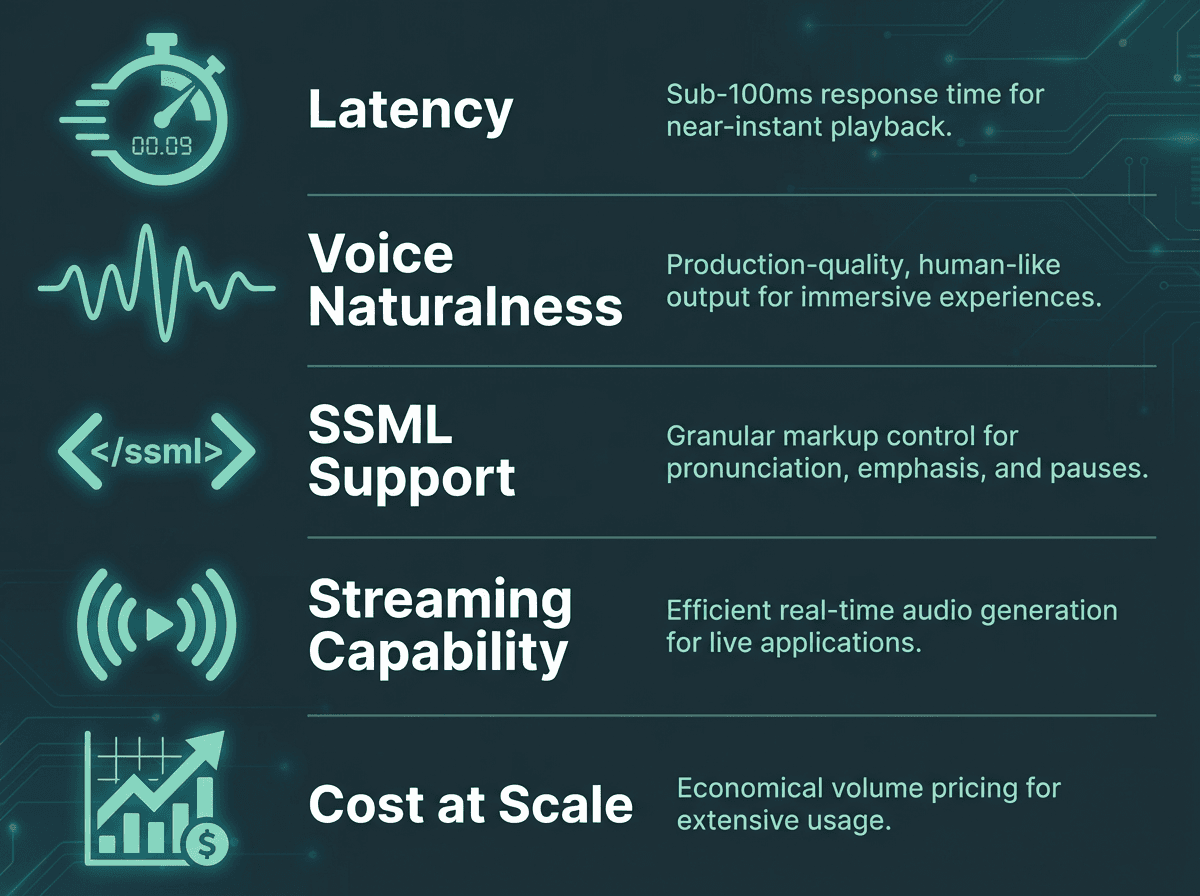
Evaluate any TTS reader against these five criteria before committing to a production integration.
Frequently asked questions
What is the difference between a text to speech reader and a TTS API?
How do I choose a text to speech reader for accessibility purposes?
What latency should I expect from a production-grade TTS tool?
Can AI text to speech readers handle multiple languages accurately?
Is Smallest.ai suitable for both developers and non-technical users?