Smallest AI on Rapida: Bring Your Own Speech Models to a Self-Hostable Voice Stack
Smallest AI is now available on Rapida for TTS and STT, bringing low-latency voice AI, self-hosting, model flexibility, diarization, and PII/PCI redaction.
Most voice AI platforms ask you to trust them with your data, your credentials, and your deployment. Rapida asks the opposite question: what if you didn't have to?
Rapida is an open-source voice AI orchestration platform built around three ideas: ownership (run it managed or self-hosted, your data stays yours), control (pick your own models and integrations, no vendor lock-in), and scale (production-grade observability for real workloads). It's the kind of platform agencies reach for when they're building white-label voice products for clients, and the kind enterprises reach for when "send our call audio to a third party" isn't a sentence their compliance team will sign off on.
We're glad to share that Smallest AI is now available as a TTS and STT provider inside Rapida, configurable directly from the Providers and Models dashboard, whether you're running Rapida managed or self-hosted on your own infrastructure.
Why This Integration Matters
Rapida is written in Go and built on gRPC for real-time, bidirectional audio streaming, which means whatever speech provider sits behind it needs to keep up with a genuinely low-latency pipeline. It also means the provider layer has to play well with the things enterprise and agency deployments actually ask for: PII redaction, speaker diarization, word-level timestamps, punctuation control, none of which are optional extras when you're handling regulated call data or building audit-ready transcripts for a client.
That's the surface this integration exposes. Pulse plugs in as Rapida's realtime STT over WebSocket, with word and sentence timestamps, diarization, PII/PCI redaction, inverse text normalization, and punctuation formatting all available as opt-in toggles. Lightning plugs in as TTS, with the standard lightning_v3.1 pool (voice cloning, 12 languages) and the premium lightning_v3.1_pro pool (curated American, British, and Indian English and Hindi voices) both selectable per assistant deployment.
Because Rapida treats interruptions as a pipeline-level concern, on barge-in, it closes and reopens the TTS connection for the next turn, there's no custom interruption handling needed on the Smallest AI side either. You get the low-level control Rapida is built for without having to hand-roll the plumbing yourself.
Getting Started
Setup happens entirely from the Rapida dashboard, no SDK required.
Step 1: Open Providers and Models
In your Rapida dashboard, navigate to Providers and Models.
Step 2: Add a Smallest AI Credential
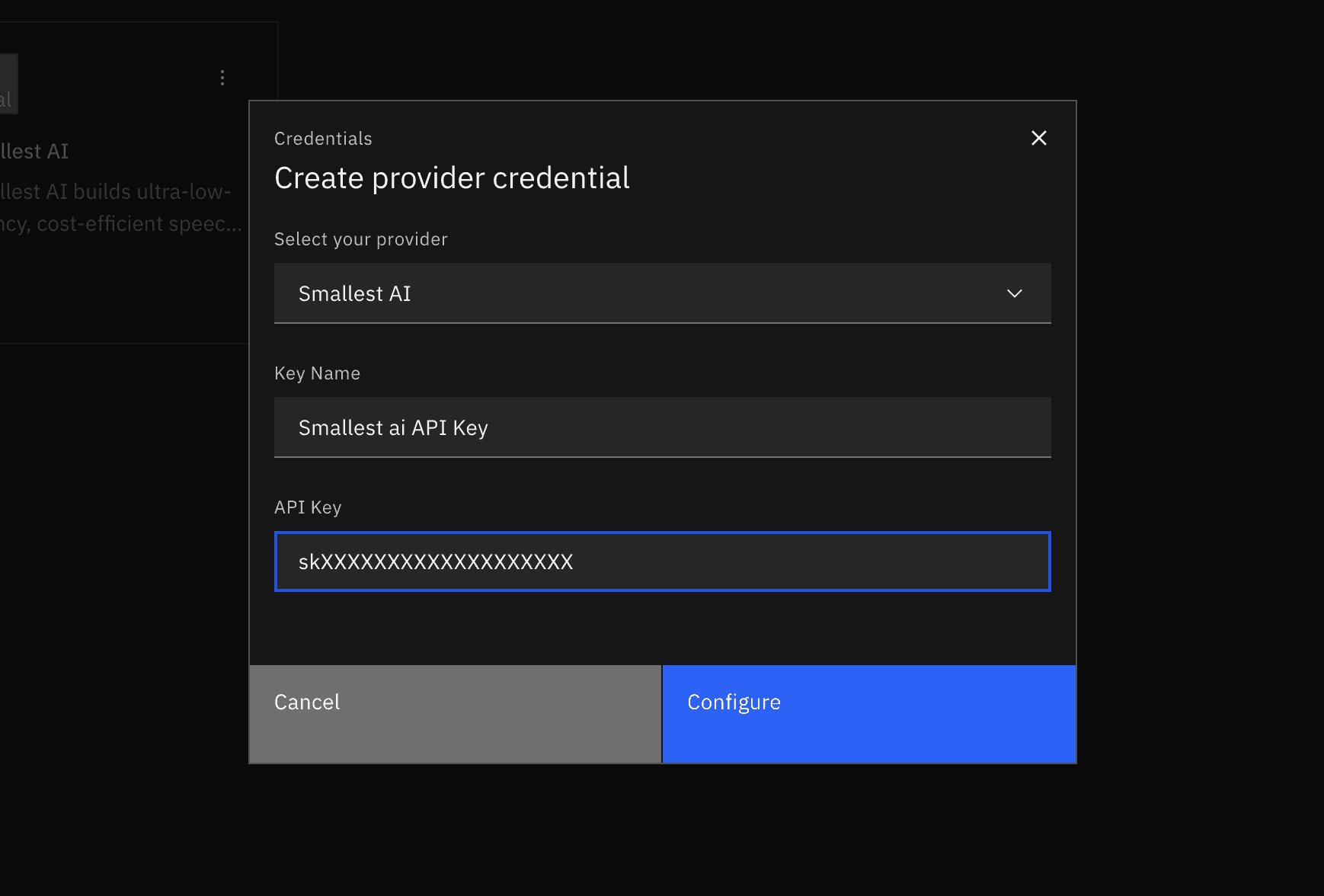
Add a new provider credential, select Smallest AI, and paste in your API key from the Smallest AI dashboard.
Step 3: Configure STT
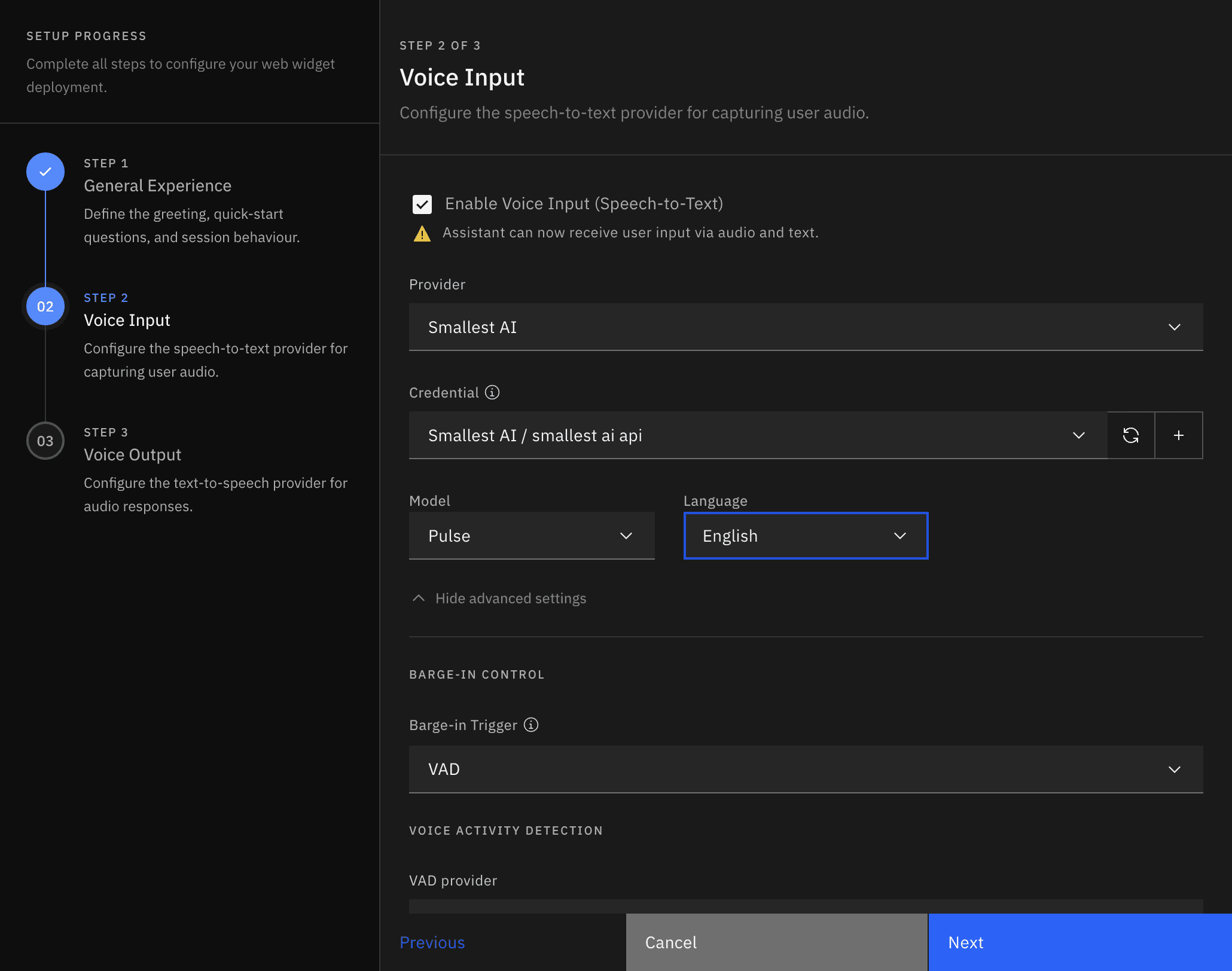
Set the speech-to-text provider to Smallest AI. The model is pulse, Rapida's integration streams over Pulse's realtime WebSocket, so pulse-pro (the pre-recorded, HTTP-only variant) isn't offered here. Set the Language, or leave it unset for auto-detect.
From there, a set of feature toggles are available if you need them: word and sentence timestamps, speaker diarization, PII/PCI redaction, inverse text normalization, and punctuation formatting.
Step 4: Configure TTS
On your assistant's deployment, set the text-to-speech provider to Smallest AI and pick a model:

lightning_v3.1, standard pool, voice cloning supported, 12 languages (voices likemagnus,devansh,kartik,maithili,liam,avery, and more)lightning_v3.1_pro, premium pool with curated American, British, and Indian voices across English and Hindi (voices likemeher,kaitlyn,blake,sophie,sam,aviraj, and more)
The Voice dropdown is scoped to whichever model you pick, Pro voices simply won't appear if you've selected lightning_v3.1, so a mismatched pairing isn't something you can select from the UI in the first place. Set the Language, and optionally a Speed between 0.5x and 2.0x.
Configuration Reference
Rapida stores provider options as listen.* keys for STT and speak.* keys for TTS.
On the STT side, listen.model defaults to pulse and is the only model wired to the realtime endpoint. listen.language defaults to auto-detect. The seven feature flags, word_timestamps, sentence_timestamps, diarize, redact_pii, redact_pci, numerals, and smart_format, are all opt-in; Rapida only sends them to Smallest AI when you explicitly set them, so leaving them alone doesn't change default behavior.
On the TTS side, speak.model defaults to lightning_v3.1, speak.voice.id defaults to magnus, speak.language defaults to en, and speak.speed defaults to 1.0 with a 0.5–2.0 range.
A Few Notes Worth Knowing
Rapida routes TTS requests to Smallest AI's streaming WebSocket endpoint, and STT requests to Pulse's realtime WebSocket endpoint.
Barge-in is handled at the pipeline level: Rapida closes and reopens the TTS connection on interruption, so you don't need to build interruption logic yourself.
If an unsupported voice/model pairing does get sent, say, a Pro-only voice typed in under
lightning_v3.1, Rapida surfaces it as an error on that turn instead of hanging. The dashboard's model-scoped dropdown is the main safeguard against this; this is just the fallback for free-typed voice IDs.
What Can You Build?
Rapida plus Smallest AI is a natural fit for teams that need ownership over their voice stack as much as the voice quality itself:
White-label voice agents for agency clients, self-hosted under your own infrastructure
Regulated-industry call handling with PII/PCI redaction and diarized, audit-ready transcripts
Multilingual assistants across English, Hindi, and 10+ other languages
Internal voice tooling where data residency and vendor control actually matter
Own Your Stack, Without Compromising on Speech Quality
If control over your deployment has been the trade-off holding you back from a faster or more natural-sounding voice model, this integration removes that trade-off. Configure it once in the Rapida dashboard, and Pulse and Lightning run inside whichever environment you've chosen to trust.
For issues with the integration, open one on the Rapida repository or reach us on Discord.
Frequently asked questions
What is the Smallest AI integration with Rapida?
Can I self-host Rapida with Smallest AI as the speech provider?
Which Smallest AI models does Rapida support?
Do I need to use Smallest AI for both STT and TTS?
Does Rapida support PII or PCI redaction with Smallest AI's STT?
What happens if I select an unsupported voice and model combination?
